let you know that I have same behavior into our site using Enfold theme,
this is the details about our site.
the option to upload profile images is not working, and we have problem with the following error
page to reproduce error
click into Change Profile Button
we have a javascript error
Uncaught TypeError: Cannot read property ‘frames’ of undefined
at edit_profile_image (my-account:891)
at HTMLButtonElement.onclick (my-account:698)
<!–
Debugging Info for Theme support:
Theme: Enfold
Version: 4.5.4
Installed: enfold-new
AviaFramework Version: 5.0
AviaBuilder Version: 0.9.5
aviaElementManager Version: 1.0.1
ML:256-PU:66-PLA:20
WP:5.1.1
Compress: CSS:all theme files – JS:all theme files
Updates: disabled
PLAu:19
–>
Hi,
We’re in the early stages of creating a knowledge base site for a client. We have a big search bar like yours, and when you type in, there’s a little animation on the search button that we’d like to disable.
It’s the same animation in this search box on your demo site – the little spinning circle which appears to the right of the button.
https://kriesi.at/themes/enfold-knowledgebase-demo/
Thanks in advance.
Hi,
Thank you for using Enfold.
The theme does add a quantity button to the default product quantity field. You can disable that by editing the config-woocommerce > woocommerce-mod.js file. Look for the “avia_apply_quant_btn” function and comment it out.
avia_apply_quant_btn();
//if the cart gets updated via ajax (woocommerce 2.6 and higher) we need to re apply the +/- buttons
$( document ).on( 'updated_cart_totals', avia_apply_quant_btn );
Best regards,
Ismael
Dear @Ismael
we try, but no change on custom post types. . FTP-Login in private field.
Any updates on the other related issues maybe?
1. WPDM buttons and calendarize it shortcodes for calendars not working
2. post type “infothek”. But now the boxzilla box appears in frontend without button and button has moved within the footer of the page.
Best Regards Marc
P.S.: I try to ask several times for the 4.5.3 version of enfold. I now got the files — in worst case will we be able to roll back the theme if we overwrite new theme files with 4.5.3 or will it not work?
Thanks Jordan. I’m wondering, how do you use the Layout Builder with blog posts? Or is that just not possible with Enfold? I can’t figure out why there would be a “Read more” button added just because I used the Layout Builder. Seems like that would make Avia useless for posts.
Hi,
If your css is working in the inspector but not when you add it to the style.css of your child theme, please try this step:
perhaps your css/js file merging is on in your performance settings, so your merged css needs to be re-built. Please try going to Enfold Theme Options > General Styling > Quick CSS field and add a blank space in the field, then save your theme settings by clicking the big blue button “Save all changes”, then clear or purge any cache plugin, then clear your browser cache.
Your css should work now, if not then try disabling your merged css in the performance settings, and clear any cache.
If this still doesn’t work, please try adding your css to the: WordPress > Customize > Additional CSS field:
This loads last and overrides all other css if you are using !important;.
Best regards,
Mike
Hi,
Maybe a plugin like https://de.wordpress.org/plugins/simple-share-buttons-adder/ can help?
You probably need to modify enfold\includes\loop-page.php for your needs.
But this is customization and beyond the scope of support.
Best regards,
Günter
Dear @Ismael
one more error –> This is our code within a boxzilla pop-up
Boxzilla Pop-Up –> it shows normally a pop-up with a enfold button to a register page. This pop-up is placed within custom post type “infothek”. But now the boxzilla box appears in frontend without button and button has moved within the footer of the page.
Infothek Footer
Best Regards Marc
Hi,
Please use our pre-built child theme
You will want to take a couple of steps, 1: please export your theme settings at: Enfold Theme Options > Import/Export > Export Theme Settings File to your computer, this is just for backup.
2: Once you install your child theme, please import your parent theme settings at:
Enfold Theme Options > Import/Export > Import Settings from your Parent Theme
Then you’ll need to re-set your menu options.
Finally, sometimes it is necessary to save your theme options one more time, to encourage the settings to be saved and activated in the merged /wp-content/uploads/dynamic_avia/ folder, a simple way to do this is to go to General Styling > Quick CSS field and place a space in the field so the theme options “Save all changes” button is clickable.
If you have any trouble with this we can help with an admin login and ftp access in the Private Content area.
Best regards,
Mike
HI,
I am using POPUP MAKER plugin(ver.1.8.5).
I put the shortcode of “[av_image_hotspot…” on three popups of POPUP MAKER.
When l use ENFOLD ver 4.5.2, it works well.
However, when I use(update) ENFOLD ver 4.5.5 or 4.5.6, it does not work properly.
On the toppage, the popups of hotspot images open after clicking buttons until ENFOLD ver 4.5.2.
However after updating to 4.5.5 or 4.5.6, the popups of hotspot images display below footer without clicking buttons.
I would like to know solution.
Thank you
Hello!
perfect, I already have the child theme, but I don’t know what the file to edit is, and how to modify it, if I had the code and knew in which file to write it, I can recreate the path in the child theme and try
-I also have another problem, because after the last update of enfold, the scrolls no longer work, for example the scroll on top button that remains fixed, doesn’t work. I put the link in private for you to try ..
Sincerly
Sacha
-
This reply was modified 6 years, 10 months ago by
Marco.
I’m on version 4.4.1. When I click the update now button, it will not update to 4.5.6
Dear support
UPDATE: Well done! We now noticed another problem with new enfold versions ( we now running 4.5.6 in hope that this would have fixe the problems. But surprise surprise we noticed another issue ( maybe there since 4.5.5 we do not know ).
No mobile breakpoints and views are working below 989px on custom post types –>
Examples:
working WP pages –>
https://www.l-mobile.com/interaktiv/kontakt/
working WP posts –>
NOT working custom post types –>
ALL custom post types were broken, pages and posts working on mobile views.
Summary of the update –>
1. custom post types on mobile not working
2. problem with enfold merge and css background images ( we now changed asset-manager.class.php to fix it )
3. WPDM buttons and calendarize it shortcodes for calendars not working
…….
@Basilis we received a answer from WPDM Downloadmanger, they think it is a css issue with the theme and their WPDM button addon. We can change the use of the shortcodes to another way but that fixes only 1 problem at all…..
Best Regard Marc
Hi everyone
I tried to listen to a freelancher but … I just can’t afford it.
I have to figure out for myself how it works and how to do it … maybe you can give me some indication to do it myself?
I also have another problem, but I can’t open a new topic …
The “scroll on top” button no longer works, and I do not understand what is the cause, I have already tried to disable all the plugins, I believe it has stopped working with the last enfold update.
Can you do a check?
-
This reply was modified 6 years, 10 months ago by
Marco.
Hello Enfold team,
I cannot import demo content on my wordpress website. When I click on the upload button, it keeps on rolling and never completes and nothing shows on the website to indicate that the demo importation is successful except the default enfold activation template. Please, what do I do?
Hey markransome,
Thank you for using Enfold.
Add this script in the functions.php file to apply the target attribute to the consent buttons.
add_action('wp_footer', 'ava_consent_button_target', 9999);
function ava_consent_button_target() {
?>
<script>
(function($) {
$('.avia-cookie-consent-button').attr('target', '_blank');
})(jQuery);
</script>
<?php
}
Best regards,
Ismael
Hey!
Zu
1.) Im WordPress / Dashboard / Aktualisierungen ist das Enfold NICHT als Update aufgeführt oder verfügbar. Das macht mich etwas stutzig.
2.) Im WordPress / Enfold / Theme Update ist das Update ebenso nicht aufgeführt / verfügbar. Auch nach Eingabe von Theme Forest UserName und API Key KEIN Enfold Update verfügbar. Momentane Version 3.0.4. Das macht mich zum zweiten mal stutzig.
Das ist eine Alterserscheinung der Enfold 3.0.4 Version. Themeforest hat vor einiger Zeit die alte Update API deaktiviert und leider unterstützen nur die aktuellen Enfold Versionen die neue API. Diese muss auch noch entsprechend neu eingerichtet werden (siehe zB https://www.egm.at/wordpress-theme-enfold-neues-api-token-fuer-updates-generieren-und-eintragen/ ).
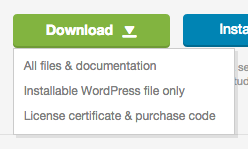
Wenn per ftp das Update nicht klappt (zB weil der Theme Ordner nicht zugänglich ist), würde ich versuchen das Theme über den WordPress Updater zu aktualisieren. Hierzu muss vorher – wie oben beschrieben – das Plugin https://wordpress.org/plugins/update-theme-and-plugins-from-zip-file/ installiert werden. Da WordPress die Themeforest-Dateien nicht als Theme erkennt, muss entweder die Option “Installable WordPress files only” beim Download Button (unter: https://themeforest.net/downloads ) gewählt werden (Screenshot: https://help.market.envato.com/hc/en-us/article_attachments/201329780/downloadButton.png ) oder man muss vorher die enfold.zip aus den Themeforest Dateien entpacken (Anleitung: https://help.market.envato.com/hc/en-us/articles/202821510 ).
Wenn Du Dir nicht sicher bist, ob Code-Anpassungen vorgenommen wurden, empfehle ich das Vaultpress Plugin: https://vaultpress.com zu installieren und einzurichten. Damit kannst Du bequem vor dem Update Backups der Dateien und der Datenbank erstellen und bei Problemen jederzeit die ursprüngliche Website wiederherstellen.
Leider ist es aber sehr schwer im Nachhinein Änderungen von Dritten nachzuvollziehen, insbesondere wenn diese nicht “lege artis” mit Child Theme, filter/action hooks, usw. durchgeführt wurden und lediglich “hardcoded” irgendwo im Theme Code verstreut sind. Wenn dann noch unterschiedliche DBs angelegt oder undokumentiert DBs versioniert wurden, wird es noch unübersichtlicher.
Ich würde daher empfehlen zuerst ein VaultPress Backup zu machen, dann die Theme, WordPress und Plugin Updates einzuspielen und einmal das Ergebnis zu checken. Wenn es so passt (bzw. man es über die Theme/Plugin Einstellungen passend machen kann), hat man schon ein gutes Grundgerüst. Wenn nicht, muss mit VaultPress das Backup wiederhergestellt werden und evaluieren, wie man weiter vorgeht (Website neu aufsetzen vs. versuchen die Änderungen nachzuvollziehen).
LG,
Peter
This reply has been marked as private.
Hello,
I have more small issues what I cannot solve by information on your forum and documentation.
I have tried many solution but nothing works. The website is laydeejane.eu
1. I use the icon in menu. It works great but I cannot change the position. It’s too high. This code doesn’t work:
#menu-item-990 .av_font_icon.av-icon-style-border .av-icon-char { padding: 10px 0 0 0; border-width: 0; }
2. I want to extend the social icons in the menu.
I followed this documentation: https://kriesi.at/documentation/enfold/social-share-buttons/#how-to-add-custom-social-icons-to-enfold-options
and added the code into child functions and imported icons. I can put the icon into the text but it doesn’t want to appear in the menu. The place is empty with active link and caption but no icon.
I want to add 2 icons from imported zip file and then next 3 icon from image. (I didn’t try images yes till the first step with imported icons will work)
3. I translated website by WPML plugin and in Czech language when I want to change one word, it tell me that it’s saved but it isn’t. When I go back and want to edit page, that the word is back. I also tried to add box with another text but the same result. Also tried to change it manually in code. It’s title DISCOGRAFIE in Czech site version. Need to change to to DISKOGRAFIE.
4. I use Fullwidth Easy Slider and the main information is on the picture on the right side. I tried many code but I cannot move the picture position on mobile to the left from center. Also need to increase the caption text. It’s too small on mobile.
The admin login link is attached in the private content area.
Hey allyson3,
#1: The share like button doesn’t look like it is from Enfold. It looks like a plugin “sharedaddy” please try disabling your plugins.
#2: Please try this code in the General Styling > Quick CSS field or in the WordPress > Customize > Additional CSS field:
#top .widget ul.children {
padding-left: 20px !important;
}
#top .widget li.cat-item.cat-item-37 > a, #top .widget li.cat-item.cat-item-42 > a {
pointer-events: none !important;
}
#3: for the recent posts it looks like you are using the Advanced Layout Builder, so please try this shortcode
#4: for square corrners please try this css:
.avia-content-slider .slide-image {
border-radius: 0px !important;
}
To have your posts in two columns, please try this css:
#top.blog .slide-entry.av_one_third {
width: 47% !important;
}
Please ensure you clear your browser cache.
Best regards,
Mike
Seems like the Blurry image problem just wont go away.
I have spent many days going over code in here trying all sorts.
I have latest WP, Enfold and Woo versions
When I go to the default Shop page via my menu, and see my products, all images are blurry.
If I click on one, go to that product page, the image is crystal clear.
Then I use the back button ( or click the Shop menu item again), then that image is now clear.
If I go out of it and clear cache Ctrl F5 etc then it is all back to blurry images..
is there Any code I can try or any info would be appreciated.
Oh and I am using a Desktop Dev system at this stage so no login available..
Unless you want to remote in and see..
Thanks for your help
Hey Kriesi Team,
A few blog issues:
1) How can I remove the Likes on the bottom of the blog pages. The “Show Likes” button is unchecked, but it’s still visible.
2) I want to show the category hierarchy in the sidebar (I have the box checked, but it doesn’t seem to do anything). I have two main categories (Project Type and Stone Type) and I want the subcategories to be indented (and/or highlighted some how) and the main categories to be un-clickable. Is this possible?
3) How do I show most recent posts at the bottom of each blog post?
4) On the main Blog page, I want 2 columns with the date showing. I also want all photos to have square corners (not round).
http://new.legacytops.com/blog/ vs. https://kriesi.at/themes/enfold/blog/blog-grid/
Thanks again for all your awesome support! In case no one’s told you lately, you rock!
P.S. I think you’d get less new threads if it was easier to search theme issues.
Hi,
Thanks, for your copyright issue, please add [nolink] to the copyright field.
For your menu item, it is conected to a page called “services”, if you only want it to be a parent item of your sub-menu, then please create a “custom” menu item with a hash tag as the link.
To create a custom icon, please see our documentation here.
Best regards,
Mike
Hi,
Thanks for the update.
Try to adjust the selector used in this function:
scrollToTab( '.menu-item a', 'click' );
.. with the button’s class attribute.
scrollToTab( '.avia-buttonrow-wrap a', 'click' );
You can also turn on the custom css class field if you want to manually specify the selector.
// https://kriesi.at/documentation/enfold/intro-to-layout-builder/#turn-on-custom-css-class-field-for-all-alb-elements
Best regards,
Ismael
Hi,
Yes indeed, it looks like they are using the 1/3 container elements then they have added images, text and button elements. You should be able to create something similar within a few minutes in Enfold. There’s no demo which looks exactly like that site, so I would start with the default demo.
Best regards,
Rikard
Hello, I’m trying to update Enfold from the Enfold Them Options/Theme Update panel.
This is what I see:
Update Available!
A new Version (4.5.5) of your Enfold Theme is available! You are using Version 4.4.1.
See what’s new in change log. Do you want to update?
Everytime I hit the Update Now! button, I get this: An error occurred while updating Enfold: Download failed. A valid URL was not provided.
I also get a bunch of warnings that I placed under Private Content because they include part of the url of my website.
Please help.
Thank you,
Daniel
Hi, i am just working on a fresh website (2nd time with the great enfold)
but I have probleme LayerSlider show a total blank result on the homepage
I used LayerSlider advanced button on ENFOLD (4.5.5).
All extension or cache system are disable.
My logs are in the private section.
Any help will be so cool.
Thanks for that.
DDD
Hi there!
This is a long-time annoyance that I could never fix with Enfold masonry galleries…
If I limit the gallery to show fewer images than there are and add a “load more” option – clicking the button starts shaking the browser window or starts flickering the scrollbar. If I try to scroll while the window is shaking and scrollbar is flickering (before images load) – I can no longer scroll once the images are loaded – I must click on the browser window again and only then can I scroll.
Can this be fixed at all? It’s very annoying and looks nasty :/
As an additional problem – how do I remove the 1px bottom border that gets added with every full-width “color section” element? There are no options for it anywhere and that 1px border annoys me to hell and back (even though the code seems to suggest it’s set to 0px!). The border appears if you add anything below the color section element, such as a separator or a gallery, that isn’t in another color section. Two color sections one after the other seem to be fine.
Thanks!
Here’s a video of the problems (first part is the shaking, the other is the border): https://youtu.be/zgkRFGusJi8
Hope this helps visualize what I’m talking about.
Hi,
I created a page called Insights as my blog, and added a header, some text, and a Blog Content element. I hooked up the menu to it.
I have set both Enfold and WordPress to use the “Insights” page as my blog page.
I have set them both to use full text, and Enfold to only show three posts at once.
However, none of the posts are full text. They all display the header and a “Read More” button.
What am I missing?
Thanks.