
-
AuthorSearch Results
-
April 21, 2019 at 4:34 pm #1093053
In reply to: Animate.css & Wow.js
Hi,
Sorry for the late reply, did you see this css to block all animations at the above link?.avia_transform .avia_start_animation.left-to-right.avia_image, .avia_transform .avia-icon-list .avia_start_animation .iconlist_icon, .avia_transform .avia_start_animation.avia-testimonial .avia-testimonial-image { -webkit-animation: none!important; -moz-animation: none!important; -o-animation: none!important; animation: none!important; opacity: 1!important; -webkit-transform: scale(1)!important; -moz-transform: scale(1)!important; -o-transform: scale(1)1important; transform: scale(1)!important; }But I believe that this will not allow you to use a alternative animation because you will not be able to use these classes, you will have to add new classes to your elements for the animation.
Another point is that each element css file has the animation added, so the cleanest way would be to edit each one of them and delete the animation css, and then add the theme classes to your animate.css file, but this would still be a lot of editing.
Perhaps the easiest way would be to add your new animation to each element with the !important; on the rule and then add it to your WordPress > Customize > Additional CSS which overrides all other css.
This would be easy if your only changing a few of them.
How many different elements do you want to change the animation on?Best regards,
MikeApril 8, 2019 at 2:39 am #1088087In reply to: footer mobil phone
Hi,
You should replace the “avia-builder-el-6” selector with a custom css class that is specified manually.
Turn on the custom css class as instructed in the documentation, add a custom css class attribute to the image element and then use that in place of the generic selector “avia-builder-el-6”.
.page-id-399 .custom-css-class {
     height: 400px! important;
     min-height: 400px! important;
}
Replace “custom-css-class” with what it is that was specified in the custom css class field.
Best regards,
IsmaelMarch 27, 2019 at 3:21 am #1083355In reply to: Color section on mobile not working
Hi,
On mobile devices, the parallax effect is disabled and the background attachment is set to scroll, so the background image is not going to animate. The background also tends to look a little different on mobile view because the image has to be resized in order to keep its aspect ratio. You can, however, change the background position with css to recenter the images’ point of interest.
@media only screen and (max-width: 767px) {
.avia_mobile .avia-full-stretch {
    background-attachment: scroll !important;
    background-position: 50% 130px !important;
}
}
Turning the custom css class attribute should help.
Best regards,
IsmaelMarch 25, 2019 at 12:29 pm #1082626In reply to: Bilder werden geladen, aber nicht angezeigt
Hi,
The images are not displaying when the Section ID is filled because of this css code.
#so-123 img {
    opacity: 0!important;
}
Looks like you’re using the generic (.avia-builder-el-11, .avia-builder-el-6 etc) class attributes as selectors for the elements. Those class attributes are temporary and can change based on the number of elements in the page and their order in the builder. Turn on the custom css class field in order to apply a permanent css class attribute to the elements, which can then be used to change their style.
Best regards,
IsmaelMarch 10, 2019 at 9:53 am #1076959Topic: Button row alignment in color section
in forum EnfoldFreek
ParticipantHi,
I have a 100% height color section with 2 columns (1 text and 1 image), and beneath the content i have a button row.
Now i want to stick the button row to the bottom of the color section.
If i use the following code (color section css class) all content will be on the bottom of the color section./*------------------------ Content alignment --------------------------*/ #section-content-bottom .container .content { vertical-align: bottom; }I want only the button row on bottom, so i tried the following code with no luck.
/* Pill shape buttons */
.my-custom-button-row .avia-button {
   border-radius: 50px;
   border: 1px solid #070707 !important;
min-width: 20px!important;
  vertical-align: bottom;
}
Any ideas?
THX FreekMarch 8, 2019 at 10:29 pm #1076484In reply to: Blog Category Search Result Format
Hey Basilis,
Thanks for the link, I used the first suggestion as my problem has nothing to do with Woo prices. Unofrtunately, the blog category results look exactly the same.
Please let me know if I screwed something up.
search.php file (Enfold, site runs a child theme)
<?php
if ( !defined(‘ABSPATH’) ){ die(); }global $avia_config;
/*
* get_header is a basic wordpress function, used to retrieve the header.php file in your theme directory.
*/
get_header();// allows to customize the layout
do_action( ‘ava_search_after_get_header’ );$results = avia_which_archive();
echo avia_title(array(‘title’ => $results ));do_action( ‘ava_after_main_title’ );
?><div class=’container_wrap container_wrap_first main_color <?php avia_layout_class( ‘main’ ); ?>’>
<div class=’container’>
<main class=’content template-search <?php avia_layout_class( ‘content’ ); ?> units’ <?php avia_markup_helper(array(‘context’ => ‘content’));?>>
<div class=’page-heading-container clearfix’>
<section class=”search_form_field”>
<?php
echo “<h4>”.__(‘New Search’,’avia_framework’).”</h4>”;
echo “<p>”.__(‘If you are not happy with the results below please do another search’,’avia_framework’).”</p>”;get_search_form();
echo “<span class=’author-extra-border’></span>”;
?>
</section>
</div><?php
if(!empty($_GET[‘s’]) || have_posts())
{
echo “<h4 class=’extra-mini-title widgettitle’>{$results}</h4>”;/* Run the loop to output the posts.
* If you want to overload this in a child theme then include a file
* called loop-search.php and that will be used instead.
*/
$more = 0;
global $posts;
$post_ids = array();
foreach($posts as $post) $post_ids[] = $post->ID;if(!empty($post_ids))
{
$atts = array(
‘type’ => ‘grid’,
‘items’ => get_option(‘posts_per_page’),
‘columns’ => 3,
‘class’ => ‘avia-builder-el-no-sibling’,
‘paginate’ => ‘yes’,
‘use_main_query_pagination’ => ‘yes’,
‘custom_query’ => array( ‘post__in’=>$post_ids, ‘post_type’=>get_post_types() )
);$blog = new avia_product_slider($atts);
$blog->query_entries();
echo “<div class=’entry-content-wrapper’>”.$blog->html().”</div>”;
}?>
<!–end content–>
</main><?php
//get the sidebar
$avia_config[‘currently_viewing’] = ‘page’;get_sidebar();
?>
</div><!–end container–>
</div><!– close default .container_wrap element –>
<?php get_footer(); ?>
Then Quick CSS:
.template-search .post-entry.slide-entry {
position: relative;
clear: none;
}#top .av-main-nav > li > a {
font-weight: normal !important;
}.avia-menu-fx {
display: none;
}.avia-layerslider.avia-shadow {
box-shadow: none !important;
}.av-iconlist-small li {
margin-bottom: 3px;
font-family: “adelle-sans”,sans-serif !important;
font-style: normal;
font-weight: 300;
}.avia-button {
font-size: 18px!important;
}.avia-arrow {
display: none;
}#top .av-caption-style-overlay a.av-masonry-item-with-image .av-inner-masonry-content {
background:rgba(236,0,140,0.9) !important;
}.av-masonry-sort * {
font-size: 17px;
}.avia-testimonial-content {
background-color: #ffffff!important;
border-color: rgba(255,255,255,0.7)!important;
box-shadow: 0px 0px 15px rgba(0, 0, 0, 0.2);
}.avia-testimonial-name {
font-size: 18px !important;
line-height: 27px !important;
color: #000000!important;
font-weight: 300;}
.avia-testimonial-subtitle {
font-size: 17px !important;
#595959!important;
}.home #layer_slider_1 .ls-wrapper.ls-in-out {
text-shadow: 0px 0px 15px #000000;
}@media only screen and (max-width: 767px) {
figcaption.av-inner-masonry-content {
display: none!important;
}}span.logo {
margin-top: 5px;
}#footer .widget {
text-align: center;
}#footer {
padding: 0;
}#footer p {
font-size: 13px!important;
}#footer .widget{
margin-bottom:0px!important;
}#socket .copyright {
text-align: center;
width: 100%;
}#socket .social_bookmarks {
text-align: center;
width: 60%;
}#footer {
padding-bottom: 0;
}.widgettitle {
text-transform: none;
}March 6, 2019 at 12:07 pm #1075468DigitalEssence
ParticipantHi everyone,
this is a question for the Enfold Community as a whole and not a support question.
I’m wondering what your go-to functions, hooks, filters and snippets of code are and what you have in your default child theme and functions.php that you use when you provision a site?
For example, my child theme looks like this:
/child-theme-name
/shortcodes
– functions.php
– login-logo.png (login logo to replace WordPress)
– screenshot.png (880×660 pixel image for the themes page)
– style.cssAnd my default functions.php is:
<?php

//Enable Custom class for all elements
add_theme_support('avia_template_builder_custom_css');

/*
//Enable support for shortcodes
add_filter('avia_load_shortcodes', 'avia_include_shortcode_template', 15, 1);
function avia_include_shortcode_template($paths)
{
	$template_url = get_stylesheet_directory();
  array_unshift($paths, $template_url.'/shortcodes/');
	return $paths;
}
*/

/*
//Add Widget area to header
add_action( 'ava_main_header', 'enfold_customization_header_widget_area' );
function enfold_customization_header_widget_area() {
dynamic_sidebar( 'header' );
}
*/

/*
//set builder mode to debug
add_action('avia_builder_mode', "builder_set_debug");
function builder_set_debug()
{
  return "debug";
}
*/

//Add dynamic year in Socket Copyright
// Add [year] to Socket
function year_shortcode() {
	$year = date('Y');
	return $year;
}
add_shortcode('year', 'year_shortcode');

// Change login Logo URL
function my_login_logo_url() {
    return home_url();
}
add_filter( 'login_headerurl', 'my_login_logo_url' );

// Change Login Logo Text
function my_login_logo_url_title() {
    return 'Digital Essence';
}
add_filter( 'login_headertitle', 'my_login_logo_url_title' );

//Add Company Logo to login page
function my_login_logo() { ?>
    <style type="text/css">
	.login {background: #3A3A3A!important;}
	#loginform {background: #3A3A3A!important; box-shadow:none!important; color: #fff!important;}
	#loginform label {font-size: 1.2em; color: #fff;}
	#nav a, #backtoblog a {color: #fff!important; font-size:1.2em;}
        #login h1 a, .login h1 a {
            background-image: url(<?php echo get_stylesheet_directory_uri(); ?>/login-logo.png);
		width:150px;
		height:150px;
		background-size: 150px 150px;
		background-repeat: no-repeat;
        	padding-bottom: 0px;
        }
    </style>
    <?php }
	add_action( 'login_enqueue_scripts', 'my_login_logo' );
I use others regularly but these are in my default functions file which I use to kick each project off. Pretty sure I need to add more but you know what it’s like, list of things to do is always long.
So, what do you have in your child theme when you provision a site?
February 24, 2019 at 4:32 pm #1070963In reply to: Picture and text zoom on smartphone
Hi,
Perhaps add some images or icons to the links, are they the name of cities? Also perhaps a full-width search bar in the middle, like this:
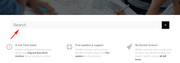
To add a search bar, add this code to the end of your functions.php file in Appearance > Editor:add_shortcode('avia_search', 'get_search_form');then add a code block with the custom class “search-bar”

and inside the code block add this shortcode:[avia_search]then add this css to your Quick CSS:
#top .search-bar #searchform>div {
width: 100% !important;
max-width: 100% !important;
}
#top .search-bar input[type='text']#s {
font-size: 32px;
padding: 10px 60px 10px 20px;
}
#top .search-bar #searchsubmit.button {
width: 60px !important;
height: 60px !important;
}
It’s just a thought.
Best regards,
MikeFebruary 22, 2019 at 2:28 am #1070159In reply to: Double sided (switching) image effect?
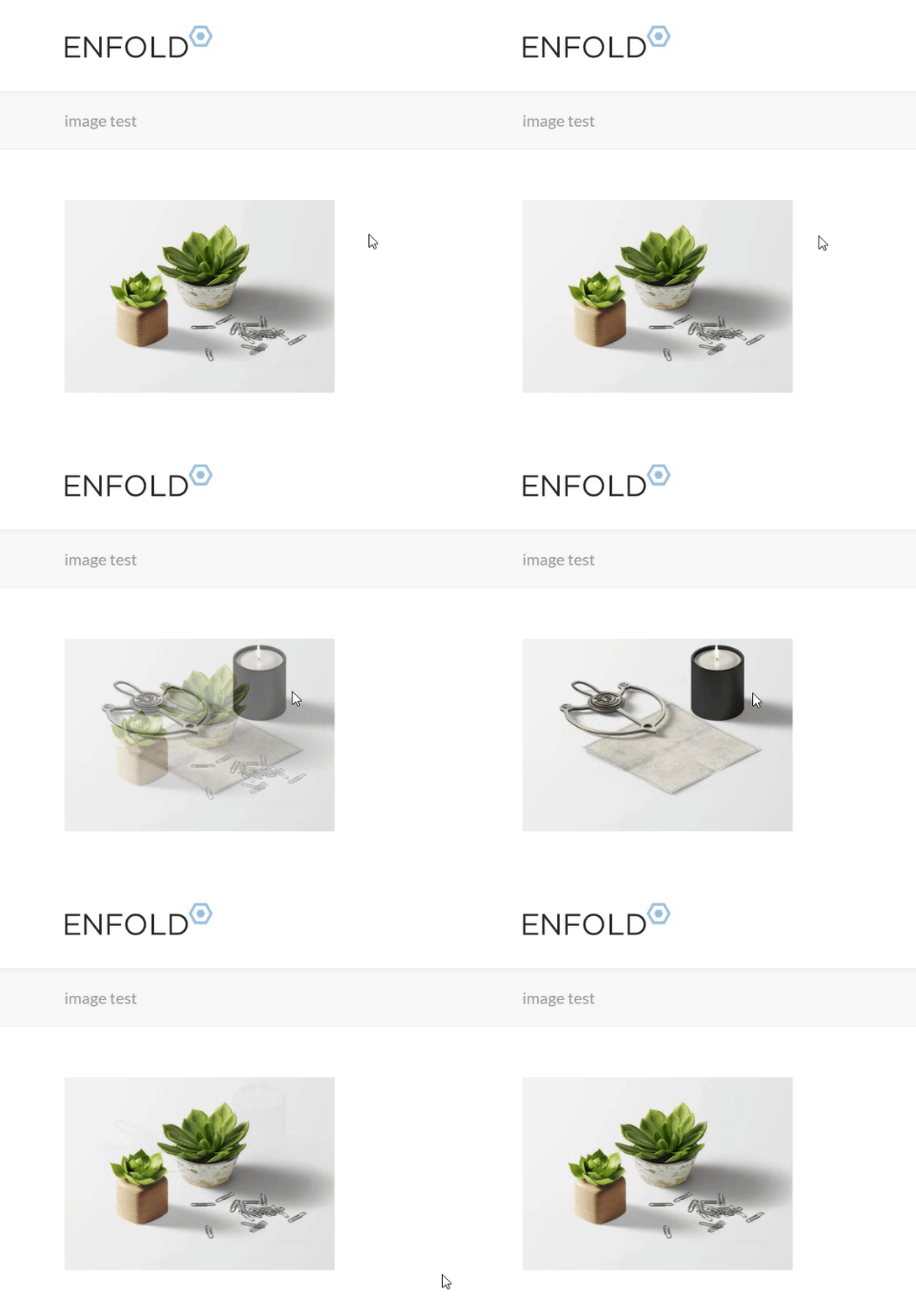
Hi,
Great, well the first step is to ensure you have the Enfold Theme Options > Layout Builder > Show element options for developers option checked so you can add custom classes:
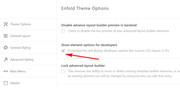
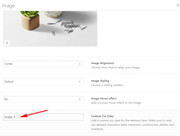
Then when you add a image, include a custom class, add a different custom class to each image:
Then copy the url to the other inage you are going to use, from the media library:
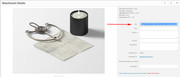
then add your custom class in two places and your image url to your css:
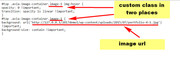
#top .avia-image-container.image-1 img:hover {
opacity: 0 !important;
transition: opacity 1s linear !important;
}
#top .avia-image-container.image-1 {
background: url('https://127.0.0.1/2017demo1/wp-content/uploads/2015/07/portfolio-4-1.jpg') !important;
background-size: contain !important;
}
and that is it :)
Best regards,
MikevFebruary 21, 2019 at 6:55 am #1069796In reply to: Double sided (switching) image effect?
Hi,
Unfortunately the element is now set up for “transform” which is for 2D or 3D animation, and what you want is “transition” which is for values to occur smoothly over a specified duration. But they can not be just switched out one for the other, the HTML also needs to be different.
But we can replace the image on the page with a transition on hover, this css will only target the one image on the page of the surfer girl, and on hover will slowly swap it out. To test add this code in the General Styling > Quick CSS field or in the WordPress > Customize > Additional CSS field:#top.page-id-10723 .avia-image-container.avia-builder-el-7 img:hover { opacity: 0 !important; transition: opacity 1s linear !important; } #top.page-id-10723 .avia-image-container.avia-builder-el-7 { background: url('https://new.restube.com/wp-content/uploads/2018/11/MG_0710-1-845x684.jpg') !important; background-size: contain !important; }If you want to use this on other images you will need to set a custom class to each image so it can be targeted, with the Enfold Theme Options > Layout Builder > Show element options for developers
and I can explain the code so you can do it.Best regards,
MikeFebruary 18, 2019 at 9:40 am #1068209In reply to: Theme Update Enfold from 3.5.4
Hey Rikard,
thanks for the reply: I have no idea, cause I can not really read code. Is it possible for you guys to take a look?
This is the Enfold Header.php
<?php
if ( ! defined(‘ABSPATH’) ){ die(); }global $avia_config;
$lightbox_option = avia_get_option( ‘lightbox_active’ );
$avia_config[‘use_standard_lightbox’] = empty( $lightbox_option ) || ( ‘lightbox_active’ == $lightbox_option ) ? ‘lightbox_active’ : ‘disabled’;
/**
* Allow to overwrite the option setting for using the standard lightbox
* Make sure to return ‘disabled’ to deactivate the standard lightbox – all checks are done against this string
*
* @added_by Günter
* @since 4.2.6
* @param string $use_standard_lightbox ‘lightbox_active’ | ‘disabled’
* @return string ‘lightbox_active’ | ‘disabled’
*/
$avia_config[‘use_standard_lightbox’] = apply_filters( ‘avf_use_standard_lightbox’, $avia_config[‘use_standard_lightbox’] );$style = $avia_config[‘box_class’];
$responsive = avia_get_option(‘responsive_active’) != “disabled” ? “responsive” : “fixed_layout”;
$blank = isset($avia_config[‘template’]) ? $avia_config[‘template’] : “”;
$av_lightbox = $avia_config[‘use_standard_lightbox’] != “disabled” ? ‘av-default-lightbox’ : ‘av-custom-lightbox’;
$preloader = avia_get_option(‘preloader’) == “preloader” ? ‘av-preloader-active av-preloader-enabled’ : ‘av-preloader-disabled’;
$sidebar_styling = avia_get_option(‘sidebar_styling’);
$filterable_classes = avia_header_class_filter( avia_header_class_string() );
$av_classes_manually = “av-no-preview”; /*required for live previews*//**
* Allows to alter default settings Enfold-> Main Menu -> General -> Menu Items for Desktop
* @since 4.4.2
*/
$is_burger_menu = apply_filters( ‘avf_burger_menu_active’, avia_is_burger_menu(), ‘header’ );
$av_classes_manually .= $is_burger_menu ? ” html_burger_menu_active” : ” html_text_menu_active”;/**
* Add additional custom body classes
* e.g. to disable default image hover effect add av-disable-avia-hover-effect
*
* @since 4.4.2
*/
$custom_body_classes = apply_filters( ‘avf_custom_body_classes’, ” );/**
* @since 4.2.3 we support columns in rtl order (before they were ltr only). To be backward comp. with old sites use this filter.
*/
$rtl_support = ‘yes’ == apply_filters( ‘avf_rtl_column_support’, ‘yes’ ) ? ‘ rtl_columns ‘ : ”;?><!DOCTYPE html>
<html <?php language_attributes(); ?> class=”<?php echo “html_{$style} “.$responsive.” “.$preloader.” “.$av_lightbox.” “.$filterable_classes.” “.$av_classes_manually ?> “>
<head>
<meta charset=”<?php bloginfo( ‘charset’ ); ?>” />
<?php
/*
* outputs a rel=follow or nofollow tag to circumvent google duplicate content for archives
* located in framework/php/function-set-avia-frontend.php
*/
if (function_exists(‘avia_set_follow’)) { echo avia_set_follow(); }?>
<!– mobile setting –>
<?phpif( strpos($responsive, ‘responsive’) !== false ) echo ‘<meta name=”viewport” content=”width=device-width, initial-scale=1, maximum-scale=1″>’;
?><!– Scripts/CSS and wp_head hook –>
<?php
/* Always have wp_head() just before the closing </head>
* tag of your theme, or you will break many plugins, which
* generally use this hook to add elements to <head> such
* as styles, scripts, and meta tags.
*/wp_head();
?>
</head>
<body id=”top” <?php body_class( $custom_body_classes . ‘ ‘ . $rtl_support . $style.” “.$avia_config[‘font_stack’].” “.$blank.” “.$sidebar_styling); avia_markup_helper(array(‘context’ => ‘body’)); ?>>
<?php
do_action( ‘ava_after_body_opening_tag’ );
if(“av-preloader-active av-preloader-enabled” === $preloader)
{
echo avia_preload_screen();
}?>
<div id=’wrap_all’>
<?php
if(!$blank) //blank templates dont display header nor footer
{
//fetch the template file that holds the main menu, located in includes/helper-menu-main.php
get_template_part( ‘includes/helper’, ‘main-menu’ );} ?>
<div id=’main’ class=’all_colors’ data-scroll-offset='<?php echo avia_header_setting(‘header_scroll_offset’); ?>’>
<?php
if(isset($avia_config[‘temp_logo_container’])) echo $avia_config[‘temp_logo_container’];
do_action(‘ava_after_main_container’);February 17, 2019 at 6:15 pm #1067922In reply to: When using 3 columns the center coloumn is bigger
Hi,
I tried to recreate your page on my localhost, at the top I placed a grid row with the images in each grid at full size:

and below that I placed 3 columns with zero padding and used “Equal Height” with the images at full size:

the result was that all images were the same size and the lined up nicely without any additional css or tricks:

Try Enabling Avia Layout Builder Debugger and paste this shortcode in the paser at the bottom of the page:

[av_layout_row border='' min_height_percent='' min_height='0' color='main_color' mobile='av-flex-cells' id='' av_element_hidden_in_editor='0' mobile_breaking='' av-desktop-hide='' av-medium-hide='' av-small-hide='' av-mini-hide='' av_uid='av-agpo17']

[av_cell_one_third vertical_align='top' padding='0px' padding_sync='true' background='bg_color' background_color='' background_gradient_color1='' background_gradient_color2='' background_gradient_direction='vertical' src='' attachment='' attachment_size='' background_attachment='scroll' background_position='top left' background_repeat='no-repeat' link='' linktarget='' link_hover='' mobile_display='' av_uid='av-8q2frf' custom_class='']

[av_image src='https://127.0.0.1/2017demo1/wp-content/uploads/2019/02/1.png' attachment='3165' attachment_size='full' align='center' styling='' hover='' link='' target='' caption='' font_size='' appearance='' overlay_opacity='0.4' overlay_color='#000000' overlay_text_color='#ffffff' copyright='' animation='no-animation' av_uid='av-js93dghn' custom_class='' admin_preview_bg=''][/av_image]

[/av_cell_one_third][av_cell_one_third vertical_align='top' padding='0px' padding_sync='true' background='bg_color' background_color='' background_gradient_color1='' background_gradient_color2='' background_gradient_direction='vertical' src='' attachment='' attachment_size='' background_attachment='scroll' background_position='top left' background_repeat='no-repeat' link='' linktarget='' link_hover='' mobile_display='' av_uid='av-6ua8jf' custom_class='']

[av_image src='https://127.0.0.1/2017demo1/wp-content/uploads/2019/02/2.png' attachment='3166' attachment_size='full' align='center' styling='' hover='' link='' target='' caption='' font_size='' appearance='' overlay_opacity='0.4' overlay_color='#000000' overlay_text_color='#ffffff' copyright='' animation='no-animation' av_uid='av-js93e2oe' custom_class='' admin_preview_bg=''][/av_image]

[/av_cell_one_third][av_cell_one_third vertical_align='top' padding='0px' padding_sync='true' background='bg_color' background_color='' background_gradient_color1='' background_gradient_color2='' background_gradient_direction='vertical' src='' attachment='' attachment_size='' background_attachment='scroll' background_position='top left' background_repeat='no-repeat' link='' linktarget='' link_hover='' mobile_display='' av_uid='av-63fl5n' custom_class='']

[av_image src='https://127.0.0.1/2017demo1/wp-content/uploads/2019/02/3.png' attachment='3167' attachment_size='full' align='center' styling='' hover='' link='' target='' caption='' font_size='' appearance='' overlay_opacity='0.4' overlay_color='#000000' overlay_text_color='#ffffff' copyright='' animation='no-animation' av_uid='av-js93f1id' custom_class='' admin_preview_bg=''][/av_image]

[/av_cell_one_third][/av_layout_row][av_one_third first min_height='av-equal-height-column' vertical_alignment='av-align-top' space='no_margin' margin='0px' margin_sync='true' row_boxshadow_color='' row_boxshadow_width='10' link='' linktarget='' link_hover='' padding='0px' padding_sync='true' highlight_size='1.1' border='' border_color='' radius='0px' radius_sync='true' column_boxshadow_color='' column_boxshadow_width='10' background='bg_color' background_color='' background_gradient_color1='' background_gradient_color2='' background_gradient_direction='vertical' src='' attachment='' attachment_size='' background_position='top left' background_repeat='no-repeat' animation='' mobile_breaking='' mobile_display='' av_uid='av-js939ne0' custom_class='']
[av_image src='https://127.0.0.1/2017demo1/wp-content/uploads/2019/02/1.png' attachment='3165' attachment_size='full' align='center' styling='' hover='' link='' target='' caption='' font_size='' appearance='' overlay_opacity='0.4' overlay_color='#000000' overlay_text_color='#ffffff' copyright='' animation='no-animation' av_uid='av-js93fgfx' custom_class='' admin_preview_bg=''][/av_image]
[/av_one_third]

[av_one_third min_height='' vertical_alignment='' space='' custom_margin='' margin='0px' row_boxshadow='' row_boxshadow_color='' row_boxshadow_width='10' link='' linktarget='' link_hover='' padding='0px' highlight='' highlight_size='' border='' border_color='' radius='0px' column_boxshadow='' column_boxshadow_color='' column_boxshadow_width='10' background='bg_color' background_color='' background_gradient_color1='' background_gradient_color2='' background_gradient_direction='vertical' src='' background_position='top left' background_repeat='no-repeat' animation='' mobile_breaking='' mobile_display='' av_uid='av-40fm2z']
[av_image src='https://127.0.0.1/2017demo1/wp-content/uploads/2019/02/2.png' attachment='3166' attachment_size='full' align='center' styling='' hover='' link='' target='' caption='' font_size='' appearance='' overlay_opacity='0.4' overlay_color='#000000' overlay_text_color='#ffffff' copyright='' animation='no-animation' av_uid='av-js93fxiy' custom_class='' admin_preview_bg=''][/av_image]
[/av_one_third]

[av_one_third min_height='' vertical_alignment='' space='' custom_margin='' margin='0px' row_boxshadow='' row_boxshadow_color='' row_boxshadow_width='10' link='' linktarget='' link_hover='' padding='0px' highlight='' highlight_size='' border='' border_color='' radius='0px' column_boxshadow='' column_boxshadow_color='' column_boxshadow_width='10' background='bg_color' background_color='' background_gradient_color1='' background_gradient_color2='' background_gradient_direction='vertical' src='' background_position='top left' background_repeat='no-repeat' animation='' mobile_breaking='' mobile_display='' av_uid='av-arsrv']
[av_image src='https://127.0.0.1/2017demo1/wp-content/uploads/2019/02/3.png' attachment='3167' attachment_size='full' align='center' styling='' hover='' link='' target='' caption='' font_size='' appearance='' overlay_opacity='0.4' overlay_color='#000000' overlay_text_color='#ffffff' copyright='' animation='no-animation' av_uid='av-js93gave' custom_class='' admin_preview_bg=''][/av_image]
[/av_one_third]
you may need to replace the images as mine are on my localhost, but you should get the columns setup as I do.
Best regards,
MikeFebruary 16, 2019 at 9:44 pm #1067809In reply to: When using 3 columns the center coloumn is bigger
Hey Synne,
Please try this code in the General Styling > Quick CSS field or in the WordPress > Customize > Additional CSS field:#av-layout-grid-1 .avia-image-container img { height: 425.688px !important; max-height: 425.688px !important; } #av_section_1 .avia-image-container img { height: 311.188px !important; max-height: 311.188px !important; }This will adjust all of the images on your test page, to apply this for other pages please assign a unique custom class or ID for the image and replace the ID in the begining of the code.
Please see the custom ID option at Enfold Theme Options > Layout Builder > Show element options for developers
Please let us know if you need some assistance with this.Best regards,
MikeFebruary 13, 2019 at 10:50 am #1066381In reply to: Move mediaelement "picture" individually (per CSS ?)
Hi JS,
We apologize for the late response.
You can use Custom Css Class for that, in the WordPress Dashboard go to Enfold > Layout Builder > check Show element options for developers then save.
Then each element should have a Custom Css Class field. For the first cross you can put cross1 then for the 2nd cross cross2
In Quick CSS (located in Enfold > General Styling), add this css code:#top .cross1 img.avia_image { position: relative; top: -10px; left: 30px; } #top .cross2 img.avia_image { position: relative; top: 10px; left: -20px; }Just adjust the top and left values (you can use negative values).
Hope this helps.Best regards,
NikkoFebruary 1, 2019 at 11:35 pm #1061775In reply to: BreadCrumb Not appearing on some pages
Hi,
I tried to implement 3rd party breadcrumb. but I having another issue with this theme.
I fI make any changes on header.php file then a
coding apearig on header " /> like this
<?php
	if ( ! defined('ABSPATH') ){ die(); }

	global $avia_config;

	$lightbox_option = avia_get_option( 'lightbox_active' );
	$avia_config['use_standard_lightbox'] = empty( $lightbox_option ) || ( 'lightbox_active' == $lightbox_option ) ? 'lightbox_active' : 'disabled';
	/**
	 * Allow to overwrite the option setting for using the standard lightbox
	 * Make sure to return 'disabled' to deactivate the standard lightbox - all checks are done against this string
	 *
	 * @added_by G端nter
	 * @since 4.2.6
	 * @param string $use_standard_lightbox				'lightbox_active' | 'disabled'
	 * @return string									'lightbox_active' | 'disabled'
	 */
	$avia_config['use_standard_lightbox'] = apply_filters( 'avf_use_standard_lightbox', $avia_config['use_standard_lightbox'] );

	$style 					= $avia_config['box_class'];
	$responsive				= avia_get_option('responsive_active') != "disabled" ? "responsive" : "fixed_layout";
	$blank 					= isset($avia_config['template']) ? $avia_config['template'] : "";
	$av_lightbox			= $avia_config['use_standard_lightbox'] != "disabled" ? 'av-default-lightbox' : 'av-custom-lightbox';
	$preloader				= avia_get_option('preloader') == "preloader" ? 'av-preloader-active av-preloader-enabled' : 'av-preloader-disabled';
    $sidebar_styling 		= avia_get_option('sidebar_styling');
	$filterable_classes 	= avia_header_class_filter( avia_header_class_string() );
	$av_classes_manually	= "av-no-preview"; /*required for live previews*/

	/**
	 * Allows to alter default settings Enfold-> Main Menu -> General -> Menu Items for Desktop
	 * @since 4.4.2
	 */
	$is_burger_menu = apply_filters( 'avf_burger_menu_active', avia_is_burger_menu(), 'header' );
	$av_classes_manually   .= $is_burger_menu ? " html_burger_menu_active" : " html_text_menu_active";

	/**
	 * Add additional custom body classes
	 * e.g. to disable default image hover effect add av-disable-avia-hover-effect
	 *
	 * @since 4.4.2
	 */
	$custom_body_classes = apply_filters( 'avf_custom_body_classes', '' );

	/**
	 * @since 4.2.3 we support columns in rtl order (before they were ltr only). To be backward comp. with old sites use this filter.
	 */
	$rtl_support			= 'yes' == apply_filters( 'avf_rtl_column_support', 'yes' ) ? ' rtl_columns ' : '';

?><!DOCTYPE html>
<html <?php language_attributes(); ?> class="<?php echo "html_{$style} ".$responsive." ".$preloader." ".$av_lightbox." ".$filterable_classes." ".$av_classes_manually ?> ">
<head>
<meta charset="<?php bloginfo( 'charset' ); ?>" />
<?php
/*
 * outputs a rel=follow or nofollow tag to circumvent google duplicate content for archives
 * located in framework/php/function-set-avia-frontend.php
 */
 if (function_exists('avia_set_follow')) { echo avia_set_follow(); }

?>

<!-- mobile setting -->
<?php

if( strpos($responsive, 'responsive') !== false ) echo '<meta name="viewport" content="width=device-width, initial-scale=1, maximum-scale=1">';
?>

<!-- Scripts/CSS and wp_head hook -->
<?php
/* Always have wp_head() just before the closing </head>
 * tag of your theme, or you will break many plugins, which
 * generally use this hook to add elements to <head> such
 * as styles, scripts, and meta tags.
 */

wp_head();

?>

</head>

<body id="top" <?php body_class( $custom_body_classes . ' ' . $rtl_support . $style." ".$avia_config['font_stack']." ".$blank." ".$sidebar_styling); avia_markup_helper(array('context' => 'body')); ?>>

	<?php

	do_action( 'ava_after_body_opening_tag' );

	if("av-preloader-active av-preloader-enabled" === $preloader)
	{
		echo avia_preload_screen();
	}

	?>

	<div id='wrap_all'>

	<?php
	if(!$blank) //blank templates dont display header nor footer
	{
		 //fetch the template file that holds the main menu, located in includes/helper-menu-main.php
         get_template_part( 'includes/helper', 'main-menu' );

	} ?>

	<div id='main' class='all_colors' data-scroll-offset='<?php echo avia_header_setting('header_scroll_offset'); ?>'>

	<?php

		if(isset($avia_config['temp_logo_container'])) echo $avia_config['temp_logo_container'];
		do_action('ava_after_main_container');

	?>
	<?php if ( !is_front_page() ) : ?>
	<div class="stretch_full container_wrap alternate_color light_bg_color title_container">
	    <div class="container">
	    <div class="breadcrumb breadcrumbs">
	        <?php echo do_shortcode( '[breadcrumb]' );?>
	        </div></div></div>
<?php endif; ?>
this is the change i made. even I delete the changes from header.php that pre coding still there
thanks
January 31, 2019 at 10:23 am #1060852Hi,
You can set a maximum width for those images.
.avia-image-container .avia_image {
    max-width: 100px;
}
Turn on the custom css class field so that you can target them specifically.
Best regards,
IsmaelJanuary 28, 2019 at 12:23 am #1059476In reply to: Can't update from 4.5 to 4.5.2
This reply has been marked as private.January 14, 2019 at 3:21 pm #1053707In reply to: Is there a way to achieve this?
you have to have than image as png file with cut-out form.
That was my test setup:
click to enlarge it –

the image alb gets a custom class ( on my case it is: overlap-image )
this comes to quick css:.avia-image-container.overlap-image { position: relative; top: -200px; }or take some relative dimensions like top: -15vw or 10% etc. play a bit on that.
see result – better wouid be to have the image totaly as cut-off.
https://webers-testseite.de/overlap/December 11, 2018 at 9:29 pm #1043991Topic: Avia Text Block Custom Css Class
in forum Enfoldkoraytastan
ParticipantHello my friends,
I want to vertically align image with text. My custom class css is “customclass”;
.customclass img{ vertical-align: middle; }But img css class in textblock doesn’t work. How can i fix it ?
Best regards.
November 21, 2018 at 2:24 pm #1036061In reply to: CSS customizations
Hi P3T3R_0ne,
1. I see what you mean, it does change the in that sense, because those numbers for example #av_section_1 depends on their order from top to bottom, for example if you created a Color Section on top of #av_section_1 then that becomes the new #av_section_1, while what was #av_section_1 becomes #av_section_2. You can basically use these selectors if you’re sure that the order is final, however if you need move elements and change their order, I would suggest using Custom Css Classes. To give an example I added leaf-icon on the Custom Css Class of your leaf icon, then I have replaced your css code in Quick CSS from:
#av_section_1 > div > main > div > div > div.flex_column.av_one_third.av-animated-generic.pop-up.flex_column_div.av-zero-column-padding.avia-link-column.avia-link-column-hover.first.avia-builder-el-3.el_after_av_image.el_before_av_one_third.avia_start_animation.avia_start_delayed_animation > span > span {
  position: relative;
  left: 34px;
}
to:
#top .leaf-icon  {
  position: relative;
  left: 34px;
}
The issue also with the code you previously used is that if on other pages it will have the same layout with different icon, that css will also apply.
The best way to code in Enfold is to use Custom Css Classes then use this selector:
#top .my-custom-class {

}
if it is still overridden then try using this instead:
#top #wrap_all .my-custom-class {

}
Hope this helps.
Best regards,
NikkoNovember 9, 2018 at 6:33 pm #1031755Topic: CSS Applied to Elements Not Working
in forum Enfoldalexcouto11
ParticipantI have added custom css classes to elements (don’t want to apply globally – apply only to these elements) but they are not applying.
What is the protocol for using custom css classes. Please see the private link to the page I’m working on. I’m trying to do the following:
1. Adjust the top and bottom margin of the .avia-image-container but only for this page.
2. Adjust the Special Heading Text #top #wrap_all .av-inherit-size .av-special-heading-tag to move up on top of the container above it. Trying to add a z-index and negative top margin.
3. Adjust the top margin of the contact form.I have tried various ways of adding my custom css class to the quick css but I can’t get it to apply. My custom css classes are as follows:
1. Color Section: #contact-color-section1
2. 1/1 column: .contact-page-col1
3. Image: .contact-image
4. Special Heading: .contact-title-hello
When I test in via Inspect and go to the element and enter the css rule the results apply; but I can’t make it work through the Quick CSS.
I’m using Chrome and when I Inspect, I see the custom Css Class I created as part of the avia div class. However, if I try to filter the custom class on the styles tab on the right, the custom class does not show up.
Also, can I apply CSS per page instead of Global.Thank you
November 8, 2018 at 10:05 pm #1031401Hi,
This is because each element is given a class automatically, such as “avia-builder-el-20” but when you add another element this may change the number in the auto class.
To correct please enable custom IDs and classes by going to Enfold Theme Options > Layout Builder > Show element options for developers
Then go to your two post sliders and give them each a unique class, such as “firstpostslider” & “secondpostslider” then replace the auto class with your custom one, like this:.secondpostslider span.blog-categories.minor-meta, .secondpostslider span.av-vertical-delimiter, .secondpostslider .slide-image { display: none !important; }Please note that classes begin with a dot and IDs begin with a hash mark. If you have any troubles then go ahead and add your special heading, and we will look and post the updated css.
Best regards,
MikeNovember 8, 2018 at 1:29 pm #1031242Topic: Text Shadow Slider Text & Blog-Post
in forum Enfoldsocial_natives
ParticipantHello,
i have 2 Problems with my Project and hope you could help me.
1) I wanted to add a black text shadow to the fullscreen slider text and maybe the slider title, i searched in this forum and find this solutions that i already tried:
.avia_transform .av_slideshow_full .active-slide .avia-caption-title,
.avia_transform .av_fullscreen .active-slide .avia-caption-title
{text-shadow: 3px 3px 2px #000;}
#top .avia-fullscreen-slider h2 { text-shadow: 1px 1px 7px #000; }#top .avia-fullscreen-slider p { text-shadow: 1px 1px 7px #000 !important; }after I tried this solutions and they didnt work, i activate the developer options and add a custom css class to the fullscreen slider with the name topslider and tried the solutions with .topslider instead of the CSS ids above. But it also does not work :( I hope you can find my mistake.
2) My Second question is about the Blog Posts, if i edit them in the normal WordPress Editor they will show with the Blog-Image and the Blog-Title, but if i edit them with the enfold editor to Add Site Elements like a contact formular, they will be just show the content from the enfold editor without Blog-title and the blog-image. How could i prevent that?
Sorry for my bad english i hope you can understand my issues. (Dont know if i could write in german).
Thanks in advance.
-
This topic was modified 7 years, 5 months ago by
social_natives.
November 7, 2018 at 1:02 pm #1030842In reply to: Error 500 after FTP Enfold Update
This is what I get when i try to upload the latest version
Unpacking the package…
Upgrading your theme…
No backup of old version of theme created. Backup option disabled in settings.
Removing the old version of the theme…
The update cannot be installed because we will be unable to copy some files. This is usually due to inconsistent file permissions. config-events-calendar/views/single-event-no-mobile.php, config-layerslider/LayerSlider/classes/class.ls.config.php, config-layerslider/LayerSlider/classes/class.ls.popups.php, config-layerslider/LayerSlider/includes/slider_markup_export.php, config-layerslider/LayerSlider/static/admin/css/addons.css, config-layerslider/LayerSlider/static/admin/css/index.php, config-layerslider/LayerSlider/static/admin/css/plugin_settings.css, config-layerslider/LayerSlider/static/admin/img/ao-bm-blend.jpg, config-layerslider/LayerSlider/static/admin/img/ao-bm-text.png, config-layerslider/LayerSlider/static/admin/img/ao-bm.jpg, config-layerslider/LayerSlider/static/admin/img/ao-fil.jpg, config-layerslider/LayerSlider/static/admin/img/ao-ori.jpg, config-layerslider/LayerSlider/static/admin/img/ao-pbs.jpg, config-layerslider/LayerSlider/static/admin/img/ao-pop.jpg, config-layerslider/LayerSlider/static/admin/img/ao-rev.jpg, config-layerslider/LayerSlider/static/admin/img/ao-tpl.jpg, config-layerslider/LayerSlider/static/admin/img/index.php, config-layerslider/LayerSlider/static/admin/img/layout-popup.png, config-layerslider/LayerSlider/static/admin/img/popup-example-bg.jpg, config-layerslider/LayerSlider/static/admin/img/popup-example-slidy.png, config-layerslider/LayerSlider/static/admin/js/index.php, config-layerslider/LayerSlider/static/admin/js/ls-admin-addons.js, config-layerslider/LayerSlider/static/admin/js/ls-admin-settings.js, config-layerslider/LayerSlider/static/admin/media/index.php, config-layerslider/LayerSlider/static/admin/scss/addons.scss, config-layerslider/LayerSlider/static/admin/scss/index.php, config-layerslider/LayerSlider/static/admin/scss/plugin_settings.scss, config-layerslider/LayerSlider/static/admin/index.php, config-layerslider/LayerSlider/static/air-datepicker/i18n/index.php, config-layerslider/LayerSlider/static/air-datepicker/index.php, config-layerslider/LayerSlider/static/codemirror/addon/comment/index.php, config-layerslider/LayerSlider/static/codemirror/addon/dialog/index.php, config-layerslider/LayerSlider/static/codemirror/addon/display/index.php, config-layerslider/LayerSlider/static/codemirror/addon/edit/index.php, config-layerslider/LayerSlider/static/codemirror/addon/fold/index.php, config-layerslider/LayerSlider/static/codemirror/addon/hint/index.php, config-layerslider/LayerSlider/static/codemirror/addon/lint/index.php, config-layerslider/LayerSlider/static/codemirror/addon/merge/index.php, config-layerslider/LayerSlider/static/codemirror/addon/mode/index.php, config-layerslider/LayerSlider/static/codemirror/addon/runmode/index.php, config-layerslider/LayerSlider/static/codemirror/addon/scroll/index.php, config-layerslider/LayerSlider/static/codemirror/addon/search/index.php, config-layerslider/LayerSlider/static/codemirror/addon/selection/index.php, config-layerslider/LayerSlider/static/codemirror/addon/tern/index.php, config-layerslider/LayerSlider/static/codemirror/addon/wrap/index.php, config-layerslider/LayerSlider/static/codemirror/addon/index.php, config-layerslider/LayerSlider/static/codemirror/keymap/index.php, config-layerslider/LayerSlider/static/codemirror/lib/index.php, config-layerslider/LayerSlider/static/codemirror/mode/css/index.php, config-layerslider/LayerSlider/static/codemirror/mode/htmlembedded/index.php, config-layerslider/LayerSlider/static/codemirror/mode/htmlmixed/index.php, config-layerslider/LayerSlider/static/codemirror/mode/javascript/index.php, config-layerslider/LayerSlider/static/codemirror/mode/php/index.php, config-layerslider/LayerSlider/static/codemirror/mode/sass/index.php, config-layerslider/LayerSlider/static/codemirror/mode/sql/index.php, config-layerslider/LayerSlider/static/codemirror/mode/xml/index.php, config-layerslider/LayerSlider/static/codemirror/mode/index.php, config-layerslider/LayerSlider/static/codemirror/theme/index.php, config-layerslider/LayerSlider/static/codemirror/index.php, config-layerslider/LayerSlider/static/dashicons/index.php, config-layerslider/LayerSlider/static/layerslider/css/index.php, config-layerslider/LayerSlider/static/layerslider/js/index.php, config-layerslider/LayerSlider/static/layerslider/plugins/debug/index.php, config-layerslider/LayerSlider/static/layerslider/plugins/origami/index.php, config-layerslider/LayerSlider/static/layerslider/plugins/timeline/index.php, config-layerslider/LayerSlider/static/layerslider/plugins/index.php, config-layerslider/LayerSlider/static/layerslider/plugins/popup/layerslider.popup.css, config-layerslider/LayerSlider/static/layerslider/plugins/popup/index.php, config-layerslider/LayerSlider/static/layerslider/plugins/popup/layerslider.popup.js, config-layerslider/LayerSlider/static/layerslider/skins/borderlessdark/index.php, config-layerslider/LayerSlider/static/layerslider/skins/borderlessdark3d/index.php, config-layerslider/LayerSlider/static/layerslider/skins/borderlesslight/index.php, config-layerslider/LayerSlider/static/layerslider/skins/borderlesslight3d/index.php, config-layerslider/LayerSlider/static/layerslider/skins/carousel/index.php, config-layerslider/LayerSlider/static/layerslider/skins/darkskin/index.php, config-layerslider/LayerSlider/static/layerslider/skins/defaultskin/index.php, config-layerslider/LayerSlider/static/layerslider/skins/fullwidth/index.php, config-layerslider/LayerSlider/static/layerslider/skins/fullwidthdark/index.php, config-layerslider/LayerSlider/static/layerslider/skins/glass/index.php, config-layerslider/LayerSlider/static/layerslider/skins/lightskin/index.php, config-layerslider/LayerSlider/static/layerslider/skins/minimal/index.php, config-layerslider/LayerSlider/static/layerslider/skins/noskin/index.php, config-layerslider/LayerSlider/static/layerslider/skins/numbers/index.php, config-layerslider/LayerSlider/static/layerslider/skins/outline/index.php, config-layerslider/LayerSlider/static/layerslider/skins/roundedflat/index.php, config-layerslider/LayerSlider/static/layerslider/skins/v5/index.php, config-layerslider/LayerSlider/static/layerslider/skins/v5/skin-min.css, config-layerslider/LayerSlider/static/layerslider/skins/v6/index.php, config-layerslider/LayerSlider/static/layerslider/skins/index.php, config-layerslider/LayerSlider/static/layerslider/skins/photogallery/index.php, config-layerslider/LayerSlider/static/layerslider/skins/photogallery/info.json, config-layerslider/LayerSlider/static/layerslider/skins/photogallery/loading.gif, config-layerslider/LayerSlider/static/layerslider/skins/photogallery/nothumb.png, config-layerslider/LayerSlider/static/layerslider/skins/photogallery/skin.css, config-layerslider/LayerSlider/static/layerslider/index.php, config-layerslider/LayerSlider/static/minicolors/index.php, config-layerslider/LayerSlider/static/public/index.php, config-layerslider/LayerSlider/static/shuffle/index.php, config-layerslider/LayerSlider/static/index.php, config-layerslider/LayerSlider/static/dindent/Indenter.php, config-layerslider/LayerSlider/static/dindent/index.php, config-layerslider/LayerSlider/static/dindent/Exception/index.php, config-layerslider/LayerSlider/static/dindent/Exception/DindentException.php, config-layerslider/LayerSlider/static/dindent/Exception/InvalidArgumentException.php, config-layerslider/LayerSlider/static/dindent/Exception/RuntimeException.php, config-layerslider/LayerSlider/static/font-awesome/index.php, config-layerslider/LayerSlider/static/font-awesome/css/font-awesome.min.css, config-layerslider/LayerSlider/static/font-awesome/css/font-awesome.css, config-layerslider/LayerSlider/static/font-awesome/css/index.php, config-layerslider/LayerSlider/static/font-awesome/fonts/fontawesome-webfont.eot, config-layerslider/LayerSlider/static/font-awesome/fonts/fontawesome-webfont.svg, config-layerslider/LayerSlider/static/font-awesome/fonts/fontawesome-webfont.ttf, config-layerslider/LayerSlider/static/font-awesome/fonts/fontawesome-webfont.woff, config-layerslider/LayerSlider/static/font-awesome/fonts/fontawesome-webfont.woff2, config-layerslider/LayerSlider/static/font-awesome/fonts/FontAwesome.otf, config-layerslider/LayerSlider/static/font-awesome/fonts/index.php, config-layerslider/LayerSlider/static/html2canvas/html2canvas.min.js, config-layerslider/LayerSlider/templates/tmpl-addons.php, config-layerslider/LayerSlider/templates/tmpl-button-presets.php, config-layerslider/LayerSlider/templates/tmpl-import-layer.php, config-layerslider/LayerSlider/templates/tmpl-import-slide.php, config-layerslider/LayerSlider/templates/tmpl-insert-icons-modal.php, config-layerslider/LayerSlider/templates/tmpl-insert-media-modal.php, config-layerslider/LayerSlider/templates/tmpl-popup-example-slider.php, config-layerslider/LayerSlider/templates/tmpl-popup-presets-window.php, config-layerslider/LayerSlider/templates/tmpl-post-chooser.php, config-layerslider/LayerSlider/templates/tmpl-preview-context-menu.php, config-layerslider/LayerSlider/templates/tmpl-slide-tab.php, config-layerslider/LayerSlider/templates/html-export/ls-instructions.png, config-layerslider/LayerSlider/templates/html-export/INSTRUCTIONS.html, config-layerslider/LayerSlider/templates/html-export/template.html, config-layerslider/LayerSlider/views/addons.php, config-layerslider/LayerSlider/views/css_editor.php, config-layerslider/LayerSlider/views/settings.php, config-templatebuilder/avia-shortcodes/.DS_Store, config-templatebuilder/avia-shortcodes/audio-player/audio-player.js, config-templatebuilder/avia-shortcodes/audio-player/audio-player.css, config-templatebuilder/avia-shortcodes/audio-player/audio-player.php, config-templatebuilder/avia-shortcodes/blog/blog.php, config-templatebuilder/avia-shortcodes/blog/blog.css, config-templatebuilder/avia-shortcodes/buttonrow/buttonrow.php, config-templatebuilder/avia-shortcodes/buttonrow/buttonrow.css, config-templatebuilder/avia-shortcodes/buttons/buttons.php, config-templatebuilder/avia-shortcodes/buttons/buttons.css, config-templatebuilder/avia-shortcodes/buttons_fullwidth/buttons_fullwidth.php, config-templatebuilder/avia-shortcodes/buttons_fullwidth/buttons_fullwidth.css, config-templatebuilder/avia-shortcodes/catalogue/catalogue.php, config-templatebuilder/avia-shortcodes/catalogue/catalogue.css, config-templatebuilder/avia-shortcodes/comments/comments.php, config-templatebuilder/avia-shortcodes/comments/comments.css, config-templatebuilder/avia-shortcodes/contact/contact.js, config-templatebuilder/avia-shortcodes/contact/contact.css, config-templatebuilder/avia-shortcodes/contact/contact.php, config-templatebuilder/avia-shortcodes/contentslider/contentslider.php, config-templatebuilder/avia-shortcodes/contentslider/contentslider.css, config-templatebuilder/avia-shortcodes/countdown/countdown.js, config-templatebuilder/avia-shortcodes/countdown/countdown.css, config-templatebuilder/avia-shortcodes/countdown/countdown.php, config-templatebuilder/avia-shortcodes/events_countdown/events_countdown.php, config-templatebuilder/avia-shortcodes/events_upcoming/events_upcoming.css, config-templatebuilder/avia-shortcodes/events_upcoming/events_upcoming.php, config-templatebuilder/avia-shortcodes/gallery/gallery.js, config-templatebuilder/avia-shortcodes/gallery/gallery.css, config-templatebuilder/avia-shortcodes/gallery/gallery.php, config-templatebuilder/avia-shortcodes/gallery_horizontal/gallery_horizontal.js, config-templatebuilder/avia-shortcodes/gallery_horizontal/gallery_horizontal.css, config-templatebuilder/avia-shortcodes/gallery_horizontal/gallery_horizontal.php, config-templatebuilder/avia-shortcodes/google_maps/google_maps.php, config-templatebuilder/avia-shortcodes/google_maps/google_maps.css, config-templatebuilder/avia-shortcodes/grid_row/grid_row.css, config-templatebuilder/avia-shortcodes/grid_row/cell.php, config-templatebuilder/avia-shortcodes/grid_row/grid_row.php, config-templatebuilder/avia-shortcodes/heading/heading.php, config-templatebuilder/avia-shortcodes/heading/heading.css, config-templatebuilder/avia-shortcodes/headline_rotator/headline_rotator.js, config-templatebuilder/avia-shortcodes/headline_rotator/headline_rotator.css, config-templatebuilder/avia-shortcodes/headline_rotator/headline_rotator.php, config-templatebuilder/avia-shortcodes/hr/hr.php, config-templatebuilder/avia-shortcodes/hr/hr.css, config-templatebuilder/avia-shortcodes/icon/icon.php, config-templatebuilder/avia-shortcodes/icon/icon.css, config-templatebuilder/avia-shortcodes/iconbox/iconbox.php, config-templatebuilder/avia-shortcodes/iconbox/iconbox.css, config-templatebuilder/avia-shortcodes/icongrid/icongrid.js, config-templatebuilder/avia-shortcodes/icongrid/icongrid.css, config-templatebuilder/avia-shortcodes/icongrid/icongrid.php, config-templatebuilder/avia-shortcodes/iconlist/iconlist.js, config-templatebuilder/avia-shortcodes/iconlist/iconlist.css, config-templatebuilder/avia-shortcodes/iconlist/iconlist.php, config-templatebuilder/avia-shortcodes/image/image.php, config-templatebuilder/avia-shortcodes/image/image.css, config-templatebuilder/avia-shortcodes/image_hotspots/image_hotspots.js, config-templatebuilder/avia-shortcodes/image_hotspots/image_hotspots.css, config-templatebuilder/avia-shortcodes/image_hotspots/image_hotspots.php, config-templatebuilder/avia-shortcodes/logoslider/logoslider.php, config-templatebuilder/avia-shortcodes/magazine/magazine.css, config-templatebuilder/avia-shortcodes/magazine/magazine.js, config-templatebuilder/avia-shortcodes/magazine/magazine.php, config-templatebuilder/avia-shortcodes/mailchimp/mailchimp.php, config-templatebuilder/avia-shortcodes/masonry_entries/masonry_entries.css, config-templatebuilder/avia-shortcodes/masonry_entries/masonry_entries.js, config-templatebuilder/avia-shortcodes/masonry_entries/masonry_entries.php, config-templatebuilder/avia-shortcodes/masonry_gallery/masonry_gallery.php, config-templatebuilder/avia-shortcodes/masonry_gallery/.DS_Store, config-templatebuilder/avia-shortcodes/menu/menu.js, config-templatebuilder/avia-shortcodes/menu/menu.css, config-templatebuilder/avia-shortcodes/menu/menu.php, config-templatebuilder/avia-shortcodes/notification/notification.js, config-templatebuilder/avia-shortcodes/notification/notification.css, config-templatebuilder/avia-shortcodes/notification/notification.php, config-templatebuilder/avia-shortcodes/numbers/numbers.js, config-templatebuilder/avia-shortcodes/numbers/numbers.css, config-templatebuilder/avia-shortcodes/numbers/numbers.php, config-templatebuilder/avia-shortcodes/portfolio/portfolio.css, config-templatebuilder/avia-shortcodes/portfolio/isotope.js, config-templatebuilder/avia-shortcodes/portfolio/portfolio.js, config-templatebuilder/avia-shortcodes/portfolio/portfolio.php, config-templatebuilder/avia-shortcodes/postslider/postslider.php, config-templatebuilder/avia-shortcodes/postslider/postslider.css, config-templatebuilder/avia-shortcodes/product_snippets/product_snippet_info.php, config-templatebuilder/avia-shortcodes/product_snippets/product_snippet_button.php, config-templatebuilder/avia-shortcodes/product_snippets/product_snippet_meta.php, config-templatebuilder/avia-shortcodes/product_snippets/product_snippet_price.php, config-templatebuilder/avia-shortcodes/product_snippets/product_snippet_review.php, config-templatebuilder/avia-shortcodes/product_snippets/product_snippet_tabs.php, config-templatebuilder/avia-shortcodes/product_snippets/product_snippet_upsells.php, config-templatebuilder/avia-shortcodes/product_snippets/product_snippets.php, config-templatebuilder/avia-shortcodes/productslider/productslider.php, config-templatebuilder/avia-shortcodes/progressbar/progressbar.css, config-templatebuilder/avia-shortcodes/progressbar/progressbar.js, config-templatebuilder/avia-shortcodes/progressbar/progressbar.php, config-templatebuilder/avia-shortcodes/promobox/promobox.php, config-templatebuilder/avia-shortcodes/promobox/promobox.css, config-templatebuilder/avia-shortcodes/search/search.php, config-templatebuilder/avia-shortcodes/search/search.css, config-templatebuilder/avia-shortcodes/slideshow/slideshow.css, config-templatebuilder/avia-shortcodes/slideshow/slideshow-video.js, config-templatebuilder/avia-shortcodes/slideshow/slideshow.js, config-templatebuilder/avia-shortcodes/slideshow/slideshow.php, config-templatebuilder/avia-shortcodes/slideshow_accordion/slideshow_accordion.js, config-templatebuilder/avia-shortcodes/slideshow_accordion/slideshow_accordion.css, config-templatebuilder/avia-shortcodes/slideshow_accordion/slideshow_accordion.php, config-templatebuilder/avia-shortcodes/slideshow_feature_image/slideshow_feature_image.php, config-templatebuilder/avia-shortcodes/slideshow_feature_image/slideshow_feature_image.css, config-templatebuilder/avia-shortcodes/slideshow_fullscreen/slideshow_fullscreen.js, config-templatebuilder/avia-shortcodes/slideshow_fullscreen/slideshow_fullscreen.css, config-templatebuilder/avia-shortcodes/slideshow_fullscreen/slideshow_fullscreen.php, config-templatebuilder/avia-shortcodes/slideshow_fullsize/slideshow_fullsize.php, config-templatebuilder/avia-shortcodes/slideshow_fullsize/slideshow_fullsize.css, config-templatebuilder/avia-shortcodes/slideshow_layerslider/slideshow_layerslider.js, config-templatebuilder/avia-shortcodes/slideshow_layerslider/slideshow_layerslider.css, config-templatebuilder/avia-shortcodes/slideshow_layerslider/slideshow_layerslider.php, config-templatebuilder/avia-shortcodes/social_share/social_share.css, config-templatebuilder/avia-shortcodes/social_share/.DS_Store, config-templatebuilder/avia-shortcodes/social_share/social_share.php, config-templatebuilder/avia-shortcodes/tab_section/tab_section.js, config-templatebuilder/avia-shortcodes/tab_section/tab_section.css, config-templatebuilder/avia-shortcodes/tab_section/tab_section.php, config-templatebuilder/avia-shortcodes/tab_section/tab_sub_section.php, config-templatebuilder/avia-shortcodes/table/table.php, config-templatebuilder/avia-shortcodes/table/table.css, config-templatebuilder/avia-shortcodes/tabs/tabs.js, config-templatebuilder/avia-shortcodes/tabs/tabs.css, config-templatebuilder/avia-shortcodes/tabs/tabs.php, config-templatebuilder/avia-shortcodes/team/team.php, config-templatebuilder/avia-shortcodes/team/team.css, config-templatebuilder/avia-shortcodes/testimonials/testimonials.css, config-templatebuilder/avia-shortcodes/testimonials/.DS_Store, config-templatebuilder/avia-shortcodes/testimonials/testimonials.js, config-templatebuilder/avia-shortcodes/testimonials/testimonials.php, config-templatebuilder/avia-shortcodes/timeline/timeline.js, config-templatebuilder/avia-shortcodes/timeline/timeline.css, config-templatebuilder/avia-shortcodes/timeline/timeline.php, config-templatebuilder/avia-shortcodes/toggles/toggles.js, config-templatebuilder/avia-shortcodes/toggles/toggles.css, config-templatebuilder/avia-shortcodes/toggles/toggles.php, config-templatebuilder/avia-shortcodes/video/video.js, config-templatebuilder/avia-shortcodes/video/video.css, config-templatebuilder/avia-shortcodes/video/video.php, config-templatebuilder/avia-template-builder/assets/css/avia-builder-rtl.css, config-templatebuilder/avia-template-builder/images/placeholder-audio.png, config-templatebuilder/avia-template-builder/images/sc-audio-player.png, config-templatebuilder/avia-template-builder/images/sc-buttonrow.png, config-templatebuilder/avia-template-builder/images/sc-icongrid.png, config-templatebuilder/avia-template-builder/images/sc-price.png, config-templatebuilder/avia-template-builder/images/sc-search.png, config-templatebuilder/avia-template-builder/images/sc-timeline.png, config-templatebuilder/avia-template-builder/php/asset-manager.class.php, config-templatebuilder/avia-template-builder/php/element-manager.class.php, config-templatebuilder/avia-template-builder/php/shortcode-parser.class.php, config-templatebuilder/avia-template-builder/php/external/JSqueeze.php, config-wpml/wpml-mod.js, css/avia-snippet-cookieconsent.css, css/avia-snippet-lightbox.css, css/avia-snippet-site-preloader.css, css/avia-snippet-widget.css, framework/css/conditional_load/avia_global_admin.css, (Email address hidden if logged out) , (Email address hidden if logged out) , (Email address hidden if logged out) , (Email address hidden if logged out) , (Email address hidden if logged out) , framework/js/conditional_load/avia_facebook_front.js, framework/js/conditional_load/avia_google_maps_api.js, framework/js/conditional_load/avia_google_maps_front.js, framework/js/conditional_load/avia_google_maps_widget_admin.js, framework/php/auto-updates/class-avia-envato-base-api.php, framework/php/auto-updates/class-avia-theme-updater.php, framework/php/class-gmaps.php, framework/php/font-management/class-avia-icon-fonts.php, framework/php/font-management/class-avia-font-management-base.php, framework/php/font-management/class-avia-type-fonts.php, images/layout/fake_facebook.jpg, images/layout/logo_modern.png, images/layout/search.png, includes/admin/demo_files/demo_images/agency-onepage.jpg, includes/admin/demo_files/demo_images/band.jpg, includes/admin/demo_files/demo_images/dark-photography.jpg, includes/admin/demo_files/demo_images/dj.jpg, includes/admin/demo_files/demo_images/elegant-portfolio.jpg, includes/admin/demo_files/demo_images/freelancer.jpg, includes/admin/demo_files/demo_images/gaming.jpg, includes/admin/demo_files/demo_images/knowledgebase.jpg, includes/admin/demo_files/demo_images/law.jpg, includes/admin/demo_files/demo_images/minimal-photography.jpg, includes/admin/demo_files/demo_images/visual-artist.jpg, includes/admin/demo_files/agency-onepage.php, includes/admin/demo_files/agency-onepage.xml, includes/admin/demo_files/band.php, includes/admin/demo_files/band.xml, includes/admin/demo_files/dark-photography.php, includes/admin/demo_files/dark-photography.xml, includes/admin/demo_files/dj.php, includes/admin/demo_files/dj.xml, includes/admin/demo_files/elegant-portfolio.php, includes/admin/demo_files/elegant-portfolio.xml, includes/admin/demo_files/freelancer.php, includes/admin/demo_files/freelancer.xml, includes/admin/demo_files/gaming.php, includes/admin/demo_files/gaming.xml, includes/admin/demo_files/knowledgebase.php, includes/admin/demo_files/knowledgebase.xml, includes/admin/demo_files/law.php, includes/admin/demo_files/law.xml, includes/admin/demo_files/minimal-photography.php, includes/admin/demo_files/minimal-photography.xml, includes/admin/demo_files/visual-artist.php, includes/admin/demo_files/visual-artist.xml, includes/helper-assets.php, includes/helper-privacy.php, js/aviapopup/.DS_Store, js/avia-snippet-cookieconsent.js, js/avia-snippet-lightbox.js, js/avia-snippet-megamenu.js, js/avia-snippet-sidebarmenu.js, js/avia-snippet-site-preloader.js, js/avia-snippet-sticky-header.js, js/avia-snippet-widget.js, lang/ca.mo, lang/ca.po, lang/pl_PL.mo, lang/pl_PL.po, lang/sk_SK.mo, lang/sk_SK.po, config-gutenberg/class-avia-gutenberg.php, config-menu-exchange/config.php
Theme update failed.
October 24, 2018 at 3:19 am #1025756Ok, i have resolved this issue as well – had to edit image.php to get the caption out of the parent Div.
//$overlay = "<div class='av-image-caption-overlay'>{$overlay_bg}<div class='av-image-caption-overlay-position'><div class='av-image-caption-overlay-center' {$style}>{$content}</div></div></div>";
							$overlay = "<div class='av-image-caption-overlay-center' {$style}>{$content}</div><div class='av-image-caption-overlay'>{$overlay_bg}<div class='av-image-caption-overlay-position'></div></div>";
and add this to custom.css:
.av-overlay-on-hover .av-image-caption-overlay-center{opacity: 0; filter:alpha(opacity=00); } .av-overlay-on-hover .avia-image-container-inner:hover .av-image-caption-overlay-center{opacity: 1; filter:alpha(opacity=100);}-
This reply was modified 7 years, 5 months ago by
jomo5280.
October 22, 2018 at 8:40 am #1024735Hi,
1- Please go to Enfold theme options > Layout Builder and check “Show element options for developers” and then edit your image element and give it a custom CSS class (“my-custom-class” in example below) and then add following code to Quick CSS field in Enfold theme options > General Styling tab
.my-custom-class.avia-image-container {
    margin-bottom: 0!important;
}
2- Could you please create a temporary admin login and post it here privately so we can look into it?
3- You are currently using an older version of Enfold. Could you please update Enfold to the latest version 4.5 via FTP – https://kriesi.at/documentation/enfold/how-to-install-enfold-theme/#reinstall-or-update-using-ftp. Alternatively, you can download the latest version of the theme from ThemeForest and then install this plugin – https://wordpress.org/plugins/update-theme-and-plugins-from-zip-file/ and then update the theme by uploading Enfold 4.5 in Appearance > Themes > Add New > Upload.
You can now edit Masonry element and disable animation :)Best regards,
YigitOctober 12, 2018 at 4:49 pm #1020735Topic: Hiding easy slider leaves whitespace
in forum Enfoldzero0cool
ParticipantI’m using two easy sliders on a page whose element visibility is different for desktop, tablet landscape, tablet portrait (slider 1) and mobile portrait (slider 2). This works great, but whilst the hidden slider is not visible, it leaves unnecessary whitespace which really bugs me.
Since pictures say more than 1000 words
With hidden easy slider between menu and image: https://pasteboard.co/HI7xrFw.png
Hidden easy slider removed: https://pasteboard.co/HI7xVMj.png
if it helps, this is the div of the hidden easy slider.
<div data-size="masonry" data-lightbox_size="large" data-animation="fade" data-conditional_play="" data-ids="534,535,536" data-video_counter="0" data-autoplay="true" data-bg_slider="false" data-slide_height="" data-handle="av_slideshow" data-interval="5" data-class=" avia-builder-el-0 el_before_av_slideshow avia-builder-el-first av-desktop-hide av-medium-hide av-small-hide" data-css_id="" data-scroll_down="" data-control_layout="av-control-default" data-custom_markup="" data-perma_caption="" data-autoplay_stopper="" data-image_attachment="" data-min_height="0px" data-default-height="100" class="avia-slideshow avia-slideshow-1 av-control-default avia-slideshow-masonry av_slideshow avia-builder-el-0 el_before_av_slideshow avia-builder-el-first av-desktop-hide av-medium-hide av-small-hide avia-fade-slider" itemprop="ImageObject" itemscope="itemscope" itemtype="https://schema.org/ImageObject"><ul class="avia-slideshow-inner " style="padding: 0px;"><li class=" slide-1 " style="visibility: visible; opacity: 1; transition: all 0.4s cubic-bezier(0.55, 0.085, 0.68, 0.53) 0s; transform: translateZ(0px);"><div data-rel="slideshow-1" class="avia-slide-wrap "><img src="https://i1.wp.com/coaching-choices.ch/wp-content/uploads/2018/10/MK3C2960.jpg?fit=705%2C705&ssl=1" width="705" height="705" title="MK3C2960" alt="" itemprop="thumbnailUrl" data-lazy-src="https://i1.wp.com/coaching-choices.ch/wp-content/uploads/2018/10/MK3C2960.jpg?fit=705%2C705&ssl=1&is-pending-load=1" srcset="data:image/gif;base64,R0lGODlhAQABAIAAAAAAAP///yH5BAEAAAAALAAAAAABAAEAAAIBRAA7" class=" jetpack-lazy-image" style="left: 0px;"><noscript><img src='https://i1.wp.com/coaching-choices.ch/wp-content/uploads/2018/10/MK3C2960.jpg?fit=705%2C705&ssl=1' width='705' height='705' title='MK3C2960' alt='' itemprop="thumbnailUrl" /></noscript></div></li><li class=" slide-2 "><div data-rel="slideshow-1" class="avia-slide-wrap "><img src="https://i0.wp.com/coaching-choices.ch/wp-content/uploads/2018/10/MK3C2704.jpg?fit=705%2C705&ssl=1" width="705" height="705" title="MK3C2704" alt="" itemprop="thumbnailUrl" data-lazy-src="https://i0.wp.com/coaching-choices.ch/wp-content/uploads/2018/10/MK3C2704.jpg?fit=705%2C705&ssl=1&is-pending-load=1" srcset="data:image/gif;base64,R0lGODlhAQABAIAAAAAAAP///yH5BAEAAAAALAAAAAABAAEAAAIBRAA7" class=" jetpack-lazy-image"><noscript><img src='https://i0.wp.com/coaching-choices.ch/wp-content/uploads/2018/10/MK3C2704.jpg?fit=705%2C705&ssl=1' width='705' height='705' title='MK3C2704' alt='' itemprop="thumbnailUrl" /></noscript></div></li><li class=" slide-3 "><div data-rel="slideshow-1" class="avia-slide-wrap "><img src="https://i1.wp.com/coaching-choices.ch/wp-content/uploads/2018/10/MK3C2703.jpg?fit=705%2C705&ssl=1" width="705" height="705" title="MK3C2703" alt="" itemprop="thumbnailUrl" data-lazy-src="https://i1.wp.com/coaching-choices.ch/wp-content/uploads/2018/10/MK3C2703.jpg?fit=705%2C705&ssl=1&is-pending-load=1" srcset="data:image/gif;base64,R0lGODlhAQABAIAAAAAAAP///yH5BAEAAAAALAAAAAABAAEAAAIBRAA7" class=" jetpack-lazy-image"><noscript><img src='https://i1.wp.com/coaching-choices.ch/wp-content/uploads/2018/10/MK3C2703.jpg?fit=705%2C705&ssl=1' width='705' height='705' title='MK3C2703' alt='' itemprop="thumbnailUrl" /></noscript></div></li></ul><div class="avia-slideshow-arrows avia-slideshow-controls"><a href="#prev" class="prev-slide" aria-hidden="true" data-av_icon="" data-av_iconfont="entypo-fontello">Previous</a><a href="#next" class="next-slide" aria-hidden="true" data-av_icon="" data-av_iconfont="entypo-fontello">Next</a></div><div class="avia-slideshow-dots avia-slideshow-controls"><a href="#1" class="goto-slide active">1</a><a href="#2" class="goto-slide ">2</a><a href="#3" class="goto-slide ">3</a></div></div>September 20, 2018 at 10:49 am #1012197In reply to: how do I put prev / next at the botton of the pages?
themes\enfold\config-events-calendar\views\single-event.php
does not contain what I need, home navigation seems to be controlled elsewhere<?php /** * Single Event Template * A single event. This displays the event title, description, meta, and * optionally, the Google map for the event. * * Override this template in your own theme by creating a file at [your-theme]/tribe-events/single-event.php * * @package TribeEventsCalendar * */ if ( !defined('ABSPATH') ) { die('-1'); } $event_id = get_the_ID(); ?> <div id="tribe-events-content" class="tribe-events-single vevent hentry"> <p class="tribe-events-back"><a href="<?php echo tribe_get_events_link() ?>"> <?php _e( '« All Events', 'avia_framework' ) ?></a></p> <!-- Notices --> <?php if(function_exists('tribe_the_notices') ) { tribe_the_notices(); } else { tribe_events_the_notices(); } ?> <?php while ( have_posts() ) : the_post(); ?> <div id="post-<?php the_ID(); ?>" <?php post_class(); ?>> <!-- Event featured image, but exclude link --> <div class='av-single-event-content'> <?php the_title( '<h2 class="tribe-events-single-event-title summary entry-title">', '</h2>' ); ?> <div class="tribe-events-schedule updated published tribe-clearfix"> <?php echo tribe_events_event_schedule_details( $event_id, '<h3>', '</h3>'); ?> <?php if ( tribe_get_cost() ) : ?> <span class="tribe-events-divider">-</span> <span class="tribe-events-cost"><?php echo tribe_get_cost( null, true ) ?></span> <?php endif; ?> </div> <!-- Event content --> <?php do_action( 'tribe_events_single_event_before_the_content' ) ?> <div class="tribe-events-single-event-description tribe-events-content entry-content description"> <?php echo tribe_event_featured_image($event_id, 'entry_with_sidebar', false); ?> <?php the_content(); ?> </div><!-- .tribe-events-single-event-description --> <div class='av-single-event-meta-bar av-single-event-meta-bar-mobile'> <div class='av-single-event-meta-bar-inner'> <!-- Event meta --> <?php do_action( 'tribe_events_single_event_before_the_meta' ) ?> <?php /** * See comment below - backwards comp. only * * To allow a more logical order of content on mobile/desktop we add 2 copies of the meta data * and show/hide with CSS */ if ( ! apply_filters( 'tribe_events_single_event_meta_legacy_mode', false ) ) { tribe_get_template_part( 'modules/meta' ); } else { echo tribe_events_single_event_meta(); } ?> <?php do_action( 'tribe_events_single_event_after_the_meta' ) ?> </div> <!-- Event meta --> </div> <?php do_action( 'tribe_events_single_event_after_the_content' ) ?> <?php if( get_post_type() == Tribe__Events__Main::POSTTYPE && tribe_get_option( 'showComments', false ) ) comments_template() ?> </div> <!-- av-single-event-content --> <div class='av-single-event-meta-bar av-single-event-meta-bar-desktop'> <div class='av-single-event-meta-bar-inner'> <!-- Event meta --> <?php do_action( 'tribe_events_single_event_before_the_meta' ) ?> <?php /** * The tribe_events_single_event_meta() function has been deprecated and has been * left in place only to help customers with existing meta factory customizations * to transition: if you are one of those users, please review the new meta templates * and make the switch! * * Function was removed in version 3.11 on 22.7.2015 * * To allow a more logical order of content on mobile/desktop we add 2 copies of the meta data * and show/hide with CSS */ if ( ! apply_filters( 'tribe_events_single_event_meta_legacy_mode', false ) ) { tribe_get_template_part( 'modules/meta' ); } else { echo tribe_events_single_event_meta(); } ?> <?php do_action( 'tribe_events_single_event_after_the_meta' ) ?> </div> </div> </div> <!-- #post-x --> <?php endwhile; ?> <!-- Event footer --> <div id="tribe-events-footer"> <!-- Navigation --> <!-- Navigation --> <h3 class="tribe-events-visuallyhidden"><?php _e( 'Event Navigation', 'avia_framework' ) ?></h3> <ul class="tribe-events-sub-nav"> <li class="tribe-events-nav-previous"><?php tribe_the_prev_event_link( '<span>«</span> %title%' ) ?></li> <li class="tribe-events-nav-next"><?php tribe_the_next_event_link( '%title% <span>»</span>' ) ?></li> </ul><!-- .tribe-events-sub-nav --> </div><!-- #tribe-events-footer --> </div><!-- #tribe-events-content -->September 19, 2018 at 11:05 am #1011727In reply to: Video on hover for portfolio items
Hi,
Are you going to use mp4 videos on your site? This script might work for the portfolio grid but you have to add the videos as the portfolio items’ external url.
Add this in the functions.php file:
add_action('wp_footer', 'ava_custom_portfolio_video', 9999);
function ava_custom_portfolio_video(){
	?>
	<script type="text/javascript">
		(function($) {
            $('.grid-entry').each( function(e) {
                var entry = $(this);
                var link = entry.find('.grid-image');
                var poster = link.find('img');
                var video = '<video class="w-100 grid-video" loop="" preload="true" controls="false" muted=""><source src="'+link.attr("href")+'" type="video/mp4"></video>';

                $(video).appendTo(entry);
                var video = entry.find('video');

                $(this).hover( hoverVideo, hideVideo );

                function hoverVideo(e) {
                    video.get(0).play();
                    link.css('z-index', '1');
                }

                function hideVideo(e) {
                    video.get(0).pause();
                    link.css('z-index', '3');
                }
            });

            $('.grid-video', 'body').avia_html5_activation({ratio:'16:9'});
		})(jQuery);
	</script>
	<?php
}
And then use this on the Quick CSS field:
.grid-video .mejs-controls, .grid-video .mejs-button, .grid-video .mejs-overlay-button {
  display: none !important;
}

.grid-video {
  position: absolute;
  top: 0;
  width: 100% !important;
  height: 100% !important;
  z-index: 2;
}

.grid-video video {
  object-fit: cover !important;
}
NOTE: This is not going to work for youtube or vimeo videos.
Best regards,
IsmaelSeptember 19, 2018 at 9:05 am #1011662In reply to: Gallery: Move thumbnails above big image
Hey Daan88,
Please use this code for the gallery.php:
<?php
/**
 * Gallery
 *
 * Shortcode that allows to create a gallery based on images selected from the media library
 */
if ( ! defined( 'ABSPATH' ) ) {  exit;  }    // Exit if accessed directly

if ( !class_exists( 'avia_sc_gallery' ) )
{
	class avia_sc_gallery extends aviaShortcodeTemplate
	{
			static $gallery = 0;
			var $extra_style = "";
			var $non_ajax_style = "";

			/**
			 * Create the config array for the shortcode button
			 */
			function shortcode_insert_button()
			{
				$this->config['self_closing']	=	'yes';

				$this->config['name']			= __('Gallery', 'avia_framework' );
				$this->config['tab']			= __('Media Elements', 'avia_framework' );
				$this->config['icon']			= AviaBuilder::$path['imagesURL']."sc-gallery.png";
				$this->config['order']			= 6;
				$this->config['target']			= 'avia-target-insert';
				$this->config['shortcode'] 		= 'av_gallery';
				$this->config['modal_data']     = array('modal_class' => 'mediumscreen');
				$this->config['tooltip']        = __('Creates a custom gallery', 'avia_framework' );
				$this->config['preview'] 		= 1;
				$this->config['disabling_allowed'] = 'manually'; //only allowed manually since the default [gallery shortcode] is also affected
			}

			function extra_assets()
			{
				//load css
				wp_enqueue_style( 'avia-module-gallery' , AviaBuilder::$path['pluginUrlRoot'].'avia-shortcodes/gallery/gallery.css' , array('avia-layout'), false );

				wp_enqueue_script( 'avia-module-gallery' , AviaBuilder::$path['pluginUrlRoot'].'avia-shortcodes/gallery/gallery.js' , array('avia-shortcodes'), false, TRUE );

			}

			/**
			 * Popup Elements
			 *
			 * If this function is defined in a child class the element automatically gets an edit button, that, when pressed
			 * opens a modal window that allows to edit the element properties
			 *
			 * @return void
			 */
			function popup_elements()
			{
				$this->elements = array(
					array(
						"type" 	=> "tab_container", 'nodescription' => true
					),

					array(
						"type" 	=> "tab",
						"name"  => __("Content" , 'avia_framework'),
						'nodescription' => true
					),

					array(
							"name" 	=> __("Edit Gallery",'avia_framework' ),
							"desc" 	=> __("Create a new Gallery by selecting existing or uploading new images",'avia_framework' ),
							"id" 	=> "ids",
							"type" 	=> "gallery",
							"title" => __("Add/Edit Gallery",'avia_framework' ),
							"button" => __("Insert Images",'avia_framework' ),
							"std" 	=> ""),

					array(
							"name" 	=> __("Gallery Style", 'avia_framework' ),
							"desc" 	=> __("Choose the layout of your Gallery", 'avia_framework' ),
							"id" 	=> "style",
							"type" 	=> "select",
							"std" 	=> "thumbnails",
							"subtype" => array(
												__('Small Thumbnails',  'avia_framework' ) =>'thumbnails',
												__('Big image with thumbnails below', 'avia_framework' ) =>'big_thumb',
												__('Big image only, other images can be accessed via lightbox', 'avia_framework' ) =>'big_thumb lightbox_gallery',
												)
							),

					array(
							"name" 	=> __("Gallery Big Preview Image Size", 'avia_framework' ),
							"desc" 	=> __("Choose image size for the Big Preview Image", 'avia_framework' ),
							"id" 	=> "preview_size",
							"type" 	=> "select",
							"std" 	=> "portfolio",
							"required" 	=> array('style','contains','big_thumb'),
							"subtype" =>  AviaHelper::get_registered_image_sizes(array('logo'))
							),

					array(
							"name" 	=> __("Force same size for all big preview images?", 'avia_framework' ),
							"desc" 	=> __("Depending on the size you selected above, preview images might differ in size. Should the theme force them to display at exactly the same size?", 'avia_framework' ),
							"id" 	=> "crop_big_preview_thumbnail",
							"type" 	=> "select",
							"std" 	=> "yes",
							"required" 	=> array('style','equals','big_thumb'),
							"subtype" =>  array(__('Yes, force same size on all Big Preview images, even if they use a different aspect ratio', 'avia_framework') => 'avia-gallery-big-crop-thumb', __('No, do not force the same size', 'avia_framework') => 'avia-gallery-big-no-crop-thumb')),

					array(
                        "name" 	=> __("Gallery Preview Image Size", 'avia_framework' ),
                        "desc" 	=> __("Choose image size for the small preview thumbnails", 'avia_framework' ),
                        "id" 	=> "thumb_size",
                        "type" 	=> "select",
                        "std" 	=> "portfolio",
							"required" 	=> array('style','not','big_thumb lightbox_gallery'),
                        "subtype" =>  AviaHelper::get_registered_image_sizes(array('logo'))
                    ),

					array(
							"name" 	=> __("Thumbnail Columns", 'avia_framework' ),
							"desc" 	=> __("Choose the column count of your Gallery", 'avia_framework' ),
							"id" 	=> "columns",
							"type" 	=> "select",
							"std" 	=> "5",
							"required" 	=> array('style','not','big_thumb lightbox_gallery'),
							"subtype" => AviaHtmlHelper::number_array(1,12,1)
							),

					array(
	                        "name" 	=> __("Use Lighbox", 'avia_framework' ),
	                        "desc" 	=> __("Do you want to activate the lightbox", 'avia_framework' ),
	                        "id" 	=> "imagelink",
	                        "type" 	=> "select",
	                        "std" 	=> "5",
							"required" 	=> array('style','not','big_thumb lightbox_gallery'),
	                        "subtype" => array(
	                            __('Yes',  'avia_framework' ) =>'lightbox',
	                            __('No, open the images in the browser window', 'avia_framework' ) =>'aviaopeninbrowser noLightbox',
	                            __('No, open the images in a new browser window/tab', 'avia_framework' ) =>'aviaopeninbrowser aviablank noLightbox',
	                            __('No, don\'t add a link to the images at all', 'avia_framework' ) =>'avianolink noLightbox')
	                    	),

	                    array(
		                        "name" 	=> __("Thumbnail fade in effect", 'avia_framework' ),
		                        "desc" 	=> __("You can set when the gallery thumbnail animation starts", 'avia_framework' ),
		                        "id" 	=> "lazyload",
		                        "type" 	=> "select",
		                        "std" 	=> "avia_lazyload",
							"required" 	=> array('style','not','big_thumb lightbox_gallery'),
		                        "subtype" => array(
		                            __('Show the animation when user scrolls to the gallery',  'avia_framework' ) =>'avia_lazyload',
		                            __('Activate animation on page load (might be preferable on large galleries)', 'avia_framework' ) =>'deactivate_avia_lazyload')
		                    ),

							array(
									"type" 	=> "close_div",
									'nodescription' => true
								),

		                	array(
									"type" 	=> "tab",
									"name"	=> __("Screen Options",'avia_framework' ),
									'nodescription' => true
								),

								array(
								"name" 	=> __("Element Visibility",'avia_framework' ),
								"desc" 	=> __("Set the visibility for this element, based on the device screensize.", 'avia_framework' ),
								"type" 	=> "heading",
								"description_class" => "av-builder-note av-neutral",
								),

								array(
										"desc" 	=> __("Hide on large screens (wider than 990px - eg: Desktop)", 'avia_framework'),
										"id" 	=> "av-desktop-hide",
										"std" 	=> "",
										"container_class" => 'av-multi-checkbox',
										"type" 	=> "checkbox"),

								array(

										"desc" 	=> __("Hide on medium sized screens (between 768px and 989px - eg: Tablet Landscape)", 'avia_framework'),
										"id" 	=> "av-medium-hide",
										"std" 	=> "",
										"container_class" => 'av-multi-checkbox',
										"type" 	=> "checkbox"),

								array(

										"desc" 	=> __("Hide on small screens (between 480px and 767px - eg: Tablet Portrait)", 'avia_framework'),
										"id" 	=> "av-small-hide",
										"std" 	=> "",
										"container_class" => 'av-multi-checkbox',
										"type" 	=> "checkbox"),

								array(

										"desc" 	=> __("Hide on very small screens (smaller than 479px - eg: Smartphone Portrait)", 'avia_framework'),
										"id" 	=> "av-mini-hide",
										"std" 	=> "",
										"container_class" => 'av-multi-checkbox',
										"type" 	=> "checkbox"),

							array(
									"type" 	=> "close_div",
									'nodescription' => true
								),

						array(
							"type" 	=> "close_div",
							'nodescription' => true
						),

						);

			}

			/**
			 * Editor Element - this function defines the visual appearance of an element on the AviaBuilder Canvas
			 * Most common usage is to define some markup in the $params['innerHtml'] which is then inserted into the drag and drop container
			 * Less often used: $params['data'] to add data attributes, $params['class'] to modify the className
			 *
			 *
			 * @param array $params this array holds the default values for $content and $args.
			 * @return $params the return array usually holds an innerHtml key that holds item specific markup.
			 */
			function editor_element($params)
			{
				$params['innerHtml'] = "<img src='".$this->config['icon']."' title='".$this->config['name']."' />";
				$params['innerHtml'].= "
<div class='avia-element-label'>".$this->config['name']."</div>
";
				$params['content'] 	 = NULL; //remove to allow content elements
				return $params;
			}

			/**
			 * Frontend Shortcode Handler
			 *
			 * @param array $atts array of attributes
			 * @param string $content text within enclosing form of shortcode element
			 * @param string $shortcodename the shortcode found, when == callback name
			 * @return string $output returns the modified html string
			 */
			function shortcode_handler($atts, $content = "", $shortcodename = "", $meta = "")
			{

	        	extract(AviaHelper::av_mobile_sizes($atts)); //return $av_font_classes, $av_title_font_classes and $av_display_classes

				$output  = "";
				$first   = true;

				if(empty($atts['columns']) && isset($atts['ids']))
				{
					$atts['columns'] = count(explode(",", $atts['ids']));
					if($atts['columns'] > 10) { $atts['columns'] = 10; }
				}

				extract(shortcode_atts(array(
				'order'      	=> 'ASC',
				'thumb_size' 	=> 'thumbnail',
				'size' 			=> '',
				'lightbox_size' => 'large',
				'preview_size'	=> 'portfolio',
				'ids'    	 	=> '',
				'ajax_request'	=> false,
				'imagelink'     => 'lightbox',
				'style'			=> 'thumbnails',
				'columns'		=> 5,
                'lazyload'      => 'avia_lazyload',
                'crop_big_preview_thumbnail' => 'avia-gallery-big-crop-thumb'
				), $atts, $this->config['shortcode']));

				$attachments = get_posts(array(
				'include' => $ids,
				'post_status' => 'inherit',
				'post_type' => 'attachment',
				'post_mime_type' => 'image',
				'order' => $order,
				'orderby' => 'post__in')
				);

				//compatibility mode for default wp galleries
				if(!empty($size)) $thumb_size = $size;

				if('big_thumb lightbox_gallery' == $style)
				{
					$imagelink = 'lightbox';
					$lazyload  = 'deactivate_avia_lazyload';
					$meta['el_class'] .= " av-hide-gallery-thumbs";
				}

				if(!empty($attachments) && is_array($attachments))
				{
					self::$gallery++;
					$thumb_width = round(100 / $columns, 4);

                    $markup = avia_markup_helper(array('context' => 'image','echo'=>false, 'custom_markup'=>$meta['custom_markup']));
					$output .= "
<div class='avia-gallery {$av_display_classes} avia-gallery-".self::$gallery." ".$lazyload." avia_animate_when_visible ".$meta['el_class']."' $markup>";
					$thumbs = "";
					$counter = 0;

					foreach($attachments as $attachment)
					{
						$link	 =  apply_filters('avf_avia_builder_gallery_image_link', wp_get_attachment_image_src($attachment->ID, $lightbox_size), $attachment, $atts, $meta);
						$custom_link_class = !empty($link['custom_link_class']) ? $link['custom_link_class'] : '';
						$class	 = $counter++ % $columns ? "class='$imagelink $custom_link_class'" : "class='first_thumb $imagelink $custom_link_class'";
						$img  	 = wp_get_attachment_image_src($attachment->ID, $thumb_size);
						$prev	 = wp_get_attachment_image_src($attachment->ID, $preview_size);

						$caption = trim($attachment->post_excerpt) ? wptexturize($attachment->post_excerpt) : "";
						$tooltip = $caption ? "data-avia-tooltip='".$caption."'" : "";

                        $alt = get_post_meta($attachment->ID, '_wp_attachment_image_alt', true);
                        $alt = !empty($alt) ? esc_attr($alt) : '';
                        $title = trim($attachment->post_title) ? esc_attr($attachment->post_title) : "";
                        $description = trim($attachment->post_content) ? esc_attr($attachment->post_content) : esc_attr(trim($attachment->post_excerpt));

                        $markup_url = avia_markup_helper(array('context' => 'image_url','echo'=>false, 'id'=>$attachment->ID, 'custom_markup'=>$meta['custom_markup']));

						if( strpos($style, "big_thumb") !== false && $first)
						{
							$big_thumb = "<a class='avia-gallery-big fakeLightbox $imagelink $crop_big_preview_thumbnail $custom_link_class' href='".$link[0]."'  data-onclick='1' title='".$description."' ><span class='avia-gallery-big-inner' $markup_url>";
							$big_thumb .= "	<img width='".$prev[1]."' height='".$prev[2]."' src='".$prev[0]."' title='".$title."' alt='".$alt."' />";
			   if($caption) $big_thumb .= "	<span class='avia-gallery-caption'>{$caption}</span>";
							$big_thumb .= "</span></a>";
						}

						$thumbs .= " <a href='".$link[0]."' data-rel='gallery-".self::$gallery."' data-prev-img='".$prev[0]."' {$class} data-onclick='{$counter}' title='".$description."' $markup_url><img {$tooltip} src='".$img[0]."' width='".$img[1]."' height='".$img[2]."'  title='".$title."' alt='".$alt."' /></a>";

						$first = false;
					}

					$output .= "
<div class='avia-gallery-thumb'>{$thumbs}</div>
{$big_thumb}";
					$output .= "</div>
";

					$selector = !empty($atts['ajax_request']) ? ".ajax_slide" : "";

					//generate thumb width based on columns
					$this->extra_style .= "<style type='text/css'>";
					$this->extra_style .= "#top #wrap_all {$selector} .avia-gallery-".self::$gallery." .avia-gallery-thumb a{width:{$thumb_width}%;}";
					$this->extra_style .= "</style>";

					if(!empty($this->extra_style))
					{

						if(!empty($atts['ajax_request']) || !empty($_POST['avia_request']))
						{
							$output .= $this->extra_style;
							$this->extra_style = "";
						}
						else
						{
							$this->non_ajax_style = $this->extra_style;
							add_action('wp_footer', array($this, 'print_extra_style'));
						}
					}

				}

				return $output;
			}

			function print_extra_style()
			{
				echo $this->non_ajax_style;
			}

	}
}
and add this code to the quick css field:
#top div .avia-gallery .avia-gallery-big {
    width: 100%;
}
Best regards,
Peter -
This topic was modified 7 years, 5 months ago by
-
AuthorSearch Results
-
Search Results
-
Hi,
I have a 100% height color section with 2 columns (1 text and 1 image), and beneath the content i have a button row.
Now i want to stick the button row to the bottom of the color section.
If i use the following code (color section css class) all content will be on the bottom of the color section./*------------------------ Content alignment --------------------------*/ #section-content-bottom .container .content { vertical-align: bottom; }I want only the button row on bottom, so i tried the following code with no luck.
/* Pill shape buttons */ .my-custom-button-row .avia-button { border-radius: 50px; border: 1px solid #070707 !important; min-width: 20px!important; vertical-align: bottom; }Any ideas?
THX FreekHi everyone,
this is a question for the Enfold Community as a whole and not a support question.
I’m wondering what your go-to functions, hooks, filters and snippets of code are and what you have in your default child theme and functions.php that you use when you provision a site?
For example, my child theme looks like this:
/child-theme-name
/shortcodes
– functions.php
– login-logo.png (login logo to replace WordPress)
– screenshot.png (880×660 pixel image for the themes page)
– style.cssAnd my default functions.php is:
<?php //Enable Custom class for all elements add_theme_support('avia_template_builder_custom_css'); /* //Enable support for shortcodes add_filter('avia_load_shortcodes', 'avia_include_shortcode_template', 15, 1); function avia_include_shortcode_template($paths) { $template_url = get_stylesheet_directory(); array_unshift($paths, $template_url.'/shortcodes/'); return $paths; } */ /* //Add Widget area to header add_action( 'ava_main_header', 'enfold_customization_header_widget_area' ); function enfold_customization_header_widget_area() { dynamic_sidebar( 'header' ); } */ /* //set builder mode to debug add_action('avia_builder_mode', "builder_set_debug"); function builder_set_debug() { return "debug"; } */ //Add dynamic year in Socket Copyright // Add [year] to Socket function year_shortcode() { $year = date('Y'); return $year; } add_shortcode('year', 'year_shortcode'); // Change login Logo URL function my_login_logo_url() { return home_url(); } add_filter( 'login_headerurl', 'my_login_logo_url' ); // Change Login Logo Text function my_login_logo_url_title() { return 'Digital Essence'; } add_filter( 'login_headertitle', 'my_login_logo_url_title' ); //Add Company Logo to login page function my_login_logo() { ?> <style type="text/css"> .login {background: #3A3A3A!important;} #loginform {background: #3A3A3A!important; box-shadow:none!important; color: #fff!important;} #loginform label {font-size: 1.2em; color: #fff;} #nav a, #backtoblog a {color: #fff!important; font-size:1.2em;} #login h1 a, .login h1 a { background-image: url(<?php echo get_stylesheet_directory_uri(); ?>/login-logo.png); width:150px; height:150px; background-size: 150px 150px; background-repeat: no-repeat; padding-bottom: 0px; } </style> <?php } add_action( 'login_enqueue_scripts', 'my_login_logo' );I use others regularly but these are in my default functions file which I use to kick each project off. Pretty sure I need to add more but you know what it’s like, list of things to do is always long.
So, what do you have in your child theme when you provision a site?
Hello my friends,
I want to vertically align image with text. My custom class css is “customclass”;
.customclass img{ vertical-align: middle; }But img css class in textblock doesn’t work. How can i fix it ?
Best regards.
I have added custom css classes to elements (don’t want to apply globally – apply only to these elements) but they are not applying.
What is the protocol for using custom css classes. Please see the private link to the page I’m working on. I’m trying to do the following:
1. Adjust the top and bottom margin of the .avia-image-container but only for this page.
2. Adjust the Special Heading Text #top #wrap_all .av-inherit-size .av-special-heading-tag to move up on top of the container above it. Trying to add a z-index and negative top margin.
3. Adjust the top margin of the contact form.I have tried various ways of adding my custom css class to the quick css but I can’t get it to apply. My custom css classes are as follows:
1. Color Section: #contact-color-section1
2. 1/1 column: .contact-page-col1
3. Image: .contact-image
4. Special Heading: .contact-title-hello
When I test in via Inspect and go to the element and enter the css rule the results apply; but I can’t make it work through the Quick CSS.
I’m using Chrome and when I Inspect, I see the custom Css Class I created as part of the avia div class. However, if I try to filter the custom class on the styles tab on the right, the custom class does not show up.
Also, can I apply CSS per page instead of Global.Thank you
Hello,
i have 2 Problems with my Project and hope you could help me.
1) I wanted to add a black text shadow to the fullscreen slider text and maybe the slider title, i searched in this forum and find this solutions that i already tried:
.avia_transform .av_slideshow_full .active-slide .avia-caption-title, .avia_transform .av_fullscreen .active-slide .avia-caption-title {text-shadow: 3px 3px 2px #000;}#top .avia-fullscreen-slider h2 { text-shadow: 1px 1px 7px #000; }#top .avia-fullscreen-slider p { text-shadow: 1px 1px 7px #000 !important; }after I tried this solutions and they didnt work, i activate the developer options and add a custom css class to the fullscreen slider with the name topslider and tried the solutions with .topslider instead of the CSS ids above. But it also does not work :( I hope you can find my mistake.
2) My Second question is about the Blog Posts, if i edit them in the normal WordPress Editor they will show with the Blog-Image and the Blog-Title, but if i edit them with the enfold editor to Add Site Elements like a contact formular, they will be just show the content from the enfold editor without Blog-title and the blog-image. How could i prevent that?
Sorry for my bad english i hope you can understand my issues. (Dont know if i could write in german).
Thanks in advance.
I’m using two easy sliders on a page whose element visibility is different for desktop, tablet landscape, tablet portrait (slider 1) and mobile portrait (slider 2). This works great, but whilst the hidden slider is not visible, it leaves unnecessary whitespace which really bugs me.
Since pictures say more than 1000 words
With hidden easy slider between menu and image: https://pasteboard.co/HI7xrFw.png
Hidden easy slider removed: https://pasteboard.co/HI7xVMj.png
if it helps, this is the div of the hidden easy slider.
<div data-size="masonry" data-lightbox_size="large" data-animation="fade" data-conditional_play="" data-ids="534,535,536" data-video_counter="0" data-autoplay="true" data-bg_slider="false" data-slide_height="" data-handle="av_slideshow" data-interval="5" data-class=" avia-builder-el-0 el_before_av_slideshow avia-builder-el-first av-desktop-hide av-medium-hide av-small-hide" data-css_id="" data-scroll_down="" data-control_layout="av-control-default" data-custom_markup="" data-perma_caption="" data-autoplay_stopper="" data-image_attachment="" data-min_height="0px" data-default-height="100" class="avia-slideshow avia-slideshow-1 av-control-default avia-slideshow-masonry av_slideshow avia-builder-el-0 el_before_av_slideshow avia-builder-el-first av-desktop-hide av-medium-hide av-small-hide avia-fade-slider" itemprop="ImageObject" itemscope="itemscope" itemtype="https://schema.org/ImageObject"><ul class="avia-slideshow-inner " style="padding: 0px;"><li class=" slide-1 " style="visibility: visible; opacity: 1; transition: all 0.4s cubic-bezier(0.55, 0.085, 0.68, 0.53) 0s; transform: translateZ(0px);"><div data-rel="slideshow-1" class="avia-slide-wrap "><img src="https://i1.wp.com/coaching-choices.ch/wp-content/uploads/2018/10/MK3C2960.jpg?fit=705%2C705&ssl=1" width="705" height="705" title="MK3C2960" alt="" itemprop="thumbnailUrl" data-lazy-src="https://i1.wp.com/coaching-choices.ch/wp-content/uploads/2018/10/MK3C2960.jpg?fit=705%2C705&ssl=1&is-pending-load=1" srcset="data:image/gif;base64,R0lGODlhAQABAIAAAAAAAP///yH5BAEAAAAALAAAAAABAAEAAAIBRAA7" class=" jetpack-lazy-image" style="left: 0px;"><noscript><img src='https://i1.wp.com/coaching-choices.ch/wp-content/uploads/2018/10/MK3C2960.jpg?fit=705%2C705&ssl=1' width='705' height='705' title='MK3C2960' alt='' itemprop="thumbnailUrl" /></noscript></div></li><li class=" slide-2 "><div data-rel="slideshow-1" class="avia-slide-wrap "><img src="https://i0.wp.com/coaching-choices.ch/wp-content/uploads/2018/10/MK3C2704.jpg?fit=705%2C705&ssl=1" width="705" height="705" title="MK3C2704" alt="" itemprop="thumbnailUrl" data-lazy-src="https://i0.wp.com/coaching-choices.ch/wp-content/uploads/2018/10/MK3C2704.jpg?fit=705%2C705&ssl=1&is-pending-load=1" srcset="data:image/gif;base64,R0lGODlhAQABAIAAAAAAAP///yH5BAEAAAAALAAAAAABAAEAAAIBRAA7" class=" jetpack-lazy-image"><noscript><img src='https://i0.wp.com/coaching-choices.ch/wp-content/uploads/2018/10/MK3C2704.jpg?fit=705%2C705&ssl=1' width='705' height='705' title='MK3C2704' alt='' itemprop="thumbnailUrl" /></noscript></div></li><li class=" slide-3 "><div data-rel="slideshow-1" class="avia-slide-wrap "><img src="https://i1.wp.com/coaching-choices.ch/wp-content/uploads/2018/10/MK3C2703.jpg?fit=705%2C705&ssl=1" width="705" height="705" title="MK3C2703" alt="" itemprop="thumbnailUrl" data-lazy-src="https://i1.wp.com/coaching-choices.ch/wp-content/uploads/2018/10/MK3C2703.jpg?fit=705%2C705&ssl=1&is-pending-load=1" srcset="data:image/gif;base64,R0lGODlhAQABAIAAAAAAAP///yH5BAEAAAAALAAAAAABAAEAAAIBRAA7" class=" jetpack-lazy-image"><noscript><img src='https://i1.wp.com/coaching-choices.ch/wp-content/uploads/2018/10/MK3C2703.jpg?fit=705%2C705&ssl=1' width='705' height='705' title='MK3C2703' alt='' itemprop="thumbnailUrl" /></noscript></div></li></ul><div class="avia-slideshow-arrows avia-slideshow-controls"><a href="#prev" class="prev-slide" aria-hidden="true" data-av_icon="" data-av_iconfont="entypo-fontello">Previous</a><a href="#next" class="next-slide" aria-hidden="true" data-av_icon="" data-av_iconfont="entypo-fontello">Next</a></div><div class="avia-slideshow-dots avia-slideshow-controls"><a href="#1" class="goto-slide active">1</a><a href="#2" class="goto-slide ">2</a><a href="#3" class="goto-slide ">3</a></div></div>




