

Forum Replies Created
-
AuthorPosts
-
Hi,
@apremierdj: Please open a new thread so we can assist, we will want communicate in the Private Content area, such as your URL & admin login, but as this is not your thread your info will not be private.In your new thread Please create one button using this method on a test page, and include a admin login in the private content area so we can take a closer look.
Best regards,
MikeApril 21, 2018 at 5:06 pm in reply to: Excerpt in magazine not showing up (Enfold child theme) #944925Hey wacky32,
To show the excerpt in the magazine element you will need to follow these instructionsBest regards,
MikeHi,
I was able to login and I took a look at your top two color sections that make your “Wachstum – Effizienz – Transparenz” for the different device views.
I see that for phones & tablets they use one of the color sections, that is a sky & ocean, I also see that in both views the position is top & center.
I believe that what you are referring to is that in the tablet view, that you like, it is mostly sky.
And in the phone view, that you don’t like, it is 50% sky & 50% ocean.
Do I understand the issue correctly?
In this case why not edit your image so it will only show what you want to see?
I have created an example, uploaded it, and selected it for the background of your color section, please check.
If it doesn’t suit, please re-select your original image.Best regards,
MikeHey JeffBianchi,
To add more social profiles please follow the instructions here instead of “Houzz” you will be using “IMDB”
I took a quick look on Fontello and found the do have the IMBD icon:
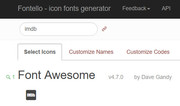
Let us know if you need more assistance with this.Best regards,
MikeHey iedigitaldesign,
It looks as though the links in your menu are formatted like this:/legal-services/#special-needsplease try changing to this:
/legal-services#special-needsBest regards,
MikeHey Ushbot,
Thank you for using Enfold.The portfolio category sort will not be displayed base on the categories’ hierarchy. It will include all categories (parent & sub) in a single list. Creating a dropdown for the sub categories will require a major modification on the theme that we will not be able to provide here. Please contact codeable: http://kriesi.at/contact/customization
Best regards,
MikeApril 21, 2018 at 2:15 pm in reply to: external links are not opened in new tab, even though it is configured correctly #944907Hey ssmgmbh,
I believe that you do want your links to open in a new tab, and I see you are using “target _blank” is this error site wide or just one page?
Can you please include a admin login in the private content area for the site with the error, so we can take a closer look.Best regards,
MikeApril 21, 2018 at 2:04 pm in reply to: SSL-Umstellung, AVIA Java-Script lädt unsicheres Bild nach #944905Hey swelzel,
Es sieht so aus, als ob ein Demo-Image nicht korrekt importiert wurde. Bitte schauen Sie in den Farbbereich mit dem roten Streifen
“Laden Sie sich unseren Flyer herunter” für ein Hintergrundbild und entfernen Sie es. (Haus-Draht-Modell-Fade-White-1500×1085.png)
Wenn Sie es nicht finden können, geben Sie bitte einen Administrator-Login im Bereich für private Inhalte an, damit wir genauer hinsehen können.
Bitte sehen Sie sich den Screenshot im Bereich Privater Inhalt an.
———
It looks as though a demo image didn’t get imported correctly, please look in the color section with the Red Stripe
“Laden Sie sich unseren Flyer herunter” for a background image and remove it. (house-wire-model-fade-white-1500×1085.png)
If you can’t find it, please provide a admin login in the private content area so we can take a closer look.
Please see screenshot in Private Content area.Best regards,
MikeHi,
The email address for the login is not correct, please check.
The removing of the code may have not worked for you due to caching.Best regards,
MikeHi,
I see the form changed a little, I replaced the code with this:p#element_avia_1_1,p#element_avia_4_1,p#element_avia_6_1 { padding-right: 10px; }To remove the gallery boarder, I added this code:
#top div .avia-gallery img {
    border-style: none!important;
    border-width: 0px!important;
    padding: 0px!important;
}
The gallery caption is added when you add gallery items that have a caption typed under the image, I removed the caption for you:
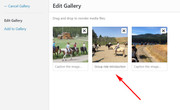
Please review these changes, and list the adjustments we still need to address, I think there’s just one left?Best regards,
MikeApril 21, 2018 at 12:44 pm in reply to: Hide social and tel on mobile and change secondary menu from right to left #944896Hi,
I added this css and seems to work correctly for landscape phones, please clear your browser cache and check.@media only screen and (min-width: 645px) and (max-width: 660px) { .responsive #header_meta .sub_menu>ul { text-align: left!important; } }Best regards,
MikeApril 21, 2018 at 12:28 pm in reply to: Demo Import for Enfold not working – demo name is Startup Business Demo #944891Hi,
Glad we were able to help, we will close this now. Thank you for using Enfold.For your information, you can take a look at Enfold documentation here
and the video tutorials here
And if there are features that you wish Enfold had, you can request them and vote the requested ones here
For any other questions or issues, feel free to start new threads under Enfold sub forum and we will gladly try to help you :)Best regards,
MikeHey Jim,
Typically this is due to a older PHP version being used by your webhost, please ask them to update your PHP version to v7
Another solution could be to replace your header.php with this one.Best regards,
MikeHi,
@Illingco: I would not recommend trying to import any of the demos at this point because it looks like you have been customizing your site. Importing a demo now will cause you to lose the content you now have.
Is there a certain page or element in a demo that you are trying to recreate?
@Gunther_Axeli: it looks like you have also begun customizing your site, do you wish for any further anassistance?Best regards,
MikeHi,
Es tut mir leid, dass mein Deutsch nicht sehr gut ist. Ich verwende Google Translate, weshalb ich immer in zwei Sprachen poste.
Ich bin mir nicht sicher, was mit Ihrer Website passiert ist, bevor Sie uns kontaktiert haben, aber der Grund, warum Ihre Website nicht funktioniert oder keinen Inhalt zeigt, ist, dass Sie keine Themenordner in Ihrem Themenverzeichnis hatten.Nachdem ich dein enfold.zip extrahiert habe, um einen enfold Theme-Ordner zu erstellen, zeigte deine Seite Inhalt, was meine Bedeutung hinter “arbeiten” war
Jetzt glaube ich, dass Sie sagen, dass Sie ein Problem mit Farbbereichen haben, und ich würde gerne helfen, aber ich habe eine Testseite mit Farbbereichen erstellt, die gut zu funktionieren scheinen:
Bitte beachten Sie diesen LinkVersuchen Sie, eine neue Seite zu erstellen, die Ihr Problem veranschaulicht, und versuchen Sie, Screenshots der Schritte anzuzeigen, die den Fehler verursachen, sodass ich den Fehler in einer Untersuchung reproduzieren kann.
—————————
I’m sorry that my German is not very good, I have been using Google Translate, which is why I always post in two languages.
I’m not sure what happened to your site before you contacted us, but the reason your site would not “work” or show any content, was because you had no theme folders, in your theme directory.After I extracted your enfold.zip to create a enfold theme folder, your site showed content, which was my meaning behind “working”
Now I believe you are saying that you have a issue with color sections, and I would like to help, but I created a test page with color sections that seem to work good:
Please see this linkPlease try to create a new page that demonstrates your issue, and try to show screenshots of the steps that cause the error, so I can reproduce the error an investigate.
Best regards,
MikeHi,
Danke, ich fand, dass du nur enfold.zip in deinem Themenordner und kein funktionierendes / enfold / Verzeichnis hast.
Ich habe die enfold.zip extrahiert, um dir ein Verzeichnis zu geben und jetzt funktioniert deine Seite.
Bitte prüfe.————
Thank you, I found that you only had enfold.zip in your theme folder, and no working /enfold/ directory.
I extracted the enfold.zip to give you a directory and now your site works.
Please check.Best regards,
MikeHey René,
Unfortunately you can’t change the background color of the iframe because of cors policies and they are also using !important; on the background color.
But you can reduce the scale of the form and increase the iframe to show the full form via css, Try this code in the General Styling > Quick CSS field:div.mfp-iframe-scaler,#_form_32_._form _form_32 _inline-form { height: 150vh !important; } iframe { -moz-transform: scale(0.70, 0.70); -webkit-transform: scale(0.70, 0.70); -o-transform: scale(0.70, 0.70); -ms-transform: scale(0.70, 0.70); transform: scale(0.70, 0.70); -moz-transform-origin: top left; -webkit-transform-origin: top left; -o-transform-origin: top left; -ms-transform-origin: top left; transform-origin: top left; }Feel free to adjust to suit.
Best regards,
MikeHey tecnicoposiciona,
Can I suggest a better way to control the slides and positioning for mobile devices, try creating a copy of your layerslider, then change the canvas to the size your are targeting, such as 480px, which is the size for most mobile devices.
Then use the visual tools in the layerslider to resize and position your elements, and save.
Then add it to your page under your current one, and we can help adjust which screen sizes it will show on with css like this:@media only screen and (max-width: 767px) { div#layer_slider_1 { display:none!important; } } @media only screen and (min-width: 768px) { div#layer_slider_2 { display:none!important; } }This really will work better for you, than trying to manually target and adjust how the layers work in the layerslider.
Best regards,
MikeHi,
Glad we were able to help, we will close this now. Thank you for using Enfold.For your information, you can take a look at Enfold documentation here
and the video tutorials here
And if there are features that you wish Enfold had, you can request them and vote the requested ones here
For any other questions or issues, feel free to start new threads under Enfold sub forum and we will gladly try to help you :)Best regards,
MikeHi,
Glad we were able to help, we will close this now. Thank you for using Enfold.For your information, you can take a look at Enfold documentation here
and the video tutorials here
And if there are features that you wish Enfold had, you can request them and vote the requested ones here
For any other questions or issues, feel free to start new threads under Enfold sub forum and we will gladly try to help you :)Best regards,
MikeHi,
I have manually installed your demo, please check all setting to ensure they are correct & please confirm your site email address, a link was emailed to you. You may also remove the temp admin if you wish.
Please check and let us know if there is anything else about the demo install we can assist with.Best regards,
MikeHi,
Sorry, I have uploaded all of the files needed for the demo import, but I was not able to update your database, it seems there are some non-standard tables causing it to fail such as “_mig_wp_terms” the next step was to manually import the database via cPanel > PHPmyAdmin but I’m unable to find either.
It seems your plan is a “managed host” which makes me think you don’t have access?
I have included the database in the Private Content area, which has already have the url’s changed for your site if you can get Godaddy to import it for you then your site should work.Best regards,
MikeHi,
Ok I have manually uploaded the images and files, but unfortunately it is not working for you. Please try using the Wp-Reset plugin to reset your site and then try installing the demo again, the images I uploaded will stay in your uploads folder and be available for the new install.
Or I can reset the site for you and manually install the demo if you wish. Just let us know if you would like us to do this.Best regards,
MikeHi,
I will try uploading the images for the demo, and the flaticon file.
With the bundled layerslider there is no need for a license code as it can not be activated, it has been designed to work without the license with Enfold by the layerslider team.
I will post again once I have completed the upload.Best regards,
MikeHey Danielle,
I have seen this happen a few times with the GoDaddy webhost and Strato webhost, we could assist with a manual demo import if you wish. We will need FTP access to upload the files. Please note with a manual import you will lose all of your content and files, and your users will be reset, typically this is fine because with a demo your starting from scratch anyways.
Please include FTP access in the Private Content area.Best regards,
MikeHey paulohenrique,
Perhaps this solution will work for you:
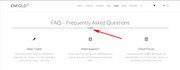
in a code block on your page, add this code:<hr class="hr-text">then add this code in the General Styling > Quick CSS field:
hr.hr-text {
  font-family: Arial, sans-serif;
  text-align: center;
  line-height: 1px;
  height: 1px;
  font-size: 1em;
  border-width: 1px 0;
  border-style: solid;
  border-color: #676767;
  margin: 20px 10px;
  overflow: visible;

  /* ensure 1px gap between borders */
  -webkit-box-sizing: content-box;
  -moz-box-sizing: content-box;
  -ms-box-sizing: content-box;
  -o-box-sizing: content-box;
  box-sizing: content-box;
}

hr.hr-text:after {
  content: "Enfold";
  color: #000;
  display: inline;
  background-color: #fff;
  padding: 0 0.5em;
}
Adjust the word “Enfold” to suit.
Best regards,
MikeHi,
BODY:
– How can I make the title appear below the slider? eg. https://campbel3.mywhc.ca/activities/. Though I will most likely be using Layerslider WP, not the Slider as per this page.
The title seems to be below the slider now, is it different when using the layerslider, can you create an example?– Slider – I’d also like the rope to appear at the bottom of the slider (overlapping) like https://www.campbellhillsguestranch.com/site/activities/children-and-horses.html
This is done with this css:#topNav:after, header:after { content: ""; position: absolute; bottom: -5px; height: 18px; background: url(//static.campbellhillsguestranch.com/themes/CampBell17/images/layout/rope1.png) center top repeat; width: 100%; left: 0; right: 0; transition: all .5s ease; z-index: 110; }We probably should do this once you know what slider you are going to use.
– There is a huge space between the title and the first elements. How can that be reduced?
Do you mean between the slider and the title? Please see screenshot in Private Content area.– Bullet points – can I make a custom bullet point? like https://www.campbellhillsguestranch.com/site/guest-ranch-vacations/packing-list.html
Please try the Icon list element:
Here is a video: https://youtu.be/arXUypFtzCk– Gallery – I want to remove the white border. I also want to remove the hover captions.
Sorry, on the https://campbel3.mywhc.ca/gallery/ page I don’t see any hover captions or a white boarder, perhaps I’m looking at the wrong page?– Masonry Gallery – I want a transparent background. Just like https://www.campbellhillsguestranch.com/site/activities/children-and-horses.html. It is currently https://campbel3.mywhc.ca/activities/children-and-horses/.
Try this code in the General Styling > Quick CSS field:.main_color .av-masonry { background-color: transparent!important; }– Masonry Gallery – Is there an option for a more stylish setup? like two at the top and three at the bottom?
A more stylish setup is to use the “Perfect Automatic Masonry” option where most images get the same size, only very wide images get twice the width and very high images get twice the height. Yet you would need to upload some of the images taller and some wider. Similar to this: https://kriesi.at/themes/enfold/shortcodes/masonry-gallery/– Grid – Can I customize the grid colours/background? Like https://www.campbellhillsguestranch.com/site/guest-ranch-vacations/rates-and-availability.html
I think you mean “tables” we can assist with css, once you create a table.Best regards,
MikeHi,
Since your site is in maintenance or development mode and I can only see one page, I’m going to assume the /the-power-of-art/ page is the blog page we are talking about. I see at the very top there is a full width slider, it is an image of paints, although it doesn’t slide. Also I see a sidebar near the bottom, under a “call to action” strip with the button “Join the heartistic movement” with a blog element next to the sidebar.
When I click any of the blog posts, I see a message that it is password protected.
But I take it that you want to add a slider to these posts, are you using the advanced layout builder for the posts?
Perhaps if I had a admin login I could see the issues better, but right now it only looks as you don’t have the blog posts sliders that you want?Best regards,
MikeApril 20, 2018 at 1:13 am in reply to: Hide social and tel on mobile and change secondary menu from right to left #944364Hi,
Thanks for the login, In your child theme stylesheet, I changed line 3186 from 100% to 85%. Then I cleared my browser cache, and it looks good now.
Please clear your browser cache and check.Best regards,
MikeHi,
Es scheint etwas falsch mit Ihrem Thema zu sein, es sagt der Autor ist “falsch”, von “falscher” Version “falsch”
Bitte sehen Sie sich den Screenshot im Bereich Privater Inhalt an.
Ich sehe auch, dass die URL für eine Subdomain einer Domain ist, die eine andere Enfold-Installation hat.
Bitte beachten Sie die Hinweise im Bereich Privater Inhalt.——————-
There seems to be something wrong with your theme, it says the author is “false”, from “false” version “false”
Please see screenshot in Private Content area.
I also see the URL is for a subdomain of a domain that has another Enfold install.
Please see notes in Private Content area.Best regards,
Mike -
AuthorPosts
