

Forum Replies Created
-
AuthorPosts
-
Hi,
Glad we were able to help, we will close this now. Thank you for using Enfold.For your information, you can take a look at Enfold documentation here
and the video tutorials here
And if there are features that you wish Enfold had, you can request them and vote the requested ones here
For any other questions or issues, feel free to start new threads under Enfold sub forum and we will gladly try to help you :)Best regards,
MikeHi,
Thanks for sharing your solution, is there anything else we can assist with on this, or shall we close this?Best regards,
MikeHi,
Well I’m sure we can do this, but your image is not working, it’s only spinning:
[url=https://postimg.cc/image/i44nzw6kt/][img]https://s6.postimg.cc/i44nzw6kt/2018-04-19_161634.jpg[/img][/url]
but what we really need is the sectors, classes, & elements to write the right code for you.
So if it’s on your localhost, can you use all-in-one-wp-migration and link to the file via DropBox or Google Drive so I can install on my localhost?
Here’s a All-in-One WP Migration tutorialBest regards,
MikeApril 19, 2018 at 10:14 pm in reply to: Hide social and tel on mobile and change secondary menu from right to left #944340Hi,
Sorry that was unexpected, Can you please include a admin login in the private content area so we can take a closer look.
To be sure I’m looking to make the correct changes, please see screenshot in Private Content area.Best regards,
MikeHi,
Glad to hear you will try CF7, So first when using Mail2 your setup sounds right, here is a tutorial to check: How to Setup Autoresponder in Contact Form7
But there is the possibility that your host has some mail rules, to check I recommend installing WP Mail Logging which will show you a log of the emails to see if and where WordPress is sendind and if there are errors.
Often people find that their host requires SMTP to send outbound email, this is to cut down on spam, still other hosts require a special “Reply” field in the mail header, asking your host if they use “spamassasin” or something similar will tell us if we need to add this for you.
Here is a video on setting up SMTP which typically solves the sending issue. https://youtu.be/gqju-VMkn1Y
Note that Mail2 will only send after a successful form send.
Also here is the Contact Form 7 docsBest regards,
MikeHey nadjak77,
Please include the url to the page in question so we can take a closer look.Best regards,
MikeHey Butter_Cheese,
Your tracking code in Enfold > Google services > Google Analytics Tracking Code should look like this:
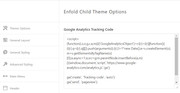
this should not cause any errors, please ensure there in no other code in there.
Yet I see you also have “Google Analytics by MonsterInsights plugin v7.0.5” adding code in your header, do you want to use both?
Your incorrect “UA-116433851-1” should not be showing though, try disabling your plugins. If that resolves the issue, reactivate each one individually until you find the cause.
If this doesn’t help, Can you please include a admin login in the private content area so we can take a closer look.Best regards,
MikeApril 19, 2018 at 12:56 pm in reply to: Product Grid – change font size of product title smaller #944078Hey Taravonribbeck,
We can assist with custom css, please include the url to the page in question so we can take a closer look.Best regards,
MikeHi,
The code of your buttons has curly quotes which is braking them, did you add the elements or page via the debugger?
If so re-paste the code as plain text so there won’t be any curly quotes.
If not try disabling your plugins, or remove custom js from the page.
If this doesn’t help, Can you please include a admin login in the private content area so we can take a closer look.
Please see screenshot in Private Content area.Best regards,
MikeHi,
Is there anything else we can assist with on this issue, or shall we close this then?Best regards,
MikeHey whdsolutions,
For the full width easy slider title, please try this code in the General Styling > Quick CSS field:.avia-fullwidth-slider h2.avia-caption-title { color: red !important; }For the title and body, try:
.avia-fullwidth-slider h2.avia-caption-title, .avia-fullwidth-slider .avia-caption-content {
color: red !important;
}
Adjust to suit
If this doesn’t work please Please include the url to the page in question so we can take a closer look.Best regards,
MikeHey mforlano,
Did you set your frontpage at Enfold Theme Options > Theme Options > Frontpage Settings or at WordPress > Settings > Reading > Your homepage displays ?
The Enfold Theme Options should take lead.
If this doesn’t help, please include a admin login in the private content area so we can take a closer look.
Please include the name of the page you wish to be the frontpage.Best regards,
MikeHi,
Glad we were able to help, we will close this now. Thank you for using Enfold.For your information, you can take a look at Enfold documentation here
and the video tutorials here
And if there are features that you wish Enfold had, you can request them and vote the requested ones here
For any other questions or issues, feel free to start new threads under Enfold sub forum and we will gladly try to help you :)Best regards,
MikeHi,
Glad we were able to help, we will close this now. Thank you for using Enfold.For your information, you can take a look at Enfold documentation here
and the video tutorials here
And if there are features that you wish Enfold had, you can request them and vote the requested ones here
For any other questions or issues, feel free to start new threads under Enfold sub forum and we will gladly try to help you :)Best regards,
MikeHi,
Thank you :)
FOOTER:
– Rope separator with drop shadow, same as header and https://www.campbellhillsguestranch.com.
For the shadow I added:#footer { box-shadow: 0px -1px 14px 4px rgba(0,0,0,.4); }– Can the social icons be in the footer, like https://www.campbellhillsguestranch.com?
the social icons are built into the socket, below the footer, I enabled so you can see at:
Enfold Theme Options > Footer > Default Footer Widgets & Socket Settings
– Can I add a button into the footer?
I added a button into your third footer widget area, HTML block. Notice the class is different than the top button so it will stay in the footer.<a class="footer-res-button" href="https://www.campbellhillsguestranch.com/site/guest-ranch-vacations/rates-and-availability.html">Reservations</a>the css:
a.footer-res-button,a.footer-res-button:visited {
    display: inline-block;
    font: 400 16px/32px 'EB Garamond',"Times New Roman",Georgia,serif;
    text-decoration: none;
    text-align: center;
    color: #fff;
    padding: 0 15px;
    margin: 0 auto;
    min-width: 24px;
    letter-spacing: .05em;
    -webkit-box-sizing: border-box;
    -moz-box-sizing: border-box;
    box-sizing: border-box;
    border: 1px dashed #33270E;
    background-image: url(//static.campbellhillsguestranch.com/themes/CampBell17/images/layout/leatherBG-light.jpg);
    background-repeat: repeat-x;
    background-position: left center;
    transition: transform .3s,box-shadow .3s;
}
BUTTONS:
– Can I customize the buttons to have a particular background image (not just colour)? They can all be the same, but Id like to use an image, like https://www.campbellhillsguestranch.com/.
I found buttons on the activity page and on the contact page, so I used them as the models for your buttons in which this css will add the background image:a.avia-button { font: 400 16px/32px 'EB Garamond',"Times New Roman",Georgia,serif!important; color: #fff!important; border-style: none!important; background-color: #e4d7bf !important; background-image: url(//static.campbellhillsguestranch.com/themes/CampBell17/images/layout/leatherBG-light.jpg)!important; background-repeat: repeat-x; background-position: left center; }FORM:
– Can I customize the size of the words and spacing between form elements?
I only see a contact form on your site, so to change the font size please try:#top label { font-size: 0.92em!important; }I didn’t apply, this is the size it is now, try changing to “1.2em” or more to suit.
as for the form spacing I assume you mean to the right of “first name” & “email” so they are not touching:p#element_avia_1_1,p#element_avia_3_1 { padding-right: 10px; }I didn’t apply, please adjust to suit.
OK, so lets see how these look, we still need to fix the “overlapping”.
Hopefully, these will be ok and then we can tackle the “Body” :)Best regards,
MikeHey Picfinity,
I believe you are taking about the image in the Private Content area.
this image didn’t show for me on desktop on first view.
I believe this is because the animation is being conflicted with by a lazy load plugin or a caching plugin.
Please try disabling these, and try disabling the “fade-in” animation in the element.Let us know if this helps.
Best regards,
MikeApril 19, 2018 at 3:41 am in reply to: Hide social and tel on mobile and change secondary menu from right to left #943853Hey webWahine,
Please try changing this:.av_secondary_right .sub_menu { width: 100% !important; }to this:
.av_secondary_right .sub_menu {
    width: 70% !important;
}
Best regards,
MikeHey elames,
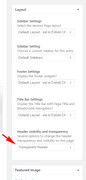
When your editing the page, did you set the Layout > Header visibility and transparency to “Transparent Header” in the right hand sidebar above featured image?
Best regards,
MikeHi,
Perhaps you needed to clear your cache, because it seems to e working for me. Please see screenshot in Private Content area.Best regards,
MikeHi,
I created a new tab, called “Contact Us” and pasted in the html of your form, please check.Best regards,
MikeHi,
Thank you for the site login, but I was unable to get into godaddy. This is strange, I never had such trouble. Is your godaddy login saved in your browser, or do you type it in each time?
Please see screenshot in Private Content area.
If it is saved, and you use Chrome, please check the passwords using this tip: http://www.thewindowsclub.com/manage-view-saved-passwords-chromeBest regards,
MikeHi,
Please try adding this css to WordPress > Customize > Additional CSS:#top.page-id-3296 .main_color div { border-color: transparent!important; } #top.page-id-3296 span.post-meta-infos { margin-top: 35px !important; }The top rule is for the thin white line, and the second is for adding space between the elements.
Please adjust to suit.Best regards,
MikeHi,
Sorry none of those worked, perhaps include your godaddy login, cPanel.
I also noticed that we don’t have a admin login for you site, and since we are not familiar with your site, I’m unsure what is wrong with your elements. Please explain with screenshots if possible.Best regards,
MikeHi,
Glad we were able to help, we will close this now. Thank you for using Enfold.For your information, you can take a look at Enfold documentation here
and the video tutorials here
And if there are features that you wish Enfold had, you can request them and vote the requested ones here
For any other questions or issues, feel free to start new threads under Enfold sub forum and we will gladly try to help you :)Best regards,
MikeHi,
I’m pretty certain that Ismael means that this code in the pastebin is the class, or function, from the “class-framework-widgets.php” and need to be placed in your child theme functions.php, and then you need to make the changes that he suggested.Best regards,
MikeHi,
Glad we were able to help, we will close this now. Thank you for using Enfold.For your information, you can take a look at Enfold documentation here
and the video tutorials here
And if there are features that you wish Enfold had, you can request them and vote the requested ones here
For any other questions or issues, feel free to start new threads under Enfold sub forum and we will gladly try to help you :)Best regards,
MikeHey arnacampbell,
Welcome and thanks for choosing Enfold, lets take a look at your questions…
HEADER:
– I’d like the phone number in the header with the social icons.
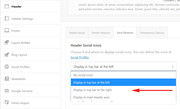
To move the phone & social I adjusted at to Enfold Theme Options > Header > Extra Elements > Header Social Icons:
– I’d like a button on the left, just like https://www.campbellhillsguestranch.com
To create this button I added this css to your Enfold Theme Options > General Styling > Quick CSS field:@media only screen and (min-width: 767px) { a.res-button,a.res-button:visited { display: inline-block; font: 400 16px/32px 'EB Garamond',"Times New Roman",Georgia,serif; text-decoration: none; text-align: center; color: #fff; padding: 0 15px; margin: 0 auto; min-width: 24px; letter-spacing: .05em; -webkit-box-sizing: border-box; -moz-box-sizing: border-box; box-sizing: border-box; border: 1px dashed #33270E; background-image: url(//static.campbellhillsguestranch.com/themes/CampBell17/images/layout/leatherBG-light.jpg); background-repeat: repeat-x; background-position: left center; float: left !important; left: 10px; top: 60px; position: absolute; transition: transform .3s,box-shadow .3s; } }*note you will need to adjust the image url when you remove the other theme.
Then a added this button code to Enfold Theme Options > Header > Extra Elements > Phone Number or small info text:<a class="res-button" href="https://www.campbellhillsguestranch.com/site/guest-ranch-vacations/rates-and-availability.html">Reservations</a>– Can the drop down menu have the same background as the header? With white text?
To add the background-image to your sub-menu, I added this css:.header_color .main_menu ul ul {background: #e4d7bf url(https://static.campbellhillsguestranch.com/themes/CampBell17/images/layout/leatherBG.jpg) no-repeat right top !important;} .header_color .main_menu ul ul.sub-menu li a { background: transparent; } .header_color .main_menu ul ul.sub-menu li a:hover { background-color:rgba(250,250,250,0.3)!important;}*again adjust the image url
– Rope separator with drop shadow (same as https://www.campbellhillsguestranch.com). At the moment, I’ve just attached the rope to the background header image but it leaves a space. I’d like it to overlap.
I added the box-shadow to your header image:.header_color .header_bg { box-shadow: 0 4px 10px 2px rgba(0,0,0,.4); }It still isn’t overlapping correctly, but I will have to research this some more.
So other than the overlap, please check these before we move on to the next section.Best regards,
MikeHi,
Please try adding this css to WordPress > Customize > Additional CSS:.html_elegant-blog #top.page-id-3296 .entry-content-wrapper .big-preview.single-big { margin-top: 20px !important; } #top.page-id-3296 h1.post-title.entry-title a { font-size: 38px !important; color: #70a874 !important; }The top rule is the current top margin between the title and image, please adjust to suit.
The second rule is the current font-size for the title, with the color of your button added, please adjust to suit.Best regards,
MikeHi,
The Theme Forest API checks the versions and licenses, it seems this is not working on such an old version.
There are some major changes with the theme folder structure, so please update via FTP, and Please note that you should remove the theme folder “enfold” before adding the new one, so old files are not left behind.
Going forward your client can use the Envato Market WordPress Plugin as an easy way to keep the theme up to date.Best regards,
Mike -
AuthorPosts

![https://s6.postimg.cc/i44nzw6kt/2018-04-19_161634.jpg[/img][/url]](https://s6.postimg.cc/i44nzw6kt/2018-04-19_161634.jpg[/img][/url])