

Forum Replies Created
-
AuthorPosts
-
April 22, 2018 at 4:53 pm in reply to: Please read – Regarding Wordfence LayerSlider warning on Enfold 4.0.3 #945069
Hi,
Is your speed test a plugin or a website like http://www.webpagetest.org/ ?
Please try the website and link the results here.Best regards,
MikeHey simonac,
I found that in Chrome your page looks the same logged in or out, most likely because I logged in with Chrome, but on first load with Firefox the wpfc-minified stylesheet couldn’t be loaded which was causing styling issues.
Clearing the wpfc minified cache and reloading in Firefox solved.
I also notice that the wpfc option panel doesn’t look right, and I believe there is a conflict from another plugin.
I also notice that you have not white listed /wp-content/uploads/dynamic_avia/ & /wp-content/cache/wpfc-minified/ in your firewall which is where some of your stylesheets are. Try white listing the whole /wp-content/
Please first disable the minifying of the cache plugin and clear the cache a few times.
Then disable your other plugins to fine the one conflicting with wpfcBest regards,
MikeHi,
The WordPress maintenance message is normal after such a change, it is only for a short time. I have checked and your site is now working correctly.
Please clear your browser cache and check.Best regards,
MikeHi,
If I’m understanding what you did correctly, the reason the new theme crashed was because you tried to “update” the theme folder, instead of “replacing” it.
We are making so major changes to the theme’s directory and file structure, trying to “update” the theme folder leaves old files behind that will brake the theme.Please try to do what Guenni007 suggested, rename the “enfold” folder in /wp-content/themes/ to “enfold-old” via FTP, then upload the new “enfold” folder, once you see the new “enfold” is working on the front end, you can delete the “enfold-old” folder via FTP.
Otherwise if it doesn’t work, rename the new enfold folder to “enfold-new” and rename the “enfold-old” back to “enfold” and let us know.Best regards,
MikeApril 22, 2018 at 3:45 pm in reply to: SSL-Umstellung, AVIA Java-Script lädt unsicheres Bild nach #945053Hi,
@Guenni007 thank you for helping.Best regards,
MikeApril 22, 2018 at 3:40 pm in reply to: Random text in footer of enfold construction theme – #ua-117526703-1" #945051Hi,
Glad we were able to help, we will close this now. Thank you for using Enfold.For your information, you can take a look at Enfold documentation here
and the video tutorials here
And if there are features that you wish Enfold had, you can request them and vote the requested ones here
For any other questions or issues, feel free to start new threads under Enfold sub forum and we will gladly try to help you :)Best regards,
MikeHi,
Glad we were able to help, we will close this now. Thank you for using Enfold.For your information, you can take a look at Enfold documentation here
and the video tutorials here
And if there are features that you wish Enfold had, you can request them and vote the requested ones here
For any other questions or issues, feel free to start new threads under Enfold sub forum and we will gladly try to help you :)Best regards,
MikeHi,
Glad we were able to help, we will close this now. Thank you for using Enfold.For your information, you can take a look at Enfold documentation here
and the video tutorials here
And if there are features that you wish Enfold had, you can request them and vote the requested ones here
For any other questions or issues, feel free to start new threads under Enfold sub forum and we will gladly try to help you :)Best regards,
MikeHi,
To remove the border, please try:#top.home #after_section_2.container_wrap { border-top-style: none!important; }To make the slider 100% wide, Please try:
#top.home #portfolio .avia-content-slider .slide-entry.av_one_fourth {
    width: 25%!important;
}
Best regards,
MikeApril 22, 2018 at 3:11 pm in reply to: Excerpt in magazine not showing up (Enfold child theme) #945045Hi,
Thanks for your feedback, is there anything else we can assist with on this, or shall we close this?Best regards,
MikeHi,
It does seem to work on my Android, but the icon columns are not evenly spaced because “kom-inline1” is a class that is only on two of the icon columns. When I had added the classes I thought you wanted them 2×2
I hope you don’t mind, but since you want them in one line, I changed all 4 of them to “kom-inline” and rewrote the css to add 2% margin to all 4 so they would be evenly spaced:@media only screen and (max-width: 480px) { .kom-inline { display: inline-block!important; width: 72px!important; margin-left: 2%!important; } }Please clear your browser cache and check.
Best regards,
MikeHi,
Glad we were able to help, we will close this now. Thank you for using Enfold.For your information, you can take a look at Enfold documentation here
and the video tutorials here
And if there are features that you wish Enfold had, you can request them and vote the requested ones here
For any other questions or issues, feel free to start new threads under Enfold sub forum and we will gladly try to help you :)Best regards,
MikeHey Perry,
I recommend using a link masking service such as https://goo.gl/
I tested using & to replace the & in your link, but after a couple of edits to was replaced with the other symbol.
I also tested this plugin which seems to work with the default editor, it doesn’t work with the advanced layout builder.
But it’s still not a good solution because the filter that WordPress puts in place it there to protect your site, which is why you won’t find a plugin on the WordPress plugin site that will do this.
I’m sure you could setup a 301 redirect, or write a js script, but in the long run it would just be easier to use a link shorter or masking service.Best regards,
MikeHey norbou,
I have looked at your production site and found no errors on the page. Unless these errors only show on the backend?
For your new demo site, please Try disabling your plugins and include a admin login in the private content area so we can take a closer look.
I was able to FTP in, but I assume that it is the root for your production site, and I couldn’t determine which folder was for your new demo site.
I also assume that as it is a new demo site you have not updated a older version of Enfold to the latest version? I ask to rule this error out.
Which PHP version is your webhost using? Hopefully version 7.x but not 7.2Best regards,
MikeApril 21, 2018 at 8:24 pm in reply to: Random text in footer of enfold construction theme – #ua-117526703-1" #944964Hey lkulube,
This looks like Google Analytics code, I imagine that it was placed in the Enfold Theme Options > Google Services > Google Analytics Tracking Code box incorrectly.
If this is true, please remove the code and replace it with the whole code with the script that you get from Google Analytics, it should look similar to this:<script> (function(i,s,o,g,r,a,m){i['GoogleAnalyticsObject']=r;i[r]=i[r]||function(){ (i[r].q=i[r].q||[]).push(arguments)},i[r].l=1*new Date();a=s.createElement(o), m=s.getElementsByTagName(o)[0];a.async=1;a.src=g;m.parentNode.insertBefore(a,m) })(window,document,'script','https://www.google-analytics.com/analytics.js','ga'); ga('create', 'UA-XXXXX-Y', 'auto'); ga('send', 'pageview'); </script>Best regards,
MikeHey FadingReality,
The first one is a grid row with two halves, on the left is a column and text blocks, on the right is a background image in the grid row.
Please try to Enable Avia Layout Builder Debug and paste this code into the debugger box on a new page on your site and save *please note the images will not show on your site, try adding your own images.:[av_layout_row border='' min_height_percent='' min_height='' color='main_color' mobile='av-flex-cells' id='Best Rated' av_element_hidden_in_editor='0'] [av_cell_one_half vertical_align='middle' padding='150px,0px,150px,150px' background_color='#f8f8f8' src='' attachment='' attachment_size='' background_attachment='scroll' background_position='top left' background_repeat='no-repeat' mobile_display=''] [av_one_full first min_height='' vertical_alignment='av-align-top' space='no_margin' custom_margin='aviaTBcustom_margin' margin='0px' margin_sync='true' padding='0px' padding_sync='true' border='' border_color='' radius='0px' radius_sync='true' background_color='' src='' attachment='' attachment_size='' background_position='top left' background_repeat='no-repeat' animation='left-to-right' mobile_display=''] [av_heading tag='h1' padding='20' heading='More than 100.000 users and the best rating on Themeforest' color='custom-color-heading' style='blockquote modern-quote' custom_font='#000000' size='40' subheading_active='' subheading_size='15' custom_class='' admin_preview_bg=''][/av_heading] [av_hr class='custom' height='50' shadow='no-shadow' position='left' custom_border='av-border-fat' custom_width='50px' custom_border_color='#000000' custom_margin_top='30px' custom_margin_bottom='30px' icon_select='no' custom_icon_color='' icon='ue808' font='entypo-fontello'] [av_textblock size='' font_color='' color='' admin_preview_bg='rgb(255, 255, 255)'] Enfold is the best rated top seller on <a href="https://themeforest.net/?ref=Kriesi" target="_blank">Themeforest</a>. There is no other theme with that many sales that has an average rating of 4.85. Heck, you will be hard pressed to find <strong>ANY</strong> product on the web with that many sales and a rating that good ;) [/av_textblock] [av_hr class='invisible' height='20' shadow='no-shadow' position='left' custom_border='av-border-fat' custom_width='50px' custom_border_color='#000000' custom_margin_top='30px' custom_margin_bottom='30px' icon_select='no' custom_icon_color='' icon='ue808' font='entypo-fontello'] [av_font_icon icon='ue808' font='entypo-fontello' style='' caption='' link='' linktarget='' size='40px' position='left' color='#e2bc12'][/av_font_icon] [av_font_icon icon='ue808' font='entypo-fontello' style='' caption='' link='' linktarget='' size='40px' position='left' color='#e2bc12'][/av_font_icon] [av_font_icon icon='ue808' font='entypo-fontello' style='' caption='' link='' linktarget='' size='40px' position='left' color='#e2bc12'][/av_font_icon] [av_font_icon icon='ue808' font='entypo-fontello' style='' caption='' link='' linktarget='' size='40px' position='left' color='#e2bc12'][/av_font_icon] [av_font_icon icon='ue808' font='entypo-fontello' style='' caption='' link='' linktarget='' size='40px' position='left' color='#e2bc12'][/av_font_icon] [av_hr class='invisible' height='42' shadow='no-shadow' position='left' custom_border='av-border-fat' custom_width='50px' custom_border_color='#000000' custom_margin_top='30px' custom_margin_bottom='30px' icon_select='no' custom_icon_color='' icon='ue808' font='entypo-fontello'] [av_button label='Get it now' link='manually,http://themeforest.net/item/enfold-responsive-multipurpose-theme/4519990?license=regular&open_purchase_for_item_id=4519990&purchasable=source&ref=Kriesi' link_target='' size='large' position='left' icon_select='yes' icon_hover='aviaTBicon_hover' icon='ue859' font='entypo-fontello' color='dark' custom_bg='#444444' custom_font='#ffffff' admin_preview_bg='rgb(255, 255, 255)'] [/av_one_full][/av_cell_one_half][av_cell_one_half vertical_align='middle' padding='500px,0px,500px,0px' background_color='#f8f8f8' src='https://test.kriesi.at/enfold-2017/wp-content/uploads/sites/24/2017/01/mockup.png' attachment='298' attachment_size='full' background_attachment='scroll' background_position='bottom left' background_repeat='no-repeat' mobile_display='av-hide-on-mobile'] [/av_cell_one_half] [/av_layout_row]The second one is a color section with a background image, and two 1/2 columns, the left column is empty, the column on the right has text blocks. Here’s the code for it:
[av_section min_height='' min_height_px='500px' padding='huge' shadow='no-border-styling' bottom_border='border-extra-arrow-down' bottom_border_diagonal_color='#ffffff' bottom_border_diagonal_direction='' bottom_border_style='' id='Demos' color='main_color' custom_bg='' src='https://test.kriesi.at/enfold-2017/wp-content/uploads/sites/24/2015/07/isometric-1.jpg' attachment='447' attachment_size='full' attach='scroll' position='center left' repeat='contain' video='' video_ratio='16:9' overlay_opacity='0.5' overlay_color='' overlay_pattern='' overlay_custom_pattern='' av_element_hidden_in_editor='0']
[av_one_half first min_height='' vertical_alignment='av-align-top' space='no_margin' custom_margin='aviaTBcustom_margin' margin='50px' margin_sync='true' padding='0px' padding_sync='true' border='' border_color='' radius='0px' radius_sync='true' background_color='' src='' attachment='' attachment_size='' background_position='top left' background_repeat='no-repeat' animation='left-to-right' mobile_display='']

[/av_one_half][av_one_half min_height='' vertical_alignment='av-align-top' space='no_margin' custom_margin='aviaTBcustom_margin' margin='0px' margin_sync='true' padding='50px' padding_sync='true' border='' border_color='' radius='0px' radius_sync='true' background_color='rgba(255,255,255,0.85)' src='' attachment='' attachment_size='' background_position='top left' background_repeat='no-repeat' animation='left-to-right' mobile_display='']

[av_heading tag='h1' padding='20' heading='A growing library of more than 2 dozen demos' color='custom-color-heading' style='blockquote modern-quote' custom_font='#000000' size='40' subheading_active='' subheading_size='15' custom_class=''][/av_heading]

[av_hr class='custom' height='50' shadow='no-shadow' position='left' custom_border='av-border-fat' custom_width='50px' custom_border_color='#000000' custom_margin_top='30px' custom_margin_bottom='30px' icon_select='no' custom_icon_color='' icon='ue808' font='entypo-fontello']

[av_textblock size='' font_color='' color='' admin_preview_bg='rgb(255, 255, 255)']
Our demos are one of a kind: we only offer<strong> full concept demos</strong> with multiple pages that show whole projects, unlike others who only include a single page and call that a demo ;)

You can import them with <strong>a single click</strong>, they are easily adaptable to your needs and you can chose from a variety of layouts and niche designs. In addition to that you can also use the <strong>demo images used in our demo for your own project</strong>!
[/av_textblock]

[/av_one_half]
[/av_section]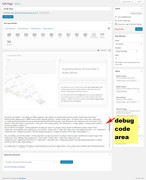
Best regards,
MikeHey Daniel-88,
Did you happen to update the theme before this occurred? If so did you update via FTP?
After you renamed the theme folder so you could login, did you try disabling your plugins?
Is your webhost using PHP v7? Not v7.2After checking the plugins and PHP version, if this doesn’t help, Can you please include a admin login to one of the sites with FTP access in the private content area so we can take a closer look.
Best regards,
MikeHi,
Is there anything else we can assist with this issue, or shall we close this then?Best regards,
MikeHey werbeagenturlauf,
Please try this code in the General Styling > Quick CSS field:div.av-logo-container { background: url(https://your-site.de/wp-content/uploads/2018/04/Logo-Brodner-full-size-1.png) no-repeat; background-size: contain; background-position: center; } .logo img { display: none !important; }Please see screenshot in Private Content area.
Best regards,
MikeHey francescozerbinato,
Once you have installed a demo, choosing another will overwrite the first.
But you can install Enfold on a localhost and install a different demo on it, then copy the pages using the Avia Layout Builder Debugger to your live site.Best regards,
MikeHey bilgecelik,
Please see this article: Fix: WordPress Memory Exhausted Error – Increase PHP MemoryBest regards,
MikeApril 21, 2018 at 6:45 pm in reply to: Hide social and tel on mobile and change secondary menu from right to left #944945Hi,
Glad we were able to help, we will close this now. Thank you for using Enfold.For your information, you can take a look at Enfold documentation here
and the video tutorials here
And if there are features that you wish Enfold had, you can request them and vote the requested ones here
For any other questions or issues, feel free to start new threads under Enfold sub forum and we will gladly try to help you :)Best regards,
MikeHi,
To make your post slider 100% width, please add your Post Slider inside a Color Section element with a unique ID – http://kriesi.at/documentation/enfold/wp-content/uploads/sites/2/2013/12/color-section-ID.png
and then add following code to Quick CSS in Enfold theme options under General Styling tab#your-unique-id .container { max-width: 100%; margin: 0; padding: 0; }Best regards,
MikeHi,
Odd, I don’t see the round edges, perhaps I’m looking in the wrong place?
Please see screenshot in Private Content area.Best regards,
MikeApril 21, 2018 at 6:30 pm in reply to: Hide social and tel on mobile and change secondary menu from right to left #944940Hi,
Do you mean that you are doing a tiny bit of tweaking on other elements, or that you wanted assistance with a tiny bit of tweaking on other elements?
If so please explain.Best regards,
MikeHi,
I added a new class to the 4 icon columns “kom-inline” & “kom-inline1”
I then added this code in the General Styling > Quick CSS field:@media only screen and (max-width: 480px) { .kom-inline,.kom-inline1 { display: inline-block!important; width: 105px!important; } .kom-inline1 { margin-left: 20%!important; } }This is the result:

Please clear your browser cache and check.Best regards,
MikeHey kellyCraftMedia,
To open the thumbnail of the post slider in a lightbox please try this solution
To remove the margin from the slides please try this css:#top.home .avia-content-slider-inner .slide-entry-wrap .slide-entry.flex_column { margin-left: 0%!important; }Please remove the permissions for viewing your mockup.
Best regards,
MikeHey ExagOne59,
Sorry, this was custom created by Kriesi for his site, and while it has been asked before, this custom code and script is not available at this time.
Please feel free to request – or vote if already requested – such feature on Enfold feature request form.Best regards,
Mike -
AuthorPosts

