

Forum Replies Created
-
AuthorPosts
-
Hi,
Ok, then don’t add the code :)
But I still see the numbers in black, where do you see the numbers as white?
Do you still see this?
Please see the screenshots in Private Content area.Best regards,
MikeHey laceym002,
Thank you for the video and the login, typically these kinds of links are added with javascript, but examining your site I don’t see the link. I tried viewing your site while “logged out” to ensure that the script didn’t only apply the link for non-users.
I also checked your plugins to ensure it was not one of them.
Does this show every time or only sometimes?
This could be a browser hijacker that is adding links only in your browser, please try viewing your site in incognito mode, or try installing another browser, different from the one you are using.
Then you could use both at the same time to see if it shows. There used to be a tool to remove these scripts “Hijack Me” but I see it’s not active anymore, perhaps “Malwarebytes” could clean it, it may be worth a try.
Or to check your site, please try the plugin Anti-malware security and brute force firewall
If I could see the link I could help more, please let us know if any of this helps.Best regards,
MikeFebruary 9, 2019 at 12:30 am in reply to: Blog post sidebar displaying 'Pages', 'Categories', 'Archive' — can't change it #1064806Hi,
If I understand correctly, there is a demo setting that shows a sidebar when an empty one is used, please try adding an empty text widget to the sidebar to correct.Best regards,
MikeHey Illingco,
Is it meant to be on other pages? On the /request-a-quote/ page it is styled, or do you want it removed from all pages?
Please include an admin login in the Private Content areaBest regards,
MikeHi,
Sorry, your links do not seem to go to the same page in your screenshot, the linked pages show the text in black:
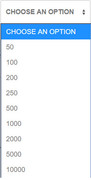
To reverse the options, so the highest number is on top, Try adding this code to the end of your functions.php file in Appearance > Editor:function reverse_options(){ ?> <script> (function($){ $(document).ready(function(){ var $select = $('select'); var options = $select.find('option:nth-child(n+2)'); // turn the nodelist into an array and reverse it options = [].slice.call(options).reverse(); // add each option back $.each(options, function (i, el) { $select.append($(el)); }); }); })(jQuery); </script> <?php } add_action('wp_footer', 'reverse_options');Best regards,
MikeHi,
The option is on the bottom of the Enfold Theme Options page, under the maintenance mode setting, if you are using at least version 4.5.1
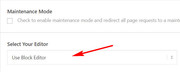
Best regards,
MikeHi,
Sorry this is not one of the options for the portfolio grid, but you could try this solutionBest regards,
MikeHi,
Shall I delete the “enfold-old” folder via ftp and close this thread?Best regards,
MikeFebruary 8, 2019 at 10:48 pm in reply to: Portfolio Categories into a sidebar on a specific page #1064777Hi,
Please see the link in the Private Content area.
On the page “Team Test” I used the “magic wand” to create the shortcode for the “post slider”
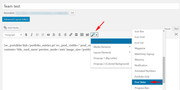
with the portfolio as the source and the category “private clients”
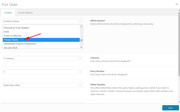
I copied the shortcode to a html widget
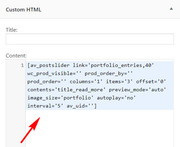
and now it shows in the sidebar of the page I created, please take a look.
If you use the Widget Options plugin you can choose which page each widget shows on. Is this what you had in mind?Best regards,
MikeHi,
Sorry my mistake, the color is taken from Enfold Theme Options > General Styling > Main Content > Primary color
Please explain what color you would like the buttons, and which buttons. We will try to offer some css for those buttons.Best regards,
MikeFebruary 8, 2019 at 6:13 am in reply to: How do I centre an element both vertically and horizontally in a Grid Row? #1064422Hey DigitalEssence,
Sorry for the late reply, I took a look at your site and it seems the left side box “Gift Vouchers” is center, and only the right side button needs to be adjusted.
Please try this code in the General Styling > Quick CSS field or in the WordPress > Customize > Additional CSS field:#top.home #av-layout-grid-1 .grid-row-right { vertical-align: middle !important; }Best regards,
MikeHey dlambers,
Sorry for the late reply, but it appears that you have found the solution because your main menu font is white,
Please see the screenshot in Private Content area.
Do you still need assistance with this?Best regards,
MikeFebruary 8, 2019 at 5:41 am in reply to: Portfolio Categories into a sidebar on a specific page #1064410Hey bauchope,
Sorry for the late reply, I took a look at your site but I didn’t find the “teams portfolio” element, can you link to one?
As for showing them in the sidebar, you should be able to copy the element shortcode and display it in a HTML widget, then you can control which pages it shows on the Widget Options plugin.Best regards,
MikeHi,
Sorry for the late reply, to disable the sonar animation, Please try this code in the General Styling > Quick CSS field or in the WordPress > Customize > Additional CSS field:.av_font_icon.av-icon-style-border .av-icon-char:after { display: none !important; }To change the color, please adjust this css:
@-webkit-keyframes sonarEffect {
	0% {opacity: 0.3;}
	40% {opacity: 0.5;box-shadow: 0 0 0 2px rgba(255,255,255,0.1), 0 0 10px 10px #ff0000, 0 0 0 10px rgba(255,255,255,0.5);}
	100% {box-shadow: 0 0 0 2px rgba(255,255,255,0.1), 0 0 10px 10px #ff0000, 0 0 0 10px rgba(255,255,255,0.5);-webkit-transform: scale(1.5);opacity: 0;}
}
@-moz-keyframes sonarEffect {
	0% {opacity: 0.3;}
	40% {opacity: 0.5;box-shadow: 0 0 0 2px rgba(255,0,255,0.1), 0 0 10px 10px #ff0000, 0 0 0 10px rgba(255,255,255,0.5);}
	100% {box-shadow: 0 0 0 2px rgba(255,0,255,0.1), 0 0 10px 10px #ff0000, 0 0 0 10px rgba(255,0,255,0.5);-moz-transform: scale(1.5);opacity: 0;}
}
@keyframes sonarEffect {
	0% {opacity: 0.3;}
	40% {opacity: 0.5;box-shadow: 0 0 0 2px rgba(255,0,255,0.1), 0 0 10px 10px #ff0000, 0 0 0 10px rgba(255,0,255,0.5);}
	100% {box-shadow: 0 0 0 2px rgba(255,0,255,0.1), 0 0 10px 10px #ff0000, 0 0 0 10px rgba(255,0,255,0.5);transform: scale(1.5);opacity: 0;}
}
There are 3 sets of the same code to target the 3 types of browsers.
Best regards,
MikeHey Eric,
Sorry for the late reply, to change the background color of your coupon field button,
Please try this code in the General Styling > Quick CSS field or in the WordPress > Customize > Additional CSS field:input#gf_coupon_button.button { background-color: #2634ee !important; }For your first question, there are a lot of different classes for the buttons such as avia-button, big_button, button, buttons, avia_cart_buttons, etc
While you can change the default colors in the Advanced Styling for buttons, the theme also assumes that you want the transparent buttons to also be included. So the best option is to set your default color and then override the transparent buttons with css so they are a different color. You may find some good tips in our button documentation If you want some help overriding certain buttons, just let us know.Best regards,
MikeHey Antonio,
Sorry for the late reply, unfortunately I’m not able to reproduce this error on Chrome, Firefox, Edge in development mode or on Android. I see your screenshots are from a iPhone, so I wrote this css to target only the iPhone.
Please try this code in the General Styling > Quick CSS field or in the WordPress > Customize > Additional CSS field:@supports (-webkit-overflow-scrolling: touch) { #top.page-id-396 .entry-content-wrapper,#top.page-id-416 .entry-content-wrapper { padding-top: 150px !important; } }Please try adjusting the 150px to move the title under your logo where you wish.
Best regards,
MikeHey Sovik,
Sorry for the late reply, please try this css instead of the above:@media only screen and (max-width: 1170px) and (min-width: 768px) { .responsive #top .av_mobile_menu_tablet .av-main-nav .menu-item { display: none !important; } .responsive #top .av_mobile_menu_tablet .av-main-nav .menu-item-avia-special { display: block !important; } }Best regards,
MikeHey MeghanNathanson,
Thank you for the link, I took a look and it seems that the font for the blog and the “About” section above are the same, so to match the font size Please try this code in the General Styling > Quick CSS field or in the WordPress > Customize > Additional CSS field:article.post-entry p { font-size: 13px !important; }For the blog titles do you want them to be the same size and color as the “News and Writings” title?
Best regards,
MikeHi,
Thank you for the FTP access, I have updated your site by renaming your current theme to “enfold-old” then I uploaded the new “enfold” and checked that your site is working correctly. Please also check for yourself.
Once you are happy you, (or I) can delete the “enfold-old” via ftp, (not the WP theme page)
Should for some reason you wish to roll-back to the old version, it’s easy to do, simply rename the new “enfold” to “enfold-new” via ftp and then rename “enfold-old” to “enfold” then refresh your page.Best regards,
MikeHey SandraSquires,
Thank you for the login, I have looked at your server settings and you should be able to update to the latest version.
I would recommend updating with the update-theme-from-zip-file plugin that will allow you to manually update via the WordPress Theme panel by uploading the enfold.zip file from your Theme Forest account. You can see the steps involved here
For the reason why your advanced layout builder is not working right now, you seem to have a js error that may be coming from your All In One SEO Pack plugin, but the reason behind that could be the age of your theme.
Please try updating to see if that corrects the issue.Best regards,
MikeHi,
Thank you for your feedback and the article about the requirements of Dreamhost, but we try to accommodate what our users have requested the most for this function over the years, as our users use many different webhosts, each with different requirements.
We are always happy to assist each user with their own and their hosts requirements.Best regards,
MikeHey ProTravelGolf,
Thank you for the login, I didn’t see the Update Theme and Plugins from Zip File plugin installed, so I went ahead and installed it and used your file to update the theme. You are now using v4.5.3 You can delete the plugin if you wish.
Please check your site, and let us know if there is anything else we can assist with.Best regards,
MikeHi,
Glad we were able to help, we will close this now. Thank you for using Enfold.For your information, you can take a look at Enfold documentation here
For any other questions or issues, feel free to start new threads under Enfold sub forum and we will gladly try to help you :)Best regards,
MikeFebruary 7, 2019 at 2:54 pm in reply to: Pushing submission datalayer event with form ajax response #1064149Hi,
Glad we were able to help, we will close this now. Thank you for using Enfold.For your information, you can take a look at Enfold documentation here
For any other questions or issues, feel free to start new threads under Enfold sub forum and we will gladly try to help you :)Best regards,
MikeHi,
Glad to help, I will leave this open for now as I try to recreate the issue on my localhost.Best regards,
MikeFebruary 7, 2019 at 2:44 pm in reply to: Enfold 4.5 Theme Update "Update Failed: Download failed. A valid URL was not pro #1064143Hi,
@fulanoinc please compare the token permissions of your site with the required permissions.
If this doesn’t help, Please open a new thread, and include your admin login in the Private Content area, but as this is not your thread your login info will not be private if posted here.Best regards,
MikeFebruary 7, 2019 at 2:39 pm in reply to: Enfold 4.5 Theme Update "Update Failed: Download failed. A valid URL was not pro #1064141Hi,
@ProTravelGolf Thanks, I see that the file is correct, and I tested it on my localhost without issue using the Update Theme and Plugins from Zip File plugin.
We should take a look with your admin login, Please open a new thread, and include your admin login in the Private Content area, but as this is not your thread your login info will not be private if posted here.Best regards,
MikeHi,
Thank you for the login, I see the merged js is loading:
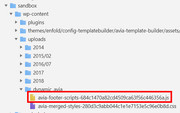
But I see that you have a JS error:
HTMLDivElement (avia-snippet-lightbox.js)
I found that this error has been reported before with a corrupt theme file, please try updating to v4.5.3 via ftp to replace the corrupt file.
Please note that if you update via FTP, you will need to remove the old theme folder “enfold” first (via FTP) then upload the new “enfold” folder at /wp-content/themes/enfold/
Please don’t try to overwrite the theme folder, as this will leave old files behind and cause errors.Best regards,
Mike -
AuthorPosts
