

Forum Replies Created
-
AuthorPosts
-
April 14, 2019 at 1:43 am in reply to: Text fields are empty in Builder and new Classic section #1090481
Hey Chris,
This sounds like a conflict with the new WordPress block editor in v5+
We had to make a lot of code changes to work with the latest WordPress and their new editor, I would expect your version to have errors.
Also Theme Forest has changed how they update the theme about the same time so you will need to update manually vis FTP and then set up a new Theme Forest “Token” to allow auto updates in the future.
Please let us know if you want a hand manually updating.Best regards,
MikeHey schweg33,
Yes this can easily be done with css rules in your Quick CSS field.
For example, on my demo site the copyright text is 11px, so to change it for mobile I would use this css:@media only screen and (max-width: 767px) { span.copyright { font-size: 8px !important; } }To change the padding, or it’s actually the margin, my container width is 85% percent of the screen, so to change or remove it all I will use this css:
@media only screen and (max-width: 767px) {
.responsive #top #wrap_all #socket > .container {
    width: 100% !important;
    max-width: 100% !important;
}
}
If this doesn’t help, then please link to your page and try to explain a little more what you would like.
Best regards,
MikeApril 14, 2019 at 1:16 am in reply to: Does the license cover a test/development and a production environment? #1090477Hey olifant551,
You can have a staging site as long as it’s on the same domain, using a sub-domain is fine with one license.Best regards,
MikeHey subpad,
I took a look at your site and see that your server settings seem fine and your theme is also up to date.
I opened your homepage in the editor and it seemed like I could edit it, with no spinning wheel.
Although I did see this error: Error during WebSocket handshake: Unexpected response code: 403
I believe this is a JetPack error.
So are you having this issue on all pages, or just some?
Have you tried disabling your plugins? Please do try this.Best regards,
MikeApril 14, 2019 at 12:59 am in reply to: Documentation request: footer socket/copyright area #1090474Hey fillance1,
Here is our documentation
To remove the backlink add the below shortcode in the copyright field.[nolink]Best regards,
MikeHi,
That is great news! Who would have thought such an old version could be patched?
But, please forward the info to the client to purchase a license and update the theme, it could save a lot of headaches later because most WordPress installs auto update now and with their new direction and the block editor, this will most likely break the sites using the older versions.
I know you said the client is not very WP savvy, which is ok because we often help members with updating via FTP.
I will leave this ticket open so if you ever reply again about the user being ready to update I will see it :)Anyways, well done and have a great day.
Best regards,
MikeApril 14, 2019 at 12:10 am in reply to: enfold fullwidth easy slider-title, caption, button #1090469Hey Lori,
Sorry for the late reply, I took a look at your site and to change your titles to mixed case, Please try this code in the General Styling > Quick CSS field or in the WordPress > Customize > Additional CSS field:.template-page .entry-content-wrapper h1, .template-page .entry-content-wrapper h2 { text-transform: none !important; }This is for the title “Structural Engineering”, your h3 headings below it seem to have been typed in as all caps, please manually change.
To set the slider container width for the title and caption to be the same and specify the width and set to mixed case:
h2.avia-caption-title,.avia-caption-content p {
width: 300px !important;
}
div .slideshow_caption h2 {
    text-transform: none !important;
}
Please feel free to adjust the width to suit.
To add a arrow to your button save it with no text or label, for this example I used the “light” button styling so it would just be a button border.
Then use this css:.avia-slideshow-button::before { content: "\e889"; font-family: entypo-fontello; font-size: 40px; color: #fff; }and this is the result:

Best regards,
MikeHey Line,
Sorry for the late reply, this is because the category pages have a different layout, but I added this code to the end of your functions.php file in Appearance > Editor://change category page layout to blog single big style add_filter('avf_blog_style','avia_change_category_blog_layout', 10, 2); function avia_change_category_blog_layout($layout, $context){ if($context == 'archive') $layout = 'single-big'; return $layout; }to change your category page to the “single-big” layout that shows the image.
Unfortunately, you can not have the masonry on the category page.Best regards,
MikeHi,
Sorry for the late reply, I tried a few different tricks but they didn’t work because in the editor when the page is opened it is treated as an iframe, which means you can’t adjust the css in the DOM.
So your last hope is to manually change the file: /enfold/config-gutenberg/css/avia-gutenberg-editor.css
on about lines 172-180 you will find:blockquote{ border-left-style:solid; border-left-width:7px; padding-left:20px; margin-bottom:1em; margin-right:1em; font-size: 1.235em; line-height: 1.5em; }change the font-size to 1em;
then save and clear your browser cache.Best regards,
MikeHey HITFighter,
Sorry for the late reply, the PSD files are for the old default demo, because the demo didn’t include most of the images. Since 2017 the demos include royalty free images and the demos were created with the Advanced Layout Builder in the theme, so no PSD’s were created, nor is there a reason to create them.Best regards,
MikeApril 13, 2019 at 8:58 pm in reply to: woocommerce shop – sorting by price breaks with simple and variable products #1090452Hi,
Glad we were able to help, we will close this now. Thank you for using Enfold.For your information, you can take a look at Enfold documentation here
For any other questions or issues, feel free to start new threads under Enfold sub forum and we will gladly try to help you :)Best regards,
MikeHi,
Sorry for the late reply, and thank you for the screenshots.
So to review, on a different server everything was fine, on the new server the “no products found” warning is showing, plus other customizations are not working.I believe this is because when the site was moved and re-saved the automatic generated clases changed, for the “no products found” warning it depends on “.avia-builder-el-5” which is a automatic class, which could change if any elements are moved on the page and then re-saved.
I could not login to check this, please re-new the login so I can check.
If any other css or scripts depend on auto classes like “.avia-builder-el-5” and they don’t work, this would explain it.
BTW, I also see that you are getting 404’s on your site because the google map iframes in your footer doesn’t seem to include the API key You might want to look at that :)
Best regards,
MikeApril 13, 2019 at 8:22 pm in reply to: Sub-menu on blog is disappear after upgrade to Enfold v4.5.4 #1090447Hi,
Sorry for the late reply, and thank you for the screenshot. I’m using Windows 10 also, but I don’t see the second scrollbar in Chrome, but I do see it in Firefox.
I corrected the issue by replacing this css in your Quick CSS:html.responsive, .responsive body { overflow-x: hidden; overflow-y: overlay; }with this:
html.responsive, .responsive body {
    overflow-x: visible !important;
}
Please clear your browser cache and check.
Best regards,
MikeApril 13, 2019 at 7:56 pm in reply to: Sticky header showing behind menu rather than reducing and moving up #1090444Hi,
Sorry for the late reply, I took a look at your site and I believe the reason your logo is not shrinking on scroll is because of these custom css:#header.header-scrolled-full{ height:170px!important; } #header.header-scrolled-full #header_main_alternate{ margin-top:60px!important; }notice how they are keeping the header size large on header scrolled.
I assume that you wanted this css for a different reason. I recommend removing all of your custom css and clear your cache to see if this fixes your header, then add your css back a little at a time to find all of the css that doesn’t conflict with the header.
Then we can try to solve the remaining issue without out effecting the header.
As I try to read back through your posts it seems that the header not shrinking is fairly new, so we should be able to get back to it working easily.
I also assume there was no new plugins added recently.Best regards,
MikeHi,
Try adding this code to the end of your functions.php file in Appearance > Editor:add_filter('avia_post_slide_query','avia_order_by_random', 10, 2); function avia_order_by_random($query, $params) { $query['orderby'] = 'title'; $query['order'] = 'rand'; $terms = explode(',', $params['categories']); if (!empty($terms) && in_array(1, $terms)) { $query['orderby'] = 'date'; } return $query; }Best regards,
MikeHi,
Thank you, we will close this now, but feel free to open new topics for anything we can assist with.
Have a great day!Best regards,
MikeHey BlutVampir,
Sorry for the late reply, the blog styles are defined in the \enfold\config-templatebuilder\avia-shortcodes\blog\blog.php starting about line 99.
I didn’t find any tutorials or documentation to explain how you could add your own, but perhaps you could model the ones already there.
I assume that you already work with php and javascript, and have your favorite editor, but I would share that the “open folder” option in Visual Studio Code allows you to open all of the theme files at once and then the “find in files” allows you to search all of the files at once. This makes it easier to trace the functions across the files.Best regards,
MikeHey Michaela,
Sorry for the late reply, I took a look at the W3C validator, and found the issues to be a misunderstanding of the validator, for example, the first 6 say that we don’t need to use the type attribute for our scripts, but this has been standard practice for a very long time, so we choose to do this. Then it says we should not use “roles” but for the same reason above we do.
Then for most of the rest the validator is not reading our builder shortcode correctly, it thinks that it is reading pure html which it is not.
We have had these misunderstandings brought up many times, and the dev team has considered them. Our dev team is in the middle of a complete rewrite to help move the theme forward for the future. For now we ask for your patience while we do this, and your understanding that the validator doesn’t always read our shortcode and scripts correctly.
Thank you.Best regards,
MikeHi,
Please try this code in the General Styling > Quick CSS field or in the WordPress > Customize > Additional CSS field:@media only screen and (max-width: 767px) { .responsive #top #wrap_all .flex_column.avia-builder-el-18,.responsive #top #wrap_all .flex_column.avia-builder-el-20,.responsive #top #wrap_all .flex_column.avia-builder-el-22 { margin-bottom: 0px !important; } #top .avia-builder-el-19 .av-iconlist-small .iconlist_content_wrap,#top .avia-builder-el-21 .av-iconlist-small .iconlist_content_wrap,#top .avia-builder-el-23 .av-iconlist-small .iconlist_content_wrap { min-height: 24px !important; } }expected results:
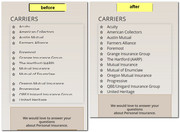
After you add the css, be sure to clear your browser cache.Best regards,
MikeHi,
I couldn’t see the image you linked to on the tinypic site, but I think I understood. I removed the red on-hover overlay and ensured the black overlay was restored.
Actually, I didn’t “remove” the css I just “commented it out” should you ever want to see it again, it’s in your style.css in your child theme.
So Please clear your browser cache and check.Best regards,
MikeApril 13, 2019 at 5:01 pm in reply to: woocommerce shop – sorting by price breaks with simple and variable products #1090395Hi,
Glad Günter was able to help, and yes the fix will be in the update, shall we close this then?Best regards,
MikeHi,
I took a look and the hover over the crosses seems a lot better now, but as you pointed out, just a little off. I see that you are using the columns as the link, instead of the cross image. I would use the images as the link, but I assume that you don’t want to hover background for the images or the green circle, so this should remove it:#av_section_1 .kreuz_361 a:hover .image-overlay,#av_section_1 .kreuz_manufaktur a:hover .image-overlay { background: transparent !important; opacity: 0 !important; }Let us know if this helps. When you try the 1/1 version, I had a after thought that you might need to add display: inline-block to your css to line the two images up, but we’ll know more when you try.
One question, the two crosses are not in a line with the “moebel” text in the center, is this meant to be a straight line across?Best regards,
MikeHi,
Please try this code in the General Styling > Quick CSS field or in the WordPress > Customize > Additional CSS field:#top #header .av-main-nav > li ul li:hover > a .avia-menu-text, #top #header .av-main-nav > li ul li:hover > a .avia-menu-subtext { color: #fd9351 !important; }Best regards,
MikeHi,
Oh I see now, I assume that you are no longer in contact with the original purchaser, and they didn’t transfer the license to you.
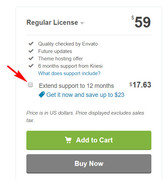
I recommend purchasing a license which will allow you to download the latest theme files and you will also get 6
months of support in our forum. But our best value is to check the box to “Extend support to 12 months” for only a few dollars more.
Best regards,
MikeHi,
Thank you for the login, as I looked closer I found that the error is actually for Google Maps (init_embed.js:172)
which is your map iframe:<iframe style="border: 0;" src="https://www.google.com/maps/embed?pb=!1m18!1m12!1m3!1d2357.2121961597686!2d-3.0491942839249377!3d53.78571074941063!2m3!1f0!2f0!3f0!3m2!1i1024!2i768!4f13.1!3m3!1m2!1s0x487b4402051c9e99%3A0x5b177425636c9e5d!2sSouth+Shore+Mot+Blackpool!5e0!3m2!1sen!2suk!4v1555064402445!5m2!1sen!2suk" width="400" height="300" frameborder="0" allowfullscreen="allowfullscreen"></iframe>Removing it solves, but I know you want to use it :) So as I compaire your iframe with the Google Developers Guide it looks like the map iframe requires a API Key, and I don’t see one in yours. Please read the developers guide and get a API Key and add it to your code.
Best regards,
MikeHi,
I have taken a look at your css and have found that in your custom css you have this rule:#top #header_meta, #top #header_meta nav ul ul li, #top #header_meta nav ul ul a, #top #header_meta nav ul ul { background-color: #fd9351; }We need to add !important; to it like this:
#top #header_meta, #top #header_meta nav ul ul li, #top #header_meta nav ul ul a, #top #header_meta nav ul ul {
    background-color: #fd9351 !important;
}
If you can’t find the css to adjust, then please just add the css above and clear your browser cache and check.
Best regards,
MikeApril 13, 2019 at 1:53 pm in reply to: change the word "Mostra dettagli" in the product sheet #1090351Hi,
Please check that the code you copied above doesn’t have any “curly quotes” if that doesn’t solve, then Please include an admin login in the Private Content area so we can be of more assistance.Best regards,
MikeHi,
To add a page title automatically above the page content, but below the title bar, first, add this shortcode to your functions.phpfunction page_title_sc( ){ return '<h1 class="container">'. get_the_title() . '</h1>'; } add_shortcode( 'page_title', 'page_title_sc' );Then edit: \enfold\template-builder.php on lines 100-102, look for:
	$content = apply_filters('the_content', $content);
	$content = apply_filters('avf_template_builder_content', $content);
	echo $content;
and change to:
	$content = apply_filters('the_content', $content);
	$content = apply_filters('avf_template_builder_content', $content);
	echo do_shortcode("[page_title]");
	echo $content;
This is the results:

Best regards,
Mike -
AuthorPosts
