

Forum Replies Created
-
AuthorPosts
-
April 18, 2019 at 7:40 am in reply to: Aligning social icons and privacy policy to the left as hidden on mobile #1092305
Hey darrenwise,
To have your footer social icons float left, Please try this code in the General Styling > Quick CSS field or in the WordPress > Customize > Additional CSS field:#socket .social_bookmarks { float: left !important; margin: 0px !important; }To have larger icons, please try:
#socket .social_bookmarks li a {
width: 50px!important;
line-height: 50px!important;
min-height: 50px!important;
font-size: 30px;
}

#socket .social_bookmarks li {
height: 50px!important;
width: 50px!important;
}

#socket .social_bookmarks {
    height: 60px!important;
}
Please adjust to suit.
Best regards,
MikeApril 18, 2019 at 7:30 am in reply to: Spliting of Column into 50/50 with an image on one side and text on the other. #1092301Hey JordanTH3,
Please try setting the columns to equal height, the column with only a background image will act as if it’s empty and have no height.

But as equal height the column with the text will add height to it.Best regards,
MikeHi,
Sorry for the late reply, I took another look but your menu is still not back to the 3 columns as in your screenshot. I tried to follow your explanation and clear my browser cache with no luck.
So I commented out your css and tried again from scratch and was able to create the original 2 columns for the sub-menu.Best regards,
MikeHi,
Thanks for creating the staging site, so to recreate the 404 error I tried to undo your work around “under Woocommerce > Settings > Products > General I have NOT selected a Shop page”
but it doesn’t seem to cause the error. Am I reading this correctly?Best regards,
MikeHi,
I can’t think of any overall issues, it is generally specific issues. Glad that you were able to find a solution.
Unless there is anything else we can assist with on this issue, shall we close this then?Best regards,
MikeHi,
Please also try this css:@media only screen and (max-width: 767px) { #top.page-id-982 #after_section_1 .flex_column.av_one_fifth.avia-builder-el-2,#top.page-id-982 #after_section_1 .flex_column.av_one_fifth.avia-builder-el-2 p:last-child { margin-bottom: 0 !important; } }Best regards,
MikeHi,
It looks like your site is giving this css somewhere, please check, if you find it please remove:@media screen and (max-width: 750px){header {margin-bottom: -10px;}}Otherwise we will try to ovoverwrite, please try this css:
@media only screen and (max-width: 767px) {
#top.page-id-46 #av_section_2 .flex_column_table_cell {
padding-left: 0px !important;
}
#top.page-id-46 #av_section_2 .iconlist_content_wrap > header.entry-content-header {
margin-bottom: 0px !important;
}
}
Best regards,
MikeHi,
I don’t understand why you can’t upload your file to DropBox and then post the link here. But I have sent you an email, please check.Best regards,
MikeHi,
Thank you, unless there is anything else we can help with on this issue, shall we close this then?Best regards,
MikeHi,
Thank you, as I look at your them settings I see that you are using a child theme, but you also have the warning:This theme is broken. The parent theme is missing. Please install the "enfold test" parent theme.because your child theme style.css is pointing to:
Template: enfold testwhere it should be:
Template: enfoldIs this by intention?
I created a test page where I used the woocommerce product grid showing 9 items per page and the pagination did show and work. I then deleted the test page. So this tells me that the pagination is working, except for on your default shop page.
I also tested the shop page on my localhost and the pagination does show.
So I recommend these steps in this order and check for the pagination after each step:
correct your child theme
update woocommerce
disable pluginsBest regards,
MikeHi,
Sorry, I couldn’t find any way to disable swipe on a site, but from my research changing the “overflow” may help, please try this css:#top.page-id-1522 #av-tab-section-1.av-tab-section-container { overflow: unset !important; }Best regards,
MikeHi,
Please try this solutionBest regards,
MikeHi,
Sorry but it seems that we have limited access, your theme settings are not visible along with woocommerce and more, so we can’t see what needs adjusting to make your pagination work.Best regards,
MikeHi,
Glad we could help, I assume we can close this now, but I like to ask first.
Is there anything else we can assist with on this issue?Best regards,
MikeHi,
To remove the order around the button, Please try this code in the General Styling > Quick CSS field or in the WordPress > Customize > Additional CSS field:#top #wrap_all .avia-button.avia-color-light, #top #wrap_all .avia-button.avia-color-dark { border-width: 0px !important; }To remove the gap, please try this css:
.avia-caption-content p,h2.avia-caption-title {
margin: 0px !important;
}
Best regards,
MikeHi,
Glad we were able to help, we will close this now. Thank you for using Enfold.For your information, you can take a look at Enfold documentation here
For any other questions or issues, feel free to start new threads under Enfold sub forum and we will gladly try to help you :)Best regards,
MikeHi,
Since you are using the product grid have you set the pagination and the bottom of the options?
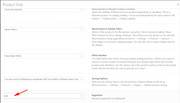
I assume that you have but just need to check. In my research, I found another possible solution here.
Is it possible for us to login as admin to assist? If so please include admin login in the Private Content area.Best regards,
MikeHi,
Thank you for your explanation, so please try this:
in your footer > copyright field please use this code:<span class="mobile-copy">© 2019 RMS SICHERHEITSANSTALT</span><span class="desk-copy">© 2019 Copyright – RMS Sicherheitsanstalt</span>[nolink]Then in your Quick CSS, please use this css:
@media only screen and (max-width: 767px) {
    .desk-copy {display: none;}
}
@media only screen and (min-width: 768px) {
    .mobile-copy {display: none;}
 }
Now you will have different copyright text showing for different devices.
Using these classes you can also change the color of the text, font-size, and much much more!Best regards,
MikeHi,
Sorry, I don’t mean to irritate you, I’m only trying to help, and get a full understanding of the issue.
In my experienced Mac and PC are not always the same, so this info helps. Thank you.
I will ask a team member with a Mac to take a look.Best regards,
MikeHi,
To remove the border around the ticket area, Please try this code in the General Styling > Quick CSS field or in the WordPress > Customize > Additional CSS field:table.tribe-events-tickets { border-style: hidden !important; }Best regards,
MikeHi,
Sorry, it seems that my speed typing app tried to “auto correct” what I was typing, the last line of my post above should have been that we can not put each button on it’s own line, this is because the first two buttons are in one div. My goal with the css above was to remove the bottom margin of the third button so they are all in one line.
So when I check now this has been accomplished, Please see the screenshot in Private Content area. If you did understand that this is what I was trying to do and still don’t see this, then please clear your browser cache.Best regards,
MikeHi,
The conditional tag wp_is_mobile() is not recommended for css because of how it works, here is a good post on it
Please try this instead, it seemed to work in my test on our demo:function remove_mobile_cart_link(){ ?> <script> (function($){ $(document).ready(function(){ var width = $(window).width(), height = $(window).height(); if ((width <= 768)) { $('a.cart_dropdown_link').removeAttr('href'); } else {} }); })(jQuery); </script> <?php } add_action('wp_footer', 'remove_mobile_cart_link');Best regards,
MikeApril 16, 2019 at 3:04 am in reply to: 404 error loading themes/enfold/images/background-images/ios-linen-dark.png #1091183Hi,
Interesting that this is not happening on your staging site because if I recall correctly they are both on the same server with the same settings. Is this image set in your functions.php with a add action like this?add_action('wp_head', function() { echo '<link rel="icon" sizes="32x32" href="/ios-linen-dark.png">'; });and if so please try changing the path to absolute, this is the full url.
If the image is added in your header.php, or wherever, still try changing the path.Best regards,
MikeHi,
Thank you for the login, well my idea doesn’t seem to be having much success in correcting this, and it looks like your site is live and taking orders now so I don’t want to dig too deep guessing and affect your orders.
Now in your first post when everything was working correctly, was the site on a staging or localhost, or was it in maintenance?Best regards,
MikeHey ilonka78,
When I take a look at your site it looks like your css is working, I don’t see any extra space between your sections. I do see some overlap, so you may want to adjust again. Please see the screenshot in Private Content area.
Please try clearing your browser cache.Best regards,
MikeHi,
Glad Nikko was able to help, unless there is anything else we can help with on this issue, shall we close this then?Best regards,
MikeHey Robin Ferris,
Typically this means that your PHP Max Upload Size is too small.
Please ask your webhost to change your site setting to these:PHP Version: 7.0.x
PHP Time Limit: No limit
PHP Memory Limit: 256M
PHP Post Max Size: 50M
PHP Max Upload Size: 20MBest regards,
MikeHey Thảo,
That is great news, you are looking at the “Enfold Construction Demo” which is a free demo inside of “Enfold”
Please go here to purchase.
You will also get 6 months of support in our support forum.
I recommend upgrading to a full year of support by checking the box: “Extend support to 12 months”
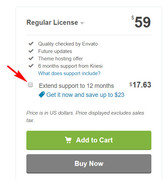
Please let us know if there is anything else we can help with.Best regards,
Mike -
AuthorPosts
