

Forum Replies Created
-
AuthorPosts
-
May 13, 2019 at 1:17 am in reply to: How to move menu to the right and logo to the left on mobile #1099859
Hi,
Are you still having this issue? When I look at your site on mobile the logo is on the left and the burger menu is on the right, Please see the screenshot in Private Content area.Best regards,
MikeHi,
Glad Rikard was able to help, we will close this now. Thank you for using Enfold.For your information, you can take a look at Enfold documentation here
For any other questions or issues, feel free to start new threads in the Enfold forum and we will gladly try to help you :)Best regards,
MikeHey Michaela,
Thanks for the link, but when I look at your site it seems your breadcrumbs are to the right, is this resolved?
Please see the screenshot in Private Content area.Best regards,
MikeMay 13, 2019 at 1:01 am in reply to: Top bar – Menu – placement of search bar to the right and background color #1099853Hi,
Glad we were able to help, we will close this now. Thank you for using Enfold.For your information, you can take a look at Enfold documentation here
For any other questions or issues, feel free to start new threads in the Enfold forum and we will gladly try to help you :)Best regards,
MikeMay 13, 2019 at 12:47 am in reply to: contact form field not align on wpml translation site #1099852Hey Roger,
Please try this code in the General Styling > Quick CSS field or in the WordPress > Customize > Additional CSS field:@media only screen and (min-width: 767px) and (max-width: 990px) { #element_avia_6_1,#element_avia_3_1 { width: 29% !important; } #element_avia_1_1 { width: 36% !important; } }Best regards,
MikeHey Peter,
I believe you are asking about the lines in the screenshots in the Private Content area, so in this case Please try this code in the General Styling > Quick CSS field or in the WordPress > Customize > Additional CSS field:.container_wrap { border-color:transparent !important; } .av_minimal_header_shadow { box-shadow: none !important; }Please clear your browser cache and check.
Best regards,
MikeHey sarah82,
Please try this code in the General Styling > Quick CSS field or in the WordPress > Customize > Additional CSS field:time.slide-meta-time.updated { display:none !important; }Best regards,
MikeHi,
Sorry, I don’t know of a plugin for this. But you could add a custom class to all of the images you want the above css to work on.Best regards,
MikeHey gharry79,
This is not built in, but it can be achieved with css, an example is:.item:hover img { -moz-transform: scale(1.1); -webkit-transform: scale(1.1); transform: scale(1.1); }it is basically the same rule for the top 3 browsers, and you can adjust the “1.1” to suit.
If you would like help making this work for you, please include an admin login in the Private Content area, and a link to the pageBest regards,
MikeHi,
Glad to hear, we will close this now. Thank you for using Enfold.For your information, you can take a look at Enfold documentation here
And if there are features that you wish Enfold had, you can request them and vote the requested ones here
For any other questions or issues, feel free to start new threads under Enfold sub forum and we will gladly try to help you :)Best regards,
MikeMay 12, 2019 at 12:26 pm in reply to: How to change background color on hover for a submenu element #1099734Hi,
Glad we were able to help, we will close this now. Thank you for using Enfold.For your information, you can take a look at Enfold documentation here
For any other questions or issues, feel free to start new threads in the Enfold forum and we will gladly try to help you :)Best regards,
MikeHi,
Sorry for the late reply, the mobile menu is activated by the class on click “av-burger-overlay”
it changes the opacity, which is embedded in “avia.js”
it sounds like you have some experience with jQuery, here’s an example I have for closing the burger menu://close burger menu on click (function($){ $(document).ready(function(){ $('body').click(function(){ $("html").removeClass('av-burger-overlay-active-delayed'); $('.av-burger-overlay').css({opacity:'0'}); // $('.av-hamburger').removeClass('is-active'); this resets menu icon spin - but need to use with a diffent click class }); }); })(jQuery);So basically we just need to reverse it, I would like to help more but I will need to see the elements to adjust.
Best regards,
MikeHi,
Sorry for the late reply, I have tested the code above on the latest update v4.5.7, and it still seems to work on my install, after you updated the theme did you try to add the code again?
Updating would have removed this code.
If you need more help with this please include an admin login & FTP access in the Private Content area, so we can be of more assistance.Best regards,
MikeHi,
Sorry for the late reply, I took a look at your site and found the error was with your demo icon font, I replaced it and now your error is resolved.
Please check.Best regards,
MikeHi,
Sorry for the late reply, you will see that there are actually two files for the language .po & .mo. The .po file is the “human readable” version, the .mo file is the “machine readable” version actually used by WordPress. So, if the .po is updated nothing will actually change until the corresponding .mo file is also updated.
You can do this with the Poedit software, here is an article explaining how to do this.
Please let us know if this helps.Best regards,
MikeHi,
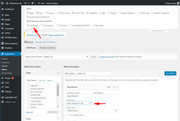
Sorry for the late reply, to set a menu item’s “link target” please look for the option within the “screen options” at the top of the menu page and check it, then each menu item will have this option.
To move the “Booking” button up a little, Please try this code in the General Styling > Quick CSS field or in the WordPress > Customize > Additional CSS field:#top #header #header_main .widget { top: -25px !important; }I also see that you have your “Booking” widget background set to white (#ffffff) you may find it better to change this to:
background: transparent;so when it overlaps your logo you can still see it.
Best regards,
MikeMay 12, 2019 at 9:08 am in reply to: Changing the mouse cursor from an arrow to a pointing hand #1099693Hi,
Glad we were able to help, we will close this now. Thank you for using Enfold.For your information, you can take a look at Enfold documentation here
For any other questions or issues, feel free to start new threads in the Enfold forum and we will gladly try to help you :)Best regards,
MikeMay 12, 2019 at 3:17 am in reply to: Changing the mouse cursor from an arrow to a pointing hand #1099660Hi,
Oh I sorry, I read your request too quickly, please use this css instead:.splash-logo:hover { cursor: pointer !important; }Best regards,
MikeHey hostworks,
Thanks for the links and the screenshot, please try adding your buttons in the: Enfold Theme Options > Header > Extra Elements > Phone Number or small info text
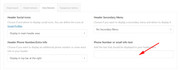
here is an example of the code to use:<a href="http://new.integralrecoveries.com"> <img border="0" alt="integralrecoveries.com" src="https://new.integralrecoveries.com/wp-content/uploads/2019/05/Button_MakeaPayment148x30.png" width="148" height="30"> </a>just do this for each button.
Expected results:

Please let us know if this helps.Best regards,
MikeHey S.,
I’m not sure that I understand fully, but I believe you are referring to hiding like this:

yet when you don’t hover the element the section title is visible:

am I understanding correctly?
If not can you please include some screenshots?Best regards,
MikeHey mangodays,
Thank you, I see that you are using v4.2 with a child theme, please note that if you update via FTP, you will need to remove the old theme folder “enfold” first (via FTP) then upload the new “enfold” folder at /wp-content/themes/enfold/
Please don’t try to overwrite the theme folder, as this will leave old files behind and cause errors.
Also with an older version and a child theme, often the child theme will contain a “header.php” to include custom scripts, but in this case this will also cause errors because of changes we have had to make for WordPress v5.x, so please save a copy of it, review for custom scripts, and replace with a updated “header.php” that includes any custom scripts.
Please give this a try, but if you find that you would like more help Please include an admin login & FTP access in the Private Content area so we can be of more assistance.
Also upload your copy of the latest Enfold (4.5.7) to your site as a zip file (anywhere is fine, just tell us the directory to find it) so we can assist.Best regards,
MikeHi,
Thank you for the screenshot and the link, I have taken a look and found that you have this custom css:/* adjustments - move header top social bookmarks */ #top #wrap_all .social_bookmarks, #top #wrap_all .social_bookmarks a, #top #wrap_all .social_bookmarks li { background: transparent; right: 85px!important; }the right: 85px!important; is moving the “li” and the icons, but not the “ul” container, but because it contains “!important; ” it’s hard to override. So if you can remove the code above and use this instead, I believe you will find it to work:
#header_meta.container_wrap > div.container > ul.social_bookmarks {
    right: 150px!important;
}
.av_icon_active_right .social_bookmarks {
    padding-left: 0px !important;
}
Please clear your browser cache and check after you add the new css.
If this doesn’t help, please include an admin login in the private content area so we can be of more assistance.Best regards,
MikeHey jvana,
Typically this should be available, can we login to take a closer look?
Is the font already uploaded to the media folder?
Please include admin login in the Private Content area so we can be of more assistance.Best regards,
MikeMay 12, 2019 at 12:02 am in reply to: Need CSS to hide "Return to Shop" link on empty cart page #1099650Hey whiteshanty,
Please try this code in the General Styling > Quick CSS field or in the WordPress > Customize > Additional CSS field:.return-to-shop > a.button.wc-backward { display:none !important; }Then clear your browser cache and any cache plugin, and check.
Best regards,
MikeHi,
Sorry for the late reply, unfortunately, the default demo here doesn’t include all of the assets. As seen in the demo install link.
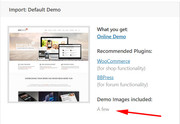
This was the original demo and due to a change of how the Layerslider works are not available.Best regards,
MikeMay 11, 2019 at 10:33 pm in reply to: Changing the mouse cursor from an arrow to a pointing hand #1099644Hey ofekw,
Sorry for the late reply, Please try this code in the General Styling > Quick CSS field or in the WordPress > Customize > Additional CSS field:a.av-masonry-entry img:hover { cursor: pointer !important; }Best regards,
MikeHey swotes,
Sorry for the late reply, please see this post in our documentationBest regards,
MikeHey Bettina,
Sorry for the late reply, please see this post in our documentationBest regards,
MikeHey Marc,
Sorry for the late reply, I assume you are “catching” these clicks with Google Analytics,
I believe that in this case the “footer page” should be viewed as an iframe, while technical not, it is added in the DOM the same way an iframe would be. So my first thought is using the Google Analytics options here
but I have not set this up before, so it’s a theory.
My second thought is adding an “event” to the links via jQuery on the page load in the DOM similar to this
but again, I have not set this up before, I hope this points you in the right direction.Best regards,
MikeHey Annelies,
Sorry for the late reply, it looks like you are adding the phone icon via “fontello” icon upload and the “social profiles”
with functions.php code. Typically, in this case the icon “fontello” font name is a little off. Please include admin login in the Private Content area so we can be of more assistance.Best regards,
Mike -
AuthorPosts
