

Forum Replies Created
-
AuthorPosts
-
Hey Tom,
Sorry for the late reply, I looked at your layerslider anchor link and adjusted the link to the layerslider ID “layerslider_6” this element doesn’t have a native ID field, if you clear your browser cache and check it should be working now.
Please check and confirm, and we can look at your other requests.Best regards,
MikeHi,
Did you get a chance to ask your webhost if the server log has any details on why the server responded with a status of 404 on /wp-admin/admin-ajax.php?Best regards,
MikeMay 22, 2019 at 12:57 pm in reply to: Importing Demo after Reinstalling WordPress (GoDaddy WP Hosting) #1103258Hi,
Glad to hear you got it sorted out. This sounds like a local network issue. We will close this now. Thank you for using Enfold.For your information, you can take a look at Enfold documentation here
For any other questions or issues, feel free to start new threads in the Enfold forum and we will gladly try to help you :)Best regards,
MikeHey birgitthaler,
Ich habe versucht, einen Blick auf Ihre Website zu werfen, aber ich bin mir sicher, dass ich die 3 1/3 Elemente sehe. Ist es der Abschnitt “Back to School”?
Wir können den Abstand zwischen den Bildern entfernen, aber ich nehme an, Sie möchten einen gewissen Abstand zwischen dem Textblock und den Bildern?
Vielleicht hilft uns ein Screenshot, das zu verstehen.— Translated with Google —
I tried to take a look at your site but I’m sure I see the 3 1/3 elements. Is it the “Back to School” section?
We can remove the spacing from between the images, but I assume you will want some spacing between the text block and the images?
Perhaps a screenshot will help us understand.Best regards,
MikeHey 4david,
I tried the take a look at your site but the url is not working for me, is the link in the Private Content area correct? Are you blocking any IP’s?Best regards,
MikeHi,
Your font file also includes the “macosx” folder, please delete this folder and then delete your installed version and upload the new zip file.Best regards,
MikeHi,
First please try to check the option: Enfold Theme Options > Performance > Delete old CSS and JS files
then save your theme settings again and clear your browser and server cache.
Since you have been adding your css to your child theme, then try adding a blank space to the Quick CSS and save your theme settings again, and clear your browser cache again.
This is because when you add css to your child theme the merged css file is not rebuilt until the theme settings is saved.Best regards,
MikeHi,
Thank you for the explanation and the link, I took a look and found that on the page all 3 special headings for “products” contain the “textshadow” class. Please see the screenshot in Private Content area. It sounds like you have check the element for the class and didn’t find it. So I will need admin login to investigate.Best regards,
MikeHey GOLDSMITHPE,
I believe you are referring to the Theme Forest download page, because Theme Forest is serving the file. Perhaps they are checking or filtering IP addresses.Best regards,
MikeMay 22, 2019 at 4:19 am in reply to: Grid Row – 1st cell doesn't size the same as other cells in Mobile view #1103150Hey smallisland,
Please try this code in the General Styling > Quick CSS field or in the WordPress > Customize > Additional CSS field:@media only screen and (max-width: 767px) { .responsive #top.home #wrap_all #av-layout-grid-1.av-flex-cells .no_margin.avia-builder-el-10 { padding-left: 0% !important; padding-right: 0% !important; } }Best regards,
MikeHi,
Thanks for the info above, but I don’t see any ftp or webhost login info or a link to your webhost login page.
Please include.Best regards,
MikeHi,
Glad to hear. I would not recommend the database method as it could be risky.Best regards,
MikeHi,
Thank you again, we will close this now. Thank you for using Enfold.For your information, you can take a look at Enfold documentation here
For any other questions or issues, feel free to start new threads in the Enfold forum and we will gladly try to help you :)Best regards,
MikeHi,
Please try replacing your: /enfold/config-templatebuilder/avia-shortcodes/tab_section/tab_section.css
via ftp with the file in the Private Content area.
Please save a copy of the old file should you wish to roll the changes back.
Then be sure to clear your browser and server cache.Best regards,
MikeHi,
Glad Victoria could help, we will close this now. Thank you for using Enfold.For your information, you can take a look at Enfold documentation here
For any other questions or issues, feel free to start new threads in the Enfold forum and we will gladly try to help you :)Best regards,
MikeHi,
Glad to help, I assume we can close this now, but I like to ask first. Shall we close this then?Best regards,
MikeHi,
Glad we were able to help, we will close this now. Thank you for using Enfold.For your information, you can take a look at Enfold documentation here
For any other questions or issues, feel free to start new threads in the Enfold forum and we will gladly try to help you :)Best regards,
MikeHi,
Thank you, this helps a lot.
I see the email addresses overlap, typically I would suggest using css “word break” to create two lines for the text, but that may not be satisfactory because it’s an email address.
The other option would be to make the text smaller, but the email addresses are so long, the text would be very small, so probably not satisfactory.
So I would suggest changing the number of columns down to two for this screen size.
I would clone the entire page and placing it below the current page with the new column layout and setting it’s visibility only for the screen size when the overlap is happening, otherwise have it hidden for all other sizes.Best regards,
MikeHi,
I added the css for you, Please clear your browser cache and check.Best regards,
MikeHi,
Thank you for the login, it made a difference once I logged in I could see your pages, and because I was not logged in Firefox I only saw the 404 page again.
Am I understanding the issue better now?
If I recall correctly this was an issue with your version, I could assist with updating your site but I would need FTP access, but I assume you don’t know what that is, I could also do it with cPanel login (webhost login)
Or I could try to write a very detailed post on how you could do this, but I could do it faster myself.
I notice that your links (permalinks) are like: /?page_id=143 instead of a real word, is that something you would also like? I also see you don’t have an image logo at the top of your site, did you have one?Best regards,
MikeHi,
Glad to hear, yes you could add a section ID, or if this is going to be in a widget in the footer each widget has a unique ID, so you could control it that way.
Or even easier is to enable custom classes for your elements at: Enfold Theme Options > Layout Builder > Show element options for developers

I did this for you on your test site.

and then adjusted your code block css with the new class “footer-icons”, which could be added to your Quick CSS instead.
Please review.PS. if you copy the code block css don’t use the:
<style> </style>tags, it’s only there to make the css work in a code block :)
Best regards,
MikeHi,
Thank you, I look forward to your results.
I checked the page that had the underline for the images and cleared my browser cache and the lines were not there, Please see the screenshot in Private Content area. It looks like it’s been 7 hours since you posted, so hopefully by the time you check you will also see this. But will be happy to address any other pages or posts that you may have an issue with.Best regards,
MikeHi,
When you manually resize your browser, please try refreshing your page at that size and see if you still see the error.
Browers don’t always recalculate in real time. Imagine how your visitors will visit your site, for example, they won’t be using a desktop screen and suddenly switch to mobile, they will be loading one or the other at any one time.The nature of css is written is pixel sizes and typically not percentages, so there is a possibility that a screen size that is not used, such as 899px might have an issue, but since there are no devices that size no one see it.
Device sizes are 320px 375px 425px 768px 1024px 1440px, ect.
Most browsers will show you these sizes in their dev tools, for example, Chrome on Windows will open with the F12 key and you can choose the sizes by clicking the top bar or using the drop-down, and then also refresh (F5)
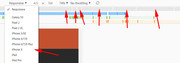
I hope this makes sense, we will help if you are still having an issue with a certain size, but please give this a try.Best regards,
MikeHi,
It is possible that if the admin email doesn’t match, but it looks like your admin email did set correctly.
Also, I believe this would also cause an issue with CF7, which is not the case.
Perhaps try testing with this plugin: WP Test Email
Have asked your webhost if they require a “reply to” mail header or something else?
Our contact form is very basic when compared to CF7, and I have seen a webhost requirement like this before.Best regards,
MikeHi,
Thank you, I see that the css is in your “layout.css” on line 251, but I also see that you are using Enfold v4.0.2 with WordPress v5.2
You will need to correct some server issues and update your theme. We are now at v4.5.7
Please see the screenshot in Private Content area and ask your webhost to assist with the server issues.Best regards,
MikeHi,
I took a look at your page and don’t see this css applying to other special headings, was what you saw on the same page or other pages?
To test I changed your css in my dev tools to be much larger and red so it would be easier to see for me, Please see the screenshot in Private Content area.
I also searched your page for the class “textshadow” but it only came up once.
Please elaborate.Best regards,
MikeHi,
If I understand correctly the text “Geben Sie den obigen Text ein:” is overlapping the “name” label, when it should be below the captcha, correct?
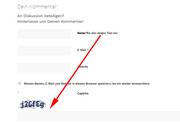
To correct this Please try this code in the General Styling > Quick CSS field or in the WordPress > Customize > Additional CSS field:#commentform > label, .comment-form-captcha > label { position: relative !important; left: 15px !important; } .comment-form-captcha span.required { display: none !important; }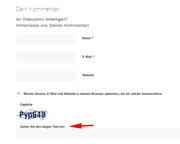
Best regards,
MikeHi,
Thank you for sharing your solution, perhaps others will benefit from it.
As this is the default behavior of TinyMCE, a core element of WordPress, we typically don’t want to add overriding functions to Enfold, as it’s not good practice.
Unless there is anything else we can assist with on this issue, shall we close this then?Best regards,
Mike -
AuthorPosts
