

Forum Replies Created
-
AuthorPosts
-
Hey Trasco,
Please take a look at the theme options and recommended plugins at: Enfold Theme Options > Performance > Image Optimization, but I don’t believe these “integrate into the page builder” in the way you are looking for. Our page builder is very unique and I don’t think you will find one that does integrate at this level.Best regards,
MikeMay 18, 2019 at 9:38 pm in reply to: Unable to make or edit posts since WordPress and Enfold updates #1102101Hey SB_Citino,
Please try disabling your plugins. If that resolves the issue, reactivate each one individually until you find the cause.Best regards,
MikeHey Scott,
Please try this code in the General Styling > Quick CSS field or in the WordPress > Customize > Additional CSS field:#footer { z-index: 0 !important; }Best regards,
MikeHey Jürgen,
Sorry for the late reply, WordPress often strips HTML entitys in visual mode, but please try this solutionBest regards,
MikeHi,
Glad to hear you have found the cause, shall we close this then?Best regards,
MikeHey blutcat,
Thanks for the link, I see you have this css causing the issue:#top .av_header_scrolldown.av_header_transparency { opacity: 0; margin-top: -250px !important; }but I will need admin access to examine the root of the css and correct.
Best regards,
MikeHey Jimchil,
I see that you are getting this error:Failed to load resource: the server responded with a status of 404 () /wp-admin/admin-ajax.phpI recommend disabling your plugins and checking your server log for the cause of the 404.
Best regards,
MikeMay 18, 2019 at 5:34 pm in reply to: Default Special Heading missing line in only one section #1102066Hey iedigitaldesign,
I tried to take a look at your site, but I get a “500 error” please check your url.Best regards,
MikeHey move3a,
Please see this post to see if you followed these steps.Best regards,
MikeHey davidjrfoster,
Please see this post to see if you followed these stepsBest regards,
MikeHey havi,
I took a look at your site, but both of your links are the same so I couldn’t see a comparison of what you want and what is happening.
You seem to be talking about your “signature at the end of the article” but the profile image is not a link, so it would not be underlined.
Can you please include a screenshot of what you want to be underlined so we can assist.Best regards,
MikeMay 18, 2019 at 4:47 pm in reply to: Importing Demo after Reinstalling WordPress (GoDaddy WP Hosting) #1102061Hey ghorab,
No there is no “usage log at kriesi.at” but if you are switching to “Godaddy WP managed hosting” their security settings could be blocking the import.
Please check your PHP settings to see if the secure options are activated.
“allow_url_fopen, “allow_url_include” and “register_globals” are “off”
Try turning these “on”.
Otherwise we will need to take a closer look, Please include an admin login in the Private Content area.Best regards,
MikeHey Alwin,
Thank you for asking, first I recommend saving a copy of your “Export Theme Settings File” at Enfold Theme Options > Import/Export > Export Theme Settings File to your computer as a backup:
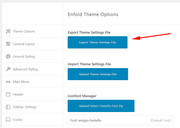
Then disable the Enfold Theme Options > Performance > JS & CSS file merging and compression and any cache plugins.
Then upload the Enfold Child Theme and activate it.
Now you will see a new option at Enfold Theme Options > Import/Export which is: Import Settings from your Parent Theme:
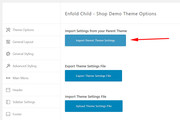
Cliking this will import your theme settings, which should compete the operation, and you will also need to clear your browser cache, but depending on your server cache you may wish to go to Enfold Theme Options > General Styling > Quick CSS field and add a blank space to allow the “Save all Changes” button to be clicked:
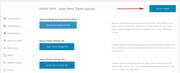
This last step is useally is not needed, but you will need to clear your browser and server cache, sometimes twice.
Please let us know if this helps.Best regards,
MikeHey gharry79,
Yes this is possible with css using:your-class { display: none !important; }but there are a few variables, so it would be easier to see an example post in your post type to suggest a compete css solution.
Please link to your example post in the Private Content area.Best regards,
MikeHey sweetloove,
While many elements have “tooltips” already, I assume that you are looking for a more customized solution which can easily be added with css, please see this tutorial. There are also javascript solutions but this can be much trickier to embed, depending on your experience.
Please let us know if this helps.Best regards,
MikeHey Crisvaltru,
Thanks for the link to your site, but can you please explain what change you can not make and include admin login in the Private Content area so we can be of more assistance.Best regards,
MikeHey Louise_Brace,
Sorry for the late reply, can you please link to your page so we can examine it closer.Best regards,
MikeHey mike.rav,
Please try this code in the General Styling > Quick CSS field or in the WordPress > Customize > Additional CSS field:#top.archive.woocommerce-page #main > .container_wrap > .container { background-color: #000 !important; }Please adjust to suit, then clear your browser cache and check.
Best regards,
MikeHey Gerhard,
Sorry for the late reply, and thanks for the login. I have looked at your site and found that you have this css in your Quick CSS:li {display: block;}this was causing the issue because a list-item should not be “block”, I commented out the css and now it shows correctly.
Please clear your browser cache and check.Best regards,
MikeHey nickgin,
Sorry for the late reply, I took a look at your site and couldn’t reproduce the wrong url with /cart/
I began at your site and added an item to the cart, and then searched “pet”, I also went into the checkout page and searched “pet”
both times I landed at: https://zoomit.gr/wordpress_2/?s=pet
with no “/cart/”, am I testing this correctly?
I do note that I do land on a “404” for “pet”, but I assume that my language (EN) will do this and it’s a different (if any) issue.Best regards,
MikeHey kashmyra,
Sorry for the late reply, I would recommend installing the plugin WP Mail Logging to see what errors are occurring when the contact form is used. Sometimes the mail is sent but the server trashes as spam because of the server rules.Best regards,
MikeHey AuroraArcus,
Sorry for the late reply, I have taken a look and some of your images don’t seem to be on your server anymore, please see the example link in the Private Content area.
Can you verify if the path to your images has changed, such as the /year/month/ and are the posts / pages that had these images are still there?
I see that you only have 2 posts and 10 pages. I not sure what could cause this, but I don’t believe updating Enfold would do this. Please try these steps.Best regards,
MikeHey Cynthia45,
Please include an admin login in the Private Content area, so we can be of more assistance.Best regards,
MikeHi,
Your site is giving the error:Failed to load resource: the server responded with a status of 403 (Forbidden)a “403 error” comes from your server, please ask your webhost to check your server logs for a cause.
I do see that you are using WordPress v4.8.9 & Enfold v4.5.7, while I have not seen any reports of a conflict with these, I also would ask to correct this first. Please try to manually update your WordPress to v5.x to see if that solves.Best regards,
MikeHi,
Thanks, as I look at your first screenshots I’m not seeing these errors, please see my screenshots below.
I assume that you have tried clearing your browser cache, which browser are you using?Best regards,
MikeHi,
Thanks for the login, I gave a few things a try and unfortunately it didn’t work as I expected, but I was able to place the icon list over the slider with a negative margin-top css..avia-icon-list-container { margin-top: -50vh!important; }This css could be added to your Quick CSS, but I added it to a code block element so you could see it easier.
Please take a look at the page and the elements and let us know if this helps.Best regards,
MikeHi,
I see that your favicon.ico is now on the site in the /wp-content/ directory, please try uploading to the root directory via ftp, that is the same directory as index.phpBest regards,
MikeHi,
Thank you for the screenshot, it demonstrates better. I checked in Chrome, Firefox, Edge & IE11 but it seems this only happens in Safari.
Please try this code in the General Styling > Quick CSS field or in the WordPress > Customize > Additional CSS field:div#av-tab-section-1 { margin:-.1px !important; }Best regards,
MikeMay 16, 2019 at 6:23 pm in reply to: image background efect (increasing and decreasing) in color section #1101552Hi,
You will want to add a custom class to your image, and then use that custom class in the first line of the css:
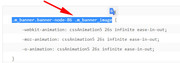
Please try setting up a test page on your site with a custom class that we can see, and we can demonstrate the adjustments.Best regards,
MikeHi,
Glad we were able to help, we will close this now. Thank you for using Enfold.For your information, you can take a look at Enfold documentation here
For any other questions or issues, feel free to start new threads in the Enfold forum and we will gladly try to help you :)Best regards,
Mike -
AuthorPosts
