

Forum Replies Created
-
AuthorPosts
-
Hi,
Freut mich zu hören, dass dies gelöst ist. Sollen wir dies dann schließen?— Translated with Google —
Glad to hear this is solved, shall we close this then?
Best regards,
MikeHey keckundfroelich,
Wir können dies mit einigen CSS unterstützen, aber leider wurde Ihre Website nicht für mich geladen.
Wenn ich richtig verstehe, haben bestimmte Textblöcke eine andere Hintergrundfarbe. Bitte geben Sie im Bereich Private Inhalte den Administrator-Benutzernamen und eine Testseite an, damit wir Ihnen zeigen können, wie das geht.— Translated with Google —
We can assist with this with some css, but unfortunately your site was not loading for me.
If I understand correctly certain blocks of text would have a different background color. Please provide admin login in the Private Content area, and a test page so we can demonstrate how to do this.Best regards,
MikeHey nezatk,
When I look at your page I see a “Tab Section” and not a “Masonry Element” So I’m not sure I understand correctly.
For Masonry, I assume you have tried to select the portfolio categories to show within the masonry element, please include admin login in the Private Content area so we can examine the issue closer.Best regards,
MikeMay 23, 2019 at 5:03 am in reply to: Changing Phone Number/Extra Info background only on content pages #1103541Hey HostageMedia,
We can help achieve this with some css, can you link to an example page so we can examine.Best regards,
MikeHi,
Glad to hear, we will close this now. Thank you for using Enfold.For your information, you can take a look at Enfold documentation here
For any other questions or issues, feel free to start new threads in the Enfold forum and we will gladly try to help you :)Best regards,
MikeMay 23, 2019 at 4:43 am in reply to: Grid Row – 1st cell doesn't size the same as other cells in Mobile view #1103523Hi,
Glad we were able to help, we will close this now. Thank you for using Enfold.For your information, you can take a look at Enfold documentation here
For any other questions or issues, feel free to start new threads in the Enfold forum and we will gladly try to help you :)Best regards,
MikeHi,
Glad we were able to help, we will close this now. Thank you for using Enfold.For your information, you can take a look at Enfold documentation here
For any other questions or issues, feel free to start new threads in the Enfold forum and we will gladly try to help you :)Best regards,
MikeHi,
Glad to hear it’s working for you.
The layerslider ID is set automatically, and each one on each page is different. I found your ID by examining the page and then updated your link.
To find the ID yourself please examine the page with the dev tools on your browser:

Naturally we will be happy to assist.Best regards,
MikeHi,
I looked at the DropBox zip file that you posted earlier, so I assumed you uploaded the zip file. here’s the screenshot:
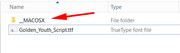
I see this issue a lot because I’m on Windows, I believe this folder is hidden from Mac users, are you on a Mac?
Please try the corrected file in the Private Content area.Best regards,
MikeHi,
Glad to hear, I will let the dev team know, we will close this now. Thank you for using Enfold.For your information, you can take a look at Enfold documentation here
For any other questions or issues, feel free to start new threads in the Enfold forum and we will gladly try to help you :)Best regards,
MikeHi,
If I understand correctly, the live site you linked to doesn’t have the issue, but your localhost does.
I recommend trying to emulate your live server settings as much as possible on your localhost, or use some space on your live server for development, such as a staging site. Using different servers and settings for development and production can be very tricky. You can easily limit access with .htaccess to your staging site.Best regards,
MikeHi,
Glad to hear that is solved.
To include the sub-heading, please using this css instead:.textshadow .av-special-heading-tag,.textshadow .av-subheading { text-shadow: 0px 0px 5px black !important; }Best regards,
MikeHi,
I have replied to your new request, sorry for the late reply. Please check.
We should close this thread now, as Ismael is correct, agree?Best regards,
MikeHey Tom,
Sorry for the late reply, I looked at your layerslider anchor link and adjusted the link to the layerslider ID “layerslider_6” this element doesn’t have a native ID field, if you clear your browser cache and check it should be working now.
Please check and confirm, and we can look at your other requests.Best regards,
MikeHi,
Did you get a chance to ask your webhost if the server log has any details on why the server responded with a status of 404 on /wp-admin/admin-ajax.php?Best regards,
MikeMay 22, 2019 at 12:57 pm in reply to: Importing Demo after Reinstalling WordPress (GoDaddy WP Hosting) #1103258Hi,
Glad to hear you got it sorted out. This sounds like a local network issue. We will close this now. Thank you for using Enfold.For your information, you can take a look at Enfold documentation here
For any other questions or issues, feel free to start new threads in the Enfold forum and we will gladly try to help you :)Best regards,
MikeHey birgitthaler,
Ich habe versucht, einen Blick auf Ihre Website zu werfen, aber ich bin mir sicher, dass ich die 3 1/3 Elemente sehe. Ist es der Abschnitt “Back to School”?
Wir können den Abstand zwischen den Bildern entfernen, aber ich nehme an, Sie möchten einen gewissen Abstand zwischen dem Textblock und den Bildern?
Vielleicht hilft uns ein Screenshot, das zu verstehen.— Translated with Google —
I tried to take a look at your site but I’m sure I see the 3 1/3 elements. Is it the “Back to School” section?
We can remove the spacing from between the images, but I assume you will want some spacing between the text block and the images?
Perhaps a screenshot will help us understand.Best regards,
MikeHey 4david,
I tried the take a look at your site but the url is not working for me, is the link in the Private Content area correct? Are you blocking any IP’s?Best regards,
MikeHi,
Your font file also includes the “macosx” folder, please delete this folder and then delete your installed version and upload the new zip file.Best regards,
MikeHi,
First please try to check the option: Enfold Theme Options > Performance > Delete old CSS and JS files
then save your theme settings again and clear your browser and server cache.
Since you have been adding your css to your child theme, then try adding a blank space to the Quick CSS and save your theme settings again, and clear your browser cache again.
This is because when you add css to your child theme the merged css file is not rebuilt until the theme settings is saved.Best regards,
MikeHi,
Thank you for the explanation and the link, I took a look and found that on the page all 3 special headings for “products” contain the “textshadow” class. Please see the screenshot in Private Content area. It sounds like you have check the element for the class and didn’t find it. So I will need admin login to investigate.Best regards,
MikeHey GOLDSMITHPE,
I believe you are referring to the Theme Forest download page, because Theme Forest is serving the file. Perhaps they are checking or filtering IP addresses.Best regards,
MikeMay 22, 2019 at 4:19 am in reply to: Grid Row – 1st cell doesn't size the same as other cells in Mobile view #1103150Hey smallisland,
Please try this code in the General Styling > Quick CSS field or in the WordPress > Customize > Additional CSS field:@media only screen and (max-width: 767px) { .responsive #top.home #wrap_all #av-layout-grid-1.av-flex-cells .no_margin.avia-builder-el-10 { padding-left: 0% !important; padding-right: 0% !important; } }Best regards,
MikeHi,
Thanks for the info above, but I don’t see any ftp or webhost login info or a link to your webhost login page.
Please include.Best regards,
MikeHi,
Glad to hear. I would not recommend the database method as it could be risky.Best regards,
MikeHi,
Thank you again, we will close this now. Thank you for using Enfold.For your information, you can take a look at Enfold documentation here
For any other questions or issues, feel free to start new threads in the Enfold forum and we will gladly try to help you :)Best regards,
MikeHi,
Please try replacing your: /enfold/config-templatebuilder/avia-shortcodes/tab_section/tab_section.css
via ftp with the file in the Private Content area.
Please save a copy of the old file should you wish to roll the changes back.
Then be sure to clear your browser and server cache.Best regards,
MikeHi,
Glad Victoria could help, we will close this now. Thank you for using Enfold.For your information, you can take a look at Enfold documentation here
For any other questions or issues, feel free to start new threads in the Enfold forum and we will gladly try to help you :)Best regards,
Mike -
AuthorPosts
