

-
AuthorPosts
-
May 21, 2019 at 7:10 pm #1103038
I seem to be getting the following error when adding the Enfold Latest News Widget.
Warning: strip_tags() expects parameter 1 to be string, array given in /Volumes/WebClients/www.2019/www.stjameslodge.dev.cc/wp-content/themes/enfold/framework/php/class-framework-widgets.php on line 1039
I have looking into this and can’t figure it out. Perhaps I can get you to look into it for me.
Thanks
Dave.
May 22, 2019 at 5:39 am #1103155Hey 4david,
I tried the take a look at your site but the url is not working for me, is the link in the Private Content area correct? Are you blocking any IP’s?Best regards,
MikeMay 22, 2019 at 10:05 pm #1103471Hi Mike
Sorry the site in the private area is not correct. Proper info has been posted in the Private content section of this reply.Note that the site I’m having a problem is a development site that resides on a raid drive in my office so tough to fix that unless you have suggestions as to what my be happening with the server config. I can tell you that I’m using PHP Version 7.3.1 and Apache.
What I have done is created a staging site and added a user (see Private content) for you to login and have a look. Note however that the server the site is on is using a different version PHP version: 7.2.7 so that could be the issue with the error on my home server.
The other issue with the Enfold Child Latest News Widget is that there is an option to pick categories that you would like to display however the categories you pick do not display, the widget simply displays the number of posts you choose by date they were added. So when I choose 2005, 2008, 2017, 2018 as the categories the four most recent posts display.
Also if you pick “display title and excerpt” you get Title and Date.Thanks for looking into this for me. I look forward to a fix.
May 22, 2019 at 11:31 pm #1103486Oh and the widget in on the sample page only. for Demo.
May 23, 2019 at 3:25 am #1103502Hi,
If I understand correctly, the live site you linked to doesn’t have the issue, but your localhost does.
I recommend trying to emulate your live server settings as much as possible on your localhost, or use some space on your live server for development, such as a staging site. Using different servers and settings for development and production can be very tricky. You can easily limit access with .htaccess to your staging site.Best regards,
MikeMay 25, 2019 at 12:42 am #1104114Well partly right Mike. Seems that the php error does not exist on the live site however the other issues do exist in both places. Other issues are that the Widget allows you to select categories that you want to appear in the widget however that doesn’t work. Also the display title and excerpt doesn’t work either.
Perhaps you can look into that also.
Thanks
May 25, 2019 at 6:02 pm #1104188Hi,
Please explain further how the widget is not working for you and include an admin login so we can examine the issue closer.
I didn’t find a blog on your site so I couldn’t examine your display title and excerpt issue. Please explain further.Best regards,
MikeMay 26, 2019 at 12:42 am #1104232Hi Mike
Its a shame that I can’t send you a screen shot however in the mean time if you go to the following link https://stjameslodgedev.stjameslodge.ca/log-me-in
and then use the following credentials to login (see private area).
Once you’re logged in then nav to the Widgets section of WordPress and you will see in the active widget area, Display everywhere. Under that you will see Enfold Child latest news. Click that to expand.
In the options for that widget is the following.
-Title: that works
-How many entries do you want to display: that works.
-Choose the categories you want to display (multiple selection possible): That does not work. you can pick as many as you want and only the most recent will appear based on the previous option.
-Display title only or title & excerpt: This option does not work. Only the title and the date appear.
-Visibility: That works.To view the actual widget in action and to test with different options use the following. https://stjameslodgedev.stjameslodge.ca/sample
Let me know if you need any further info. thanks.
-
This reply was modified 6 years, 10 months ago by
4david.
May 26, 2019 at 12:49 am #1104234Sorry I had to change the password. See in private area. REMOVED see above or below.
-
This reply was modified 6 years, 10 months ago by
May 26, 2019 at 12:58 am #1104237sorry I can’t seem to get the username and password to work properly most likely due to UPME so just use my credentials.
May 26, 2019 at 3:52 pm #1104306Hi,
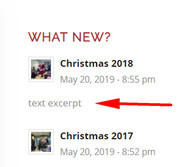
Thank you for the login, I checked one of your widget items (CHRISTMAS 2018) to see why the excerpt was not showing and found that you created the post with the Advanced Layout Builder.
In order to show an excerpt for this post you will need to add a manual excerpt by going to the top of the post page and clicking the “screen options” tab/button and check the excerpt box:
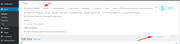
this will show an excerpt field below the post that you can add text to.
I do see that your category choice is not working, but I note that you have a “visibility” option that I don’t:
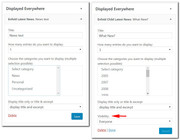
I believe this is from your “Conditional Menus” plugin, please try disabling to test, a similar plugin that does work with Enfold is: Widget OptionsBest regards,
MikeMay 29, 2019 at 9:54 pm #1105290Hi Mike
Ah that makes sense. I’ll add the excerpt if required manually. I will also test the Widget plugin you suggested. Thanks for the assistance.If I have any other issues with this subject I’ll let you know.
Dave.
May 31, 2019 at 3:55 am #1105553 -
This reply was modified 6 years, 10 months ago by
-
AuthorPosts


- You must be logged in to reply to this topic.