

Forum Replies Created
-
AuthorPosts
-
Hey bur2000,
Please try this solutionBest regards,
MikeHey Miki,
Thank you for the link to your page, the menu items are not showing because they are empty, it seems this is blocked by the password protection, is this a plugin or the default password protection?To hide the gray box we would need to find a class for password protection and not, but I don’t see one.
Perhaps we could assist more if we could login to see your backend.Best regards,
MikeHey moderntech2014,
Sorry for the late reply, I was not able to login or see your site, are you blocking some countries?Best regards,
MikeJune 30, 2019 at 1:32 am in reply to: Blog posts displayed in Masonry element open up in new tab? #1114546Hey bobfurgo,
Sorry for the late reply, we could do this with some javascript but we will need to see the page to examine the sectors.
Right now the page requires a login to view.Best regards,
MikeHey jscarlett,
Sorry for the late reply, please try changing your css above to this:@media only screen and (max-width: 1430px) { nav.main_menu { display: none !important; } #avia-menu .menu-item { display: none; } .av-burger-menu-main.menu-item-avia-special { display: block !important; } }Best regards,
MikeJune 30, 2019 at 1:21 am in reply to: Show excerpt not full article on tag pages and archive pages #1114544Hey m,
Sorry for the late reply it looks like this would work for you, the archive.php is in the home folder “enfold” please copy to your child theme and edit via ftp.Best regards,
MikeHi,
I tried to take a look at your issue but I didn’t see a link to your page, please include so we can investigate.Best regards,
MikeJune 30, 2019 at 12:59 am in reply to: One-page navigation + masonry animations not working properly #1114542Hey Estra,
Thank you for the link, so I assume that this solution worked for you until you updated the theme again?
Please include an admin login & FTP access in the Private Content area so we can apply it again.Best regards,
MikeJune 30, 2019 at 12:43 am in reply to: How do I properly import pages that previously utilized Template Builder? #1114541Hey CarletonTorpin,
Unfortunately, the Propulsion Theme and Enfold are not compatible with the builder template shortcodes.
You may need to recreate some pages. Sorry for the inconvenience.Best regards,
MikeJune 30, 2019 at 12:21 am in reply to: sub-menu disappears too quickly upon collapsing the header #1114539Hey Tim,
Sorry for the late reply, the reason your sub-menu closes quickly is because the sub-menu is too far away from the menu due to this css in your child theme css:.menu > li > .sub-menu { top: 110px !important; color: #000000 !important; }Please try replacing with this css:
.menu > li > .sub-menu {
    top: 60px !important;
    color: #000000  !important;
}
Best regards,
MikeHey Jacob Conrad,
Thanks for the link to your site, I see that you are using Enfold v3.1.5 which is very old, we are now at v4.5.7.
Unfortunately, Theme Forest has changed the update method from an API to a Token system, so you will need to login to the Theme Forest account to download the latest version and update via ftp.
Have you tried resetting the account password with the past user email address?
We don’t have access to the Theme Forest account info.If this doesn’t help, I recommend purchasing a new license because you will also receive 6 months of support via our forum and we can assist you in updating your theme.
Best regards,
MikeJune 29, 2019 at 11:30 pm in reply to: Advanced Layout Builder has vanished after taking update #1114536Hi,
Thanks for the login, I found that in your settings were using the “Block Editor”, once I changed to the “Classic Editor” your Advanced Layout Builder was showing again.
I believe this was due to a plugin conflict with the block editor. You can check by disabling each plugin one at a time to find the issue.
By the way here is the documentation to Enable Avia Layout Builder DebugBest regards,
MikeHey Ronit,
Please post a copy of the code you are using, perhaps there is an error in it.
are you adding the code to your page via a code block element? can we see an example page?Best regards,
MikeJune 29, 2019 at 10:58 pm in reply to: Broken Themes The following themes are installed but incomplete. #1114529Hi,
Thanks for the login, these 3 folders are not themes, they are document folders that should have not been uploaded, I removed them for you.Best regards,
MikeJune 29, 2019 at 10:46 pm in reply to: Share buttons in blog posts opening new tabs instead of pop-up #1114527Hey perfectword,
Sorry for the late reply, opening a new tab is correct. I don’t recall them opening popups.Best regards,
MikeHey zOrg,
Please include an admin login in the Private Content area so we can see.Best regards,
MikeHey Bart,
Thanks for the login, I see that you are getting this error:/wp-admin/admin-ajax.php Failed to load resource: net::ERR_CONNECTION_RESETI don’t see any security plugins on your site, does your webhost have any built-in?
Otherwise, please ask the webhost to check the server logs for why this is happeningBest regards,
MikeHi,
Thank you, the staging site requires a login, but the one above doesn’t seem to work. Please advise.Best regards,
MikeHey roytreffers,
Please include an admin login & site url in the Private Content area so we can examine.
Which demo do you want to import?Best regards,
MikeHi,
Yes I understand that you wish to remove this from the search results, but first, we need to remove the date from the page.
But as we don’t have a link to your site I can’t confirm that this is true.I assume that you understand that Google search results are cached and may take a few days to correct. I have also seen that Google will find any date on your site and will post that as the “post date” which is often wrong.
Please link to your page and to the search results you found so we can examine.
Best regards,
MikeHi,
Sorry for the inconvenience, but back when WordPress released v5 with the “block editor” there were some undocumented WP changes that we had to adjust for. At about the same time Theme Forest changed how updates worked, they changed from using an API to a Token, so there are a couple of versions that the automatic updating will not work in, thus the need to manually update.We are happy to assist with updating your theme to resolve this, but we will need admin & ftp access in the Private Content area. Please don’t worry, with the steps above we have not lost a single site when updating :)
Naturally as a good practice, please use your webhost full backup tool to create a backup “just in case” your webhost will be happy to assist with the backup should you be unsure how to do this.
I hope this explains the unusual issues that were out of our control, and our steps to correct.
Best regards,
MikeHi,
Thank you for the FTP access, I renamed your current theme to “enfold-old” then I uploaded the new beta version “enfold” and then checked that your site was working correctly. I found that your contact shortcode in the footer widget was now working.But I see that you are getting a 403 error for your entypo-fontello font that shows your icons, I tried to clear your site cache and checked your file permissions which seems fine.
I have also committed out your child theme function:add_filter( 'widget_text', 'do_shortcode' );because I believe this is depreated.
I believe this font issue could be due to your server cache, but I rolled back the update because I believe your site is live and didn’t want to leave it like this.
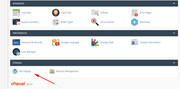
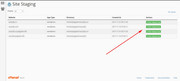
Does your webhost offer staging sites? Please check your webhost to see if you have the one click staging site option, this is a option in most cPanels to create a staging clone of your site so we can test on it and you site will stay up and running. You can always ask your webhost to help you with setting this up if you want.
Here are some screenshots of what it would look like:
Best regards,
MikeHey Dandelion222,
Thanks for the login, when I check your site I see that the first slider image is 834px high and the other two are smaller.
I’m not able to login and check the slider image sizes, but you could try this css in the General Styling > Quick CSS field or in the WordPress > Customize > Additional CSS field:#full_slider_1 ul.avia-slideshow-inner,#full_slider_1 ul.avia-slideshow-inner img { height: 834px !important; }Best regards,
MikeHey RazielRZ,
Please try this code in the General Styling > Quick CSS field or in the WordPress > Customize > Additional CSS field:#full_slider_1 .caption_framed .slideshow_caption .avia-caption-title { background: rgba(173, 60, 7, 0.5) !important; }Please adjust the color to suit, and Then clear your browser cache and any cache plugin, and check.
Best regards,
MikeHey Nicole,
Thank you for the login, but Please include FTP access in the Private Content area so if your site crashes again we can correct.Best regards,
MikeHi,
Thanks, that worked. You are getting this error because you are using Enfold v4.4.1 you are going to need to update to v4.5.7 manually via ftp.
The easiest and safest way to do this is to download the newest version from Theme Forest and rename your current theme to “enfold-old” then upload the new “enfold” and check that your site is working correctly.
Once you are happy you can delete the “enfold-old” via ftp, (not the WP theme page)
Should for some reason you wish to roll-back to the old version, it’s easy to do, simply rename the new “enfold” to “enfold-new” via ftp and then rename “enfold-old” to “enfold” then refresh your page.
Please don’t try to overwrite the theme folder, as this will leave old files behind and cause errors.Please let us know if this helps.
Best regards,
MikeHi,
Sorry I misunderstood, I removed the css so it now as it was before. I had placed the css in the WordPress > Customize > Additional CSS field.
The reason you are seeing the larger logo is because the size of the logo is larger when the transparent logo is showing, then when the switch is made the main logo shows while the size changes.
Sorry but I don’t see a good solution for this other than having the size of the logos the same.Best regards,
MikeHi,
When you use the Classic Editor the comment section is added automatically, when you use the Advanced Layout Builder you can use the comment element:

Best regards,
MikeJune 28, 2019 at 5:27 am in reply to: Content not updating despite purging cache with W3 and browser cache puring #1114164 -
AuthorPosts
