

Forum Replies Created
-
AuthorPosts
-
Hi,
Glad Jordan could help, we will close this now. Thank you for using Enfold.For your information, you can take a look at Enfold documentation here
For any other questions or issues, feel free to start new threads in the Enfold forum and we will gladly try to help you :)Best regards,
MikeHey jaimemerz,
Thank you for the link to the report, but unfortunately, your requests would require an intensive rewrite and is outside of our scope. We can recommend Codeable for their experience and expertise with Enfold. Please follow the link to discuss your project and time frame with them.
You can request that the changes are applied to a child theme and this would ensure updates do not lose your customizations, but I would recommend updating your site before submitting your request because your version (3.0.4) is very old and not stable with the latest WordPress.Best regards,
MikeHey Stas,
Thanks for the screenshot and link and css you want, but it seems to work for me when I apply !important; did you try this?#top #header_main > .container, #top #header_main > .container .main_menu .av-main-nav > li > a, #top #header_main #menu-item-shop .cart_dropdown_link{ height:80px; line-height: 110px!important; }Please clear your browser cache and check.
If this doesn’t help, please include an admin login in the private content area so we can be of more assistance.Best regards,
MikeHey ezs-ident,
Please try this code in the General Styling > Quick CSS field or in the WordPress > Customize > Additional CSS field:#top #wrap_all .error .text_input, #top #wrap_all .error .text_area, #top #wrap_all .error .select { border: 5px solid #DF653E !important; }Then clear your browser cache and any cache plugin, and check.
Best regards,
MikeHey Leonardo,
One possibility is that your webhost doesn’t have the PHP ZipArchive Extension activated so WordPress can not extract the zip file, the other is that the zip file exceeds your PHP Max Updoad size limit.
Please check these, if you need further assistance please create a support account, as right now this message seems to have been sent through our pre-sales email form:
For technical support please register here kriesi.at/support/register with your item purchase code .Go to: https://kriesi.at/support/enfold
Scroll to the bottom of the page to open a new ticket.
Best regards,
MikeHey Mulholr1,
Thank you for the login, the reason you are not seeing the custom font importer is because you are using Enfold v4.1.2
Please update your theme, please note you will have to update via ftp because with this version the auto updater will not work.
The easiest and safest way to do this is to download the newest version from Theme Forest and rename your current theme to “enfold-old” via ftp then upload the new “enfold” and check that your site is working correctly.
Once you are happy you can delete the “enfold-old” via ftp, (not the WP theme page)
Should for some reason you wish to roll-back to the old version, it’s easy to do, simply rename the new “enfold” to “enfold-new” via ftp and then rename “enfold-old” to “enfold” then refresh your page.
Please don’t try to overwrite the theme folder, as this will leave old files behind and cause errors.Best regards,
MikeHi,
Glad Nikko was able to help, here is a video on how to use the Layer Slider We will close this now. Thank you for using Enfold.For your information, you can take a look at Enfold documentation here
For any other questions or issues, feel free to start new threads in the Enfold forum and we will gladly try to help you :)Best regards,
MikeSeptember 14, 2019 at 8:33 pm in reply to: How to make an excerpt in the blog a link as well #1138390Hi,
Glad Nikko was able to help, we will close this now. Thank you for using Enfold.For your information, you can take a look at Enfold documentation here
For any other questions or issues, feel free to start new threads in the Enfold forum and we will gladly try to help you :)Best regards,
MikeHi,
Glad @Guenni007 and Rikard were able to help, we will close this now. Thank you for using Enfold.For your information, you can take a look at Enfold documentation here
For any other questions or issues, feel free to start new threads in the Enfold forum and we will gladly try to help you :)Best regards,
MikeHi,
Thank you for the logins, I mixed and matched them until I could gain access to your staging site.
In order to update your site you will need to upload the theme files via FTP or your cPanel file manager, I have done this for you on your staging site.
Now you will be able to use the Enfold Advanced Layout Builder to edit the pages About, Blog, & Portfolio but not the other pages because they use the X Theme shortcodes that Enfold doesn’t read, so you will need to recreate these pages.Best regards,
MikeHey ceiton,
Sorry for the late reply, to change your category layout to be similar to your blog layout, Try adding this code to the end of your functions.php file in Appearance > Editor:add_filter('avf_blog_style','avia_change_category_blog_layout', 10, 2); function avia_change_category_blog_layout($layout, $context){ if($context == 'archive') $layout = 'single-big'; return $layout; }For your second question, do you mean you would like the category page to have a sidebar? This can be turned on in the theme settings for sidebars, please make your choice for the archive pages.
Best regards,
MikeHey Andreas,
Wir entschuldigen uns für die verspätete Antwort und freuen uns, dass Sie Ihre mit Enfold erstellte Website genießen. Bitte melden Sie sich in Ihrem Support-Konto an, damit wir Ihre Fragen genauer beantworten können. Diese Nachricht scheint von unserem Kontaktformular vor dem Verkauf zu kommen.
Ich werde versuchen, Ihre Fragen schnell zusammenzufassen:
1: Ja, die Demo, die Sie sehen, ist die vollständige Demo in installiertem Zustand.
2: Ja, Sie können über das Produktelement eine separate Homepage hinzufügen und Produkte hinzufügen.
3: Ja, Enfold ist DSGVO-konform.
4: Informationen zu den DSGVO-Einstellungen finden Sie in diesem Beitrag: https://kriesi.at/documentation/enfold/privacy-cookies/
5: Wir sind nicht mit woocommerce verbunden, empfehlen jedoch woocommerce für den Shop.
6: Es gibt viele WordPress-Sicherheits-Plugins. Wir haben keine offizielle Empfehlung und schlagen vor, nach Ihren Bedürfnissen zu recherchieren.
7: woocommerce bietet einige verschiedene Zahlungsoptionen und -einstellungen. Weitere Informationen finden Sie unter woocommerce.— Translated with Google —
Sorry for the late reply, we are glad that you are enjoying your site built with Enfold. Could you please login to your support account so we can assist with your questions in more depth, this message seems to be coming from our pre-sales contact form.
I will try to summarize your questions quickly:
1: Yes, the demo you are seeing is the complete demo as installed.
2: Yes, you can add a separate home page and add products using the product element.
3: Yes, Enfold is DSGVO compliant.
4: Please see this post for DSGVO settings: https://kriesi.at/documentation/enfold/privacy-cookies/
5: We are not affiliated with woocommerce, but recommend woocommerce for the shop.
6: There are many WordPress security plugins, we don’t have an official recommendation and suggest researching with your needs in mind.
7: woocommerce offers a few different payment options and settings, please refer to woocommerce for further insight.Best regards,
MikeHi,
Please try this code in the General Styling > Quick CSS field or in the WordPress > Customize > Additional CSS field:#header_main.container_wrap.container_wrap_logo { border-color: transparent !important; }Best regards,
MikeHi,
Sorry for the late reply and thanks for the link to your site, I see that you have some sections that are duplicated that show/hide depending on screen size, which is a good tactic for controlling how your site looks on devices. But the issue you are now experiencing is that these different sections have the same ID’s so the links are anchoring to the first ID they find, visible or not. To correct please ensure that each section has a unique ID and create a copy of your sub-menu with the new anchor IDs which we can also hide with css depending on screen width.Please give this a try, if you would like assistance on achieving this please let us know and give us permission to adjust your elements.
Best regards,
MikeHey Enis,
Sorry for the late reply, please look in the file:
\enfold\config-templatebuilder\avia-shortcodes\slideshow\slideshow.js
on lines 41-42 (v4.6.2) for://transition speed when switching slide transitionSpeed:900,and adjust to suit and clear your browser cache a few times.
To ensure your customizations are not overwritten during theme updates, please copy your /slideshow/ directory to your child theme in a directory named /shortcodes/ like this:
/enfold-child/shortcodes/slideshow/
and add this function to your child theme functions.phpadd_filter('avia_load_shortcodes', 'avia_include_shortcode_template', 15, 1); function avia_include_shortcode_template($paths) { $template_url = get_stylesheet_directory(); array_unshift($paths, $template_url.'/shortcodes/'); return $paths; }Best regards,
MikeSeptember 14, 2019 at 3:11 pm in reply to: Cookie Consent Message Bar – link to page – Enfold 4.6.1 #1138324Hi,
@Hokuspokus sorry your issue is actually different than this thread, you can try this css below, if it doesn’t help then please open a new thread so we can assist..avia_ajax_form.av-form-labels-hidden .av_form_privacy_check label{ position: initial !important; top: initial !important; left: initial !important; }Best regards,
MikeHi,
Did your webhost find a cause for the 404 error on the admin-ajax.php file in the server log?
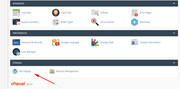
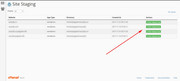
Also does your webhost offer one-click staging site creation? This is a option that will allow you to create a clone of your site that we can test with while your live site remains untouched.
Here are some screenshots of what it could look like:
Best regards,
MikeHey jennifer Davdsion ,
Thanks for reaching out, to get a theme update you will need to login to your Theme Forest or Envato account, if you have forgotten your password there you can use their password recovery link.
To get access to the support forum you will need to have a current support contract that is typically renewed every year, once you login to your Theme Forest account you will be able to renew it there unless you have already renewed it within the past year.If it has been years since you have logged into Theme Forest, and you can’t use the recovery method from Theme Forest because you don’t have access to the recovery email address, then you are in luck, because right now we are having a birthday sale and you can purchase a new license and download the updated theme and get 6 months of support on our support forum for less than the cost of renewing your support for 6 months!
But I recommend upgrading to a full year of support with your purchase, which is only a couple of dollars more and is only available once to new purchases and is a huge value!
Please hurry, we can not extend this offer.Best regards,
MikeHi,
Thanks for the link to your site and the link to the css you wanted to use. I took a look at your page and it didn’t contain the same classes as the css needed, so I have adjusted it for you so that it will only work in the one section on the one page that you linked to.
Please try this code in the General Styling > Quick CSS field or in the WordPress > Customize > Additional CSS field:#top.page-id-962 .post-entry-962 ul li { list-style: none; } #top.page-id-962 .post-entry-962 ul li { padding-left: 8px; } #top.page-id-962 .post-entry-962 ul li:before { content: '\2713'; color: green; font-family: 'entypo-fontello'; font-size: 23px; font-weight: normal; position: absolute; left: 6px; }Please see the screenshot in Private Content area.
Best regards,
MikeHi,
Glad to hear that you were able to purchase Enfold, as I understand your question you have tried to create an API key for the Enfold v3.8 to update automatically through the theme. Unfortunately, this will not work because Theme Forest doesn’t use the API key anymore to update, they have switched to a Token system that v3.8 doesn’t support. So you will need to update via FTP or your webhost “file manager”, here is a short tutorial:
The easiest and safest way to update an old theme is to download the newest version from Theme Forest and rename your current theme to “enfold-old” via ftp then upload the new “enfold” and check that your site is working correctly.
Once you are happy you can delete the “enfold-old” via ftp, (not the WP theme page)
Should for some reason you wish to roll-back to the old version, it’s easy to do, simply rename the new “enfold” to “enfold-new” via ftp and then rename “enfold-old” to “enfold” then refresh your page.
Please don’t try to overwrite the theme folder, as this will leave old files behind and cause errors.If you don’t feel comfortable doing this I will assist, I will need an admin login & FTP access in the Private Content area.
But you will also need to register your new support account, from this end it looks like you are still using the contact form email that we started on. I will add the instructions to register your support account below and then you can post the info I need there. Then please copy the url to your post and add it to this email so I can find it quickly and assist.
Sorry for the extra step, but I can only offer support to support members, thanks for your understanding.For technical support please register here kriesi.at/support/register with your item purchase code .
Go to https://kriesi.at/support/enfold
Scroll to the bottom of the page to open a new ticket.
Best regards,
MikeSeptember 14, 2019 at 2:31 am in reply to: Cookie Consent Message Bar – link to page – Enfold 4.6.1 #1138256Hi,
Please provide FTP access in the Private Content area, I would like to test further thanks.Best regards,
MikeHey isarivera,
Thanks for reaching out to us, I took a look at the “Coming Soon” demo and found that the logo is in an image element above the text element in the middle column. Please note that hovering over the image element may look like the text element, please see this video.Best regards,
MikeHey smoke_house,
I took a look at your script above and tested it on my localhost and it’s working for me.

Are you getting any errors in your browser console?Best regards,
MikeSeptember 13, 2019 at 5:08 am in reply to: Headline Rotator: Change Colour block, before it deletes typo #1137768Hey Katrin,
Thanks for the link, Please try this code in the General Styling > Quick CSS field or in the WordPress > Customize > Additional CSS field:.av-marked-text span.av-rotator-text-single { background-color: transparent !important; color: #fff !important; }Best regards,
MikeHey Niky67,
Sorry, we don’t have an option for a page load popup, it probably could be done with some jQuery, but there are many plugins that already do this well, it would be like reinventing the wheel. I’m not sure which would work best for you but perhaps on like this would: Popups – WordPress PopupBest regards,
MikeHey Katherine,
Perhaps you can supply the email address and the regulation code, but I suspect that the 6 months of support that is included with the theme purchase has expired and you would need to renew the support contract, which would have to be done through Theme Forest.
Luckily today we are having a birthday sale so you could get access to the updated theme, and you could also get the included 6 months of support. The cost right now is less than updating the service contract alone – this is a huge value!
I would recommend opting for the full year of support for only a little more, this option is only available once and is an even greater value!Best regards,
MikeHi,
Cargaría sobre su sitio de WordPress y activaría el tema secundario, se extraerá automáticamente del tema principal. Por favor lea más aquí: Lea sobre el uso de un tema infantil— Translated with Google —
You would upload bout to your WordPress site and activate the child theme, it will automatically draw from the parent theme. Please read more here: Read about using a Child Theme
Best regards,
MikeHey David Young,
Thank you for contacting us, I see that you are using Enfold v3.8 which is very old and could have issues with PHP v7.2
but I also see that you are using WordPress v5.2.3, which will cause issues, because Enfold v3.8 is not WP v5 readyA temporarily solution is to try changing your PHP to v5.6, and use this plugin to roll your WP back to v4.9 or v4.8
Then you can use this plugin to disable future updates.You should really update Enfold. I assume that you don’t have access to the Theme Forest account that your theme was purchased from because I see that updates were disabled for your theme.
The good news is that Enfold is on sale today for our birthday and with a new license and future updates you will also get 6 months of support in our support forum. I would recommend opting for the 12 months of support on the sales page because it is only a little more and it’s the only opportunity to get such great value from our team.I understand that you are a school and funds are probably tight, but as long as you store the Theme Forest login in your department, future members will be able to update the theme.
Best regards,
Mike -
AuthorPosts
