

Forum Replies Created
-
AuthorPosts
-
Hi,
Glad we were able to help, we will close this now. Thank you for using Enfold.For your information, you can take a look at Enfold documentation here
For any other questions or issues, feel free to start new threads in the Enfold forum and we will gladly try to help you :)Best regards,
MikeHi,
Great you will be able to use the update for your site, we will be able to assist if needed.Best regards,
MikeHi,
Ok, we’ll leave this open to hear back from you. If you decide you don’t need this please let us know so we can close it.Best regards,
MikeHi,
Glad we were able to help, we will close this now. Thank you for using Enfold.For your information, you can take a look at Enfold documentation here
For any other questions or issues, feel free to start new threads in the Enfold forum and we will gladly try to help you :)Best regards,
MikeHey jannnnnneke,
Thanks for the links, but when I check your pages I don’t see the issue. Please see the screenshots in Private Content area.
What browser are you using?Best regards,
MikeHey Bernhard,
Thanks for the login, I checked your site and the theme update worked fine. Please check.
Envato limits updates and checking of updates, so if you have many sites you may need to update them a few each day.Best regards,
MikeHey Daniel,
I believe that I understand, but I’m not seeing the play button in the header, I see “All Courses”, “Login” “Get Access” and the video seems to already be loaded on the page.
Please see the screenshot in Private Content area.
I did work on another question so I thought it might be a cookie issue, but clearing didn’t help.
Has this page changed?Best regards,
MikeHi,
The container has transition: opacity 0.6s ease-in; applied, to remove this for the one page
please try this code in the General Styling > Quick CSS field or in the WordPress > Customize > Additional CSS field:.js_active #top.postid-1 #hero-fade.av-minimum-height .container { opacity: 1 !important; -webkit-transition: none !important; transition: opacity none !important; }Best regards,
MikeHey Jak73,
Typically you would change the option at Enfold Theme Options > General Styling there are a few options,
Main Content background color
Alternate Background color
Logo Area background color
Body background color
Footer background color
Socket background color
Please adjust to suit.Best regards,
MikeHi,
Thanks for the login, all of your pages are in Draft mode so they will not show in your menu options until you publish them.Best regards,
MikeHi,
Please add this to Quick CSS:.more-link:hover { text-decoration: none !important; }Best regards,
MikeHey andyux,
Please try adjusting your tag html to this:<p style="text-align:center;max-width:500px;margin:auto;">Okami Medical was formed to address the evolving needs of patients and physici...</p>Best regards,
MikeHi,
Try adding this code to the end of your child theme functions.php file in Appearance > Editor:add_filter( 'avf_google_heading_font', 'avia_add_heading_font'); function avia_add_heading_font($fonts){ $fonts['Suez One'] = 'Suez One'; return $fonts; } add_filter( 'avf_google_content_font', 'avia_add_content_font'); function avia_add_content_font($fonts){ $fonts['Suez One'] = 'Suez One'; return $fonts; } function add_suez_one_font(){ ?> <link href="https://fonts.googleapis.com/css?family=Suez+One&display=swap&subset=hebrew,latin-ext" rel="stylesheet"> <?php } add_action('wp_head', 'add_suez_one_font');When the font is selected in the theme settings:

Results:

For future readers, this is for an older version and is not needed or recommended for v4.6+Best regards,
MikeHi,
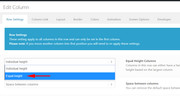
I need the areas A1 and A2 to have the same width while their height must be equal but dynamically adapt to the content of the longer one
This option is available in the column settings:
Earlier you said that you don’t want to use a sidebar, but it seems that if you adopted the sidebar as your area 3 you would have the layout you were looking for.
Perhaps I could assist more if I could see the final mockup, I feel that I’m missing a key point.Best regards,
MikeHi,
Sorry, this is not correct, the Leads Plugin is not installed with Enfold. Enfold doesn’t install any plugins with any of the demos, there are a couple of demos that we recommend these plugins for some functions:-
WooCommerce
The Events Calendar
BBPress
WooCommerce BookingsYou can view all of the demos and recommended plugins in the theme options under Demo Import.
It looks like your “Leads” plugin is a part of a larger group of plugins called “Marketing” as seen in your Admin toolbar:
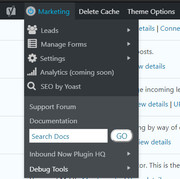
These were installed by someone or your webhost, but are not a part of Enfold.I hope this helps, Best regards,
MikeSeptember 15, 2019 at 3:30 pm in reply to: Full width slider button not showing on mobile – Sperator Icon at the start #1138522Hi,
Thanks for the link and screenshot, I wrote this css to be general so it will work for your whole site, but please check thoroughly and let us know if you find any issues. Please try this code in the General Styling > Quick CSS field or in the WordPress > Customize > Additional CSS field:.hr-custom.hr-left.hr-icon-yes > span.inner-border-av-border-fat:first-child { display: none !important; }Please see the screenshot in Private Content area.
Best regards,
MikeHey justmind,
Thanks for the link to your site, the following css will make your menu background white and also give the gray hover.
Please try this code in the General Styling > Quick CSS field or in the WordPress > Customize > Additional CSS field:.header_color .sub_menu #avia2-menu li ul a { background-color: #fff !important; } #top #wrap_all #avia2-menu ul > li:hover > a { background-color: #f0f0f0 !important; }Best regards,
MikeHi,
Sorry for the late reply, to change the social icons in your footer to circles try this code in the General Styling > Quick CSS field or in the WordPress > Customize > Additional CSS field:#top .social_widget_icon { border-radius: 100px !important; }Best regards,
MikeHey cornaviera,
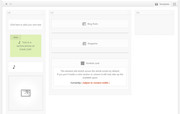
Perhaps you can create one row of your three columns and stack your content in areas 1 & 2 which will allow area 3 to be a full-height.
Best regards,
MikeHi,
Try adding this code to the end of your functions.php file in Appearance > Editor:function custom_script(){ ?> <script> (function($){ $(document).ready(function(){ $('body').click(function(){ $("html").removeClass('av-burger-overlay-active-delayed'); $('.av-burger-overlay').css({opacity:'0'}); }); }); })(jQuery); </script> <?php } add_action('wp_footer', 'custom_script');Best regards,
MikeHi,
Glad we were able to help, we will close this now. Thank you for using Enfold.For your information, you can take a look at Enfold documentation here
For any other questions or issues, feel free to start new threads in the Enfold forum and we will gladly try to help you :)Best regards,
MikeHi,
I’m glad that this helped, please open a new thread on the support forum for new topics, typically we prefer to keep threads on single topics. Thank you for your understanding.Best regards,
MikeHi,
Glad we were able to help, we will close this now. Thank you for using Enfold.For your information, you can take a look at Enfold documentation here
For any other questions or issues, feel free to start new threads in the Enfold forum and we will gladly try to help you :)Best regards,
MikeHi,
I took a look at your page but I don’t see any shaking, I tested with Chrome, Firefox, Edge & IE11. I do see the whitespace after your sign-up form, to remove this please try this css in your Quick CSS field:#top.home #after_section_4 { display: none !important; }Best regards,
MikeHey koomo,
Please include an admin login in the Private Content area so we can be of more assistance.Best regards,
MikeHi,
Sorry I couldn’t login because I don’t see a user name for the site only the url & password, please include.
But there seems to be a misunderstanding because fixing plugins is outside our scope also, you could try contacting the developers of the site.Best regards,
MikeHi,
@MikeTandySwag typically lazy load doesn’t work well, but if this is the only issue you are experiencing with the lazy load then you can try to exclude it from the plugin, if the plugin offers that function.Best regards,
MikeHi,
Glad Jordan could help, we will close this now. Thank you for using Enfold.For your information, you can take a look at Enfold documentation here
For any other questions or issues, feel free to start new threads in the Enfold forum and we will gladly try to help you :)Best regards,
Mike -
AuthorPosts
