

Forum Replies Created
-
AuthorPosts
-
Hi,
Thank you for the links, it looks like your blog post sidebar is a 1/4 column with a widget element in it, and the category page is an actual sidebar.
Though as I look at them I’m not sure what is the difference you are referring to, is it that the page layout is smaller so the sidebar looks closer to the center?Best regards,
MikeNovember 13, 2019 at 5:47 pm in reply to: Blog Posts Element not showing Date meta on first (top) displayed post #1156453Hi,
It looks like you are using the Advanced Layout Builder to create your blog posts, this doesn’t add the post meta.
You can use the shortcode[sc_post_meta]to add it, after you add this code to the end of your functions.php file in Appearance > Editor:function post_meta_shortcode(){ ob_start(); $taxonomies = get_object_taxonomies(get_post_type($the_id)); $cats = ''; $excluded_taxonomies = apply_filters('avf_exclude_taxonomies', array('post_tag','post_format'), get_post_type($the_id), $the_id); if(!empty($taxonomies)) { foreach($taxonomies as $taxonomy) { if(!in_array($taxonomy, $excluded_taxonomies)) { $cats .= get_the_term_list($the_id, $taxonomy, '', ', ','').' '; } } } if(!empty($cats)) { echo '<span class="blog-categories minor-meta">'.__('in','avia_framework')." "; echo $cats; echo '</span>'; } echo "<span class='post-meta-infos' style='margin-top: -25px;'>"; $markup = avia_markup_helper(array('context' => 'entry_time','echo'=>false)); echo "<time class='date-container minor-meta updated' $markup>".get_the_time(get_option('date_format'))."</time>"; echo "<span class='text-sep text-sep-date'>/</span>"; if ( get_comments_number() != "0" || comments_open() ){ echo "<span class='comment-container minor-meta'>"; comments_popup_link( "0 ".__('Comments','avia_framework'), "1 ".__('Comment' ,'avia_framework'), "% ".__('Comments','avia_framework'),'comments-link', "".__('Comments Disabled','avia_framework')); echo "</span>"; echo "<span class='text-sep text-sep-comment'>/</span>"; } echo '<span class="blog-author minor-meta">'.__('by','avia_framework')." "; echo '<span class="entry-author-link" '.avia_markup_helper(array('context' => 'author_name','echo'=>false)).'>'; echo '<span class="vcard author"><span class="fn">'; the_author_posts_link(); echo '</span></span>'; echo '</span>'; echo '</span>'; echo '</span>'; return ob_get_clean(); } add_shortcode( 'sc_post_meta', 'post_meta_shortcode' );some css may be necessary to adjust.
If you are not using the Advanced Layout Builder, you will need to use the blog style Elegant or Default, Modern Business doesn’t show the post meta at the top.Best regards,
MikeHi,
Please try this instead:#top.home #av_section_1 > div > div > div > div > div.flex_column.avia-builder-el-2 > div > div > div > img:hover { -webkit-transform: rotate(30deg); -moz-transform: rotate(30deg); -ms-transform: rotate(30deg); transform: rotate(30deg); -webkit-transition: all 0.4s ease-in-out; -moz-transition: all 0.4s ease-in-out; -o-transition: all 0.4s ease-in-out; transition: all 0.4s ease-in-out; }After applying the css, Please clear your browser cache and check.
If this doesn’t work, please add a custom class to the image so we can try again.Best regards,
MikeHi,
Glad we were able to help, we will close this now. Thank you for using Enfold.For your information, you can take a look at Enfold documentation here
For any other questions or issues, feel free to start new threads in the Enfold forum and we will gladly try to help you :)Best regards,
MikeHi,
I didn’t delete your elements, I can see them, Please see the screenshot in Private Content area.
Sorry, perhaps I was not clear, showing code is not the issue here, showing code is easy with the <code> tag, showing a link in the code tag is the WordPress issue.
In the article I linked to above suggested using the SyntaxHighlighter Evolved plugin, I tested this plugin on my site along with the
<pre> <code> tags and made this screenshot to help explain.
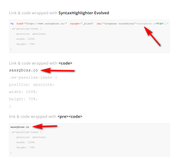
I hope this helps.Best regards,
MikeNovember 13, 2019 at 1:03 pm in reply to: contact form deavtivated error message Google Recaptcha #1156385Hi,
It works for me on desktop also, after scroll, is that what you wanted?Best regards,
MikeNovember 13, 2019 at 12:55 pm in reply to: Latest News widget — how to prevent time stamps from rendering? #1156379Hi,
I took a look at your page and see that one of your headers is for mobile and tablet:

which is a large area to cover, perhaps making these two different headers would be better, or you could adjust with css like this:@media only screen and (min-width: 1024px) and (max-width: 1440px) { .av-parallax-inner { height: 70% !important; } }Best regards,
MikeNovember 13, 2019 at 12:20 pm in reply to: Latest News widget — how to prevent time stamps from rendering? #1156361Hi,
Sorry, I didn’t realize that you had a certain criteria that you wanted this to work in, I only saw that in your question you wanted to remove the date and time from your Latest News widget without using css.
Anyways in the function there is no $format there is $date and $time_format
you can read about these here: Formatting Date and Time
you can use an IF statement to trigger the function, please let us know if you want a hand writing an IF statement.Best regards,
MikeHi,
Thanks for the login, do you mean that when viewing the page “pagination” is not visible? This is because you only have 9 items and you are showing them all on the page, for Pagination to show you will need to show fewer items.
If you mean that when you click on an item the Pagination arrows do not show to the next item, this is because the items are not opening in a lightbox, the images are opening directly, you will need to enable the lightbox at Enfold Theme Options > Lightbox Modal WindowBest regards,
MikeHi,
Glad we were able to help, we will close this now. Thank you for using Enfold.For your information, you can take a look at Enfold documentation here
For any other questions or issues, feel free to start new threads in the Enfold forum and we will gladly try to help you :)Best regards,
MikeHi,
Glad we were able to help, we will close this now. Thank you for using Enfold.For your information, you can take a look at Enfold documentation here
For any other questions or issues, feel free to start new threads in the Enfold forum and we will gladly try to help you :)Best regards,
MikeHi,
Glad that it helped, as for putting the tags at the beginning or end of the post, it’s just a design preference, do you think tags add value to the post such as the title, or is it just a way to link similar posts? Do you want visitors to read the post first then find similar posts, or get sidetracked and leave the post before they read it?Best regards,
MikeHi,
Glad that is working, as for Safari I found thedisplay: table;may be causing the issue with the-webkit-background-clip: text;(more about background-clip) This may be a solution, please note that on that page it is pointed out that this is a Safari bug, Please try changingdisplay: table;todisplay: inline;and see if that helps, after clearing your browser cache.Best regards,
MikeHi,
Ok, the article I linked to above will show you how to do this manually, I went ahead and did it for you:
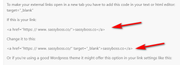
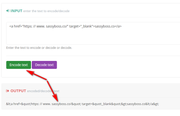
To recap paste your html code into this website and click encode and copy the output to your site:
Now I assume that you are “previewing” your page and it is not looking right, “previewing” doesn’t always work correctly with the Advanced Layout Builder because the WordPress “previewer” doesn’t connect properly to the elements and there is a preview cache.
To check you can “privately publish” and view your page, and then set your page back to draft if you wish, but only admins and editors can view a “privately published” page.
Here is what the published page will look like:
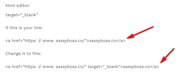
Now another issue you may run into is if you re-edit your page again and WordPress converts your encoded code back to the regular code which will show the link again, if this happens just encode your code again at the website above. (I have to deal with this every time I edit one of my posts here.)
I know this is a pain, but this is a WordPress “shortcoming” I guess no one thought of showing the code of a link, and that is why there are so many plugins that correct this.
An alternative to dealing with all of this is to post a screenshot of the code you want to show, then WordPress can’t change it.Best regards,
MikeHi,
The css above allows you to change the color of the last two columns as you asked for, the first column is already red. But I will add it also here. Just adjust the colors to suit, Please see the screenshot in Private Content area.#top.page-id-1065 #av_section_1 > div > div > div > div > div.avia-table.main_color.avia-pricing-table-container.avia_show_empty_cells.avia_pricing_default.avia-table-1.avia-builder-el-8.el_after_av_heading.el_before_av_hr > div:nth-child(2) > ul > li.avia-heading-row { background-color: red !important; border-color: red !important; } #top.page-id-1065 #av_section_1 > div > div > div > div > div.avia-table.main_color.avia-pricing-table-container.avia_show_empty_cells.avia_pricing_default.avia-table-1.avia-builder-el-8.el_after_av_heading.el_before_av_hr > div:nth-child(3) > ul > li.avia-heading-row { background-color: green !important; border-color: green !important; } #top.page-id-1065 #av_section_1 > div > div > div > div > div.avia-table.main_color.avia-pricing-table-container.avia_show_empty_cells.avia_pricing_default.avia-table-1.avia-builder-el-8.el_after_av_heading.el_before_av_hr > div:nth-child(4) > ul > li.avia-heading-row { background-color: blue !important; border-color: blue !important; }After applying the css, Please clear your browser cache and check.
Best regards,
MikeHi,
I see so you will need those two lines of code. I thought you wanted allh2.kop-gradientcentered?
If not then add another class, such ascenterto theh2.kop-gradientelements, be sure you leave a space between the classes likekop-gradient centerthen use this css instead:h2.kop-gradient.center { margin: auto !important; }As for the Safari issue I will have to investigate more.
Best regards,
MikeHi,
Sorry for the late reply, I believe that this article will help you, please scroll down to “Method 3. Display Code in WordPress Manually (No Plugin or Block)”
While there are plugins such as Lite Syntax Highlighting that can make this easier for you by wraping your code or link with a shortcode like this:[slh lang="html"]<a href="https: // www. sassyboss.co/" target="_blank" rel="noopener">sassyboss.co</a>[/slh]and it will show like this:

From your posts above it seems that you didn’t like how the background color changed when using<pre> or <code>but this can be changed with css, so if you find a solution that works for you but don’t like the colors, we maybe able to help adjust.Best regards,
MikeNovember 11, 2019 at 12:38 pm in reply to: Error with sticky header mobile in new Enfold version #1155560Hi,
Thank you for sharing your solution, Glad we were able to help, we will close this now. Thank you for using Enfold.For your information, you can take a look at Enfold documentation here
For any other questions or issues, feel free to start new threads in the Enfold forum and we will gladly try to help you :)Best regards,
MikeHi,
Sorry I’m not experiencing transparent text, but I’m on Windows and I assume you are on IOS, if so then try removing those two lines of code they are for IOS and was recommended as necessary, but perhaps I misunderstood.
I see that your H2 is not centering because we had to set the display to “table” for the gradient to work, to center we need to add:h2.kop-gradient { margin: auto !important; }Best regards,
MikeHi,
Sorry for the late reply, I have taken a look at your page and see that you are using a “Lazy Load” for the images, which has replaced the images with a 1px gif encoded in base64. Please see the screenshot in Private Content area.
I believe it’s from the plugin: /wp-content/plugins/wp-smushit/app/assets/js/smush-lazy-load.min.js
Please disable this and the images should work again.Best regards,
MikeHi,
Glad we were able to help, we will close this now. Thank you for using Enfold.For your information, you can take a look at Enfold documentation here
For any other questions or issues, feel free to start new threads in the Enfold forum and we will gladly try to help you :)Best regards,
MikeHi,
Glad we were able to help, we will close this now. Thank you for using Enfold.For your information, you can take a look at Enfold documentation here
For any other questions or issues, feel free to start new threads in the Enfold forum and we will gladly try to help you :)Best regards,
MikeHi,
Glad to hear you solved the burger menu, to move the main menu closer to the logo, please try this css:#top #header_main .main_menu { right: 10% !important; }feel free to adjust, then clear your browser cache, and check.
Best regards,
MikeHey geraldinetay27,
Sorry for the late reply, I couldn’t find this on your site so I tested it on mine and your code worked for me:

I used a code block element
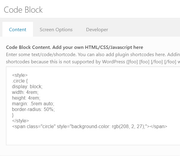
here is the code I used in the code block element<style> .circle { display: block; width: 4rem; height: 4rem; margin: .5rem auto; border-radius: 50%; } </style> <span class="circle" style="background-color: rgb(208, 2, 27);"></span>Please give this a try
Best regards,
MikeHey sdesign-web,
Sorry for the late reply, are you trying to do this with the “block editor”? I tested this and you won’t be able to do this unless you post in a “code block”
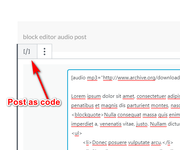
The block editor splits everything up, unlike the Classic Editor, here is the post code from one of our demos, you can post it into a “audio post” and add a featured image and the audio will be over the image.[audio mp3="http://www.archive.org/download/Macroform2011/Macroform-600LightYears.mp3" preload="auto"][/audio] Lorem ipsum dolor sit amet, consectetuer adipiscing elit. Aenean commodo ligula eget dolor. Aenean massa. Cum sociis natoque penatibus et magnis dis parturient montes, nascetur ridiculus mus. Donec quam felis, ultricies nec, pellentesque eu, pretium quis, sem. <blockquote>Nulla consequat massa quis enim. Donec pede justo, fringilla vel, aliquet nec, vulputate eget, arcu. In enim justo, rhoncus ut, imperdiet a, venenatis vitae, justo. Nullam dictum felis eu pede mollis pretium. Integer.</blockquote> <ul> <li>Donec posuere vulputate arcu.</li> <li>Phasellus accumsan cursus velit.</li> <li>Vestibulum ante ipsum primis in faucibus orci luctus et ultrices posuere cubilia Curae;</li> <li>Sed aliquam, nisi quis porttitor congue</li> </ul> <!--more--> Nunc nec neque. Phasellus leo dolor, tempus non, auctor et, hendrerit quis, nisi. Curabitur ligula sapien, tincidunt non, euismod vitae, posuere imperdiet, leo. Maecenas malesuada. Praesent congue erat at massa. Sed cursus turpis vitae tortor. <ul> <li>Donec posuere vulputate arcu.</li> <li>Phasellus accumsan cursus velit.</li> <li>Vestibulum ante ipsum primis in faucibus orci luctus et ultrices posuere cubilia Curae;</li> <li>Sed aliquam, nisi quis porttitor congue</li> </ul>I was able to make it work with both, but the Classic Editor was easier.

Best regards,
MikeHi,
Thanks for the link, here is the css to make the center logo rotate on hover:#top.home #av_section_1 > div > div > div > div > div.flex_column.av_one_full.av-hide-on-mobile.flex_column_div.av-zero-column-padding.first.avia-builder-el-2.el_before_av_one_fifth.avia-builder-el-first > div > div > div > img:hover { -webkit-transform: rotate(30deg); -moz-transform: rotate(30deg); -ms-transform: rotate(30deg); transform: rotate(30deg); -webkit-transition: all 0.4s ease-in-out; -moz-transition: all 0.4s ease-in-out; -o-transition: all 0.4s ease-in-out; transition: all 0.4s ease-in-out; }Best regards,
MikeNovember 11, 2019 at 1:26 am in reply to: Latest News widget — how to prevent time stamps from rendering? #1155438Hi,
Thank you for the screenshots and the good explanation, I tested @Yigit’s function and was able to adjust it so the date & time will not show, I’m unsure if this has an effect elsewhere so please check.
Try adding this code to the end of your functions.php file in Appearance > Editor:add_filter('avia_widget_time', 'change_avia_date_format', 10, 2); function change_avia_date_format($date, $time_format) { $time_format = get_option(''); return $time_format; }Best regards,
Mike -
AuthorPosts
