

Forum Replies Created
-
AuthorPosts
-
Hi,
Thank you for the login, I commented out your css and adjusted the function to this:function custom_logo_script(){ ?> <script> (function($){ $(window).load(function(){ $('#header.av_header_transparency #header_main .av-logo-container .inner-container').css({ 'height': '175%' }); $(window).scroll(function() { var scroll = $(window).scrollTop(); if (scroll >= 5) { $('#header.av_header_transparency #header_main .av-logo-container .inner-container').css({ 'height': '100%' }); $('.logo .subtext img.alternate').attr("src","https://lnsc.nl/lnsc2020/wp-content/uploads/Logo-LNSC2020-240.png"); } else if (scroll <= 5){ $('#header.av_header_transparency #header_main .av-logo-container .inner-container').css({ 'height': '175%' }); $('.logo .subtext img.alternate').attr("src","https://lnsc.nl/lnsc2020/wp-content/uploads/Logo-LNSC-2020-240.png"); } else { $('#header.av_header_transparency #header_main .av-logo-container .inner-container').css({ 'height': '175%' }); $('.logo .subtext img.alternate').attr("src","https://lnsc.nl/lnsc2020/wp-content/uploads/Logo-LNSC-2020-240.png"); } }); }); })(jQuery); </script> <?php } add_action('wp_footer', 'custom_logo_script');result:
via GIPHYplease clear your browser cache and check.
Best regards,
MikeNovember 15, 2019 at 12:24 pm in reply to: Latest News widget — how to prevent time stamps from rendering? #1157156Hi,
Yes, because theavia_newsboxis pulling posts, which includes among other things the time and date, thus the filter:
$time_format = apply_filters( 'avia_widget_time', get_option('date_format')." - ".get_option('time_format'), 'avia_newsbox' );
butavia_newsboxhas no baring on$time_formatplease see the entire function at\enfold\framework\php\class-framework-widgets.phpthis filter occur at line 961Earlier you wrote:
Yes I accidentally left out that part about the conditional requirements. But let’s not worry about that–I was able to find a solution in terms of those conditions I specified.
So this means this is solved?
Best regards,
MikeNovember 14, 2019 at 2:16 pm in reply to: Latest News widget — how to prevent time stamps from rendering? #1156792Hi,
Sorry, that is not correct date_format is how Date and Time is Formated. Please read: Formatting Date and Time
Here is an example:<span class='date-container minor-meta updated'><?php the_time(get_option('date_format')); ?></span>Try using Visual Studio Code, it is free, then open the theme folder with it, this will load every file, then you can search “find in files” for “date_format” or anything else, and you will see every instance of it.
Best regards,
MikeHi,
To move the slider under the menu you need to set the page with a transparent header.
please try this css for the logo, I didn’t see the other css I posted above, where you sure to clear your browser and cache plugin cache?
Please try this code in the General Styling > Quick CSS field or in the WordPress > Customize > Additional CSS field:#top.home #logotwist .avia-image-container img.avia_image:hover { -webkit-transform: rotate(30deg) !important; -moz-transform: rotate(30deg) !important; -ms-transform: rotate(30deg) !important; transform: rotate(30deg) !important; -webkit-transition: all 0.4s ease-in-out !important; -moz-transition: all 0.4s ease-in-out !important; -o-transition: all 0.4s ease-in-out !important; transition: all 0.4s ease-in-out !important; }If this doesn’t work Please include an admin login in the Private Content area, perhaps you have a missing bracket in your css not allowing the css to work.
Best regards,
MikeHi,
Thank you, please see the screenshot in the Private Content area of the two sidebars side by side.
So what I see is:- link colors are not the same
- text is not justified the sane
- indention is not the same
and you like the blog style, is this correct?
Best regards,
MikeHi,
Glad we were able to help, we will close this now. Thank you for using Enfold.For your information, you can take a look at Enfold documentation here
For any other questions or issues, feel free to start new threads in the Enfold forum and we will gladly try to help you :)Best regards,
MikeNovember 14, 2019 at 1:00 pm in reply to: Enfold: Latest version of Event Calendar not working with Counter #1156764Hi,
Thank you, I checked again, the ftp access works, and the dev & live sites allow me into WordPress, but they are not admin access, please see the screenshot in Private Content area.
I would prefer to investigate and test within the dev site, please check.Best regards,
MikeHi,
Glad to help, please check one more time and then we will close this thread.Best regards,
MikeHi,
Ok I have enabled categories only for the mobile homepage view with this css:@media only screen and (min-width: 768px) { .blog-categories.minor-meta { display: none !important; } } @media only screen and (max-width: 767px) { #top:not(.home) .blog-categories.minor-meta { display: none !important; } }Please clear your browser cache and check.
Best regards,
MikeHi,
So it is working only when scrolling down, correct?
I tried adjusting for the scroll back up, but I will have to research more and perhaps try something else.
Try removing it and changing your css to this:#header.av_header_transparency .logo img.alternate { height: 175%; max-height: 350px; overflow: visible; }Otherwise please include an admin login in the Private Content area, so I can test when I find a new solution.
Best regards,
MikeHi,
OK, I also notice that the gradient is not very good with display:flex, so it seems display:inline is the best way.
So lets try adding a div around the h2 and center that:<div class="cme"><h2 class="kop-gradient center">Sta-op stoel Arnhem</h2></div>this will be the css for the new class “cme”
.cme {
    display: flex;
    justify-content: center;
}
So we are leaving the h2 in the way we know works in Safari, and wrapping it in a new div which we will then center with flex.
If your not sure how to add a div, Please include an admin login in the Private Content area so I can demonstrate.Best regards,
MikeHi,
Thank you, that link does have a date and time that is a link, but Enfold does not.
We can enable the categories on the homepage for mobile only, but the date and time will still not be a link.
But I’m now not sure why we are talking about categories when we were talking about date and time, is this a new topic now?Sorry, I think I get confused each time we start a new topic in this thread, typically we like to start a new thread for each new topic.
Best regards,
MikeHey jannnnnneke,
Perhaps this will help, Try adding this code to the end of your functions.php file in Appearance > Editor:function custom_logo_script(){ ?> <script> (function($){ $(window).load(function(){ $(window).scroll(function() { var scroll = $(window).scrollTop(); if (scroll >= 1) { $('.logo .subtext img.alternate').hide(); } else { $('.logo .subtext img.alternate').show(); } }); }); })(jQuery); </script> <?php } add_action('wp_footer', 'custom_logo_script');Best regards,
MikeHey Wouterkloosterman,
version 4.2 used the API but Theme Forest now uses the Token, you will need to update via ftp.
The easiest and safest way to do this is to download the newest version from Theme Forest and rename your current theme folder to “enfold-old” via ftp then upload the new “enfold” folder and check that your site is working correctly.
Once you are happy you can delete the “enfold-old” folder via ftp, (not the WP theme page)
Should for some reason you wish to roll-back to the old version, it’s easy to do, simply rename the new “enfold” folder to “enfold-new” via ftp and then rename “enfold-old” to “enfold” then refresh your page.
Please don’t try to overwrite the theme folder, as this will leave old files behind and cause errors.Best regards,
MikeNovember 13, 2019 at 7:19 pm in reply to: Blog Posts Element not showing Date meta on first (top) displayed post #1156477Hi,
Glad we were able to help, we will close this now. Thank you for using Enfold.For your information, you can take a look at Enfold documentation here
For any other questions or issues, feel free to start new threads in the Enfold forum and we will gladly try to help you :)Best regards,
MikeHi,
Try removing the margin rule, and see if this works with Safari for centering and the gradient:h2.kop-gradient.center, h1.kop-gradient.center { display: flex !important; justify-content: center !important; }Best regards,
MikeNovember 13, 2019 at 7:07 pm in reply to: Blog Posts Element not showing Date meta on first (top) displayed post #1156474Hi,
You could use css display:none or you could use this function instead:function post_meta_shortcode(){ ob_start(); echo "<span class='post-meta-infos' style='margin-top: -25px;'>"; $markup = avia_markup_helper(array('context' => 'entry_time','echo'=>false)); echo "<time class='date-container minor-meta updated' $markup>".get_the_time(get_option('date_format'))."</time>"; echo '</span>'; return ob_get_clean(); } add_shortcode( 'sc_post_meta', 'post_meta_shortcode' );Best regards,
MikeHi,
I’m not sure that I understand correctly, the page you linked to doesn’t show date & time for the posts, it shows one date & time at the top of the page that is not a link, and it only shows the current date and time.
If we re-enable your date and time it will not be a link.Best regards,
MikeNovember 13, 2019 at 6:21 pm in reply to: Blog Posts Element not showing Date meta on first (top) displayed post #1156466Hi,
I tested this code on my site before posting it to ensure it still worked, and I looked at your functions.php and tested the shortcode on a post of yours and it worked.
Please check again.Best regards,
MikeHi,
Thank you for the links, it looks like your blog post sidebar is a 1/4 column with a widget element in it, and the category page is an actual sidebar.
Though as I look at them I’m not sure what is the difference you are referring to, is it that the page layout is smaller so the sidebar looks closer to the center?Best regards,
MikeNovember 13, 2019 at 5:47 pm in reply to: Blog Posts Element not showing Date meta on first (top) displayed post #1156453Hi,
It looks like you are using the Advanced Layout Builder to create your blog posts, this doesn’t add the post meta.
You can use the shortcode[sc_post_meta]to add it, after you add this code to the end of your functions.php file in Appearance > Editor:function post_meta_shortcode(){ ob_start(); $taxonomies = get_object_taxonomies(get_post_type($the_id)); $cats = ''; $excluded_taxonomies = apply_filters('avf_exclude_taxonomies', array('post_tag','post_format'), get_post_type($the_id), $the_id); if(!empty($taxonomies)) { foreach($taxonomies as $taxonomy) { if(!in_array($taxonomy, $excluded_taxonomies)) { $cats .= get_the_term_list($the_id, $taxonomy, '', ', ','').' '; } } } if(!empty($cats)) { echo '<span class="blog-categories minor-meta">'.__('in','avia_framework')." "; echo $cats; echo '</span>'; } echo "<span class='post-meta-infos' style='margin-top: -25px;'>"; $markup = avia_markup_helper(array('context' => 'entry_time','echo'=>false)); echo "<time class='date-container minor-meta updated' $markup>".get_the_time(get_option('date_format'))."</time>"; echo "<span class='text-sep text-sep-date'>/</span>"; if ( get_comments_number() != "0" || comments_open() ){ echo "<span class='comment-container minor-meta'>"; comments_popup_link( "0 ".__('Comments','avia_framework'), "1 ".__('Comment' ,'avia_framework'), "% ".__('Comments','avia_framework'),'comments-link', "".__('Comments Disabled','avia_framework')); echo "</span>"; echo "<span class='text-sep text-sep-comment'>/</span>"; } echo '<span class="blog-author minor-meta">'.__('by','avia_framework')." "; echo '<span class="entry-author-link" '.avia_markup_helper(array('context' => 'author_name','echo'=>false)).'>'; echo '<span class="vcard author"><span class="fn">'; the_author_posts_link(); echo '</span></span>'; echo '</span>'; echo '</span>'; echo '</span>'; return ob_get_clean(); } add_shortcode( 'sc_post_meta', 'post_meta_shortcode' );some css may be necessary to adjust.
If you are not using the Advanced Layout Builder, you will need to use the blog style Elegant or Default, Modern Business doesn’t show the post meta at the top.Best regards,
MikeHi,
Please try this instead:#top.home #av_section_1 > div > div > div > div > div.flex_column.avia-builder-el-2 > div > div > div > img:hover { -webkit-transform: rotate(30deg); -moz-transform: rotate(30deg); -ms-transform: rotate(30deg); transform: rotate(30deg); -webkit-transition: all 0.4s ease-in-out; -moz-transition: all 0.4s ease-in-out; -o-transition: all 0.4s ease-in-out; transition: all 0.4s ease-in-out; }After applying the css, Please clear your browser cache and check.
If this doesn’t work, please add a custom class to the image so we can try again.Best regards,
MikeHi,
Glad we were able to help, we will close this now. Thank you for using Enfold.For your information, you can take a look at Enfold documentation here
For any other questions or issues, feel free to start new threads in the Enfold forum and we will gladly try to help you :)Best regards,
MikeHi,
I didn’t delete your elements, I can see them, Please see the screenshot in Private Content area.
Sorry, perhaps I was not clear, showing code is not the issue here, showing code is easy with the <code> tag, showing a link in the code tag is the WordPress issue.
In the article I linked to above suggested using the SyntaxHighlighter Evolved plugin, I tested this plugin on my site along with the
<pre> <code> tags and made this screenshot to help explain.
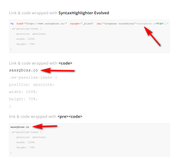
I hope this helps.Best regards,
MikeNovember 13, 2019 at 1:03 pm in reply to: contact form deavtivated error message Google Recaptcha #1156385Hi,
It works for me on desktop also, after scroll, is that what you wanted?Best regards,
MikeNovember 13, 2019 at 12:55 pm in reply to: Latest News widget — how to prevent time stamps from rendering? #1156379Hi,
I took a look at your page and see that one of your headers is for mobile and tablet:
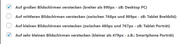
which is a large area to cover, perhaps making these two different headers would be better, or you could adjust with css like this:@media only screen and (min-width: 1024px) and (max-width: 1440px) { .av-parallax-inner { height: 70% !important; } }Best regards,
MikeNovember 13, 2019 at 12:20 pm in reply to: Latest News widget — how to prevent time stamps from rendering? #1156361Hi,
Sorry, I didn’t realize that you had a certain criteria that you wanted this to work in, I only saw that in your question you wanted to remove the date and time from your Latest News widget without using css.
Anyways in the function there is no $format there is $date and $time_format
you can read about these here: Formatting Date and Time
you can use an IF statement to trigger the function, please let us know if you want a hand writing an IF statement.Best regards,
Mike -
AuthorPosts
