Forum Replies Created
-
AuthorPosts
-
Hi,
Thank you for the feedback, I added$('#main .avia-breadcrumbs').append('<br/>');to solve the mobile featured image issue.
Adding the meta author be below the breadcrumbs broke the layout, so as you asked above I put it under the featured image.Best regards,
MikeHi,
This is becauseborder-width&border-stylehave both been set to zero or none, to add this to the code above it would look like this:.wc-block-grid__product-add-to-cart a.wp-block-button__link { background-color: red !important; color: white !important; border: solid 3px blue !important; } .wc-block-grid__product-add-to-cart a.wp-block-button__link:hover { background-color: green !important; color: yellow !important; border: solid 3px red !important; }Please adjust to suit, after applying the css, Please clear your browser cache and check.
Best regards,
MikeNovember 18, 2019 at 11:50 am in reply to: ADD MAPBOX INSTEAD OF GOOGLE MAP – MUCH NICER STYLE #1157816Hi,
Glad we were able to help, we will close this now. Thank you for using Enfold.For your information, you can take a look at Enfold documentation here
For any other questions or issues, feel free to start new threads in the Enfold forum and we will gladly try to help you :)Best regards,
MikeHi,
Overwriting theme files typically causes errors like this, please let us know if this solves.Best regards,
MikeHi,
Glad we were able to help, we will close this now. Thank you for using Enfold.For your information, you can take a look at Enfold documentation here
For any other questions or issues, feel free to start new threads in the Enfold forum and we will gladly try to help you :)Best regards,
MikeHi,
Glad we were able to help, we will close this now. Thank you for using Enfold.For your information, you can take a look at Enfold documentation here
For any other questions or issues, feel free to start new threads in the Enfold forum and we will gladly try to help you :)Best regards,
MikeHi,
Glad we were able to help, we will close this now. Thank you for using Enfold.For your information, you can take a look at Enfold documentation here
For any other questions or issues, feel free to start new threads in the Enfold forum and we will gladly try to help you :)Best regards,
MikeNovember 17, 2019 at 10:05 pm in reply to: Link parent page above nested subpages in sidebar navigation #1157691Hi,
Your code was a little off, I found this to work:
$sidebar_menu .= "<a href='". get_the_permalink($parent) ."'> <span class='parent_nav_menu'>".get_the_title($parent)."</span></a>";
notice I added a custom class “parent_nav_menu” to help with styling it with css, if you choose to.
I’m using a child theme so I put this code in my child theme functions.php:function avia_sidebar_menu($echo = true) { $sidebar_menu = ""; $subNav = avia_get_option('page_nesting_nav'); $the_id = @get_the_ID(); $args = array(); global $post; if($subNav && $subNav != 'disabled' && !empty($the_id) && is_page()) { $subNav = false; $parent = $post->ID; $sidebar_menu = ""; if (!empty($post->post_parent)) { if(isset($post->ancestors)) $ancestors = $post->ancestors; if(!isset($ancestors)) $ancestors = get_post_ancestors($post->ID); $root = count($ancestors)-1; $parent = $ancestors[$root]; } $args = array('title_li'=>'', 'child_of'=>$parent, 'echo'=>0, 'sort_column'=>'menu_order, post_title'); //enables user to change query args $args = apply_filters('avia_sidebar_menu_args', $args, $post); //hide or show child pages in menu - if the class is set to 'widget_nav_hide_child' the child pages will be hidden $display_child_pages = apply_filters('avia_sidebar_menu_display_child', 'widget_nav_hide_child', $args, $post); $children = wp_list_pages($args); if ($children) { $default_sidebar = false; $sidebar_menu .= "<a href='". get_the_permalink($parent) ."'> <span class='parent_nav_menu'>".get_the_title($parent)."</span></a>"; $sidebar_menu .= "<nav class='widget widget_nav_menu $display_child_pages'><ul class='nested_nav'>"; $sidebar_menu .= $children; $sidebar_menu .= "</ul></nav>"; } } $sidebar_menu = apply_filters('avf_sidebar_menu_filter', $sidebar_menu, $args, $post); if($echo == true) { echo $sidebar_menu; } else { return $sidebar_menu; } }If you are not using a child theme, try the step in the post note that line numbers are probably wrong so search by text.
Best regards,
MikeHi,
If the 404 option has been set, first change the “Select Your Custom Error 404 Page” to “Select Page”, so that the selection is none:
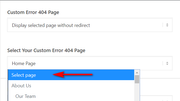
Then when you change the “Custom Error 404 Page” to “No custom 404 page selected” and the option above is hidden, it is not set to any page:
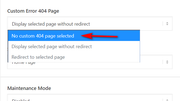
It looks like you changed the settings back to the way they were?Best regards,
MikeHey Tilman,
Thanks for the link, Please try this code in the General Styling > Quick CSS field or in the WordPress > Customize > Additional CSS field:.wc-block-grid__product-add-to-cart a.wp-block-button__link { background-color: red !important; color: white !important; } .wc-block-grid__product-add-to-cart a.wp-block-button__link:hover { background-color: green !important; color: yellow !important; }Please adjust the colors to suit, and after applying the css, Please clear your browser cache and check.
Best regards,
MikeNovember 17, 2019 at 9:02 pm in reply to: Hide price and hints for shipping costs and tax rate on product detail page #1157684Hi,
Glad we were able to help, we will close this now. Thank you for using Enfold.For your information, you can take a look at Enfold documentation here
For any other questions or issues, feel free to start new threads in the Enfold forum and we will gladly try to help you :)Best regards,
MikeHi,
Sorry for the late reply, I see that you have downgraded to v4.5.7 and now your site is working.
Is there anything else we can assist with?Best regards,
MikeHi,
Sorry for the late reply, Please try this code in the General Styling > Quick CSS field or in the WordPress > Customize > Additional CSS field:#top.home li.product.type-product > div > a > div.thumbnail_container { height: 165px !important; max-height: 165px !important; } #top.home li.product.type-product > div > a > div.inner_product_header { height: 112px !important; max-height: 112px !important; }After applying the css, Please clear your browser cache and check.
Best regards,
MikeNovember 17, 2019 at 8:25 pm in reply to: Reduce the space between top margin and first element #1157679Hey sanjamarinkson,
Sorry, but I was not able to login, please check password.
I assume that I must login to see the error, on /teaser/ correct?Best regards,
MikeHi,
I have removed your 404 redirect from the theme options, and cleared your cache and tested many of your links returning “home” each time with no errors, please clear your browser cache and check.Best regards,
MikeHi,
To remove the double titles please select this option from the “layout” column in the Classic Editor,
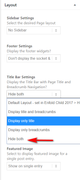
If this doesn’t help, please include an admin login in the private content area so we can be of more assistance.Best regards,
MikeHi,
Thanks for the login, I took a look at your page and added this css to your Quick CSS:@media only screen and (max-width:767px){ #top.home #av-layout-grid-2, #top.home #av-layout-grid-6,#top.home #av-layout-grid-8 { display: flex !important; flex-direction: column-reverse !important; } }Please clear your browser cache and check.
Best regards,
MikeHi,
Glad to hear this worked for you, we will close this now. Thank you for using Enfold.For your information, you can take a look at Enfold documentation here
For any other questions or issues, feel free to start new threads in the Enfold forum and we will gladly try to help you :)Best regards,
MikeHi,
Please try this code in the General Styling > Quick CSS field or in the WordPress > Customize > Additional CSS field:@media only screen and (max-width: 1200px) { #top #header_meta, #top #header_meta nav ul ul li, #top #header_meta nav ul ul a, #top #header_meta nav ul ul { background-color: #14396c !important; } }After applying the css, Please clear your browser cache and check.
Best regards,
MikeHi,
Sorry for the late reply and thanks for the lopgin, Please try this code in the General Styling > Quick CSS field or in the WordPress > Customize > Additional CSS field:#menu-item-64 a span .yz-primary-nav-area { opacity: 1 !important; display: inline-block !important; }this will show the menu item when logged in, when logged out the container is empty.
After applying the css, Please clear your browser cache and check.Best regards,
MikeHi,
Sorry for the late reply, I was able to login, and I see your two icon images in the media library, but I’m not sure which menu item this should be for on the homepage, or if it’s for a different page, please advise.Best regards,
MikeHi,
Thanks for the link to your site, I notice that your Whatsapp icon has a http link like this:http://1-555-555-5555please try using the tel link like this:tel://1-555-555-5555
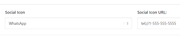
Please note that the number format is important if you want it to work with both IOS & Android, please read this article.
When I test this on my Windows localhost with Chrome, it seems to trigger the correct response:
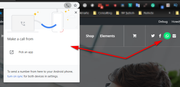
unfortunately, I don’t have an iPhone and I can’t connect my Android to my localhost, but I believe this will help, please try.Best regards,
MikeHey Roger,
Thank you for the link and screenshots, I also noticed that between 480px & 599px the social icons take space without showing pushing the language icons and burger menu over the logo, so I included a fix for this also.
Please try this code in the General Styling > Quick CSS field or in the WordPress > Customize > Additional CSS field:@media only screen and (max-width: 989px) and (min-width: 768px){ #top #header.av_header_glassy.av_header_transparency .social_bookmarks li, #top .av_header_glassy.av_header_transparency .social_bookmarks li a { border-color: rgba(255,255,255,.25); color: #fff; } #top #header.av_header_glassy #header_main .social_bookmarks li a { color: #9c9288 !important; border-color: transparent; background: 0 0; } } @media only screen and (max-width: 767px) and (min-width: 600px){ #top #header.av_header_glassy #header_main .social_bookmarks li a { color: #9c9288 !important; border-color: transparent; background: 0 0; } #top #header #header_main .avia-menu.av_menu_icon_beside { margin-right: 0 !important; } } @media only screen and (max-width: 599px) and (min-width: 480px){ #top #header.av_header_glassy #header_main .social_bookmarks { display: none !important; } }After applying the css, Please clear your browser cache and check.
Best regards,
MikeNovember 17, 2019 at 3:25 pm in reply to: Paragraph text all aligning left regardless of setting & custom CSS. #1157646Hi,
Glad to hear, thanks for using Enfold.
For your information, you can take a look at Enfold documentation here
For any other questions or issues, feel free to start a new thread and we will gladly try to help you :)Best regards,
MikeHi,
Glad to hear, we will close this now. Thank you for using Enfold.For your information, you can take a look at Enfold documentation here
For any other questions or issues, feel free to start new threads in the Enfold forum and we will gladly try to help you :)Best regards,
MikeHey fionayoung,
I recommend using a plugin such as Password Protected it is very easy to use. I also recommend checking the box at WordPress > Settings > Reading > Search Engine Visibility to ask Google to not index it.
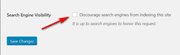
Best regards,
MikeNovember 17, 2019 at 1:05 pm in reply to: Hide price and hints for shipping costs and tax rate on product detail page #1157623Hey Jörg,
Thanks for the link and screenshot, Please try this code in the General Styling > Quick CSS field or in the WordPress > Customize > Additional CSS field:#top.single-product p.wc-gzd-additional-info,#top.single-product .legal-price-info { display:none !important; }After applying the css, Please clear your browser cache and check.
Best regards,
MikeHi,
Glad to hear we will close this now. Thank you for using Enfold.For your information, you can take a look at Enfold documentation here
For any other questions or issues, feel free to start new threads in the Enfold forum and we will gladly try to help you :)Best regards,
MikeHi,
Ok, I changed the blog post layout to Elegant and changed the script in the functions.php to:function move_breadcrumb_below_title() { ?> <script type="text/javascript"> (function($) { function a() { $('#main .avia-breadcrumbs').detach().insertAfter('h1.post-title.entry-title'); $('#main .post-meta-infos').detach().insertAfter('.big-preview.single-big'); } a(); })(jQuery); </script> <?php } add_action('wp_footer', 'move_breadcrumb_below_title');and added this css to the italian Quick CSS, you may need to add it to your other languages:
.html_elegant-blog #top .post-entry .post-meta-infos {
	margin-top: 0 !important;
}
#top.single span.av-vertical-delimiter {
	border-color: transparent; !important;
}
please clear your browser cache and check the link in the Private Content area.
Best regards,
Mike -
AuthorPosts