

Forum Replies Created
-
AuthorPosts
-
December 11, 2019 at 12:45 pm in reply to: Fullscreen Slider Video Playing at Low Resolution #1164799
Hi,
As this pertains to the video issue above I don’t believe that speeding up your site more will change this behavior, when I was testing on my localhost it didn’t.
But we do have an article about this please see part 4 for Defer parsing of JavaScript.Best regards,
MikeHi,
Sorry, I’m not seeing the same errors as in your screenshots, is this resolved?Best regards,
MikeDecember 11, 2019 at 12:17 pm in reply to: Layer sliders disappeared in whole site (Enfold) #1164793Hi,
Your site seems down right now, is this something you are working on?Best regards,
MikeHi,
Ok, please clear your browser cache and check the child theme now.Best regards,
MikeDecember 10, 2019 at 1:46 pm in reply to: Horizontal gallery one click to scroll horizontally #1164395Hi,
Thank you for the feedback, we do understand what you mean, I probably explained it in a technical way, sorry.
I have asked the team for advice on this, Thank you for your patience while we find a solution.Best regards,
MikeDecember 10, 2019 at 1:34 pm in reply to: About font upload cannot be deleted and the load button does not work #1164387Hi,
Thank you for the update, first I want to apologize for any misunderstanding, I have to use Google Translate for your language on your site & it is not always 100% correct.
Second, I’m glad to hear you have one issue solved, but I don’t seem to be able to check today because I’m getting a 404 for your site. Please see the screenshot in Private Content area.
Third, Enfold is compatible with WordPress v5.3, we have not seen this issue elsewhere.
So when your site is back online I will be happy to assist.Best regards,
MikeDecember 10, 2019 at 12:47 pm in reply to: Latest update broken the Styling and will not save any changes #1164376Hi,
Thanks for the feedback, as I pointed out before your web server is giving astatus of 403 (Forbidden)for your “customjs.js” file, and your error log for the 500 (internal server error) is showingThe WC_Cart::get_item_data function is deprecated since version 3.3.among many others.
You have a lot of customized functions and scripts, so I recommend having this looked at by your freelancer, these are not standard for WooCommerce or Enfold.
I wish I could help more but debugging customized scripts and functions is outside of our scope.Best regards,
MikeHi,
Glad to hear, but I’m not sure of the logo error, Please see the screenshot in Private Content area of what I see, perhaps you can explain a little further, screenshots are always welcomed.
To add a screenshot please try using https://postimages.org/ and pasting the image URL in your post.Best regards,
MikeHi,
The error looks like it may be coming fromaddtoany.com/menu/page.jsBest regards,
MikeHi,
Thank you, I found that the images in the sliders were in a different location for the update, so I corrected via FTP, but it seems all of your sliders are from the demo, did you have one you made for your site?
Also your Frontpage in the theme options is not set, please select.
We now have a script error, probably from an old plugin, can I disable your plugins temporarily? Please note some plugins may not retain their settings when disabled. Most do but I wanted to warn you.Best regards,
MikeHi,
Thanks for the login, but the typical login: /wp-admin/ is leading to a 404 for me.
Do you have a hidden login page, or are you blocking some IPs from your login?Best regards,
MikeHi,
Glad we were able to help, we will close this now. Thank you for using Enfold.For your information, you can take a look at Enfold documentation here
For any other questions or issues, feel free to start new threads in the Enfold forum and we will gladly try to help you :)Best regards,
MikeHi,
Thanks for the feedback, I recognize it is two different topics and glad you posted as such, I just happen to find both of them.
But with such an old version, and so many improvements over the years, I expect an update to solve.
If my update instructions are not clear we are happy to assist.Best regards,
MikeHi,
Glad this was some help,
I have tested this in our next update, v4.6.4 and not checking the option to “loop” works with all 3 player options, including “autoplay” but with autoplay videos will be muted.
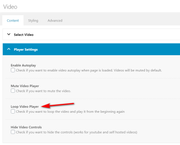
Shall we close this thread then?Best regards,
MikeDecember 9, 2019 at 4:00 am in reply to: What's the best way to build a "catalog" page (a page showing all my products)? #1163954Hey Thomas,
I gave this some thought, and first thought of the different elements we have but to match your page and have the images the right size with each book page showing the book info as described, I believe a plugin may be better for you, perhaps like MyBookTable Bookstore by Author Media it supports Amazon links and I saw all of your books are sold on Amazon.
I found this plugin here, so perhaps there is one you would prefer better.Best regards,
MikeHi,
You can use any email address and then just post the user login and the password in the Private Content area.
I believe these issues could be related to you theme is Enfold v3.8.3 with WordPress v5.3, please see my earlier reply in a different thread to you about this.
But we are happy to check.Best regards,
MikeHi,
Sorry for the late reply, It seems that your dev site and live site are the same url.
Please check.
Unfortunately, a page such as your /portfolio/ page may be better served by excluding the lazy load because of the javascript the page first loads the incorrect place holders for the images and then there is not enough room for the images when lazyload kicks in.
But seeing your live site without lazyload will help to see if this is as I recall.Best regards,
MikeHi,
Please include an admin login in the Private Content area so we can take a closer look.Best regards,
MikeHey eC,
“itemprop” would not affect seo, Google will grab the title and keywords before following the link to your sub-pages, this is normal for all pages. It is recommended to not overstuff your titles and links with keywords, it is best to let Google naturally find your sub-pages and it’s content.Best regards,
MikeHi,
I took a look at your site and it looks like the change Victoria make has corrected your javascript errors, I do see some 404’s for missing images, please try reselecting them.
I also see that you may have tried using the “Page Builder by SiteOrigin” plugin, it is why the page /early-life/ looks like code.
This plugin and Enfold are not a good match, please try using Enfold.
All of the pages I tested worked fine, please clear your browser cache and check.Best regards,
MikeHi,
I see that you are using Enfold v3.8.3 and WordPress v5.3 these are not expected to work together. You could update your Enfold via ftp, as long as your webhost sets your PHP version to at least 7.
The easiest and safest way to update is to download the newest version from Theme Forest and rename your current theme folder to “enfold-old” via ftp then upload the new “enfold” folder and check that your site is working correctly.
Once you are happy you can delete the “enfold-old” folder via ftp, (not the WP theme page)
Should for some reason you wish to roll-back to the old version, it’s easy to do, simply rename the new “enfold” folder to “enfold-new” via ftp and then rename “enfold-old” to “enfold” then refresh your page.
Please don’t try to overwrite the theme folder, as this will leave old files behind and cause errors.If you are unsure of doing this we can assist, but we will need your WordPress login also and your latest version of Enfold that you download from Theme Forest, you can upload to DropBox and add the like in the Private Content area.
Or you could “roll back” your WordPress version to about 4.98 with the plugin: WP Downgrade and prevent future updates with the plugin: Disable All WordPress Updates
But this is not a long term solution.Best regards,
MikeHey Andrew,
Glad to hear you have sorted this out. We will close this now. Thank you for using Enfold.For your information, you can take a look at Enfold documentation here
For any other questions or issues, feel free to start new threads in the Enfold forum and we will gladly try to help you :)Best regards,
MikeDecember 9, 2019 at 2:02 am in reply to: woocommerce-tabs in the products do not look the same as in the shop demo #1163940Hi,
Glad to hear, thanks for using Enfold.
For your information, you can take a look at Enfold documentation here
For any other questions or issues, feel free to start a new thread and we will gladly try to help you :)Best regards,
MikeHi,
Sorry you site is getting this error:
Failed to load resource: the server responded with a status of 503 ()
Please check with your webhost.Best regards,
MikeDecember 9, 2019 at 1:20 am in reply to: Woocommerce Bookings Availability – unwanted artefacts on load/placeholder #1163931Hi,
Sorry for the late reply, the login details are not working for me, please check.
So do you mean that you couldn’t find the file at /enfold/js/avia-snippet-cookieconsent.js?Best regards,
MikeHey Emmasfm,
Thanks for the link to your site, so when I look at your “blog” link in your menu I see a page with no content, so I can’t see any of your “posts” or your settings, to see where your issues are coming from. Enfold is a good blogging form, but we may need to change a few settings.
The sidebar “Pages” and “Categories” that you don’t want are probably just from the default demo, we can help adjust this for you.
Please include an admin login in the Private Content area so we can be of more assistance.Best regards,
MikeHi,
I took a look at your site and see that your Enfold theme is quite old, you will need to update via ftp and download the newest version from your Theme Forest account.The easiest and safest way to update is to download the newest version from Theme Forest and rename your current theme folder to “enfold-old” via ftp then upload the new “enfold” folder and check that your site is working correctly.
Once you are happy you can delete the “enfold-old” folder via ftp, (not the WP theme page)
Should for some reason you wish to roll-back to the old version, it’s easy to do, simply rename the new “enfold” folder to “enfold-new” via ftp and then rename “enfold-old” to “enfold” then refresh your page.
Please don’t try to overwrite the theme folder, as this will leave old files behind and cause errors.Best regards,
MikeHey jomo5280,
The “header-scrolled” class only occurs when the “Shrinking Header” is used, so you could use the custom “Header Size” with the “Shrinking Header” or you could use your solution which seems to be working fine.Best regards,
MikeHi,
Sorry for the late reply, and thanks for the login. I took a look at your settings, but I have a concern because many of your setting are not showing, such as your “start page”, “blog page”, WordPress “home page”, “blog page”, your “plugins” and “theme editor” (to see what custom functions are)
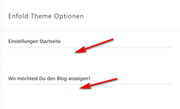
I can see you are using the JetPack plugin, so either you have a plugin that is causing a conflict, or you are using a “user ui” plugin. So please try disabling your plugins because there seems to be a conflict somewhere.Best regards,
Mike -
AuthorPosts
