

Forum Replies Created
-
AuthorPosts
-
Hey MarcusJeroch,
Thanks for the feedback, typically this is enabled if you notice the text doesn’t change on click only the button, which as point out is clear in it’s state.
I guess it’s like the saying “half full” or “half empty” so in a sense anything we write the would be wrong 50% of the time, right?Best regards,
MikeHey Blatze,
Thank you for reporting this, this has been addressed already for the next version. Thank you for using Enfold.Best regards,
MikeDecember 15, 2019 at 2:52 am in reply to: Inconsistent & differing versions of Enfold around? #1165971Hey pixopolis2222,
Sorry for the late reply, are you sure these are both from the same elements?
There are cookie statements about the different roles cookies are for and some are included with WordPress that we don’t have any control over and some plugins also include statements, the second one looks like it’s from a woocommerce page, while the first one looks like it is describing the role of “Essential Website Cookies” which is not about all cookies just the essential ones, it depends on the context that the statements are shown.
The good news is in the theme’s options under “Privacy and Cookies” you can adjust the cookie statements to suit your site needs.Best regards,
MikeHi,
Sorry for the late reply and thanks for the login, I have copied your page to my localhost and tested and found no issues, I was able to edit and save a few times and publish and click to view the pdf.
I see that you are using Enfold v4.2.3, which is kind of old now. Please update to v4.6.3.1 I’m sure you won’t have this issue.
I also see you are using PHP v5.6.40, please update to v7+
Please note that with your version of Enfold you will have to update via FTP, The easiest and safest way to update this is to download the newest version from Theme Forest and rename your current theme folder to “enfold-old” via ftp then upload the new “enfold” folder and check that your site is working correctly.
Once you are happy you can delete the “enfold-old” folder via ftp, (not the WP theme page)
Should for some reason you wish to roll-back to the old version, it’s easy to do, simply rename the new “enfold” folder to “enfold-new” via ftp and then rename “enfold-old” to “enfold” then refresh your page.
Please don’t try to overwrite the theme folder, as this will leave old files behind and cause errors.Best regards,
MikeHi,
Thank you for the feedback, after researching about PodLove some more I found that you will need to create a custom taxonomy by using this function:add_theme_support('add_avia_builder_post_type_option'); add_theme_support('avia_template_builder_custom_post_type_grid');and then add your taxonomy to the episodes, but not your pages, then if you use the ALB or shortcodes and choose that taxonomy it will only show your episodes and not the pages. Such as in this example.
So we can understand better, are you using the blog post element in the Advanced Layout Builder to create your episode grid pages, or are you using PodLove shortcodes to create the grid?
[podlove-episode-list]If you are using PodLove shortcodes, then there must be variables that you can add to the shortcodes to filter what is shown, in which case please ask the PodLove support, because we don’t know their shortcodes. Or are you using a template like this? If that is the case then I would think that the PodLove support would have a filter for that too.Best regards,
MikeDecember 15, 2019 at 12:42 am in reply to: Woocommerce: Advanced Layout Builder without Gallery function?! #1165966Hey Mike,
Sorry for the late reply, this is true, you will need to use the default editor to edit the woocommerce panels to add these special woocommerce elements. This is how woocommerce is setup.Best regards,
MikeHey linktotheme,
Sorry for the late reply, I’m not too sure if I saw this because it flashed very quickly, but unfortunately these types of options have been removed from the YouTube API, your only option is to use a different service such as Vimeo or self-host the video on your site.Best regards,
MikeDecember 15, 2019 at 12:15 am in reply to: Problem, after activating the Enfold: Creating default object…Layerslider.php #1165960Hi,
Sorry for the late reply, and thanks for the login, I have installed Enfold on many sites but have not seen this before, perhaps your webhost doesn’t have the PHP ZipArchive Extension enabled so the LayerSlider didn’t extract correctly? Please include ftp access in the Private Content area because I’d like to try activating the theme and see what is going on, and fix it. While I’m doing this do you want one of the demos installed? I could do this also to ensure you don’t have further snags.Best regards,
MikeHi,
Sorry for the late reply I was able to login to your site but I can’t see your theme settings because it is not an admin login, please upgrade our access.
So when installing a demo you will need to choose one that you most like, such as the Enfold Church Demo, and then to get a page from another demo you like such as the home page of Enfold Shop we can assist with the shortcode by using the Avia Layout Builder Debugger we can turn this on for you if we have full admin access and the WordPress > Appearance > Editor option is visible.
Please note that for the Shop pages you will need to install the WooCommerce plugin it is free and creates the “store”
It may be easier to install woocommerce, then the Shop Demo, then add a page or two from the Church Demo, only because there are a lot of settings in the Shop Demo if you plan on setting up an online store. We can try either way, is an online store your main goal or do you only want to sell a couple of items?Best regards,
MikeHi,
Glad to hear you have been able to sort this out.
We will close this now. Thank you for using Enfold.For your information, you can take a look at Enfold documentation here
For any other questions or issues, feel free to start new threads in the Enfold forum and we will gladly try to help you :)Best regards,
MikeHi,
I have made an adjustment and tried to clear your site cache, it is working for me, please clear your browser cache and check.Best regards,
MikeHi,
Sorry for the late reply, your site is not loading for me but since you are not seeing the “Custom Font Manager” I assume that your theme is quite old, this is what you should be seeing:

Please try updating and then you should have many updates and options.Best regards,
MikeHi,
Sorry for the late reply, I have checked on Safari and it seems to be showing fine
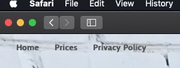
I hope that helps! If you have any other questions or issues, please register to our support forum – https://kriesi.at/support/register/ and start a new thread under Enfold sub forum – https://kriesi.at/support/forum/enfold/#new-post :)Best regards,
MikeDecember 14, 2019 at 10:13 pm in reply to: Problem with slider menu overlaying video and preview image under slide on mobil #1165940Hi,
Ok I will try to reinstall the theme, but I thought the ftp access was posted above but now see it is not, please include ftp access in the Private Content area.Best regards,
MikeHi,
Sorry for the late reply, the dev team is testing a solution for the missing social icons and plans to release a fix in the next day or two.
It seems to be coming from WordPress 5.3.1 formatting.php
I will post the solution here when the dev team releases it.
Thank you for your patience.Best regards,
MikeDecember 14, 2019 at 9:47 pm in reply to: Two Team Members inside Accordion which is in a 2/3 column moves 1/3 column #1165936Hi,
Sorry for the late reply, I have examined your test page and it seems the team elements in the accordion that was inside of two 1/2 elements with “equal height” was braking the layout due to nesting. Removing the “equal height” from the columns corrected, but left the second column lower than the first, by default you can not adjust the second column alone. CSS would have been a good solution here if the columns had custom classes, but I found another workaround in this case. You can view the test page now and the shortcode in the text file in the Private Content area, what I did was make the columns “individual height” and in the “custom margin” of the first column I set it to “zero” to remove the normal top margin for both columns, and then for the padding I set the top padding to 30px for the first column and 0px for the top padding of the second column which made them equal.As an alternative, If you are familiar with CSS, I would recommend adding a custom class for the second column and making the columns “individual height” and then writing css to add -30px to the second column, I would have found that easier.
Best regards,
MikeDecember 14, 2019 at 8:13 pm in reply to: cookieconsent.js causig troubleshoot on Safari with TesimonialPro plugin #1165928Hey Sirpa,
Sorry for the late reply and the details, I took a look at your two links and the console errors and I found:
(index):281 Uncaught SyntaxError: Unexpected token 'if'which is from a custom script in your functions.php:
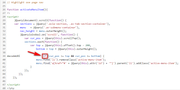
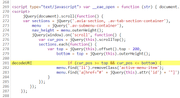
and(index):20 Uncaught ReferenceError: ga is not defined
which is being adding by the wpSEO plugin:
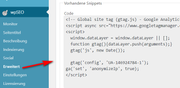
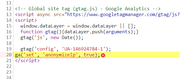
but neither of these are coming fromavia-snippet-cookieconsent.jsas suggested above nor are they standard to Enfold.
So I’m not sure if I’m understanding your question correctly or how we can assist.Best regards,
MikeDecember 14, 2019 at 7:24 pm in reply to: Probleme mit Avia Layout Builder und Seite ist sehr langsam geworden #1165920Hi,
Sorry for the late reply, and thanks for the login, I have reviewed your site and now find no errors, such as in your screenshots, everything seems to now work properly. Do you intend to import one of the demos?
Would you like help with this?Best regards,
MikeHi,
Sure, 1: download the file, (I recommend you do that now and save it to your computer)
2: rename\enfold\config-templatebuilder\avia-shortcodes\gallery_horizontal\gallery_horizontal.jstogallery_horizontal.js.old(as a backup)
3: upload the new file.
4: clear your browser and site cache.Best regards,
MikeDecember 14, 2019 at 6:45 pm in reply to: Problem with slider menu overlaying video and preview image under slide on mobil #1165915Hi,
Thanks for the feedback, I tried to investigate this further by recreating your page on my localhost in the same version with the same element settings using your video and fallback image, and the fallback image showed on mobile screen sizes without the video and the video showed on desktop without the fallback image, in short it worked correctly.
I even tried installing your “Widget Options” plugin to test for a conflict, but found none.
I also tested this on our next version that should be released soon and found no errors.
So I’m not sure why this is happening for you, but I added this css to your Quick CSS for now so your homepage video will work for you:.avia-slide-wrap > p.av-fallback-message { display: none !important; }Please clear your browser cache and check.
I recommend removing this css after the next update and adding the fallback image to check that the slider then works correctly.
The only other thing I can think of is to re-upload your theme now, do you want us to try that, or wait for the update?Best regards,
MikeHi,
Thank you for the logins, I uploaded the file I linked above to:\enfold\config-templatebuilder\avia-shortcodes\gallery_horizontal\gallery_horizontal.jsI left a copy of the original asgallery_horizontal.js.old
It is now working, please clear your browser cache and check.
As I wrote above I was not able to deregister the original script and add this to your child theme, so please follow this step again after your next update.
https://www.dropbox.com/s/xyvr4ub6aktg9p9/gallery_horizontal.js?dl=0Best regards,
MikeHi,
There seems to be a conflict with a plugin on your site, but I can not be sure because your site doesn’t allow us access to your plugin page, I get this error:Du bist leider nicht berechtigt, auf diese Seite zuzugreifen.
Also as I pointed out before your theme settings for your “start page” and “blog page” are not showing
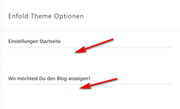
and your WordPress settings for your “start page” and “blog page” are not showing, which should look like this:
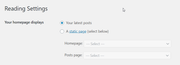
I checked your Podlove plugin for a setting to choose which items are chosen to show on your homepage but found none.
I assume that Podlove is assigning the custom template that is creating the pages in your menu that you don’t want to show on your homepage, but I don’t see the setting and you “post”, pages” and “portfolio” admin pages are all empty, yet there are more grid items than are showing in your “episodes” admin page.
I’m starting to believe that you have a user security plugin and we don’t have full access to your site, is this correct?Best regards,
MikeHi,
Sorry for the late reply, I changed the code only on the German homepage, and I just checked again and see both the German and English are correct.
Except both mp4’s are audio only.Best regards,
MikeHi,
Sorry for the late reply, I copied your post /learning-spanish-101/ to my localhost and matched your blog and theme settings, and your Simple Image Size plugin settings, and once I regenerated my thumbnails the featured image was not cropped, Please see the screenshot in Private Content area. So seeing that this worked I then tried to regenerate your thumbnails but the process seemed to lock up without any errors, so I tried uploading a new copy of the featured image and choose it for your post and the new image was not cropped. I believe this is going to work for you for future posts, please try creating a new test post and upload a new featured image to check.Best regards,
MikeHi,
Sorry for the late reply, thank you for creating a test page and enabling the debugger. So I see the error on your CPT test page, I copied the shortcode to my localhost and created a standard page and the error didn’t occur, I then created a standard page test page on your site and the error didn’t occur there either, please see link in the Private Content area.
I then created another CTP test page on your site and the error did occur again, I noticed that in your pages you do not have the “Enfold Shortcode Parser” option in the screen options at the top of the page, and it is not showing below the debugger.
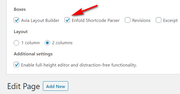
But I did test your shortcode in mine and got no errors:
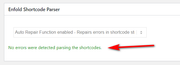
So since you have already tested with your plugins deactivated, I believe this seems to be connected to your CPT, but I don’t know why.Best regards,
MikeHi,
Sorry, I couldn’t login to WP or your sftp, to take a closer look, please check.Best regards,
MikeHi,
@Dani
Thanks for the links, so on your homepage in the masonry portfolio I’m not seeing the Font Awesome code where you want the icons to show:<i class="fas fa-ruler-horizontal">did you add this?
I would ask for a admin login to check, but as this is not your thread your details will not be private.
I recommend opening a new thread with this is the Private Content area.Best regards,
MikeDecember 12, 2019 at 1:12 pm in reply to: Problem with slider menu overlaying video and preview image under slide on mobil #1165195Hi,
Sorry for the late reply, and thanks for the login, I have been looking into the fallback image, and noticed that the slider video always loads on my Android device, but I don’t have an iPhone. Do you find it always loads for you also, I recommend removing the fallback image and check while we can check into this further.Best regards,
MikeHi,
I have taken a look at your slider and notice that at my full width screen (1536×864) your slide images are returning a 404, this is for all of the images that end with: (1920×576.jpg) such as: (willkommen-1920×576.jpg)
But at a smaller screen width such as (1440×781) the images used are (willkommen.jpg)
So when the layerslider is set to “ls-device-is-desktop” the images are 404’s
I’m not sure your actual layerslider settings, perhaps you meant to use different sized images for different screen widths, or if this setting was automatically by layerslider, but if these images were there they would show.So, if you could include admin login in the Private Content area we could check your settings, or if you include ftp access we could ensure that the files were in the correct location.
Best regards,
Mike -
AuthorPosts
