

Forum Replies Created
-
AuthorPosts
-
December 16, 2019 at 12:32 am in reply to: How to insert an image in the widget title of the footer #1166204
Hi,
Glad to see you have found a solution, shall we close this then?Best regards,
MikeHi,
Glad we were able to help, we will close this now. Thank you for using Enfold.For your information, you can take a look at Enfold documentation here
For any other questions or issues, feel free to start new threads in the Enfold forum and we will gladly try to help you :)Best regards,
MikeHi,
Sorry for the late reply, I have updated both site for you, I left your old theme files on both sites in a folder called “enfold-old” until you have a chance to test so we have the opportunity to roll back if need be.
Once you are satisfied that the new theme version will not cause any issues with your plugins or custom scripts you can delete the folders “enfold-old”
I also included an icon fix that was released today in the file “function-set-avia-frontend.php” so if you see any posts about this you will know you already have it.
After you check the sites please let us know that we can close this thread, thank you for your patience and using Enfold.Best regards,
MikeHi,
Sorry for the late reply, the dev team has just released this to fix the missing icons please upload the following file via FTP to
\enfold\framework\php\function-set-avia-frontend.php
https://www.dropbox.com/s/gmbg5202rjz1vou/function-set-avia-frontend.php?dl=0
Please save a copy of your old file should you encounter an upload error.
Then clear your browser cache and any cache plugin, and check.Best regards,
MikeHey massiglia,
Sorry for the late reply, I couldn’t see your site because it is in maintenance, if you added the css to your child theme stylesheet and your Enfold Theme Options > Performance > JS & CSS file merging and compression is on then your compressed css file didn’t get updated, to solve go to your Enfold Theme Options > General Styling > Quick CSS field and enter a blank space and save your theme settings, this will force the file to be rebuilt. Then clear your browser cache and any cache plugin, and check.
If you can’t see any icons, the dev team has just released this to fix the missing icons please upload the following file via FTP to
\enfold\framework\php\function-set-avia-frontend.php
https://www.dropbox.com/s/gmbg5202rjz1vou/function-set-avia-frontend.php?dl=0
Please save a copy of your old file should you encounter an upload error.
Then clear your browser cache and any cache plugin, and check.Best regards,
MikeHi,
Sorry for the late reply, so I updated your instagram social icon in your functions.php on line 247:
from:
'instagram' => array( 'font' =>'entypo-fontello', 'icon' => 'ue909'),
to:
'instagram' => array( 'font' =>'fontello', 'icon' => 'uf16d'),
but your icon was still not showing because of a small issue we had with WordPress changing a file, so I also updated yourfunction-set-avia-frontend.phpfile for this and now it is working

Please clear your browser cache and check.Best regards,
MikeHey vbonora,
Sorry for the late reply, I see that your social icons are not showing in the av-share-box, the dev team has just released this to fix the missing icons please upload the following file via FTP to
\enfold\framework\php\function-set-avia-frontend.php
https://www.dropbox.com/s/gmbg5202rjz1vou/function-set-avia-frontend.php?dl=0
Please save a copy of your old file should you encounter an upload error.
Then clear your browser cache and any cache plugin, and check.Best regards,
MikeHi,
Glad to hear you have been able to sort this out.
Thank you for using Enfold.Best regards,
MikeHi,
Sorry for the late reply, the dev team has just released this to fix the missing icons please upload the following file via FTP to
\enfold\framework\php\function-set-avia-frontend.php
https://www.dropbox.com/s/gmbg5202rjz1vou/function-set-avia-frontend.php?dl=0
Please save a copy of your old file should you encounter an upload error.
Then clear your browser cache and any cache plugin, and check.Best regards,
MikeHey Jillian,
Sorry for the late reply, the dev team has just released this to fix the missing icons please upload the following file via FTP to
\enfold\framework\php\function-set-avia-frontend.php
https://www.dropbox.com/s/gmbg5202rjz1vou/function-set-avia-frontend.php?dl=0
Please save a copy of your old file should you encounter an upload error.
Then clear your browser cache and any cache plugin, and check.Best regards,
MikeDecember 15, 2019 at 10:28 pm in reply to: social icons image dissapear but the link and the background color stay #1166151Hi,
Sorry for the late reply, the dev team has just released this to fix the missing icons please upload the following file via FTP to
\enfold\framework\php\function-set-avia-frontend.php
https://www.dropbox.com/s/gmbg5202rjz1vou/function-set-avia-frontend.php?dl=0
Please save a copy of your old file should you encounter an upload error.
Then clear your browser cache and any cache plugin, and check.Best regards,
MikeHi,
Sorry for the late reply, the dev team has just released this to fix the missing icons please upload the following file via FTP to
\enfold\framework\php\function-set-avia-frontend.php
https://www.dropbox.com/s/gmbg5202rjz1vou/function-set-avia-frontend.php?dl=0
Please save a copy of your old file should you encounter an upload error.
Then clear your browser cache and any cache plugin, and check.Best regards,
MikeHi,
Sorry for the late reply, to fix the missing icons please upload the following file via FTP to
\enfold\framework\php\function-set-avia-frontend.php
https://www.dropbox.com/s/gmbg5202rjz1vou/function-set-avia-frontend.php?dl=0
Please save a copy of your old file should you encounter an upload error.
Then clear your browser cache and any cache plugin, and check.Best regards,
MikeHi,
Sorry for the late reply, to fix the missing icons please upload the following file via FTP to
\enfold\framework\php\function-set-avia-frontend.php
https://www.dropbox.com/s/gmbg5202rjz1vou/function-set-avia-frontend.php?dl=0
Please save a copy of your old file should you encounter an upload error.Best regards,
MikeHi,
Sorry about that, it used to work, anyways I’ve got another that does work I just tested it.
Try adding this code to the end of your functions.php file in Appearance > Editor:/* related posts shortcode = [rpost] */ function related_posts_shortcode( $attr ) { ob_start(); get_template_part( 'includes/related-posts' ); return ob_get_clean(); } add_shortcode( 'rpost', 'related_posts_shortcode' );then in a code block element use this shortcode
[rpost]
please ensure your post has a tag that some other post share.Advanced Layout Builder posts don’t show this element, only default posts show this.
Best regards,
MikeHi,
The featured image is not loading for you? I tested in Chrome, Firefox, Edge & IE11 with no issues, which browser are you using?Best regards,
MikeDecember 15, 2019 at 8:52 pm in reply to: Problem Showing FontAwesome in excerpt of masonry portfolio element #1166137Hi,
Sorry for the late reply, I tested Emoji’s in the excerpt and they work
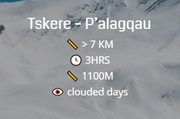
I got them from Emoji Terra just copy the Emoji image and paste 📏 🕓 👁️Best regards,
MikeHi,
Sorry for the late reply, I’m not sure what your question is, as I read the thread @Basilis says it can not be done?Best regards,
MikeDecember 15, 2019 at 7:53 pm in reply to: menu on two lines and the first and second line change position. How to fix. #1166129Hi,
Sorry for the late reply, in the first post you asked to have your menu split into two lines, but where do you want the two lined menu, on the right side of the page in the same line as the logo? Or below the logo like in your first screenshot?
Please include a mockup of what you are trying to accomplish.
In your last screenshot the menu is below the logo and full width, this can be done with one of the built-in header layouts at: Enfold > Header > Header Layout > Menu and Logo Position
called Logo left, Menu below:

Right now your menu is to the right of your logo and fits well because there are only 5 items, do you plan to add more?
I was not able to login to your site because the user is unknown, please check.
If you would like to see our documentation on our header layouts, please see here.Best regards,
MikeHi,
Sorry for the late reply, it looks like all of your posts are built using the Advanced Layout Builder, so you will have to add the related entries shortcode to each post in a code block element.
[avs_related_entries]Best regards,
MikeHi,
Sorry for the late reply, unfortunately as it is right now the columns are using the “equal height” option so we can’t override the script, if you use the “individual height” option and give the first one a custom class, and the other three a different custom class we should be able to do this, but this may also affect how the content of the columns look, I’m not sure until we try.Best regards,
MikeDecember 15, 2019 at 4:10 pm in reply to: How do I show portfolio categories on a portfolio item? #1166094Hi,
Sorry for the late reply, in your output above there is a space after the term and before the</a >$output .= '<span class="portfolio_cat"><a href='.$termlink.'>'.$term->name.' </a></span>';please try moving the space to the other side, like this:
$output .= '<span class="portfolio_cat"><a href='.$termlink.'> '.$term->name.'</a></span>';Then clear your browser cache and any cache plugin, and check.
Best regards,
MikeDecember 15, 2019 at 3:48 pm in reply to: Font (Quicksand) not displaying correctly in Firefox #1166089Hi,
Glad we were able to help, we will close this now. Thank you for using Enfold.For your information, you can take a look at Enfold documentation here
For any other questions or issues, feel free to start new threads in the Enfold forum and we will gladly try to help you :)Best regards,
MikeHi,
Thank you for enabling the login, I have Enabled the Avia Layout Builder Debugger in your child theme functions.php, now you will see a new text field below the Advanced Layout Builder, here you can copy and paste the raw shortcodes for elements and pages. Please note that this shortcode needs to be in Plain Text, be careful of “curly quotes” & special characters from some text editors.It sounds like you would like to copy many pages from a few demos, so I recommend installing another instance of Enfold on a localhost or on a testing sub-domain, we allow a sub-domain “staging” or “testing” install and often recommend this practice for testing updates before updating your live site. On your testing site you can import a demo and use the debugger to copy the shortcode to your live site, and then use a reset plugin before importing a different demo. Please note every demo will overwrite your site, so please don’t try to import multiple demos to your live site.
Also the images in the shortcode are not copied when you do this, so if you want the images you will have to move them manually. The same is true for custom css, although all of the elements settings and options, such as background color, padding, and margins, that are made within the element is copied over because that css in inline.When you want to import the “Shop Demo” on your testing site, please install woocommerce before you import the shop demo so all of the settings are imported.
Now about your child theme and adding css to the stylesheet, each time you add css to the child theme stylesheet the theme settings needs to be saved again so the compressed css file is updated, simply saving the stylesheet will not do this.
I recommend turning the Enfold Theme Options > Performance > JS & CSS file merging and compression off while you are building your site, or using the Enfold Theme Options > General Styling > Quick CSS field until you are done and then moving your css to the child theme stylesheet, or after adding css to the child theme stylesheet you can add a blank line to the Quick CSS and save the theme settings to force the file to be rebuilt.Well, that is all I can think of that you might need to know for this to go quickly and smoothly for you, but if you have any questions we are happy to help.
Best regards,
MikeDecember 15, 2019 at 1:43 pm in reply to: Google maps dose not showing "Maps where disable by visitor…" #1166069Hey flomojoe,
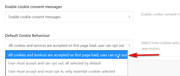
Sorry for the late reply, please try selecting “All cookies and services are accepted on first page load, user can opt out” which is the top option at Enfold Theme Options > Cookie Consent > Default Cookie Behaviour
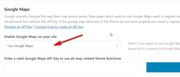
Please also check that “Use Google Maps” is selected at Enfold Theme Options > Google Services > Google Maps > Enable Google Maps on your site
Best regards,
MikeHey roamingk,
Sorry for the late reply, Please try this code in the General Styling > Quick CSS field or in the WordPress > Customize > Additional CSS field:.iconlist_icon,.iconlist-char { -webkit-animation: none !important; animation: none !important; -webkit-transform: scale(1) !important; -ms-transform: scale(1) !important; transform: scale(1) !important; opacity: 1 !important; }Then clear your browser cache and any cache plugin, and check.
Best regards,
MikeHi,
Sorry for the late reply, was this font uploaded with an older version of Enfold and then you updated?
Please try removing the custom font, save, clear all caches and reload the site, then try uploading again to see if this corrects.Best regards,
MikeDecember 15, 2019 at 12:42 pm in reply to: Font (Quicksand) not displaying correctly in Firefox #1166031Hey Cleverreisenmitkids,
Sorry for the late reply, I believe that your font is not quite right,
Chrome is typically more forgiving than other browsers. I recommend downgrading the font from the link in the Private Content area, I tested this one on my localhost in Edge, FireFox & Chrome.
and upload it to your site at:
Enfold Theme Options > Import/Export > Custom Font Manager

Then choose the new Quicksand in your Enfold Theme Options > Advanced Styling it will be at the bottom of the list:

ensure you choose the elements you want this font to show as, such as “H3”, or “all headings”, etc.
Then clear your browser cache and any cache plugin, and check.Best regards,
MikeHi,
PHP v5.6.40 had been the minimum version for WordPress until recently when WordPress started “recommending” v7+, so v5.6.40 may still work. Typically if you contact your webhost they will update your PHP, webhosts have known about this update for well over a year now.
The Enfold changelog is here.
It looks like most of your plugins are quite old and need updating too, I recommend disabling all of them before updating, and after updating enable one at a time and update each.
Also ask your webhost to create a full backup for you, this way if something goes wrong they can restore your site for you, this is also a common service webhosts will do for free.Best regards,
MikeDecember 15, 2019 at 11:24 am in reply to: Two Team Members inside Accordion which is in a 2/3 column moves 1/3 column #1166023Hi,
Glad we were able to help, we will close this now. Thank you for using Enfold.For your information, you can take a look at Enfold documentation here
For any other questions or issues, feel free to start new threads in the Enfold forum and we will gladly try to help you :)Best regards,
Mike -
AuthorPosts
