

Forum Replies Created
-
AuthorPosts
-
Hey wtek,
Please try this code in the General Styling > Quick CSS field or in the WordPress > Customize > Additional CSS field:#top .main_color .avia-color-theme-color-highlight { color: #ffffff; border-color: #ffffff; background-color: #000 !important; }and adjust the colors to suit, then clear your browser cache and any cache plugin, and check.
Best regards,
MikeHi,
We will close this now. Thank you for using Enfold.For your information, you can take a look at Enfold documentation here
For any other questions or issues, feel free to start new threads in the Enfold forum and we will gladly try to help you :)Best regards,
MikeHi,
I see gray squares in the sub-menu? Perhaps I’m looking in the wrong area, I’m looking at the main menu > sub-menu on the homepage
Please see the screenshot in Private Content area.Best regards,
MikeHi,
Glad to hear, when you add css to the “style.css” located in appearance/theme-editor and you have the css & js file merging enabled you will also need to save the theme settings to force re-building of the merged file.The merged files only update then the theme settings are updated, such as clicking the big blue button “save all changes”, saving the style.css file doesn’t update the merged files.
If the save button is not clickable, try adding a blank space into the Quick CSS field to activate the button.
I hope this helps explain what is happening.
Unless there is anything else we can assist with on this issue, shall we close this then?Best regards,
MikeHi,
Glad we were able to help, we will close this now. Thank you for using Enfold.For your information, you can take a look at Enfold documentation here
For any other questions or issues, feel free to start new threads in the Enfold forum and we will gladly try to help you :)Best regards,
MikeJanuary 12, 2020 at 9:16 pm in reply to: Gallery thumbnail hover effect: zoom instead of fade #1172572Hi,
I see that your page is now a masonry item, do you have another page with a gallery item to test with? To apply this to only one or some gallery items you would add a custom class to the gallery and then include the custom class in the css.Best regards,
MikeHi,
The dev team has worked on this for the next version and in the Private Content area I have included the files for you to test.
You will have to have the beta version of Enfold for this to work, so I also include this also.
You will also have to include a filter in your functions.php to assign the post links for Yelp for the in-post social links.
This is the link to the filter example
I recommend setting up a staging site to test this on.Best regards,
MikeJanuary 12, 2020 at 7:21 pm in reply to: Gallery thumbnail hover effect: zoom instead of fade #1172559Hey mihand78,
To have the zoom effect on the gallery please try this css in your Quick CSS:.avia-gallery-thumb a { -webkit-animation: in 1s; } .avia-gallery-thumb a:hover { -webkit-animation: out 1s; } @-webkit-keyframes in { from { -webkit-transform: scale(1.05,1.05); } to { -webkit-transform: scale(1.05,1.05);} } @-webkit-keyframes out { 0% { -webkit-transform: scale(1.05,1.05); } 100% { -webkit-transform: scale(1.05,1.05); } } #top .avia-gallery .avia-gallery-thumb a:hover { opacity: 1 !important; }Best regards,
MikeHi,
@dondela
I added the link to another one of your threads in the Private Content area.Best regards,
MikeHi,
Thank you for the login, I added this css in your child theme stylesheet:/*sub-menu-bullets*/ #top .av-main-nav ul a:before{ content: url('https://voltaris.de/redesign2020/wp-content/uploads/2020/01/aufzaehlung-footer.jpg'); padding-right: 5px; }Please clear your browser cache and check.
Best regards,
MikeHi,
Sorry for the late reply and thanks for the login. I added this css to your Quick CSS:#top.home #av_section_1 > .av-section-color-overlay-wrap { background: url(//your-site.ca/wp-content/themes/enfold/images/background-images/diagonal-thin-dark.png) center center repeat scroll; }Please clear your browser cache and check.
Best regards,
MikeHi,
I found the url in your Enfold Theme Options > Header > Transparency Options > Transparency Logo so you can replace your transparent logo or remove it.Best regards,
MikeHi,
Glad we were able to help, we will close this now. Thank you for using Enfold.For your information, you can take a look at Enfold documentation here
For any other questions or issues, feel free to start new threads in the Enfold forum and we will gladly try to help you :)Best regards,
MikeHey phouthuijzen,
Sorry for the late reply, Try adding this code to the end of your functions.php file in Appearance > Editor:function custom_checkout_page(){ ?> <script> (function($){ $(document).ready(function(){ $( "#top.woocommerce-checkout .woocommerce-shipping-fields" ).appendTo( ".col-1" ); $( "#top.woocommerce-checkout .woocommerce-additional-fields" ).appendTo( ".col-1" ); $( "#top.woocommerce-checkout #order_review_heading" ).appendTo( ".col-2" ); $( "#top.woocommerce-checkout #order_review" ).appendTo( ".col-2" ); }); })(jQuery); </script> <?php } add_action('wp_footer', 'custom_checkout_page');Best regards,
MikeHi,
Please try this code in the General Styling > Quick CSS field or in the WordPress > Customize > Additional CSS field:#top.home #av_section_6 > div > div > div > div > div.flex_column.avia-builder-el-51 > div > div.avia-content-slider-inner { height: 135px !important; }Best regards,
MikeHi,
Sorry for the late reply, in this thread a couple of solutions were provided, but it seems the css solution was the one used in the end.
If this doesn’t help you then please explain what you are trying to achieve and link to an example so we can assist.Best regards,
MikeHey adGroupMarketing,
Sorry for the late reply, I see from your screenshot that your browser width seems to be about 1024px, I also see that your mobile menu is active until about 988px, would you like the mobile menu to stay active until 1100px where the main menu will be all on one line?
If so please try this code in the General Styling > Quick CSS field or in the WordPress > Customize > Additional CSS field:@media only screen and (max-width: 1100px) and (min-width: 768px) { .responsive #top .av_mobile_menu_tablet .av-main-nav .menu-item { display: none !important; } .responsive #top .av_mobile_menu_tablet .av-main-nav .menu-item-avia-special { display: block !important; } .responsive #top #wrap_all .av_mobile_menu_tablet .main_menu { top: 0; left: auto; right: 0; display: block !important; } .responsive #top .av_mobile_menu_tablet #header_main_alternate { display: none !important; } } @media only screen and (max-width: 1100px) and (min-width: 989px) { .responsive.html_mobile_menu_tablet.html_header_top #top #main { padding-top: 150px !important; margin: 0; } }To have less space between sub-menu items, please try this css:
#top #menu-supermarket-shop.av-subnav-menu > li > a {
    padding: 0px 5px 0px 5px !important;
}
To make your sidebar widget bullet points a down arrow, please try this css:
#top .widget_nav_menu ul ul li:before {
    content: "\2BC6" !important;
}
The missing social icons was due to a change the WordPress v5.2.3 core files, I have applied the patch to your site so they now show.
Please check these solutions and once you are satisfied we will look at your other issues, typically we ask that you create one thread for each issue because it makes it easier to address and for other users to find solutions, thank you for your understanding and patience.Best regards,
MikeHi,
Thanks for the login, I see on your live site you are using Enfold v3.4.7 with WordPress v5.3.2, which are not compatible.
You will have to update via FTP, The easiest and safest way to do this is to download the newest version from Theme Forest and rename your current theme folder to “enfold-old” via ftp then upload the new “enfold” folder and check that your site is working correctly.
Should for some reason you wish to roll-back to the old version, it’s easy to do, simply rename the new “enfold” folder to “enfold-new” via ftp and then rename “enfold-old” to “enfold” then refresh your page.
Once you are happy you can delete the “enfold-old” folder via ftp, (not the WP theme page)
Please don’t try to overwrite the theme folder, as this will leave old files behind and cause errors.If you don’t feel comfortable doing this, please include FTP access in the Private Content area with a DropBox link to your theme files from Theme Forest and I will assist.
As for your localhost issues it sounds like your PHP setting are too low, try these:
PHP Time Limit: No limit
PHP Memory Limit: 256M
PHP Post Max Size: 50M
PHP Max Upload Size: 20M
but as we can’t investigate your localhost it will be hard to assist, perhaps we should update your live site.Best regards,
MikeHi,
I believe you have this code in your functions.php:add_filter('avf_logo_subtext', 'kriesi_logo_addition'); function kriesi_logo_addition($sub) { $sub .= 'image url here'; return $sub; }or something very similar, if you find it try removing it if it has the url I posted above.
If you don’t find it, please include an admin login in the Private Content area so we can be of more assistance.Best regards,
MikeHi,
Sorry, I get this error when I try to login:Unbekannter Benutzername. Überprüfe ihn noch einmal oder versuche es mit deiner E-Mail-Adresse.
please check.
Please try this code in the General Styling > Quick CSS field or in the WordPress > Customize > Additional CSS field:
#top.home .avia_textblock h1 {
	text-transform: uppercase !important;
	background: linear-gradient(to right, #30CFD0 0%, #330867 100%);
	-webkit-background-clip: text;
	-webkit-text-fill-color: transparent;
}
Then clear your browser cache and check.
Best regards,
MikeHi,
Sorry for the late reply, as I investigate your issue I was able to make a link to the image in the lightbox cover the column by adding this code to a code block element within your column:<style> a.fullwidth { display: block; position: absolute; top: 0; left: 0; width: 100%; height: 100%; } </style> <a class="fullwidth" href="https://sensmaroc.nl/wp-content/uploads/2020/01/Sens-Maroc-Moroccan-traingle.jpg?iframe=true"></a>But this now creates a new issue, your image is too large and because it is in a iframe it can’t be sized with css. The iframe itself can be sized larger to fill the screen, but even then your image is too large, and if you choose to do that the other lightboxes will also be larger because they are all the same lightbox.
So please take a look at your column link and decide if you want to make your image smaller or if you want to link to the image on another page.Best regards,
MikeHi,
Oh, I see. One thing I notice is an image not from your domain that is timing out and trigging a “mixed content” warning, see url in the Private Content area. It looks like a staging site url from before you went live and is in your subtext function, probably in your functions.php
Since this image never completes it is causing your site to just keep “loading”, please try correcting this.Best regards,
MikeJanuary 11, 2020 at 7:57 pm in reply to: Social Icons are not appearing in Mobile in WordPress 5.3.2 #1172441Hi,
Oh, I see. Try adding this code to the end of your functions.php file in Appearance > Editor:function ava_custom_script_mod(){ ?> <script> (function($){ var int = ''; function a() { var isMobile = $('.av-burger-menu-main').css('display'), htmlString = $('#header_main .social_bookmarks:first').find('li a'), mobileMenu = $('.av-burger-overlay'), socialString = []; if(isMobile == 'none') return; if($('.burger-social').length) clearInterval(int); htmlString.each(function() { var socialClass = $(this).parent('li').attr('class'), socialItems = $(this).wrap('<div class="'+ socialClass + ' av-active-burger-items burger-social"></div>').parent().unwrap(); socialString.push(socialItems); }); $(socialString).each(function() { $(this).appendTo('#av-burger-menu-ul'); }); } $('#header').on('mousedown', '.av-main-nav-wrap', function() { int = setInterval(function() { a(); }, 500); }); })(jQuery); </script> <?php } add_action('wp_footer', 'ava_custom_script_mod');then add this code in the General Styling > Quick CSS field:
@media only screen and (max-width: 767px) {
.burger-social {
    height: 30px;
    text-align: center;
}
.burger-social {
    width: 30px;
    height: 30px;
    line-height: 30px;
    text-align: center;
    display: inline-block !important;
}
.burger-social a {
    border-bottom: none;
    padding: 0;
}
}
Then clear your browser cache and any cache plugin, and check.
Best regards,
MikeHi,
To add the gradient to your page title H1 heading you would use this css in your Enfold Theme Options > General Styling > Quick CSS field:#main h1.main-title a { text-transform: uppercase !important; background: linear-gradient(to right, #30CFD0 0%, #330867 100%); -webkit-background-clip: text; -webkit-text-fill-color: transparent; }To add the gradient to another element that is using the H1 heading such as a Special Heading element you would first add a custom class to the element such as “h1-gradient” and then use this css:
#main .h1-gradient h1 {
	text-transform: uppercase !important;
	background: linear-gradient(to right, #30CFD0 0%, #330867 100%);
	-webkit-background-clip: text;
	-webkit-text-fill-color: transparent;

}
Expected results:

If you have trouble targeting your H1 element please link to it and we will help identify the correct sector.Best regards,
MikeHi,
Glad we were able to help, we will close this now. Thank you for using Enfold.For your information, you can take a look at Enfold documentation here
For any other questions or issues, feel free to start new threads in the Enfold forum and we will gladly try to help you :)Best regards,
MikeHi,
Glad we were able to help, we will close this now. Thank you for using Enfold.For your information, you can take a look at Enfold documentation here
For any other questions or issues, feel free to start new threads in the Enfold forum and we will gladly try to help you :)Best regards,
MikeHi,
Thanks for the ftp access, I updated your header.php and now the product image opens in the lightbox.
Please clear your browser cache and check.Best regards,
MikeHi,
I see that the social icons are working correctly now, so the WordPress update must have been the solution.
Please clear your browser cache and check.Best regards,
MikeHi,
Thanks for the login, I see that your child theme is using an old header.php without the lightbox config in it, please try renaming it via ftp to “header.php.old” and copy the new header.php from the parent theme (enfold) to your child theme folder via ftp and then check.
If this doesn’t solve I also notice that when setting the featured image for your product, there is an additional field that sets how the link will open that is not in a standard install:
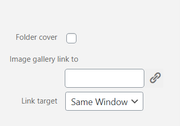
this seems to be from a media library plugin, I wonder if it is overriding the standard function. Please try disabling this plugin to test.Best regards,
MikeHey RobbieDone,
It seems that we have not included the print.css since v4.2.6, it is now included in the base.css around line 533
/enfold/css/base.cssIf you would like to create your own custom styles for print you can add the media query:
@media print{ your-style-here }to your custom stylesheet.Best regards,
Mike -
AuthorPosts
