

Forum Replies Created
-
AuthorPosts
-
Hey mihand78,
Please try this function, it will remove the title on page load. Try adding this code to the end of your functions.php file in Appearance > Editor:function remove_masonry_image_title(){ ?> <script> (function($){ $(window).load(function(){ $('a.av-masonry-entry').removeAttr('title'); $('a.av-masonry-entry .av-masonry-image-container').removeAttr('title'); }); })(jQuery); </script> <?php } add_action('wp_footer', 'remove_masonry_image_title');After applying the code, Please clear your browser cache and check.
Best regards,
MikeHey metin_aydin,
I see that you are using Enfold v4.6.3.1, this was due to a change in the latest WordPress update, please update Enfold to v4.7.1Best regards,
MikeJanuary 15, 2020 at 12:38 pm in reply to: Enfold Timeline – custom date and title font sizes are ignored/buggy #1173935Hey morecoffee,
please try replacing\enfold\config-templatebuilder\avia-shortcodes\timeline\timeline.phpwith this file via FTP. Please save a fallback copy of your old file.
If you are not comfortable with doing this please include an admin login & FTP access in the Private Content area so we can assist.Best regards,
MikeJanuary 15, 2020 at 12:28 pm in reply to: Problem with html code in slider headline after update #1173931Hey OblakJ,
I assume you are using Enfold v4.7.1, if so please try replacing\enfold\config-templatebuilder\avia-shortcodes\av-helper-slideshow.phpwith this file via FTP. Please save a fallback copy of your old file.
If you are not comfortable with doing this please include an admin login & FTP access in the Private Content area so we can assist.
Also please include a link to the page in question.Best regards,
MikeHi,
Please try going to Enfold Theme Options > Sidebar Settings > Page Sidebar navigation and uncheck the “Page Sidebar navigation” option, then go to your Sidebar widget page and add the woocommerce widgets that you want to show in the sidebar that is assigned to the Archive Pages. To see which sidebar is assigned to the Archive Pages go to Enfold Theme Options > Sidebar Settings > Sidebar on Archive Pages.Best regards,
MikeJanuary 15, 2020 at 11:45 am in reply to: set the same font for different languages frontpage #1173910Hi,
Under the English language in the top admin bar, I went to Languages > String Translations in the left side admin bar.
Please see the screenshot in Private Content area.Best regards,
MikeHi,
Can you include a link directly to a page where the comment shows above the Mark Complete button, I tried to find one but couldn’t.
I may be able to move the element with javascript. Also if you can point to an example where there are more than 3 comments so I can see if we can collapse them?Best regards,
MikeJanuary 15, 2020 at 11:23 am in reply to: set the same font for different languages frontpage #1173900Hi,
I found the text 19 times in your String Translations assigned to different layerslider slides, please try disabling these to see if the text from the layerslider begins to show.Best regards,
MikeJanuary 15, 2020 at 10:50 am in reply to: How to replace rather than add to enfold sidebar? #1173890Hi,
Thanks, I understand better now, the plugin may work well for you because I’ve seen people have about ten different items in a sidebar which were checked off in different combinations to show on different pages or categories.
Is there anything else we can assist with on this issue or shall we close this thread?Best regards,
MikeHi,
Thank you, simply go to the Enfold sales page on Theme Forest and purchase again, then you will get another purchase code which you can use when registering it on your new domain.Best regards,
MikeJanuary 14, 2020 at 2:56 pm in reply to: Gallery thumbnail hover effect: zoom instead of fade #1173353Hi,
Thank you, it would be like this:.test .avia-gallery-thumb a { -webkit-animation: in 1.5s; animation-fill-mode: forwards; } .test .avia-gallery-thumb a:hover { -webkit-animation: out 1.5s; animation-fill-mode: forwards; } @-webkit-keyframes in { from { -webkit-transform: scale(1.05,1.05);} to { -webkit-transform: scale(1,1); } } @-webkit-keyframes out { 0% { -webkit-transform: scale(1,1); } 100% { -webkit-transform: scale(1.05,1.05); } } #top .avia-gallery.test .avia-gallery-thumb a:hover { opacity: 1 !important; }After applying the css, Please clear your browser cache and check.
Best regards,
MikeHi,
@Thisafternoon thank you for letting us know, this could help others using this plugin.Best regards,
MikeHi,
I’m not sure I follow how this will create lots of manual work, lets take a look at this. So are most of your pages going to have the same sidebar?
If true then set the “Page Sidebar” widget to reflect that, even if this means you want the sidebar menu on most of them, in which case you can remove the blank the empty text widget.
then if there are a few pages you want a different sidebar then in those pages change which sidebar shows on the page by choosing one of your other sidebars in the “layout” option of the page when you are editing it.
If the number of pages is closer to 50/50 or something more complex, then try the plugin Widget Options which will give you the option to show or hide each widget element on any number of pages, then you can add the “navigation menu” widget to your sidebar and choose the pages to show or hide on and then add your other widgets and do the same. This way all of the changes are made from the widget option page and you won’t need to edit any of the pages.
I hope one of these approaches helps you set your sidebar the easiest way for you.Best regards,
MikeHi,
To create a on-click drop-down menu from the sidebar menu widget please remove the css above, then try adding this code to the end of your functions.php file in Appearance > Editor:function custom_widget_menu_dropdown(){ ?> <script> (function($){ $(document).ready(function(){ $('#menu-supermarket-shop-1 > li.menu-item-has-children').find('ul').hide(); $('#menu-supermarket-shop-1 > li.menu-item-has-children').click(function () { $('#menu-supermarket-shop-1 > li.menu-item-has-children').not(this).find('ul').hide(); $(this).find('ul').toggle(); }); }); })(jQuery); </script> <?php } add_action('wp_footer', 'custom_widget_menu_dropdown');Then clear your browser cache and check.
Best regards,
MikeJanuary 14, 2020 at 12:48 pm in reply to: Social Icons are not appearing in Mobile in WordPress 5.3.2 #1173261Hi,
Sorry I misread your request, I thought you wanted the menu moved over.
So please remove that css and use this instead:@media only screen and (max-width: 479px) { .responsive #top #wrap_all #header .social_bookmarks { display: block !important; } .main_menu { display: flex !important; flex-direction: row-reverse !important; } }I didn’t see a “blue box” in your screenshot but this css does put the social icons before the burger menu.
After applying the css, Please clear your browser cache and check.Best regards,
MikeJanuary 14, 2020 at 12:30 pm in reply to: set the same font for different languages frontpage #1173253Hey Matsky1,
Sorry for the late reply, in my investigation I found that your English & Russian layersliders that show on the pages are not matching the sliders that can be edited in the backend.
The text on the frontend is:WE PARTNER WITH CONSULTANTS, FUNDERS
AND DEVELOPERS WHO SHARE OUR AMBITON
AND COMMITMENT TO DELIVER MARKET-
LEADING BUILDINGSon every slide, but in the layerslider that text doesn’t show on any slide?
Do you also see this?I thought this might be due to caching but it looks like your caching plugin is turned off, so unless you have server side caching I don’t see how this is possible.
Best regards,
MikeHi,
I have figured it out, step one is to go to Enfold Theme Options > Sidebar Settings > Page Sidebar navigation and uncheck the “Page Sidebar navigation” option, then go to your “Page Sidebar” widget and add a empty text widget, now nothing shows in your sidebar.
You can add a different widget to replace the empty text widget if you like, it is only a placeholder so the menu doesn’t show and any widget there will prevent the menu from showing. You can also change which sidebar shows on the page by choosing one of your many custom sidebars.I will also point out that you are using Enfold v3.8.5 with WordPress v5.3.2, this version of Enfold is not expected to be compatible with the version 5 of WordPress because of the major changes it included. Please update.
Unfortunately, due to the Theme Forest changes of replacing the API key with the “Token” you will have to update via FTP.
The easiest and safest way to do this is to download the newest version from Theme Forest and rename your current theme folder to “enfold-old” via ftp then upload the new “enfold” folder and check that your site is working correctly.
Should for some reason you wish to roll-back to the old version, it’s easy to do, simply rename the new “enfold” folder to “enfold-new” via ftp and then rename “enfold-old” to “enfold” then refresh your page.
Once you are happy you can delete the “enfold-old” folder via ftp, (not the WP theme page)
Please don’t try to overwrite the theme folder, as this will leave old files behind and cause errors.Best regards,
MikeJanuary 14, 2020 at 2:47 am in reply to: Gallery thumbnail hover effect: zoom instead of fade #1173046Hi,
In the latest version 4.7.1 go to any element > advance tab > developer settings > custom css class:
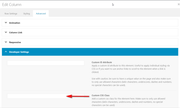
as for the zoom effect, the structure of the elements are a little different so it’s acting a little different, I tried to match it the best I could.Best regards,
MikeHi,
Thank you, perhaps this will help others in the future.
Unless there is anything else we can assist with on this issue, shall we close this then?Best regards,
MikeHi,
I found that the function is missing a “)” which was causing the error, this is the updated code:function avf_sidebar_menu_filter_mod($menu, $args, $post) { if(is_page(array(42, 'about', 'Contact'))) { $menu= ''; } return $menu; } add_filter('avf_sidebar_menu_filter', 'avf_sidebar_menu_filter_mod', 10, 3);but I don’t think this is working correctly, just to make sure I’m understanding this correctly, on the one page in the Private Content area you don’t want the sidebar menu to show, or is it that you don’t want the sidebar to show?
Best regards,
MikeJanuary 13, 2020 at 1:28 pm in reply to: Gallery thumbnail hover effect: zoom instead of fade #1172769Hi,
Thanks, Please try this code in the General Styling > Quick CSS field or in the WordPress > Customize > Additional CSS field:.avia-gallery-thumb a { -webkit-animation: in 1.5s; animation-fill-mode: forwards; } .avia-gallery-thumb a:hover { -webkit-animation: out 1.5s; animation-fill-mode: forwards; } @-webkit-keyframes in { from { -webkit-transform: scale(1.05,1.05);} to { -webkit-transform: scale(1,1); } } @-webkit-keyframes out { 0% { -webkit-transform: scale(1,1); } 100% { -webkit-transform: scale(1.05,1.05); } } #top .avia-gallery .avia-gallery-thumb a:hover { opacity: 1 !important; }I didn’t see a custom class added to this gallery so I didn’t add it to the css, if you add a custom class I can adjust this for you.
Best regards,
MikeHi,
Glad we were able to help, we will close this now. Thank you for using Enfold.For your information, you can take a look at Enfold documentation here
For any other questions or issues, feel free to start new threads in the Enfold forum and we will gladly try to help you :)Best regards,
MikeHi,
Glad we were able to help, we will close this now. Thank you for using Enfold.For your information, you can take a look at Enfold documentation here
For any other questions or issues, feel free to start new threads in the Enfold forum and we will gladly try to help you :)Best regards,
MikeJanuary 13, 2020 at 1:06 pm in reply to: Social Icons are not appearing in Mobile in WordPress 5.3.2 #1172743Hi,
Please try this code in the General Styling > Quick CSS field or in the WordPress > Customize > Additional CSS field:@media only screen and (max-width: 767px) { .responsive #top #wrap_all .main_menu { right: 50% !important; } }please adjust the “50%” in the code to suit your needs.
Then clear your browser cache and check.Best regards,
MikeHi,
Thanks for the feedback, the ” less space between sub-menu items” code is for your “full width menu” originally there was 10px of padding for each menu item, now there is only 5px, in this screenshot the green marks are the menu item padding.
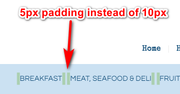
If I’m understanding the space issue correctly then try changing the “5px” in the code to “1px” for them to be even closer.I see what you mean about the sidebar menu needing a drop-down for parent items now. So to add the arrow to only parent menu items and create a drop-down for the children items please try this css:
#top .widget_nav_menu ul li.menu-item-has-children > a:before {
    content: "\2BC6" !important;
}
#top .widget_nav_menu ul ul.sub-menu {
    display: none !important;
}
#top .widget_nav_menu ul li.menu-item-has-children:hover ul.sub-menu {
    display: block !important;
}
Best regards,
MikeJanuary 13, 2020 at 11:38 am in reply to: How to replace rather than add to enfold sidebar? #1172714Hi,
Please take a look at your child theme functions.php your first line is:
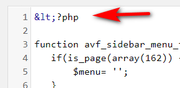
it needs to be:
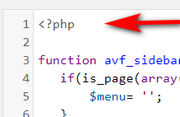
I tried to change it for you but WordPress says it needs to be done via FTP, please correctBest regards,
MikeHi,
Thank you, please try this css:.avia_mega_div .avia-bullet { display: none !important; }Then clear your browser cache and check.
Best regards,
MikeHey akn7162,
Thanks for the login, I see that your lessons are built with the Advanced Layout Builder, when using the Advanced Layout Builder comments do not show on a post, to show comments on a post you would need to use the comment element.
You can try using the WordPress editor to create a lesson to see if the comment will show.
You can also try using this shortcode on a lesson built with the Advanced Layout Builder to see if that helps:[av_comments_list av-desktop-hide='' av-medium-hide='' av-small-hide='' av-mini-hide='' av_uid='av-79s2f5']Also try adding a manual comment in the backend to see if that forces them to show.
Best regards,
MikeJanuary 12, 2020 at 10:46 pm in reply to: How to replace rather than add to enfold sidebar? #1172589Hi,
Sorry for the late reply, I have reviewed the thread and I see that at one point you copied the parent theme functions.php and added it to your child theme, this caused your error because it contained functions that are now being called twice.
The functions.php for the child theme should be basically empty except for this code at the very top:<?phpand then your addon function below it.
If you download the pre-built child theme you will see what I mean.
I see that your child theme has almost all of the files from your parent theme in it, you should really only have the style.css, functions.php, and any file that you customized in your child theme.Best regards,
Mike -
AuthorPosts
