

Forum Replies Created
-
AuthorPosts
-
Hi,
Glad Ismael could help, if you have any further questions please create a new thread and we will gladly try to help you. Thank you for using Enfold.Best regards,
MikeHi,
Glad we were able to help, if you have any further questions please create a new thread and we will gladly try to help you. Thank you for using Enfold.Best regards,
MikeHi,
Glad to hear this is working for you, if you choose to add a custom class you would add it in the table element developer settings:

in this example the custom class is custom-table note that no dot is used, then you would add the custom class to the css like this:.main_color table.custom-table { background-color: #fff; } .main_color table.custom-table td { border: none; } #main .main_color table.custom-table td:nth-child(1) { color: rgb(0, 141, 202); font-weight: bold; } #main .main_color table.custom-table td:nth-child(2) { color: #000; font-weight: bold; }To make the menu smaller try this css:
#top #header #header_main_alternate .container,
.html_header_top.html_bottom_nav_header #top #header_main_alternate .main_menu>div,
.html_header_top.html_bottom_nav_header #top #header_main_alternate .main_menu ul:first-child,
.html_header_top #top .av_bottom_nav_header #header_main_alternate .main_menu ul:first-child > li > a {
    height: 30px;
    line-height: 30px;
}
the current height is 50px, so this will make it 30px or adjust to suit.
After applying the css, please clear your browser cache and check.Best regards,
MikeMay 25, 2022 at 11:07 am in reply to: Spezielles Kantenlayout – spezielles Layout an den Kanten #1352900Hi,
Glad Ismael could help, if you have any further questions please create a new thread and we will gladly try to help you. Thank you for using Enfold.Best regards,
MikeHi,
Glad we were able to help, if you have any further questions please create a new thread and we will gladly try to help you. Thank you for using Enfold.Best regards,
MikeMay 25, 2022 at 1:02 am in reply to: How to modify the homepage of Default Demo's Advanced Layout Builder #1352833Hi,
Unfortunately your theme has not been updated, please see your other thread for more info.Best regards,
MikeHi,
I see that your theme has not been updated:

the Envato Market plugin says you have incorrect token permissions:

please only check the token permissions as in the image Nikko posted above, you can read how in our documentation
If you still have trouble with it, you could update your version of Enfold by downloading the latest version from your Theme Forest account and upload it to your WordPress ▸ Appearance ▸ Themes ▸ Add Themes ▸ Add New

after you choose the zip file and click install, you will see a This theme is already installed message because you are updating, you can continue

then you will see the Theme updated successfully message.

Best regards,
MikeHi,
To make your grid row element sticky you can use the same script that was given in another thread:function custom_collant_script() { ?> <script> window.addEventListener('DOMContentLoaded', function() { (function($){ $(function() { var scroll_start = 0; var startchange = $('.avia-section.collant'); var offset = startchange.offset(); var width = $(window).width() if (startchange.length){ $(document).scroll(function() { scroll_start = $(this).scrollTop(); if((width >= 990) && (scroll_start > offset.top - 117)) { document.querySelector('.avia-section.collant').classList.add('sticky-top'); } else { document.querySelector('.avia-section.collant').classList.remove('sticky-top'); } }); } }); })(jQuery); }); </script> <?php } add_action('wp_footer', 'custom_collant_script');I added this custom class to the grid row for you
avia-section collan
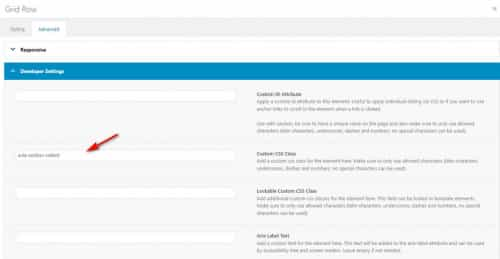
and now the grid row sticks near the top, the only thing is that this function sticks 117px from the top because on the other page you had a sticky header, but for product pages it looks like you want to remove the sticky header, is this correct or are you going to use a sticky header on your product pages too?Best regards,
MikeHi,
Glad Nikko was able to help, if you have any further questions please create a new thread and we will gladly try to help you. Thank you for using Enfold.Best regards,
MikeMay 24, 2022 at 6:45 pm in reply to: Insert Enfold templates above content | Feature request #1352796Hi,
Glad Rikard could help, if you have any further questions please create a new thread and we will gladly try to help you. Thank you for using Enfold.Best regards,
MikeHi,
Thank you for the link to your site with the example, please try this code in the General Styling ▸ Quick CSS field or in the WordPress ▸ Customize ▸ Additional CSS field:.main_color table.avia-data-table { background-color: #fff; } .main_color table.avia-data-table td { border: none; } #main .main_color table.avia-data-table td:nth-child(1) { color: rgb(0, 141, 202); font-weight: bold; } #main .main_color table.avia-data-table td:nth-child(2) { color: #000; font-weight: bold; }After applying the css, please clear your browser cache and check.
This css will affect all tables on your site, so I recommend adding a custom class to your table element and including it in the css so you can control which tables will get this style.Best regards,
MikeMay 24, 2022 at 5:20 pm in reply to: Re-sized thumbnails / images are not correctly created by Enfold #1352790Hi,
Glad to hear that you have this sorted out, and thanks for following up with your solution. If you have any further questions please create a new thread and we will gladly try to help you. Thank you for using Enfold.Best regards,
MikeHey babettegcc,
Thanks for the screenshot and the link to your site, please try this code in the General Styling ▸ Quick CSS field or in the WordPress ▸ Customize ▸ Additional CSS field:#top .avia-testimonial_inner > .avia-testimonial-content { height: 80px !important; vertical-align: middle !important; display: table-cell !important; }After applying the css, please clear your browser cache and check.
Best regards,
MikeHey whdsolutions,
Thanks for the screenshot but I’m not able to reproduce this in Chrome Dev Tools (320px – 425px) or on an actual Android device (360px).
I also tested with browserstack.com on a live iPhone 13 and there was no gap.
If you are testing with an iPhone, can be hard to clear the cache, often you need to also clear the history to fully purge the cache, following these steps for Safari and note Step 4 where you will Clear the History.
Please see the screenshots in the Private Content area.Best regards,
MikeHi,
Glad Rikard could help, if you have any further questions please create a new thread and we will gladly try to help you. Thank you for using Enfold.Best regards,
MikeHi,
Glad Rikard could help, if you have any further questions please create a new thread and we will gladly try to help you. Thank you for using Enfold.Best regards,
MikeHi,
I found an error in your css, please clear your browser cache and check again.Best regards,
MikeMay 23, 2022 at 6:22 pm in reply to: menu non collant sur une page particulière ou sur tous mes produits #1352653Hi,
To add more pages add them like this:
if(is_page(array(42, 21, 85))) {Best regards,
MikeHi,
Glad we were able to help, if you have any further questions please create a new thread and we will gladly try to help you. Thank you for using Enfold.Best regards,
MikeHi,
Glad to hear, you should be able to use wp-rocket, we just wanted to clear the cache. Try enabling it again and checking, also use the wp-rocket options to clear it’s cache, if all is good then try enabling the theme Enfold Theme Options ▸ Performance ▸ JS & CSS file merging and compression, if all is fine then good you are all set, if you see an error again then check if wp-rocket has a minifying option enabled, if so disable this option, because if the theme and wp-rocket are both minifying this could cause issues.
Try different settings until all is working well again.Best regards,
MikeHi,
Sorry, I was not able to reproduce this on my site, so I don’t believe that there is an error in the in above code.
Try rewriting your function without the wrapping divs and just inject the shortcode of the element.Best regards,
MikeHi,
Glad this helped, it is a customization for you so keep in your child theme, unless there is anything else we can help with on this issue, shall we close this then?Best regards,
MikeHi,
Thanks for the feedback I adjusted, please clear your browser cache and check and see the screenshot in the Private Content area.Best regards,
MikeMay 23, 2022 at 11:52 am in reply to: timeline on mobile does'nt show correctly unless you turn the phone to landscape #1352616Hi,
Glad we were able to help, if you have any further questions please create a new thread and we will gladly try to help you. Thank you for using Enfold.Best regards,
MikeHey jkos,
Thanks for the login I added this css to your WordPress ▸ Customize ▸ Additional CSS field to correct:#main .template-page .entry-content-wrapper h2{ text-transform: capitalize; }please clear your browser cache and check.
Best regards,
MikeHi,
Glad we were able to help, if you have any further questions please create a new thread and we will gladly try to help you. Thank you for using Enfold.Best regards,
MikeHi,
Thanks for the link to your site, please try this code in the General Styling ▸ Quick CSS field or in the WordPress ▸ Customize ▸ Additional CSS field:#full_slider_1 .slideshow_caption { width: 55%; }After applying the css, please clear your browser cache and check.
Best regards,
MikeHey Asterios,
This is because for mobile the theme doesn’t expect a fixed header as your customization, so the sticky menu has it’s height set to auto and position absolute.
For your situation try this css:@media only screen and (max-width: 782px) { #sub_menu1 { top: 117px !important; position: fixed !important; } } @media only screen and (min-width: 783px) and (max-width: 989px) { #sub_menu1 { top: 121px !important; position: fixed !important; } }After applying the css, please clear your browser cache and check.
Best regards,
MikeHi,
Glad Rikard could help, if you have any further questions please create a new thread and we will gladly try to help you. Thank you for using Enfold.Best regards,
Mike -
AuthorPosts
