

Forum Replies Created
-
AuthorPosts
-
January 25, 2023 at 12:42 pm in reply to: Split menu with centered logo through quick css – can’t click logo now #1395134
Hey padclip,
Thank you for the link to your site and the screenshot, try adding this css:#header_main .logo { z-index: 3; }After applying the css, please clear your browser cache and check.
Best regards,
MikeHey yundian,
Thanks for your question, this seems to be added by your plugin All in One SEO Pack

Please disable this plugin and check again.
I’m not sure which setting in the plugin controls this so try checking all of the settings until you find it.Best regards,
MikeHi,
Please try this function instead:function make_column_height_equal_to_width() { ?> <script> window.addEventListener('DOMContentLoaded', function() { (function($) { $(window).on("debouncedresize", function() { $(".sc-av_one_third").each(function() { var column = $(this).find(".av_one_third"); var width = column.width(); column.height(width); }); }); })(jQuery); }); </script> <?php } add_action('wp_footer', 'make_column_height_equal_to_width');Please ensure to copy the code from the forum and not an email notification so the symbols are not converted.
If this doesn’t help please include an admin login in the Private Content area so we can be of more assistance.Best regards,
MikeHey jeel147,
The best way to do this is the duplicate the element with the image below the original, then change the image to the new one.
Then go the advanced tab in the element and set the Element Visibility to only show on mobile and tablets, and then change the Element Visibility on the original element to not show on mobile and tablets.Best regards,
MikeJanuary 24, 2023 at 7:46 pm in reply to: Remove vertical white line on right side of transparent header #1394991Hi,
Try this css:.av-main-nav ul.sub-menu { top: 65%; }65% will put the sub-menu item right under the main menu item, adjust to suit.
Best regards,
MikeJanuary 24, 2023 at 7:36 pm in reply to: Theme registration, Envato, Personal token don't work #1394990Hi,
Thanks for sharing, it looks like Envato support recommends downloading the latest version from your Envato account as Ismael did. Hopefully, they will be able to assist you with your Tokens.
There is an easier way to manually update than FTP, you can download the latest installable WP version from your Theme Forest account and upload it to your WordPress ▸ Appearance ▸ Themes ▸ Add Themes ▸ Add New

after you choose the zip file and click install, you will see a This theme is already installed message because you are updating, you can continue

then you will see the Theme updated successfully message.

Best regards,
MikeJanuary 24, 2023 at 7:29 pm in reply to: Sidebar issues with Woocommerce product page + Page Templates #1394986Hi,
Thanks for the feedback, for some reason your post on the 17th didn’t show on my feed so I’m glad that you added another post.
Thanks for the explanation, so originally you had created products with the Advanced Layout Builder and now you are going to import 2k more products in bulk which will make them default Woocommerce single product page layout.
So the short answer is no, you can not create a layout with the ALB and have it as the default Woocommerce single product page layout.
Above you asked how to add 5 column related products to your product pages, this should add the related products in the place that you want them, did you try it?
I couldn’t test because your sandbox site doesn’t allow the child theme functions.php to be edited.
Try the function to add the new related products and then add the css to hide the old one in the alternate content area.Best regards,
MikeJanuary 24, 2023 at 1:10 pm in reply to: Remove vertical white line on right side of transparent header #1394914Hi,
The sub-menu item is currently at the top of the element:

perhaps you mean something else, can you please explain further?Best regards,
MikeHi,
If you followed the steps above carefully and copied the code from the forum and not an email notification, and still can’t achieve this then please include an admin login in the Private Content area below so we can assist.Best regards,
MikeHi,
Try using the Fullwidth Easy Slider element, or the Fullscreen Slider element.Best regards,
MikeHi,
Glad we were able to help, if you have any further questions please create a new thread and we will gladly try to help you. Thank you for using Enfold.Best regards,
MikeHi,
Glad we were able to help, if you have any further questions please create a new thread and we will gladly try to help you. Thank you for using Enfold.Best regards,
MikeHi,
There probably is a way to do it I just don’t think that you can do it that way, but I think that this is over my head.
Unfortunately, I couldn’t get your code to work on my site so I couldn’t tinker with it, I’m glad it works on your site.
I’d like to see this work, but we are probably going to need more advanced help, I would recommend posting it on Upwork.comBest regards,
MikeHi,
Glad this helps, the breadcrumbs for posts are for their relationship to the blog.
Pages are shown the breadcrumbs in their relationship to their parent page.
I don’t see where you could have a mix of pages and posts.Best regards,
MikeHi,
Thank you for the link to your site, I have reviewed your two pages and found that you are usingname="anchor"for your anchor links.
The name attribute on the a element is obsolete. For quite some time now using the ID as the anchor link has been the standard.<h3 id="anchor">
The name attribute will still work but the theme looks for ID anchor links and applies a offset to the scroll to account for the header, it also slows the scroll some so it’s not a hard jump to the element.
I adjusted your /data-protection/ page because there was only 4 links and so you could see the result.
So for example using your Individual Clients anchor, you had:
<h3><a style="font-size: 16px; background-image: url('img/anchor.gif');" name="individuals"></a>Individual Clients</h3>
but the correct method is:
<h3 id="individuals"><a style="font-size: 16px; background-image: url('img/anchor.gif');"></a>Individual Clients</h3>
Please clear your browser cache and review the page and apply the changes to your other pages.
Also I don’t know why you are usingbackground-image: url('img/anchor.gif');on your anchors it is making your site give 404 errors, I imagine that you copied this code from somewhere and didn’t include the image to your site, I recommend removing all of these from your site.Best regards,
Mike-
This reply was modified 3 years, 2 months ago by
Mike.
Hey rixi,
For the page linked below you should follow this thread to enable a local open sans font.Best regards,
MikeJanuary 22, 2023 at 10:53 pm in reply to: How would I achieve the Parallax look (plus a little more) #1394721Hi,
Typically this occurs when you download the wrong zip file from Theme Forest there are two to choose from, please check again that you are downloading the installable WP versionBest regards,
MikeHey rixi,
Thank you for the link to your site, to make the cells in all of your tables equal height for this one page only try adding this code to the end of your child theme functions.php file in Appearance ▸ Editor:function equal_height_table_cells() { ?> <script> window.addEventListener('DOMContentLoaded', function() { (function($){ $('#top.page-id-1292 .avia-pricing-table-container').each(function(){ var $columns = $('li',this); var maxHeight = Math.max.apply(Math, $columns.map(function(){ return $(this).height(); }).get()); $columns.height(maxHeight); }); })(jQuery); }); </script> <?php } add_action('wp_footer', 'equal_height_table_cells');and add this css to your Enfold Theme Options ▸ General Styling ▸ Quick CSS field to center the text in the cells:
#top.page-id-1292 .avia-pricing-table-container li {
   align-items: center;
   display: flex;
   justify-content: center;
}
After applying the css, please clear your browser cache and check.
Please ensure to copy the code from the forum and not an email notification so the symbols are not converted.
Please see the screenshot in the Private Content area of the expected results.Best regards,
MikeHi,
Glad we were able to help, if you have any further questions please create a new thread and we will gladly try to help you. Thank you for using Enfold.Best regards,
MikeJanuary 22, 2023 at 8:42 pm in reply to: Theme registration, Envato, Personal token don't work #1394715Hi,
Thanks for the update, we will leave this open to hear back from you.Best regards,
MikeHi,
Thank you for your patience and the link to your site, I changed the function to show the widget in the header that was in your child theme functions.php to this:add_action( 'ava_main_header', 'enfold_customization_header_widget_area' ); function enfold_customization_header_widget_area() { dynamic_sidebar( 'header' ); }and then I added this function in your child theme functions.php to move the notification area above the top bar:
function add_top_notification_widget() { ?>
  <script>
window.addEventListener('DOMContentLoaded', function() {
(function($) {
     $('#header_main .widget').detach().insertBefore('#header_meta');
})(jQuery);
});
</script>
  <?php
}
add_action('wp_footer', 'add_top_notification_widget');
and I added this css to your child theme stylesheet:
/* Notification bar */
.responsive #top #header .widget>div {
    display: flex;
    justify-content: center;
    align-items: center;
    align-self: center;
    line-height: 14px;
    padding: 0 10px;
    background: gold;
    width: 100vw;
    position: relative;
    z-index: 1;
    left: 50%;
    transform: translateX(-50%);
}
.responsive #top #header .widget>div>p {
	margin: 0;
    padding: 7px;
}
.responsive #top #header .widget {
	padding:  0;
}
and after clearing your cache this is the result:

I was not sure if you wanted it to show because you had the widget hidden, so I hid it when I was done, so please un-hide to check.

Best regards,
MikeHi,
Please try adding this css to your Enfold Theme Options ▸ General Styling ▸ Quick CSS field:#top #main .small-button a:hover .avia-button.avia-color-light { border: none; opacity: 0; }After applying the css, please clear your browser cache and check.
Best regards,
MikeHi,
Glad we were able to help, if you have any further questions please create a new thread and we will gladly try to help you. Thank you for using Enfold.Best regards,
MikeJanuary 22, 2023 at 5:09 pm in reply to: Individual height of tab sections not active on mobile screen size #1394707Hi,
Glad we were able to help, if you have any further questions please create a new thread and we will gladly try to help you. Thank you for using Enfold.Best regards,
MikeHey lauragrashoff,
The TikTok icon is not available on Fontello.com so you need to create it by finding an SVG and converting it on Fontello to create the icon font

The icon font will be black and white a colored SVG won’t work. But if you find a png with a transparent background then you can convert it here. For example I found a TikTok icon here and downloaded it as a SVG and then uploaded it to Fontello which converted it for me. This is the fontello-tiktok.zip file I’m using in this example.
Then to create the TikTok social profile follow the steps outlined here in our documentation.
For example, I added this code to the end of my child theme functions.php file in Appearance ▸ Editor, If you are not using a child theme I recommend the WPcode plugin this plugin supports PHP code snippets, JavaScript code snippets, & CSS code snippets and allows you to export and import your custom code snippets to other sites that you may have or as a backup.function avia_add_custom_icon($icons) { $icons['tiktok'] = array( 'font' =>'fontello', 'icon' => 'ue800'); return $icons; } add_filter('avf_default_icons','avia_add_custom_icon', 10, 1); function avia_add_custom_social_icon($icons) { $icons['TikTok'] = 'tiktok'; return $icons; } add_filter('avf_social_icons_options','avia_add_custom_social_icon', 10, 1); add_filter('avia_social_share_link_arguments', 'avia_add_social_share_link_arguments', 10, 1); function avia_add_social_share_link_arguments($args){ $tiktok = array('tiktok' => array("encode"=>true, "encode_urls"=>false, "pattern" => "https://www.tiktok.com/", 'label' => __("Share on TikTok",'avia_framework'))); $args = array_merge($tiktok, $args); return $args; }Then I enabled it at Enfold Theme Options ▸ Social Profiles ▸ Your social profiles
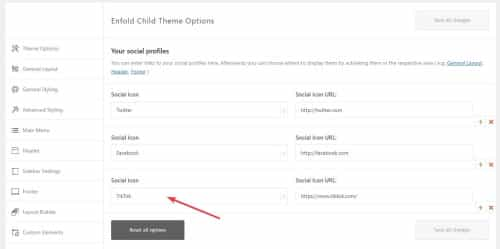
Now it shows on the frontend:

Now to add the on mouse-over color add this css to your Enfold Theme Options ▸ General Styling ▸ Quick CSS field:#top #wrap_all .av-social-link-tiktok:hover a{ color:#fff; background-color:#00f2ea; }Now go to the theme options Enfold Theme Options ▸ Blog Layout ▸ Profile Links At The Bottom Of Your Blog Post and enable the TikTok item:

and now on blog posts when the share box shows TikTok will be included:

Best regards,
MikeHey jetsaveurs.com,
Thank you for the link to your site, the errors above are from WordPress files and not the theme, I’m not sure why you would see these errors but I’m running Enfold on PHP v8.1 with no issues or warnings. I also don’t see any warning on your site in the source code, so I don’t know why you would see these in the dashboard.
Try disabling your plugins. If that resolves the issue, reactivate each one individually until you find the cause.Best regards,
MikeJanuary 22, 2023 at 3:04 pm in reply to: Individual height of tab sections not active on mobile screen size #1394700Hey Vera,
Thanks for your patience and the link to your site I have checked with my browser Dev Tools and my Android device and the solution seems to be working, please see the screenshot in the Private Content area. You could try changing the wait time for the script to work, it was set to 300 milliseconds

try changing it to 500, or 700, or 900 all of which is still less than a second.
If this doesn’t help addconsole.log("click");to it so we can see if it is consistently clicking, it will add a message to the browser console log.
This is how you would add it:function custom_portfolio_tab_click() { ?> <script> window.addEventListener('DOMContentLoaded', function() { (function($) { if ($(window).width() < 768) { setTimeout(function(){ $("#top.single-portfolio #av-tab-section-1").find('a.av-active-tab-title').trigger("click"); console.log("click"); },500); } else {} }(jQuery)); }); </script> <?php } add_action('wp_footer', 'custom_portfolio_tab_click');Best regards,
MikeHi,
Thank you for your question, according to our documentation the Special Character Translation plugin only supports:###lt### => < ###gt### => > ###91### => [ ###93### =>']If you want to add the amp you can edit the plugin and add this code after the others after line 45:
'###amp###' => '&'
or uninstall and delete the plugin from your site and install this custom one instead.
If this doesn’t change your amp please link to it so we can help with some css.Best regards,
Mike -
This reply was modified 3 years, 2 months ago by
-
AuthorPosts
