Forum Replies Created
-
AuthorPosts
-
Hey schweg33,
Thank you for the inquiry.
You can add this css code to adjust the position of the social icon bookmarks.
#top .social_bookmarks {
    position: relative;
    top: 42px;
    right: 50px;
}

#top .header_color .social_bookmarks a {
    color: #ffffff;
}
And if you want to hide the top header, add this css.
#header_meta, #header_meta .container {
    min-height: 0;
    height: 0;
    margin-top: -30px;
}

.html_header_top.html_header_sticky #top #wrap_all #main {
    padding-top: 55px;
}
Best regards,
IsmaelHi,
To adjust the background color of the calendar days, try to use this css code.
.main_color .fc-body tr:nth-child(odd), .main_color .pricing-table>li:nth-child(odd), .main_color .pricing-extra {
    background: transparent;
}
Best regards,
IsmaelHey xela,
Thank you for the inquiry.
You can adjust the width of the color section container with css. Please check this documentation for more info.
// https://kriesi.at/documentation/enfold/color-section/#color-section-with-100-content-width
Best regards,
IsmaelHi,
Please continue here: https://kriesi.at/support/topic/exclude-custom-post-type-in-blog-posts-overview/
Best regards,
IsmaelHi,
Have you tried replacing “vacature” with “acf-field-group”?
if( $value == 'acf-field-group' ) {Best regards,
IsmaelOctober 27, 2023 at 2:27 am in reply to: avia gallery thumbs are not displayed correctly on mobile devices #1423855Hey soltner,
Thank you for the inquiry.
We can’t reproduce the issue on our end. What is the actual model of the device where the screenshot was taken? If the issue persists, please try adding this css code.
@media only screen and (max-width: 489px) {

  /* Add your Mobile Styles here */
  .avia-chrome .avia-gallery-thumb {
    display: flex;
    flex-direction: row;
    flex-wrap: wrap;
  }

  #top #wrap_all .avia-gallery .avia-gallery-thumb a {
    display: block;
    float: none;
  }
}
Best regards,
IsmaelHi,
For what is this hex encoding?
It’s the value used in the rand function inside the antispambot function.
// Line 2911: https://core.trac.wordpress.org/browser/tags/6.3/src/wp-includes/formatting.php#L2911
// Line 2914: https://core.trac.wordpress.org/browser/tags/6.3/src/wp-includes/formatting.php#L2914This is the manual for the rand function.
// // https://www.php.net/manual/en/function.rand.php
The returned value (0 to 2) of the rand function determines the execution of these conditions.
if ( 0 == $j ) {
	                        $email_no_spam_address .= '&#' . ord( $email_address[ $i ] ) . ';';
	                } elseif ( 1 == $j ) {
	                        $email_no_spam_address .= $email_address[ $i ];
	                } elseif ( 2 == $j ) {
	                        $email_no_spam_address .= '%' . zeroise( dechex( ord( $email_address[ $i ] ) ), 2 );
	                }
If you want to check the functions that are executed inside these conditions, please see the links below.
// https://www.php.net/manual/en/function.ord.php
// https://www.php.net/manual/en/function.dechex.php
// https://developer.wordpress.org/reference/functions/zeroise/Best regards,
IsmaelHi,
Could this change in permissions make a difference in the update working and not working?
Yes, it might be related to folder permissions. Granting write permissions to the user group performing the rollback procedure might help.
Is this a WordPress issue that they are going to correct – or is it something on Enfold’s end?
We are not really sure but since the error is generated by a WordPress core function, it’s more likely that this is related to the interaction between the server and WordPress.
Best regards,
IsmaelOctober 26, 2023 at 10:25 am in reply to: Help with editing embedded javascript in code block #1423757Hi,
Since we couldn’t locate the “Liver Studies” section on the page, we assumed you were trying to modify the heading element within the embedded script. Please include this css code.
#top #wrap_all .all_colors h2.osArea {
    background: #2a303b;
    color: #ffffff;
}
Best regards,
IsmaelHey diogovareta,
Thank you for the inquiry.
We are not familiar with the plugin but we’ve found a dedicated plugin and a documentation on how to integrate the newsletter platform to WordPress.
// https://acumbamail.com/en/integrations/wordpress/
// https://en.soporte.acumbamail.com/article/131-integracion-wordpress-pluginUnfortunately, the plugin has not been updated and tested with 3 major releases of WordPress.
// https://wordpress.com/plugins/acumbamail-signup-forms
Best regards,
IsmaelHey Guenter,
Thank you for the inquiry.
You might be able to use the wp_ajax_{$action} function to create a script that queries a certain category and hides a specific menu item if the query returns nothing.
// https://developer.wordpress.org/reference/hooks/wp_ajax_action/
Best regards,
IsmaelOctober 26, 2023 at 9:35 am in reply to: Link to a Vimeo video should open in a new tab instead of iframe #1423752Hey Christof_Deinhard,
Thank you for the inquiry.
Have you tried disabling the Lightbox Modal Window option in the Enfold > Theme Options panel? You can also add the “nolightbox” class to the link to prevent it from opening in the lightbox.
<a href="#" class="nolightbox">This is a link</a>Best regards,
IsmaelHi,
Thank you for the update.
As you can check the image dimensions placed on that Blog Posts element are 724px x 724px larger than the 655px
We forgot to mention that the default thumbnail used by the Blog Posts element is called portfolio, which has a maximum width and height of 495px. You can increase the size of this thumbnail by using the avf_modify_thumb_size filter in the functions.php file.
add_filter( 'avf_modify_thumb_size', 'avf_modify_thumb_size_mod', 10, 1 );
function avf_modify_thumb_size_mod( $size ) {
   $size['portfolio'] = array('width'=>1000, 'height'=>1000);
   return $size;
}
After adding the filter, you have to regenerate the thumbnails with this plugin.
// https://wordpress.org/plugins/regenerate-thumbnails/
To adjust the background color of the image container, please add this css code.
.main_color .avia-content-slider .slide-image {
    background: transparent;
}
Best regards,
IsmaelOctober 26, 2023 at 9:16 am in reply to: Masonry-Gallery Lightbox Link Settings doesn’t work #1423749Hey emilconsor,
Thank you for the inquiry.
It seems to fade in initially to open the lightbox but then redirects to the actual image page. Have you installed a lazy loading or another gallery plugin? We may need to access the site in order to properly check the issue. Please provide the login details in the private field.
Best regards,
IsmaelHey bonsaimedia,
Thank you for the inquiry.
You can use the following filter in the functions.php file to exclude a specific custom post type from the query.
function avia_post_slide_query_mod($query, $params) {
    foreach($query['post_type'] as $key => $value) {
        if( $value == 'vacature' ) {
            unset($query['post_type'][$key]);
        }
    }

    return $query;
}
add_filter('avia_post_slide_query', 'avia_post_slide_query_mod', 10, 2);
Best regards,
IsmaelHi,
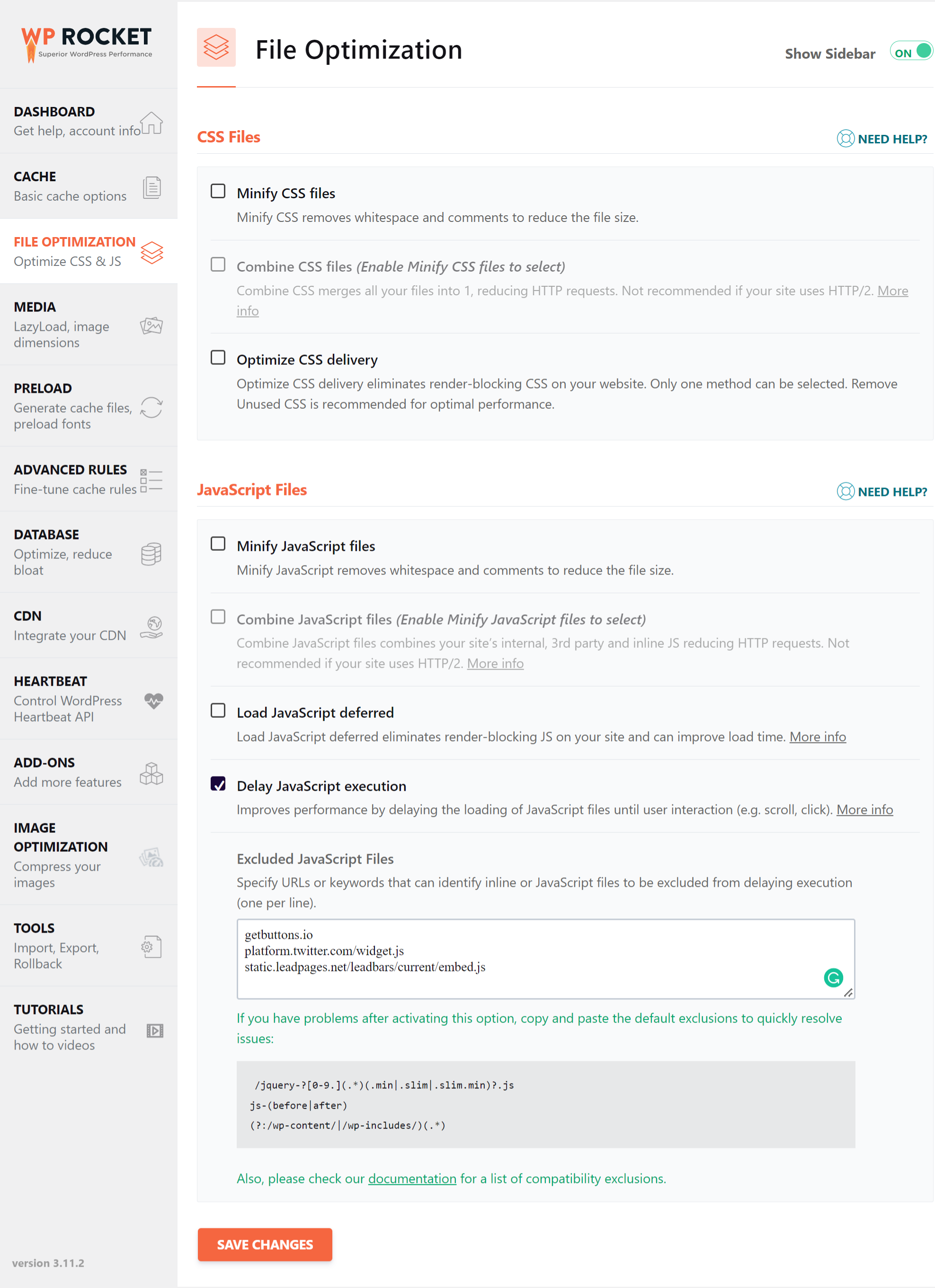
We deactivated all options shown in the screenshot below.
// https://wp-rocket.me/wp-content/uploads/2022/05/wprocket-1-css-js.png
If you want to learn more about file compression, please check the following article.
// https://wp-rocket.me/blog/wp-rocket-and-autoptimize
Best regards,
IsmaelHey Patrizio Saliani,
Thank you for the inquiry.
What do you mean by “portfolio setting column” and “settings toggle button”? Could you please provide a screenshot of these elements? If the site has not been updated to version 5.6.8, we recommend upgrading the theme immediately and then toggle or temporarily disable the Enfold > Performance > File Compression settings afterward. This upgrade might help resolve the issue you’re currently experiencing.
Best regards,
IsmaelHi,
To activate, just add this code in the functions.php file.
add_filter(‘avf_obfuscate_email_link’, ‘__return_true’);And to adjust the hex_encoding parameter, use this.
add_filter('avf_obfuscate_email_link_hex_encoding', function($hex) {
    return 0;
}, 10, 1);
Best regards,
IsmaelHi,
Thank you for the update.
It may be that you toggled the Fullscreen mode without wanting it
Are you trying to disable the fullscreen mode of the editor by default? Please try to add this code in the functions.php file.
add_action( 'enqueue_block_editor_assets', 'ava_disable_editor_fullscreen_by_default' );
/**
 * Disable Fullscreen Gutenberg.
 */
function ava_disable_editor_fullscreen_by_default() {
	$script = "window.onload = function() { const isFullscreenMode = wp.data.select( 'core/edit-post' ).isFeatureActive( 'fullscreenMode' ); if ( isFullscreenMode ) { wp.data.dispatch( 'core/edit-post' ).toggleFeature( 'fullscreenMode' ); } }";

	wp_add_inline_script( 'wp-blocks', $script );
}
Best regards,
IsmaelOctober 25, 2023 at 10:28 am in reply to: Can’t update template; Enfold template overriding plugin template #1423664Hi,
Thank you for the inquiry.
The theme add its own template modifications to the event pages but these can be disabled completely by adding the following code in the functions.php file.
add_theme_support( 'deactivate_tribe_events_calendar');Best regards,
IsmaelHi,
Thank you for the inquiry.
Please remove the css modifications, then update the theme to version 5.6.8. The update should fix the issue with the tab section element.
Best regards,
IsmaelOctober 25, 2023 at 8:15 am in reply to: Accordion Toggle not functioning properly after Chrome Version 118.0.5993.89 #1423656Hi,
We’ve added a hotfix for this particular issue in the latest version of the theme. Please upgrade to version 5.6.8 as soon as possible. You may need to toggle or temporarily disable the Enfold > Performance > File Compression settings in order to reload the scripts and stylesheets.
Thank you for your patience.
Best regards,
IsmaelHi,
Glad to know that you managed to solve the issue! Please feel free to open another thread if you have more questions about the theme.
Have a nice day.
Best regards,
IsmaelOctober 25, 2023 at 8:12 am in reply to: Twitter icon not displaying after the most recent update #1423653Hey Michael Heavner,
Thank you for the inquiry.
The X icon seems to be displaying correctly on our end (see private field). Would you mind providing a screenshot of the issue?
Best regards,
IsmaelHey bbertuzzi7,
Thank you for the inquiry.
According to the documentation, the fonts can be loaded from https://use.typekit.net site and the embed code is available on the Web Projects page. Please check the documentation below.
// https://helpx.adobe.com/fonts/using/embed-codes.html
After obtaining the embed code, try to add it inside the head tag of your WordPress site using the wp_head hook.
// https://developer.wordpress.org/reference/functions/wp_head/
Example:
add_action('wp_head', function() {
   echo ' 	<link rel="stylesheet" href="https://use.typekit.net/xxxxxxx.css">';
}, 10);
You can also try the wp_enqueue_style function.
// https://developer.wordpress.org/reference/functions/wp_enqueue_style/
Best regards,
IsmaelHi,
What do you mean? We’ve intentionally kept the cache plugin’s file optimization options disabled so you can verify it yourself. As mentioned earlier, we suggest either installing a different compression plugin or enabling the default file compression settings from the theme.
Best regards,
IsmaelHi,
Thank you for the update.
You may need to do the update manually via FTP. Please check the documentation below for more info.
// https://kriesi.at/documentation/enfold/theme-update/#update-via-ftp
Best regards,
IsmaelHi,
Which specific part of the calendar are you attempting to further adjust? They appear quite similar on our end, and we prefer the larger appearance of the calendar with the Enfold theme. The default styles make the calendar look somewhat compressed.
Best regards,
IsmaelHey Ramiro,
Thank you for the inquiry.
This option is not available by default, but the contact form uses the default wp_mail function, which means that you can utilize hooks to execute additional functions after successfully sending an email. One of the hooks you can use is wp_mail_succeeded.
// https://developer.wordpress.org/reference/hooks/wp_mail_succeeded/
Unfortunately, this kind of customization is beyond the scope of support. You may have to hire a freelancer who can assist you with the customization or find freelancers who specialize in theme customization by visiting our customization page.
If you have any other questions or require further assistance, please feel free to let us know.
Best regards,
IsmaelHey diogovareta,
Thank you for the inquiry.
This will depend on the number of columns and the maximum container width. If there are two columns for example and the maximum container width is set to 1320px, the minimum width of the images should be at least 660px or larger.
Best regards,
Ismael -
AuthorPosts