

Forum Replies Created
-
AuthorPosts
-
2) Under Widgets – did you create a widget area : header ?
Your code alone is not enough, the snippet only assigns the widget area position in the DOM.1) I don’t think the fact that a child theme is used here has anything to do with it. There can be many reasons. It starts with the hoster, or certain htaccess settings could also be responsible. Some security plugins can also be a reason.
PS : how was the child theme created? Is it the one provided by Enfold – or a manually created version?
sadly there is no class for those pages that are password protected – so maybe it is only possible to use the page-id of those pages.
#top.page-id-15240 .container_wrap.container_wrap_first {
  background: url(//dorfgeschichte.li/wp-content/themes/enfold/images/background-images/floral-dark-compressed.png) !important;
  background-repeat: repeat;
}
but: because you set the background to all pages ( except the home page ) to wrap_all container – you only need to get rid of the backgrounds overlaying this:
#top.page-id-15240 #main, #top.page-id-15240 .container_wrap.container_wrap_first { background: transparent !important; min-height: 75vh }if both sliders are determined by their alias – you can try that with one function too. Both i guess will work:
add_action( 'ava_after_main_container', 'rev_slider_mod', 10 );
function rev_slider_mod() {
	if ( is_page(15240) ) {
		echo do_shortcode('[rev_slider alias="bereich-vorstand"][/rev_slider]');
	}
	if ( is_page(2959) ) {
		echo do_shortcode('[rev_slider alias="bereich-mitglieder"][/rev_slider]');
	}
}
for color try in quick css:
#top .rs-parallax-wrap .rs-layer {
  color:  yellow !important;
}
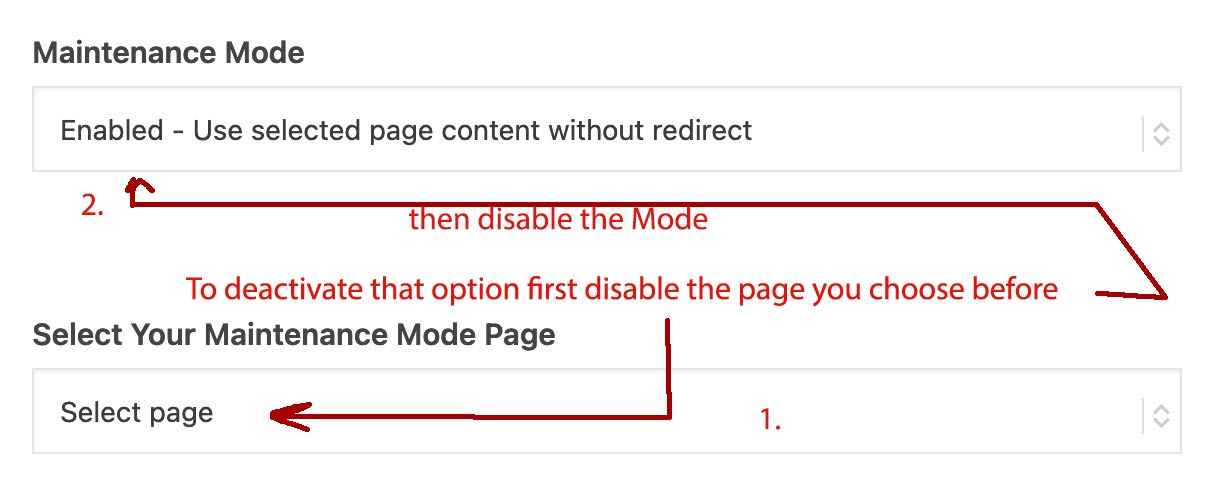
December 3, 2023 at 9:34 am in reply to: This page is selected to be displayed as maintenance mode page but is not active #1427023You have mistakenly assumed that deactivating the mode (on Maintenance Mode) will also reset the setting at the bottom (Select Maintainance Mode Page). If this were technically possible, it would be a good thing. However, you must first reset the page to the default value, which is “Select page” (and that means no page is selected) – only then you should set the checkbox at the top to unchecked (Disable Maintainance Mode).
That’s why I set the numbering in the drawing.1) first disable the page you choose
2) then disable the ModeDecember 2, 2023 at 10:22 pm in reply to: Random background image (possibly from a list) in color section #1427004oh wow – long time ago
ps on that given example page there are both versions – on top : showing the bg-image of that weekday
on bottom randomized.by the way: here it is for the seasons:
function scheduling_per_season(){ if(is_page(39621)){ ?> <script> var currentTime = new Date(); var month = currentTime.getMonth() + 1; var imglocation = "/wp-content/uploads/season-images/"; // put the images in this folder switch(true) { case (month >= 6 && month <= 8): var seasonImg = "summer.jpg"; var season = "summer"; break; case (month >= 9 && month <= 11): var seasonImg = "fall.jpg"; var season = "fall"; break; case (month == 12 || month == 1 || month == 2): var seasonImg = "winter.jpg"; var season = "winter"; break; default: var seasonImg = "spring.jpg"; var season = "spring"; } document.getElementById('changed_on_season').style.backgroundImage = 'url(' + imglocation + seasonImg + ')'; document.body.classList.add(season); document.getElementById('changed_on_season').getElementsByClassName("av-special-heading-tag")[0].textContent = "It is "+season+""; </script> <?php } } add_action('wp_footer', 'scheduling_per_season');December 2, 2023 at 11:18 am in reply to: This page is selected to be displayed as maintenance mode page but is not active #1426945Are you looking to your domain as logged-out user?
________
Or have I misunderstood your question and it remains active – even though the mode is disabled?
Then it is probably the case that you first have to remove the page that was originally selected there (i.e. set it to the “select Page” ( ) and then deactivate the mode. Like Mike mentioned above.
 December 2, 2023 at 6:43 am in reply to: Password protected post image in masonry not displayed #1426935
And you did already what Ismael said: “Look for this block of code around line 948, and remove it. ” ?
December 1, 2023 at 9:56 pm in reply to: Password protected post image in masonry not displayed #1426921you now got under the folder: config-templatebuilder two folders ( one for legacy case – and a default one )
you now find those files under:
/enfold/config-templatebuilder/avia-shortcode-helpers/class-avia-masonry.php ( the lines are : 1244 ff)
and
/enfold/config-templatebuilder/avia-shortcode-legacy/av-helper-masonry.php ( lines : 978ff )don’t know if it is needed to edit both – i think it will be enough to edit only the first one.
Have you ever thought about displaying a real clock in the logo?
see: https://weber.tips/clock/Or if it only affects a few icons and it is therefore not worth uploading your own font icon set, you can also swap the icon via a user class and using css.
The advantage could then also be that multi-colored icons are possible.First case: you see a different html-entity f.e. here: https://www.toptal.com/designers/htmlarrows/
then you can replace that content directly:
my custom class is in this case: my-separator-icon#top .my-separator-icon .av-seperator-icon:before { content: "\00A7"; font-size: 40px; }next colored icons:
my custom class is in this case: my-colored-separator-icon#top .my-colored-separator-icon .av-seperator-icon:before { content: ""; display: inline-block; position: relative; width: 40px; height: 40px; background: url(/wp-content/uploads/webers-globe1.svg); background-size: contain; background-repeat: no-repeat; }i had to see the page it concerns.
if it is similar to this:
https://kriesi.at/themes/enfold-2017/blog/blog-multi-author/ or
https://kriesi.at/themes/enfold-2017/blog/Or do you mean the single blog post? – it only differs in the heading tag ( h1 or h2 ) so this might work on both cases:
#top .template-blog .post-title.entry-title { font-family: "Times" !important; }yes – now it works well. so do not change now your setting.
but keep in mind that svgs are a mighty image format – you can influence from outside by css. And often much smaller in file-size and with maximum sharpness.PS: if your Logo could be changed a bit – ( like i do ) it would be nice to easier identify the “plant” as the missing “i” in Griegos.
We as layout-savvy users see this immediately, but a normal visitor to the site may not.the point is that logo.hide() will hide the whole anchor. ( including the alt-logo)
you had to be more specific in your selectorbtw. i would work with an svg logo ( you know your fonts ( Dante and Tribute) so you only had to vectorize the “i” plant.
i would place both parts in that svg – like this ( where the plant part is set to opacity: 0 from the beginning – only here to see where it is and what dimension it could have.)
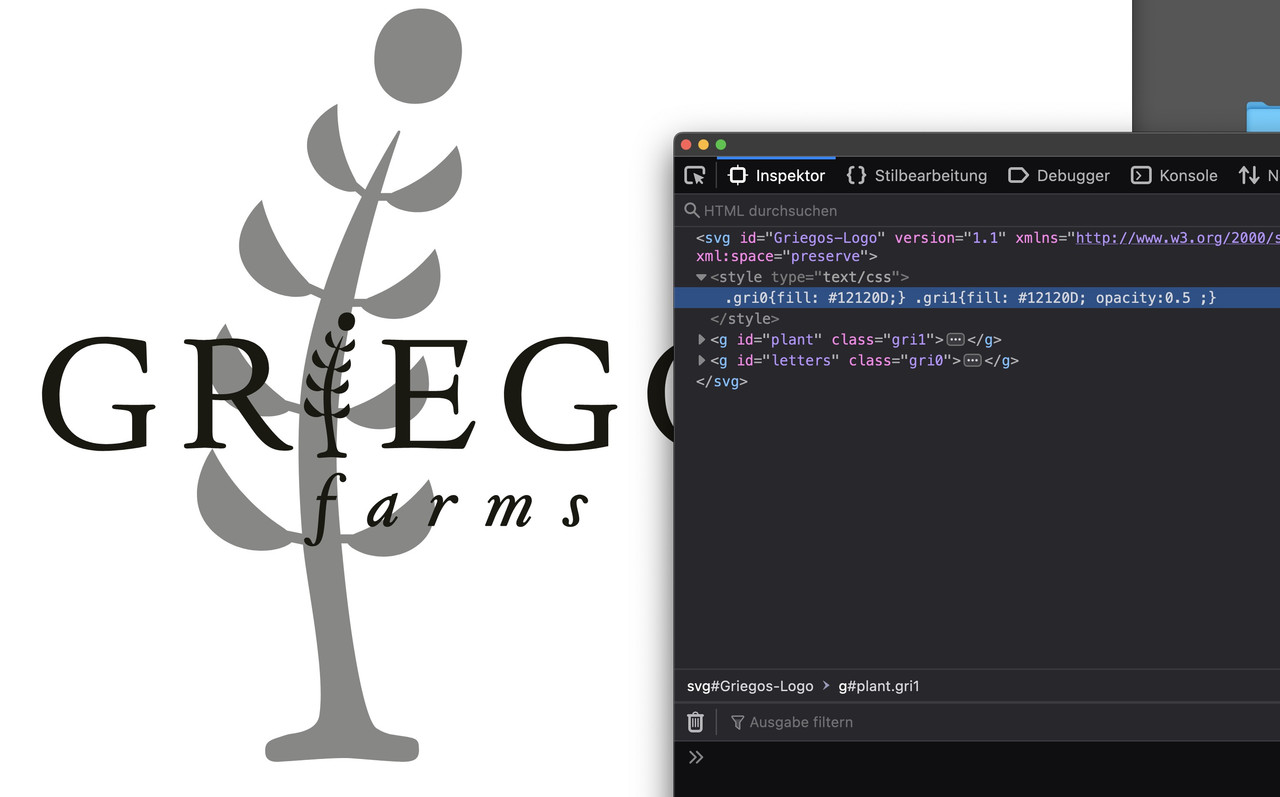
the rest is easy then – you can influence and animate the show and hide of the svg parts by ID:if you like to hide it only for real mobile devices ( and not for all small screens ) you can use that class – enfold added to the document ( html ) for mobile devices: avia_mobile
  .responsive.avia_mobile #footer,
  .responsive.avia_mobile #socket {
    display: none;
  }
and if you like to allow for “mobile Devices” with big screens tablets etc. (ipad…) use a combination of both.
@media only screen and (max-width: 767px) { .responsive.avia_mobile #footer, .responsive.avia_mobile #socket { display: none; } }i’m so sorry – i pasted only the function above that i tested on the demo pages with developer tools.
i forgot to wrap it as Mike said for the child-theme functions.php.
________See how a test on dev tools work with script :
Just open the console and enter the function you like to test. Return – and testclick the gif to see the video:

try to modify this to your needs:
    (function($) {
        $(document).ready(function () {
            if (window.innerWidth > 989) {
                var header = $('#header');
                var main = $('#main');
                var burger = $('.html_header_sidebar #top div .av-burger-menu-main');
                var footer = $('.html_header_sidebar.html_header_left .av-curtain-footer.av-curtain-activated .av-curtain-footer-container');
                var menu = $('.responsive.html_header_sidebar #header .av-main-nav > li').not('.av-burger-menu-main, .av-active-burger-item');

                $(window).scroll(function () {
                  if ($(this).scrollTop() > 200) {
                    burger.show();
                    menu.hide();
                    header.css({'width': '120px', 'transition': 'all 1s ease'});
                    main.css({'margin-left': '120px', 'transition': 'all 1s ease'});
                    footer.css({ 'width': 'calc(100% - 120px)', 'margin-left': '121px'  });
                  } else {
                    menu.show();
                    burger.hide();
                    header.css({'width': '300px', 'transition': 'all 1s ease'});
                    main.css({'margin-left': '300px', 'transition': 'all 1s ease'});
                    footer.css({ 'width': 'calc(100% - 300px)', 'margin-left': '301px'  });
                  }
                });
            }
          });
    })(jQuery);
and you had to find a solution for the opened hamburger then yourself. trying to find a solution for paddings on the hamburger ul
and – because of the new existing place for main some alb elements are not willing to go with that. F.e. on : https://kriesi.at/themes/enfold-photography/blog/ i can see in developer tools that there wasn’t a recalculation on masonry styles. And you had to find a way to close the hamburger menu when scrolling back to top position.copy&paste error – it is of course a (f)unction in the first line
It works fine for me in Firefox now that Mike has made some changes.
But why make life so difficult for yourself? A very slim plugin like Page Scroll to ID does this very elegantly. For example, you can not only specify an offset, but even an offset scroll position in the form of a selector: #header. This makes perfect sense for our shrinking header. But what I really like is the ability to navigate to an anchor on another page. This can be set so that the page opens at the top and then scrolls to the anchor after an (adjustable) delay.by the way – here is the metropolis with its italic font-styles. because the little “e” is in italic not only a slanted regulare “e”
https://webers-testseite.de/Metropolis.zipPS: Enfold supports the variable fonts too. But i would upload them as a separate font-file. And you should know if you realy do need it.
in the variable font – you got all those options of all static fonts – and more. But at least it is f.e. for nunitio 537kb big. if you only need the 300,400,700 Styles it will be 295kb.
Less options but better performance.First – i think you have uploaded the whole downloaded archive from google to enfold. Because only the static font-styles are seen – and they are registered as “static” font.
Next: do you really need all those font-weights ? form 200 to 900 and italic too?
for most websites it is sufficient to offer only 300, 400 and 700.
Hint: as you can see here on a post of mine for a lot of fonts it is o.k. to use the browser way to render italic fonts.
https://kriesi.at/support/topic/host-web-font-yourself-some-info/#post-1364066. – ( that topic is in many ways old and obsolete – because a lot of those features are now included to enfold – but f.e. the transfonter tool is still good to use)
You can see that only a few serif fonts show significant differences between browser-rendered italic fonts and real italic fonts.
Next: if you look inside the downloaded static folder – you see some expanded, condensed, semicondensed etc. font-styles-
This is what you mean by squished. Only upload those fonts you like to use.Next: the nunito font is separated on google to a 7pt and a 10pt style ( i believe it is a kind of kerning they use. optical or metric kerning)
i think the 7pt will be the most used.Conclusion: Long story short – I have put together the 7pt version as ttf and woff2 ( for modern browsers this is best) font in an uploadable zip.
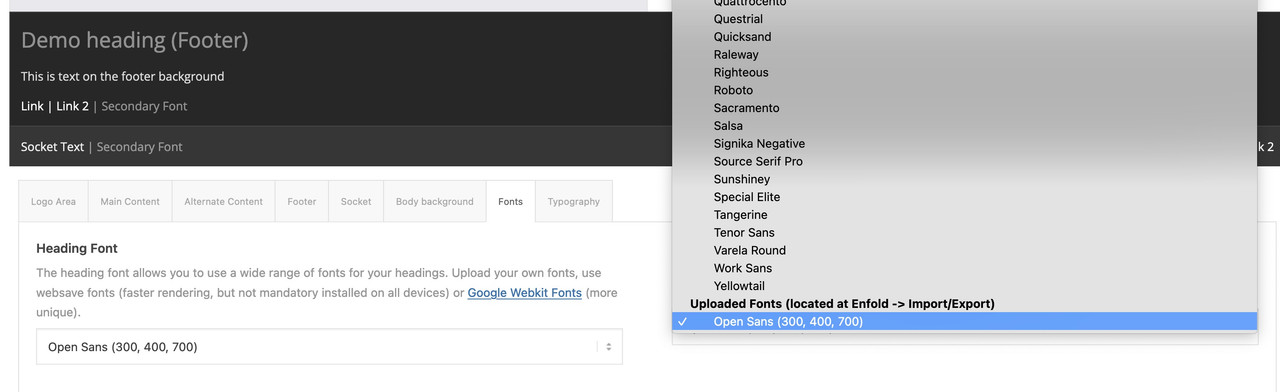
Delete your uploaded file from the font manager and upload this zip here instead: https://webers-testseite.de/NunitoSans.zipby the way – activating it for enfold : the fontmanager fonts will be at the end of the dropdown list.
Danke – das ist schon klar warum es passiert. Nur ist das nicht immer vom Kunden gewünscht. Kann dann geschlossen werden. Dachte es gäbe eine einfache Lösung.
if i looks ok on logged in version – then it is a caching problem.
i see you are using WP Rocket – clear all cachings there and merge the enfold files again ( if you have choosen that option) – clear all browser cachings.But please let’s clarify the terms first, i think there’s already a problem here.
justification means left and right letters in a paragraph are in one line. ( as you can see on the right side of your screenshot : not logged in )
on the left side this is ( called in Germany Flattersatz ) : ragged margin
What do you prefer to have?Next : do you like to have this narrow blog – or do you like to have it in one line with logo and navigation?

sorry for your setting of allways use jQuery instead of $
use instead:
jQuery(window).on('load', function(){i do always use the jQuery in a different way – wrapping it inside a jQuery function allows me to use $ instead of jQuery:
function popup_inline() { ?> <script type="text/javascript"> (function($) { $(window).on('load', function(){ $('.pu-link a').addClass('open-popup-link'); $('.open-popup-link').magnificPopup({ type:'inline', midClick: true // Allow opening popup on middle mouse click. Always set it to true if you don't provide alternative source in href. }); }); })(jQuery); </script> <?php } add_action('wp_head', 'popup_inline');By the way:
hyphens:auto does not hyphenate Capitalized words: https://github.com/mozilla/wg-decisions/issues/54One big exception is german language! – Because we write a lot of nouns with big letters at the beginning.
thanks for the link :
First: you had the wrong language defintiton on your page – for a good hyphenation you should have your lang set for the main language on your page.
guess it is:lang="da-DK"
(alway click to enlarge the images)
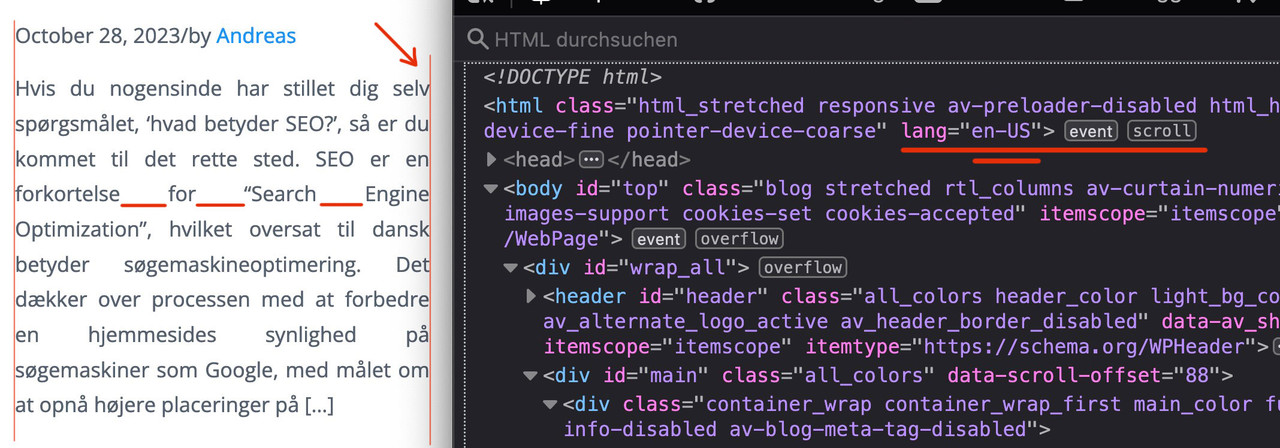
Next: this is justified text layout ! – you can see the rule for it here:
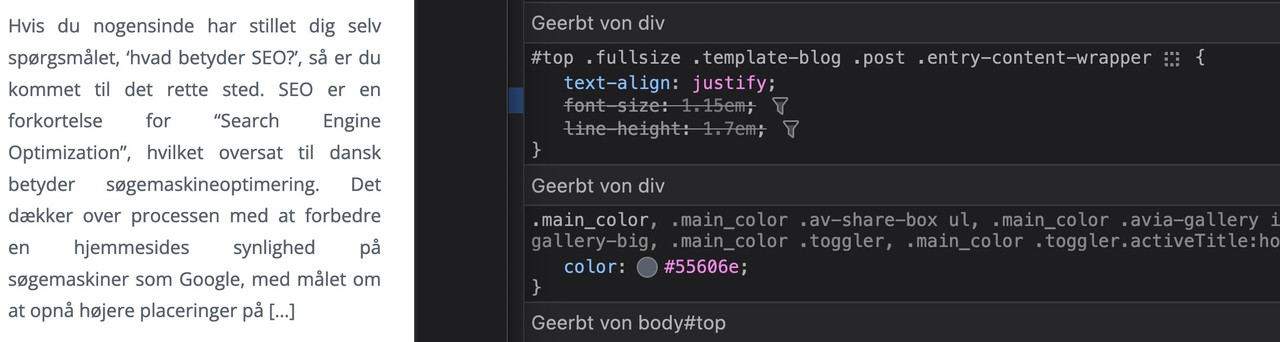
i told you in the other topic that it is alway difficult to have a nice word distance without breaking the words on justified text.
if you do not like to justify the text get rid of that part inside:#top .fullsize .template-blog .post .entry-content-wrapper { text-align: left; /****** this part is set to justify in your css *****/ font-size: 1.15em; line-height: 1.7em; max-width: 800px; /****** see comment under this codeblock *****/ margin: 0 auto; }the 800px ( or 40em ) max-width is a default setting from enfold – if this is what you mean in your e-mail talking about:
it’s stuck in the center regardless of the CSS I apply
then you can avoid that by:
#top #wrap_all .fullsize .template-blog .post .entry-content-wrapper,
#top #wrap_all .fullsize .template-blog .post .entry-content-wrapper > * ,
#top #wrap_all .fullsize .template-blog .post-title {
  max-width: unset !important;
  margin: 0;
}
if you like to preserve the justification of your paragraph texts – then a hyphens: auto will mainly solve that issue:
(those ugly underlined spaces inside block : “for______Search_____Engine”)#top #wrap_all .fullsize .template-blog .post .entry-content-wrapper p { text-align: justify; -webkit-hyphens: auto; hyphens: auto !important; text-justify: distribute; word-spacing: -0.05em !important; text-align-last: left; }but: as mentioned above the hyphenation only works well if the lang attribute on html is set to the language of your texts.
F.e. the word “Søgemaskineoptimering” does not hyphen on small screens.first: on jQuery 3.x. the
jQuery(window).load(function(){
is deprecated – use instead:
$(window).on('load', function(){now: a link to that page it concerns would be the best way to give you advice
please post your webpage where you like to solve that issue.
I’m participant as you – but with a lot of experience in css.
if you do not like to post the link here – you can send me an e-mail. My Avatar will show you contact details.just a little cosmetic correction – always leave a space after punctuation ( even in english :lol )
so replace that one line to – and with pipe:
$cat = implode(' | ', array_map('ucfirst', $categories));wenn gar nichts mehr hilft versuch das mal in der child-theme functions.php
(aber besser ist immer die Entstehung des Elements zu verändern)function replace_tags_with_tags(){ ?> <script> (function($) { function replaceElementTag(targetSelector, newTagString) { $(targetSelector).each(function(){ var newElem = $(newTagString, {html: $(this).html()}); $.each(this.attributes, function() { newElem.attr(this.name, this.value); }); $(this).replaceWith(newElem); }); } replaceElementTag('h1.the_input_element', '<h2></h2>'); }(jQuery)); </script> <?php } add_action('wp_footer', 'replace_tags_with_tags');das war ja auch gedacht um den Title vom Breadcrumb in etwas anderes zu transformieren als ein h1.
Dann würde das ja die Doppelt h1 Problematik lösen.
Wie gesagt – besser wäre es das Plugin , welches für den Shortcode zuständig ist zu betrachten.
der wird wohl das h1 setzen.
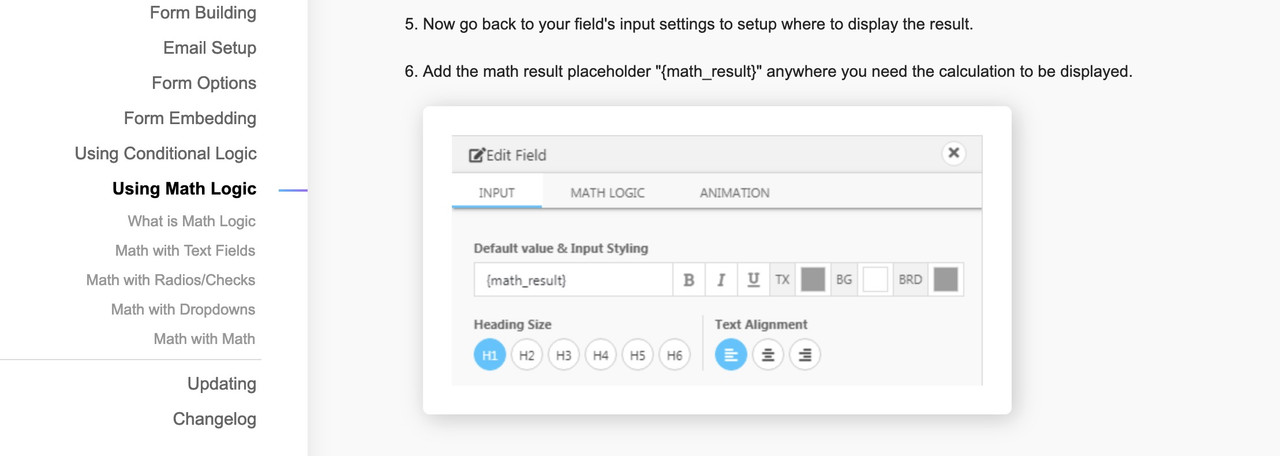
Denn das:<h1 class=”the_input_element” data-math-equation=”” data-original-math-equation=”” data-decimal-places=”0″>Angebot für eine PV-Anlage</h1>
ist nicht von Enfold seite aus gesetzt worden.Kann ich deine Seite mal sehen?
-
AuthorPosts

