

Forum Replies Created
-
AuthorPosts
-
Your setting is ok – but please remove the equal-height option for the columns.
have a look here for more info on how to: https://webers-testseite.de/iconboxes-with-equalheight/If you want to make it more perfect – maybe you can live with the 500 font-weight – then you had to load the 500 font-weight instead of the 700 one – and redeclare the css for all headings to 500.
Guess thats what Yigit now does for you.
Thats what i said.Your title on the topic is wrong: with egual parameters – the parameters are not equal – thats the point.
Next time – migrate with duplicator – then you will have a 1:1 copyMay 18, 2020 at 11:49 am in reply to: Difference All Headings (H1-H6) with egual parameters #1213992As far as i understood you – you like to have the style as in the other page. ( not so bold )
But: if you can live with the “wrong” rendering – just remove the loading of the fonts in 700 weight.
If you want to make it more perfect – maybe you can live with the 500 font-weight – then you had to load the 500 font-weight instead of the 700 one – and redeclare the css for all headings to 500.
May 18, 2020 at 11:36 am in reply to: avia-merged-styles css the highest priority in page loading, why? #1213988For Enfold you do not need to implement the child in this way:
https://kriesi.at/documentation/enfold/child-theme/As long as the child style.css has this on top:
/*
Theme Name: Enfold Child
Description: A <a href='http://codex.wordpress.org/Child_Themes'>Child Theme</a> for the Enfold WordPress Theme. If you plan to do a lot of file modifications we recommend to use this Theme instead of the original Theme. Updating wil be much easier then.
Version: 1.0
Author: Kriesi
Author URI: http://kriesi.at
Template: enfold
*/
everything works with this child style.css.
because parent-theme style.css is empty too. The styles of Enfold are loaded ( conditionally ) via functions.php.so I can’t write upstairs anymore.You’re going in circles. I think it’s more correct how it is displayed there, because you have set up a bold style and a bold style is displayed. If you look at Oswald on Google, Oswald is much thicker in the 600 weight than what you have on the first page.
The rendering on ( Link ) is actually strictly speaking wrong.But: if you can live with the “wrong” rendering – just remove the loading of the fonts in 700 weight.
you see it on this image – when commenting out the loading of the 700er Oswald – the look is what you like to have:

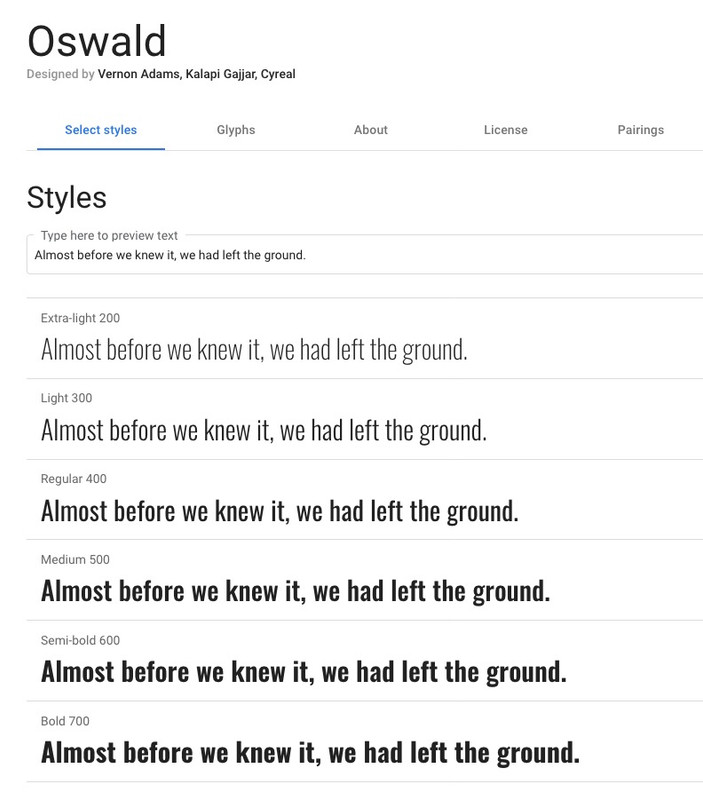
Look on https://fonts.google.com/specimen/Oswald?query=oswald what it should look like. This font you had to load. If it comes nearer to the 500 – you have to load that. And then set the headings to font-weight: 500
this is what google dev tools for your sites:
( i do allways have extra windows instead of only sidebar look on dev tools in the browsers )again – click to enlarge the image

first i told you here: https://kriesi.at/support/topic/difference-all-headings-h1-h6-with-egual-parameters/#post-1213764 that this is just for info.
( not intended as a solution for you )there must be differences in your installations. The difference is that on this : https://trikego.com/it/ you have installed a font-weight of 700 from Oswald. This is ok – and if you are using a 600 ( semi-bold ) setting browsers will use the 700 for that.
On that site there are these 72 Rules to import: Lato, Nunito, Open Sans, Oswald, Poppins and Raleway ( see images above).
I don’t know if you did this by accident or consciously I only see that these fonts are loaded and not on the other site.
I don’t think it’s the difference between Enfold 4.7.2 and 4.7.4.If you like the smaller look then you had to synchronize the font-loading
on https://trikego.com/it/ you load (72 css rules)
Lato(100, 300, 400, 700, 900); Nunito (300, 400); Open Sans (300, 400); Oswald ( 300, 400, 700); Poppins (300, 400, 500, 600, 700); Raleway (100, 200, 300, 500)On http://www.brunocover.it/CMS/wordpress/trikego/ there are only 19 css rules on that segment :
Open Sans (400, 600); Oswald (400);you had to know your self where you did that – but because these are not in the merged files css – you had to remember yourself where you had done that.
PS: with duplicator i migrate a page in less than 1 hour.
Just for Info: ( not intended as a solution for you ) Oswald is one of the google fonts which have variable font-weights: https://web.dev/variable-fonts/
nice info video about new browser support on that since May 2020 : https://youtu.be/B42rUMdcB7c?t=30
so you can even import a 450 font-weight with f.e. 400 and 600
@import url('https://fonts.googleapis.com/css2?family=Oswald:wght@400;450;600&display=swap');On that page here : https://trikego.com/it/ you see in css files that you are loading the 700 font-weight.
On setting the rule for headings with 600 font-weight and that is a semi-bold one – the browsers will take this 700 for it!
This results in a bold looking font – and that is correct !!!On your site http://www.brunocover.it/CMS/wordpress/trikego/ you only load via @import rule the 400 Oswald – on defining for headings a 600 font-weight – browser only tries to make the font a little thicker – but it is an “illusion” of a little bolder style ( on my opinion this is a wrong rendering of the font)
so if you like that little bolder Oswald try to implement the 500 medium font-weight for the site.
Click to enlarge the image:
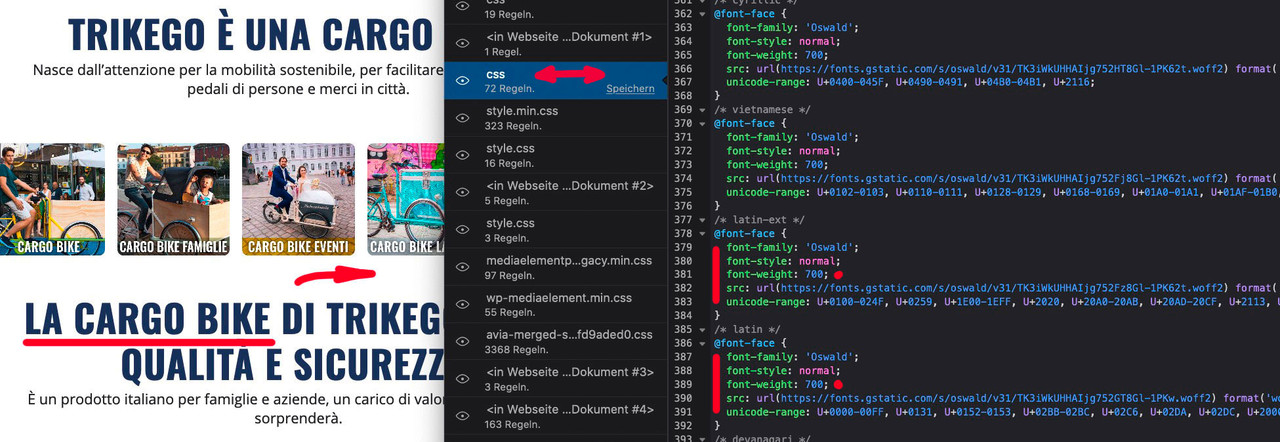
if i erase those entries via developer tools ( just virtually erase ) the look will change to the wanted style :
to better see what i mean i just commented out those lines:
just looking for hs-form-required on google
Aha : you have on the one installation loaded Oswald with a 700 font-weight on the other not.
there must be two loading instructions on that – because on that installation ( https://trikego.com ) there is a bolder font-weight the instruction of 600 maybe will take the 700 for it.
On ( http://www.brunocover.it/CMS/wordpress/trikego/ ) you only load a 400 Oswald font-weight. – Guess Browser will then only tries to render it thicker.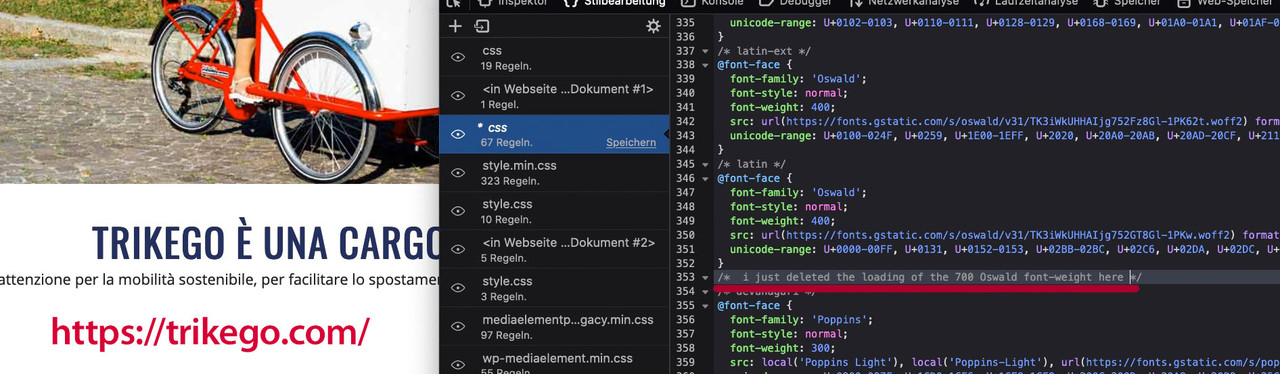
So Actually, where you think it’s right, it’s wrong! You have selected 600 or even 900 – which is not loaded as a font style.
If you compare the style on ( https://trikego.com ) that page with the google fonts – this comes nearer to the right font-weight then on your wanted one:
-
This reply was modified 5 years, 10 months ago by
Guenni007.
Next Question – you like to have the smaller font-weight : 600 ? like on : http://www.brunocover.it/CMS/wordpress/trikego/
but there we have:
#top #wrap_all .all_colors h1,
#top #wrap_all .all_colors h2,
#top #wrap_all .all_colors h3,
#top #wrap_all .all_colors h4,
#top #wrap_all .all_colors h5,
#top #wrap_all .all_colors h6 {
 color:#24305e;
 font-weight:900;
 text-transform:uppercase
}
on the page where the black style is on you have 600 ?
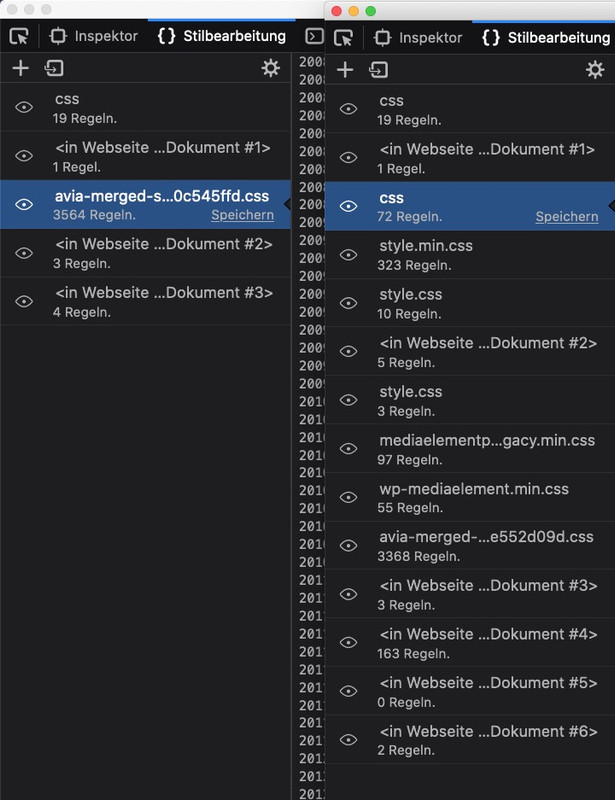
Next : can you please disable the merging of the css files for the duration of the investigation and have the files regenerated – this can be done under Enfold – Performance
If i compare it via Developer Tools i can see a big difference on loading css recources:
Then some thoughts on using font-weight – if the font-weight does not exist on loading – you haven’t a 900 weight on your loaded fonts !
I do not know how browsers react on font-weights they can’t find as a source.Then: you on the one enfold on 4.7.2 and on the other on 4.7.4 etc. pp.
Maybe you decide to update the one you like to have to the newest Enfold – install Duplicator and migrate with this tool.
If you need help for that – please feel free to say itIt sounds a bit like you did the move of the hopmepage by hand. With transfer of the settings and css settlements etc.
I always migrate WordPress installations with Duplikator ( Link ) and never had to fear such problems.
Maybe you decide to take this step.But first: tests you could still do –
Check if the settings in the “Advanced Settings” are identical.
If yes then try a backup of the settings data via Enfold – Import/Export : Export Theme Settings File and then the import in the new installation will bring a little more.Aha – belongs to hubspot:
.hs-form label .hs-form-required { color: #8E199D; }if your page is like this here: https://kriesi.at/themes/enfold/pages/contact/
you can include here the font-size too:.main_color .required { color: #8E199D; font-size: 20px; }if it is in a placeholder you had to style the placeholder text. – is there a page to see the issue?
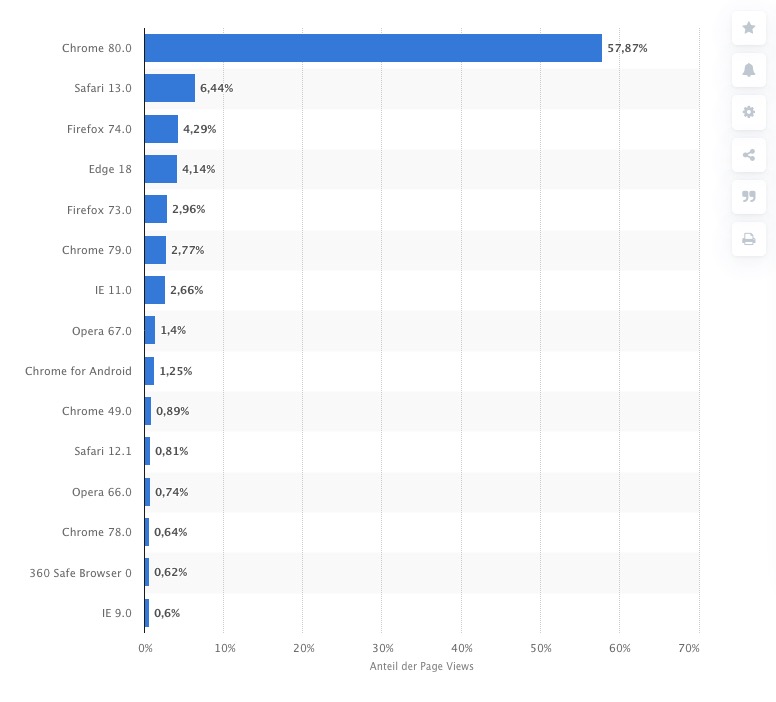
Excuse me for saying that now so decisively, but from my side I don’t want to install ancient versions of browsers to optimize internet layouts. The IEs have always been bad browsers in my eyes, only Edge seems to be getting better. But even these versions have a worldwide distribution of about 4%.
2.66% of all opened pages are loaded with IE11. – Safari 12 : 0,81%
ich persönlich blende die Infos immer aus, welcher Editor für die die Seiten/Beitragserstellung zuständig war.
Lediglich Entwurf und wichtige Infos ( Datenschutzseite) lasse ich drin.Legt mal folgendes in Eurer Child-Theme functions.php an:
/****  Die Poststates im Dashboard nicht anzeigen - wichtige schon *****/
function remove_post_state( $post_states, $post ) {
  if("! has_blocks( $post->ID )") {
    unset($post_states['wp_editor']);
  }
  if("!= Avia_Builder()->get_alb_builder_status($post->ID)") {
    unset($post_states['avia_alb']);
  }
return $post_states;
}
add_filter('display_post_states','remove_post_state',999,2);
Das betrifft eben auch die Menus.
_________
Ansonsten sehe ich die Darstellungsprobleme nicht im Menu – lediglich das Laden der vollständingen Seite verhindert das zeitnahe Rendern der kompletten Seite – dadurch hatte ich auch zunächst Darstellungsprobleme eures Menüs.Geht mal auf Gtmetrix und forscht mal nach, warum ihr soviele Requests habt :
https://gtmetrix.com/reports/www.institut-generationenberatung.de/Ng6GhVjPDann versucht doch mal das Merging von Enfold. Das stelle ich auch immer erst zum Schluss an, weil die vereinten js und css files während des layouts oft wie ein Caching wirken und das hält auf. Wenn die Seite allerdings dann steht, kann man das Anstellen.
______________
for non German participants herePersonally, I always hide the information about which editor was responsible for the pages/contributions.
Only draft and important information (data protection page) I leave inside.Please look at the code above.
This also applies to the menus.
_________Otherwise I don’t see the display problems in the menu – only the loading of the complete page prevents the timely rendering of the complete page – so I had display problems of your menu at first.
Go to Gtmetrix and find out why you have so many requests:
https://gtmetrix.com/reports/www.institut-generationenberatung.de/Ng6GhVjPWhy don’t you try merging Enfold? I always do this at the end of the layout because the merged js and css files often act like a caching during the layout and that stops. But when the page is finished, you can start the merging.
search icon: you have set the padding-right to 0
.html_main_nav_header.html_logo_left #top .main_menu .menu > li:last-child > a ,
.html_bottom_nav_header #top #menu-item-search > a {
    padding-right: 0;
}
on default it is 13px – so delete this setting
you can add to your logo a little padding – and maybe for non-responsive case a little top positioning:
.logo img {
    padding: 5px;
}

@media only screen and (min-width:768px) {
	.logo img {
	    top: 5px;
	}
}
for centering the menu in relation to logo – maybe you better adjust logo position a bit.
PS: Bumping but then no interest on a solution ? ;)As mentioned above your favicon : http://www.downundermusic.com/wp-content/uploads/2019/01/favicon-16×16.png
tries to load from http and could not be found under this url.
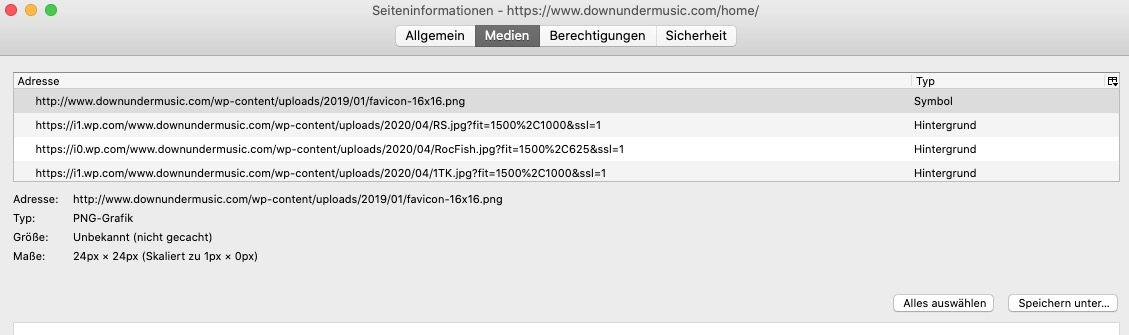
svg “images” are kept by WordPress in the media library with 0x0 px.
so your image is there but had no dimension: add something like this to your quick css:#socket img { width: 300px; }and because you have ssl certs – use:
https://www.downundermusic.com/wp-content/uploads/2020/05/downunder_white.svg
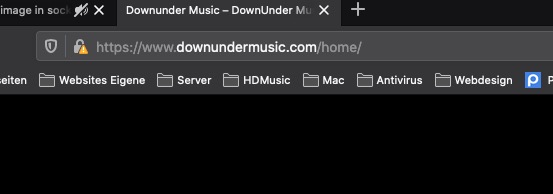
same thing on favicon use https: then the yellow warning will not be shown on top:
Keiner!
Und wieso kannst du nicht einfach eine Antwort auf eine generelle Frage geben?
weil sowas hier für 95% der Mitstreiter hier an Board nicht hilfreich ist: https://developer.wordpress.org/reference/functions/get_bloginfo/
______
Wie du hier am Board Logo siehst, hat Kriesi eine Bildmarke und Text eingebunden.
Das tat ich zB. auch auf einer meiner Seiten: https://guenterweber.com
Man hat dann wie hier die Möglichkeit verschiedene Effekte noch auf diese anzuwenden ( siehe oben beim Shrinken )Das kann man z.B. auch mit dem Seitennamen und der Beschreibung machen – wobei etwas css noch dazugehört diese dann richtig zu positionieren.:
das hier in die child-theme functions.phpadd_filter('avf_logo_subtext', 'kriesi_logo_addition'); function kriesi_logo_addition($sub) { $sub .= "<span class='logo-title'>"; $sub .= get_bloginfo( 'name', 'display' ); $sub .= "</span>"; $sub .= "<span class='logo-title logo-subtitle'>"; $sub .= get_bloginfo( 'description', 'display' ); $sub .= "</span>"; return $sub; }wenn du es aber oben im Top-Menu links haben wolltest muss eine andere Lösung her etc. pp beides wäre auch als oben links zu bezeichnen, wenn das Logo links positioniert hast.
Daher mein Nachfragen. Mir war das zu allgemein um eine präzise Lösung anzubieten.
Sorry – I must have misunderstood your demand.
That was not quite clear to me – maybe you should have just said that you wanted to stretch the picture on the right to have it in a block set. It sounded to me like you didn’t want to have the alignment. ( aligns to left and does not extend ): my faultwhat do you mean by upper left corner? Screen or besides the logo etc. pp.
or best would be to see the site – and a description then where you like to have that information.haha – hier steht der Avatar für die Seite ;)
hier wäre ja zumindest der Seitentitel doppelt genannt mit deinem Logo …
Try this in quick css :
@media only screen and (max-width:767px) {
	.big-preview.single-big {
	  padding: 0 0 30px;
	}

	.big-preview a {
	  overflow: visible !important;
	}

	.big-preview.single-big img {
	  width: 101vw !important;
	  min-width: 101vw !important;
	  position: relative;
	  left: -9% !important;
	  margin-top: -50px;
	}
}
please do not ask where the -9% left positioning comes from ( on theory 7.5% should be enough – because .container width on default is set to 85% ) – so I cowardly opted for a little more width. ;)
your header-meta overlaps that area:
you can set the header_meta to less z-index:#header_meta { z-index: 1 !important; }Edit : and it overlaps because of a header_meta rule sets min-height to 80px – default value is 30px
so better get rid of that rule and let the z-index of header_meta to its default value 10#header_meta .container { min-height: 30px; }May 13, 2020 at 12:41 pm in reply to: Menu shrinking on scroll, but not ava_inside_main_menu #1212591Was this advice enough to solve your problem or do you need support?
In this case I would have to know more about your setting – the best thing would be to see the page it’s about.
( Think of : i’m participant as you are – so i do not see private content in your postings )May 13, 2020 at 9:49 am in reply to: Menu shrinking on scroll, but not ava_inside_main_menu #1212548what kind of header-settings do you have: logo left menu right or something else?
what kind of content – an image as “second logo” ?so – the script responsible for shrinking behavior is: avia-snippet-sticky-header.js
you can have a child-theme script instead of loading the parent one by:add_action( 'wp_enqueue_scripts', 'wp_change_sticky_header_script', 100 ); function wp_change_sticky_header_script() { wp_deregister_script( 'avia-sticky-header' ); wp_enqueue_script( 'avia-sticky-header-child', get_stylesheet_directory_uri().'/js/avia-snippet-sticky-header.js', array('avia-default'), $vn, true); }This script takes care of the shrink factor and other settings – for example the varialble line-height while shrinking.
In the function avia_header_size there is the calculation of the effect – the trick will be to include the new element to be calculated f.e. in height and width.May 13, 2020 at 9:19 am in reply to: Featured image by default in post with Avia, possible ? #1212535This is only a crutch; it would certainly be better if the corresponding image was inserted at a suitable place. For the markup it is not unimportant whether I create the post/portfolio including color-sections or other full-width elements or not.
So you have to check in each individual case if it would be better to put the post-image into the appropriate container.
some thoughts on it:
https://kriesi.at/support/topic/diagonal-border-angle/#post-1138048for color-sections the best position to have real divider is as mentioned in the link above:
<div class="avia-section  …
  <svg  (  inline for the top ) > …</svg>
     <div class="container">… </div>
   <svg  ( inline  for the bottom ) >… </svg>
</div>
the reason for using svg is easy : these can be influenced to react responsive – and if they use only vectors they are allways sharp, they are extremly small in file-size, and you can set fill-colors for the needed transition. They can be animated : see here on the footer: https://webers-testseite.de/pureinstall/fullwidth-slider/
you can even use them on sliders – as you can see in the link above. But you have to choose a better place to insert them to markup.
-
This reply was modified 5 years, 10 months ago by
-
AuthorPosts


