

Forum Replies Created
-
AuthorPosts
-
July 17, 2020 at 1:55 pm in reply to: how to load a child-theme avia-default script conditionally #1231282
thanks Ismael and – of course you can close the topic now
Too early:
i tested it on shrinking script and:add_action( 'wp_enqueue_scripts', 'wp_change_sticky_header_script', 100 ); function wp_change_sticky_header_script() { wp_deregister_script( 'avia-sticky-header' ); $condition = (isset($options['header_position']) && $options['header_position'] == "header_top"); $condition2 = (isset($options['header_sticky']) && $options['header_sticky'] == "header_sticky") && $condition; avia_enqueue_script_conditionally( $condition2 , 'avia-sticky-header-child', get_stylesheet_directory_uri().'/js/avia-snippet-sticky-header.js', array('avia-default'), $vn, true); }i tought that this is the right code but on my shrinking script i see that this is not working that way.
indeed it will be best to see the page it concerns
Yes – you are right – i didn’t realize that – because i do allways selfhost my fonts.
For google ( youtube and maps ) scripts – they are probably only loaded conditionally, right?
But nevertheless that would be a nice idea to only load essential scripts etc.But you decide which page is shown in Maintenance mode !
So create one – set for example the template to : Blank no header no footer. https://webers-testseite.de/under-construction/
Thats all. : You are GDPR (DSGVO) complient if you do not have a contact information on that page!
( top part of the page)If you have – then you are right – there had to be an imprint info. ( bottom part of that page )
If you do not use cookies or other relevant objects on that page – no need for privacy page ( look to your link – it says only an imprint is needed )
An Imprint is half a page as you can see.there is the code-snippet on the documentation: Link that may help you – to decide on the alb itself.
put the snippet to your child-theme functions.php:
( on my point of view it is enough by the function itself to overwrite a plugable function on parent-theme )// this will insert on the given allowed elements some new Options for sorting function avia_custom_query_extension($query, $params) { global $avia_config; if(!empty($avia_config['avia_custom_query_options']['order'])) { $query['order'] = $avia_config['avia_custom_query_options']['order']; } if(!empty($avia_config['avia_custom_query_options']['orderby'])) { $query['orderby'] = $avia_config['avia_custom_query_options']['orderby']; } unset($avia_config['avia_custom_query_options']); return $query; } add_filter('avia_masonry_entries_query', 'avia_custom_query_extension', 10, 2); add_filter('avia_post_grid_query', 'avia_custom_query_extension', 10, 2); add_filter('avia_post_slide_query', 'avia_custom_query_extension', 10, 2); add_filter('avia_blog_post_query', 'avia_custom_query_extension', 10, 2); add_filter('avf_magazine_entries_query', 'avia_custom_query_extension', 10, 2); add_filter('avf_template_builder_shortcode_elements','avia_custom_query_options', 10, 1); function avia_custom_query_options($elements) { $allowed_elements = array('av_blog','av_masonry_entries','av_postslider','av_portfolio','av_magazine'); if(isset($_POST['params']['allowed']) && in_array($_POST['params']['allowed'], $allowed_elements)) { $elements[] = array( "name" => __("Custom Query Orderby",'avia_framework' ), "desc" => __("Set a custom query orderby value",'avia_framework' ), "id" => "orderby", "type" => "select", "std" => "", "subtype" => array( __('Default Order', 'avia_framework' ) =>'', __('Title', 'avia_framework' ) =>'title', __('Random', 'avia_framework' ) =>'rand', __('Date', 'avia_framework' ) =>'date', __('Author', 'avia_framework' ) =>'author', __('Name (Post Slug)', 'avia_framework' ) =>'name', __('Modified', 'avia_framework' ) =>'modified', __('Comment Count', 'avia_framework' ) =>'comment_count', __('Page Order', 'avia_framework' ) =>'menu_order') ); $elements[] = array( "name" => __("Custom Query Order",'avia_framework' ), "desc" => __("Set a custom query order",'avia_framework' ), "id" => "order", "type" => "select", "std" => "", "subtype" => array( __('Default Order', 'avia_framework' ) =>'', __('Ascending Order', 'avia_framework' ) =>'ASC', __('Descending Order', 'avia_framework' ) =>'DESC')); } return $elements; } add_filter('avf_template_builder_shortcode_meta', 'avia_custom_query_add_query_params_to_config', 10, 4); function avia_custom_query_add_query_params_to_config($meta, $atts, $content, $shortcodename) { global $avia_config; if(empty($avia_config['avia_custom_query_options'])) $avia_config['avia_custom_query_options'] = array(); if(!empty($atts['order'])) { $avia_config['avia_custom_query_options']['order'] = $atts['order']; } if(!empty($atts['orderby'])) { $avia_config['avia_custom_query_options']['orderby'] = $atts['orderby']; } return $meta; } // end of new options on sortingUnder the filters – you will have then :
 July 16, 2020 at 8:11 am in reply to: Lightbox open 2 times with "Portfolio Filter Gallery Premium" Plugin #1230852
nice – but if you use the pagename – you had to put it in quotationmarks i guess:
if(is_page('pagename')){
the page id you can find on the body#top container – it has the class page-id-ID on my case above page-id-38198 etc.– yes – and the direct link to it is: https://kriesi.at/documentation/enfold/icon/#icons-are-showing-as-rectangular-boxes-
hm no idea – even if i set the link to open in new window the addendum as described works as expected.:
https://webers-testseite.de/pureinstall/vimeo-test/and even loop will work there:
https://vimeo.com/407573211?iframe=true&autoplay=1&loop=1But even your images do not open in lightbox : https://cce.createdigitalmedia.co.uk/parts/
have you activated the lightbox on enfold ? : Enfold Options – Theme Options : Lightbox Modal Window
-
This reply was modified 5 years, 8 months ago by
Guenni007.
Hey Mike – when will the next update be issued?
what url do you have inserted?
try to add behind the url: ?iframe=true&autoplay=1
f.e.: https://vimeo.com/64927358?iframe=true&autoplay=1Füge mal spasshalber diesen Code in dein Quick CSS und schau was mit der Seitenleiste dann passiert:
#top.page-id-6292 { overflow-x: visible; } .page-id-6292 #wrap_all { overflow: visible; } @media only screen and (min-width: 767px){ .page-id-6292 #after_full_slider_1 .container { display: flex; flex-flow: row nowrap; justify-content: space-between; align-items: flex-start; } .page-id-6292 #after_full_slider_1 .container .sidebar { position: -webkit-sticky !important; position: sticky !important; top: 20px; align-self: flex-start; } }-
This reply was modified 5 years, 8 months ago by
Wo kommt dieser “pf-content” her ?
Das gehört irgendwie nicht zu Enfold. Kommt das von dem print-friendly plugin?
Wenn du nach dem Slider alles nur in Container packst ( 1/1 etc. ) sollte die Seitenleiste auch rechts erscheinen.-
This reply was modified 5 years, 8 months ago by
Can you link to that demo page please?
yes – that is just the price for individual wishes. If the developers would consider every single wish here and integrate it into the theme, it would bloat unnecessarily as I think.
This leaves room for own ideas and the pages do not all look the same. The pre-condition for this is, of course, that you have some basic knowledge.
Take a look at the buttons I created based on the existing setting “light transparent”.
I only have to set two classes to get this look. ( One class takes care of the styling and the other class takes care of the color )
Or beneath those glassy buttons the pulsing gradient button – very easy with a bit of @keyframes instruction.https://webers-testseite.de/buttons/
_____________
PS: https://kriesi.at/documentation/enfold/button/#toggle-id-22
and https://kriesi.at/documentation/enfold/button/#toggle-id-23-
This reply was modified 5 years, 8 months ago by
July 15, 2020 at 6:42 am in reply to: Issues in adding custom code to postslider.php in child theme #1230515yes – that is as you said above the same tree structure of folder. So put in your edited alb file to the shortcodes folder. The code above reflects exactly that structure.
For a lot of other child-theme files this will be enough ( like you tried before ) most of the php files f.e. to have your own child-theme loop-index.php. Just put it in the child-theme includes folder. There is no need to have a code snippet like the one above.
For js files there had to be new loading snippets ( de-register the parent-script – enqueue the new child-theme script) – f.e. avia-snippet-sticky-header.js file to have your own header shrinking etc. ppWell – Rikard is on that right – backgrounds do not tend to have alt attributes – but your lightbox-images do have them if you choose flexible masonry
so it depends on what kind of masonry you have choosen: if you have perfect grid – than this will be as you said.Flexible Masonry: ( if your images have the same size do this)
the image ( that is set to display none ( the source for the background-image) has alt Attribute too ! )
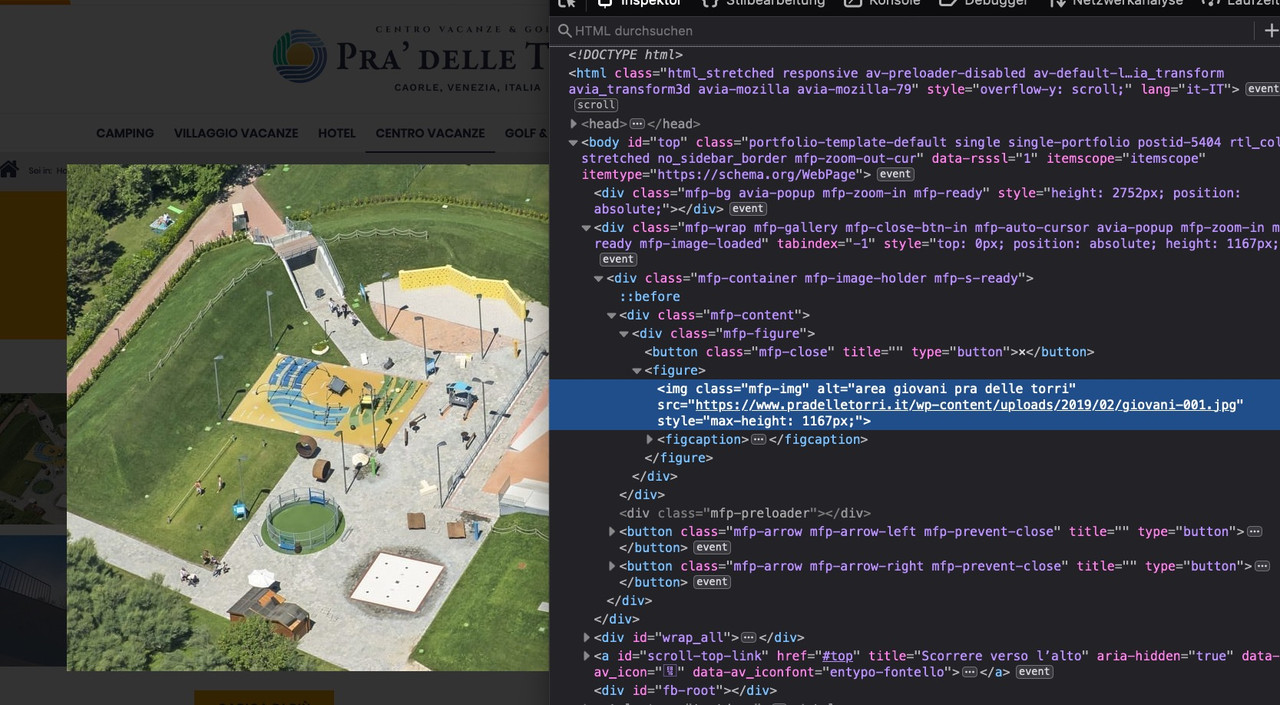
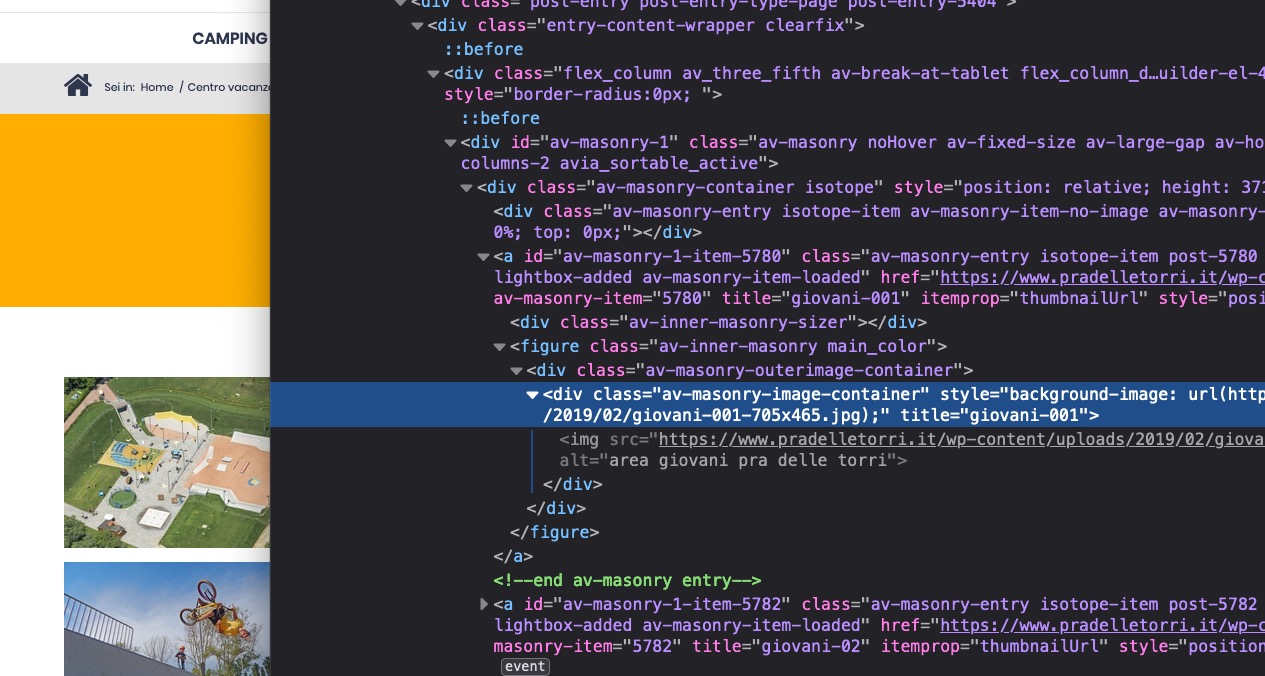
So from an SEO point of view all is done, because even elements set to display: none are crawled.
But yes maybe an alt attribute should be present on lightbox image!
On those little divs with background-image the anchor has title attribute – that is all allowed as global setting:
Global attributes for anchor-links
href
target
download
rel
hreflang
type-
This reply was modified 5 years, 8 months ago by
yes because it is not that ID:
.page-id-103 .avia-slideshow-arrows {
    display: none;
}
try first without !important. if it does not work set it to important.
July 14, 2020 at 3:37 pm in reply to: Issues in adding custom code to postslider.php in child theme #1230323to have your own child-theme alb elements – yes : create a subfolder in your child-theme : shortcodes and put this to your child-theme functions.php:
function avia_include_shortcode_template($paths){ $template_url = get_stylesheet_directory(); array_unshift($paths, $template_url.'/shortcodes/'); return $paths; } add_filter('avia_load_shortcodes', 'avia_include_shortcode_template', 15, 1);ich werde dich per E-Mail nochmal kontakten.
July 14, 2020 at 10:42 am in reply to: Copy/Clone slide Caption Content to div outside slider. #1230252Thanks Ismael – I figured there had to be something like that. – Only, of course, this does not include the first slide of the show. Therefore I have to consider the first slide before.
A background-image is a backgroundimage is a background image.
All kidding aside. You could of course set the color section to follow the aspect ratio of the background image, but you run the risk of making the content too large for the container, which would then be cropped / overlapped.
Example: if you have an Iphone 6, the maximum width is about 375px – with a 16:9 picture you will have about 210px height.
With a font size of 16px and 1.5 times the line height per line, this would be 40px – making about 5 lines at 210px.
Everything above that would be too large.Now you could of course set the property of the background image to “contain”, but then, like Ismael, you would have white areas without image.
See responsive color-section on .: https://webers-testseite.de/terve/
on wide screens this maybe ok – but on smaller screens ?Is there also a public link to it, or do you have to keep the site private?
( By the way – if it is a blue pattern – and no photorealistic images – then you can set the pattern to repeat.
A lot of patterns are in this way that they are seamless on repeating them )July 12, 2020 at 11:04 am in reply to: How to blur the background image in a color section? #1229760Does your background-image scroll or is it set to fixed?
(Edit : i ask – because there will be a solution if it is set to scroll.)_____
But however it will be easier to blur it in a graphic programm and upload that blurred image.
July 10, 2020 at 10:09 am in reply to: Copy/Clone slide Caption Content to div outside slider. #1229362i think i got it with MutationObserver – but it would be nice/better to have a solution that uses existing triggers or functions
Or is it possible to use out of the slideshow.js an existing function like: after_slide or a used trigger ( maybe: avia-transition-done ) for that ?
July 10, 2020 at 9:45 am in reply to: Copy/Clone slide Caption Content to div outside slider. #1229358we need an expert
you see in DOM that the cell is dynamically inserted – but only the first slide.Darunter versuche ich jetzt die Grid-Row.
Hallo Tobias : das wird mit dem Sliden ein Problem – denn das ist irgendwie auf Overflow: hidden angewiesen.
Eventuell kannst du mit faden ja zufrieden sein:
Das wäre hier so ein aufbau:Color-Section : 1/1 container darin – dort dann einen easy slider platziert:
Der Color-Section gab ich eine benutzerdefinierte Klasse.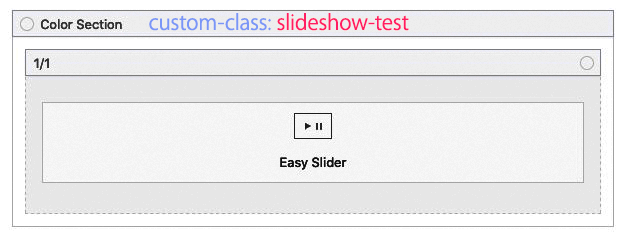
.slideshow-test .avia-caption {
    position: absolute;
    left: 60%;
    z-index: 50;
    top: 0;
    width: 40%;
    height: 100%;
    padding: 30px;
}

.slideshow-test .avia-slideshow li img {
    display: block;
    width: 60%;
    margin: 0;
    border-radius: 3px;
    position: relative;
}

.slideshow-test .avia-slideshow li  {
    z-index: 10 !important;
}

.slideshow-test .avia-slideshow-inner::before {
    content: "";
    background-color: #f9be46;
    width: 40%;
    height: 100%;
    z-index: 10;
    position: absolute;
    right: 0;
}

.slideshow-test .caption_framed .slideshow_caption .avia-caption-content p,
.slideshow-test .caption_framed .slideshow_caption .avia-caption-title,
.slideshow-test .avia-caption .avia-caption-content p,
.slideshow-test .avia-caption .avia-caption-title {
    background: none;
    display: inline-block;
    margin: 0 0 1px 0;
    padding: 10px 15px;
}
https://webers-testseite.de/tobiasp/
aber: du siehst, dass der responsive Fall natürlich ein Problem darstellt. Bei Viel Text in der Caption.
Und das Laden nicht so gelingt ohne den Übergang zu vermeiden. Daher bleibe ich mal dran an dem Thema.
Ich muss mich da wohl oder Übel einlesen in “mutationobserver”Ich habe hier mal eine Anfrage, dass wäre sicherlich eine Lösung: https://kriesi.at/support/topic/bind-event-to-slide-change/
-
This reply was modified 5 years, 8 months ago by
July 9, 2020 at 10:44 am in reply to: Header is not sticky at bigger mobile screens / smaller tablets, transparency #1229099PS: wenn du auf allen Seiten Transparenz im Responsiven Fall möchtest, dann musst du das im Content auf den Seiten mit einberechnen – heißt z.B. bei der Modell Seite, oben Platz zu lassen. ( entweder Einfügen eines white separators : Vorteil – den könnte man nur für den Responsvien Fall anzeigen lassen ; oder der Color-Section generell ein huge-padding zu geben.
Sonst sieht es nämlich so aus:
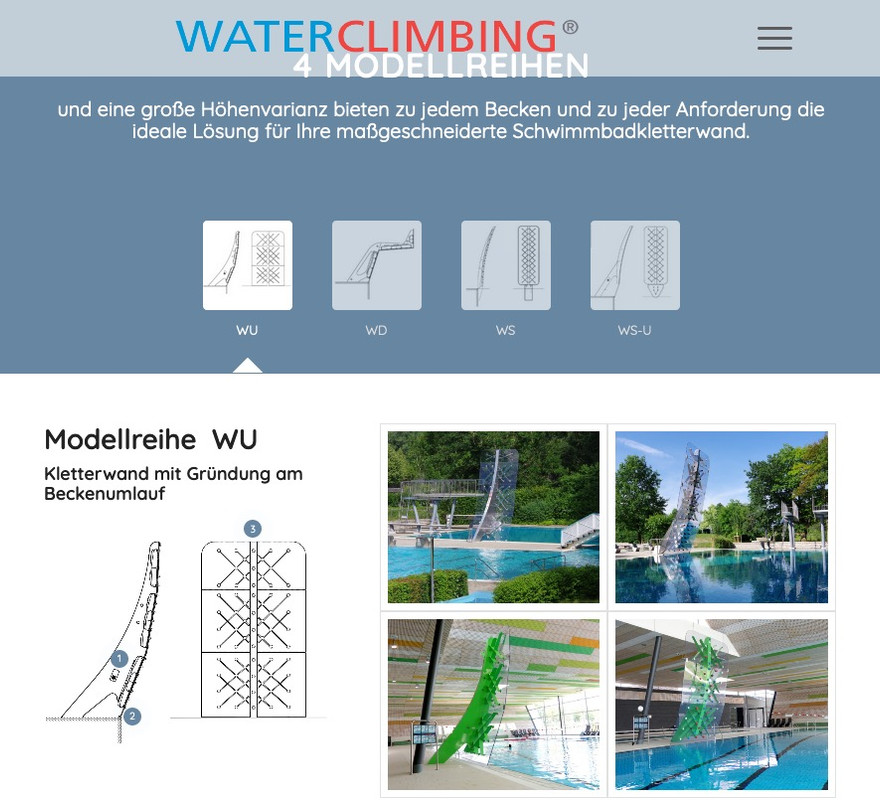
Und wie gesagt, ich würde das Logo im responsiven Fall links floaten lassen und das Zentrieren somit aufheben.
-
This reply was modified 5 years, 8 months ago by
July 9, 2020 at 10:29 am in reply to: Header is not sticky at bigger mobile screens / smaller tablets, transparency #1229094zunächst einmal : Du schreist mich nicht wirklich an – oder ? Nichts Anderes ist es wenn man in Foren Alles in Großbuchstaben schreibt ;)
Also wenn Du bitte zunächst das mal umsetzt und auch kurz dann so lässt, dann kann man eventuell auch den Rest noch erledigen.
Dann wäre es hilfreich, du würdest für die Zeit des Layouts das Merging abstellen. Zumindest das vom CSS – dann sieht man auch schneller wo andere Einstellungen mit hineinspielen.
Das Logo muss die Möglichkeit haben bei sehr kleinen Screenweiten auf den verbleibenden Platz zu reagieren; oder du musst um für alle Screenweiten die gleiche Größe zu haben – Auch für breitere Screens ein Kleineres Logo in Kauf nehmen.
Das Logo hat am Anfang ungefähr eine Weite von 400px – wie willst du das ohne Veränderung in eine Screenbreite von 375px inclusive dem Hamburger-Menü und Padding sonst unterbringen?Versuche jetzt bitte mal das hier:
@media only screen and (max-width: 989px) {
  .responsive #top #wrap_all #header .container {
    width: 90%;
    max-width: 90%;
  }

  #header {
    position: fixed !important;
    height: 80px !important;
    max-height: 80px !important;
  }

  #header_main {
    border: none;
  }

  .responsive #top #wrap_all .av_header_transparency {
    background-color: transparent;
  }

  .responsive #top .header_bg {
    opacity: 1;
    filter: alpha(opacity=100);
    background-color: rgba(255,255,255,0.6) !important;
  }

  .responsive #top .av-logo-container ,
  .responsive #top .logo a,
  .responsive #top .logo img {
    max-height: 80px !important;
  }

  .responsive.html_header_transparency #top #main {
    padding-top: 0 !important;
  }

  .responsive #top .av-main-nav .menu-item-avia-special a {
    height: 80px !important;
    line-height: 80px !important;
  }
}
teste es geren mit dem rgba(255,255,255,0.3) aber du wirst sehen, dass etwas weniger Transparenz besser aussieht. Das ist aber Dir überlassen.
______________________
first of all : you are not really shouting at me – are you ? Nothing else is it if you write everything in capital letters in forums ;)So if you please put this into practice and leave it like this for a short time, then you might be able to do the rest.
Then it would be helpful if you would turn off the merging for the time of the layout. At least that of the CSS – then you can see more quickly where other settings play a role.
The logo has to be able to react to the remaining space on very small screens; or you have to accept a smaller logo to have the same size for all screens – even for wider screens.
The logo has a width of about 400px at the beginning – how else do you want to fit this into a screen width of 375px including the hamburger menu and padding without changing it?July 9, 2020 at 9:15 am in reply to: Header is not sticky at bigger mobile screens / smaller tablets, transparency #1229079for the non transparent header sites you have to get rid of:
.responsive.html_mobile_menu_tablet.html_header_top #top #main {
    padding-top: 0 !important;
    margin: 0;
}
and maybe you decide not to have the centering of the logo on responsive case too:
@media only screen and (max-width: 989px) { .html_header_top.html_logo_center .logo { left: 0; -webkit-transform: none; -ms-transform: none; transform: none; } } -
This reply was modified 5 years, 8 months ago by
-
AuthorPosts
