

Forum Replies Created
-
AuthorPosts
-
February 18, 2021 at 11:33 pm in reply to: Filling the Header Area completely with a Photo Image #1282102
sorry you had to wait till mods are here – no private content for my eyes!
February 18, 2021 at 11:45 am in reply to: Filling the Header Area completely with a Photo Image #1281960div.header_bg ( header background) is the last div container in the header container.
( It rules a lot of settings f.e. glassy header etc. pp)
click to enlarge
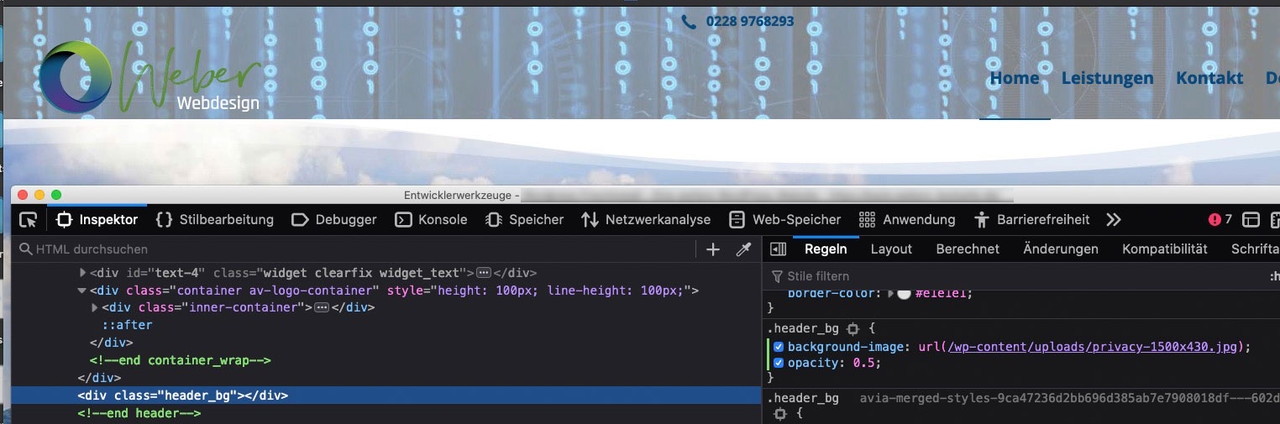
rule on that is:
.header_bg {
    background-image: url(/wp-content/uploads/privacy-1500x430.jpg);
    background-repeat: no-repeat;
    background-size: cover;
    opacity: 0.5;
}
but it depends on your header settings – and …
so more info about your header settings – then you can be offered more precise css code.PS : a good advice is always to get familiar with the developer tools of the browsers ( that dark thing in my image above ) it tells you a lot of DOM Structure and give you the concerning css Rules set.
in Addition – you can influence and test (virtually) by adding or changing css rules in developer tools.
Even you can test some of the jQuery snippets offered here on board.-
This reply was modified 5 years, 1 month ago by
Guenni007.
February 18, 2021 at 12:49 am in reply to: Filling the Header Area completely with a Photo Image #1281899it would be helpful to know what kind of setting your header is set to.
Best is to see your site to give precise instructions.But on most cases the header_bg class is for that a good hint
maybe you give a different color to the time format:
.portfolio-new-meta .date-container {
    color: #999 !important;
}
________________
Sad it is closed –
PPS: the responsive case is not nice – so try:
@media only screen and (max-width: 767px) {
  .blog-samenvatting.grid-sort-container {
    display: flex !important;
    flex-flow: row wrap;
    justify-content: space-between;
  }

  .blog-samenvatting.grid-sort-container .grid-entry {
    flex: 1 1 100% !important;
    width: unset !important;
    margin: 0 0 50px !important;
    padding: 0;
  }

  .blog-samenvatting.grid-sort-container .grid-entry .inner-entry > div  {
    width: 100% !important;
  }

  /****  these lines only if you like to have the image on top ******/
  .blog-samenvatting.grid-sort-container .grid-entry .inner-entry   {
    display: flex !important;
    flex-flow: wrap-reverse row;
    justify-content: stretch
  }

  #top .isotope-item.special_av_fullwidth .av_table_col .avia-arrow {
    top: 0%;
  }
 /****** remove it between these two comments if you are stisfied with image under the content *******/
}
and switch at every px-value you like – maybe 989 is better
-
This reply was modified 5 years, 1 month ago by
February 17, 2021 at 4:30 pm in reply to: scroll hide AND transparent header, is this possible? #1281787it is in deed the fact that it is a bit transparent ( opacity: 0.95)
just change for those pages the .header_bg option with quick css:.home .header_bg { opacity:0.5; filter:alpha(opacity=50); }it maybe neccessary to have here an !important – but first try it without
by the way – i shift it this way:
function shift_extra_portfolio_meta(){
?>
<script type="text/javascript">
(function($) {
        $('.portfolio-new-meta').each(function() {
            $(this).next('.portfolio-entry').append($(this));
        });
})(jQuery);
</script>
<?php
}
add_action('wp_footer', 'shift_extra_portfolio_meta');
do not forget to get rid of this $markup in your code
Sorry – take the time only form $entry – i changed the snippet above so try for your needs:
function avf_portfolio_extra_mod($output, $entry) { $output = '<div class="portfolio-new-meta">'; $output .= '<div class="portfolio-read-more-link"><a href="'.get_permalink($entry->ID).'" class="more-link">'.__('Read more','avia_framework').'<span class="more-link-arrow"></span></a></div>'; $output .= '<time class="date-container minor-meta updated">' .get_the_date("j. F Y", $entry).'</time>'; $output .= '</div>'; return $output; } add_filter('avf_portfolio_extra', 'avf_portfolio_extra_mod', 10, 2);if you like to have some binding words between the date shortcodes you had to insert a \ before the letters each – if they got a meaning on date format like a or t ( am/pm , time, etc.)
f.e. this:
.get_the_date("j\. F Y \a\\t G:i", $entry).see: https://wordpress.org/support/article/formatting-date-and-time/
don’t know why a double \\ must before the t – but that works
PS: it seems to slow down the site on loading if you got a lot of entries on that page.
Maybe a Mod knows a better way to insert the entry date to that place-
This reply was modified 5 years, 1 month ago by
First – does it realy work with $markup ? at the classes
what about this :
add_filter('avf_portfolio_extra', 'avf_portfolio_extra_mod', 10, 2);
function avf_portfolio_extra_mod($output, $entry) {
	$output = '<div class="portfolio-new-meta">';
	$output .= '<div class="portfolio-read-more-link"><a href="'.get_permalink($entry->ID).'" class="more-link">'.__('Read more','avia_framework').'<span class="more-link-arrow"></span></a></div>';
	$output .= '<time class="date-container minor-meta updated">'.get_the_date("Y-m-d", $entry).'</time>';
 	$output .= '</div>';
	return $output;
}
the point is to include the same relation to the entry ID as on permalink – you can do everything as format you like f.e.
.get_the_date("d. M Y", $entry).on default the month names are localized via General Setting Language of the page
by the way: thanks – nice use of that filter !
on my versions of Enfold : 4.7.6.4 and testing 4.8 beta – there are no options to show title – excerpt and read more !
no option to show post meta here – that is the reason for my question – where did you set to show the date?Only Chance to see it is to put in the excerpt field the shortcodes of the postmeta
is there a link you can make here public. only that image leads me to a different way it was generated than over the portfolio grid alb element.
Edit Ok – i didn’t see that there is : “special column layout – side by side” option. ( has this been around for a while?)
Next Question – how do you set the date to this element? because on default i got no date there.
Are these portfolio ALB generated – or set by classic editor. Do you have inserted here the post meta data?
If so – did you take the publishing date or the last modified date etc. ppmore input please
-
This reply was modified 5 years, 1 month ago by
Very important on flex modell use!
every element that is inside the flex-container is part of the rules – so no additional Heading inside a 1/1 container or a hr to have more space on top or bottom ( you can do this via padding ) should be inside the flex container.Everything stayes the same but you have instead of:
jQuery(window).load(function(){that:
jQuery(window).on('load', function () {do not forget to clear all browser cache and to refresh (if used) the merged files in enfold (see performance tab in enfold options)
See here in the first yellow frame: https://api.jquery.com/load-event/
See here:
https://kriesi.at/support/topic/magnific-popup-doesnt-work-anymore/#post-1277163
if you got other scripts with load or click event – replace them all by .on(‘load’,… and .on(‘click’, …
PS: it is not neccessary to load this script in the header area – so wp_footer is good too.maybe a jQuery ( no SEO influence on that) solution will be ok for you –
try this in child-theme functions.php:Edit: ok i see you began to insert manually – what is best for SEO Purpose too.
Have you thought about editing the first of the 1/4 columns of each row so that it is set to no-margin?
Unfortunately, the first in a row is always assigned the default value: “space between columns”.Be carefull to do this each time – when you change positions in your layout ( by moving the columns e.g.)
it is because of this rule in enfold settings:
.responsive .av_one_fourth.first + .av_one_fourth.flex_column_div {
 margin-left: 4%
}
so you got two options here – either you think of that to edit each first column in that layout – or you overwrite it by:
( and that is much more comfortable ).responsive #top .four-in-a-row .flex_column { margin-left: 0 !important }-
This reply was modified 5 years, 1 month ago by
If you have seen that effect now – please tell – because i want to remove the images on copyright reasons
Edit: done – i used now some images from pixabay.
2. pictures have 0 padding & margin. BUT have a 50px left and right padding to the parent container.(again exactly like the website I mentioned above)
i do not see that on the image in your example page – as on my test page too
My setup above – go and open the 1/4 column and set the other image as background-image – with background-repeat: contain !
now you will have the additonal css:
.four-in-a-row .entry-content-wrapper .flex_column:hover img {
  opacity: 0;
  transition: opacity 1s ease;
}

.four-in-a-row .entry-content-wrapper .flex_column img {
  opacity: 1;
  transition: opacity 1s ease;
}
and if you like to have your own cursor type – like your example-page replace that one rule with
.four-in-a-row .entry-content-wrapper .flex_column:hover img {
    opacity: 0;
    transition: all 1s ease;
    cursor: url(/wp-content/uploads/tile-hover.png) 60 12,auto;
}
see first image in test page
Then you can link the full 1/4 column to the team member page.so more and precise input for those who want and could help.
Use instead of the img container a code block alb. Why – are these svgs you want to use as inline svg with inside animations / hover states etc ?
if they all got the same view-box size ( or at least the same aspect ratio ) this could be done.
But to speculate further here would be unproductive. Either show what kind of “images” you are talking about, or a link to the corresponding page.See Testpage again with ( now sorry they do not have the same size as the images ) : https://webers-testseite.de/4inarow/
hover the svgs
this is my Advance Layout for it:
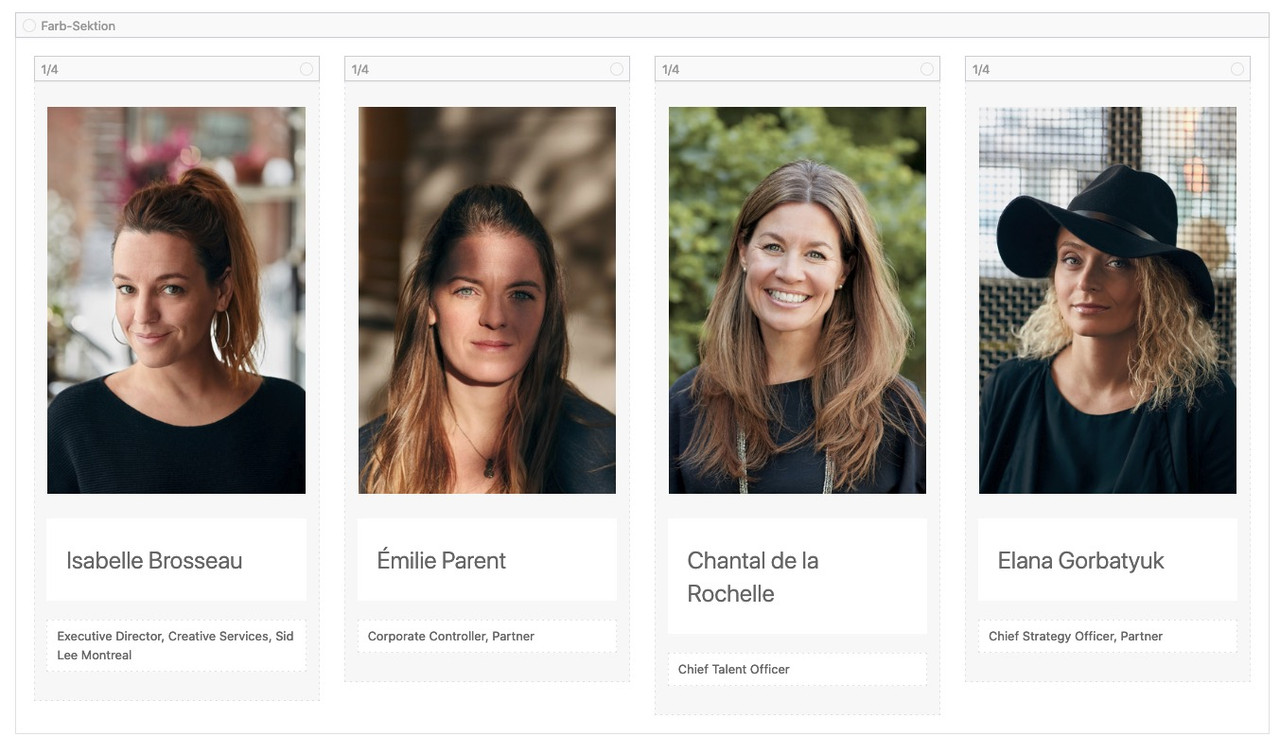
- give a custom class to the color section f.e. : four-in-a-row
- you can put as many 1/4 Containers in it you like.
- BUT: ever first 1/4 column in it – you had to set the no-margin ( no space between the columns) option again
- The Containers 1/4 : no distance but indivual height
- put in each 1/4 container an image , a heading , a textblock
- the images are pure images – you can animate them if you like
- the images should have the same dimensions!
put this to your quick css:
.four-in-a-row .entry-content-wrapper {
  display: flex;
  flex-flow: row wrap;
  justify-content: space-between;
}

.four-in-a-row .entry-content-wrapper:before,
.four-in-a-row .entry-content-wrapper:after,
.four-in-a-row .entry-content-wrapper .flex_column:before,
.four-in-a-row .entry-content-wrapper .flex_column:after {
  display: none
}

.four-in-a-row .entry-content-wrapper .flex_column {
  float: none;
  width: unset !important;
  padding: 0;
  margin: 0;
  flex: 0 1 25%;
  display: inline-flex;  /***  the flex-item itself is a flex-container too ***/
  flex-flow: column wrap;
  justify-content: stretch;
}

.four-in-a-row .entry-content-wrapper .flex_column .av-special-heading {
  padding: 0 !important;
  margin: 0;
}

.four-in-a-row .entry-content-wrapper .flex_column .av-special-heading,
.four-in-a-row .entry-content-wrapper .flex_column .av_textblock_section  {
  padding: 5px 20px !important;
}

@media only screen and (max-width: 989px) {
  .four-in-a-row .entry-content-wrapper .flex_column {
    flex: 0 1 33.33%;
  }
}

@media only screen and (max-width: 767px) {
  .four-in-a-row .entry-content-wrapper .flex_column {
    flex: 0 1 50%;
  }
}

@media only screen and (max-width: 480px) {
  .four-in-a-row .entry-content-wrapper .flex_column {
    flex: 1 1 100%;
  }
}
if you like to start with 6 images in a row – no problem :
start with
flex: 0 1 16.66%;see result: https://webers-testseite.de/4inarow/
is it the whole breadcrump ? including Title?
another thing : what if he has a transparency header – or a fullwidth-slider on top?it would be nice to have a filter on that to have breadcrumbs even on transparency header or slider on top. – Then place breadcrumb under it!
There is still on functions-enfold.php line 1192 :
if(!empty($transparency)) $header['header_title_bar'] = 'hidden_title_bar';February 5, 2021 at 12:55 pm in reply to: Hidden texts of social bookmark boxes below the boxes instead on top of them #1277966yes on avia.js line 32 :
you can enter postion:’bottom’ and the rest will be css – but maybe a mod knows a child-theme solution without having a whole avia.js on child-theme folder.new $.AviaTooltip({"class": 'avia-related-tooltip', data: 'avia-related-tooltip', position:'bottom', scope: ".related_posts, .av-share-box", attach:'element', delay:0});on line 1609 maybe that is enough to replace top with bottom – sadly this is not a pluggable function ( if function exists …) then it would be ease to have a child theme solution)
Sorry – hope ismael or günter knows how to.
February 5, 2021 at 12:27 pm in reply to: Hidden texts of social bookmark boxes below the boxes instead on top of them #1277962avia.js pos1 is for top positioning since lines: 1598 and on focus 1773ff
now it is to look if there could be a child-theme solution.
But on reading those lines – isn’t there a bottom position as option? ( Edit – no seems to be only for image with tooltip )February 5, 2021 at 12:21 pm in reply to: Hidden texts of social bookmark boxes below the boxes instead on top of them #1277960this is hard stuff – because it seems to be calculated values in the infinite vastness of the source code.
Maybe some of the Devs knows where to find.li.av-share-link:hover .avia-related-tooltip { transform: translateY(15px) !important; top: unset !important; margin-top: unset !important; } li.av-share-link:hover .avia-related-tooltip .avia-arrow-wrap { top: 0 !important; bottom: auto !important; transform: scaleY(-1) !important; }This quick css solution is an insufficient solution of the whole, because the original container initially appears for fractions of a moment at the top position.
February 5, 2021 at 11:54 am in reply to: Hidden texts of social bookmark boxes below the boxes instead on top of them #1277948can you show me a link to a demo page of enfold ( link ) where that is shown?
do you refer to those tooltips on hovering the share button? https://kriesi.at/themes/enfold-2017/elements/social-share-buttons/-
This reply was modified 5 years, 1 month ago by
February 5, 2021 at 11:32 am in reply to: Add custom widget after main content, but before sidebar #1277943maybe Günter could insert an extra class to that page ( similar to privacy-policy page ) which is set to be the footer-page
where then in fact the question would be how to rewrite the code so that it works with a class to body.
i tested of course !is_page(106) but even with the ID it does not work. so !is_page(‘kontact-section’) won’t work too.Thank you GrandmasterA for your addition to the if-clause.
Preventing something from emerging is definitely better here than just hiding it later.February 4, 2021 at 4:09 pm in reply to: Add custom widget after main content, but before sidebar #1277740hm – that is strange because if the footer-page is a page – then this content shouldn’t be affected.
you can do this to child-theme functions.php below the above code :
function remove_widget_area_from_footer_page(){ if (is_singular('post')) { ?> <script> (function($){ $(window).on('load', function () { $('#footer-page .avia-builder-widget-area').remove(); }); })(jQuery); </script> <?php }} add_action('wp_footer', 'remove_widget_area_from_footer_page'); -
This reply was modified 5 years, 1 month ago by
-
AuthorPosts
