

Forum Replies Created
-
AuthorPosts
-
February 28, 2021 at 11:35 pm in reply to: display the last (not the latest/newest) posts on a single post page #1284300
hm – this is i think a usefull option to have
February 26, 2021 at 11:22 pm in reply to: preset a portfolio to have on default a custom widget area shown. #1284018Thanks – that is a good idea to have a timeout function – with it the old snippet works too:
function trigger_alb_on_load(){
?>
<script>
(function($){
    $(window).on('load', function(){
      setTimeout(function() {
        $("#avia-builder-button").trigger('click');
      }, 500);
    });
})(jQuery);
</script>
<?php
}
add_action('admin_head-post-new.php', 'trigger_alb_on_load');
even 300ms is enough – maybe document ready will also suffice
February 26, 2021 at 8:45 am in reply to: Translate value of "copyright" in theme options (WPML) #1283796Ok – this is of course the special case of the page being used as a footer.
I haven’t had this case yet, – and if you have on both languages : “Select a page to display as footer and socket” ( first option under Page based Footer Options) – this could be a bug.but on one customer site i tested it in the meanwhile – and i have on both the option to set the copyright field.
What Enfold Version do you use?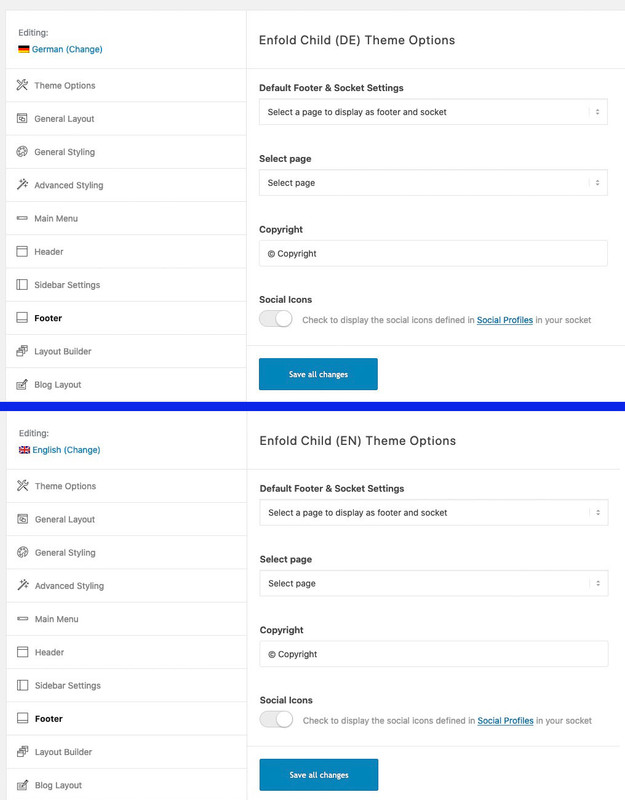 February 26, 2021 at 8:23 am in reply to: Translate value of "copyright" in theme options (WPML) #1283794
the whole Enfold Options are language specific on WPML. You can see that in the upper left corner – there are flags indicating the independent use of Enfold Options for languages.
So even the Quick Css fields are different when you switch languages in Enfold Options. Some say this is a bug – I think it’s an added benefit.
I always style all my settings for my main language first – even with all the quick css I need.
Then I sync the settings by exporting the theme settings file – switch to the other language in the backend – and load the theme settings file into the new language. – This for each language you have.
After that, if you want to style the language differently you can start customizing.so I suspect that in your main language you have set the Footer settings to German and left them at a different setting in the other language.

So if there are any quick css entries afterwards, you have to remember to add them for the other languages as well. In this case I do not go over the theme settings files but transfer them manually.
well you got this in your css – i do not see where because merging is active:
#top .av_gmaps_browser_disabled, #top .av-maps-user-disabled .av_text_confirm_link {
    display: none;
}
find it and set it temporarily to display: block
Because i think you set in your Google Map Advanced Settings Dialog : “Only open Google Maps in a new window”
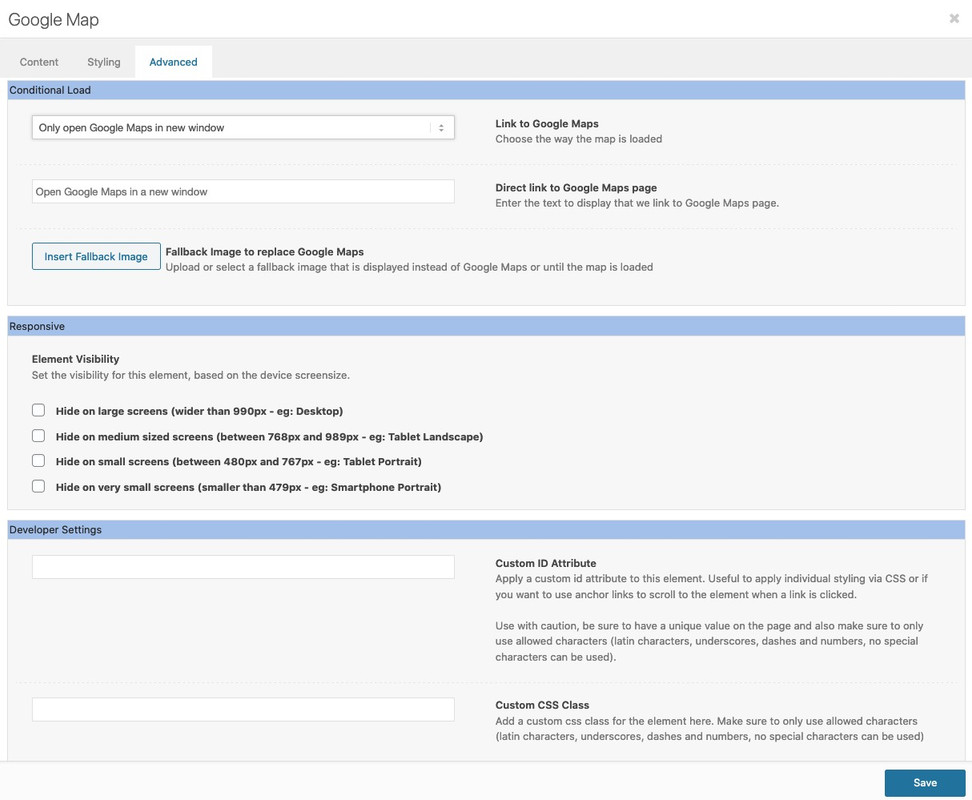
If this is the way you want to use it – a fallbackimage could be shown as long the user click that button f.e.:
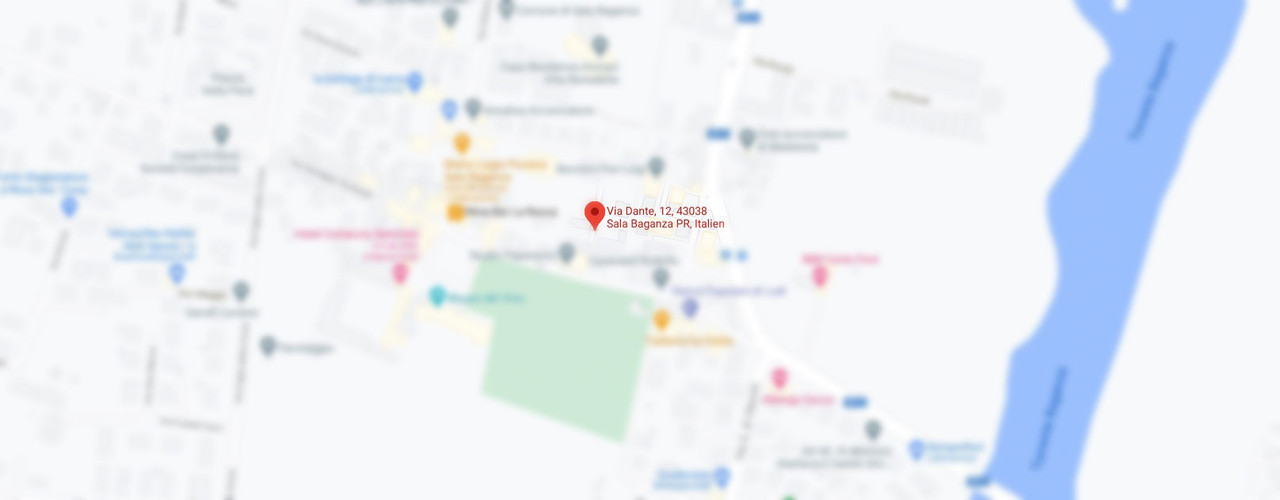
Yes – closed too soon:
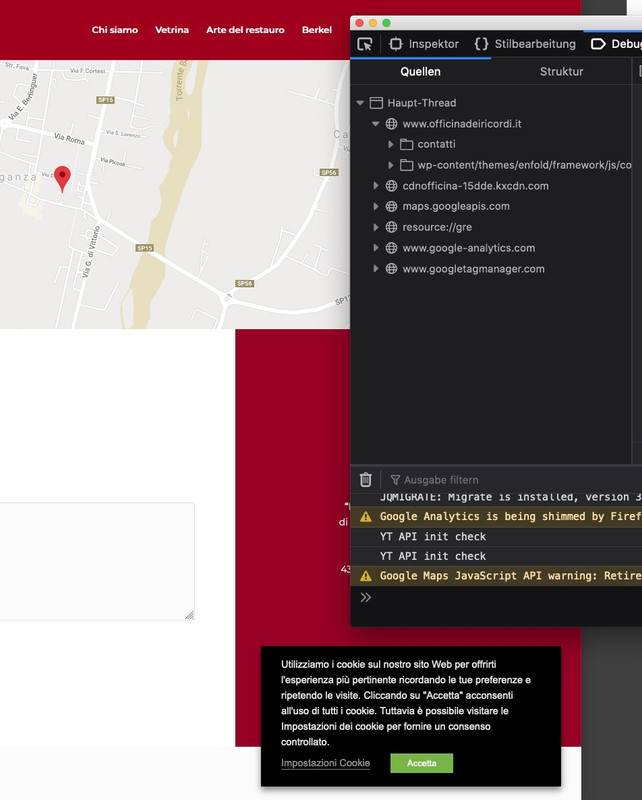
If you have installed cookie consent tools – it is not a good one. Or you did something wrong.
All cookies had to be blocked – before consent – but visiting your site all stuff was already loaden :
well the
a[href*=".webp"]is allready included to 4.8.0-dev-6 but thea[href*=".webp?"]is missing – so wait til next update and change it on your parent theme file : avia-snippet-lightbox.js yourself without the child-theme construct from above and the next update will bring it back.Hey Ismael – i will help him to load those fonts – allthough i prefer my little plugin for that, I’ll have to read your instructions in the documentation on how to do this via import.
Thanks – That works:
$user = wp_get_current_user();
$allowed_roles = array( 'administrator' );
	if ( array_intersect( $allowed_roles, $user->roles ) ) {
	   add_action('avia_builder_mode', 'builder_set_debug');
			function builder_set_debug(){
		return 'debug';
	}
}
February 24, 2021 at 12:05 pm in reply to: preset a portfolio to have on default a custom widget area shown. #1283363Thanks Ismael – but there is no difference on the code i posted here for the sidebar: https://kriesi.at/support/topic/preset-a-portfolio-to-have-on-default-a-custom-widget-area-shown/#post-1280598
that part : “the thought if i include this to the function…” – but it was more trivial then i thought.
Because the line$elements[$counter]['std'] = 'Portfolio';is case-sensitive my custom-widget-area for those portfolio entries is called : Portfolio thats all :lol
but my first code to open a new portfolio with the well known snippet – first code here: https://kriesi.at/support/topic/preset-a-portfolio-to-have-on-default-a-custom-widget-area-shown/#post-1280598 does not work anymore
(jQuery 3.5.1 with no migrate helper)the rest is considered solved, since I didn’t think of treating it case-sensitive
Well a lot of the other mates do not.
And with one post so far, I just wanted to make sure it wasn’t due to such a trivial error.what did you try to upload? is it that zip file you got from envato?
there are two downloads on envato – the one with all additional files – and the other one as an istallable zip file with theme files only.
In the first with all files there is included the second one as enfold.zip ( this is the installable zip file )If this is not the problem – and you have got the right zip file – then try to upload the unzippped Theme to the theme-folder by ftp.
3a) if you like to have your own “backlink” you can insert this to your child-theme functions.php:
/**  new backlink in copyright insertion*/
function new_nolink(){
$kriesi_at_backlink = "<a href='https://your-wanted-backlink-path'>Your Backlink Text</a>";
return $kriesi_at_backlink;
}
add_filter("kriesi_backlink","new_nolink");
alternative the newest way :
add_filter( 'kriesi_backlink', 'my_own_backlink', 10, 1); function my_own_backlink($link){ $theme_string = 'Custom Backlink Text'; $backlink_url = 'Backlink URL'; $no = "rel='nofollow'"; $link = " - <a {$no} href='{$backlink_url}' target='_blank'>{$theme_string}</a>"; return $link; }1) well we had to be a bit more precise here: we got the id: #footer ( that is the place where the widgets are in ) and the footer with id : #socket.
What do you like to have a bigger height?
2) What size do you like to increase – the heading text or the widget content text or both etc.
3) insert to that options input field at the end:[nolink]which font do you want to include?
do you have all font-weights you need in that zip file you upload? / or in the folder you upload?a good starting (not only for google fonts – but for comparison) – this page could show you how it works to load fonts locally:
https://google-webfonts-helper.herokuapp.com/fontsIf you choose in the list on the left side one font – you an see on the right side the options you have.
On 2. Style select you can make your choice what font-style you like to include – if you want to do it exactly, you should select the italic fonts as well. Often it is enough to leave this display to the browser. Because every font style that should be loaded costs performance.
On 3. you can decide if you like to support even older browsers – or to load only modern browser support ( only woff and woff2)But what’s wrong with the home page header?
What should be achieved for the German or the English version?first it is set to 100% in base.css ( inside the css folder )
a little down that definition it is set to:/*default*/ h1, h2, h3, h4, h5, h6 { /* font-family: "Georgia", "Times New Roman", Helvetica, Arial, sans-serif; */ font-weight: 600; } #top h1 a, #top h2 a, #top h3 a, #top h4 a, #top h5 a, #top h6 a { font-weight: inherit; text-decoration: none; color: inherit; } #top h1 strong, #top h2 strong, #top h3 strong, #top h4 strong, #top h5 strong, #top h6 strong { color: inherit; } h1 { font-size: 34px; line-height: 1.1em; margin-bottom: 14px;} h2 { font-size: 28px; line-height: 1.1em; margin-bottom: 10px; } h3 { font-size: 20px; line-height: 1.1em; margin-bottom: 8px; } /*28*/ h4 { font-size: 18px; line-height: 1.1em; margin-bottom: 4px; } /*21*/ h5 { font-size: 16px; line-height: 1.1em; } /*17*/ h6 { font-size: 14px; line-height: 1.1em; }the option in the Enfold settings dialog “Default content font size” sets the size for the body. Many font size definitions go back to this value
the reason why i wrote it down like this in a description is if i write: you will see nothing but the wanted analogon.

the semicolon had to follow those codes without any space between.Try the unicode dezimal – and give the plugin a try.
The edited version from Günter is here for download: https://pastebin.com/dl/RfmWQRvN
and here to see: https://pastebin.com/RfmWQRvNthen you use it as #shy# or #nbsp# etc. pp like in the list
by the way it is the only way to use < or > or [ ] etc in the htmlbut btw: the css for that – you can use hyphens: auto
But these hyphenations are also partially incorrect – so the only true hyphenation is via softhyphens and manually.-
This reply was modified 5 years ago by
Guenni007.
sorry no private content for me – i’m participant as you!
but all pages except the front page :
function add_class_to_images(){
if(is_page() && !is_front_page()){
?>
<script>
	(function($) {
		$('img').addClass('zoooom');
	})(jQuery);
</script>
<?php
}
}
add_action('wp_footer', 'add_class_to_images');
the Exclamation mark indicates a not logic so it is all pages but not front page
PS: is_home() might work here too – but there is a little difference inbetween is_front_page() and is_home()try to use instead the unicode dezimal short for it so not
­with semicolon behind but
­with a semicolon behind
( when i set the semicolon it will directly transformed)-
This reply was modified 5 years ago by
Well you can use every conditional tag wordpress offers: https://codex.wordpress.org/Conditional_Tags
a douple pipe is a logic or and a double && is a logic and
so you can start with – the if clause wraps the script that should be used.
e.g.:function add_class_to_images(){ if(is_page() || is_singular('post') || is_singular('portfolio')){ ?> <script> (function($) { $('img').addClass('zoooom'); })(jQuery); </script> <?php } // this closes the if statement } // this closes the function itself add_action('wp_footer', 'add_class_to_images');//more specific selections can be made within the brackets. (e.g. - which pages should be affected via an array). // IDs without quotes and page names like privacy , portfolio etc. with quotes if(is_page(array( 1396, 1617, 'privacy'))){ …it might be better to see your pages it concerns to give exact help on that.
February 20, 2021 at 1:27 am in reply to: preset a portfolio to have on default a custom widget area shown. #1282348Neither the New Portfolio – opens with advanced layout editor at start – nor the custom-widget-area is set from the beginning as right sidebar.
Yes the right-sidebar was activated from the beginning – but the wanted widget-area not ( on opening new portfolio it is set to standard widget area)I can not imagine that it is due to Enfold 4.8.0-dev-6
-
This reply was modified 5 years, 1 month ago by
Not all Images are inserted in Enfold as
<img src=" …
a lot of them are only background-images f.e.: https://kriesi.at/themes/enfold-2017/elements/masonry/you can try this in child-theme functions.php if you need that class directly on the img tag itself
if you need it on the parent element tell me – then we can find that parent by another selector.
( i think even an each function is not neccessary)function add_class_to_images(){ ?> <script> (function($) { $('img').addClass('zoooom'); })(jQuery); </script> <?php } add_action('wp_footer', 'add_class_to_images');February 19, 2021 at 5:05 pm in reply to: Instagram missing in 'Social Media Share buttons' element #1282269hi Roger – sorry – not now for this post here- the topic on the other page is closed.
I created a solution for responsive case on that: https://kriesi.at/support/topic/issue-with-portfolio-grid-layout/#post-1281896see same example page on top: https://webers-testseite.de/excerpt/
take an enfold button – light transparent and give to those buttons a custom class: button-liner.avia-button-wrap.button-liner { width: 100%; float: none !important; height: 100%; display: block; overflow: hidden !important; } .avia-button-wrap.button-liner:before { display: inline-block; content: ""; position: relative !important; top: 8px; /*depending on your setting - like font-size etc. */ left: 0; width: calc(100% - 150px) !important; /*you know best how long this had to be for your text */ border-bottom: 2px solid #ccc; }-
This reply was modified 5 years, 1 month ago by
is it a manually set button – or you want the default read more link to like this?
See here for elegant-blog style on : https://webers-testseite.de/excerpt/
you had to adjust it to your selectors for your blog layout
.html_elegant-blog .avia-content-slider .read-more-link { padding-bottom: 0; display: inline-table; height: auto; width: 100%; } .html_elegant-blog .avia-content-slider .read-more-link:before { content: ""; position: absolute; top: 0; left: 0; height: calc(50% - 2px); width: 100%; border-bottom: 2px solid #999; z-index: -1 } .html_elegant-blog .avia-content-slider .read-more-link:hover:before { border-color: #f29811 !important; /* take your hover color for it */ } .html_elegant-blog .more-link { margin: 0; padding: 0 0 0 10px; text-align: right; font-family: Georgia !important; text-transform: uppercase !important; float: right; top: 0; width: auto; background-color: #fff; }function grid_layout_notfull(){ ?> <script> (function($){ $('.av-layout-grid-container.grid-notfull' ).wrap( '<div class="main_color notfullsize"></div>'); $('.notfullsize').css({"clear": "both", "width": "100%" , "float": "left" , "position": "static" , "min-height": "100px" }); $('.grid-notfull').css({"max-width": "1310px", "margin": "0 auto" , "padding": "0 50px"}); })(jQuery); </script> <?php } add_action('wp_footer', 'grid_layout_notfull');maybe a little child-theme functions.php snippet rules i a bit better.
https://kriesi.at/support/topic/grid-row-not-fullsize-how-to/#post-902770as mentioned in that post:
1) the notfullsize class added to the surrounding container gets the same settings as avia-section and the class main_color to have the same background-color
2) and the grid-notfullsize gets the setting of “container”this here f.e. is :
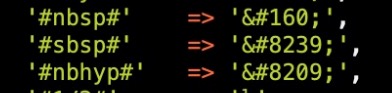
non breaking space
small no-break Space
non breaking hyphensee a list of them here: http://unicode.e-workers.de/entities.php
-
This reply was modified 5 years, 1 month ago by
and you inserted this?

____________ additional info _____________
on some inputfields this well known entity is working but after saving the whole page – the inserted entity is not seen anymore – allthough it has an effect on the frontend.
Editing a f.e. Heading again – these inserted entities are gone.to avoid this and to see in backend the usage of those little helpers i use that little plugin from Günter : https://github.com/KriesiMedia/enfold-library/tree/master/integration%20plugins/Enfold/Special%20Character%20Translation
you can extend that little list in the plugin by additional entities
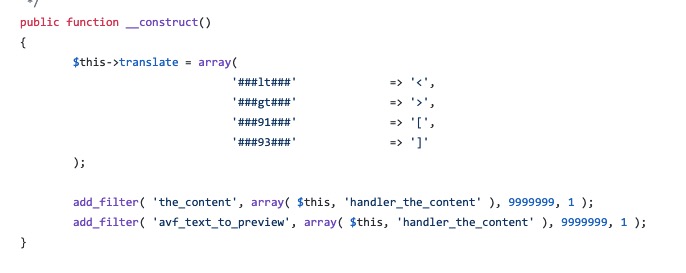
i do change and add some entities on that replacement list f.e. ( i only use one #before and after the inserted code )
my replacement list looks this way:
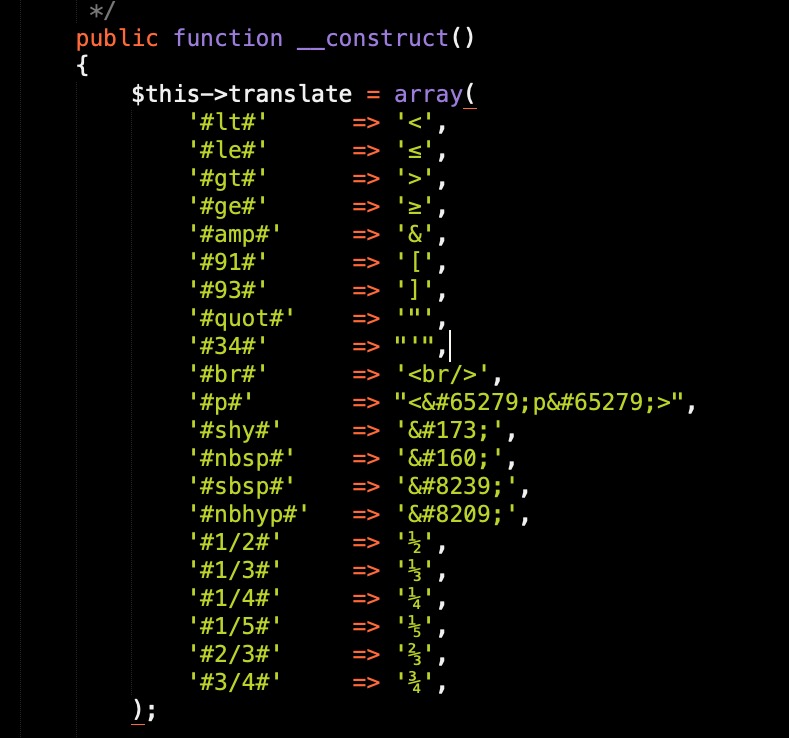
after that i insert on the places f.e. #shy# for a softhypen.
this will be seen on backend – even after saving the post and on editing them again.February 19, 2021 at 12:09 am in reply to: Partner/Logo Elemente mit Link keine Transparenz mehr obwohl png #1282103can you try this in your quick css:
.main_color .avia-content-slider .slide-image { background: transparent !important; } .av-partner-fake-img { box-shadow: none; } -
This reply was modified 5 years ago by
-
AuthorPosts
