

Forum Replies Created
-
AuthorPosts
-
September 28, 2021 at 9:49 am in reply to: My theme stuck in 3.8.4 and I can not update newer version #1322594
i would update such older Versions allways via ftp in this manner: https://kriesi.at/support/topic/some-hints-and-advice-to-update-enfold/#post-1056107 , because you will have a rollback enfold version if you had to go back.
And make a complete Backup of your page ( f.e. with duplicator ).What about your php and Wordpess Versions? Are these allready on newest one?
be more specific on your selectors.
Maybe you give custom ID’s or custom classes to those table.Is it too complicated for you to implement?
maybe this is better – ( as mentioned above – the second button had to be not an anchor link leading to an id of a color-section or something like this )function inline_popup_youtube_link() { ?> <script type="text/javascript"> (function($){ $(window).on('load', function () { $('.custom-class').find('a[href^="#"]').addClass('no-scroll'); $('.custom-class').magnificPopup({ delegate: 'a[href^="#"]', type:'inline', midClick: true, }); }); })(jQuery); </script> <?php } add_action('wp_footer', 'inline_popup_youtube_link', 9999);Borlabs can block iframes – see : Borlabs – Content Blocker – Youtube :

This is the shorcode i put inside a div – and set for the div a class : mfp-hide
This class is the magnificPopup class that is set to display: none
With that code above – every anchor link that starts with “#” inside that custom-class ( you can have every other name for it ) will open in a lightbox. In this case it is that youtube film – blocked by borlabs cookie til you consent.
The button itself is linking to manual #youtube-film ( this had to correlate with the div ID that you like to open )<div id="youtube-film" class="mfp-hide">[borlabs-cookie id="youtube" type="content-blocker"]<iframe width="100%" height="800" src="https://www.youtube-nocookie.com/embed/Uzjt3fvIlnY" frameborder="0" allow="accelerometer; autoplay; clipboard-write; encrypted-media; gyroscope; picture-in-picture" allowfullscreen></iframe>[/borlabs-cookie]</div>and you realy replaced your code ( on phone-info input field ) with mine ???
<a href="tel:3109333123">[av_font_icon icon='ue854' font='entypo-fontello' size='20px' position='left' color='#b02b2c' ][/av_font_icon] (310)933 3123</a> - <a href="mailto: (Email address hidden if logged out) ">[av_font_icon icon='ue805' font='entypo-fontello' size='20px' position='left' color='#b02b2c' ][/av_font_icon] (Email address hidden if logged out) </a>try this in your quick css :
.mb-center .mb-container {
  margin: 0 !important
}

.mb-center a {
  width: 100% !important;
  display: inline-table !important;
  padding: 0 10px;
}

/*** just a bit more space ***/
.mb-center a .mb-text {
  line-height: 1.2em !important
}
if you come into conflict with desktop look – just wrap the code above in a media query:
@media only screen and (max-width:767px) {
   /*** code goes here  ***/
}
September 26, 2021 at 7:39 am in reply to: Fullscreen Slider Fixed (Background)-Image not working in Firefox #1322333Yes – i found that link too – but i thought that there is in the meanwhile a solution from firefox til now.
See Date ot that topic: Opened 5 years ago Closed 5 years agoI’m trying to make the phone number and email clickable in the area above the header
so i guess it is the area of the header_meta.
You can insert content to that area by using the phone-info field. As far i can see – you have done this.
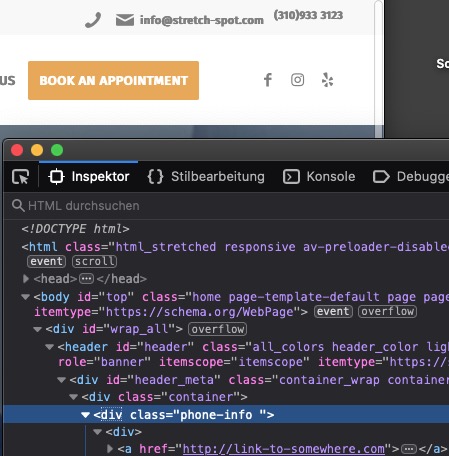
Add that little css to your quick css. – just give it a try
Copy & Paste this code to your phone-info input field ( replace the other entries )<a href="tel:3109333123">[av_font_icon icon='ue854' font='entypo-fontello' size='20px' position='left' color='#b02b2c' ][/av_font_icon] (310)933 3123</a> • <a href="mailto: (Email address hidden if logged out) ">[av_font_icon icon='ue805' font='entypo-fontello' size='20px' position='left' color='#b02b2c' ][/av_font_icon] (Email address hidden if logged out) </a>dear mods, you no longer have to thank there – and certainly not so often :lol: ;)
September 24, 2021 at 11:51 am in reply to: Fullwidth Sub Menu not sticking to top of screen on mobile #1322186the values must be adjusted – f.e. if there is a header_meta – the code above goes to @oladigital_co
But wait til a mod looks into that topic here again. There must be a reason to exclude the audio-player from mce.
Go to
enfold/config-templatebuilder/avia-shortcodes/audio-player have a look on audio-player.php arround line 79results in :
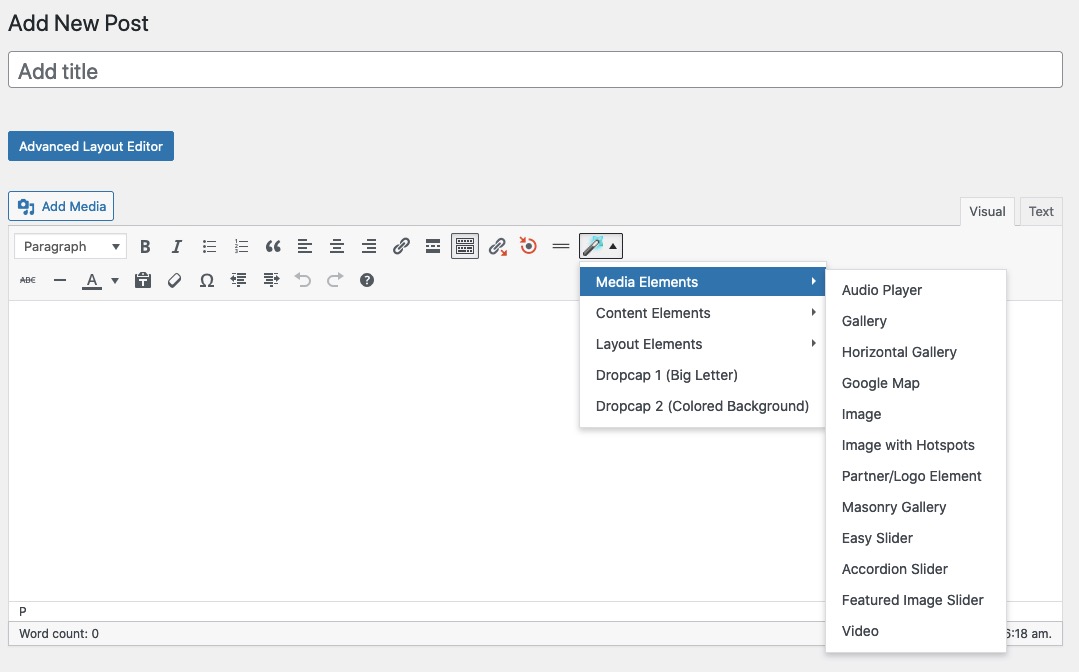
can you try this in your child-theme functions.php:
see : Linkfunction av_change_logo_link_for_polylang_lang($link){ if(pll_current_language() == 'en'){ $link = "https://kriesi.at"; } return $link; } add_filter('avf_logo_link','av_change_logo_link_for_polylang_lang');on default we can try this too – i do not test it yet as if clause:
if (get_locale() == 'en_GB') {dear Mods and Devs: may i ask you why in the audio-player.php that line is set?
$this->config['tinyMCE'] = array( 'disable' => 'true' );if i comment that out – the audio is in that dropdown list and it works – are there any inconsistencies?
is it because the element isn’t a self-closing one?well – borlabs offers an iframe option.
- something like this placed on that page in a codeblock element:
<div id="youtube-film" class="mfp-hide">[borlabs-cookie id="youtube" type="content-blocker"]<iframe width="100%" height="800" src="https://www.youtube-nocookie.com/embed/Uzjt3fvIlnY" frameborder="0" allow="accelerometer; autoplay; clipboard-write; encrypted-media; gyroscope; picture-in-picture" allowfullscreen></iframe>[/borlabs-cookie]</div>
The mfp-hide class will ensure that the div in the codeblock isn’t visible. - your button is linking to that ID: #youtube-film ( if you got more than one film – each got his own id ) for each a unique div with that id (could be in the same codeblock)
- Give a custom-class to your button!
- Then you had to make your own magnificPopup script to open that class in an inline popup ;)
the custom-class as trigger withmidclick=true, type= 'inline', delegate: 'a',as option
Link
maybe you include in that script outside that magnificPopup function
$('.custom-class').find('a').addClass('no-scroll');
PS: it will work – but with two buttons on that slider we had to find better selectors ! otherwise the second button will be triggered too.as mentioned above give a custom-class in this case to the slider
function inline_popup_youtube_link() {
?>
<script type="text/javascript">
(function($){
$(window).on('load', function () {
	$('.custom-class').find('a[href*="youtube"]').addClass('no-scroll');
	$('.custom-class').magnificPopup({
		delegate: 'a[href*="youtube"]',
		type:'inline',
		midClick: true,
	});
 });
})(jQuery);
</script>
<?php
}
add_action('wp_footer', 'inline_popup_youtube_link', 9999);
PPS: because the link isn’t really a youtube link ( remember the link goes to that div with ID: #youtube-film )
if you like to use it on other places – the ID must have a string with “youtube” maybe you can name them #youtube-1, #youtube-2 etc.OR choose as selector: for the anchor :
a[href^="#"]( replace it on both lines ) – it means the link starts with #
But then the second button in the slider must not be an anchor link of the page. This would also fall into the trigger.
________
Das dort die Vorschaubilder von Youtube gezeigt werden in einer lokalen Version ( daher meine Frage oben ) – wird bei dir nicht der Fall sein !
Es wird das Standard Borlabs Preview image gezeigt werden.
Da habe ich ordentlich borlabs und youtube kenntnisse mit eingebracht und eigene Scripte geschrieben.And you did not test mine ?
OK –September 23, 2021 at 4:23 pm in reply to: Fullscreen Slider Fixed (Background)-Image not working in Firefox #1322059Yes – but he is right even on the newest Enfold – the fixed background is not fixed in firefox browsers.
yes you can do it this way too – if you like to have the icons inside the link ( click-active) :
<a href="tel:3109333123">[av_font_icon icon='ue854' font='entypo-fontello' size='20px' position='left' color='#b02b2c' ][/av_font_icon] (310)933 3123</a> - <a href="mailto: (Email address hidden if logged out) ">[av_font_icon icon='ue805' font='entypo-fontello' size='20px' position='left' color='#b02b2c' ][/av_font_icon] (Email address hidden if logged out) </a>important to have the icons besides the concerning link : display: inline-block ( or -table )
.phone-info a {
  display: inline-block
}
change the color to whatever you like.
September 22, 2021 at 10:24 pm in reply to: Fullwidth Sub Menu not sticking to top of screen on mobile #1321963but you have to think of – if it is good to have the submenu open – in this case the content has only 1/6 height of the whole screenheight on f.e. mobile phones !
So : why no second burger instead: https://webers-testseite.de/transparent-header/try:
@media only screen and (max-width: 989px) {
  .responsive #top #wrap_all #header .container {
    width: 90%;
    max-width: 90%;
  }

  #header {
    position: fixed !important;
    height: 80px !important;
    max-height: 80px !important;
  }

  .responsive.html_mobile_menu_tablet #top #wrap_all .av_header_transparency {
    background-color: transparent;
  }

  .responsive #top .av-logo-container ,
  .responsive #top .logo a,
  .responsive #top .logo img {
    height: 80px !important;
    max-height: 80px !important;
  }

  .responsive #top .av-main-nav .menu-item-avia-special a {
    height: 80px !important;
    line-height: 80px !important;
  }
  .responsive.html_mobile_menu_tablet.html_header_top #top #main {
    padding-top: 80px !important;
  }
}
___________ off topic __________
this is the only way i found to have sticky submenus on mobile and even with transparent header and sticky header !
see: https://webers-testseite.de/transparent-header/
https://kriesi.at/support/topic/how-to-make-the-submenu-sticky-on-mobile/#post-1225108But there is a lot to do: have some child-theme alb elements ( the menu.js and to ensure loading the child-theme menu-js – the menu.php too )
and this is the reason for the trouble in menu.js:if( burger_menu.is(":visible") ){ this.css({top: 'auto', position: 'absolute'}); fixed = false; return; }this is the only way i found to have sticky submenus on mobile and even with transparent header and sticky header !
see: https://webers-testseite.de/transparent-header/
https://kriesi.at/support/topic/how-to-make-the-submenu-sticky-on-mobile/#post-1225108But there is a lot to do: have some child-theme alb elements ( the menu.js and to ensure loading the child-theme menu-js – the menu.php too )
and this is the reason for the trouble in menu.js:
if( burger_menu.is(":visible") ){ this.css({top: 'auto', position: 'absolute'}); fixed = false; return; }the column that is the first in your row – ( 2/5) edit and go to : Row Settings – Row Layout
choose equal height and middle:
( click to enlarge )
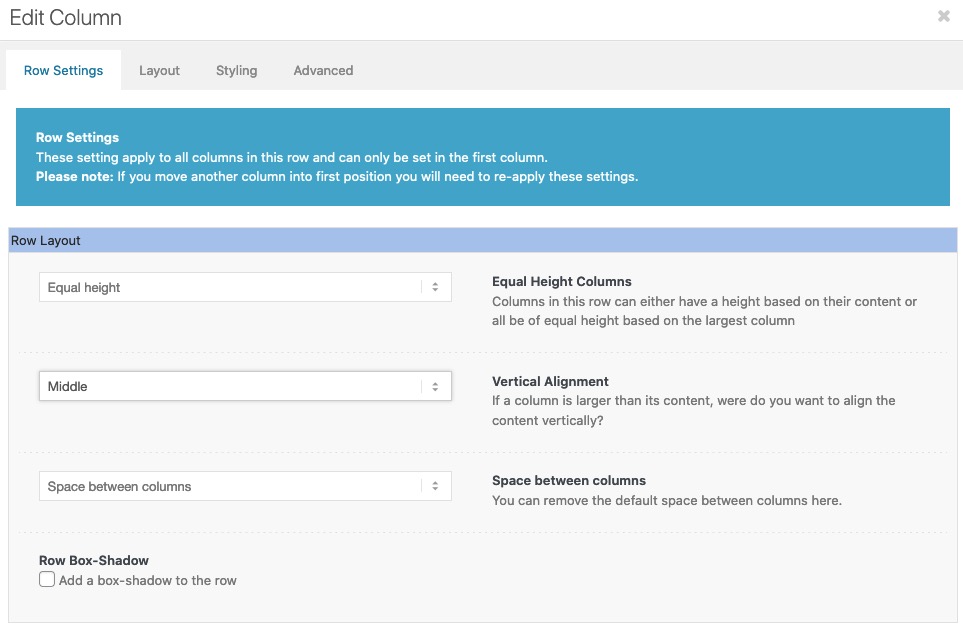
Can be closed – guess Guenter found a better solution (for the slider)
-
This reply was modified 4 years, 6 months ago by
Guenni007.
you can use the shortcode whereever you like even in widgets or text-alb element
If it is in child-theme functions.php you can have comments in one-liner by //
or in more lines by /* your text */
or like i do for my snippets – give the function a meaningfull name – i think “print_button_shortcode” is unique enough to remember what function it is.f.e.
// shortcode for print page button function print_button_shortcode($atts){ return '<a class="print-page" href="javascript:window.print()">Print This Page</a>'; } add_shortcode( 'print_button', 'print_button_shortcode' );Well a print page button is easy to get – as shortcode by this snippet in child-theme functions.php:
function print_button_shortcode($atts){
return '<a class="print-page" href="javascript:window.print()">Print This Page</a>';
}
add_shortcode( 'print_button', 'print_button_shortcode' );
class “print-page” is for styling that button – usage is via shortcode:
[print_button]
Styling may contain an image than a Text to showBut: there are a lot of print plugins – where you can influence the parts of your page to print ( f.e. by class )
Print-O-Matic f.e.there are two instances of
$img_tag = Av_Responsive_Images()->make_image_responsive( …
arround line 412 and arround line 789 first i tried only the 789is the replacement code i posted above correct?
and the place i inserted the extra_class – just before the other extra_class$slider = new avia_slideshow( $atts ); $slider->set_extra_class( $meta["el_class"] ); $slider->set_extra_class( $stretch );and please try in your constellation to use the same image in both sliders.
you can do that via filter in your child-theme functions.php:
add_filter('avf_logo_link','av_change_logo_link');
function av_change_logo_link($link){
    $link = "https://kriesi.at";
    return $link;
}
_____________________
by the way: there are a few filters to manipulate the logo:function avf_change_logo_title($title) { $title = "The new Title is here"; return $title; } add_filter('avf_logo_title', 'avf_change_logo_title'); function avf_change_logo_alt($alt) { $alt = "New Alternate Text Here"; return $alt; } add_filter('avf_logo_alt', 'avf_change_logo_alt'); function avia_new_logo_tag(){ $output = "div"; return $output; } add_filter('avf_logo_headline','avia_new_logo_tag');see: https://kriesi.at/documentation/enfold/logo/#customization
see here a snippet to replace every img tag with svg link with its inline svg:
https://kriesi.at/support/topic/replace-logo-image-with-inline-svg-code/#post-1307101the trick with the logo replacement is that the attribute of preserveAspectRatio is set in dependency where the logo is placed ( left, center, right )
PS: for some svgs the xmlns xmlns:xlink is an important setting – in this case get rid of that line:
svg = svg.removeAttr('xmlns xmlns:xlink');you can use the font-icons for it
f.e.:.avia_mega_div ul li ul li:before { content: "\e885"; /*** or \e897 ***/ position: absolute; font-family: entypo-fontello; }guess you then have to position it a bit – and you can play with font-size and line-height etc. and even have different color than the text besides.
By the way dear developer team – it would be very nice if you would also add the selector for inline svg logos in avia-snippet-sticky-header.js.
the shrinking option then of inline svg logos will work properly:var logo = $('#header_main .container .logo img, #header_main .container .logo a, #header_main .container .logo svg '),svgs do have on default for WordPress a width and height of zero “0”
Therefore, one must then assign a width to the logo. This can be a very large value and must be an absolute unit for some browsers (so % and em etc. does not work). The adjustment of the size of the logo is done via the display property of the surrounding container.
If you don’t use the option in svg support to force replacement of all svg to inline svg try:
#top .logo img {
width: 450px
}
if you have the inline svg :
#top .logo svg {
 width: 450px
}
as inline svg and shrinking header there are ways to implement the svg support too.
may i see your site? - something like this placed on that page in a codeblock element:
-
AuthorPosts
