Yeet suggest us to open this Topic,
We want to update the Enfold theme to the latest version in our site.
We tried uploading the new version of the theme through FTP and when we preview the site we get a 500 Error.
Now, we may update the theme through the Enfold’s theme settings but we want to make sure everything is going to be fine for us.
Can you please suggest the safer next step to update our theme?
Thank you!
Hi! I am trying to do some expanding modals based on this thread for a website that I’m working on (see below)… The toggles are working properly but not scrolling to the correct content, if that makes sense. Could you provide a solution so that when the button is clicked, it also scrolls down to the content that expands?
Hi I want the thin grey border around by table in a text block to be black and a bit thicker. I found this code in another thread and it makes the top row black but not thicker: tr:first-child th, tr:first-child td{border-color: #000000;}
I’d like the whole table to have black borders and thicker … I know the “first-child” has to change but to what. Already tried “nth-child” but that didn’t work … please help! Thank you.
Hi jwr18,
Ok, you have the link to a section with id=”testimonials1″ but you don’t have such an element on the page.
The link address has to be /restaurant/index.php/about/#testimonials1
Here is the code you can put in Enfold > General Styling > Quick Css, if it does not work, put into themes/enfold/css/custom.css
 .page-id-15 .avia-builder-el-27 {
   padding-top: 25px;
 }
If you need further assistance please let us know.
Best regards,
Victoria
Hi,
Yes, you can add parallax background images to Color Section element and you can use LayerSlider, an example can be seen on the top of this page – http://kriesi.at/themes/enfold-2017/ :)
Let us know if you have any other questions!
Best regards,
Yigit
I’ve used the Code Block to add custom image button. But enfold is changing the code and adds extra hover elements which disrupt the original code. How can avoid this?
My Original Code
<div class="yr-kutu">
<div class="yr-top-container">
<a href="/dedektor-videolari/"><div class="yr-container">
<img class="yr-image" style="width: 100%;" src="/wp-content/uploads/2015/10/videolar.jpg" />
<div class="yr-overlay">
<img class="yr-orta-resim" src="/wp-content/uploads/referans_detay_dugme.png" />
<div class="yr-text">detaylı incele</div>
</div></div></a>
</div>
<div class="yr-kutu-yazi"><a href="/dedektor-videolari/">Videolar</a></div>
<div class="yr-kutu-yazi-alt"></div>
</div>
Modified cofe by enfold
<div class="yr-kutu">
<div class="yr-top-container">
<a href="/dedektor-videolari/" style="position: relative; overflow: hidden; display: block;" class="yr-image"><div class="yr-container">

<img class="" style="width: 100%;" src="/wp-content/uploads/2015/10/videolar.jpg">
<div class="yr-overlay">
<img class="yr-orta-resim" src="/wp-content/uploads/referans_detay_dugme.png">
<div class="yr-text">detaylı incele</div>
</div>
	</div><span class="image-overlay overlay-type-extern" style="left: -5px; top: 0px; overflow: hidden; display: block; height: 323px; width: 333px;"><span class="image-overlay-inside"></span></span></a>
</div>
<div class="yr-kutu-yazi"><a href="/dedektor-videolari/">Videolar</a></div>
<div class="yr-kutu-yazi-alt"></div>
</div>
Ok, I got the issue detailed here by you guys, where upon installation I got an error
https://kriesi.at/support/topic/please-read-regarding-wordfence-layerslider-warning-on-enfold-4-0-3/
I was left unable to access my site other than ftp. So searching though these forums i found the function edit that allows us to access the installation and work on the site. So I was left without a slider, buat able to do my job. Now I see that with Smart Slider plugin I get the errors that I have mentioned, the space between images, etc. I also would like to use the slider animation, that was one of the features that got me buying this theme. So again, for the third time, can I install a previous version where everything actually works? If I update to php 5.4 will the error described in your previous post be fixed?
In a nutshell, how can I use LayerSlider?
Thanks
Hi,
You have to enable the Advanced Settings for Yoast, for that area to be visible.
I have enabled for you, from here
https://pegasushomecare.com/wp-admin/admin.php?page=wpseo_dashboard#top#features
Best regards,
Basilis
Hi romano2,
Here is a thread you might want to look at:
If you need further assistance please let us know.
Best regards,
Victoria
Hi jgreenblatt,
There is a fix suggested here.
If you need further assistance please let us know.
Best regards,
Victoria
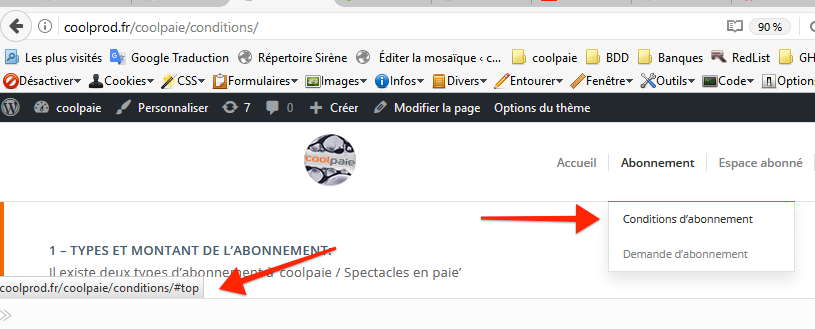
Oh you remove also the # on the top menu Item.
Ok that’s work.
Thanks
I have a homepage slider that contains an image, a video and then another image. The minimum height for the slider should be 520px. The min-height works for the images, but the video still gets resized (too small).
The example can be seen here – http://www.businessreviews.co/
How do I get the video slide to be the same height as the image slides (across all displays, mobile & desktop).
I changed the height before using something similar to:
.avia-slideshow-inner {
height: 523px !important;
}
However, this changed all of the full width sliders and I just want to control the one on the homepage (page-id-19).
Hi,Please try adding this code to the Quick CSS section under Enfold > General Styling or to your child theme’s style.css file:
.av-caption-image-overlay-bg {
    height: 30px;
    top: 42%;
    width: 80%;
    left: 10%;
}
Best regards,
Yigit
Hi, I think I´ve resolved this issue but I don´t know what I´ve done that it´s not working now.
I have three columns: 2/5 2/5 1/5
I´ve added in quick css this code to make the space between them smaller:
#top .av-flex-placeholder {
width: 2%!important;
}
This has worked for the first two columns but not to the third that is still too separated.
Could you tell me what´s wrong with that code?
Thanls!!!
Hey erick1975bcn,
You mentioned that you saw a few threads on this issue. Have you tried this solution which seemed to have worked for the gentleman:
https://kriesi.at/support/topic/overlapping-titles-at-top-of-content-window-and-section-content-hidden-link/#post-754289
Best regards,
Jordan Shannon
Hi,
Sorry my mistake, I didn’t notice that it #top is appended on the link of the current page. It’s weird that it’s behaving this way and the work around I made was to remove the # on the links (seems like as long as there is # in the menu link, #top automatically adds to the current menu item, which I could not reproduce on my end). And I added this css code in Quick CSS (located in Enfold > General Styling):
#avia-menu a {
    cursor: pointer;
}
Let us know if this is good on your end also :)
Best regards,
Nikko
Hi cmatthews1,
Please refer to this thread for a possible solution.
If you need further assistance please let us know.
Best regards,
Victoria
Hey cyberhrc,
You should add this attribute size=”medium” to the shortcode and css:
#top .gallery .gallery-item {
width: auto;
height: auto;
}
If you need further assistance please let us know.
Best regards,
Victoria
I can’t see no difference.
When i select a menu item, the page linked is opened and then the selected menu have a #top anchor on it.
Then i can’t reload the same page by the menu because of the anchor.
https://dl.dropboxusercontent.com/s/89m9rnp2lodrfqf/2017-05-09%20at%2015.52.png
Hi,
Here is the code for mobile
@media only screen and (max-width: 767px) {
.slideshow_align_caption {
    vertical-align: top;
    top: 77%;
}
}
If you need further assistance please let us know.
Best regards,
Victoria
Hi team enfold,
After you recently had access to our site to help with CSS here, we have had trouble updating CSS via. Editor –> Enfold-Child –> Style.css.
Any changes we make are not updated. We can only make changes through the Quick CSS.
For example. We have tried inserting this in style.css with no impact. But inserting in Quick CSS changes instantly
.current-menu-item span.avia-menu-text {
color: #2c4143 !important;
}
We have changed a CSS code for the color of some of the specialheadings we use. But it won’t update. Still uses the old color.
Old code:
.specialheadingsnews h2 {
color: #55c8df!important;
}
New code (which won’t update):
specialheadingsnews h2 {
color: #d41316!important;
}
We have tried to disabling all plugins.
Can you help with this?
Br
ChangeGroup
Hi,
I have checked it and it’s being overriden by this style:
#top .all_colors p {
    font-size: 13px;
    line-height: 1.7em;
    font-weight: normal;
    margin: 0.5em 0;
}
Please remove the code I gave and replace it with this one:
#top #wrap_all .all_colors p {
    margin-bottom: 1.2em;
}
Best regards,
Nikko
I think I already know the answer to my query, but would really like to know if there’s any way of having the side menu shrink / make it collapsible, exactly like the when the menu is at the top?
Ideally, I’d like to be able to have it shrink so it’s only say 10px wide (maybe with icons) and expand when hovering over. Alternatively, a button which toggles shrunk and expanded dimensions.
I’d love to be able to recreate something similar to http://www.olsonkundigarchitects.com/
Any suggestions?
Hi,
Thanks for that, it’s removed, I went to Appearance > Menus, removed the Home link and re-added it again and the #top is gone. Let me know if this is fixed on your end as well :)
Best regards,
Nikko
Hi Nikko,
No more help needed right now concerning this topic. Please go ahead and close this thread!
Best regards,
Roger
Hey ccyran,
I think that depends on what a person prefers since both have pros and cons though em is more fluid. Also em should be vs px, since em can be is a value which you can assign on a margin or padding. Try using this css code:
#top .all_colors p {
    margin-bottom: 1.2em;
}
Just adjust the bottom margin as you see fit. Hope this helps :)
Best regards,
Nikko
Hi.
Yes, the brand filter is working. The one I mentioned in this thread is the Woocommerce Layered Nav Filters widget to the main shop page sidebar (at the very top) so that shoppers can clear their filters and get back to other shopping. It is a separate widget. Sorry if I was not clear.
Specifically, it is a widget that allows you to “x” out your selections.
(I originally had a custom shopping page and then defaulted to the basic one and selected that already in WooCommerce > Settings > Products > Display so that should not be causing any issues).
Liz
you see above – the right code on &sub .= it must be the double ones – on top at add_filter the single ones (but simple do a copy/paste)
Hi dith_solanki,
Please refer to this thread for a solution for blurred images.
If you need further assistance please let us know.
Best regards,
Victoria