
-
AuthorSearch Results
-
March 14, 2024 at 1:10 pm #1437223
In reply to: styles and items have gone a few days ago…
This reply has been marked as private.March 14, 2024 at 9:35 am #1437206In reply to: Portfolio Raster Font Too Big
Hey MiaShia,
Thank you for the inquiry.
We encountered an error when we tried to access the site. The password for the specified username is incorrect.
Fehler: Das eingegebene Passwort für die E-Mail-Adresse REDACTED@gmail.com ist nicht korrekt. Passwort vergessen?Please check the info provided or post an alternative account. In the meantime, please provide a screenshot of the element that you’d like to adjust.
If you want to adjust the font size of the portfolio gird title, please use this css code.
#top #wrap_all .all_colors h3.grid-entry-title {
    font-size: 30px;
    font-weight: normal;
}
Or edit the h3 element in the Enfold > Advanced Styling panel.
Best regards,
IsmaelMarch 14, 2024 at 4:15 am #1437197In reply to: Header and slider not responsive
Hey maisonutopies,
Thank you for the inquiry.
If you need the background image of the header to be fully visible, you can add this css code:
@media only screen and (max-width: 767px) {

  /* Add your Mobile Styles here */
  .header_color .header_bg {
    background-size: contain;
  }
}
And if you want the background image to cover the header container, you can use the following css code but this will slightly distort the image.
@media only screen and (max-width: 767px) {

  /* Add your Mobile Styles here */
  .header_color .header_bg {
    background-size: 100% 100%;
  }
}
For the slider, you can try the Full Width Easy Slider if you need the slider image to be fully visible.
Best regards,
IsmaelMarch 14, 2024 at 3:25 am #1437189In reply to: styles and items have gone a few days ago…
Hi,
Thank you for the update.
The container inside the color section is not animating as expected, so the content stays hidden because of this css code.
.js_active .av-minimum-height .container {
    z-index: 1;
    opacity: 0;
    transition: opacity 0.6s ease-in;
}
This might be due to this script error generated by the “duracelltomi-google-tag-manager” plugin.
nalytics-talk-content-tracking.js?ver=1.20:1 Uncaught TypeError: Cannot read properties of null (reading 'scrollTop')
    at n (analytics-talk-content-tracking.js?ver=1.20:1:593)
Please contact the plugin author for more info about the script error.
Best regards,
IsmaelMarch 13, 2024 at 9:48 pm #1437181Fortunately and unfortunately, no. I’m going to have to go through all the pages each week in Chrome to see if it has recurred.
The first time, I remember that I was updating some blog post featured images, and adding some images to the body (including uploading and compressing new images in the media library). This most recent time I was also adding new images and compressing them in the media library, then adding sliders to the top of pages, including dropping in the code to get a button in the box under the main caption for the Easy Slider image (I did change some of the ALB layouts as well). The only other thing I can think of was this recent time I added the code y’all provided to enfold child > Editor > Functions.php (the code was to get rid of the curved arrow overlay that shows up on linked arrows).
I’ll let y’all know if it shows up again. I’ll be continuing to edit and move somethings around.
March 13, 2024 at 7:45 pm #1437178In reply to: Sticky submenu with burger navigation
Hi Mike,
Thanks for your help! It looks like this addresses the sticky submenu for mobile, but not desktop. Are there any edits I can make to those code snippets for devices larger than a tablet?
Thanks!March 13, 2024 at 6:52 pm #1437175In reply to: Wrong color display of buttons after theme update
Yes, thank you very much! The tip helped me a lot.
The script
#top #wrap_all .avia-slideshow-button, #top .avia-button {
background-color: rgba(0, 0, 0, .4) !important;
}
because I wanted the button at the top of the slider to be transparent black. I have now given the SLider a class and adapted the script:
.slider.avia-slideshow-button, .slider.avia-button {
background-color: rgba(0, 0, 0, .4) !important;
}Now everything is correct again! Perfect
Many thanks for your great support! DianaMarch 13, 2024 at 6:47 pm #1437174In reply to: Sticky submenu with burger navigation
Hey jaimemerz,
Thank you for the link to your site I added this snippet to your WP Code plugin and ensured that in the top right corner it was a code type: PHP snippet

then I added this code and saved.function mobile_sub_menu_sticky() { ?> <script> window.addEventListener('DOMContentLoaded', function() { (function($){ var width = $(window).width(); var $stickyTop = $('#sub_menu1'); if (width <= 767) { $stickyTop.waypoint(function(direction) { if (direction === 'down') { $stickyTop.addClass('sticky-top'); } if (direction === 'up') { $stickyTop.removeClass('sticky-top'); } }, { offset: '0%' }); } })(jQuery); }); </script> <?php } add_action('wp_footer', 'mobile_sub_menu_sticky');I then added a second snippet with this css:
.responsive #top #sub_menu1.av-switch-768.av-submenu-container.sticky-top {
	position:fixed!important;
	top:0!important;
	z-index:600!important;
}
and now on your page the fullwidth submenu is sticky when it reachs the top, and un-sticks with you scroll back to the top:

Please clear your browser cache and check.
Best regards,
MikeMarch 13, 2024 at 5:58 pm #1437165In reply to: How to hide fullwidth submenu on small devices
Hi,
Thanks for the update. Please let us know if you should need any further help on the topic, or if we can close it.
Best regards,
RikardMarch 13, 2024 at 5:27 pm #1437152In reply to: Wrong color display of buttons after theme update
Hi,
…and this:
#top #wrap_all .avia-slideshow-button, #top .avia-button {
  background-color: rgba(0, 0, 0, .4) !important;
}
Best regards,
RikardMarch 13, 2024 at 5:25 pm #1437151In reply to: Wrong color display of buttons after theme update
Hey Diana,
You have this added in Quick CSS:
#top.page-id-206 .avia-button.avia-color-light {
  color: #fcf7ea;
  border: 1px solid #2a3137 !important;
  background: transparent;
}
Please try removing it.
Best regards,
RikardMarch 13, 2024 at 3:00 pm #1437140Topic: Blog page questions
in forum Enfolddowlassmoss
ParticipantI’ve got a blog page ‘News & Stuff’ which has been constructed in avia builder – it’s a standard page with (from the top) a special heading element, a short text element, and then the Blog Posts content element within a 2/3rds layout column.
Sidebar settings – right sidebar
Sidebar setting – sidebar blog
Title Bar settings – display only titleIf I call the page the blogs (title & excerpt) are nicely listed on the left and the right sidebar contains categories and latest posts. Pretty good.
However, The special heading and short text content are absent, just not there. There is no title bar. And the column in which I placed the blog posts element doesn’t display the background colour it was specified with.
I’m puzzled – where have these page elements gone?
I’m wondering whether I shouldn’t have those right sidebar settings? Because something in my build is overriding some of the build elements of the page.
Advice welcome.
March 13, 2024 at 3:00 pm #1437139In reply to: Updating Enfold
Hi Rikard,
I made another thread for a problem that came up after the Enfold update, but afte 23+ hours there’s been no reply?
Here’s the link – https://kriesi.at/support/topic/on-click-pop-up-opt-in-form-not-working-after-enfold-update/#post-1437135March 13, 2024 at 2:45 pm #1437138In reply to: Full Width Easy Slider – remove buttons for mobile
Hi Mike,
Sorry for late reply. But I’ve got it working using the grid row method…one grid row visible for desktop, another grid row for mobile. That allowed me to present a few different things in a different way, seems to work quite well.
Thanks for you help and suggestions on this one.
regards
HughMarch 13, 2024 at 11:45 am #1437129Hi,
Thanks for the update. Please let us know if you should need any further help on the topic, or if we can close it.
Best regards,
RikardMarch 13, 2024 at 10:25 am #1437115Hi,
you are right, sorry, i didn’t remember i used the trick https://kriesi.at/support/topic/alb-does-not-work-with-user-role-editor/ in my child theme
and as my fatal error disapeared when unchecking the Lock Advanced Layout Builder option i thought of a pb.
it’s fineThank you
March 13, 2024 at 2:09 am #1437108In reply to: How to add a enfold icon to the menu link
Hi,
As I understand you would like to be able to add icons next to your main menu items, here is a easy was to add icons like this:
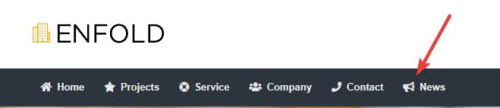
We will add this function to the end of your child theme functions.php file in Appearance ▸ Editor or if you are not using a child theme you could use the WP Code plugin then add a new snippet, in the top right corner use the PHP snippet as the code type:
then add this code and save:function enqueue_font_awesome() { wp_enqueue_style('font-awesome', 'https://cdnjs.cloudflare.com/ajax/libs/font-awesome/5.15.3/css/all.min.css'); } add_action('wp_enqueue_scripts', 'enqueue_font_awesome'); function add_icon_to_menu_item($item_output, $item, $depth, $args) { $custom_classes = implode(' ', $item->classes); preg_match('/menu-item-icon-([^ ]+)/', $custom_classes, $matches); if (!empty($matches[1])) { $icon_class = esc_attr($matches[1]); $icon = '<i class="fa ' . $icon_class . '"></i>'; $position = strpos($item_output, '<span class="avia-menu-text">'); if ($position !== false) { $item_output = substr_replace($item_output, $icon, $position, 0); } } return $item_output; } add_filter('walker_nav_menu_start_el', 'add_icon_to_menu_item', 10, 4);Please ensure to copy the code from the forum and not an email notification so the symbols are not converted.
Then add this CSS in your Enfold Theme Options ▸ General Styling ▸ Quick CSS field:#top #header li.menu-item > i ~ a { display: inline-block; } #top #header li.menu-item > i:before { color: #fff; } .av-main-nav li[class*="menu-item-icon-"] > a > i ~ .avia-menu-text { border-left-style: none; border-left-width: 0; padding-left: 13px; margin-left: -6px; } #av-burger-menu-ul li > a > i ~ .avia-menu-text { padding-left: 13px; margin-left: -6px; }Please note that you may want to change the color, in this example I’m using white because my menu is dark.
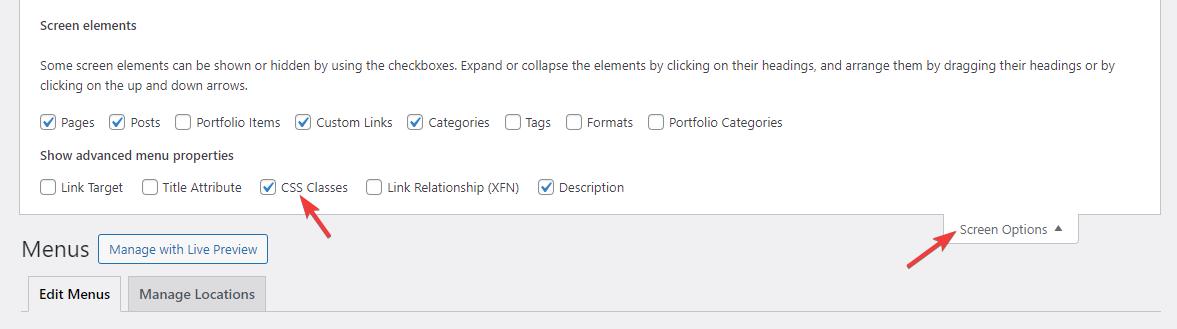
Then go to your menus and ensure that the Custom Class field is enabled for your menu items:
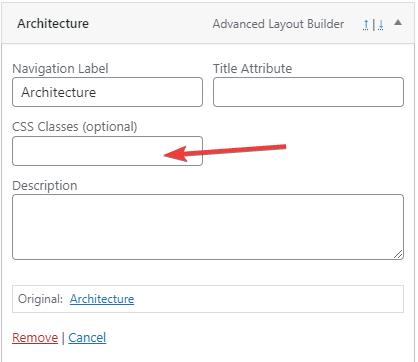
If you don’t see it go to the Screen Options and enable it.
Now we will use the Font Awesome icons because it will be easier to use a class name to determine the icon used in the custom class field, the built-in entypo-fontello icons don’t use class names the same way so it would be a little trickier for you. The function adds the icon next to the menu item based on the class used in the menu item custom class field.
Use this format: menu-item-icon-fa-home the first part menu-item-icon- tells the function that a icon will be used, and then the Font Awesome icon code is appened to the class fa-home, for example:
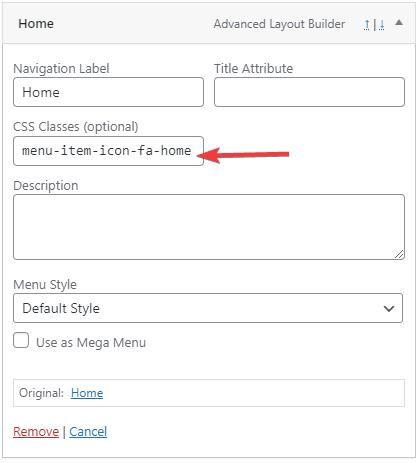
these are the classes I used in this example:
menu-item-icon-fa-home
menu-item-icon-fa-star
menu-item-icon-fa-life-ring
menu-item-icon-fa-users
menu-item-icon-fa-phone
menu-item-icon-fa-bullhorn
This also works for the sub-menu items:
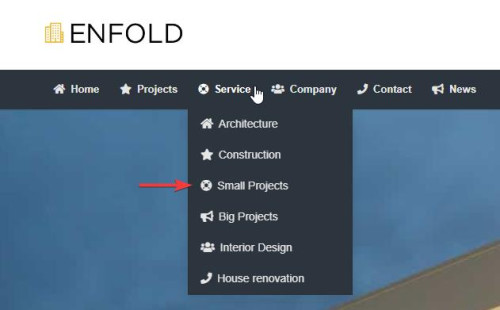
and the mobile menu:
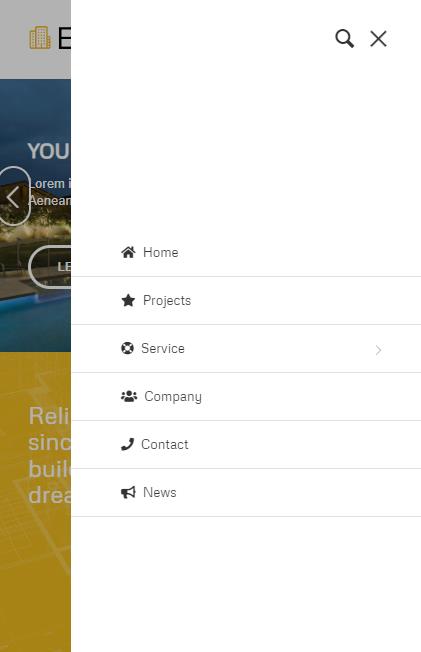
Best regards,
MikeMarch 12, 2024 at 6:28 pm #1437079*** There are 2 threads on this — I created this new one without thinking (this thread is the new one…the link below is to the old one dealing with this before). Can you and Rikard let me know which one to continue with? I can do both, but it seems like double work for y’all—this is what I wrote yesterday at 9:39pm: ***
Here’s the other post that I just created (I wasn’t thinking of just coming back here): https://kriesi.at/support/topic/some-pages-are-text-only-with-a-deformed-logo-all-specific-blog-pages-are-too/
——
A page that is currently doing this is: https://gatehealing.com/counseling-austin-tx/parenting-family-counseling/I have a screenshot, but it looks complex to get it to y’all via Dropbox (which I do have) . . . I’ll look at it when I have more time, but hopefully the link above shows the issue. Let me know if the link above does not show it. I won’t fix it till we can figure this out. My fear is that this issue will spread to my entire site again.
March 12, 2024 at 6:23 pm #1437078A page that is currently doing this is: https://gatehealing.com/counseling-austin-tx/parenting-family-counseling/
I have a screenshot, but I think it is rather complicated to get it to y’all. Let me know if the link above does not show it. I won’t fix it till we can figure this out. My fear is that this issue will spread to my entire site again.
***Also, there are 2 threads on this — I created a new one without thinking. Can you and Ismael let me know which one to continue with? I can do both, but it seems like double work for y’all—this is what I wrote yesterday at 9:39pm:***
Here’s the other post that I just created (I wasn’t thinking of just coming back here): https://kriesi.at/support/topic/all-subpages-are-just-a-white-page-and-text-blue-links/Thanks y’all
JonMarch 12, 2024 at 5:00 pm #1437066In reply to: Change blog layout afterwards in bulk
Hi,
Thanks for the screenshot, it looks like you are using the ALB for your single posts and currently the post body is a single column and you want to add a 1/5 column on both sides to reduce the post content width, but instead of editing each post you could use css.
So your two empty 1/5 columns would be about 40% of the page, so we will set the page width to 60% and we will have it only work on screens larger than 1024px.
Try this CSS in your Enfold Theme Options ▸ General Styling ▸ Quick CSS field:@media only screen and (min-width: 1024px) { .responsive #top.single-post .container_wrap_first > .container { max-width: 60%; } }Please ensure to copy the code from the forum and not an email notification so the symbols are not converted.
After applying the css, please clear your browser cache and check.
feel free to adjust to suit.Best regards,
MikeOriginally, the code worked perfectly on all pages.
.avia-content-grid-active .slide-entry-wrap .slide-content {
    margin: 0 20px;
    position: relative;
    top: -80px;
    background: #ffffff;
    padding: 0 24px;
}
Yesterday, everything was displayed correctly. Today, however, it looks different. But I don’t know what I should have done.
The grid layout is displayed correctly on the page where I manually inserted a blog layout. But not on the general blog pages.
Here is the link to the pagesTranslated with http://www.DeepL.com/Translator (free version)
March 12, 2024 at 3:41 pm #1437056In reply to: How to add a enfold icon to the menu link
This reply has been marked as private.March 12, 2024 at 9:44 am #1437024In reply to: Website reloads page on Mobiles over and over
Hi,
Great, I’m glad that Ismael could help you out. Please let us know if you should need any further help on the topic, or if we can close it.
Best regards,
RikardMarch 12, 2024 at 9:03 am #1437022In reply to: Deactivate from date for contributions
Hey Lin84,
Thank you for the inquiry.
Which blog layout did you select? Did you toggle the Blog Post Date in the Enfold > Blog Layout > Blog Meta Elements section? If you’re using the Grid Layout, please try this css code:
.responsive #top.archive .slide-meta time, .responsive #top.archive .slide-meta time  + .slide-meta-del {
    display: none;
}
Best regards,
IsmaelMarch 12, 2024 at 8:53 am #1437019And you are realy shure that you haven’t set it with Quotationmarks?
Open that element and maybe make a screenshot as i do.
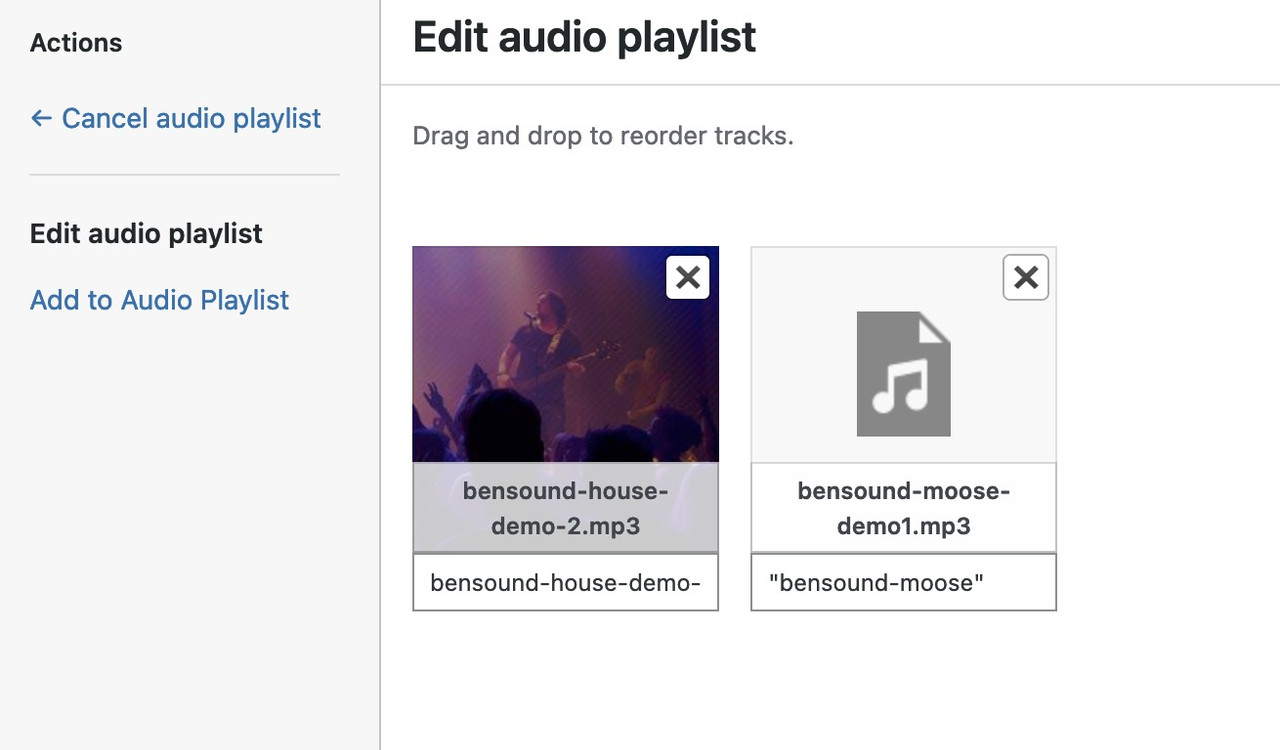
the default quotationmarks in the playlist belongs to mediaplayer of wordpress – and could be deleted by that known snippet:
https://pastebin.com/k0f385TJBut on top – these comes from Title and Description field of the media library.
Hi,
Thank you for the update.
Are you referring to the first section on every page? You can replicate this layout by adding a Color Section element at the very top of the pages and applying a different background image for each page. Please check the documentation below for more info:
// https://kriesi.at/documentation/enfold/color-section/
Best regards,
IsmaelMarch 12, 2024 at 8:15 am #1437015In reply to: Horizontal 4 Column View On Mobile
Hey kristiankeegan,
Thank you for the inquiry.
You can replace the columns with a content slider on mobile view by toggling the visibility of the elements on different screen sizes. You can find these options in the elements’ Advanced > Responsive > Element Visibility section. So you’ll have the columns on desktop view and the content slider for smaller screens.
Best regards,
IsmaelMarch 11, 2024 at 9:46 pm #1436997Eleina_Shinn
ParticipantHi, this has come up before, but still haven’t been able to resolve, even by trying to duplicate one of the other audio player.
On this page, you will see 4 people, each with their own audio playlist under their name. The one under Joe Passaro, however, has quotation marks around the current track, and also his name appears underneath, despite the fact that I have programmed the element to “hide” the artist name.
When I mentioned this in the forum before, someone from support told me I had to duplicate one of the other ones, place it under Joe’s, then remove the one on top and it seemed to work, but I tried that and it doesn’t. I also noticed, since my client is unhappy with this.
Could you help?
The page is here: https://voiceoverfortheplanet.com/about/
I will also provide login credentials below.
March 11, 2024 at 9:39 pm #1436995Apologies for not getting back . . .no, it turns out that it is worse now. Now is all pages and all blog posts except my homepage.
This is a critical problem since I am already trying to deal with ranking issues . . .and actually, I am wondering if this has been an issue for quite some time on various pages, and now on all. It is not seen if you are logged in to wp dashboard and you goto the site in the same browser, so when I have been viewing pages after updates, I have not seen it.
I am not going to use the step that I stumbled on above to try and fix this until y’all see it yourselves. . . Need to figure out the cause so i can fix it at the root.
Here’s the other post that I just created (I wasn’t thinking of just coming back here): https://kriesi.at/support/topic/all-subpages-are-just-a-white-page-and-text-blue-links/
Thanks y’all
Jon-
This reply was modified 2 years ago by
gatehealing.
March 11, 2024 at 8:25 pm #1436991Topic: Sticky submenu with burger navigation
in forum Enfoldjaimemerz
ParticipantI’m trying to implement a sticky submenu on a website that uses a burger menu on desktop. I found some guidance in this old thread: https://kriesi.at/support/topic/submenu-not-sticky/ but was hoping for some info on how to implement a fix using our Enfold Child theme. Please advise!
-
This reply was modified 2 years ago by
-
AuthorSearch Results
-
Search Results
-
Topic: Blog page questions
I’ve got a blog page ‘News & Stuff’ which has been constructed in avia builder – it’s a standard page with (from the top) a special heading element, a short text element, and then the Blog Posts content element within a 2/3rds layout column.
Sidebar settings – right sidebar
Sidebar setting – sidebar blog
Title Bar settings – display only titleIf I call the page the blogs (title & excerpt) are nicely listed on the left and the right sidebar contains categories and latest posts. Pretty good.
However, The special heading and short text content are absent, just not there. There is no title bar. And the column in which I placed the blog posts element doesn’t display the background colour it was specified with.
I’m puzzled – where have these page elements gone?
I’m wondering whether I shouldn’t have those right sidebar settings? Because something in my build is overriding some of the build elements of the page.
Advice welcome.
Hi, this has come up before, but still haven’t been able to resolve, even by trying to duplicate one of the other audio player.
On this page, you will see 4 people, each with their own audio playlist under their name. The one under Joe Passaro, however, has quotation marks around the current track, and also his name appears underneath, despite the fact that I have programmed the element to “hide” the artist name.
When I mentioned this in the forum before, someone from support told me I had to duplicate one of the other ones, place it under Joe’s, then remove the one on top and it seemed to work, but I tried that and it doesn’t. I also noticed, since my client is unhappy with this.
Could you help?
The page is here: https://voiceoverfortheplanet.com/about/
I will also provide login credentials below.
I’m trying to implement a sticky submenu on a website that uses a burger menu on desktop. I found some guidance in this old thread: https://kriesi.at/support/topic/submenu-not-sticky/ but was hoping for some info on how to implement a fix using our Enfold Child theme. Please advise!


