Viewing 30 results - 4,831 through 4,860 (of 142,859 total)
  • Author
    Search Results
  • #1445149
    This reply has been marked as private.
    #1445146
    divinecurio
    Participant

    I think the break point on my website to deem it a “small” screen needs to be updated, or I need to see why the menu items are going over the logo in the menu on my site http://www.movewithmaria.co.uk. The words start covering at the width 965px and I can’t see where to make this the size of a “small screen” can you help please?

    #1445144

    Hi there, this is no longer working and I wonder if I am missing something as my client has asked for a lot of extra code to do with the burger menu.
    In short – she wants the burger menu to be white on transparent background before scroll, then the teal colour when scrolling, The menu needs to have a teal background with white icons and writing when open and the icon needs to be white too when the menu (burger) is opened.

    Does this look right to you?

    /* CSS – Testimonial BG */

    .main_color .avia-testimonial-arrow-wrap .avia-arrow, .main_color .avia-slider-testimonials .avia-testimonial-content {
    background: #ffffff;
    }
    /* Color section container width */
    #section-container-width .container {
    width: 100% !important;
    min-width: 100%;
    padding: 0;
    margin: 0;
    }
    @media only screen and (max-width: 767px) {
    .responsive #top #wrap_all #header .main_menu {
    position: fixed;
    padding-right: 30px;
    }
    }
    .av_header_transparency .logo {
    display: none;
    }
    .av_header_transparency .av-hamburger-inner, .av_header_transparency .av-hamburger-inner::before, .av_header_transparency .av-hamburger-inner::after {
    background-color: white !important;
    }
    #top .av_header_glassy.av_header_transparency .social_bookmarks li, #top .av_header_glassy.av_header_transparency .social_bookmarks li a {
    border-color: rgba(255,255,255,0.25);
    color: #009989;
    }

    #socket .social_bookmarks {
    display : none ;
    }

    #top #av-burger-menu-ul {
    padding: 120px 0px 0px !important
    }

    #av-burger-menu-ul .menu-item-social {
    display: table;
    width: 100%;
    }

    #top #av-burger-menu-ul .menu-item-social .avia-menu-text {
    display: block;
    width: 100% !important;
    padding: 15px 50px 5px;
    text-align: left !important;
    font-style: italic;
    }
    @media only screen and (max-width: 767px) {
    .responsive .logo { display: none !important; }

    #advanced_menu_toggle, #advanced_menu_hide {
    margin-top: 10px;
    }

    #header_main {
    min-height: 82px;
    }
    }
    @media only screen and (max-width: 767px) {
    #top #wrap_all .av_header_transparency {
    background: transparent;
    position: absolute!important;
    }

    #top .av-burger-overlay li li .avia-bullet,
    #top .av-hamburger-inner,
    #top .av-hamburger-inner::before,
    #top .av-hamburger-inner::after {
    background-color: #009989 !important;
    }
    #top .av-burger-overlay li li .avia-bullet,
    #top .av-hamburger.is-active .av-hamburger-inner,
    #top .av-hamburger.is-active .av-hamburger-inner::before,
    #top .av-hamburger.is-active .av-hamburger-inner::after {
    background-color: #fff !important;
    }

    #top .av_header_glassy.av_header_transparency .social_bookmarks li, #top .av_header_glassy.av_header_transparency .social_bookmarks li a {
    border-color: rgba(255,255,255,0.25);
    color: #009989;
    }

    #1445134

    It runs with your video on iPhone – but the loop not. After the video the related Videos are shown.

    see https://webers-testseite.de/youtube-background/
    After you have inspect it – i will remove your video from my page

    PS: if i remove the playlist parameter ( see bottom color-section) the video stops playing on iPhone – but does not show those related videos allways :
    see screenshot from iPhone:

    #1445132

    In reply to: verical distance

    Hey schweg33,

    Thank you for the inquiry.

    You can add this css code to decrease the space between the menu items and the position of the arrow:

    @media only screen and (max-width: 767px) {
    
      /* Add your Mobile Styles here */
      .responsive #top .av-switch-768 .av-menu-mobile-active .av-subnav-menu>li>a {
        padding: 5px 15%;
      }
    
      .responsive #top .av-switch-768 .av-menu-mobile-active .av-subnav-menu>li a:before {
        top: 5px;
      }
    }

    Best regards,
    Ismael

    #1445113

    @Guenni007

    This is what I have now:

    https://www.youtube.com/watch?v=<VIDEO_ID>?autoplay=1&mute=1&rel=0&loop=1&playsinline=1&playlist=<VIDEO_ID>

    This doesn’t seem to make a difference. If you do this on your test page, does it run on mobile (Iphone)? The video is simply uploaded by default.

    Do you think it depends on the method of uploading?

    • This reply was modified 1 year, 10 months ago by Webvriend.
    #1445089

    @Guenni007

    Thanks for sharing. I have already applied this. This is what I have now:

    https://www.youtube.com/watch?v=<VIDEO_ID>?autoplay=1&mute=1&loop=1&playsinline=1&playlist=<VIDEO_ID>

    But unfortunately the loop doesn’t work on mobile.

    • This reply was modified 1 year, 10 months ago by Webvriend.
    #1445088

    Hi Ismael

    Thank you for your reply.

    I’ve have had a dialogue with your colleague Rikard in another thread (https://kriesi.at/support/topic/remove-all-accordion-tab-urls-like-toggle-id-1-toggle-id-1-closed/#post-1444906) and according to him, it is possible to remove the toggle IDs without a freelancer to customize the page. He referred to this guide: https://kriesi.at/documentation/enfold/accordion/#custom-tab-and-toggle-ids-for-prettier-url-hashes. Unfortunately it didn’t work, so he offered me to have a closer look at it.

    Best regards,
    Maja

    #1445060

    In reply to: Customize table

    Hi,

    The html can be added in any of the table cells:

    
    <div class="av-table-coloured av-table-coloured-red">Hiit</div>
    

    The css should be added in the Enfold > General Styling > Quick CSS field:

    .av-table-coloured {
        position: relative;
        left: 0;
        top: 0;
        width: 100%;
        padding: 10px;
    }
    
    .av-table-coloured .av-table-coloured-red {
        background: red;
    }
    
    .av-table-coloured .av-table-coloured-orange {
        background: orange;
    }
    
    .av-table-coloured .av-table-coloured-blue {
        background: blue;
    }
    

    Please check this link: https://kriesi.at/documentation/enfold/add-custom-css/#quick-css

    Best regards,
    Ismael

    #1445022

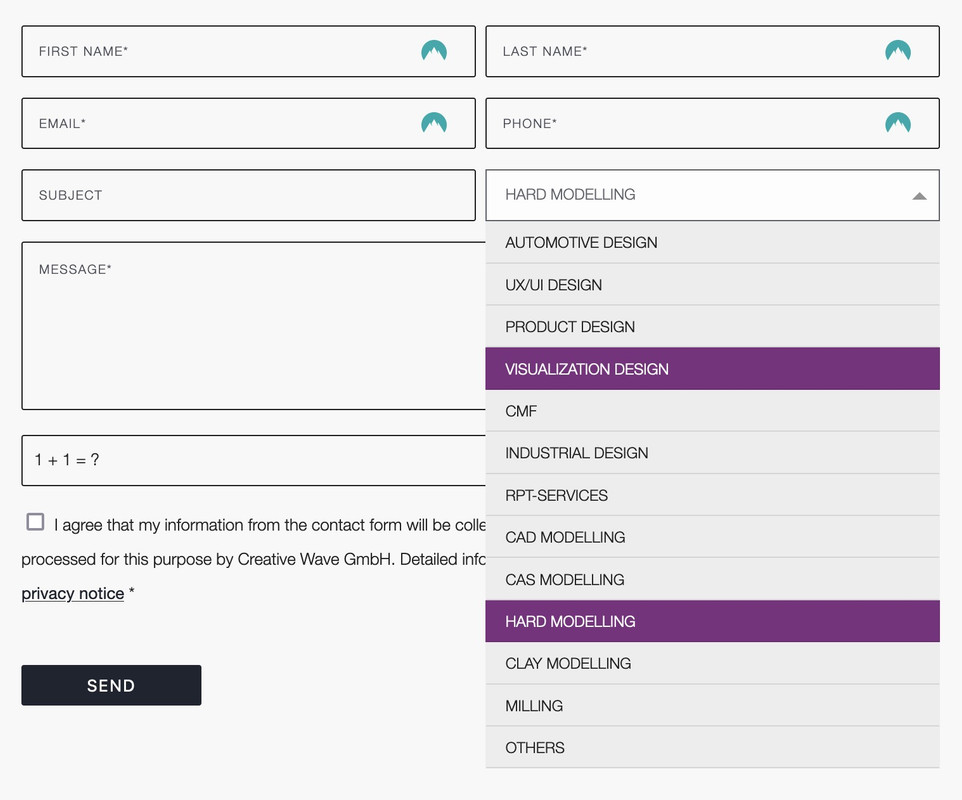
    you can only influence the select box ( as check boxes, radio buttons etc. ) by replacing the original html by a different html structure.

    put this to your child-theme functions.php:
    ( it is specific to your form – because the selector for that form element is given by the ID: #element_avia_6_1
    on other form elements it might be a different ID )

    function style_select_options(){
    ?>
    <script>
    window.addEventListener("DOMContentLoaded", function () { 
        (function($) {     
            $('.avia_ajax_form #element_avia_6_1').addClass('custom-select');
        })(jQuery);
    
        var x, i, j, l, ll, selElmnt, a, b, c;
        /* Look for any elements with the class "custom-select": */
        x = document.getElementsByClassName("custom-select");
        l = x.length;
        for (i = 0; i < l; i++) {
          selElmnt = x[i].getElementsByTagName("select")[0];
          ll = selElmnt.length;
          /* For each element, create a new DIV that will act as the selected item: */
          a = document.createElement("DIV");
          a.setAttribute("class", "select-selected");
          a.innerHTML = selElmnt.options[selElmnt.selectedIndex].innerHTML;
          x[i].appendChild(a);
          /* For each element, create a new DIV that will contain the option list: */
          b = document.createElement("DIV");
          b.setAttribute("class", "select-items select-hide");
          for (j = 1; j < ll; j++) {
            /* For each option in the original select element,
            create a new DIV that will act as an option item: */
            c = document.createElement("DIV");
            c.innerHTML = selElmnt.options[j].innerHTML;
            c.addEventListener("click", function(e) {
                /* When an item is clicked, update the original select box,
                and the selected item: */
                var y, i, k, s, h, sl, yl;
                s = this.parentNode.parentNode.getElementsByTagName("select")[0];
                sl = s.length;
                h = this.parentNode.previousSibling;
                for (i = 0; i < sl; i++) {
                  if (s.options[i].innerHTML == this.innerHTML) {
                    s.selectedIndex = i;
                    h.innerHTML = this.innerHTML;
                    y = this.parentNode.getElementsByClassName("same-as-selected");
                    yl = y.length;
                    for (k = 0; k < yl; k++) {
                      y[k].removeAttribute("class");
                    }
                    this.setAttribute("class", "same-as-selected");
                    break;
                  }
                }
                h.click();
            });
            b.appendChild(c);
          }
          x[i].appendChild(b);
          a.addEventListener("click", function(e) {
            /* When the select box is clicked, close any other select boxes,
            and open/close the current select box: */
            e.stopPropagation();
            closeAllSelect(this);
            this.nextSibling.classList.toggle("select-hide");
            this.classList.toggle("select-arrow-active");
          });
        }
    
        function closeAllSelect(elmnt) {
          /* A function that will close all select boxes in the document,
          except the current select box: */
          var x, y, i, xl, yl, arrNo = [];
          x = document.getElementsByClassName("select-items");
          y = document.getElementsByClassName("select-selected");
          xl = x.length;
          yl = y.length;
          for (i = 0; i < yl; i++) {
            if (elmnt == y[i]) {
              arrNo.push(i)
            } else {
              y[i].classList.remove("select-arrow-active");
            }
          }
          for (i = 0; i < xl; i++) {
            if (arrNo.indexOf(i)) {
              x[i].classList.add("select-hide");
            }
          }
        }
    
        /* If the user clicks anywhere outside the select box,
        then close all select boxes: */
        document.addEventListener("click", closeAllSelect); 
    
    });
    </script>
    <?php
    }
    add_action('wp_footer', 'style_select_options');
    

    after that for quick.css:

    /*the container must be positioned relative:*/
    .custom-select {
      font-family: inherit;
      text-transform: uppercase;
    }
    
    .custom-select select {
      display: none !important;
    }
    
    #top .select-selected {
      background-color: var(--enfold-main-color-bg);
      border-color: var(--enfold-main-color-primary);
      border-width: 1px;
      height: 41px;
      font-size: 12px;
      color: var(--enfold-main-color-primary);
      opacity: 0.7
    }
    
    /*style the arrow inside the select element:*/
    .select-selected:after {
      position: absolute;
      content: "";
      top: 18px;
      right: 10px;
      width: 0;
      height: 0;
      border: 6px solid transparent;
      border-color: #666 transparent transparent transparent;
    }
    
    /*point the arrow upwards when the select box is open (active):*/
    .select-selected.select-arrow-active:after {
      border-color: transparent transparent #666 transparent;
      top: 12px;
    }
    
    /*style the items (options), including the selected item:*/
    .select-items div,
    .select-selected {
      color: #FFF;
      padding: 2px 15px 2px;
      border: 1px solid transparent;
      border-color: transparent transparent rgba(0, 0, 0, 0.1) transparent;
      cursor: pointer;
      user-select: none;
    }
    
    /*style the items (options), including the selected item:*/
    .select-selected {
      padding: 5px 15px 2px;
    }
    
    /*style items (options):*/
    .select-items {
      position: absolute;
      background-color: #ddd;
      top: 100%;
      left: 0;
      right: 0;
      z-index: 99;
      font-size: 12px
    }
    
    /*hide the items when the select box is closed:*/
    .select-hide {
      display: none;
    }
    
    .select-items div:hover, .same-as-selected {
      background-color: #7d2a7e;
      color: #fff !important;
    }

    Looks then this way – but you can now style each option and pseudo states to your needs:

    • This reply was modified 1 year, 10 months ago by Guenni007.
    #1445010
    birte5
    Participant

    Hello,
    when I resize the browser window, their is a grey background appears before the video in the slider adjusts. How can I change that to the background color of the site (#080808)?
    Screenshot showing grey on top of slider
    Screenshot showing grey left and right of the slider

    #1444999

    can you try this solution: https://kriesi.at/support/topic/portfolio-items-on-click-navigagte-to-external-website/

    but i guess it is only for portfolios …

    see the comment:

    Link portfolio item to external URL
    You can add a link to any (external) page here.
    If you add a link to a video that video will open in a lightbox

    for posts you then had to set the format to “link”

    #1444992

    Hi,

    Great, I’m glad that Mike could help you out. Please let us know if you should need any further help on the topic, or if we can close it.

    Best regards,
    Rikard

    #1444970

    see playerparameters: https://developers.google.com/youtube/player_parameters?hl=de for Youtube.

    so rel should work – but if you set a playlist – and a loop – it will not stop – so same result.

    #1444968

    see – example page: https://webers-testseite.de/vimeo-bg-video/

    as long the parameter muted is set – it will autoplay on mobile iOS devices.

    #1444967
    zimbo
    Participant

    I’m raising a similar issue as described in this post: https://kriesi.at/support/topic/image-resizing-for-mobile/

    Website: http://www.henleyherald.com

    On the home page there is a Blog Posts element for Top Stories in a 2/3 column. Styling > Appearance is set for:
    • 3 columns
    • Choose the image size manually
    • Image Size is Portfolio Small (260 x 185 px)

    In desktop mode, using Dev Tools, Elements shows the img src attribute for each image is the 260 px wide image. Using the Network tab, it is confirmed that the 260 px wide image is being downloaded.

    The Lighthouse Performance score on desktop for the home page averages 97-98. Smush is used to compress images on upload. Lighthouse suggests further improvements could be achieved on the Top Story images, e.g. Efficiently encode images – Potential savings of 264 KiB. But I’m certainly not complaining about a score of 97.

    Switch Dev Tools to Mobile mode however and something weird happens. The Performance score drops significantly to 68. The improvement suggestion changes to: Properly size images – Potential savings of 401 KiB. The emulator screen size is 400 px wide.

    On analysing the Blog Posts via Elements and Network, the images being loaded in responsive mode are now the full size images.

    Take the “Hurricanes Blow Away Opposition in Cup Final” story. The img src attribute is: src=https://www.henleyherald.com/wp-content/uploads/2024/05/AFC-Henley-Hurricanes-Oxford-FA-Cup-Final-e1716205297662-260×173.jpg, and in desktop mode this file is loaded, sized at 92.8kb.

    When in mobile mode, Dev Tools says the rendered size is the same as desktop (260 x 173 px) and of course the src is as above, but the intrinsic size is now 700 x 467 px and the actual file loaded is
    https://www.henleyherald.com/wp-content/uploads/2024/05/AFC-Henley-Hurricanes-Oxford-FA-Cup-Final-e1716205297662-700×467.jpg, file size 509kb.

    Why is the full size image being loaded in mobile mode? Or is Dev Tools reporting this incorrectly?

    How do I get the correct smaller 260 x173 px image loaded instead?

    NB. There’s the same problem on the Highlighted News stories. In desktop mode, all the images are loaded as 150 px wide; when in mobile mode, all the images loaded are larger at 260px wide.

    #1444966

    Hi,
    The video at the top auto plays for me on Android, but I don’t have a iPhone to test with, and typically that one is harder to get auto play to work on. If you can’t get it to work on iPhone try creating a gif from your video and use it as the static replacement image, this has worked well for others.

    Best regards,
    Mike

    Hi,

    Great, I’m glad that Mike could help you out. Please let us know if you should need any further help on the topic, or if we can close it.

    Best regards,
    Rikard

    #1444913

    In reply to: Blogs slider

    hi

    Sure, this helps for this situation but still does not show the image or the text that was entered in that post.

    And more importantly: it still does not fix the problem I have and will try to explain again.
    We have a working situation with these post types on the live environment. When I upgrade to most recent version of Enfold, it stops working and you see what you see on the testing site (no text, no image).

    so someting changed within the avia shortcodes I assume betwean enfold 5.2 en enfold 5.7. But I am no sure where to look to try to fix this.

    #1444911

    Hi,

    Thanks for the update. Please let us know if you should need any further help on the topic, or if we can close it.

    Best regards,
    Rikard

    #1444898
    Munford
    Participant

    HI
    I have a background video on my site that is loading slowly.
    I read this thread: https://kriesi.at/support/topic/self-hosted-videos-too-slow-to-load/#post-1187018 and wondered if that also applies to self hosted videos, or if there is something else I can do to speed it up.
    thanks for your help
    Nancy

    #1444893

    but if you do not need all those features of advanced layerslider – you can use color-section background video option as well.
    just put in that inputfield : https://vimeo.com/917970783?badge=0&autoplay=1&muted=1&loop=1
    maybe with parameter ( do not track ) &dnt=1

    see here the player parameters of vimeo videos : https://help.vimeo.com/hc/de/articles/12426260232977-%C3%9Cberblick-%C3%BCber-Player-Parameter

    I have found that pages simply load faster without the layer slider.

    #1444859

    In reply to: Customize table

    Hey ijnavas,

    Thank you for the inquiry.

    There is no option for this by default, but you can manually create html inside the cell and then apply css to adjust the background colors. For example, add this html to one of the cells:

    
    <div class="av-table-coloured av-table-coloured-red">Hiit</div>
    

    Then add this css code:

    .av-table-coloured {
        position: relative;
        left: 0;
        top: 0;
        width: 100%;
        padding: 10px;
    }
    
    .av-table-coloured .av-table-coloured-red {
        background: red;
    }
    
    .av-table-coloured .av-table-coloured-orange {
        background: orange;
    }
    
    .av-table-coloured .av-table-coloured-blue {
        background: blue;
    }

    The first cell should be colored red. To use blue, just use this html:

    
    <div class="av-table-coloured av-table-coloured-blue">Gap</div>
    

    Best regards,
    Ismael

    #1444855

    Hi,

    Thank you for the update.

    We edited the iframe URL and set the muted parameter to 1. It is now playing automatically on both desktop and mobile view.

    Best regards,
    Ismael

    craig374
    Participant

    I am working on the first column of a four column footer.

    In this first column, I have a logo image at the top of the column followed by a text block. The space between the bottom of the logo and the top of the text block is too wide, and I would like to reduce it…likely by half. This is my first website build, and I am not a developer (i.e., I don’t know CSS code or anything); however, I was able to inspect the footer area and it appears that I am trying to adjust the margin space between the two elements (i.e., the logo and the text block).

    It looks like the margin is currently set to 30px. I would like it to be 15px. How do I do this and would it be the same process to change the spacing between any of the other elements in the other footer columns?

    Thank you!

    #1444800

    @Ismael

    The Layer Slider option is not useful, we don’t load it at all. Can’t you create a little hook in ~/enfold/config-templatebuilder/avia-shortcodes/slideshow/slideshow-video.js: to always force autoplay for all types of videos?

    #1444798
    amanda-mdllc
    Participant

    I have a website that I am using the the Fullwidth slider on and it is not showing up on desktop and mobile. I have it where it is an autorotation on and it is not working or even showing up. I have to arrow to the “next” image even though there are only 2 images and it shows. I deactivated all the plugins, cleared cache all around updated the theme and it still is not working.

    I created a login for you if you need to poke around.

    Thanks!
    ~Amanda

    #1444788

    In reply to: PHP upgrade fail

    Hey SugarPR,

    I see that you are running an old version of the theme, could you try to update to the latest version (5.7.1) to see if that helps please? The update to 5.7.1 has to be done manually from the version you are running, please refer to my replies in this thread: https://kriesi.at/support/topic/enfold-4-5-theme-update-update-failed-download-failed-a-valid-url-was-not-pro/#post-1021541
    You can either update manually via FTP: https://kriesi.at/documentation/enfold/how-to-install-enfold-theme/#theme-update, or upload the theme as if it was new under Appearance->Themes->Add New Theme.
    If that doesn’t work then please try to delete the whole theme folder, then replace it with the new version. Make sure that you have backups of the site before starting updating.
    Also please read this after you have updated: https://kriesi.at/documentation/enfold/theme-registration/

    Best regards,
    Rikard

    #1444785

    In reply to: Logo container

    Hi,

    Great, I’m glad that Ismael could help you out. Please let us know if you should need any further help on the topic, or if we can close it.

    Best regards,
    Rikard

    #1444783

    Hi,

    Thanks for sharing that. Do you need any more help on this topic?

    Best regards,
    Rikard

Viewing 30 results - 4,831 through 4,860 (of 142,859 total)