Hi,
Thanks for your patience, please try this code to the end of your child theme functions.php file in WordPress ▸ Appearance ▸ Theme File Editor instead:
function custom_script_move_woo_tabs() { ?>
  <script>
window.addEventListener('DOMContentLoaded', function() {
(function ($) {
    var width = $(window).width();
if (width > 767 && width < 1200) {
	$('#top.single-product .woocommerce-tabs.wc-tabs-wrapper').css({'padding-top':'0'}).appendTo( ".container_wrap_first.template-shop > .container > .product" );
	$('#top.single-product .single-product-main-image').css({'padding-bottom':'0'});
   }
})(jQuery);
});
</script>
  <?php
}
add_action('wp_footer', 'custom_script_move_woo_tabs');
this only works on screens between 767px and 1200px as asked, please copy the css from the forum and not from an email notification so the greater than symbol is copied correctly.
Also note that if you test on a desktop screen by resizing the window you will need to refresh the widow to trigger the script, this would not be an issue for an actual user.
Here is the expected results between 767px and 1200px with the tabs moved:

this is when the screen is larger than 1200px:

I have linked to my test page below, please give this a try.
Best regards,
Mike
i use this in my child-theme functions.php:
function enfold_customization_switch_fonts() {
global $avia;
$avia->style->print_extra_output = false;
}
add_action( ‘init’, ‘enfold_customization_switch_fonts’ );
but since Enfold 4.4.1. there is that filter – and i guess you can use that either.
function my_output_google_webfonts_script( $activate ){
  return false;
}
add_filter( 'avf_output_google_webfonts_script', 'my_output_google_webfonts_script', 10, 1 );
by the way, I don’t know if Google Fonts support is now disabled by default in the advanced Layerslider. So please have a look there as well on Layerslider Settings Page.
-
This reply was modified 3 years, 4 months ago by
 Yigit.
-
This reply was modified 3 years, 4 months ago by Yigit.
Hi,
We can only give you general recommendations if we can’t actually access your site unfortunately. These general recommendations would be:
– Check PHP version so that it’s 7.4 or higher. You might want to switch between versions as well, to check if the specific version is the problem.
– Deactivate all plugins
– Activate the parent theme is you are running a child theme
– Turn off WordPress debug mode. The warnings you are getting are probably only that, warnings, not errors. They should not affect any functionality on your site.
Best regards,
Rikard
Hello
I am entering the following in the autoresponder text on the contact form:
Guten Tag

Vielen Dank für Ihre Nachricht.
Gerne werden wir Sie in den nächsten Tagen persönlich kontaktieren.

Freundliche Grüsse

xyz
The email that the visitor receives, has the following markup:
Guten Tag</p><br />
<p>Vielen Dank für Ihre Nachricht.<br /><br />
Gerne werden wir Sie in den nächsten Tagen persönlich kontaktieren.</p><br />
<p>Freundliche Grüsse</p><br />
<p>xyz
Somehow the markup seems to get mixed up when saving. This causes different spacing between paragraphs in the email to the visitor.
In the shortcode_handler in the contact.php file, $atts[‘autorespond’] has the following value:
Guten Tag</p>\n<p>Vielen Dank für Ihre Nachricht.<br />\nGerne werden wir Sie in den nächsten Tagen persönlich kontaktieren.</p>\n<p>Freundliche Grüsse</p>\n<p>xyz
I have already reentered the text and also tried to define all breaks directly with HTML code – unfortunately unsuccessful so far. Also deactivating all plugins did not bring any change.
We could find the problem with Enfold 5.1.1 under WP 6.0.1 as well as with Enfold 4.7.6.3 under WP 6.0.1.
Do you have a tip for me? Many thanks!
 Alexander Baum
Hello Ricard,
I have now deactivated the slider plug-in and switched the hosting back to 8x.x.
An error of the Theme Plug-In is now caused again.
Here is the error message.
Greetings Alexander
>>>>>>>>>>>>>>>>>>>>>>>
Wenn du Hilfe bei diesem Problem suchst, wirst du möglicherweise nach einigen der folgenden Informationen gefragt:
WordPress-Version 6.0.1
Aktives Theme: Enfold (Version 5.1.1.1-image) Aktuelles Plugin: (Version ) PHP-Version 8.0.20
Fehler-Details
==============
Ein Fehler vom Typ E_ERROR wurde in der Zeile 38 der Datei /var/www/vhosts/26164.s1.creoline.cloud/httpdocs/wp-content/themes/enfold/css/dynamic-css.php verursacht. Fehlermeldung: Uncaught Error: Call to undefined function extract() in /var/www/vhosts/26164.s1.creoline.cloud/httpdocs/wp-content/themes/enfold/css/dynamic-css.php:38
Stack trace:
#0 /var/www/vhosts/26164.s1.creoline.cloud/httpdocs/wp-content/themes/enfold/includes/admin/register-dynamic-styles.php(234): require()
#1 /var/www/vhosts/26164.s1.creoline.cloud/httpdocs/wp-content/themes/enfold/functions.php(781): avia_prepare_dynamic_styles()
#2 /var/www/vhosts/26164.s1.creoline.cloud/httpdocs/wp-includes/class-wp-hook.php(307): avia_custom_styles()
#3 /var/www/vhosts/26164.s1.creoline.cloud/httpdocs/wp-includes/class-wp-hook.php(331): WP_Hook->apply_filters()
#4 /var/www/vhosts/26164.s1.creoline.cloud/httpdocs/wp-includes/plugin.php(476): WP_Hook->do_action()
#5 /var/www/vhosts/26164.s1.creoline.cloud/httpdocs/wp-settings.php(598): do_action()
#6 /var/www/vhosts/26164.s1.creoline.cloud/httpdocs/wp-config.php(79): require_once(‘…’)
#7 /var/www/vhosts/26164.s1.creoline.cloud/httpdocs/wp-load.php(50): require_once(‘…’)
#8 /var/www/vhosts/26164.s1.creoline.cloud/httpdocs/wp-login.php(12): require(‘…’)
#9 {main}
thrown
Alexander Baum
Hi Rikard,
I got a reply from the hoster. Unfortunately, I cannot write directly to the plug-in provider. Can you please do this?
Br Alex
>>>>>>>>>>>>>>>
Sehr geehrter Herr Baum,
vielen Dank für Ihre Rückmeldung.
Sofern Sie die aktuellste Version von WordPress und die aktuellste Version von Layerslider installiert haben, wird die Unterstützung von PHP 8 vom Plugin-Herstellers versichert.
https://kreatura.ticksy.com//ticket/3071227/
Falls Sie den bereits genannten Fehler mit aktiviertem PHP 8 weiter erhalten, empfehle ich Ihnen PHP 7.4 weiterzuverwenden.
Unglücklicherweise handelt es sich bei dem von Ihnen beschrieben Verhalten um einen Fehler, resultierend aus einem Drittanbieter-Plugin oder Drittanbieter-Theme.
Leider kann ich Ihnen für Drittanbieter Erweiterungen keine Unterstützung durch unseren Support anbieten.
Daher muss ich Sie bedauerlicherweise bitten, sich direkt an den Plugin-Hersteller kreatura zu wenden.
>>>>>>>>>
Hey Tobias,
Your PHP version is not 7.4:
Auf deiner Website läuft eine unsichere Version von PHP (5.6.40-nmm4), die aktualisiert werden sollte.
Please try updating that to 7.4 or higher.
Best regards,
Rikard
Hi Support,
after Update to Enfold 5.1.1. we get following error on our site: avia-template-builder/php/base-classes/class-popup-templates-responsive.php on line 220
How can we get this?
We use WordPress 6.1 and PHP 7.4, Memory Limit 256M
Best regards!
Tobias
Hi Rikard,
the same on my website. how can we get this?
We use All Inkl, PHP Version 7.4, Memory Limit 256M
Best regards!
Tobias
-
This reply was modified 3 years, 8 months ago by
 Tobias.
Hi! I´m trying to put a time line in my page named ” empresa” https://grupoempresa.com.mx/empresa/ , but it doesnt work… I put the time line element and save the page and it doesnt work
I already hace the last wordpress version, the last enfold theme version and also I tried changing my PHP version from Cpanel , I tried with version 7.3, 7.4 and 8.0 (current)
Can you help me please?
Hi,
Thanks for the feedback, to change all of the portfolio grid links on that one page to your /impressum/ page, try adding this code to the end of your child theme functions.php file in Appearance ▸ Editor:
function change_all_links_in_portfolio_grid() { ?>
  <script>
window.addEventListener('DOMContentLoaded', function() {
  (function($){
    $('#top.page-id-4746 #av-sc-portfolio-1 .grid-sort-container .grid-entry article').each(function() {
      $(this).find('a').attr('href', "/impressum/");
    });
  })(jQuery);
});
  </script>
  <?php
}
add_action('wp_footer', 'change_all_links_in_portfolio_grid');
Then clear your browser cache and check.
Best regards,
Mike
Hi,
Thanks for the login details. I see that you are running an old PHP version which is not support anymore, could you try upgrading your PHP version to 7.4 or higher, to see if that helps please?
Best regards,
Rikard
Hi there,
I have encountered an issue, upon login out as one of the user, this shows up:
lude(/home/golde928/percheronconsulting.com.au/wp-content/uploads/avia_fonts/Flaticon/charmap.php): failed to open stream: No such file or directory in /home/golde928/percheronconsulting.com.au/wp-content/themes/enfold/config-templatebuilder/avia-template-builder/php/class-font-manager.php on line 477
Warning: include(/home/golde928/percheronconsulting.com.au/wp-content/uploads/avia_fonts/Flaticon/charmap.php): failed to open stream: No such file or directory in /home/golde928/percheronconsulting.com.au/wp-content/themes/enfold/config-templatebuilder/avia-template-builder/php/class-font-manager.php on line 477
Warning: include(): Failed opening ‘/home/golde928/percheronconsulting.com.au/wp-content/uploads/avia_fonts/Flaticon/charmap.php’ for inclusion (include_path=’.:/opt/alt/php72/usr/share/pear’) in /home/golde928/percheronconsulting.com.au/wp-content/themes/enfold/config-templatebuilder/avia-template-builder/php/class-font-manager.php on line 477
Can you advise?
-
This topic was modified 3 years, 8 months ago by
 jiapien.
Hi,
Great, I’m glad to hear that it’s working using 7.4. I’m not sure if we can offer a solution though, since it’s not a general problem with the theme. I’ve been running the theme on PHP 8.x.x for months now without any problems, both on local and live installations. Are you ok with 7.4 for now?
Best regards,
Rikard
Hi,
Thanks for the details. I tried uploading a fresh copy of the theme, but I didn’t make any difference unfortunately. Could you try using a different PHP version to see if that changes anything please? 7.4 for example.
Best regards,
Rikard
Hi,
I added the code Team VDLP shared on this post – https://kriesi.at/support/topic/styling-custom-post-types-broken-since-enfold-5-0/#post-1360792 to the bottom of functions.php file of your child theme and that helped.
Please review your website :)
Best regards,
Yigit
Hello @guenni007 or @ismael
can you please tell me where in loop-index.php i have to place the code to get my CFs echoed?
<?php echo get_post_meta($post->ID, 'adress', true); ?>
(unfortuately there are no good comments which makes a normaly very easy thing quite complicate)
I followed exactly @yigit s advice here but all i got was “Call to undefined function the_field()”:
https://kriesi.at/support/topic/displaying-custom-field-on-blog-post/
This does also not work:
echo '<h2>';
get_post_meta($post->ID, 'adress', true);
echo '</h2>';
It simply shows nothing although the CF “adress” exists and is filled with data.
kind regards
Eva Simone
-
This reply was modified 3 years, 8 months ago by
 evas49.
-
This reply was modified 3 years, 8 months ago by evas49.
Alexander Baum
Hello, all plugins are disabled. The error remains unchanged. see below
Wenn du Hilfe bei diesem Problem suchst, wirst du möglicherweise nach einigen der folgenden Informationen gefragt:
WordPress-Version 6.0.1
Aktives Theme: Enfold (Version 5.1.1)
Aktuelles Plugin: (Version )
PHP-Version 8.0.20
Fehler-Details
==============
Ein Fehler vom Typ E_ERROR wurde in der Zeile 62 der Datei /var/www/vhosts/26164.s1.creoline.cloud/httpdocs/wp-content/themes/enfold/config-layerslider/LayerSlider/assets/classes/class.km.autoupdate.v3.php verursacht. Fehlermeldung: Uncaught Error: Call to undefined function extract() in /var/www/vhosts/26164.s1.creoline.cloud/httpdocs/wp-content/themes/enfold/config-layerslider/LayerSlider/assets/classes/class.km.autoupdate.v3.php:62
Stack trace:
#0 /var/www/vhosts/26164.s1.creoline.cloud/httpdocs/wp-content/themes/enfold/config-layerslider/LayerSlider/assets/classes/class.km.autoupdate.plugins.v3.php(22): KM_UpdatesV3->__construct()
#1 /var/www/vhosts/26164.s1.creoline.cloud/httpdocs/wp-content/themes/enfold/config-layerslider/LayerSlider/assets/init.php(94): KM_PluginUpdatesV3->__construct()
#2 /var/www/vhosts/26164.s1.creoline.cloud/httpdocs/wp-content/themes/enfold/config-layerslider/LayerSlider/layerslider.php(65): require(‘…’)
#3 /var/www/vhosts/26164.s1.creoline.cloud/httpdocs/wp-content/themes/enfold/config-layerslider/config.php(418): include_once(‘…’)
#4 /var/www/vhosts/26164.s1.creoline.cloud/httpdocs/wp-includes/class-wp-hook.php(307): Avia_Config_LayerSlider->handler_include_layerslider()
#5 /var/www/vhosts/26164.s1.creoline.cloud/httpdocs/wp-includes/class-wp-hook.php(331): WP_Hook->apply_filters()
#6 /var/www/vhosts/26164.s1.creoline.cloud/httpdocs/wp-includes/plugin.php(476): WP_Hook->do_action()
#7 /var/www/vhosts/26164.s1.creoline.cloud/httpdocs/wp-settings.php(598): do_action()
#8 /var/www/vhosts/26164.s1.creoline.cloud/httpdocs/wp-config.php(76): require_once(‘…’)
#9 /var/www/vhosts/26164.s1.creoline.cloud/httpdocs/wp-load.php(50): require_once(‘…’)
#10 /var/www/vhosts/26164.s1.creoline.cloud/httpdocs/wp-admin/admin.php(34): require_once(‘…’)
#11 /var/www/vhosts/26164.s1.creoline.cloud/httpdocs/wp-admin/themes.php(10): require_once(‘…’)
#12 {main}
thrown
@guenni
it was a mistake, probably to the fact that the forum didnt load when i was trying to post and got a “500”
So i used the browsers return button and clicked again on “Submit”
I didnt realize that there was a double post
@all
It does not make a difference which blogstyle i use (standard, elegent or modern business) – its always linked.
I am using a page with “masonry element” to pull the blogposts but why should this affect how a single blopgost looks like?
Eva Simone
The only code that removed the link was the first one.
But it downsized the featured image to 645px width so that it does not fit correctly into the page width.
The other two php codes did not change anything.
Here is the code from my post:
Do you need anything more?
I unfortunately cant show you the issue live cause i am on Xampp
-
This reply was modified 3 years, 8 months ago by evas49. Reason: gave more infos
-
This reply was modified 3 months, 4 weeks ago by Yigit.
-
This reply was modified 3 months, 4 weeks ago by Yigit.
Hey!
Thank you for the info @Guenni007.
I tested the filter on my end and it seems to break the layout of the post, pushing the image outside of the big-preview container.
code from: https://kriesi.at/support/topic/remove-link-from-featured-image-2/
function av_remove_featured_image_link(){
  if(is_single()){
    echo get_the_post_thumbnail( $current_post['the_id'], 'featured' );
  }
}
add_filter('avf_post_featured_image_link','av_remove_featured_image_link');
I adjusted the code a bit.
function av_remove_featured_image_link($image) {
    if (is_single()) {
        $image = get_the_post_thumbnail( $current_post['the_id'], 'featured' );
    }
    return $image;
}
add_filter('avf_post_featured_image_link','av_remove_featured_image_link', 10, 1);
This returns the same markup or image which still contains a link as expected. This is due to this markup in the loop-index.php file.
iif( $slider )
					{
						if( $link_lightbox )
						{
							$slider = '<a ' . $lightbox_attr . ' ' . $featured_img_title . '>' . $slider . '</a>';
						}
						else
						{
							$slider = '<a href="' . $link . '" ' . $featured_img_title . '>' . $slider . '</a>';
						}
					}

					if( $slider )
					{
						echo '<div class="big-preview ' . $blog_style . '" ' . avia_markup_helper( array( 'context' => 'image', 'echo' => false ) ) . '>' . $slider . '</div>';
					}
We can slightly edit the code above to remove the link completely,
iif( $slider )
					if( $slider )
					{
						echo '<div class="big-preview ' . $blog_style . '" ' . avia_markup_helper( array( 'context' => 'image', 'echo' => false ) ) . '>' . $slider . '</div>';
					}
Or just use the css suggestion above.
Best regards,
Ismael
Hi Gunter,
To display private posts in masonry you need to edit core files and change the hide_empty values to false. Can you add a button on the backend to allow a private post or a hook for functions.php instead please? It seems all your code is basically there already:
Line 372 class-avia-masonry.php

	protected function sort_buttons()
		{

			$term_args = array(
								'taxonomy'		=> $this->config['taxonomy'],
								'hide_empty'	=> false
							);

			/**
			 * To display private posts you need to set 'hide_empty' to false,

Line 1288

		$term_args = array(
								'taxonomy'		=> $params['taxonomy'],
								'hide_empty'	=> false
							);
				/**
				 * To display private posts you need to set 'hide_empty' to false,
Thanks for considering
Regards,
Tim
yes – read here further a bit more in detail : https://kriesi.at/support/topic/problem-with-hyphens/#post-1179376
i only changed a bit the code to not always use before and after those substitutes 3#
and i added new entries
you can see here the edited php file: https://pastebin.com/jttc230x
First – these are snippets for child-theme functions.php!
to reduce the compression level of calculated images :
/**** abstellen der von Enfold auf 100 gesetzten jpeg Qualität  *****/
add_filter("avf_jpeg_quality", "avf_set_quality_mod", 9999, 1);
add_filter("avf_wp_editor_set_quality", "avf_set_quality_mod", 9999, 1);
function avf_set_quality_mod($quality) { $quality = 55; return $quality;}
A) for WordPress image size formats
// Remove unneeded WP image sizes
// Remove default image sizes here.
function prefix_remove_default_images( $sizes ) {
// do NOT remove small and medium sizes, they are used in backend Media Library!
// unset( $sizes['small']); // 150px
// unset( $sizes['medium']); // 300px
 unset( $sizes['large']); // 1024px
 unset( $sizes['medium_large']); // 768px
 return $sizes;
}
add_filter( 'intermediate_image_sizes_advanced', 'prefix_remove_default_images' );
B) for Enfold image size formats
function remove_enfold_image_sizes() {
// do NOT remove widget size, is used in backend portfolio items!
// remove_image_size('widget');
  remove_image_size('square');
  remove_image_size('featured');
  remove_image_size('featured_large');
  remove_image_size('portfolio');
  remove_image_size('portfolio_small');
  remove_image_size('gallery');
  remove_image_size('magazine');
  remove_image_size('masonry');
  remove_image_size('entry_without_sidebar');
  remove_image_size('entry_with_sidebar');
  remove_image_size('shop_thumbnail');
  remove_image_size('shop_catalog');
  remove_image_size('shop_single');
  remove_image_size('shop_gallery_thumbnail');
}
add_action('init', 'remove_enfold_image_sizes');
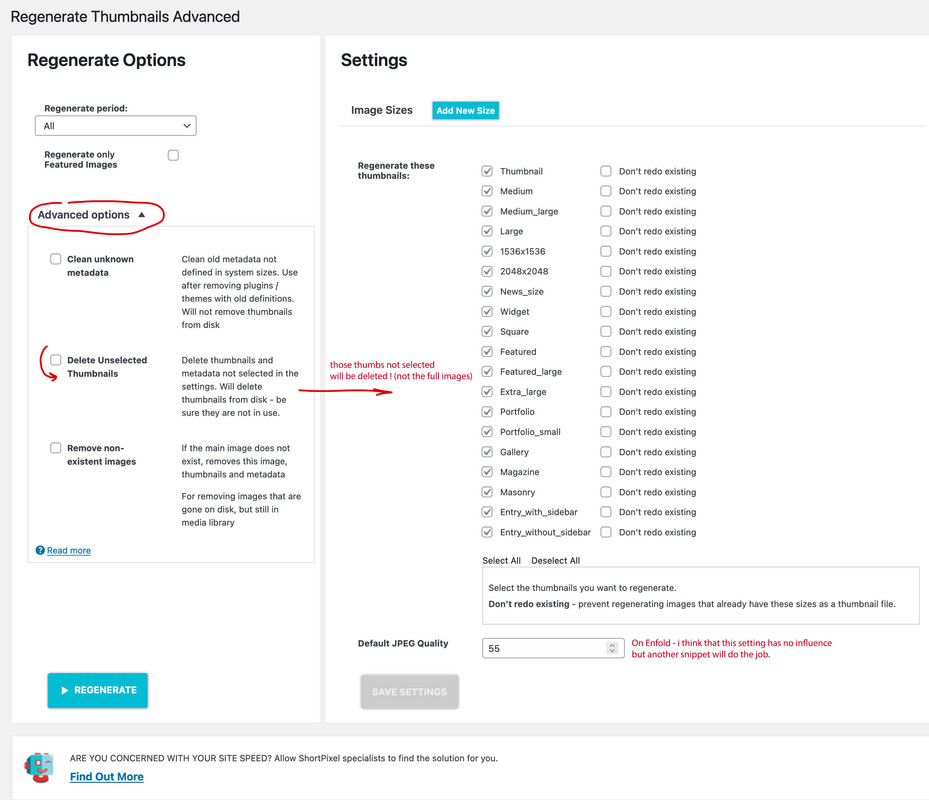
After inserting these snippets you had to recalculate thumbnails – use a plugin for that
i prefer: regenerate-thumbnails-advanced
Hi,
the temporary workaround with hiding the warnings is okay.
But the main problem is not solved when I edit and save the home page. But I have seen another problem, perhaps it the reason for the other warnings:
Warning: PHP Startup: Unable to load dynamic library ‘imagick.so’ (tried: /usr/lib/php71/extensions/imagick.so (/usr/lib/php71/extensions/imagick.so: undefined symbol: _zval_ptr_dtor), /usr/lib/php71/extensions/imagick.so.so (/usr/lib/php71/extensions/imagick.so.so: cannot open shared object file: No such file or directory)) in Unknown on line 0
Best regards,
Bernhard
Alexander BaumGuest
Hallo,
wir wollten gerade Euer Theme installieren. Leider kommt es zu einem Fehler.
Könnt Ihre das bitte prüfen.
Danke Alexander Baum
Wenn du Hilfe bei diesem Problem suchst, wirst du möglicherweise nach einigen der folgenden Informationen gefragt:
WordPress-Version 6.0.1
Aktives Theme: Enfold (Version 5.1.1)
Aktuelles Plugin: (Version )
PHP-Version 8.0.20
Fehler-Details
==============
Ein Fehler vom Typ E_ERROR wurde in der Zeile 62 der Datei /var/www/vhosts/26164.s1.creoline.cloud/httpdocs/wp-content/themes/enfold/config-layerslider/LayerSlider/assets/classes/class.km.autoupdate.v3.php verursacht. Fehlermeldung: Uncaught Error: Call to undefined function extract() in /var/www/vhosts/26164.s1.creoline.cloud/httpdocs/wp-content/themes/enfold/config-layerslider/LayerSlider/assets/classes/class.km.autoupdate.v3.php:62
Stack trace:
#0 /var/www/vhosts/26164.s1.creoline.cloud/httpdocs/wp-content/themes/enfold/config-layerslider/LayerSlider/assets/classes/class.km.autoupdate.plugins.v3.php(22): KM_UpdatesV3->__construct()
#1 /var/www/vhosts/26164.s1.creoline.cloud/httpdocs/wp-content/themes/enfold/config-layerslider/LayerSlider/assets/init.php(94): KM_PluginUpdatesV3->__construct()
#2 /var/www/vhosts/26164.s1.creoline.cloud/httpdocs/wp-content/themes/enfold/config-layerslider/LayerSlider/layerslider.php(65): require(‘…’)
#3 /var/www/vhosts/26164.s1.creoline.cloud/httpdocs/wp-content/themes/enfold/config-layerslider/config.php(418): include_once(‘…’)
#4 /var/www/vhosts/26164.s1.creoline.cloud/httpdocs/wp-includes/class-wp-hook.php(307): Avia_Config_LayerSlider->handler_include_layerslider()
#5 /var/www/vhosts/26164.s1.creoline.cloud/httpdocs/wp-includes/class-wp-hook.php(331): WP_Hook->apply_filters()
#6 /var/www/vhosts/26164.s1.creoline.cloud/httpdocs/wp-includes/plugin.php(476): WP_Hook->do_action()
#7 /var/www/vhosts/26164.s1.creoline.cloud/httpdocs/wp-settings.php(598): do_action()
#8 /var/www/vhosts/26164.s1.creoline.cloud/httpdocs/wp-config.php(78): require_once(‘…’)
#9 /var/www/vhosts/26164.s1.creoline.cloud/httpdocs/wp-load.php(50): require_once(‘…’)
#10 /var/www/vhosts/26164.s1.creoline.cloud/httpdocs/wp-admin/admin.php(34): require_once(‘…’)
#11 /var/www/vhosts/26164.s1.creoline.cloud/httpdocs/wp-admin/themes.php(10): require_once(‘…’)
#12 {main}
thrown
Hi,
Thanks for the feedback, assuming that you have added the title to each menu item:

Try adding this code to the end of your functions.php file in Appearance ▸ Editor:
function custom_aria_label_script() { ?>
  <script>
window.addEventListener('DOMContentLoaded', function() {
(function($){
  $('#avia-menu li').each(function() {
    $(this).find('a').attr('aria-label', $(this).find('a').attr('title'));
  });
})(jQuery);
});
</script>
  <?php
}
add_action('wp_footer', 'custom_aria_label_script');
and then test with your “Jaws”
Best regards,
Mike
Bespoke Ecommerce for a phone case retailer here in the UK.
place4acase – iPhone and Samsung Galaxy phone cases
place4acase are suppliers and retailers of high quality phone cases for iphone and samsung galaxy devices. The company is based in the UK and are able to sell and distribute throughout the world. They work with artists to provide unique phone case designs available in matte, glossy and reinforced options.
The site is based on a modified version of Enfold with WooCommerce. We also use the excellent WooCommerce Extra Product Options Plugin from Code Canyon
The site also uses The Smash Baloon Instragram Feed Plugin.
The following modifications have been made:
-Changed the product page layout with CSS so the thumbnails are beside the image rather than next to it
-Moved the single product image over and made it larger so it is displayed more prominently
-custom header and menu structure with mobile first design
-product pages tweaked with sidebars removed and widget based filters for navigation
The site scores up to 95/100 in mobile speed testing and up to 100/100 on desktops
(Note that ther is currently a bug in the new PayPal plugin causing the mini cart JS to load on every page. This does reduce scores to 85/100 until the new release – This post was created 04/08/2022)
Think Jarvis uses an optimised performance stack for Enfold that includes
– 500 lines of code in functions.php
– font pre-loads
– lazyloading images
– baspoke ht access settings
– 8 core VPS server shared with other optimised sites only
– Caching
– Image compression and WebP generation
– Lazy Load JS on top of Enfolds HTML option so that the Instagram Feed is Lazy Loaded
– Critical CSS generator
– Bespoke Enfold settings
Let me know if you have any feedback :)
-
This reply was modified 3 years, 8 months ago by
 thinkjarvis.
Hi,
So you can’t select a PHP version higher than 7.0? If so, then I would consider changing your hosting provider, since that version is not supported by WordPress or Enfold.
If the automatic update is not working, and you can’t use the plugin, then you can either update manually via FTP: https://kriesi.at/documentation/enfold/how-to-install-enfold-theme/#theme-update, or use a plugin to upload the theme zip file: https://wordpress.org/plugins/update-theme-and-plugins-from-zip-file/
Make sure that you have backups of the site before starting updating.
Best regards,
Rikard
Nikko
Thanks. As you predicted it was a PHP version issue. As soon as I upgraded to PHP 7.4 the theme upgrade worked without error and the issue with the video not working in the easy slider was solved too.
Thanks :-)
Hi Rikard,
Thanks. I try to change php version to 7.0 but then I get critical error and can’t access the site. I disable all plugins and only have 3 active so I don’t think is a plugin issue.
I can’t add the plugin you recommended as it need php version 7.0
What could be wrong?
Charlotte



