Hi Roberta,
The default behaviour is add a version number to the end of the CSS file. I’m not sure exactly what the problem is on your site, but your can check the different settings under Enfold->Performance->Show Advanced Options.
If you would like to try and turn off the post CSS creation, then please try this in functions.php:
/**
 * Filter to skip css file generation.
 * You can add logic to skip for certain pages/posts only.
 *
 * @since 4.8.6.1
 * @param boolean $create
 * @return boolean					true | false or anything else to skip generation of css file
 */
function custom_avf_post_css_create_file( $create )
{
	return false;
}

add_filter( 'avf_post_css_create_file', 'custom_avf_post_css_create_file', 10, 1 );
Best regards,
Rikard
-
This reply was modified 3 years, 7 months ago by
 Rikard.
Hey Thomas,
Thank you for the inquiry.
You can edit the enfold/includes/helper-social-media.php code file and around line 751 you will see the html for the social share links.
$this->html .=		"
 	<li class='av-share-link av-social-link-{$key}' >";
				$this->html .=			"<a {$blank} {$aria_label} href='" . esc_url( $url ) . "' " . av_icon_string( $icon, false ) . " title='' data-avia-related-tooltip='{$name}'>";
				$this->html .=				"<span class='avia_hidden_link_text'>{$name}</span>";
				$this->html .=			'</a>';
				$this->html .=		'</li>
';
The $name variable should contain the text “Share on xx” or “Link to xx”.
Best regards,
Ismael
Hey JaneJoyce,
Thank you for the inquiry.
In the magazine.php file, try to add this code around line 1503.
$excerpt = ! empty( $entry->post_excerpt ) ? $entry->post_excerpt : avia_backend_truncate( $entry->post_content, apply_filters( 'avf_magazine_excerpt_length', 60 ), apply_filters( 'avf_magazine_excerpt_delimiter', ' ' ), '…', true, '' );
The excerpt only displays in the large entry because of this condition around line 1478.
if( $style == 'small' )
Best regards,
Ismael
Hey Charlie Nicholls,
I included a DropBox link below to the final version below from 2018, v4.4, which is no longer supported.
Please note that at the time it worked with PHP v7.1, so it probably will not work with PHP v8
it was also compatible with WooCommerce v3.3.0, so it probably will not work with the latest WooCommerce.
Also, note that you will need to use WordPress v4.9.9, we closed support for it before WordPress v5 because we didn’t find it practical to update it for v5.
In order to use the Replete theme you will be open to many risks, I would recommend starting to work on a new updated site with Enfold, you will need to set aside some time to manually recreate the site, as there is no migration option.
Best regards,
Mike
Hi,
I believe your errors are because your theme is out-of-date, but either way, you will need to update first.
If you have a copy of the header.php or the footer.php in your child theme please also remove these from your child theme before you update.
Also, check your web host PHP version and ensure that you are using at least version 7.4.
If you are afraid that your site might crash after you update, then you should use your web host backup tool and make a complete backup of your site, I do not recommend using a backup plugin unless you have personal experience with restoring from a backup with it, as many backup plugins do not restore as expected.
Best regards,
Mike
Bonjour,
J’ai suivi vos indications en activant à nouveau la dernière version et j’ai 3 erreurs (voir ci-dessous) qui apparaissent en sachant que j’ai déjà WP DEBUG avec la valeur FALSE…
Warning: Creating default object from empty value in /homepages/13/d621856167/htdocs/jetsaveurs/wp-content/themes/enfold/config-templatebuilder/avia-shortcodes/slideshow_layerslider/slideshow_layerslider.php on line 28
Warning: Cannot modify header information – headers already sent by (output started at /homepages/13/d621856167/htdocs/jetsaveurs/wp-content/themes/enfold/config-templatebuilder/avia-shortcodes/slideshow_layerslider/slideshow_layerslider.php:28) in /homepages/13/d621856167/htdocs/jetsaveurs/wp-includes/pluggable.php on line 1421
Warning: Cannot modify header information – headers already sent by (output started at /homepages/13/d621856167/htdocs/jetsaveurs/wp-content/themes/enfold/config-templatebuilder/avia-shortcodes/slideshow_layerslider/slideshow_layerslider.php:28) in /homepages/13/d621856167/htdocs/jetsaveurs/wp-includes/pluggable.php on line 1424
Pouvez-vous m’aider s’il vous plait, je vous donne un accès en privé, soyez très prudent s’il vous plaît le site doit impérativement resté fonctionnel pour mes clients.
Dans l’attente de votre retour,
Hi there
A couple of years ago, you very kindly supplied me with a code amendment that enabled Excerpts to display along with Titles for the Magazine element. It was a one-line code change to the file …
config-template-builder/avia-shortcodes/magazine/magazine.php
… and it worked a treat for v4.7.6.3
The site has now been upgraded to v5.1.1
I have made the same code change, but the page isn’t displaying the excerpts. Could you advise the amendment I’d need to make for it to work again?
The change is at line 1284
…. unaltered code is — $style = ( $loop == 1 && ! empty( $this->config[‘first_big’] ) ) ? ‘big’ : ‘small’;
…. amended code is — $style = (!empty($this->atts[‘first_big’])) ? “big” : “small”;
I was advised at the time that for this to work on the page the tick box in admin marked “Should the first entry be displayed bigger?” must ticked, and yes it is!
Many thanks
Hey Magdalena,
Thank for your question, but the full-width submenu element is not designed to be sticky on mobile, in the element settings, the sticky option says that it is ignored on mobile.
To make the full-width submenu element sticky on mobile please add this custom ID sticky_on_mobile

Then add this css to your Quick CSS:
.sticky-top {
    position:fixed!important;
    top:0!important;
    z-index:1000!important;
}
Then add this code to the end of your child theme functions.php file in Appearance ▸ Editor:
function custom_sticky_submenu_on_mobile_script() { ?>
  <script>
window.addEventListener('DOMContentLoaded', function() {
(function($){
  $(function() {
  	var width = $(window).width();
     var scroll_start = 0;
     var startchange = $('#sticky_on_mobile');
     var offset = startchange.offset();
      if (startchange.length){
      	if (width <= 989) {
     $(document).scroll(function() {
        scroll_start = $(this).scrollTop();
        if(scroll_start > offset.top) {
          document.getElementById('sticky_on_mobile').classList.add('sticky-top');
         } else {
          document.getElementById('sticky_on_mobile').classList.remove('sticky-top');
         }
     });
      }
      }
  });
})(jQuery);
});
</script>
  <?php
}
add_action('wp_footer', 'custom_sticky_submenu_on_mobile_script');
Then clear your browser cache and check.
Best regards,
Mike
Hi,
Thanks for your question, if you are using Enfold v3.8 then you must manually update because that version will not accept the Envato Token and will only use the Envato API which Envato has disabled. Second, if your PHP is v7.3 then you must update to v7.4, then update Enfold to v5.1.1, then update WordPress to v6+, then you can update to PHP v8+
To update your version of Enfold you will need to download the latest version from your Theme Forest account and upload it to your WordPress ▸ Appearance ▸ Themes ▸ Add Themes ▸ Add New

after you choose the zip file and click install, you will see a This theme is already installed message because you are updating, you can continue

then you will see the Theme updated successfully message.

Before you do anything else !!
Please backup your site with your webhost full site backup tool.
Please do not rely on a backup plugin unless you have personal experience restoring from such a backup!
Many backup plugins only backup and do not restore!
Best regards,
Mike
Hi,
Just a follow-up, it now says this in the update screen.
Theme Updates
No Updates available. You are running the latest version! (3.8)
Check Manually
Your PHP version: 7.3.33-4+0~20220627.98+debian10~1.gbp40b3e4
Last successful check was on 2022/08/25 20:24.
Hi,
In a similar position to a lot of people at the moment with required PHP updates I need to update the PHP on my server to ideally 8.1. I have let the version of Enfold get quite behind and it has quite a few customisations so I just wanted to check what the best method would be and with the version being so low any issues I need to be aware of when performing the upgrade.
This is my current setup
Wordpress = Current version: 5.8.4
Enfold is 3.8
PHP is 7.3
I have linked my Envato token which it has accepted but it is currently saying no updates available but I don’t think it has checked yet so hopefully shortly it will say the new version. Would the best method be
1, Update Enfold from within the theme update section to 5.0
2, Update WordPress to 5.8.4
3, Update any other plugins
4, Update server PHP to 8.1
Any help really appreciated.
Thanks,
Danny
Bonjour,
J’ai suivi vos indications mais en procédant à la mise à jour j’ai l’erreur suivante qui s’affiche :Warning: Creating default object from empty value in /homepages/13/d621856167/htdocs/jetsaveurs/wp-content/themes/enfold/config-templatebuilder/avia-shortcodes/slideshow_layerslider/slideshow_layerslider.php on line 28
Et toutes les images de mon slider sont surdimmensionnées…
J’ai donc été obligé de restaurer l’ancienne version pour le moment,
Merci pour votre aide,
zunächst übernimmt Enfold die Sprache von der eingestellten WordPress Sprache.
Wenn Du also die informelle Deutsche Version unter Dashboard – Einstellungen – Allgemein gewählt hast nimmt auch Enfold die informellen Sprachfiles.
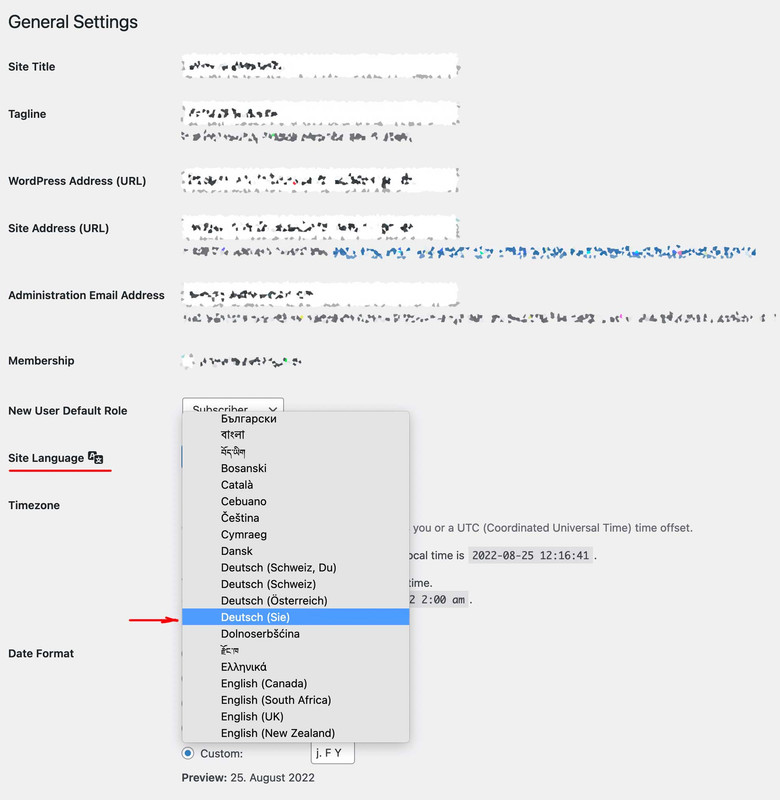
Um Übersetzungen zu verändern, kannst du die Lang Files im enfold/lang/ ordner bearbeiten, und diese als child-theme files hochladen.
Ich würde in dem Fall die Ordnerstruktur beibehalten und einen child-theme/lang/ folder dafür erstellen. Bedenke du musst zwei Files hochladen.
Editiert wird der po file der beiden, hochgeladen werden muss allerdings noch der mo file ( po-edit generiert beide)
Die Child-Theme Lang Files werden dann geladen via child-theme functions.php:
function overwrite_language_file_child_theme() {
    $lang = get_stylesheet_directory().'/lang';
    return $lang;
}
add_filter('ava_theme_textdomain_path', 'overwrite_language_file_child_theme');
_________________________________
Soviel zu dem theoretischen Weg.
Es gibt aber die Quick and Dirty Version dazu – bitte stelle aber mal zunächst auf Deutsch (Sie) um – und poste hier dann die exakten Texte die dann erscheinen.
Hi Rikard,
My ISP host is forcing an upgrade from PHP 7.4 to 8.0 (by 3 October) and this triggered me going down this pit of despair. Thank you for offering to have a closer look. Details in private content.
I tried deleting the wp-content\themes\enfold folder and replacing it with the latest version (5.1.1) and it works but it does not appear to migrate widgets successfully, for example the av_google_map widget on the contact page.
Also when trying to edit a page, it is not displayed in WYSIWYG format but embedded text (if you know what I mean).
Thanks in advance,
Pieter
 Andre Friedrich
Guest
Hello,
we’ve been getting this warning since switching to PHP 7.4.
Warning: Creating default object from empty value in /xxxxxxxxxx/magazin/wp-content/themes/enfold/config-templatebuilder/avia-shortcodes/slideshow_layerslider/slideshow_layerslider.php on line 28
Will this bug be fixed with an update to the Enfolder Theme? How can we purchase the update?
Hey Nasi,
Thank you for the inquiry.
The theme automatically adjusts the compression level of the uploaded images, which could lead to increase in file size and consume more storage space. You can adjust the default quality by using this filter in the functions.php file.
add_filter("avf_jpeg_quality", "avf_set_quality_mod", 9999, 1);
add_filter("avf_wp_editor_set_quality", "avf_set_quality_mod", 9999, 1);
function avf_set_quality_mod($quality) {
	$quality = 65;   // compression level what you like in percent
	return $quality;
}
Quality is set to 100 by default. And if you want to prevent the generation of multiple images or thumbnails, please check the following threads.
// https://kriesi.at/support/topic/how-to-reduce-thumbnails/#post-1360678
// https://kriesi.at/support/topic/enfold-image-sizes-3/#post-1109028
// https://kriesi.at/support/topic/portfolio-grid-alignment-issues/#post-1306849
// https://kriesi.at/support/topic/how-can-i-delete-all-enfold-image-sizes/
Best regards,
Ismael
on uploading custom fonts for selfhosting with Custom Font Manager
In what order does Enfold try to load the self-hosted fonts?
If I do it manually via a css, I offer the woff2 first ( see image on the bottom how entypo is loaded ) , because it provides the better but more modern compression method with brotli. Then only woff. But I have now noticed that with such a font Enfold loads the woff.
If ttf is present in the uploaded zip file – this will be uploaded first.
so on src for those selfhosted fonts it will be best to offer first woff2, woff, ttf, svg
i see that on class-font-manager.php from lines 526ff this is the sequence – but on an installation of mine the woff is loaded allthough the woff2 is present.
this is the generated css from selfhosted fontfiles via Custom Font Manager :

btw: this is how entypo-fontello font is loaded:

By the way, it’s not an academic question – it’s about performant websites. When modern browsers open a website, woff2 loads much faster than the other font container formats.
Small supplement: In the meantime I even upload woff2 and woff formats exclusively. If someone still opens my pages and doesn’t support these formats, then he may see the fallback font ;) – but first it has to load the woff2 – if browser supports it.
-
This topic was modified 3 years, 8 months ago by
 Guenni007.
-
This topic was modified 3 years, 8 months ago by Guenni007.
-
This topic was modified 3 years, 7 months ago by
 Ismael.
a paragraph is a p-tag not a h-tag not li etc.
Inside toc there are p-tags. but thats why i set the selector to find the first p-tag inside: entry-content and they have to be direct child p-tags (thats indicated by the > p )
the substitute line on the bottom is for the third p-tag inside entry-content:
( var targetElement = $(this).find('.entry-content-wrapper .entry-content > p:nth-of-type(3)'); )
insertBefore is what it says – and insertAfter … ;)
just try that snippet in your child-theme functions.php. If you are not satisfied – you can get rid of it immediately.
try:
function move_featured_image_to_first_paragraph(){
?>
<script type="text/javascript">
window.addEventListener("DOMContentLoaded", function () {
(function($) {
        $('.single .post-entry').each( function() {
            var featuredImage = $(this).find('.big-preview.single-big');
            var targetElement = $(this).find('.entry-content-wrapper .entry-content > p:nth-of-type(3)');
            $(featuredImage).insertAfter($(targetElement));
        });
})(jQuery);
});
</script>
<?php
}
add_action('wp_footer', 'move_featured_image_to_first_paragraph');
and play with that numer x inside nth-of-type(x) and see what happens
(if you merge the js and css – do not forget to refresh those files )
My test on developer tools: https://vimeo.com/742138679
and did you try my snippet in your child-theme funcitons.php?
But i see that your posts are not consistent in showing the first paragraph – sometimes there is more info before the first paragraph is seen – than you have more info.
If your postings had a similar content structure, the image would certainly be in the same place everywhere.
After I applied my codesnippet in the developer tools, I see for example in the one posting the
(I have interrupted the giant image so that it does not take up too much space here):
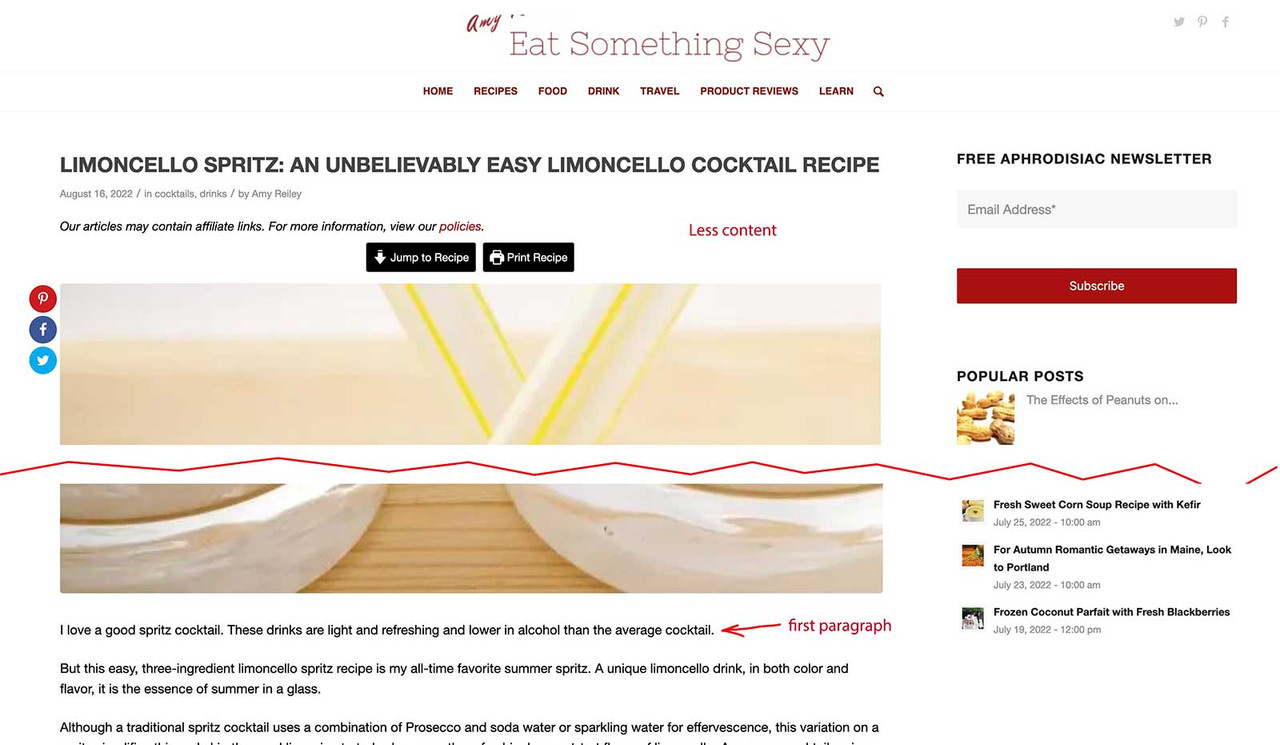
Another Posting :
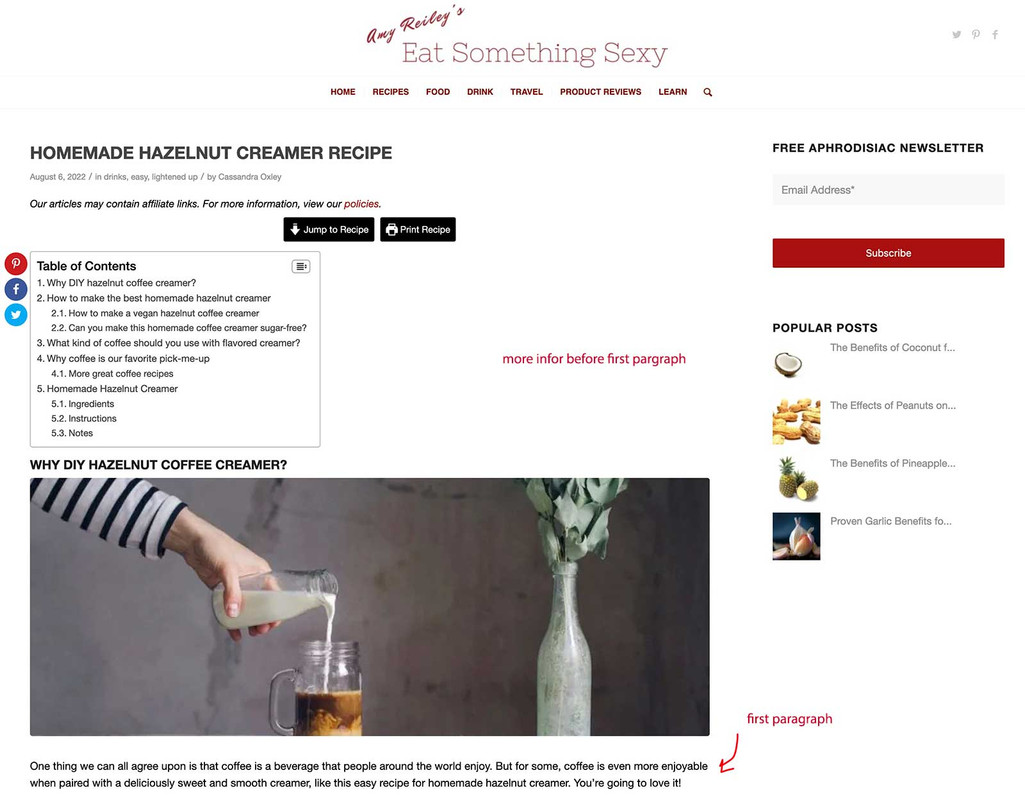
Hi Jason E,
Guenni007 is not a moderator but an Enfold user who is taking his time helping other Enfold users, so anything you post privately isn’t visible to him.
As for the Post Grid, since there’s no hook or filter for it, you’ll need to override the Post Slider.
First, you’ll need to use a child theme, if you don’t have one, you can download and find the instructions here: https://kriesi.at/documentation/enfold/child-theme/
Then follow the instructions in https://kriesi.at/documentation/enfold/intro-to-layout-builder/#add-elements-to-alb
The one you’ll need to override is the postslider folder, specifically postslider.php and you’ll need to add the category as a class in this code (line 900):
$output .= "<article class='slide-entry flex_column {$style} {$post_class} {$grid} {$extraClass} {$thumb_class} post-format-{$post_format}' {$markup_article}>";
Once that is added you should be able to add CSS to add a badge on the upper left area.
If you need further assistance or instructions are not clear, please let us know.
Best regards,
Nikko
This reply has been marked as private.
Hey DUALWERK,
Thanks for your question when the timeline is in horizontal scrolling mode it uses the \enfold\config-templatebuilder\avia-shortcodes\slideshow\slideshow.js on line 786 you will see a line that is commented out:

un-comment this line and comment out the line under it:

This will make to scroll all of the showing milestones, such as 3 at a time. I have linked to my test page below which has 9 milestones with 3 showing at a time.
After you edit the slideshow.js you will need to clear the Enfold Theme Options ▸ Performance ▸ JS & CSS file merging and compression by disabling it and then enable Enfold Theme Options ▸ Performance ▸ Delete old CSS and JS files and clear your browser cache.
I’m not sure if this will change other slider behaviors so you should check, if you want to add this modification to your child theme, ensure this function is in your child theme functions.php file:
function avia_include_shortcode_template( $paths )
{
	if( ! is_array( $paths ) )
	{
		$paths = array();
	}

	$template_url = get_stylesheet_directory();
	array_unshift( $paths, $template_url . '/shortcodes/' );

	return $paths;
}
add_filter( 'avia_load_shortcodes', 'avia_include_shortcode_template', 15, 1 );
then add the directory /shortcodes/ to your child theme and then copy the directory /slideshow/ with your customized file to the /shortcodes/ directory.
Then clear the file merging and compression and your browser cache.
Best regards,
Mike
 Stefan Barth
Guest
Hi,
a client of mine is using Enfold v. 4.1.2. Their provider is going to switch off PHP 7.4 soon. I tested the website with PHP 8.0 and 8.1; with both there are fatal errors and the screen remains blank. (I did *not* turn off the plugins – all pretty much up to date-, only switched to a standard theme, which works.)
So now I’d like to know
1. does the current version of Enfold work with PHP 8.1?
2. can we count on an upgrade being a 1:1 replacement, or is it going to break existing content?
Thanks!
Kind regards,
Stefan Barth
Hi René,
Autoplay videos don’t work by default for the reasons stated by Mike and @guenni007. If you want to allow it anyway, then you could try this script to see if you have any luck with it:
// custom script: autoplay youtube videos on mobile devices
function ava_custom_script_autoplay_youtube_videos()
{
    ?>
    <script type="text/javascript">
        var tag = document.createElement('script');
        tag.id = 'avia-yt-iframe-api';
        tag.src = 'https://www.youtube.com/iframe_api';
        var firstScriptTag = document.getElementsByTagName('script')[0];
        firstScriptTag.parentNode.insertBefore(tag, firstScriptTag);

        var avia_players = document.querySelectorAll('.avia-video iframe[src*="youtube.com"]');

        var players = [];

        function onYouTubeIframeAPIReady() {
            avia_players.forEach(function(video, index) {
                players.push(new YT.Player(video.id, {
                    events: {
                        'onReady': onPlayerReady,
                    }
                }));
            });
        }

        function onPlayerReady(event) {
            event.target.mute();
            event.target.playVideo();
        }
    </script>
    <?php
}
add_action( 'wp_footer', 'ava_custom_script_autoplay_youtube_videos', 9999 );
Best regards,
Rikard
Hi,
Thanks for the login, I see in WordPress ▸ Tools ▸ Site Health your Max input time is a negative number:

this should be 180 and your PHP time limit is also low try setting to 270
You may need to ask your web host to set these for you.
Are you using OVH hosting? If you are OVH hosting has disabled the set_time_limit() function, this function is to ensure that the WordPress import doesn’t time out, and is different than the PHP time limit.
With this function disabled some people opt to use a different web host, one user had success with these settings
Best regards,
Mike
Hi,
Glad to hear that this helped, Ismael’s solution is a PHP function and works on the server side while the page is being built, but getting the browser screen size needs to be done on the client side with javascript after the page is built, so this won’t work.
I can add a function to account for screen resizing, but it just auto reloads the page on resize and in a live situation the user would not trigger this because their devices would not change from desktop to tablet on the fly. Originally I thought you asked for the product tabs below the product image and make it fullwidth, in your last post you asked to have the title, price, add to cart button and description below the image, just like on the mobile version, so for this I have also added the resize function.
Try this code to the end of your child theme functions.php file in WordPress ▸ Appearance ▸ Theme File Editor instead:
function move_woo_product_summary_below_image_with_resize() { ?>
    <script>
window.addEventListener('DOMContentLoaded', function() {
    (function ($) {
        var width = $(window).width();
    if (width > 767 && width < 1200) {
      $('#top.single-product .woocommerce-tabs.wc-tabs-wrapper').css({'padding-top':'0'}).appendTo( ".container_wrap_first.template-shop > .container > .product" );
      $('#top.single-product .single-product-summary .entry-summary').css({'padding-top':'0'}).insertBefore( ".container_wrap_first.template-shop > .container > .product .woocommerce-tabs.wc-tabs-wrapper" );
      $('#top.single-product .single-product-main-image').css({'padding-bottom':'0','width':'100%'});
       }
    })(jQuery);
    var resizeId;
    window.addEventListener('resize', function() {
        clearTimeout(resizeId);
        resizeId = setTimeout(doneResizing, 300);
    });

    function doneResizing(){
        location.reload();
    }
});
</script>
  <?php
}
add_action('wp_footer', 'move_woo_product_summary_below_image_with_resize');
Below I have linked to my test page, I tested with a Dev Tools device emulation of a device 1024px by 1205px to test the resize by rotating portrait to landscape and back.
For portrait:

For landscape:

Please give this a try.
Best regards,
Mike
Hi there
I’ve tried to search the documentation and prior support threads, but couldn’t find anything about this.
Is it possible to use ALB to customize (or create a custom) author archive page(s)?
I’m talking about this page: https://kriesi.at/themes/enfold-2017/author/kriesi/
I’m aware it can be edited on the template file (I believe author.php?), but was hoping to avoid having to code it manually.
Thanks!



