
-
Search Results
-
Good Day
We are having issues with the theme that once UserPro is activated it breaks the look and feel of the site after switching to PHP 8 (this will soon be a mandatory upgrade, so we need to get the issue resolved asap).
We have deactivated other plugins so that just UserPro and the theme is active and you can see below how it looks activated and not.
UserPro Activated
UserPro Deactivated
Can you please into contact with us ASAP we just bought support.
Thank you
Topic: Contact Form Mobile
Hi! I have a problem and can’t find the solution. I have updated theme and wordpress, php version 7.4.
The Contacf form enfold works desktop but not mobile. I have made many attempts, set up smtp, tried to use contact form 7 (and on mobile it works). When I fill it out from mobile, it makes me redirect and tells me that the sending has been correct, but I am not receiving mail.Can you help me?
Getting a technical issue after update, tried replacing theme files and manually replacing latest version of WP core files, still getting a weird error.
Error Details
=============
An error of type E_ERROR was caused in line 385 of the file /nas/content/live/clearcututah/wp-content/themes/enfold/config-templatebuilder/avia-template-builder/php/class-post-css-management.php. Error message: Uncaught TypeError: aviaPostCssManagement::handler_wp_save_post(): Argument #2 ($post) must be of type WP_Post, null given, called in /nas/content/live/clearcututah/wp-includes/class-wp-hook.php on line 307 and defined in /nas/content/live/clearcututah/wp-content/themes/enfold/config-templatebuilder/avia-template-builder/php/class-post-css-management.php:385
Stack trace:
#0 /nas/content/live/clearcututah/wp-includes/class-wp-hook.php(307): aviaPostCssManagement->handler_wp_save_post(0, NULL, false)
#1 /nas/content/live/clearcututah/wp-includes/class-wp-hook.php(331): WP_Hook->apply_filters(true, Array)
#2 /nas/content/live/clearcututah/wp-includes/plugin.php(476): WP_Hook->do_action(Array)
#3 /nas/content/live/clearcututah/wp-includes/post.php(4673): do_action(‘save_post’, 0, NULL, false)
#4 /nas/content/live/clearcututah/wp-admin/includes/post.php(700): wp_insert_post(Array, false, false)
#5 /nas/content/live/clearcututah/wp-admin/includes/dashboard.php(547): get_default_post_to_edit(‘post’, true)
#6 /nas/content/live/clearcututah/wp-admin/includes/template.php(1401): wp_dashboard_quick_press(”, Array)
#7 /nas/content/live/clearcututah/wp-admin/includes/dashboard.php(268): do_meta_boxes(Object(WP_Screen), ‘side’, ”)
#8 /nas/content/live/clearcututah/wp-admin/index.php(203): wp_dashboard()
#9 {main}
thrownHi,
I am receiving a fatal error since some weeks regarding the memory size. In my opinion it could correlate with an automatic update to WordPress 6.0.2 on 04.09.2022. I tried several ways of fixing it but all failed. I contacted already my hoster (netcup) for an upgrade because the package includes just 64 MB php memory (what using other themes hasn’t been a problem so far). At the moment it’s still the original package as it probably is just a error of a plugin I guess. Last week I also got an automatic mail with a error description regarding enfold but couldn’t find a good fix for it.I tried to manually override wordpress and enfold files for a clean update but this has not had any positive effect.
ERROR MESSAGE WHEN UPDATING THE HOME SITE:
Fatal error: Allowed memory size of 268435456 bytes exhausted (tried to allocate 131072 bytes) in …/httpdocs/wp/wp-includes/wp-db.php on line 2135MAIL:
WordPress-Version 6.0.2
Aktives Theme: enfold (Version )
Aktuelles Plugin: (Version )
PHP-Version 7.4.30Fehler-Details
==============
Ein Fehler vom Typ E_COMPILE_ERROR wurde in der Zeile 185 der Datei …/httpdocs/wp/wp-content/themes/enfold/functions.php verursacht. Fehlermeldung: require_once(): Failed opening required ‘includes/helper-privacy.php’ (include_path=’.:/usr/local/php74/share/php74′)Wordpress-Admin-Details in the private section. Tell me, if you need access to the hoster’s backend.
Kind regards
Topic: Elementor + Enfold
Hi, I am using elementor on a few pages to make some unique designs. When I am on php 7.4, there are no issues, upgrading to php 8.0 as thrown the pages all out of whack.
I have confirmed that the issue is indeed Enfold( switching to default theme with no plugins) and it works fine, switching to enfold and there was an issue.
Is there something that I should look into to get this working?
Hi guys
I am getting this js error on one of my sites:
<blockquote>jquery.js?ver=3.6.0:130 Uncaught Error: Syntax error, unrecognized expression: #search:query=kostbarmacher&attrib%5Bsearch_type%5D%5B0%5D=product
    at Sizzle.error (jquery.js?ver=3.6.0:130:402)</blockquote>
I have deactivated all plugins and also the enfold child theme, and the error still persists.
We are currently running:
WP: 6.0.2
Enfold: 5.1.1
PHP 7.4.30Can you please have a look? I can give you access if you need since this is a test site.
Thanks for supporting
best, JayHello!
My client is using Enfold Theme Version 3.0.4. We are currently wanting to update the PHP version to 7, for speed and security purposes. However, it seems that this version is not compatible with PHP 7.
Would updating the site to the current Enfold Theme version likely break everything and require us to do a big migration, or is it mostly retrocompatible?
Website URL is in Private Content field.
Thanks!
Selfhost Custom Fonts
In most cases, these will be Google Fonts. The reason for this procedure is to achieve a GDPR ( DSGVO ) compliance by delivering the fonts on your own server.
Google Fonts are under SIL Open Font License (OFL) .In principle, however, any other commercial font source can be treated according to this procedure.
Only some online web font creators refuse to convert such fonts for CopyRight reasons. Of course, you must have the rights of use for these commercial fonts.First a recommendation: too many different fonts do not necessarily support the legibility of your page. – Apart from that, it’s also not good for the performance of your page.
Also consider if it is not enough to offer modern font files. If you look at the support for those mime types usability of woff and woff2, you will find that all modern browsers up to mobile browsers support this format. ( only Opera Mini does not). Should we therefore offer more font mime types on our upload, or accept that these browsers then have to live with the fallback font ( Helvetica, Times etc. )? – I think this is acceptable – and supports the performance idea.
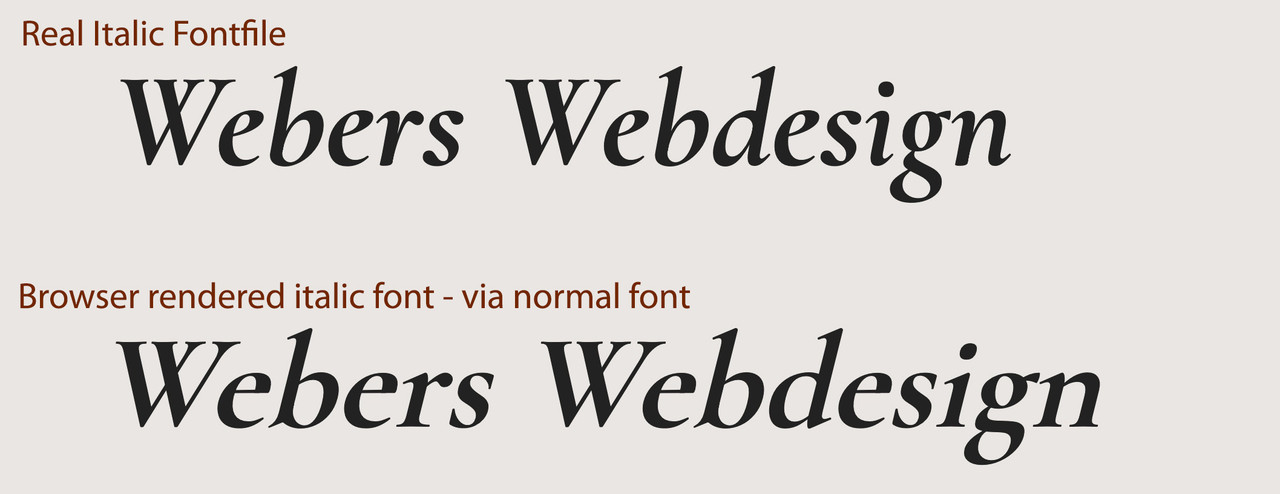
Consider whether you really need to upload an extra italic font file. Browsers can render an italic font style well from the normal font files without quality loss. Yes – as someone who also comes from print layout, I know that italic styles can vary considerably – especially with serif fonts. But therefore burdening the performance by double upload?
____________
To be GDPR compliant – you have to disable the Enfold embedding codes of Google Fonts. There are internal solutions as well as quite a few plugins.
*Deprecated snippet removed*
slightly newer snippet from 2018 using filter – mentioned by Günter
function my_output_google_webfonts_script( $activate ){
  return false;
}
add_filter( 'avf_output_google_webfonts_script', 'my_output_google_webfonts_script', 10, 1 );
Now:
Preparing fonts for Enfold import/export “Custom Font Manager” needs a bit of explanation – because sometimes I see very long lists under the Custom Font Manager – because some users upload font-weights of font-families separately.
As far as I have tested, the Font Kit Generator from FontSquirrel does not support the font family option ( The zip files uploaded afterwards usually only output the 400 font-weight. ) . This is probably sometimes the reason for the separate uploading of the different font styles.
I prefer the Transfonter – only the option to create a demo page should be removed in the settings;
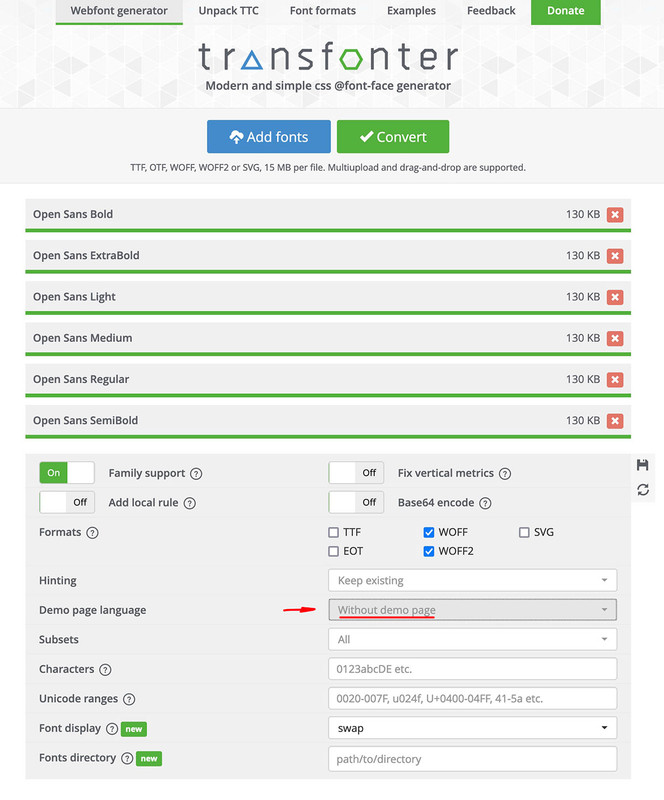
otherwise this would also be in the downloadable zip file. In principle, this zip file is ready to be uploaded. You only have to rename it with the name of the corresponding font – (the font-family name is taken from the fonts themselves, but the listing within the Custom Font Manager is done via this zip name).
If everything has worked so far, the font family will be displayed in the Custom Font Manager.

The uploaded Fonts will be at : General Styling – Fonts – Heading Font (or Font for Body text ) at the end of the dropdown list “Uploaded Fonts”:
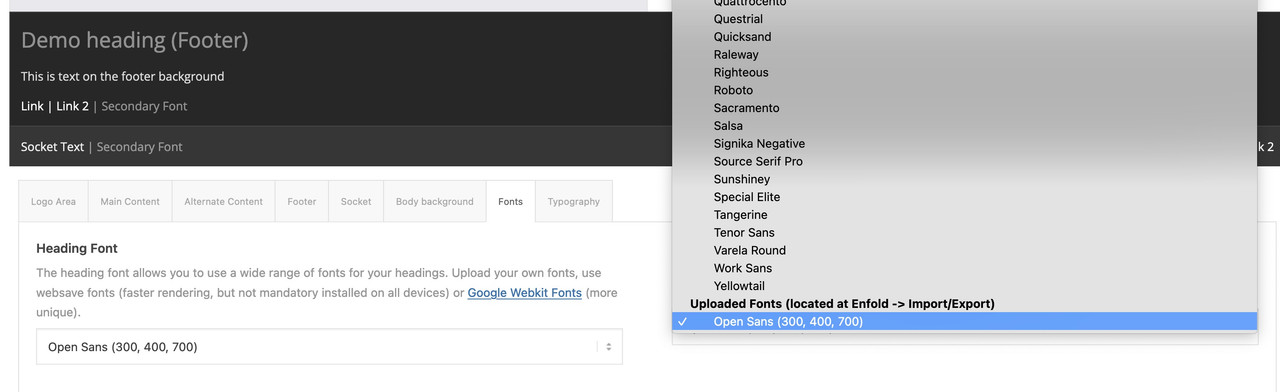
If you select this font under Enfold Child – General Styling – Fonts for your Body Text – or Heading Font, then this font will only be loaded according to the existing font-weights. A bold (700) setting ensures that the fontname-bold is loaded.
If you have uploaded the italic fonts and set this via css, the explicit fontname-italic or fontname-bolditalic will be loaded.Hi there!
My ISP is forcing an upgrade from PHP 7.4 to 8.0 by 3 Oct :(
I have enabled PHP 8.0 but then the news / blog page breaks and I have no clue how to fix it. The page looks perfect when logged in as admin and editing / viewing it but when logged out (as a normal visitor would view it) it breaks.
Help will be much appreciated! Details below in private content.
Thanks in advance,
Pieter





