Hi support team
Some bugs on my website, it seems that all my website lost all CSS and maybe other things :
I just update my last post where the problem occure :
You can close this post and continue on : https://kriesi.at/support/topic/wpml-and-enfold-problem-2
Hey navindesigns,
Thank you for the inquiry.
This is possible but you have to modify the enfold/config-templatebuilder/avia-shortcodes/gallery/gallery.php around line 683.
				$thumbs .= "<a {$lightbox_attr} data-rel='gallery-" . self::$gallery . "' data-prev-img='{$prev[0]}' {$class} data-onclick='{$counter}' title='{$lightbox_title}' {$markup_url} {$rel}>";
				$thumbs .=		$img_tag;
				$thumbs .=		"
<div class='big-prev-fake'>{$prev_img_tag}</div>
";
				$thumbs .= '</a>';
Replace it with:
$caption = wp_get_attachment_caption( $attachment->ID );

				$thumbs .= "<a {$lightbox_attr} data-rel='gallery-" . self::$gallery . "' data-prev-img='{$prev[0]}' {$class} data-onclick='{$counter}' title='{$lightbox_title}' {$markup_url} {$rel}>";
				$thumbs .=		$img_tag;
				$thumbs .=      "<span class='avia-gallery-caption'>{$caption}</span>";
				$thumbs .=		"
<div class='big-prev-fake'>{$prev_img_tag}</div>
";
				$thumbs .= '</a>';
Then add this css code to display the avia-gallery-caption container.
#top .avia-gallery .avia-gallery-caption {
    display: block;
}
This modification should display the caption below the gallery thumbnails.
Best regards,
Ismael
Dear support team
I operate an enfold-theme WordPress website and ran into issues when placing the main menu in the “left sidebar” and setting its position to “always fixed” (i.e., it doesn’t move when scrolling the main page). I also enabled the four-column footer layout. With these options, the sidebar overlaps the footer and base. The problem is that
- the footer and base content are not centered on the visible page
- the sidebar overlaps the left-most column of the footer on certain screen sizes
A fix for the overlapping issue is to use CSS and shift the sidebar background behind the footer with
.header_bg {
z-index: 0 !important;
position: relative !important;
}
However, this causes the sidebar content to overlap with the footer. Could you propose a fix to this problem by either:
- moving also the sidebar content behind the footer and base;
- centering the footer and base content on the visible part of the website.
This issue is also partially visible on the enfold theme’s consulting demo page.
-
This topic was modified 4 years ago by
 Ploti.
Hi Michaela,
Sorry for the late reply. I’m not familiar with Polylang unfortunately, Enfold only has official support for WPML. Does it make any difference if you clear the cache from your caching plugin? You could also try deactivating it temporarily.
Best regards,
Rikard
The problem does not start when GiveWP is active. We use all three plugins together on other sites with no problem.
The problem is all three plugins plus Enfold.
The problem does not start when GiveWP is active. We use all three plugins together on other sites with no problem.
The problem is all three plugins plus Enfold.
The problem does not start when GiveWP is active. We use all three plugins together on other sites with no problem.
The problem is all three plugins plus Enfold.
Hi there,
I’m currently unable to save anything on the theme. I’m getting the following error:
…./wp-content/themes/enfold/includes/helper-social-media.php on line
I’ve included my credentials :)
Kind regards,
George
Hast du Ihn unter Enfold Child – Layout Builder abgestellt oder gar deinstalliert?
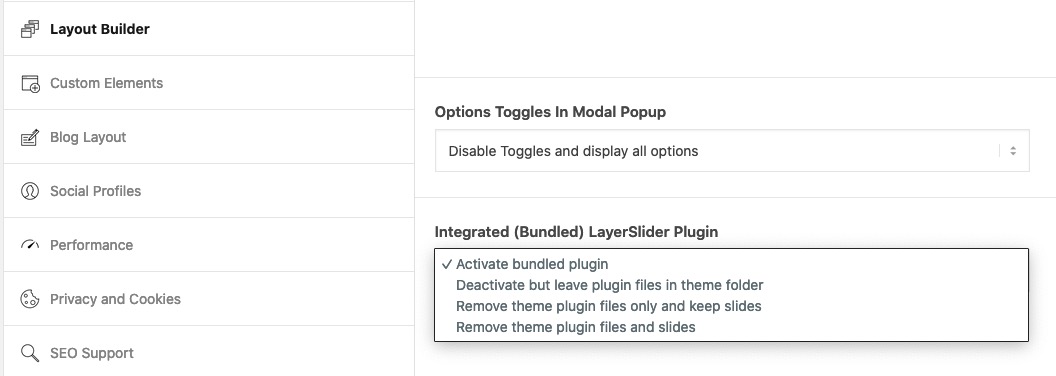
wenn du die zweite Postiion gewählt hast, versuch Ihn mal wieder zu aktivieren und die Einstellung dann zu setzen und danach kannst du ihn wieder deaktivieren. Nicht das der da trotzdem zwischen funkt.
Hi,
You will want to use a child theme otherwise the customization will be lost on the next update, please see our documentation for installing a child theme.
After you set this up, please include an admin login in the Private Content area below so we can look at creating a script for the 7 pages.
Best regards,
Mike
Hi,
Glad we were able to help, if you have any further questions please create a new thread and we will gladly try to help you. Thank you for using Enfold.
Best regards,
Mike
Hello Support Team,
I’m having trouble with mixed content on the Enfold theme. It seems as through only http requests are getting configured to get JS and CSS files. This will break the viewability of the site in chrome, which means i need to either force an https or figure out how to make it respect the protocol given.
Example – this is what the homepage requests for layout.css when i’m using https.
<link rel=’stylesheet’ id=’avia-layout-css’ href=’http://<domain>/wp-content/themes/enfold/css/layout.css?ver=4.9.2.1′ type=’text/css’ media=’all’ />
Is there a way to force all connections to be https or make it so the theme will respect the protocol given (http or https?)
Typically, would just put in some rewrite rules, but if I force https with this theme, but it seems to break the media upload area.
Regards,
Duane Johnson
Hi,
Glad to hear that you have this sorted out, if you have any further questions please create a new thread and we will gladly try to help you. Thank you for using Enfold.
Best regards,
Mike
Hello again,
Thanks for that. Ok so I add custom classes (mobile-banner & desktop-banner) to each code block and in enfold>general styling in quick CSS, I add the above codes? one of the two? correct?
BR,
M
Hi,
Thank you for your patience, the Dev Team has reviewed this and writes:
Manipulating the data structure of the serialized array in the database cannot be solved out of the box by a theme.
The serialized character count must be correct.
Thank you for using Enfold.
Best regards,
Mike
This is incorrect. The problem occurs when all three plugins are active. Any two plugins active doesn’t cause the problem.
Please review the thread again. None of the plugins is the problem. The problem lies with enfold when all three plugins are active.
Hi,
Futura doesn’t seem to be available in Google Fonts, you will need to download it elsewhere and follow our documentation on How to upload custom fonts
Please note the file structure of the font zip file, in most cases you will need to decompress it (un-zip) and remove the sub-directories and extra files so you are left with only the font file and then re-zip and upload to the Custom Font Manager in the theme options.
Best regards,
Mike
Hi,
Glad we were able to help, if you have any further questions please create a new thread and we will gladly try to help you. Thank you for using Enfold.
Best regards,
Mike
Hi,
Glad we were able to help, if you have any further questions please create a new thread and we will gladly try to help you. Thank you for using Enfold.
Best regards,
Mike
Hi,
Glad to hear, the option is at Enfold Theme Options ▸ Performance ▸ Change WordPress defaults ▸ Disable jQuery Migrate

Best regards,
Mike
Hi,
Thanks for the feedback, it looks like your mega menu is using rows instead of columns, try following our documentation for Creating submenu rows and columns.
Best regards,
Mike
Hey DianaLucio,
Which font are you looking to add? You can add Google fonts under Enfold->Import/Export.
Best regards,
Rikard
Hi Claudia,
Please try the following in Quick CSS under Enfold->General Styling:
.html_modern-blog .avia-content-slider .slide-entry-title {
    font-size: 24px;
}
Best regards,
Rikard
Hi Sunny,
First of all, please register on the support forum. After that, then you can use this link to open a new thread, or click this button on the Enfold forum: https://imgur.com/a/AnoSPNb.
Best regards,
Rikard
Hey Yaphoon,
Thank you for your patience, unfortunately the Enfold contact form doesn’t include these features, it is only meant to be a basic contact form, typically we recommend contact form 7 for features like this. I believe contact form 7 has it’s own CAPTCHA.
Best regards,
Mike
Hi,
Glad we were able to help, thank you for the review, if you have any further questions please create a new thread and we will gladly try to help you. Thank you for using Enfold.
Best regards,
Mike
Hi,
Glad to hear that you have this sorted out, the Dev Team is still reviewing your other issue and will reply when we hear back.
If you have any further questions please create a new thread and we will gladly try to help you. Thank you for using Enfold.
Best regards,
Mike
Hey beyondscarface,
If you are using version 3.6.1 then you will need to manually update because the license API in that version is no longer supported by Theme Forest.
Version 3.6.1 is very old and we are now at V4.9.2.1, so before updating please ensure that you make a full backup using your web hosting backup option, if you need help please ask your web host as each host has different options and they will know their options best.
Then ensure you are using the latest version of WordPress and your server PHP is at least v7.4.
Then to update your version of Enfold you will need to download the latest version from your Theme Forest account and upload it to your WordPress ▸ Appearance ▸ Themes ▸ Add Themes ▸ Add New

after you choose the zip file and click install, you will see a This theme is already installed message because you are updating, you can continue

then you will see the Theme updated successfully message.

Best regards,
Mike
Hey WPStyling2020,
Please try editing the schema code in /enfold/includes/helper-markup.php by removing lines 425-433, in version 4.9.2.1:
		if( ! in_array( 'date', $exclude ) )
		{
			$output .= "<span class='av-structured-data' {$entry_time_markup}>{$post->post_date}</span>";
		}

		if( ! in_array( 'date_modified', $exclude ) )
		{
			$output .= "<span class='av-structured-data' {$date_markup}>{$post->post_modified}</span>";
		}

then add this file to your child theme in the directory /includes/

then add this function to the top of your child theme functions.php: require_once( 'includes/helper-markup.php' );
in my test this worked:

Best regards,
Mike



