I have read the forum and cannot seem to find the solution for Enfold.
Issue:
I need to allow for the header and the content area (of course all other areas), to be able to show the body background image through the color. I am working with a client, a band, that wants a Grunge background, and a semi transparent body, header etc. I have been able to accomplish this with AVADA, but I would prefer to use Enfold. Can you send me some suggestions as to the css?
Thanks
Tim
I think the layerslider is a bit buggy, as some things such as scale don’t work properly on the live site, yet works in the preview. I don’t blame the enfold theme for this as it is a third party plugin. Just have to live with it’s buggyness until they fix it.
Hi!
I just bought Enfold and Im really impressed, great work!
I saw the translation thread, but couldn’t find anything for swedish. I don’t really have an issue though except for the breadcrumbs: Both that the homepage is called “Home” and the “You are here” text. Im a bit familiar with the css and php-files and have done quite som own editing of other themes in the past. Though I haven’t figured out if there is an easy way to find which file to edit. I use chrome and the webmaster tool to look/find in the code, and found this:
“<span class=”breadcrumb-title”>You are here:</span>” But is there any way to see what file it’s in? I usually just search through the files by guessing (often functions, single-page or something like that).
I also wonder if I add the portfolio category to the breadcrumbs? Right now I have “You are here:Home/Portfolio page/Portfolio name”, I would like “You are here:Home/Portfolio page/Portfolio category/Portfolio name”.
Best regards,
Tomas
hallo ..
ich wollte den “advanced layout builder” auch bei den posts verwenden – soweit so gut, aber es gibt ein problem.
hab die datei /enfold/config-templatebuilder/avia-template-builder/config/meta.php in der zeile 4-7 verändert, soweit hat noch alles geklappt und der advanced layout builder wurde auch verwendbar – leider zeigt es keine der eingestelten standard sidebars mehr an. erstelle ich die post mit dem standard editor werden diese schon noch angezeigt – was muss ich tun um advanced layout builder so hinzubekommen dass alles wie gewollt (inkl. der sidebars angezeigt wird)
$boxes = array(
array( ‘title’ =>__(‘Avia Layout Builder’,’avia_framework’ ), ‘id’=>’avia_builder’, ‘page’=>array(‘portfolio’,’page’, ‘post’), ‘context’=>’normal’, ‘priority’=>’high’, ‘expandable’=>true ),
array( ‘title’ =>__(‘Layout’,’avia_framework’ ), ‘id’=>’layout’, ‘page’=>array(‘portfolio’, ‘page’ , ‘post’), ‘context’=>’side’, ‘priority’=>’low’),
);
gruß
acm
So your demo page has customizations you dont even know about? http://kriesi.at/themes/enfold/shortcodes/iconbox/?skin=Vine
Is avia-builder-el-5 the icon box with top icon?
Hi there,
Ive added/installed Bebas from fontsquirrel to use to change my headings in some places. In particular ive tweaked h6 (in my enfold css file) to use for a huge slab text heading (something like 70px). The text itself ive added as normal through the text layout tool however, its not being responsive when I scale down the page. What do I need to do?
Cheers
Hi!
No – unfortunately this would require some custom work and it’s not easily possible. Enfold doesn’t even generate the greyscale thumbnails and you’d need to implement the greyscale generation function and rewrite the portfolio script.
Regards,
Peter
We also would like to see site map
=======
ould like to have ability to move/re-arrange raws in a table within advanced layout editor. Now if i miss a raw with data have to delete all raws and recreate in “correct” order :(
Hey!
Yes, open up wp-contentthemesenfoldincludesloop-portfolio-single.php and delete
$thumb = get_the_post_thumbnail(get_the_ID(), $avia_config['size']);


if($thumb) echo "<div class='page-thumb'>{$thumb}</div>";
Best regards,
Peter
Actually Kriesi just forgot to update the version number in style.css. If the change log (version.txt which lists all changes) mentions the new 1.4 version changes you have the right version. We also integrated an update notification script into Enfold – when we release a new version (i.e. 1.5) the theme will display a yellow notification message at the top of the admin screen.
I just downloaded from theme forest again, first download was last night, I extracted zip & enfold zip & style sheet still says version 1.3.1, where do I get newest version?
Thank you again :)
Hi,
Please download the latest version, Enfold 1.4, on your themeforest account.
Checking the page, the URL on the first column seems to be working fine.
Regards,
Ismael
Hi,
Maybe you can add that on js > avia.js, find this code then place your code above it.
//

// responsive menu function

//
Regards,
Ismael
Hi,
Please remove the CSS code that I gave you. Go to Enfold > Theme Options > Header > Header Type, choose Header with Social Icons and bottom Navigation.
Regards,
Ismael
Hi andypeck,
You can add in your own javascript to the avai.js file within the theme files, or use a plugin that will allow you to add it in through the wordpress admin if you don’t want to go through ftp.
Regards,
Devin
Hi,
The latest update 1.4 added the WooCommerce support to the theme and fixes few minor bugs. You will see another folder named config-woocommerce. The version number may have been forgotten. You can change that on style.css,
The triangles are there. I don’t know why it is not displaying on your end. This what I have on my Enfold installation.
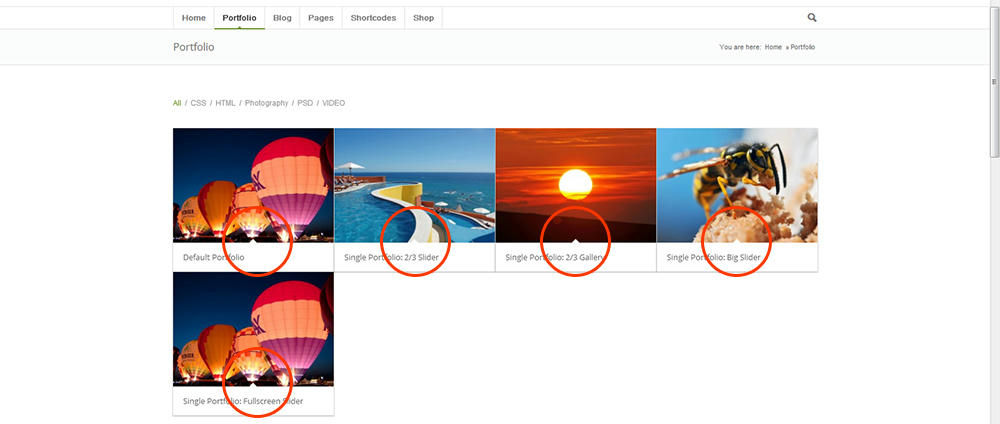
Can you give us a link to your website?
Regards,
Ismael
Hi,
1.) Oh, my bad. I also tested it and it is really not working. Let me tag the rest of the support team.
2.) Replace the code with this. Please remove browser cache then reload the page.
.image-overlay .image-overlay-inside::before {

background-color: green !important;

}
Regards,
Ismael
Hi,
Yes, please clear the displayed everywhere widget area. The widget settings are somehow getting stuck. Try to temporarily switch to a different theme then remove everything on the widget area. Switch back to Enfold theme.
Regards,
Ismael
Hi,
Please download the latest version of Enfold on your ThemeForest account. :)
Regards,
Ismael
I would like to submit a feature request for the mega menu. Instead of checking the column for it to create a new row, I would like to see an option called ‘New Menu Header’, which doesn’t automatically create a new column. So this will let me place two or more column headings right under each other, provided their is a suitable amount of space underneath each heading.
Same here…no bubble content showing…
1) Take a look at this image then you will know what i mean: http://imghost4you.com/images/maps.jpg
2) The css has no effect on the hover circle.
Hi,
on http://www.welsch-lehmann.com/marketing-automation/events/ I have a list of events.
In column one I have the name of the event linked to the URL of the source.
When editing the field it works ok to enter the content in the form <a href="http://www.example.com">Example</a>
BUT when you safe the file you get a backslash in front of the ” every time you safe the table (not the page!) resulting in a URL <a href=\"http://www.example.com\">Example</a>
We are using Enfold ver 1.3.1
Thanks,
Frank
Hi Dude,
Well I still don’t get it because when I want to insert an easy slider in a post and click on thumbnail option, I’ll still have a full width screen picture/slider.
So I can’t easily put an easy slider in a post just with the shortcode…that’s annoying..Any idea? I’ve even download again enfold theme and started fresh…but still impossible to put a small easy slider into a post..
Kind regards,
Hi pureoption,
Try adding the following CSS to your Quick CSS (located under the Styling Tab in the theme options) or the custom.css file in the css folder of your theme files:
#top .grid-entry .inner-entry {

margin-right: 0px;

box-shadow: none;

}
Regards,
Devin
Looking good so far Nicole. Nice to see some color and of course cute dogs :)
Hi there,
PORTFOLIO
Ive been trying everything but I cant seem to adjust the grid text font colors and the box background colours. Its inheriting the parameters from the Enfold Styling but I need to change it as its on a different background.
As a test could it be totally be removed (thus leaving only a grid of images) and the descriptor text placed on a rollover in grid box itself (over the corresponding image)?
In the Portfolio itself, where is the grid box rollover ‘curved arrow’ kept and can I change this for my own graphic?
FOOTER
Id like to put a decorative line (as used on the other codes for things like a portfolio grid etc) next to each Footer Widget. I have x3 widgets in the footer and each has a title. Id like a single line to extend to the right to fill the space to the right for the entire column width
Cheers
Andy
Hi,
Im using Eunoia but Im thinking of going over to Enfold. I wonder though if I can have the greyscale overlay effect for the portfolios instead of the arrow that is in the demo?
here is my site: http://www.happybeagle.de
in progress – not finished yet
cheers
Nicole
Hi,
Please could you let me know where I can amend CSS to remove the borders on the portfolio grid.
Thanks



