on uploading custom fonts for selfhosting with Custom Font Manager
In what order does Enfold try to load the self-hosted fonts?
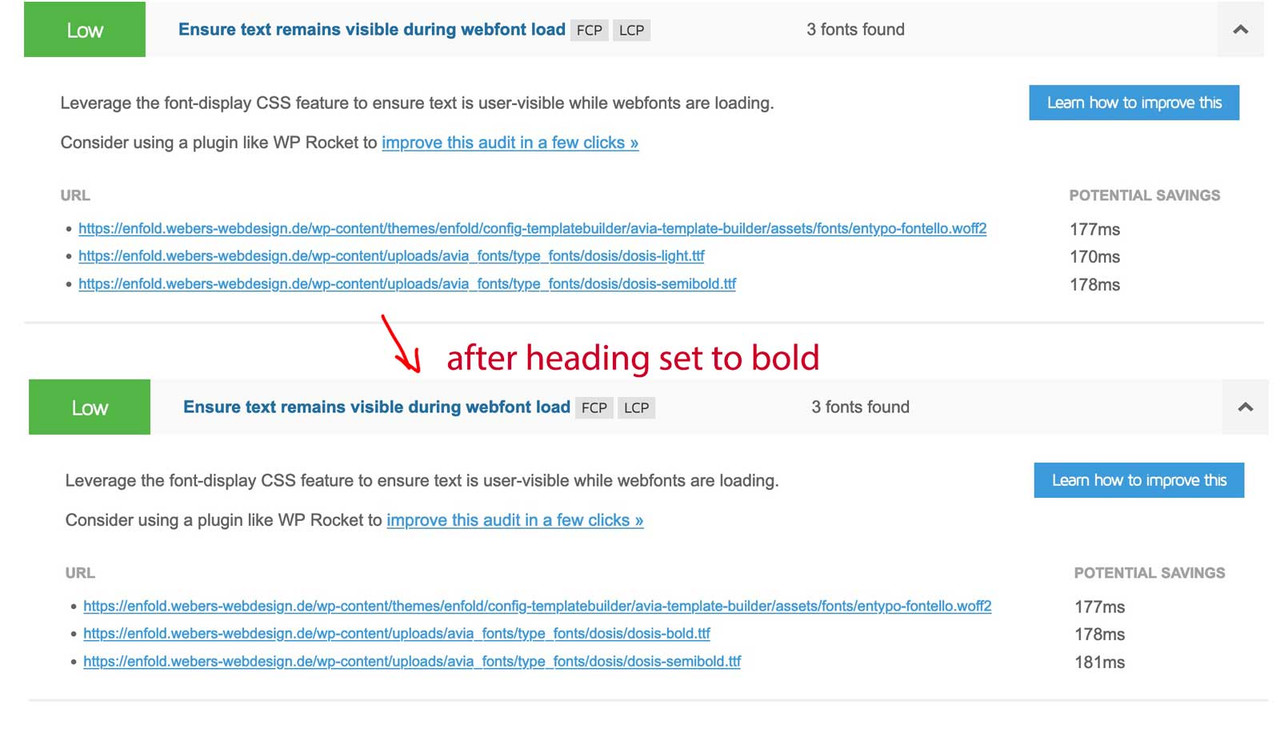
If I do it manually via a css, I offer the woff2 first ( see image on the bottom how entypo is loaded ) , because it provides the better but more modern compression method with brotli. Then only woff. But I have now noticed that with such a font Enfold loads the woff.
If ttf is present in the uploaded zip file – this will be uploaded first.
so on src for those selfhosted fonts it will be best to offer first woff2, woff, ttf, svg
i see that on class-font-manager.php from lines 526ff this is the sequence – but on an installation of mine the woff is loaded allthough the woff2 is present.
this is the generated css from selfhosted fontfiles via Custom Font Manager :

btw: this is how entypo-fontello font is loaded:

By the way, it’s not an academic question – it’s about performant websites. When modern browsers open a website, woff2 loads much faster than the other font container formats.
Small supplement: In the meantime I even upload woff2 and woff formats exclusively. If someone still opens my pages and doesn’t support these formats, then he may see the fallback font ;) – but first it has to load the woff2 – if browser supports it.
-
This topic was modified 3 years, 7 months ago by
 Guenni007.
-
This topic was modified 3 years, 7 months ago by Guenni007.
-
This topic was modified 3 years, 7 months ago by
 Ismael.
I am also having issue with Slider Revolution with Vimeo background video on Enfold theme. Can you please test it out?
Hey solf,
Did you register your theme licenses? https://kriesi.at/documentation/enfold/theme-registration/. If the updates still won’t come through after that, then please try to install and configure this plugin: https://envato.com/market-plugin/
Best regards,
Rikard
Hi Sabine,
Could you please create temporary admin logins and post them here privately so we can apply the changes for you?
Please note, we are going to need to update Enfold to the latest version 5.1.1 on your website.
Best regards,
Yigit
Good afternoon
We just published our website created with the Enfold theme (https://matrisk.ch/). The site looks great on desktops, however, the LayerSlider header on the homepage does not show on mobile browsers (tested on iOS and Android). Is this a common problem, or do you have any idea how to fix this?
Thanks for your help!
I had written my own plugin a long time ago. But through your request I became curious if it works with Enfold methods in the meantime.
Through the transfonter page it is even possible to upload the font styles as a family, – and upload them all at once as a family.
And as you can see from the picture, only the fontstyles that are used are loaded.
_____
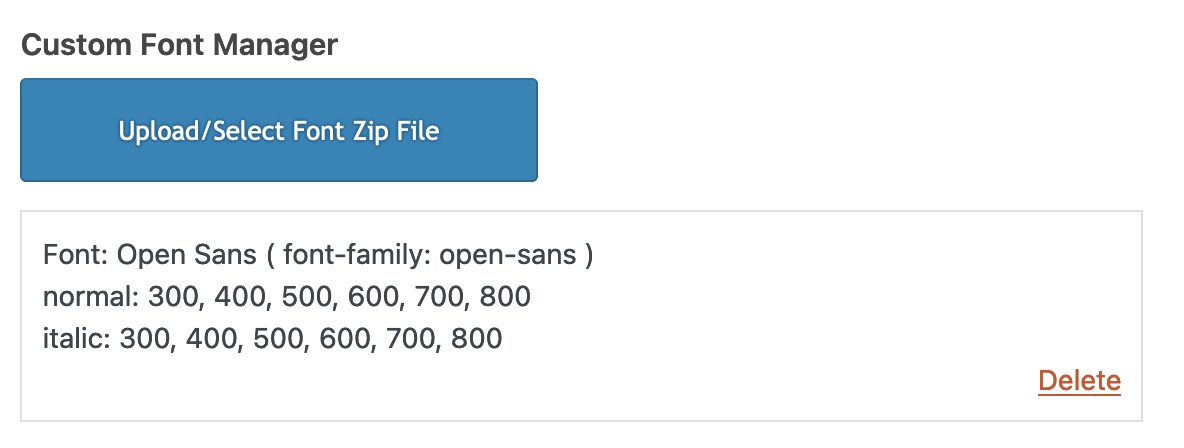
see here with italic font style
Hey Sebastian,
Thanks for contacting us!
Related events are displayed below event content and events meta. Please see the example event in private content field below. Site uses Enfold 5.1.1, WordPress 6.0.1 and The Events Calendar Pro 5.14.3 :)
Regards,
Yigit
Hi,
We are happy that Mike could help you! :)
For your information, you can take a look at Enfold documentation here – https://kriesi.at/documentation/enfold/
If you have any other questions or issues, feel free to start a new thread under Enfold sub forum and we will gladly try to help you :)
Enjoy the rest of your day!
Best regards,
Yigit
Hey Kinjal,
Thanks for contacting us!
It looks like a compatibility issue and should be fixed by purchasing a new version and updating the theme.
If you have previously purchased Enfold, you can simply login on your ThemeForest account and go to Downloads page to download the latest version and update the theme – https://kriesi.at/documentation/enfold/theme-update/ :)
Let us know if you have any other questions and enjoy the rest of your day!
Best regards,
Yigit
Thanks, I’m doing similar at the moment – but dealing with multiple websites and multiple fonts is time-consuming when every file needs re-editing.
i do load my selfhosted fonts – in that way – without going the way by font upload on Enfold Options.
What exactly do you do to avoid using Enfold Import?
thanks
Bruce
i do load my selfhosted fonts – in that way – without going the way by font upload on Enfold Options.
But if you like to use that.
Download it from Google fonts page – a ttf will be enough.
Upload these ttf ( yes all at once ) to : https://transfonter.org/
As Fallback let the ttf stay in the newly generated zip file and add woff and woff2 ( on my opinion that would be enough )
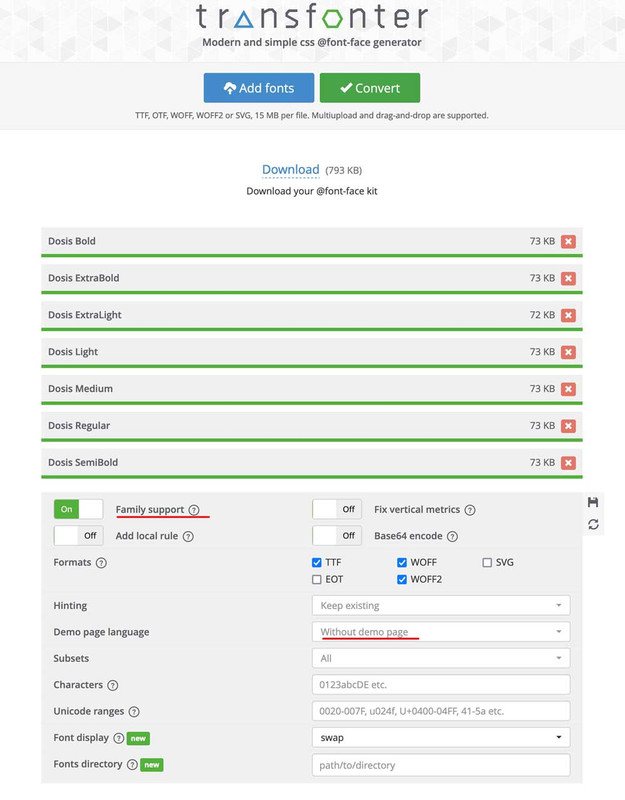
Download the generated zip file : rename it to your wanted font name – upload it to enfold via Custom Font Manager
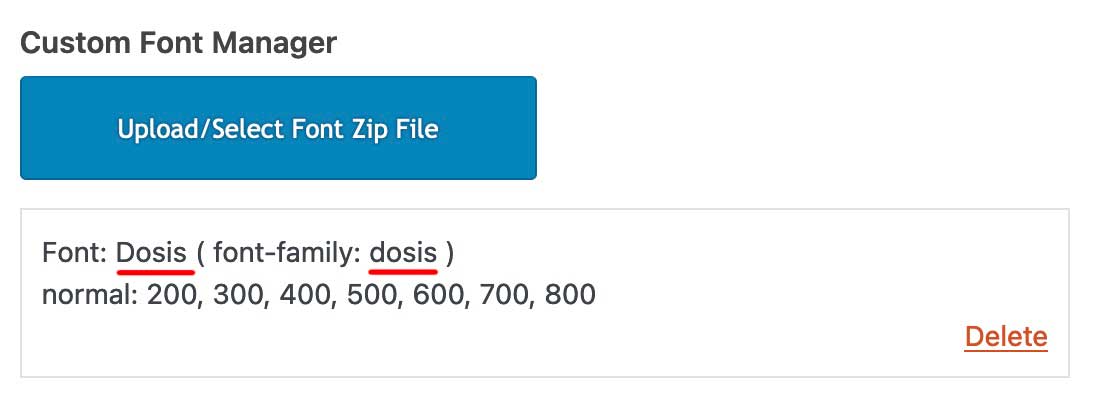
just for info – inside the tranfonter zip file ( exclude the demo page ) are those fonts and one stylesheet. But you can upload that zip to the font-manager as it is – the css will be ignored.
Hallo zusammen,
ich nutze den Enfold-Cookie-Banner und habe den Wiedereröffnungsbadge aktiviert. Beim Überfahren mit der Maus wird dieser Text angezeigt: “Öffnen Sie die Nachrichtenleiste“.
Gerne würde ich diesen Text individuell anpassen. Wer kann mir dafür einen entsprechenden Code nennen / generieren?
Vielen Dank im Voraus,
Ralf Ehlers
 Kinjal patel
Guest
Hi
Our website is using Enfold theme and it has some errors in header.php file. After doing some research we found out that the php code is old ad should replaced with the new one.
I want to ask if buying a new version of the theme will solve the issue or not?
and not to use category – you can use post tags for it.
To have the post tag on single post as body class you can use this in child-theme functions.php:
function add_tags_to_body_class( $classes ) {
if( (is_single()) && $tags = get_the_tags(get_queried_object_id())){
    foreach( $tags as $tag ) {
        $classes[] = 'tag-' . strtolower($tag->name);
    }
}
return $classes;
}
add_filter( 'body_class', 'add_tags_to_body_class' );
for blog – you can forward these classes as classes on the article.slide-entry
for that you had to edit as Nikko mentioned the postslider.php:
( and the link from Nikko to add-elements-to-alb shows you how to have a child-theme alb element.)
just before that line 900 ( see codeblock of Nikko ) insert:
( the strtolower brings all tags to lowercase – so a tag : Eating will end in a class: tag-eating )
$posttags = get_the_tags($the_id);
foreach($posttags as $posttag)
{
	$post_class .= 'tag-' . strtolower($posttag->name) . ' ';
}
then you can set on your posts the tags : badge1, badge2, badge3 or commerce-member etc
you will have on article then the class: tag-commerce-member or tag-badge1 etc.
now you can differ between those entries in f.e a grid blog.
If you decide to use that badge1, badge2, badge3 nomenklatura for your post-tags :
( the image names do not need to be synchronized with that tags )
.avia-content-slider,
.avia-content-slider-inner,
a.slide-image {
  overflow: visible !important
}

.slide-entry[class*='tag-badge'] a.slide-image:after {
  content: "";
  width: 50px;
  height: 50px;
  position: absolute;
  top: -10px;
  right: -10px;
  background-repeat: no-repeat;
  background-size: contain;
  box-shadow: 0px 0px 10px -2px #000;
  z-index: 301
}

.slide-entry.tag-badge1 a.slide-image:after {
  background-image: url(/wp-content/uploads/badge1.jpg) ;
}

.slide-entry.tag-badge2 a.slide-image:after {
  background-image: url(/wp-content/uploads/badge2.png) ;
}

.slide-entry.tag-badge3 a.slide-image:after {
  background-image: url(/wp-content/uploads/badge3.jpg) ;
}
/**** etc. ***/
see f.e.: https://enfold.webers-webdesign.de/blog/
Hi,
Glad we were able to help, if you have any further questions please create a new thread and we will gladly try to help you. Thank you for using Enfold.
Best regards,
Mike
By below the headline do you mean below the article title?
I am interested in moving it to below the first paragraph so that more than just the site title and featured image show above the fold. Studies show that, at least for food sites, this positioning is much better for retaining customers. It’s easy to see why when you visit a site such as mine. You get no information at all above the fold, just a picture. There is nothing to entice you to stay.
Leading with the photo is an outdated style and I’d love to find a way to update my site without having to give up Enfold, which I love.
Hi,
Thanks for the login, I changed the css for the header image to this:
#top.single-post .container_wrap_first:before {
  content: "";
  background-image: url(https://parkinson-journal.de/wp-content/uploads/2022/05/Headpic.png);
  width: 100%;
  height: 100%;
  position: absolute;
  background-repeat: no-repeat;
  background-size: contain;
}
#top.single-post .container_wrap_first > .template-single-blog > .content {
  margin-top: 12%;
}
please clear your browser cache and check.
On your home page I see the link color matches your chosen color:

try clearing your browser cache and check again.
If you want to change the color of the menu items, use the menu options at Enfold Theme Options ▸ Advanced Styling
Best regards,
Mike
Hi,
Thanks for your feedback, but the product slider doesn’t show the “Buy Now” or “Show Options” buttons, please see our Shop Demo example.

To add a “Buy Now” button to the product slider you can try adding this code to the end of your functions.php file in Appearance ▸ Editor:
add_action( 'after_setup_theme', function() {
     add_action( 'woocommerce_after_shop_loop_item_title', 'woocommerce_template_loop_add_to_cart', 12 );
}, 999);

Best regards,
Mike
Hi,
Glad we were able to help, if you have any further questions please create a new thread and we will gladly try to help you. Thank you for using Enfold.
Best regards,
Mike
Thanks again, however my simple questions are still not aswered:
– I don’t see anywhere the option to select for a prebuilt-in Enfold maintenance page. With both options comes a choice to choose on of my own build pages as maintenance page. Where is the (default) enfold prebuilt “maintenance mode” page where you are talking about?
– When my site is in maintenance mode and I visit my site I see the selected maintenance mode page in my browser. Why Does GTmetrix not see the see selected maintenance mode page? That is not logical for me.
– What is the difference between the 2 options “Use selected page content without redirect” and “Redirect to selected page”? Still can;’t find the answer to that question either, also not in the Enfold documentation.
Alwin,
I apologize if my explanation wasn’t clear. Please read the information below.
This link is to the documentation about maintenance mode and other pages that come built into the Enfold theme.
And here is an example of what that might look like using a prebuilt page in your theme.
The idea behind a “Maintenance Mode” or “Construction” page, “Coming Soon” page is to let your visitors know that the site is being worked on. A coming soon or construction page lets your visitors know that you’re still building the site and it will be ready very soon. It allows you to make changes to the website without the visitors seeing a bunch of weird stuff happening.
As the admin for the site, you’re still going to be able to view the website normally, but all other traffic to your website will only see the maintenance mode page you’ve selected. Referring back to my earlier example, the maintenance page is like a locked door, it keeps everyone outside while you’re inside building the site or making changes.
As for the GTMetrix, when it reaches your maintenance page, it can’t go any further so it give you the error message you encountered, which simply means it reached the locked door/maintenance mode of your website. Once, the page is taken down and the site returns to normal, it will be able to visit your site as it normally would.
Hopefully, that helps. Please read the documentation and if you need further explanation of a maintenance mode is and how it works, there are some great youtube videos that you may want to look at too.
Thank you for your reply Sozo! However I don’t understand anything about your answers, maybe you didn’t understand my questions correctly?
In maintenance mode, I don’t see anywhere the option to select for a prebuilt-in Enfold maintenance page. With both options comes a choice to choose your own page as maintenance page. Where is the (default) enfold prebuilt “maintenance mode” page where you are talking about? Maybe I’m looking over it and missing something?
Your explanation of the GTmettrix 503 error doesn’t sound entirely logical to me. Why can’t the server of GTmetrix and other similar tools open the maintenance page, while I can open the page in my browser?
Best Wishes,
Alwin
Hey Pradeep,
We are not web designers, we only develop and maintain a WordPress theme which you can use to create your own website. You can purchase it here, should you be interested: https://themeforest.net/item/enfold-responsive-multipurpose-theme/4519990
Best regards,
Rikard
The two options allow you to either use the prebuilt maintenance mode page or create your own maintenance mode page and use it.
So option 1: use the selected (default) enfold prebuilt “maintenance mode” page
Or Option 2: use the custom “maintenance mode” page (if you created one) and redirect traffic to that page while in maintenance mode.
In maintenance mode, your website it blocked, so visitors will either see whatever maintenance mode page you’ve selected. That could be the default enfold page or a custom maintenance page you’ve created. Technically, you can direct them to any page you like, but they won’t be able to navigate away from the page while in maintenance mode, which is why people generally use a splash/landing “mainstream mode” page.
As for the GTmetrix error. To put it very simply, Think of maintenance mode as a locked door to a building. GTmetrix error simple says I went to the building but the door was locked, so I couldn’t get to what’s inside.
As soon as you turn off maintenance mode, the door will be unlocked and GTmetrix will be able to do its thing like it normally would.
Hope that helps!
Dear team,
I just received a reply from Yoast support and I am now asking for your help to fix the issue.
As you can see in the video (check private), the readability analysis fails.
According to Yoast it is related to Enfold (see screenshots).
Can you please have a look at that and let me know what I can do?
Thank you
Asterios
Hi,
Please see https://kriesi.at/support/topic/bug-in-enfold-for-woocommerce-prduct-images/. I’m quite sure it’s the same issue you are experiencing, @flylanddesigns.
Best regards,
Martin
Hi,
In case #1361748 I reported a bug in Enfold that makes the settings for WooCommerce product images useless if a 450 x 450 pixel image has been generated for the product.
I came up with a workaround
add_filter( 'avf_wc_before_shop_loop_item_title_img_size', 'temp_thumbnail_size_fix', 10, 1 );

function temp_thumbnail_size_fix( $thumbnail_size ) {
    return 'woocommerce_thumbnail';
}
My case was closed with the comment “Glad to hear that this has been sorted out, if you have any further questions please create a new thread and we will gladly try to help you”. I just want to make sure that this bug will get a permanent fix, my “solution” should not be permanent. Product images have displayed correctly up until a quite recent update of Enfold, so this is a bug. Just in the last few days since I noticed this issue I have noticed a number of users reporting the same bug:
https://kriesi.at/support/topic/thumbnails-in-woocommerce-being-cropped-to-square-when-they-are-45/#post-1361952
https://kriesi.at/support/topic/woocommerce-problems-image-size-and-price-with-variations/#post-1361830
https://kriesi.at/support/topic/woocommerce-product-grid-image-choice/#post-1361987
https://kriesi.at/support/topic/woo-product-archive-thumnail-size/#post-1361707
If you handle this bug in another system and want to close this case it’s fine with me. I just want to make sure that an update of Enfold eventually will come that fixes the bug.
Best regards
Martin
-
This topic was modified 3 years, 7 months ago by
 martin_e83.
-
This topic was modified 3 years, 7 months ago by
 Mike.
Mike.
Hey tcampaner,
Thanks for the link to your example page, I see this behavior only occurs “after” the page is scrolled, and it has a sticky header.
Yet your page doesn’t have a sticky header as Enfold Theme Options ▸ Header ▸ Header Behavior ▸ Sticky Header would provide.
So assuming that you only want this “before” scroll, we will hide the menu on page load and then only show it on logo hover.
Please try this code in the General Styling ▸ Quick CSS field or in the WordPress ▸ Customize ▸ Additional CSS field:
#top #header_main_alternate {
	display: none;
}
#top #header_main:hover #header_main_alternate {
	display: block;
}
After applying the css, please clear your browser cache and check.
Best regards,
Mike
This reply has been marked as private.



