Hi,
Glad to hear that you have this sorted out, but unfortunately, the block editor is only available with WordPress v5+
We stopped supporting our older themes when the block editor was introduced with WordPress v5 because it would require a full rewrite of the theme to make it compatible.
Please see this post.
Best regards,
Mike
Hi, I am using elementor on a few pages to make some unique designs. When I am on php 7.4, there are no issues, upgrading to php 8.0 as thrown the pages all out of whack.
I have confirmed that the issue is indeed Enfold( switching to default theme with no plugins) and it works fine, switching to enfold and there was an issue.
Is there something that I should look into to get this working?
Hey chrisc121,
Please try the following in Quick CSS under Enfold->General Styling:
#top #wrap_all .header_color .av-menu-button-colored > a .avia-menu-text {
    color: ##17426E;
}
Best regards,
Rikard
This reply has been marked as private.
Hi Rikard,
Thank you for this code. Can you please jsut specify where to find “function php file” ? Is it Appearence/…/…/ or Enfold Child/…/…
Thanks and regards,
Natacha
Trying to speed up my sites and get better scores on Google web vitals :) I have 2 questions about removing unused CSS.
1 – I am using the Classic editor in WordPress. In Google Pagespeed test and GTmetrix I see that there is still some CSS loaded for Gutenberg, which is marks as a render-blocking resource:
…block-library/style.min.css?
I have found a solution to block this CSS from loading, by adding tis code im my Enfold Child Theme;s functions.php file:
// Stop Gutenberg block library CSS from loading.
function remove_wp_block_library_css() {
    wp_dequeue_style( 'wp-block-library' );
    wp_dequeue_style( 'wp-block-library-theme' );
    wp_dequeue_style( 'wc-block-style' ); // Remove WooCommerce block CSS
}
add_action( 'wp_enqueue_scripts', 'remove_wp_block_library_css', 100 );
Question: is this a correct way to block this Gutenberg CSS from loading? The above code does not cause any know conflicts within Enfold?
2 -Then there is a second piece of unused CSS:
…dynamic_avia/avia-merged-styles-5208a9f…—6311e96e03a09.css
– Is this really unused CSS and if yes, is there a way to prevent this CSS file from loading?
Thanks for the help!
Best Wishes,
Alwin
 Frank
Frank
OkWe checked the token on 2022/09/09 15:00 and we were able to connect to Envato and could access the following information:
Your purchases
Username could not be accessed (needed for your information only)
E-Mail could not be accessed (needed for your information only)
Following errors occurred:
username Errorcode 403 returned by Envato: Forbidden:
– code: not_authenticated
email Errorcode 403 returned by Envato: Forbidden:
– code: not_authenticated…now I get the following error message
The instructions says go to Enfold > Theme Update > Enter a valid Envato private token.which I can’t find anywhere on the enfold web page
Hey KD,
Thank you for your question, but unfortunately the Shoutbox is no longer supported since 2020 and WordPress 5.0
I see that your site has this error: jQuery.Deferred exception which could mean that you have a plugin causing the error, try disabling all of your plugins, or that you are using the newest WordPress v6+, try downgrading back to v4.8 as your version of Shoutbox was not meant to run on WordPress v5+ If you do downgrade you will need to downgrade your PHP version on your webhost to 7.4, your new host is probably using PHP v8+ which WordPress v4.8 will not run on.
Because of this limitation, there is not much we can do to correct this error. We recommend using a modern theme like Enfold and taking this opportunity to rebuild your site. Unfortunately, your current theme can not be “upgraded” or “imported” into Enfold, you will need to build it from scratch.
Sorry that this is not the answer you were looking for, but this could be a great opportunity to give your site an updated look and feel.
Best regards,
Mike
Hi,
Thanks for the login details. The footer widget are displaying fine on my end, please note that you have to scroll all the way down the page for them to display. If you want to change the behaviour of the footer, then you can do so under Enfold->Footer.
Best regards,
Rikard
Hi,
Glad Ismael could help, if you have any further questions please create a new thread and we will gladly try to help you. Thank you for using Enfold.
Best regards,
Mike
Hi,
Thanks for the update. Please try the following in Quick CSS under Enfold->General Styling:
@media only screen and (max-width: 767px) {
.flex_column_table .av-zero-column-padding {
  padding-bottom: 20px;
}
}
Best regards,
Rikard
Hi guys, i set up a show demo website with enfold theme. The problem is that the footer widgets are not showing. I can only see the socket.
I provided loging credentions. Please have a look!
Thanks in advanced!
Hello,
When I enable the option Delay Javascript Execution in WP-Rocket then the font I set up in Enfold (Google font Open Sans) is only loading after user interaction (like mouse over).
Please take alook at https://www.greenconnections.nl
When you mouse over the website you will see the font type changes in Open Sans. First another font (browser default?) is displayed. I tried all kind of exclusions, provided by the WP-Rocket support, but none of them is solving this issue.
I like to use this WP-Rocket option because it gives me great scores in Google Pagespeed/Web Vitals. However, I realy don’t like the font changes like this in the design, I find it not user-friendly.
I tried some different font settings in Enfold Performance Settings, did not help either.
Any idea how to use Delay Javascript Execution in WP-Rocket, and loading the correct font immediately?
Thanks,
Alwin
Hey es.design.ma,
Please try the following in Quick CSS under Enfold->General Styling:
@media only screen and (max-width: 767px) {
.slideshow_caption {
  padding-top: 10px !important;
}
}
Best regards,
Rikard
Hi,
Thanks for the update, I’ll go ahead and close this thread for now then. Please open a new thread if you should have any further questions or problems.
Best regards,
Rikard
Hi,
Thanks for the update, I’ll close this thread for now then. Please open a new thread if you should have any further questions or problems.
Best regards,
Rikard
– just to prevent misunderstandings – like you, I’m a participant here – not a moderator – I do this because I’ve had a high learning effect myself by asking questions and solving problems. If you go back in my “Enfold Vitae”, I too occasionally asked simple questions. However, I was always grateful when the moderators or sometimes even the developers of the theme explained why something works the way it does – and even better where in the source code to look for the solution. so furthermore I wish you much success for your wordpress project.
 Alfonso Balcells
Guest
Hello my dear Enfold team,
I have purchased more than 60 licenses for my clients.
But I can’t register with each of them.
I don’t understand why they can’t support me with this huge Enfold + WPML issue.
I hope you can help me.
Greetings.
Enfold is not working with WPML
Spanish page
english page
The rest of the language is the same. Nothing comes out.
Thanks.
Greetings.
That looks pretty nice. Thank you very much for closing that circle for me!
Do you know possibly a solution to get this function fired on pre-defined css classes or other existing Enfold anchors of any kind?
just put his code name it f.e. prg_patterns.php – therefore you had to start that codesnippet of him by a leading <?php
– and upload it to your child-theme/shortcodes folder.
if you haven’t allready this littel snippet in your child-theme functions.php – insert it :
function avia_include_shortcode_template($paths){
  $template_url = get_stylesheet_directory();
      array_unshift($paths, $template_url.'/shortcodes/');
  return $paths;
}
add_filter('avia_load_shortcodes', 'avia_include_shortcode_template', 15, 1);
see doku to have own alb elements
see example in the footer area with links to impressum and datenschutz
https://enfold.webers-webdesign.de/impressum/#footer
i just edited his code a bit to have on form element classes to style the form output better:
/* form output */
ob_start();
?>
	<?php if( $atts['newtab'] == 'true' ): ?>
	<form class="prg newtab" method="POST" target="_blank">
	<?php else: ?>
	<form class="prg" method="POST">
	<?php endif; ?>
		<button class="noLink" type="submit" name="prgpattern" value="<?php echo $redirect_slug; ?>"><?php echo $atts['title']; ?></button>
	</form>
<?php
return ob_get_clean();
then i can set for those forms:
#top form.prg {
  display: inline-block;
  margin-bottom: 0;
}

#top form.prg .noLink {
  border: none;
  font-size: inherit;
  color: inherit;
  background-color: transparent;
}

#top form.prg .noLink:hover {
  color: gold;
  cursor: pointer;
  transition: all 0.5s ease
}

hm – first of all – as far as i know the bots of the crawlers will not follow submit buttons – thats the trick on prg patterns. So a search form like yours would not be affected by the “linkjuice” issue anyway.
Is that an Enfold Search ALB element you put on the page? Because I don’t get a “link element” there in my DOM anyway:
(click to enlarge the image)
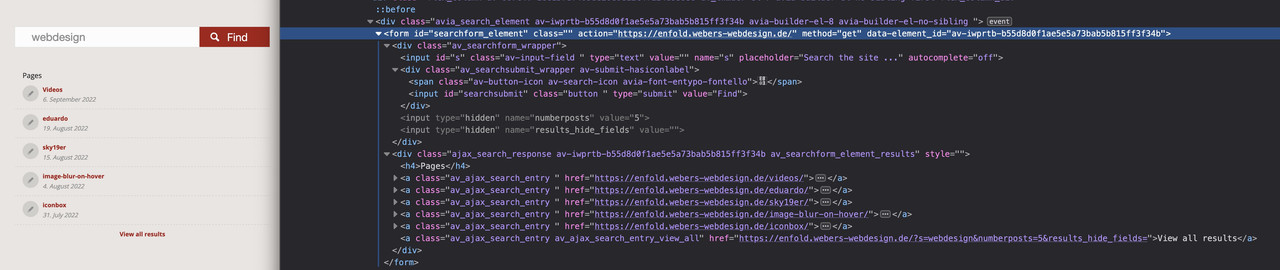
And even the search results beneath that form – do not have a rel : nofollow
So now my question regarding your Enfold version in which this occurs.
Edit: Ok now i see – this is the magnifier glass on top besides the navigation …
It is only that link that opens the search input form – But doesn’t it even make sense to set a nofollow at this anchor for SEO reasons?
Hi,
Thanks for letting us know, I’ll close this thread for now then. Please open a new thread if you should have any further questions or problems.
Best regards,
Rikard
Hi Jutta,
Could you try updating the theme to the latest version (5.1.2) to see if that helps please? https://kriesi.at/documentation/enfold/how-to-install-enfold-theme/#theme-update.
Best regards,
Rikard
Hi there,
I noticed that scripts from maps.googleapis.com are loaded on every page in the admin backend, even though Google Maps is turned off in the theme options. I searched the forum and tried quite a few of the suggestions, but, to no avail.
I finally was able to stop these requests by making a small change to a function in wp-content/themes/enfold/framework/php/class-gmaps.php:
public function handler_wp_register_scripts()
{
	// this prevents the requests to maps.googleapis.com, if Google Maps is turned off in theme options
	if( $this->is_loading_prohibited() )
	{
		return;
	}
	// leave rest of function unchanged
}
Although this works, I’d rather not change a core file. Plus, I’m new to Enfold and I am probably missing a better solution. Can someone please help me how to achieve the same, but do it properly? ;-)
Thanks,
Chris
-
This topic was modified 3 years, 6 months ago by
 Chris.
Hi,
Thanks for the update, I’ll close this thread for now then. Please open a new thread if you should have any further questions or problems.
Best regards,
Rikard
On this page I’ve added the countdown clock: https://bezzerwizzer.dk/somanyclues/
But the javascript for custom countdown text from the Enfold Documentation site doesn’t seem to work: https://kriesi.at/documentation/enfold/animated-countdown/#toggle-id-4
Here’s the javascript:
// Change countdown text
function custom_countdown_text(){
?>
<script>
jQuery(window).load(function(){
jQuery('.av-countdown-timer.my-custom-countdown').each(function() {
jQuery(".av-countdown-time-label").replaceWith(function() {
return "</p>
<p>
</p>
<div class="+"av-countdown-time-label"+">" + this.innerHTML + "</div>
<p>
</p>
<p>";
});
// Replace your custom text here
var
seconds = "Sec",
minutes = "Min",
hours = "Hrs",
days = "D",
weeks = "W",
months = "M",
years = "Y";

jQuery(".av-countdown-seconds .av-countdown-time-label").text(seconds);
jQuery(".av-countdown-minutes .av-countdown-time-label").text(minutes);
jQuery(".av-countdown-hours .av-countdown-time-label").text(hours);
jQuery(".av-countdown-days .av-countdown-time-label").text(days);
jQuery(".av-countdown-weeks .av-countdown-time-label").text(weeks);
jQuery(".av-countdown-months .av-countdown-time-label").text(months);
jQuery(".av-countdown-years .av-countdown-time-label").text(years);
});
});
</script>
<!--?php<br /--> }
add_action('wp_head', 'custom_countdown_text');
Maybe it’s because it’s for an older version of Enfold? Don’t know but it doesn’t work for me.
Hi,
Glad we were able to help, if you have any further questions please create a new thread and we will gladly try to help you. Thank you for using Enfold.
Best regards,
Mike
Hi,
the Telegram Button (sharebox) is automatically displayed for all my installations. This is very bad, because it violates the DSGVO in Germany. This should please be fixed quickly! Yvonne is right at this thread: https://kriesi.at/support/topic/bug-in-enfold-5-1-2-telgram-button/!
Best regards
Michael



