Hey lizzybeth84,
1. You can turn off file compression under Enfold->Performance.
2. I tried logging to check your settings, but the details you posted are not working. Please check and verify. If you have a test page where we can see the actual problem, then please link directly to it as well.
Best regards,
Rikard
Hi,
Thanks for the update. Did you register your theme license, and did you make sure that the token has the correct permissions? https://kriesi.at/documentation/enfold/theme-registration/. If the updates should not come through via the theme backend, then you can try to install and configure this plugin: https://envato.com/market-plugin/
Best regards,
Rikard
 Don Freijters
I cannot update de Enfold Theme, now I know why:
At thema update I get:
We hebben het token op 2020/04/28 09:32 gecontroleerd en we konden verbinding maken met Envato en hadden toegang tot de volgende informatie:
Uw aankopen
Uw gebruikersnaam: JKU5812
Uw E-mail: (Email address hidden if logged out)
Als u ooit de beperkingen van uw persoonlijke token wijzigt, kunt u het opnieuw valideren om te testen of het goed werkt.
Thema updates
Er zijn geen updates beschikbaar. U maakt al gebruik van de laatste versie! (4.8.6.2)
Controleer handmatig
Uw PHP versie: 8.0.23
Er hebben zich fouten voorgedaan bij de controle op 2022/09/30 12:08:
Productversie ophalen: Foutcode 403 geretourneerd door Envato: Forbidden:
– reason: invalid-token
So this seems to be the reason I cannot update any further.
I mistyped the URL, it must be http://www.naaiatelierudenzuid.nl
Hi Palle,
Please add following code to Quick CSS field in Enfold theme options > General Styling tab
#top #wrap_all .av-burger-overlay-scroll {
  background-color: rgba(0, 96, 156, 0.95);
}
To add a search bar, please refer to this post – https://kriesi.at/support/topic/searchfield-in-menu/#post-1365702
Best regards,
Yigit
Hi,
Sorry that we were not able to help more with this issue, but glad that you were able to work around this. If you have any further questions please create a new thread and we will gladly try to help you. Thank you for using Enfold.
Best regards,
Mike
Hi,
Glad Guenni007 could help, thank you Guenni007, if you have any further questions please create a new thread and we will gladly try to help you. Thank you for using Enfold.
Best regards,
Mike
Hi,
We have updated – https://kriesi.at/documentation/enfold/intro-to-layout-builder/#alb-for-any-post-type and added a screenshot to make it easier to find CPT name and a new “Displaying Metadata of your Custom Post Type” section right below it to point out how metadata could be displayed in CPTs :)
Regards,
Yigit
Hi,
Glad we were able to help, if you have any further questions please create a new thread and we will gladly try to help you. Thank you for using Enfold.
Best regards,
Mike
Hi Marc,
Thanks for contacting us!
Please login to our support forum and go to Enfold sub forum – https://kriesi.at/support/forum/enfold#new-post to start new threads :)
Best regards,
Yigit
Hi Lene,
Thanks for contacting us!
We had to implement valid support period policy due to our agreement with Envato (you can read more here – https://kriesi.at/support/topic/new-support-forum-policy-implemented-valid-tf-support-period-now-required ).
If you would like to receive support from us, you would need to renew support on Enfold’s ThemeForest page. After renewing support, you can go to https://kriesi.at/support/forum/enfold#new-post and re-validate your existing purchase code and start new threads.
You will receive lifetime updates even if your support is expired.
I hope that helps!
Best regards,
Yigit
 Lene Sachs
Guest
Hey Enfold
When accessing my account at the Enfold support forum this message appeared…
———————————————————————————————————————————-
We are very sorry but it seems your Theme License has expired on October 25th, 2018
In order for you to post support questions you need to enter a new valid themeforest license code
You can purchase a new license on themeforest or if you purchased one recently simply download it on themeforest
——————————————————————————————————————————–
Do I need a new license key for ongoing updates from Enfold theme or is this only related to support? This a very odd, as I could enter en support forum in 2020 and use the service.
Please could you verify, what I should do?
Best regards
Lene Sachs
-
This topic was modified 3 years, 6 months ago by
 Yigit.
Hi Guenni007,
please excuse my late reply and thank you very much for your support.
I did everything as you described and as before, it didn’t work at first (although I had deleted caches and other browser data several times).
But now a few days later some update process seems to have happened and now it works just fine – exactly as desired..
Thank so much, you’ve been a great help to me.
To the Enfold team:
Please feel free to close this topic as successfully completed.
Best regards,
fkm
Hi,
I’m using enfold and build websites from scratch using the page builder and the theme system and it’s great!
I talk with a developer that build his WP website on his own, without using a theme, and he says that we can’t get much better with a theme. His websites scores 100/100 on both mobile and desktop and loadtime is 200 to 300 milliseconds.
I want to prove him wrong!
For example, i got these two websites using Enfold and listed plugins:
computer112.dk:
– Data from pagespeed.web.dev: 62/100 mobile og 96/100
– Data from Pingdom: 1,49 seconds
Plugins:
- GP Unique ID
- Gravity Forms
- Gravity Perks
- Really Simple SSL
- Redirection
- Toolset Types
- Toolset Views
- Ulovligkopiering
- WebP Express
- WP Mail SMTP
- WP Super Cache
- Yoast Duplicate Post
- Yoast SEO
benjaminspeedtsberg.dk:
– Data from pagespeed.web.dev: 68/100 mobile og 87/100
– Data from Pingdom: 449 milliseconds
Plugins:
- GDPR Cookie Compliance
- WP Super Cache
- Yoast Duplicate Post
- Yoast SEO
I try not to use any plugins and I use WP Super Cache. Other than that I use Enfolds own optimize settings.
Does anyone have any suggestions, to what I can do to improve our pagespeed? :-)
Hey,
Thanks for contacting us!
Please add following code to Quick CSS field in Enfold theme options > General Styling tab
.html_av-overlay-side .av-burger-overlay-scroll {
  -webkit-transform: translateY(-100%);
  transform: translateY(-100%);
}
div .logo {
  z-index: 110;
}
Best regards,
Yigit
if you look to developer tools – there are preset colors and gradients :
guess the come from Gutenberg Editor – and are set on block-editor.js
Is it possible to autogenerate a theme.json file with the colors set in Enfold Options – General Styling – but at least the “Main Content Background Color” of the color schemes as preset css – and place it on f.e. child-theme root directory?
on doing that manually (generate a theme.json) will work well – but if it is possible the this file could get that values from theme setting will be brilliant
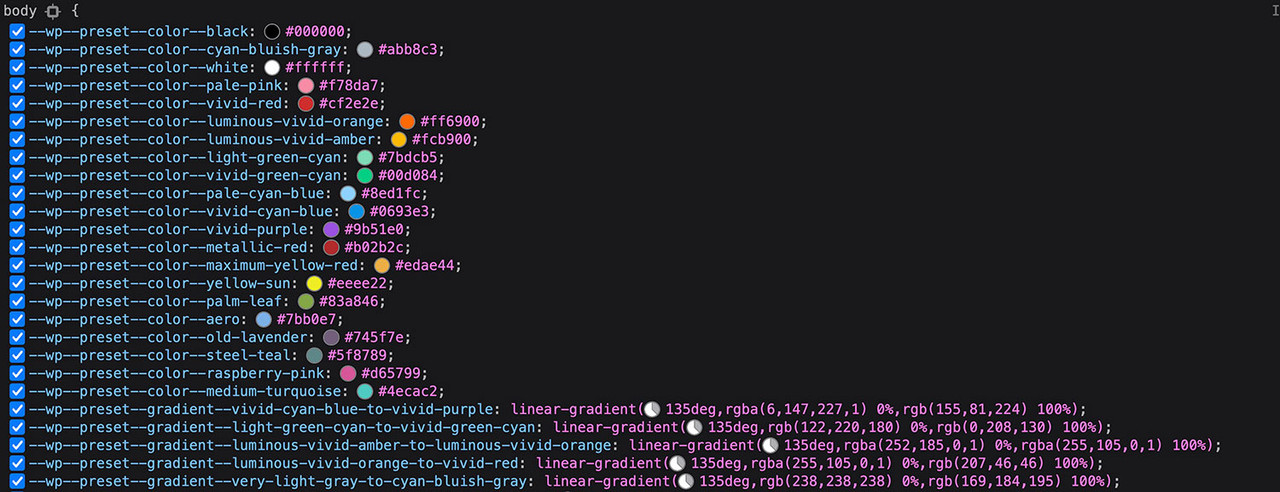
So e.g. as
–wp–preset–color–enfold-main: #hex-value
–wp–preset–color–enfold-alternate: #hex-value
–wp–preset–color–enfold-footer: #hex-value
etc.
you can use this as a variable in different color definitions e.g:
.flex_cell.custom-class {
  background-color: var(--wp--preset--color--enfold-main);
}
The advantage is obvious: if you change the background color of Main – you don’t have to rewrite the definitions – all of them will be taken over automatically.
Hi Franz,
Great, I’m glad that you found the problem, and thanks for the update. I’ll close this thread for now then, please open a new thread if you should have any further questions or problems.
Best regards,
Rikard
Hi gary,
I’m glad that Mike could help you :)
Thanks for using Enfold and have a great day!
Best regards,
Nikko
Hi spoonmedia,
You can upload fonts in Enfold > Import/Export > Custom Font Manager if the googlefont you want to use does not appear in the list, once you have done so you should see the font listed in Advanced Styling.
Best regards,
Nikko
Hey Ian,
Thanks for contacting us!
1- Please copy this HTML line – https://pastebin.com/6tfMDJYn and paste it in front of your phone number in Enfold theme options > Header > Extra Elements > Phone info
2- Please go to Appearance > Menus, add your new menu item, edit it and change menu style – https://imgur.com/a/sRiXtnH. You can adjust the styling by editing “Menu item button” or “Menu item button with border” in Enfold theme options > Advanced Styling :)
Best regards,
Yigit
Hey,
Please add following code to Quick CSS field in Enfold theme options > General Styling tab
#top .actions .button[name="update_cart"] {
  color: #CB9F2C;
}
#top .actions .button[name="update_cart"]:hover {
  color: #003D1D;
}
Best regards,
Yigit
Hey,
Please add following code to Quick CSS field in Enfold theme options > General Styling tab
#top .woocommerce-form.woocommerce-form-login input {
  border: solid 1px #fff;
}
Best regards,
Yigit
Hi,
I’m able to use shortcodes in many ALB elements but in the Easy Slider module when I attempt to place them in the Caption Title or Text I receive the warning:
Warning: Characters <,>,[,] might break ALB backend or frontend. Read more if you want to use them. You can use valid HTML markup.
I’ve followed the troubleshooting guide and tried the Avia Special Character Converter Plugin but the frontend simply renders the shortcode itself and is NOT processed by WordPress.
How do I get the shortcode to process in the Easy Slider Title/Text fields? Or is that not possible, and if so, why in this field but no other fields in ALB that I can find?
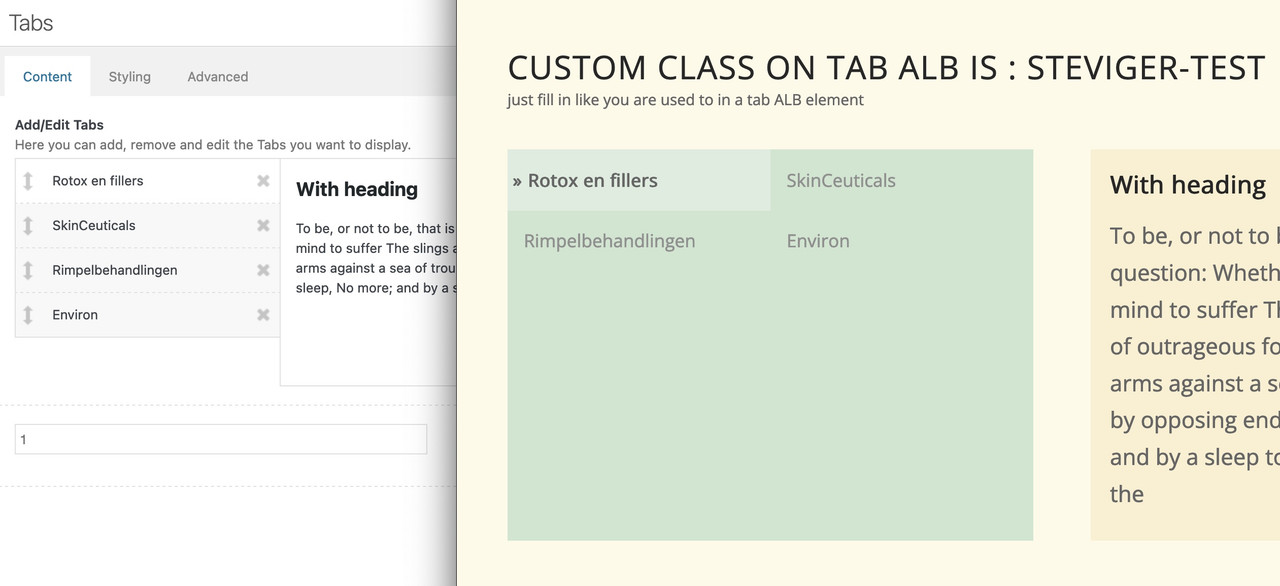
yes – I almost suspected that, but of course it wasn’t obvious from your screenshot.
Unfortunately, this method is probably not applicable then. …
Edit – see now : https://enfold.webers-webdesign.de/toggle-content/
by the way : this will end in frontend layout:
odd tab-titles count will be on the left – even tab-titles count on the right.
_
Hi,
You can also remove following one as it is enabled by default now
add_theme_support('avia_template_builder_custom_css');
If you would like to disable them, you can do so in Enfold theme options > Layout Builder > Hide Advanced Layout Builder Developer Options.
Others can stay :)
Best regards,
Yigit
Hey,
Thanks! I went to Enfold theme options and switch the editor to classic editor and buttons showed. Apparently it does not show up on block editor. We will report the issue to our devs. In the meantime, please switch to classic editor whenever you need to Add/Edit custom elements :)
Regards,
Yigit
-
This reply was modified 3 years, 6 months ago by Yigit.
Hey Tobias,
Thanks for contacting us!
Could you please try following:
– Enable debugging mode for ALB – https://kriesi.at/documentation/enfold/intro-to-layout-builder/#debug-mode
– Add Google Maps to one of your pages, give it custom ID (“custom-gmaps-id” in example below) and copy its shortcode from debugging field below ALB
– Insert your shortcode as following
[borlabs-cookie id="custom-gmaps-id" type="content-blocker"][GOOGLE MAPS SHORTCODE GOES HERE][/borlabs-cookie]
Best regards,
Yigit
Hi again,
I’m using a color section with a red background which has full width content using CSS from your documentation
In this I have a 1/3 column with a grey background containing a text element and a 2/3 column containing an image.
/* Color section container width */
#section-container-width .container {
  width: 100% !important;
  min-width: 100%;
  padding: 0;
  margin: 0;
}
In this I have removed all borders and padding from the 1/3 and 2/3 columns, selected No space between columns, no margins, no nothing but I am seeing an odd red line down the right hand side of the image which is the color section background peeking through.
The only custom code I have is putting a dashed outline round the text box and adding some padding.
I’ve tried scaling the image so that it is wider but this doesn’t amke any difference.
Now, I can remove the color section background and this would probably not be visible to the user but it’s annoying me and I’d like to resolve the issue if possible.
many thanks for your help.

-
This topic was modified 3 years, 6 months ago by
 DigitalEssence.
-
This topic was modified 3 years, 6 months ago by DigitalEssence.
-
This topic was modified 3 years, 6 months ago by Yigit.
Hey mvanstee,
Please try the following in Quick CSS under Enfold->General Styling:
#top div.woocommerce-message {
    background-color: #CB9F2C;
}

#top div div.woocommerce-message a.button {
    background: #8A0304;
}

#top div div.woocommerce-message a.button:hover {
    color: #CB9F2C;
}
Best regards,
Rikard
Hi,
You are welcome! :)
For your information, you can take a look at Enfold documentation here – https://kriesi.at/documentation/enfold/
If you have any other questions or issues, feel free to start a new thread under Enfold sub forum and we will gladly try to help you :)
Enjoy the rest of your day!
Best regards,
Yigit
Hey Don,
Thanks for contacting us!
Your website does not load on my end so I am not able to inspect it but I am pretty sure updating the theme to the latest version would fix the issue.
You can refer to this post – https://kriesi.at/documentation/enfold/theme-update/ to update the theme.
If it does not help or if you have any other question or issues, please let us know!
Regards,
Yigit



