Hi guys,
I’m wondering if anyone else has this effect: switching from Visual Mode to the Code-Editor doesn’t work. The view stays in Visual Mode. I’ve tried this with Safari 16.0 and Chrome 106.0.5249.119 but the switch fails. I’m running WP 6.0.3 de and an Enfold Child theme (Parent: 5.1.1) using PHP 7.4.30. I’m bit stumped!
It seems to be the Enfold theme because using the same browsers to work on a site with theme version 4.9.2.1 (and PHP 8.0.24) works fine. Is this a known bug (hopefully) to be fixed soon?
Thx for any tips/advice
Andrew
Hey Elie,
Thanks for the link to your site, on mobile I believe you are referring to these “play” icons:

these are added by your Instagram plugin and not the Enfold theme, but this CSS should make them much smaller on mobile, try adding to the Enfold Theme Options ▸ General Styling ▸ Quick CSS field:
@media only screen and (max-width: 767px) {
#sb_instagram #sbi_images svg:not(:root).svg-inline--fa {
    height: 0.4em;
}
#sb_instagram #sbi_images .sbi_type_video .sbi_playbtn {
    margin-top: -12px;
    margin-left: -8px;
}
}
After applying the css, please clear your browser cache and check.
Please see the expected results screenshot in the Private Content area.
Best regards,
Mike
Hey Holger,
Thanks for the link to your site, I was unable to view your screenshots as they require a Google login.
I checked your site and it is only loading the local icon font entypo-fontello.woff2
the site is using each browser’s system fonts, which means that while your site says “Open Sans”, since it is not loaded the browser substitutes it with the user’s system font, the most common system font for Windows & Mac is Arial.
I tested your page with WhatTheFont with this example:

and it says it is Arial Regular:

If you want to use Open Sans you can download it from Google Fonts and add it in the theme options Enfold Theme Options ▸ Import/Export ▸ Custom Font Manager
In my opinion, I like the look of Arial and I like the idea that the site doesn’t load any fonts so it will be faster.
Best regards,
Mike
Hi,
Thanks for reporting this. Happend when adding the .min feature.
@Guenni007 Your line above is correct.
For other users I uploaded a fixed file to
https://github.com/KriesiMedia/enfold-library/blob/master/temp_fixes/Enfold_5_2/config-templatebuilder/avia-shortcodes/slideshow_fullsize/slideshow_fullsize.php
Please replace the following file:
enfold\config-templatebuilder\avia-shortcodes\slideshow_fullsize\slideshow_fullsize.php
If you need help please let us know so we can help you.
Best regards,
Günter
 Mashrab
oops sorry, anyways, your enfold parallax will work in russian servers and russian domain?
Hi Chris,
Yes, Enfold is fully compatible with PHP 8.
Best regards,
Rikard
My issue happened on a 5.1.2 to 5.2 update. No Enfold file merge or compression activated so I can’t see how it would be related to merging if there is no merging going on.
There is this new feature in Enfold Merging/Compression – Minified Versions only Option.
maybe you try that : https://kriesi.at/support/topic/prev-next-on-testimonials-on-5-2/#post-1369726
Hello Enfold Team,
I have an issue and I hope you can help me. On the mobile version of my website mentioned below at the beginning of in the media section, there is a plug in for my Instagram, the videos are displayed in small boxes with a big play sign, unfortunately. The play sign button actually differentiates between video and image but the play sign is so big that it is covering almost the full box (I am using an iPhone, but with a Samsung the problem is other as well). My Webdesigner advised me to contact you for this issue as it does not look nice. He said that you can help me reducing the size of the sign because It is generated automatically (by default) from the plugin by Enfold.
Would you please take a look and let me know ?
I appreciate a quick turnaround.
Best regards, Elie
Hey,
It does not seem to be related to Boxed layout. I tried switching to fullwidth and fixed frame however neither made a difference. I recreated the slider and that helped. Was this page and other pages with the issue created using duplicator plugin?
I added the shortcode of your slider in private content field. You can enable ALB debugging mode by adding following code to bottom of functions.php file of your child theme
//set builder mode to debug
add_action('avia_builder_mode', "builder_set_debug");
function builder_set_debug()
{
  return "debug";
}
After that you can edit your page and see debug field right below ALB and paste the shortcode at the bottom, update the page and then move the element to it’s position.
@saccollc Could you please start a new thread under Enfold sub forum – https://kriesi.at/support/forum/enfold and attach temporary admin logins in private content field so we can look into it?
Regards,
Yigit
Hi,
Glad we were able to help, if you have any further questions please create a new thread and we will gladly try to help you. Thank you for using Enfold.
Best regards,
Mike
Hi Ismael,
I was running an experiment to adapt your code also for LearnDash post types, since started cross-testing both LMS systems to see what suits this project better.
It actually works for whatever post type by simply adding an extra line of $supported_post_types[] at both occurances for each post type:
$supported_post_types[] = 'post type';
Great! thank you again.
Next big question in this context is: Would it also be possible to add AVIA advanced layout edit functionailty to those post types, too?
I found (on the Learndash site) a code dating back to 2015 which obviosly worked back then, but does not make a difference in my current installation:
Code reads:
add_filter(‘avf_builder_boxes’, ‘avia_register_meta_boxes’, 10, 1);
function avia_register_meta_boxes($boxes)
{
if(!empty($boxes))
{
foreach($boxes as $key => $box)
{
$boxes[$key][‘page’][] = ‘sfwd-courses’;
$boxes[$key][‘page’][] = ‘sfwd-lessons’;
$boxes[$key][‘page’][] = ‘sfwd-topic’;
$boxes[$key][‘page’][] = ‘sfwd-quiz’;
}
}
return $boxes;
}
Do you have a solution that works with the current Enfold version?
Thank you and best
Michael
Hello,
I am using LayerSlider for WordPress (Kreatura).
The forward/ backward arrows in the slider are looking strange and not like an arrow. Please have a look to https://www.institut-generationenberatung.de
As a trial I have deleted all quick css codes in enfold but nothing changes.
I have contacted the Kreatura -support and got the following answer:
Unfortunately, this issue is related to your theme: Enfold. Enfold theme is manually overwriting LayerSlider’s style settings and I am not sure how to prevent it to load these custom style settings. Please contact with the Enfold Support Team, they should know the solution for this issue.
I am sure you can solve the issue.
Thank you for your apreciated support.
Best regards
Wolfgang
Hey miriamgo,
The update to 5.2 has to be done manually from the version you are running, please refer to my replies in this thread: https://kriesi.at/support/topic/enfold-4-5-theme-update-update-failed-download-failed-a-valid-url-was-not-pro/#post-1021541
You can either update manually via FTP: https://kriesi.at/documentation/enfold/how-to-install-enfold-theme/#theme-update, or use a plugin to upload the theme zip file: https://wordpress.org/plugins/update-theme-and-plugins-from-zip-file/
If that doesn’t work then please try to delete the whole theme folder, then replace it with the new version. Make sure that you have backups of the site before starting updating.
Also please read this after you have updated: https://kriesi.at/documentation/enfold/theme-registration/
Best regards,
Rikard
Hi,
Great, I’m glad that you got it working. I’ll close this thread for now then, please open a new thread if you should have any further questions or problems.
Best regards,
Rikard
Hi,
Great, I’m glad that Ismael could help you out. I’ll close this thread for now then, please open a new thread if you should have any further questions or problems.
Best regards,
Rikard
Hi there,
We purchased a new licence and are trying to update an old enfold 4.4.1
But it doesn`t work.
Please advice
Hello,
WordPress aktuell
Enfold 5.2
Hello,
I stopped Google Fonts with the plugin “Disable & Remove Google Fonts”.
Now I thought I would have to add another font to Enfold since Google Fonts (shouldn’t) work anymore. But the Open Sans font is still displayed in the backend or on the homepage in the frontend?…or does Enfold then exchange the Google fonts internally for a similar font? You can check it here https://webbkoll.dataskydd.net/
Or am I making a mistake in reasoning?
Greeting Holger
https://drive.google.com/file/d/1bMSstf6yEhMYZAS0dKCJDE7uyIs3eZne/view?usp=sharing
https://drive.google.com/file/d/1ohaMIDuNSBSU0exib-Ps7-0CIuosTzsE/view?usp=sharing
https://drive.google.com/file/d/1sQ00F8OE8bF_XhEoXr1bm2yc8BNMVjlg/view?usp=sharing
https://drive.google.com/file/d/10ncQ8YZSeDyVyImemGDoNdavXwPlBvTV/view?usp=sharing
i guess to make it in a propper way – it is hard stuff to create a custom post type (CPT).
See here f.e.: https://www.cloudways.com/blog/how-to-create-custom-post-types-in-wordpress/
to have an impression how many work this could be look inside : enfold/includes/admin/register-portfolio.php how enfold registers the portfolio post type.
on a relative fresh (5.1.2 to 5.2) – i do not have those troubles – but updating from 4.9 – the slideshow.css isn’t loaded at all.
Installation has no child-theme files ( only functions.php, style.css and screenshot.png )
the slideshow.css is needed for testimonials – but if there is no slideshow on that installation – the slideshow.css isn’t loaded when Enfold Option : only needed elements are loaded on performance ?
allthough i can see the extra_assets loading on testimonials.php
Strange :
this css is missing ( and as said the whole slideshow.css )
#top .av-control-hidden .avia-slideshow-controls {
   display: none
}
Hi,
after I updated the Enfold theme I found out the the stars from reviews at products are not showing?
My website is: https://dekorativne-rastline.si/izdelki/novoletna-dekoracija/umetne-jelke-novoletne-jelke/
Any idea how to solve the problem?
Kind regards,
Daniel
Hi,
Glad we were able to help, if you have any further questions please create a new thread and we will gladly try to help you. Thank you for using Enfold.
Best regards,
Mike
 Bart
Bart
Yigit,
Our plugin is 100% compatible with your theme, so every customer using Enfold (any version) and needing support in the area of video streaming, player or real-time analytics can be served by Bradmax.
We will be very pleased knowing, that we are recommended by you :)
Our services are wider than plugin, so it might be really profitable to each side.
In case of any support or questions please contact me (Email address hidden if logged out)
We could also have short video call and see if there is more ideas :)
Best wishes
Bart
This reply has been marked as private.
Ismael is totaly right – the overflow is the crux.
If you are working with grid-row – you don’t need to change the order of the cells. They are only the containers for your columns. But you want to have the column inside the second flex-cell to be positioned over the first cell.
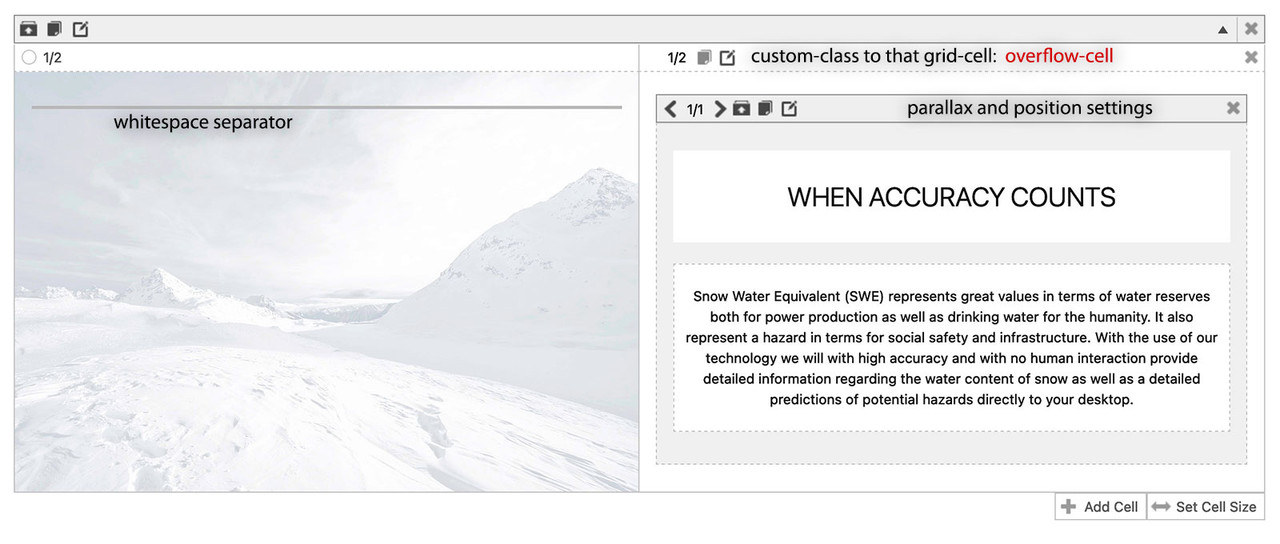
.responsive #top #wrap_all .av-flex-cells .flex_cell.overflow-cell {
  overflow: visible;
}
now the column itself – you can play with that combination of parallax and position.
you had to know that the first screen indicates the default values for all screen width – then the different screen-width are styled ( you can read on what px-range on the right side )
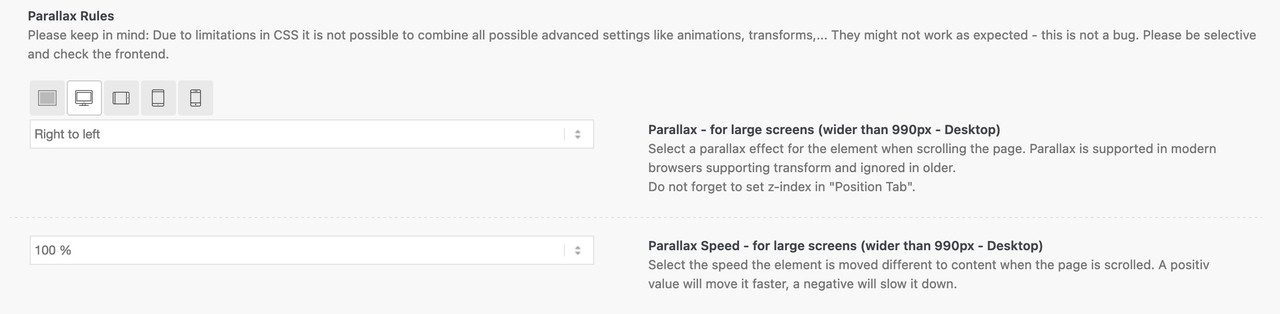
Because you break your cells on 989px – i only would set the parallax rule for screens wider than 990px and set only the position to absolute and for all screen width a z-index a bit higher (5).
For screens smaller than the 989 you better deactive the parallax rules ( or change to bottom to top – with less parallax ratio ) and beginn to set the absolute positioning for those smaller screens. ( absolute top: -150px)
result : https://enfold.webers-webdesign.de/zygizo/
Hi Yigit, we do not have any performance options enabled in Enfold. There is no merging or compression going on. I also deleted the old css and js files even though no compression is used. Same result.
The rendered html from 5.1.2 home page and 5.2 home page can be downlaoded from the link in the private info section. If you look at the difference between the two there is a clear difference of something being added in the slider treatment for 5.2 whcih was not present under 5.1.2. Apparently, this is what is botching things up.
Please advise.
Hi,
Great, I’m glad that you found the cause of your problem, and thanks for the update. I’ll close this thread for now then, please open a new thread if you should have any further questions or problems.
Best regards,
Rikard
Hi,
Thank you for the update.
How did you display the switcher in your header? The following documentation might help.
// https://kriesi.at/documentation/enfold/header/#adding-a-header-widget-area
You can add the switcher shortcode in a text or code widget, then insert it in the header widget area.
Best regards,
Ismael
Read here – if you need more help – tell me:
break-inside: avoid
https://enfold.webers-webdesign.de/multicolumn-text-block/
https://css-tricks.com/almanac/properties/b/break-inside/
nice to know
widows = minimum number of lines in a paragraph split on the new page.
orphans = minimum number of lines in a paragraph split on the old page.
Hello. I appreciate your responses to this case and the responsiveness of Enfold support. It was determined that caching in Enfold and a plugin was the source of the problem. This case can be closed.



