
-
AuthorSearch Results
-
March 5, 2023 at 10:01 pm #1400202
Hi,
Please also disable the script, we will not use it, and then try going to WordPress ▸ Customizing ▸ WooCommerce ▸ Product Images and choosing Uncropped
and then go to WooCommerce > Status > Tools > Regenerate shop thumbnails, and click the Regenerate button next to it.
If this doesn’t help try adding this code to the end of your child theme functions.php file in Appearance ▸ Editor:add_filter( 'avf_wc_before_shop_loop_item_title_img_size', 'avf_wc_before_shop_loop_item_title_img_size_mod', 10, 1 ); function avf_wc_before_shop_loop_item_title_img_size_mod( $thumbnail_size ) { return 'woocommerce_thumbnail'; }If you use the Woocommerce Gallery instead of the Enfold Gallery do you have the same issue?
Best regards,
MikeMarch 5, 2023 at 9:30 pm #1400199In reply to: Change Layout and design of Category pages
see: https://enfold.webers-webdesign.de/category/speziell/ with that custom hook and with page ID .
March 5, 2023 at 8:35 pm #1400195Hi,
Glad to hear that you have this sorted out, if you have any further questions please create a new thread and we will gladly try to help you. Thank you for using Enfold.Best regards,
MikeMarch 5, 2023 at 8:30 pm #1400191In reply to: Text instead of parallax
Hi,
Thanks for your patience and the link to your site, I checked the three page that you identified with the error and on each page you had added this: <3 and this was what caused the error, here you can see the text element with the error message warning about it:

after removing the code the text element previews the correct text and the frontend works correctly:

So try not to add this code and please remove it from any other pages.Best regards,
MikeMarch 5, 2023 at 7:27 pm #1400184In reply to: Bottom margin of masonry elements with large gap
Hi,
Thanks for the feedback, when I check the page in your screenshot /test/portfolio/ it does have a 1px right border that the entire sidebar header has even into the footer:

Perhaps you don’t see it well since it is a light color and 1px, here I make it 10px so you can see it better:

The same is true on your other page, this is the css if you want to adjust it:.html_header_sidebar #top #header { border-right: 10px #e0e0e0 solid; }After applying the css, please clear your browser cache and check.
Best regards,
MikeMarch 5, 2023 at 6:59 pm #1400178Hi,
Glad Rikard could help, if you have any further questions please create a new thread and we will gladly try to help you. Thank you for using Enfold.Best regards,
MikeMarch 5, 2023 at 6:58 pm #1400177Hi,
Thanks for the feedback, if you are going to use the short pixel plugin, then please don’t use the script, it looks like the plugin is trying to change the images.
I would recommend disabling this plugin and any other “optimizer” plugins until the core issue is solved.
Then try going to WordPress ▸ Customizing ▸ WooCommerce ▸ Product Images and choosing Uncropped
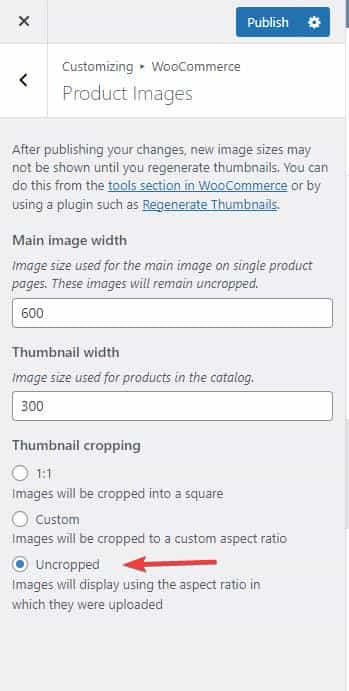
and then go to WooCommerce > Status > Tools > Regenerate shop thumbnails, and click the Regenerate button next to it.
If this doesn’t help try adding this code to the end of your child theme functions.php file in Appearance ▸ Editor:add_filter( 'avf_wc_before_shop_loop_item_title_img_size', 'avf_wc_before_shop_loop_item_title_img_size_mod', 10, 1 ); function avf_wc_before_shop_loop_item_title_img_size_mod( $thumbnail_size ) { return 'woocommerce_thumbnail'; }Then clear any cache plugins and any server cache and your browser cache.
Best regards,
MikeMarch 5, 2023 at 6:27 pm #1400175bei der freien Version funktioniert Enfold Kontakt noch nicht. Da du aber oben CF7 erwähntest – das geht automatisch auch bei der freien Version.
Teste es – du wirst überrascht sein wie gut es filtert.March 5, 2023 at 5:44 pm #1400174Hi Alexander,
Google Maps Alternative:
WP Dashboard -> Theme Extension Tab -> OpenStreetMaps ist die Alternative. Links dazu findest Du in der description dazu
Contact Form
Eine einfache Brücke ist das numerische captcha – komplett ohne irgendwelche requests.
Borlab plugin bietet eine gute Möglichkeit für die DSGVO – da kann @Guenni007 mehr Informationen liefern.
WP Armour soll laut Beschreibung in der Bezahl Version Enfold Contact Form unterstützen – wie oben schon erwähnt.
Leider habe ich momentan dazu noch keine näheren Info.
Best regards,
GünterMarch 5, 2023 at 3:32 pm #1400170Danke Günter,
gibt es keine andere Möglichkeit irgendein reCapture außer Google in die vorhandene Kontaktpluginfunktion von Enfold einzubinden?
Oder ein separates Formular wie Contact Form 7 etc… ?Danke im Voraus
AlexanderP.S.: Ihr müsstet doch wegen der deutschen Datenschutzrechnlinie und den Abmahnungen hier bereits aktiv geworden sein…
Auch eine Alternative für GoogleMaps müsste doch einbindbar sein.March 5, 2023 at 3:17 pm #1400169In reply to: Unable to import Import demo files
Hi,
Thanks for the feedback, the login doesn’t seem to be admin and Enfold doesn’t seem to be activated so we would not be able to test if the demo import works.
Please check if the demo import works and let us know.Best regards,
MikeMarch 5, 2023 at 3:10 pm #1400167In reply to: image size for magazine
Hi,
Glad Guenni007 & Nikko could help, thank you Guenni007, if you have any further questions please create a new thread and we will gladly try to help you. Thank you for using Enfold.Best regards,
MikeMarch 5, 2023 at 3:01 pm #1400165In reply to: subheading added to magazine
Hey satucker,
Thank you for your patience, to add the manual excerpt field content to the small magazine element you will need to edit the file magazine.php so to not lose your modifications after the next update I recommend installing a Child Theme, this is the most current one in the child theme functions.php you will note this snippet:function avia_include_shortcode_template( $paths ) { if( ! is_array( $paths ) ) { $paths = array(); } $template_url = get_stylesheet_directory(); array_unshift( $paths, $template_url . '/shortcodes/' ); return $paths; } add_filter( 'avia_load_shortcodes', 'avia_include_shortcode_template', 15, 1 );if you don’t use the most current one ensure this is in the functions.php
Then via FTP add the directory /shortcodes/ to your child theme and in that copy the directory /enfold/config-templatebuilder/avia-shortcodes/magazine/
Now in your new /enfold-child/shortcodes/magazine/ directory edit the file magazine.php look for this starting at line 1494 (v5.4.1)if( $style == 'small' ) { if( empty( $this->config['thumbnails'] ) ) { $image = ''; $extraClass = 'av-magazine-no-thumb'; }and add this line:
$excerpt = ! empty( $entry->post_excerpt ) ? $entry->post_excerpt : avia_backend_truncate( $entry->post_content, apply_filters( 'avf_magazine_excerpt_length', 10 ), apply_filters( 'avf_magazine_excerpt_delimiter', ' ' ), '…', true, '' );

Now you can enable the manual excerpt field in your post or portfolio item in the Screen Options tab:

add your content:

and it will show on the frontend:

This example was created with portfolio items that were created with the Advanced Layout Builder and the date in the magazine element was hidden with this css:#top time.av-magazine-time.updated { display: none; }If posts were used in the magazine element that were created with the WordPress default editor then the default excerpts would be shown and you would not need to use the manual excerpt field:

Best regards,
MikeMarch 5, 2023 at 12:49 pm #1400159In reply to: customize product web page
Hi,
Can you link to the demo page that you are trying to create, I didn’t see it on our demo.Best regards,
MikeMarch 5, 2023 at 12:42 pm #1400157Hi,
Danke @Guenni007.
In WP Armour Extended (Bezahlversion) ist Enfold aufgelistet (siehe Link oben). Bezüglich der false positiv Ergebnisse sollte man mit dem Support des plugins abklären, ob es etwas mit Enfold zu tun hat.
Falls ja und sie ein Filter benötigen (oder etwas anderes), können wir das gerne einbauen.
Leider haben wir so weit ich weiss keinen Kontakt zu den Autoren – werde das aber noch abklären mit unserem Team.
Best regards,
GünterMarch 5, 2023 at 12:28 pm #1400155In reply to: Layout der Links
Hi,
Glad we were able to help, if you have any further questions please create a new thread and we will gladly try to help you. Thank you for using Enfold.Best regards,
MikeHey Christoph,
You don’t need to renew anything, since a theme license is valid for life. If you are not seeing update on the backend, then please refer to this: https://kriesi.at/documentation/enfold/theme-registration/
Or try using this plugin: https://envato.com/market-plugin/
Best regards,
RikardMarch 5, 2023 at 10:37 am #1400143Hi,
Thanks for that. You are updating from a very old version, did you try setting the correct font under Enfold->Typography after you have activated the new version?
Best regards,
RikardMarch 5, 2023 at 9:59 am #1400142Topic: Lizenz
in forum Pre Sale QuestionsChristoph Gniadek
GuestMein Kunde hat Enfold v.4.8.6.5 installiert und möchte wieder Updates erhalten.
Offenbar wurde das Theme damals über “Envato” gekauft.Kann ich die Lizenz direkt über Sie erneuern?
Danke und viele Grüße.
March 4, 2023 at 11:58 pm #1400136In reply to: Can’t edit pages anymore – just opens blank page
Hi,
conlcoa Please open a new thread with the url to the page in question and an admin login so we can be of more assistance.Best regards,
MikeMarch 4, 2023 at 11:54 pm #1400135In reply to: Quantity Selector Not Working Within Product Bundles
Hi,
Thanks for the login I disabled avia_apply_quant_btn() on lines 106 & 109 in the /enfold/config-woocommerce/woocommerce-mod.js file:

and now the quantity selector works like the default theme either manually or with the up & down keyboard arrows.
Please clear your browser cache and check.Best regards,
MikeMarch 4, 2023 at 11:11 pm #1400134In reply to: Font Issues
Hi,
When I download your myriad-pro-cufonfonts.zip file I see the font is in an unsupported font format OTF, please see our documentation for Supported Font Formats.
You should try to Download @font-face Kit and use the @font-face rules in the stylesheet, which means that you will need to add css for the elements you want to use the font on and not in the Custom Font Manager.
I see these in your Custom Font Manager, are they all the same Myriad font?

I recommend removing these.Best regards,
MikeMarch 4, 2023 at 10:23 pm #1400129Hi,
It should look like this unless you are using a very old version of the theme, we are now at v5.4.1

If you still don’t see it please include an admin login in the Private Content area so we can be of more assistance.Best regards,
MikeMarch 4, 2023 at 9:38 pm #1400125Hi,
Glad Rikard could help, if you have any further questions please create a new thread and we will gladly try to help you. Thank you for using Enfold.Best regards,
MikeMarch 4, 2023 at 8:53 pm #1400122In reply to: pages not appearing in the menue
Hi,
Thank you for your patience, to show a footer menu please choose which menu you want to show in the footer at WordPress ▸ Appearance ▸ Menus ▸ Manage Locations

You can not add KONTAKT to your menu because it is set to private

The same is true for your page Kursbücher, and Footer Template.Best regards,
MikeMarch 4, 2023 at 8:14 pm #1400120In reply to: Blog title and blog heading too large
Hi,
Glad Rikard could help, if you have any further questions please create a new thread and we will gladly try to help you. Thank you for using Enfold.Best regards,
MikeMarch 4, 2023 at 8:09 pm #1400119In reply to: Initialise slider
Hey MotiveAgency,
Thanks for your question, I’m not familiar with slick.js I imagine that you could add your “slides” via a code block element in the color section and add css to make the “slides” look like columns for desktop devices, but I don’t see an easy way to apply the javascript to the columns to become slides.
The Content Slider uses theavia-shortcodes/slideshow/slideshow.js, but rewriting this for columns would be a big job.
I recommend your first idea of using 2 elements and showing/hiding the relevant element per device.
Perhaps another option would be to try adding a custom classes to your three columns ie: .one, .two, .three and add a icon element with the custom class .next which only shows on mobile to toggle between your column “slides”:

Then in the code block element add this:<style> @media only screen and (max-width: 767px) { #top #main .avia-section .entry-content-wrapper { overflow: hidden; position: relative; height: 100vh; } #top #main .avia-section .entry-content-wrapper .no_margin.av_one_third { float: left; width: 100%; position: relative; } } </style> <script> (function($) { var state = 1; $('.next').click(function() { if(state==1){ $('.one').hide(); $('.two').show(); state=2; } else if(state==2){ $('.two').hide(); $('.three').show(); state=3; } else if(state==3){ $('.three').hide(); $('.one').show(); state=1; } }); }(jQuery)); </script>On desktop you will have 3 columns:

on mobile only one column will show at a time and clicking the arrow will toggle the next column in a circle:

Best regards,
MikeMarch 4, 2023 at 5:15 pm #1400109In reply to: sticky header mobile not working
on that page: https://nlsla.org/ you had set the padding-top of #main to zero.
if the header is sticky you had to change that to 80px as in my code above.see above comments on these rules if you like to have background from the beginning.
  #top .av_header_glassy.av_header_transparency .header_bg {
    background-color: #376b9e;
    opacity: 1;
    filter: alpha(opacity=100);
  }

  .responsive #top .header_bg {
    opacity: 1;
    filter: alpha(opacity=100);
    background-color: #fff !important;
  }
some settings on top might not be usefull for your pages. – but try it first – then we can correct the settings
PS:
on that page (nlsla.org) – you have overwritten standard enfold setting ( middle ) :@media only screen and (max-width: 767px) { .avia-section.av-minimum-height .container .content { vertical-align: top; } }but this is not good – because your buttons will be at top in responsive case.
March 4, 2023 at 4:08 pm #1400105In reply to: Quantity Selector Not Working Within Product Bundles
Hey iff-dc,
Thank you for your patience and the link to your site, but on your live site page I don’t see any products like on your staging site which is using the Twenty Twenty-Three theme.
Please include an admin login to your staging site so we can enable & disable the Enfold theme and compare the checkbox and try to evaluate the issue.Best regards,
MikeMarch 4, 2023 at 3:43 pm #1400103In reply to: Change Layout and design of Category pages
Hey Jochen,
Thanks for the link to your pages, you cannot use the Advanced Layout Builder to create your category pages unless you create specific pages and redirect to them.
But you can change the layout of the category pages, for example, if you want to use the grid layout add this filter to your child theme functions.php:add_filter('avf_blog_style','avia_change_category_blog_layout', 10, 2); function avia_change_category_blog_layout($layout, $context){ if($context == 'archive') $layout = 'blog-grid'; return $layout; }
To create a custom header to the top of your category pages you could add the element shortcode via a function like this:add_action('ava_after_main_title', 'ava_after_main_title_mod'); function ava_after_main_title_mod() { if(is_category('news')) { echo do_shortcode("[av_one_full first min_height='' vertical_alignment='av-align-top' space='' row_boxshadow_width='10' row_boxshadow_color='' margin='0px' margin_sync='true' av-desktop-margin='' av-desktop-margin_sync='true' av-medium-margin='' av-medium-margin_sync='true' av-small-margin='' av-small-margin_sync='true' av-mini-margin='' av-mini-margin_sync='true' mobile_breaking='' mobile_column_order='' border='' border_style='solid' border_color='' radius='' radius_sync='true' min_col_height='300px' padding='' padding_sync='true' av-desktop-padding='' av-desktop-padding_sync='true' av-medium-padding='' av-medium-padding_sync='true' av-small-padding='' av-small-padding_sync='true' av-mini-padding='' av-mini-padding_sync='true' svg_div_top='' svg_div_top_color='#333333' svg_div_top_width='100' svg_div_top_height='50' svg_div_top_max_height='none' svg_div_top_opacity='' svg_div_bottom='' svg_div_bottom_color='#333333' svg_div_bottom_width='100' svg_div_bottom_height='50' svg_div_bottom_max_height='none' svg_div_bottom_opacity='' column_boxshadow_width='10' column_boxshadow_color='' background='bg_color' background_color='#7bb0e7' background_gradient_direction='vertical' background_gradient_color1='#000000' background_gradient_color2='#ffffff' background_gradient_color3='' src='' attachment='' attachment_size='' background_position='top left' background_repeat='no-repeat' highlight_size='1.1' animation='' animation_duration='' animation_custom_bg_color='' animation_z_index_curtain='100' parallax_parallax='' parallax_parallax_speed='' av-desktop-parallax_parallax='' av-desktop-parallax_parallax_speed='' av-medium-parallax_parallax='' av-medium-parallax_parallax_speed='' av-small-parallax_parallax='' av-small-parallax_parallax_speed='' av-mini-parallax_parallax='' av-mini-parallax_parallax_speed='' css_position='' css_position_location=',,,' css_position_z_index='' av-desktop-css_position='' av-desktop-css_position_location=',,,' av-desktop-css_position_z_index='' av-medium-css_position='' av-medium-css_position_location=',,,' av-medium-css_position_z_index='' av-small-css_position='' av-small-css_position_location=',,,' av-small-css_position_z_index='' av-mini-css_position='' av-mini-css_position_location=',,,' av-mini-css_position_z_index='' link='' linktarget='' link_hover='' title_attr='' alt_attr='' mobile_display='' mobile_col_pos='0' id='' custom_class='' template_class='' aria_label='' av_uid='av-leu1xz8x' sc_version='1.0'][av_heading heading='Custom Header' tag='h3' style='blockquote modern-quote modern-centered' subheading_active='' show_icon='' icon='ue800' font='entypo-fontello' size='' av-desktop-font-size-title='' av-medium-font-size-title='' av-small-font-size-title='' av-mini-font-size-title='' subheading_size='' av-desktop-font-size='' av-medium-font-size='' av-small-font-size='' av-mini-font-size='' icon_size='' av-desktop-font-size-1='' av-medium-font-size-1='' av-small-font-size-1='' av-mini-font-size-1='' color='custom-color-heading' custom_font='#ffffff' subheading_color='' seperator_color='' icon_color='' margin='' margin_sync='true' av-desktop-margin='' av-desktop-margin_sync='true' av-medium-margin='' av-medium-margin_sync='true' av-small-margin='' av-small-margin_sync='true' av-mini-margin='' av-mini-margin_sync='true' headline_padding='' headline_padding_sync='true' av-desktop-headline_padding='' av-desktop-headline_padding_sync='true' av-medium-headline_padding='' av-medium-headline_padding_sync='true' av-small-headline_padding='' av-small-headline_padding_sync='true' av-mini-headline_padding='' av-mini-headline_padding_sync='true' padding='10' av-desktop-padding='' av-medium-padding='' av-small-padding='' av-mini-padding='' icon_padding='10' av-desktop-icon_padding='' av-medium-icon_padding='' av-small-icon_padding='' av-mini-icon_padding='' link='' link_target='' id='' custom_class='' template_class='' av_uid='' sc_version='1.0' admin_preview_bg=''][/av_heading][/av_one_full]"); } }
In the code above you will note that I added the header only to the category News in if(is_category(‘news’)) this demonstrate that you can have different headers for different categories, you will also note that this element is not a color section, color sections will cause issues on pages with sidebars, you are better off using single full width columns.
You can use the shortcode wand to get the element shortcode or Enable the Avia Layout Builder Debugger.
Give this a try and if you have trouble include an admin login so we can assist.Best regards,
Mike -
AuthorSearch Results
Viewing 30 results - 18,361 through 18,390 (of 244,621 total)
-
Search Results
-
Topic: Lizenz
Mein Kunde hat Enfold v.4.8.6.5 installiert und möchte wieder Updates erhalten.
Offenbar wurde das Theme damals über “Envato” gekauft.Kann ich die Lizenz direkt über Sie erneuern?
Danke und viele Grüße.


