Hey Thomas,
What I can offer is a filter to add custom classes to main tag. Changing the div structure is too critical to break existing sites with customizations.
You certainly know, but in html tag you have a class like e.g. html_entry_id_30165 or you can use filter avf_custom_body_classes (enfold\header.php line 167) to add classes to body which you can use to limit selectors for the main tag (like “.your-body-class main”).
Does that help you or would you still prefer an own filter for main tag?
Best regards,
Günter
Hello,
hot to have space between the logo and the first button (ENG)?
There isn’t an option for that in Enfold. You’re going to need to use custom CSS.
Is it possible to set a bold font into a MENU?
Please go to Enfold theme options > Advanced Styling, edit the Menu Links in overlay/slide out, and set the Font Weight to Bold ( https://i.imgur.com/a4NwjJb.png ).
Best regards,
Yigit
 Lion
LionGuest
Hi Yigit ,
Unfortunately, the well-known WP Content Copy Protection & No Right Click plugin has problems with Enfold. It protects images correctly on desktop but on mobile devices (iOS) you can still save images.
You can notice the problem on one of the pages of my site, for example here: (link in Private Content), where the images of the mansory gallery on desktop cannot be downloaded while on any mobile device iOS is possible to save them.
The plugin developer says the problem is enfold’s mansory gallery, and he can’t fix the problem. Can you take a look at this to possibly fix the problem within enfold?
Thanks in advance….
Lion
I’ve done it and it’s working now. But, is there any way I can have Autoptimize plugin enabled and Enfold Performance File compression too?
Hi Mike,
thanks for qour reply! Unfortunately disabeling the Lightbox Modal Windows doesn’t change anything.
I’ve created a Test-Event (see Link and Password in Private Section).
The thing is, that there is a specific option for disabeling the individual data collection for guests – even the official support of The Events Calendar didn’t know that. BUT these settings do not do a thing when Enfold is active.
We don’t need to use WooCommerce as we are only allowing reservations for Events. Thats what we bought the Event Tickets Plus Plugin for. So this shouldn’t be what is causing the issue.
Could you have a look at out Test-Event to see what I mean?
Thanks in advance!
Hallo Enfold-Team,
wo kann ich in der mobilen Version einstellen, dass die Schriftgröße etwas kleiner angezeigt wird?
Mein Entwurf (offline) zeigt auf der Desktop Seite eine große Schrift, die in der mobilen version jedoch zu groß anzeigt wird.
Für eure Antwort bedanke ich mich schon mal im Voraus
English
Where can I set in the mobile version that the font size is displayed slightly smaller?
My design (offline) shows a large font on the desktop side, but it is displayed too large in the mobile version.
Thank you in advance for your answer
Hallo zusammen,
wie kann ich in Enfold das Menü in der mobilen Version dauerhaft sichtbar machen, bzw. wie bleibt das Menü beim scrollen sichtbar?
Vielen Dank schon mal im Voraus für die Antwort.
English?
How can I make the menu in Enfold permanently visible in the mobile version, or how does the menu remain visible when scrolling?
Thanks in advance for the answer.
Hi I am using WP Scalability Pro and Auto Infinite Scroll on a large Enfold site (116,000 variable products).
Auto Infinite Scroll works fine for the Products pages but it breaks on the blog.
The Pagination on the blog is nested within Main – Whereas on the Products page, The elements containing the following selectors .pagination is outside of the .products css class.
See example in private content.
To fix I have added a css class to <main> manually in the parent theme – Main Template (index.php) Line 34.
Two possible solutions
1. Place the blog in a new div so pagination follows it – Like on the woocommerce product archives pages where pagination sits outside of the products div.
On the prooduct archives:
<div class=”entry-content-wrapper”>
<ul class=”products”></ul>
Pagination is outside of the ul class.
<nav class=”pagination”></nav>
</div>
Suggestion on blog:
<main>
<newdiv>
<article>
</article>
</newdiv>
These now sit outside of the posts loop:
<single-big>
<pagination>
</pagination>
</single-big>
</main>
2. Can you add a class to <main> on the blog pages so I can use it as the selector? (See example in private content).
2a.Is there a filter already set up in Enfold to add a class here?
-
This topic was modified 2 years, 6 months ago by
 thinkjarvis.
-
This topic was modified 2 years, 6 months ago by thinkjarvis.
Hi Ismale, sorry, you’re right, it works now.
I will do more tests and respond further to update the situation.
Best regards, and thanks to all Enfold.
Oriano
Hello,
Please refer to this post https://kriesi.at/documentation/enfold/contact-form/#troubleshoot if your contact form isn’t working.
Regards,
Yigit
Hey John,
Thank you for hte inquiry.
You can add this css code to apply a border around the wpforms container.
.avia_codeblock .wpforms-container {
    border: 1px solid #777777;
    padding: 2em;
    border-radius: 5px;
}
If you need to apply this modification to a specific element, try to add a custom css class name or ID to the code block element.
// https://kriesi.at/documentation/enfold/add-custom-css/#enable-custom-css-class-name-support
Best regards,
Ismael
Hey neotel2k,
Thank you for the inquiry.
We found the following error in the console but we are not yet what is causing it because the files are compressed. Please disable Autoptimize compression temporarily, and make sure that the Enfold > Performance > File Compression settings are also disabled.
Uncaught SyntaxError: Invalid regular expression flags
Best regards,
Ismael
Hi,
Thank you for the info.
We managed to create and publish a page using the Advance Layout Builder (ALB) without encountering any errors, but we always get a 404 not found error for the wp-admin/admin-ajax.php when we try to save the theme options. Where is the site hosted? Please try to set the installation to debug mode and post the S/FTP details in the private field so that we can trace the errors.
// https://wordpress.org/documentation/article/debugging-in-wordpress/#wp_debug
Regarding the private token, please review the documentation and make sure to check the required permissions.
// https://kriesi.at/documentation/enfold/theme-registration/#toggle-id-5
Unfortunately, we do not handle refunds or sales inquiries in this forum. Please contact Themeforest support for more information.
Best regards,
Ismael
Hey hostworks,
Thank you for the inquiry.
The following documentation should help.
// https://kriesi.at/documentation/enfold/icon/#icons-are-showing-as-rectangular-boxes-
The font are not displaying because of the following CORS error, which can be fixed by adding the directive in the .htaccess file, as described in the documentation above .
other.site.org/:1 Access to font at 'http://resource.site.org/wp-content/uploads/dynamic_avia/avia_type_fonts/itc-legacysanitcboo-1/itc%20-%20legacysanitcboo.ttf' from origin 'http://other.site.org' has been blocked by CORS policy: No 'Access-Control-Allow-Origin' header is present on the requested resource.
Best regards,
Ismael
Hey Dzimnikov,
Thank you for the inquiry.
You can use this css code to adjust the position of the image for smaller screens.
@media only screen and (max-width: 767px) {

  /* Add your Mobile Styles here */
  #top .av_slideshow_full .av-lmy2017r-6f332ec5b1caff086e271debf2f4483e__0 img {
    border-radius: 0px;
    left: -100px !important;
  }
}
Please make sure to toggle or temporarily disable the Enfold > Performance > File Compression settings after adding the css code.
Best regards,
Ismael
Hi,
Thanks for the login, the error is coming from the file at includes/loop-about-author.php which is what displays the author page.
This file has beed edited and a chunk of the file is missing, I assume as part of your customization, I recommend asking whoever was helping you to compare it with a original version of the file from your Envato (Theme Forest) account and try to figure out what is needed for your customization.
I see that you are not using a Child Theme and your functions.php contains a lot of customizations, please note that this will be lost when you update. Please consider installing a child theme and move all of your customizations to it, since I see the loop-about-author.php was modified I assume that other core theme files were also modified and should be saved in a child theme before the next update.
I can see a lot of work went into your customization and it looks complicated, so I’m sure that you would not want to lose any of this.
Best regards,
Mike
Hi,
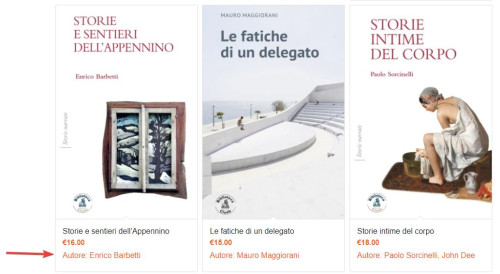
I have removed the word “Author” and I have moved the name before the price:

But it can not be a link because the whole element is already a link to the product and you can not have a link inside of a link.
Best regards,
Mike
Hi,
Thanks, I added this code to the end of your child theme functions.php file in Appearance ▸ Editor:
add_action('woocommerce_after_shop_loop_item_title', 'display_custom_attribute_in_product_grid', 10);
function display_custom_attribute_in_product_grid(){
    // HERE define the desired product attributes to be displayed
    $defined_attributes = array('autore');

    global $product;
    $attributes = $product->get_attributes();

    if ( ! $attributes ) {
        return;
    }

    $out = '<ul class="taste-attributes">';

    foreach ( $attributes as $attribute ) {

        // Get the product attribute slug from the taxonomy
        $attribute_slug = str_replace( 'pa_', '', $attribute->get_name() );

        // skip all non desired product attributes
        if ( ! in_array($attribute_slug, $defined_attributes) ) {
            continue;
        }

        // skip variations
        if ( $attribute->get_variation() ) {
            continue;
        }

        $name = $attribute->get_name();

        if ( $attribute->is_taxonomy() ) {

            $terms = wp_get_post_terms( $product->get_id(), $name, 'all' );
            // get the taxonomy
            $tax = $terms[0]->taxonomy;
            // get the tax object
            $tax_object = get_taxonomy($tax);
            // get tax label
            if ( isset ( $tax_object->labels->singular_name ) ) {
                $tax_label = $tax_object->labels->singular_name;
            } elseif ( isset( $tax_object->label ) ) {
                $tax_label = $tax_object->label;
                // Trim label prefix since WC 3.0
                if ( 0 === strpos( $tax_label, 'Product ' ) ) {
                   $tax_label = substr( $tax_label, 8 );
                }
            }

            $out .= '<li class="' . esc_attr( $name ) . '"style="width:100%" >';
            $out .= '<span class="attribute-label">' . esc_html( $tax_label ) . ': </span> ';
            $tax_terms = array();

            foreach ( $terms as $term ) {
                $single_term = esc_html( $term->name );
                array_push( $tax_terms, $single_term );
            }

            $out .= '<span class="attribute-value">' . implode(', ', $tax_terms) . '</span>';

        } else {
            $value_string = implode( ', ', $attribute->get_options() );
            $out .= '<li class="' . sanitize_title($name) . ' ' . sanitize_title( $value_string ) . '">';
            $out .= '<span class="attribute-label">' . $name . ': </span> ';
        }
    }

    $out .= '</ul>';

    echo $out;
}
and now the author is showing in the product grid and in the Related products at the bottom of product pages:
Best regards,
Mike
Hi,
Try going to Enfold Theme Options ▸ Frontpage Settings and make sure the Frontpage is set

If that doesn’t help try going to WordPress ▸ Settings ▸ Reading ▸ Your homepage displays and set the frontpage there:

Then check your Pages ▸ All Pages and the frontpage should say Front Page like this:

Otherwise, please disable your JetPack plugin and post the admin login in the Private Content area so we can login and check.
Best regards,
Mike
Hi,
I reviewed the code in the pastebin and it looks like the code was doubled, and this was noted in the other thread, so I removed the extra code and also commented out the extra line:
content_wrap.avia_swipe_trigger( {prev:'.av_prev_tab_section', next:'.av_next_tab_section'} );
and now the 4 icons are showing at the top in a grid instead of off the screen,

so if you are not seeing it like this then clear your cache or open a private window until you do.
If for small screens you want the 4 tabs to be in a single row, try this CSS in your Enfold Theme Options ▸ General Styling ▸ Quick CSS field:
@media only screen and (max-width: 430px) {
	#top.page-id-196 .av-section-tab-title {
    padding: 1px 2px 0px 2px;
	}
	#top.page-id-196 .av-tab-section-icon {
    font-size: 20px;
	}
	#top.page-id-196 .av-inner-tab-title {
    font-size: 10px;
	}
	#top.page-id-196 .av-section-tab-title {
    width: 25%;
	}
}
this is the expected results:

Best regards,
Mike
Hi Mike,
I just had the spectra support feedback.
And they tells to contact the enfold theme support.
So I am stuck!
Thanks
Hey dannyl82,
Try checking the user profile fields for bad characters, or try checking your child theme for code snippets in the functions.php, try enabling the parent theme.
Or try removing any code in your Enfold Theme Options ▸ Google Services ▸ Google Analytics Tracking Code
Otherwise please include an admin login in the Private Content area so we can investigate.
Best regards,
Mike
Hey tolerpd,
Please try the suggestions listed here: https://kriesi.at/documentation/enfold/contact-form/#troubleshoot
Best regards,
Rikard
-
This reply was modified 2 years, 6 months ago by
 Rikard.
-
This reply was modified 2 years, 6 months ago by Rikard.
Hi,
Thanks for letting us know. Please open a new thread if you should have any further questions or problems.
Best regards,
Rikard
Hello support,
For some time now, I can no longer use the space bar in a special heading.
To troubleshoot, I enter the text I want into a text editor and then paste it into the special heading.
I searched and found the cause of the problem.
If I deactivate the spectra plugin, I can use space bar again
Is it possible to have a fix?
I absolutely need the spectra plugin (which is normally, according to its publisher, compatible with all themes).
My configuration (with the latest versions):
WP 6.3.1
ENFOLD 5.6.6
SPECTRA 2.7.10
Thanks in advance
Hi,
Glad Rikard could help, if you have any further questions please create a new thread and we will gladly try to help you. Thank you for using Enfold.
Best regards,
Mike
Hey heldentraeume,
With the tab you want to remove active, click the red X on the right hand side:

Best regards,
Mike
Hey mustafa-alani,
I believe that you will need to add some code to the end of your child theme functions.php, please see this thread.
But I believe that to change some of your layout you will need to use a plugin like WPML, please see our documentation
When you use the plugin it changes the them admin panel so that each language can have a different layout, so in one language the logo can be on the left, and in the other it will be on the right, and the footer widget columns can be to opposite to each other. This is not done via RTL language files, they only change the text so it you also want to change the layout you will need to manually do so.
Best regards,
Mike
Hi,
Glad to hear that you have this sorted out, if you have any further questions please create a new thread and we will gladly try to help you. Thank you for using Enfold.
Best regards,
Mike



