Hey Lene,
1. Did you check the Let Logo And Menu Position Adapt To Browser Window option under Enfold->Header->Header Behaviour?
2. The logo image you are using seems to have a lot of white space on both left and right, could you try cropping it or upload a logo with a transparent background instead?
Best regards,
Rikard
Installed Enfold theme successfully but while demo import keep getting error Saying “Download of files for demo construction Demo didn1t work! You might want to reloading the page and then try again.
Tried refreshing, tried resetting WordPress didn`t work.
Kindly help me with the solution
Hi,
Great, I’m glad that Mike could help you out. We’ll close this thread for now then, please open a new thread if you should have any further questions or problems.
Best regards,
Rikard
Hey,
You should check the custom CSS code you have in the Enfold theme options > General Styling > Quick CSS and Appearance > Customize > Additional CSS fields for errors.
Regards,
Yigit
Hello,
You can go to Appearance > Menus, click the Screen Option on the top right corner, and check the CSS Classes option ( https://i.imgur.com/2d9bwAS.png ). Then, you can select your ENG menu item, give it a custom CSS class ( https://i.imgur.com/okZdq6l.png ), and add the following code to the bottom of the Quick CSS field in Enfold theme options > General Styling to display it in bold:
#top .custom-class { font-weight: bold; }
Best regards,
Yigit
Hey,
I can see the issue. Please see the troubleshooting steps here: https://kriesi.at/documentation/enfold/contact-form/#troubleshoot. We’d recommend you replicate the issue on a staging site and follow these steps so as not to affect your live site.
Best regards,
Yigit
Hi,
Please ensure to copy the code from the forum and not an email notification so the symbols are not converted.
If you are not using a child theme I recommend the WPcode plugin this plugin supports PHP code snippets, JavaScript code snippets, & CSS code snippets, because you will lose the custom code that you add to the enfold ▸ functions.php when you update next time.
Best regards,
Mike
Hi,
Currently your color sections are not set to a height, try setting them all to 100% height:
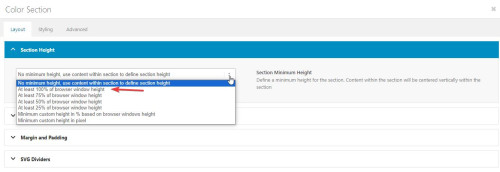
and as I understand each slide is meant to be a full screen height, and you have five sections, but two of them are code blocks with the shortcode and three of them are the slider elements:

the slider elements can not have a height set, so try changing them all to color sections with code blocks with the shortcode that are set to 100% height and see if this helps.
When I test from the homepage the services section lands in the right place, but from the blog page it doesn’t, this seems to point to the position moving as the height changiing when the content loads. Setting the height of each section should correct.
Best regards,
Mike
here you go – yes, all settings are the same. see the previous thread on this:
Hi,
You can add menu links to the sites that are live, and add the other ones later.
Try adding a structure like this with the custom menu items and links to each site

Best regards,
Mike
Hello,
I have 2 issues since updating to the latest version of Enfold.
1) the avia builder disappears on the backend, if you right click the page and inspect the element the div with the id avia_builder has the style set to display:none, unticking that seems to fix but it has to be done for all users and doesnt keep the options.
2) The archive layout has changed, I use the option “Use the advance layout editor to build your own blog layout (simply edit the page you have chosen in Enfold->Theme Options as a blog page)” but its not working. Other options work fine.
Thanks.
Can’t import the demo for Enfold 2017.
“Download of files for demo Enfold 2017 didn’t work!
You might want to try reloading the page and then try again.”
Even though I have the PHP limit to 256M and also the wp-config.php is 256M
How can I fix it?
Hi Beat,
I’m glad that we could help you :)
Thanks for using Enfold and have a great day!
Best regards,
Nikko
Hi Ismael
We changed the code in enfold/config-templatebuilder/avia-shortcodes/events_upcoming/events_upcoming.php from $start_date to ‘now’ but this changed nothing.
See the login data in the private content section.
Best regards
Mike
Hey davidkfry,
Thank you for the inquiry.
Please try to edit the enfold/config-templatebuilder/avia-shortcodes/numbers/numbers.php and look for this code around line 878:
$replace = '<span class="avia-single-number __av-single-number" data-number_format="' . $number_format . '" data-number="$1" data-start_from="' . $atts['start_from'] . '">$1</span>';
Replace it with:
$replace = '<span aria-label="$1" class="avia-single-number __av-single-number" data-number_format="' . $number_format . '" data-number="$1" data-start_from="' . $atts['start_from'] . '">$1</span>';
We just added the aria-label attribute with the actual or final number as value. Let us know if this helps.
Best regards,
Ismael
Hey OneOfMany,
Thank you for the inquiry.
You can adjust the font sizes for different screen width in the Enfold > Genera Styling > Typography panel. Additional style adjustments can be done in the Enfold > Advanced Styling panel.
Best regards,
Ismael
Hey stephaniebLOS,
Thank you for the inquiry.
You can adjust the H1 element in the Enfold > Advanced Styling panel, or use this css code to override the current style of the post title.
#top #wrap_all .all_colors h1 {
    color: #000000;
}
Best regards,
Ismael
Hey stephaniebLOS,
Thank you for the inquiry.
You can use this css code to adjust the style of the featured image, both for the overview and single post page.
.small-preview img, .big-preview img {
    display: block;
    border-radius: 0;
    position: relative;
    z-index: 4;
    width: 100%;
}

.avia-content-slider .slide-image, .avia-content-slider .slide-image img {
    border-radius: 0;
    display: block;
    position: relative;
    -webkit-perspective: 1000px;
    -webkit-backface-visibility: hidden;
    margin: 0 auto;
}
You may need to temporarily disable the Enfold > Performance > File Compression settings after applying the modification.
Best regards,
Ismael
Hey Michael,
Thank you for the inquiry.
We may need to access the site in order to properly check the issue. Please provide the WP and S/FTP details in the private field. In the meantime, please try to edit the enfold/config-templatebuilder/avia-shortcodes/events_upcoming/events_upcoming.php file around line 483.
$query = array(
	'paged'				=> $this->current_page,
	'posts_per_page'	=> $params['items'],
	'start_date'		=> 'now',
	'eventDisplay'		=> 'list'
);
Replace it with:
$query = array(
	'paged'			=> $this->current_page,
	'posts_per_page'	=> $params['items'],
	'start_date'		=> 'now',
	'eventDisplay'		=> 'list'
);
We just replaced start_date with “now”. Let us know if this changes anything.
Best regards,
Ismael
I do not see the option to upload my logo so when I use a transparent header like I always do its in the header section options?
Enfold > Header > Transparency options > Transparency Logo
Why am I not seeing this option now?
Please advise –
Thanks
B
Hello – we are seeing this issue reoccur with Safari Mac browsers. Please see the link in private info. It appears at the final slide only. There are roughly 10-11 slides active. Previously we could eliminate this problem by shorting that count to 8, but we have much content we need to display.
Any ideas?
Hi,
I first converted your PNG to SVG at this site.
Then I followed the steps in this thread to convert the SVG into a safe SVG
Then I uploaded the SVG to Fontello to make the icon font.
Then I imported the Fontello zip to my Enfold Theme Options ▸ Import/Export ▸ Iconfont Manager
and now they show in my icon element:

I linked to the Fontello zip below that I created for you to try.
Best regards,
Mike
Hi Mike,
I hope you’re doing well. I wanted to extend my heartfelt thanks for your support.
I’m currently considering subscribing to WPML for a one-year period to configure my Enfold theme for multilingual functionality. Specifically, my aim is to enable right-to-left (RTL) language support and perform translations. However, I have a question regarding the subscription.
If I choose to disable the auto-renewal of WPML after the initial one-year subscription period, will this have any adverse effects on the functionality of my website, or is it a safe and viable option?
Your expertise and guidance on this matter would be greatly appreciated.
Thanks once again for your assistance.
In accordance with the insights gleaned from various comments, it is widely recommended to employ the WPML (WordPress Multilingual Plugin) for the purposes of website translation and the incorporation of additional languages. However, the annual subscription cost of WPML, which amounts to approximately 100 euros per annum, presents a significant consideration for me.
My inquiry pertains to the implications of subscribing to WPML, utilizing its automatic renewal feature, and subsequently discontinuing said renewal. Specifically, I intend to employ WPML for facilitating language direction toggling between left-to-right and right-to-left, as well as to enable website translation and the integration of the Arabic language as a secondary linguistic option. In this context, I seek clarification on whether the cessation of WPML’s automatic renewal will impact the functional integrity of WPML, as well as the features related to language direction switching and website translation. Will these aspects continue to operate seamlessly?
Hi,
You can add the logic in the filter.
Check if you are on a blog page and then add your class tjajax.
Add this additional check inside the if statement of our example in https://github.com/KriesiMedia/enfold-library/blob/master/actions%20and%20filters/Basic%20Templates/All%20Templates/avf_custom_main_classes.php
Best regards,
Günter
Hello,
and thanks for watching Ismael.
Indeed the problem is on all the input fields.
Fortunately there is the paliative solution of copying and pasting text with spaces from a basic text editor.
after relaunching, SPECTRA support told me that they would look.
But I need a plugin in addition to gutenberg, because to add content and format job offers from the Simple Job Board plugin, we cannot use ALB from ENFOLD. So I use SPECTRA plugin which, apart from this problem, is a really nice plugin to use
Here’s the situation, if it can help someone with the same problem.
Thanks
Hi Yigit, I tried to make changes…
In Enfold Settings – Performance – Javascript File Merging And Compression I have Use Minified Thene File Javascript File without merging selected, so I thought I’d make the change to the minimized file as well. (I think it’s necessary right?)
It seems to work perfectly!!! Very very thanks!
Will I have to introduce the change manually in future versions of enfold or will it be included in future versions?
Thanks,
Lion
Hey Martin,
Please try the following in Quick CSS under Enfold->General Styling:
.page-id-5341 .post-meta-infos .blog-author, .page-id-5341 .post-meta-infos .text-sep {
  display: none;
}
Best regards,
Rikard
Hi,
If you have a staging site, please go to /enfold/js/aviapopup/ directory, open the jquery.magnific-popup.js file, find the following code:
						'<div class="mfp-img"></div>'+
						'<figcaption>'+
and change it to the following:
						'<div class="mfp-img"></div>'+
						'<div class="protectionOverlaytext"><img class="wccp_pro_overlay_protected_img" src="https://capturelight.net/wp-content/plugins/wccp-pro/images/transparent.gif" style="width:100%; height:100%"></div>' +
						'<figcaption>'+
Let us know if that works.
Best regards,
Yigit
-
This reply was modified 2 years, 6 months ago by
 Yigit.



