Hi,
Thanks for the update. Please try the code in Quick CSS under Enfold->General Styling.
Best regards,
Rikard
Hello together! I have the problem that mails from the Enfold contact form are rejected by our server, because the sender address is the same as the mail address of the contactor. How can I change the sender address in the Enfold contact form?
Thanks for your help!
Hi,
unfortunately this did not work. I tried it once in the child theme and once in the normal Enfold theme.
Best regards
Mandy
Hey Henning,
Thank you for the inquiry.
You can create number icons using the icon font generator in the fontello.com/ site. Just create an SVG file of the numbers, then upload it to the Custom Icons panel. The result can be uploaded to the theme’s Iconfont Manager. Please check the documentation below for more info.
// https://kriesi.at/documentation/enfold/icon/#adding-your-own-fontello-or-flaticon-icons-
Best regards,
Ismael
Hey Tim,
Thank you for the inquiry.
You can modify the template files themes/enfold/404.php and the themes/enfold/includes/error404.php to adjust the layout of the “page-not-found” page. You can also use 404 or redirection plugins.
// https://www.wpbeginner.com/showcase/6-best-free-404-plugins-for-wordpress/
Best regards,
Ismael
Hey Tim,
Thank you for the inquiry.
You can adjust the font size of the h1 element by using this css code.
@media only screen and (max-width: 767px) {

  /* Add your Mobile Styles here */
  #top #wrap_all .header_color h1,
  #top #wrap_all .main_color h1,
  #top #wrap_all .alternate_color h1 {
    font-size: 32px;
  }
}
You can also adjust the font settings of the headings and body text in the Enfold > General Styling > Typography panel.
Best regards,
Ismael
Hi,
Thank you for the screenshot.
The error points to a line that is not included in the theme by default. Did someone edit the functions.php file recently and add the code that you posted above?
: Undefined array key "themes" in /storage/.....00/...../2/www/wp-content/themes/enfold/functions.php on line 9 PHP message:
Best regards,
Ismael
Hey schweg33,
Thank you for the inquiry.
Did you enable the Enfold > Privacy & Cookie options for the first site? Please provide a screenshot using platforms like Savvyify, Imgur or Dropbox. Here are the steps to follow:
1.) Visit the website of your chosen platform, such as Savvyify, Imgur or Dropbox.
2.) Locate the option to upload a file or an image.
3.) Select the screenshot file from your computer or device and upload it to the platform.
4.) After the upload is complete, you will be provided with a shareable link or an embed code.
5.) Copy the link or code and include it in your message or response to provide us with the screenshot.
Thank you for taking the time to share the screenshot. It will help us better understand the issue you’re facing and provide appropriate assistance.
Best regards,
Ismael
Hi,
To bring the articles in the sidebar closer together, try this CSS in your Enfold Theme Options ▸ General Styling ▸ Quick CSS field:
.sidebar .widget {
    padding: 30px 0 0 0;
}
There is a way to ensure that the page URL becomes /podcasting/ when you are ready to delete the old page and switch to using the test page, I will do it for you when you are ready.
Please check if the above css helps and you are happy with the test page on desktop & mobile, and let us know if you want any more adjustments.
Best regards,
Mike
Hi,
Is this screenshot in the backend? I believe that you can edit the language file for your language with Poedit, the language files are at enfold/lang/
Best regards,
Mike
Hi!
I want to add “hover image reveal” type effects on my website. Do you know any plugin that is compatible with Enfold theme and Avia builder framework?
Example of the type of effects we are looking for: https://tympanus.net/Development/ImageRevealHover/
Next question: Partially, the white in the mouse hover effect does not cover the right edge of the image:
https://www.dropbox.com/scl/fi/46vguw94ms0eq1sf061lq/Screenshot-2023-10-03-141814.png?rlkey=2znvxyhigal944suqhj845q75&dl=0
Is it only me who has this problem, or is this the case on all Enfold websites?
Nächste Frage: Teilweise deckt das Weiß beim Mouse-Hover-Effekt nicht den rechten Rand des Bildes ab:
https://www.dropbox.com/scl/fi/46vguw94ms0eq1sf061lq/Screenshot-2023-10-03-141814.png?rlkey=2znvxyhigal944suqhj845q75&dl=0
Habe da nur ich das Problem, oder ist das auf allen Enfold-Websiten so?
-
This reply was modified 2 years, 6 months ago by
 Tim.
Tim.
Hey albasinchanclas,
Could you try updating the theme to the latest version (5.6.6) to see if that helps please? https://kriesi.at/documentation/enfold/how-to-install-enfold-theme/#theme-update. If not, then please post admin WordPress login details in private, so that we can have a closer look at your installation.
Best regards,
Rikard
Hello all
I created this page some time ago with the theme Enfold
Link 1 below:
When I run the cookie scanner on this page I get the answer: You are setting 3 cookies without asking – not necessary.
If I click on another page which I also created with the Enfold theme, I get the following message
Link 2 below
I get the following answer:
No relevant cookies were found!
How can I find out what I did wrong with link 1?
thanks in advance
Kind regards
Hey woogie07,
Thank you for the inquiry.
You can add this css code to adjust the columns on mobile view.
@media only screen and (max-width: 767px) {

  /* Add your Mobile Styles here */
  .responsive #top #wrap_all .slide-entry {
    width: 100%;
    margin-left: 0;
    margin-bottom: 20px;
  }

  .responsive #top #wrap_all .avia-content-slider-even .slide-entry.slide-parity-odd,
  .responsive #top #wrap_all .avia-content-slider-odd .slide-entry.slide-parity-even {
    margin-bottom: 20px;
  }

   .avia-content-slider .slide-image, .avia-content-slider .slide-image img {
     width: 100%;
   }
}
Please toggle or temporarily disable the Enfold > Performance > File Compression settings to make sure that the changes take effect.
Best regards,
Ismael
Hey joandjaxx,
Thank you for the inquiry.
You have to remove this css code to adjust the right margin of the second item.
#top #header .av-main-nav li:nth-child(2) {
    margin-right: 150px;
}
Then add this css code to push the 5th item away from the fourth, creating space for the logo.
#top #header .av-main-nav li:nth-child(4) {
    margin-right: 250px;
}
Please make sure to toggle or temporarily disable the Enfold > Performance > File Compression settings in order to ensure that the changes take effect.
Best regards,
Ismael
Hey Tim,
Thank you for the update.
Based on your screenshot, the purchase code that you have posted in your previous thread is the same as the token that you mistakenly entered in the private token field. The “create-token” page above should not return a purchase code, but it will generate a private token, which you can then use in the Enfold > Theme Updates panel.
Best regards,
Ismael
Hey Justus,
I’m not sure which requirements you have, but you can see all our demos here: https://kriesi.at/themes/enfold-overview/. All the demos are available in the Enfold theme.
Best regards,
Rikard
Hi there, my customer would like numbers (plain or in black circles) instead of icons on the home page.
I have been looking in downloadable icon sets.
Cannot find a series/set to import in Enfold.
Help?
http://www.arnoldvanouwerkerk.nl
Hi there
I use enfold theme and I try to insert a code block from the avia layout architect for a html script, whicht opens my calender. I inserted the script, but it does not work. I also tried to use a html widget, but I have the same problem. The script is not showed. The script goes like:
<!– Calendly Link-Widget Beginn –>
<link href=”https://assets.calendly.com/assets/external/widget.css” rel=”stylesheet”>
<script src=”https://assets.calendly.com/assets/external/widget.js” type=”text/javascript” async></script>
Zeitplan Zeitfenster
<!– Calendly Link-Widget Ende –>
Can anybody help me with this, please?
Thank you very much
-daniela-
you can see here that my old ipad 3 mini (iOS 12.5.7 – that last one i could install on that device) caused some troubles on newer alb element like the before/after image.
https://kriesi.at/support/topic/enfold-options-page/
see my comment here on apples philosophy to handle older devices:
https://kriesi.at/support/topic/enfold-options-page/#post-1406649
Hi,
Thank you for the screenshot.
We couldn’t reproduce the same issue when we checked the site using mobile emulation. It’s possible that the device or phone contains an older version of the browser, which for some reason, may no longer render the site properly.
. I understand that developers have to draw a line beyond which their code won’t work. Is I phone 6 beyond your line?
We don’t have a list of supported devices but we do recommend using the latest versions of browsers, plugins and other related softwares.
// https://themeforest.net/item/enfold-responsive-multipurpose-theme/4519990
Best regards,
Ismael
on newest Enfold there is that new option on “Show Advanced Options” see what is there on “Old Browser Support”
Try the option “Support old Browsers”
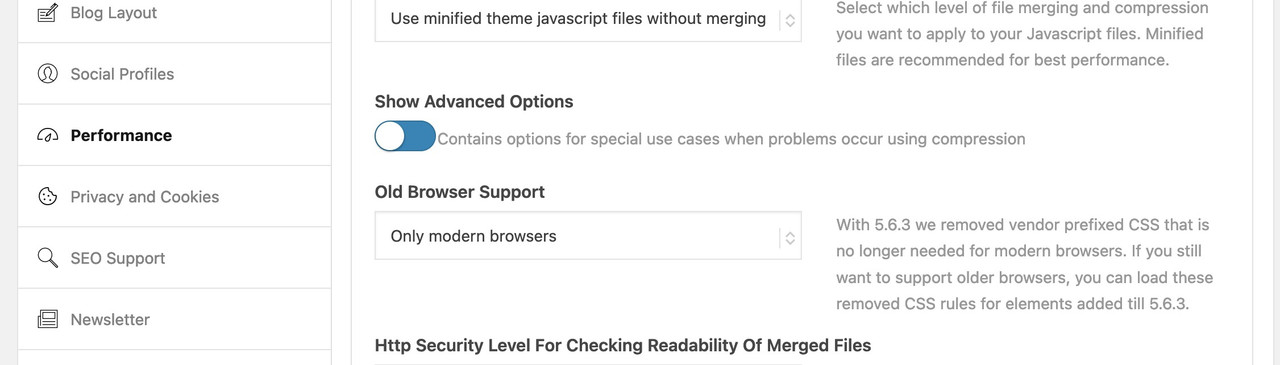
in the option “only modern Browsers” all f.e. -webkit- prefixes will not be there
– and that might be necessary css for the older iOS 12.5.7 on your iPhone
Test that – but do not forget to refresh all cache and or merged files by enfold
Hi,
Thank you for the update.
You will have to export the existing content from your previous site and import them to the new site containing the Enfold theme. For more info, please check the documentation below.
// https://wordpress.org/documentation/article/tools-export-screen/
// https://wordpress.org/documentation/article/importing-content/
You can also use plugins like Duplicator or WP All Import.
// https://wordpress.org/plugins/duplicator/
// https://wordpress.org/plugins/wp-all-import/
Please refer to their respective documentations to learn more about the plugins.
Best regards,
Ismael
Hi Ismael,
the plugin developer doesn’t know about enfold or the mansory gallery and says he doesn’t know how to do it. Can you also ask Yigit if he has any ideas please?
Hey Tim,
Thank you for the update.
In the screenshot above, looks like you’re using the purchase code in the Enfold > Theme Updates > Enter a valid Envato private token field. Please note that the purchase code is different from the Envato private token. The private token has to be generated from the following page.
// https://build.envato.com/create-token/
Please check this documentation for more info.
// https://kriesi.at/documentation/enfold/theme-registration/#toggle-id-4
Did you register in the forum before? If you did, which email address did you use to create the account? We can manually adjust the account so that you can freely open inquiries in the forum.
Best regards,
Ismael
PS: I also have a problem with the distances between my H3 Titles and the separator bar beneath: there is NO WAY I can achieve the same distance. Here too, I don’t really undeerstand what is the meaning of a padding and of a margin. Please explain me exactly which parameter I have to change to achieve a regular distance equal in all cases. The problem with spaces in Enfold is that I think I set a standard parameter at the beginning, but then it was not regular in all the responsive views, and I had to change them all in an individual way. This took a huge amount of time and now it seems to have gone off track over time and I see myself starting this loss of time all over again.
Hi Mike,
We can certainly close the issue.
But before, can you tell me how to undo the block mentioned by the message “Warning: Unterminated comment starting line 2 in /home/hulaslim/public_html/wp-content/themes/enfold-child/functions.php on line 2” and how to undo the block caused by the saving in the default editor, in case it happens again ?
Thank you
Best regards,
Natacha
Hi,
Yes it is also called the default editor, the WordPress default editor has two choices at Enfold Theme Options ▸ Select Your Editor the Classic Editor & the Block Editor, this is the one that you are currently using. I’m just in the Habit of specifying the one used. when I write.
This thread is very long now, and it seems like we have covered creating a multi-language site using sub-directories fairly well now, did you have any more questions on this, or do you feel comfortable if we closed this thread?
Best regards,
Mike



