Code d’achat: 59d5c028-68a2-43ec-8b8d-e795b17edc44 – 21 janvier 2020
Copie: https://www.topopyrenees.com/wp-content/uploads/2005/09/Soutien-Enfold.jpg
Hi,
Great, I’m glad that Mike could help you out. I’ll go ahead and close this thread for now then, please open a new thread if you should have any further questions or problems.
Best regards,
Rikard
Hi,
Great, I’m glad that Ismael could help you out. I’ll go ahead and close this thread for now then, please open a new thread if you should have any further questions or problems.
Best regards,
Rikard
Hey OneOfMany,
Could you try updating the theme to the latest version (5.6.8) to see if that helps please? https://kriesi.at/documentation/enfold/how-to-install-enfold-theme/#theme-update.
Best regards,
Rikard
Hi,
Sorry for the confusion. I see that your inital installation has been renamed, that is likely why it’s not updating automatically. Your child theme is set to use the renamed theme installation, that is why it’s still used. If you simply install a child theme from here, then the new version should be used: https://kriesi.at/documentation/enfold/child-theme/. You can copy the content of your current child theme into the new after that.
Best regards,
Rikard
 De gracia mariano
Guest
J’ai un problème avec le thème Enfold et je ne sais pas comment poster un message alors que je paye une assistance par an.
On me demande un
Please note: your support license has expired on February 17th, 2022 alors que je paye régulièrement une assistance tous les mois pour Enfold
J’ai un problème avec la version 5.6.8 et je voudrai pouvoir télécharger la version antérieure 5.6.6 pour revenir en arrière
Merci de m’aider
Hey navindesigns,
Please update to v5.6.8 and then clear all of your caches, this was addressed in our latest update.
Best regards,
Mike
Hi,
Glad Ismael could help, if you have any further questions please create a new thread and we will gladly try to help you. Thank you for using Enfold.
Best regards,
Mike
Hi,
Glad Nikko was able to help, if you have any further questions please create a new thread and we will gladly try to help you. Thank you for using Enfold.
Best regards,
Mike
Hi,
Glad Nikko was able to help, if you have any further questions please create a new thread and we will gladly try to help you. Thank you for using Enfold.
Best regards,
Mike
Hi
Is there an Option in Theme ENFOLD to HIDE both Sort Dropdowns?
– Sortieren nach Standard
– Zeige X Produkte pro Seite
I tried:
// Entfernen der Dropdown-Sortierung im Shop.
remove_action( ‘woocommerce_before_shop_loop’, ‘woocommerce_result_count’, 20 );
remove_action( ‘woocommerce_before_shop_loop’, ‘woocommerce_catalog_ordering’, 30 );
Which is not working.
Any tipps how to hide both Sort Dropdowns on Shop Page?
Thank you
Steve
Hi,
In the Enfold docs ‘How to update your Enfold theme’ https://kriesi.at/documentation/enfold/theme-update/ the section Update Via FTP instructs to upload the new Enfold theme AND the Enfold Child Theme.
The instructions then continue but never say any more about the Child Theme or what to do with it!
I’ve even watched the video and there’s no mention of child theme. Nor is the video the same as the written instuctions!!
So, given those instructions, what am I supposed to do with the Child Theme, which the instructions specifically instruct me to upload?
Thanks
Hugh
 Sara
SaraGuest
We have updated your theme to version 5.6.8. To make a plugin work (The Event Caledar Pro) we need to update WordPress to version 6.3.2. The question is: does your theme support this latest version of WordPress? Thank you.
Hey Michi,
We actually only offer one theme, which is Enfold. Maybe you are referring to the demos? If so, then those are all included and can be imported in the theme options. You can see all the demos here: https://kriesi.at/themes/enfold-overview/
Best regards,
Rikard
Hi,
You can adjust the cart’s position in Enfold > Shop Options > Header Shopping Cart Icon settings. Choose the first or second option to make the cart float on the right edge of the screen.
Best regards,
Ismael
Hi,
Thank you for the update.
We just noticed that the site is running an outdated theme version (4.8). We recommend manually updating the theme to the latest version (5.6.8) before making any further modifications.
// https://kriesi.at/documentation/enfold/theme-update/#update-via-ftp
After the update, make sure to toggle or temporarily disable the Enfold > Performance > File Compression settings and purge the cache to regenerate the scripts and stylesheets. If you encounter any errors after the update that require separate attention, please feel free to open different threads.
IMPORTANT: Please make sure to create a backup or restore point before updating the theme.
Best regards,
Ismael
Hi,
Is there yet any facility to create global ELEMENTS?
@dowlassmoss: You might want to check the Custom Elements Template (CET) as mentioned above.
// https://kriesi.at/documentation/enfold/custom-element-templates/
Please feel free to open another thread if you have more questions about the the theme.
Best regards,
Ismael
Hi ops79,
Can you try adding this CSS Code in Enfold > General Styling > Quick CSS:
@media only screen and (max-width:1140px) {
  .responsive #top .av_mobile_menu_tablet .av-main-nav .menu-item {
    display: none;
  }

  .responsive #top .av_mobile_menu_tablet .av-main-nav .menu-item-avia-special {
    display: block;
  }
}
This will hide the main menu and replace it with a mobile menu on a screen size that will overlap the logo and main menu.
Hope it helps.
Best regards,
Nikko
Hey xela,
Thank you for the inquiry.
You can adjust the width of the color section container with css. Please check this documentation for more info.
// https://kriesi.at/documentation/enfold/color-section/#color-section-with-100-content-width
Best regards,
Ismael
Hi diogovareta,
You can do it by adding this code in your child theme’s functions.php (just replace the values inside placeholder):
add_filter( 'comment_form_default_fields', 'enfold_comment_placeholders' );

function enfold_comment_placeholders( $fields ) {
    $fields['author'] = str_replace(
        '<input',
        '<input placeholder="Name"',
        $fields['author']
    );
    $fields['email'] = str_replace(
        '<input',
        '<input placeholder="Email Address"',
        $fields['email']
    );
    $fields['url'] = str_replace(
        '<input',
        '<input placeholder="Website"',
        $fields['url']
    );
    return $fields;
}
Then hide the labels with this CSS code:
#commentform .comment-form-author label,
#commentform .comment-form-email label,
#commentform .comment-form-url label {
    display: none;
}
Hope it helps.
Best regards,
Nikko
Hi Guido,
Thanks for using Enfold and have a great day!
Best regards,
Nikko
Hi,
Glad we were able to help, if you have any further questions please create a new thread and we will gladly try to help you. Thank you for using Enfold.
Best regards,
Mike
Hi, i want to export blog post to one site to another one. The blog post are buid with Enfold, but in the destinarien site i want it with Gutenberg.
I have like 700 posts to export. Is there a way to export Enfold blog post to be compatible with gutenberg?
Thanks
Hi,
Thank you for your patience, I tried the WP MapIT plugin with the theme Leaflet option disabled and the MapIT seems to show the same as when the Twenty Twenty-Threetheme is enabled.
On page load the map popups do not show, when to click on the markers the popups show:


I linked to my test page below, please check.
Best regards,
Mike
Hello, is there any known issue with the Enfold WP theme where Apple Pay / Google Pay disables the option to pay via payment card? Or is this more likely to be a WooCommerce issue? Thank you.
This reply has been marked as private.
Hey dreamreader,
To edit the menu item subline, first ensure that you have the Screen Options ▸ Description check box enable at the Screen Options at the top of the menu page:

Then you will see the menu item subline:

Best regards,
Mike
Hi,
The option would look like this:
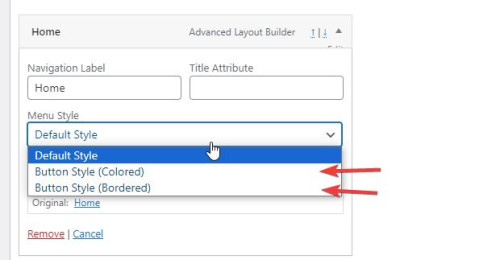
If you continue to have trouble with this issue please open a new thread and post your admin login in the Private Content area so we can assist, as this is not your thread posting your login here will not be private and you will not see our comments in the Private Content area.
Thank you for your patience and understanding and using Enfold.
Best regards,
Mike
Hi Rikard,
I’ve tried this but it isn’t showing anything on the frontend.
—-DISREGARD. forgot to checkmarkt display location “Enfold main menu”
-
This reply was modified 2 years, 5 months ago by
 Mike.
Mike.



